Outline ·
[ Standard ] ·
Linear+
Fundsupermart.com v11, Grexit or not, Europe will sail on...
|
puchongite
|
 Jul 13 2015, 05:25 PM Jul 13 2015, 05:25 PM
|

|
QUOTE(nexona88 @ Jul 13 2015, 05:10 PM) Greece bailout: Alexis Tsipras accepts 86-billion-euro bailout from eurozone leaders after 17 hours of talks http://www.abc.net.au/news/2015-07-13/euro...e-talks/6616448Time to get in or top up Europe ?  |
|
|
|
|
|
woonsc
|
Jul 13 2015, 06:12 PM
|
|
|
QUOTE(Pewufod @ Jul 13 2015, 05:03 PM) hi sifus all how do i see my shopping cart after i closed the fpx page ? can still see my order in void page but cant find the option of making payment again My Investment > View Holdings scroll down, Purchases~ |
|
|
|
|
|
Pewufod
|
Jul 13 2015, 06:12 PM
|
|
|
QUOTE(woonsc @ Jul 13 2015, 06:12 PM) My Investment > View Holdings scroll down, Purchases~ thank you brother |
|
|
|
|
|
pisces88
|
Jul 13 2015, 06:22 PM
|
|
|
QUOTE(puchongite @ Jul 13 2015, 05:25 PM) Time to get in or top up Europe ? good news  |
|
|
|
|
|
wil-i-am
|
Jul 13 2015, 07:06 PM
|
|
|
|
|
|
|
|
|
adamdacutie
|
Jul 13 2015, 07:19 PM
|
|
|
QUOTE(puchongite @ Jul 13 2015, 03:55 PM) Time to get in or top up Europe ? Should HV done it earlier during d uncertain period regarding the bailout ... but its nvr too late  |
|
|
|
|
|
adamdacutie
|
Jul 13 2015, 07:21 PM
|
|
|
QUOTE(river.sand @ Jul 13 2015, 03:49 PM) Still need Parliament approval. I dun thk Greece has such a huge ball to choose bankruptcy over bailout |
|
|
|
|
|
kucingfight
|
Jul 13 2015, 08:38 PM
|
Look at all my stars!!

|
For EU funds, best bet is global titan?
|
|
|
|
|
|
eleven dragon
|
Jul 13 2015, 08:42 PM
|
Getting Started

|
QUOTE(kucingfight @ Jul 13 2015, 08:38 PM) For EU funds, best bet is global titan? Hmm... not TA European Equity Fund? |
|
|
|
|
|
hihihehe
|
Jul 13 2015, 08:47 PM
|
|
|
is there any sharing session for unit trusts newbie here?
|
|
|
|
|
|
T231H
|
Jul 13 2015, 08:56 PM
|
|
|
|
|
|
|
|
|
hihihehe
|
Jul 13 2015, 09:02 PM
|
|
|
QUOTE(T231H @ Jul 13 2015, 08:56 PM) thx man but i also prefer to attend a session to get more idea too |
|
|
|
|
|
T231H
|
Jul 13 2015, 09:06 PM
|
|
|
QUOTE(hihihehe @ Jul 13 2015, 09:02 PM) thx man but i also prefer to attend a session to get more idea too  call them? maybe they can assign someone to arrange to that? http://www.publicmutual.com.my/ContactUs.aspx |
|
|
|
|
|
polarzbearz
|
Jul 13 2015, 10:00 PM
|
|
|
QUOTE(Pink Spider @ Jul 12 2015, 07:57 PM) I got/once got... RHB-OSK CIMB-Principal Affin Hwang Eastspring Investments Pheim Aberdeen Islamic Alliance AmInvestment Pacific ONLY CIMB rounds down, the rest all round to nearest 2 decimals That explains why rounding down fixes the difference in CIMB funds, but screw up my non cimb funds  I'll leave it as it is |
|
|
|
|
|
polarzbearz
|
Jul 13 2015, 10:06 PM
|
|
|
QUOTE(woonsc @ Jul 13 2015, 12:38 AM) OMG! <3 that's so awesome! I love u all! hahaha it's a good way to update and makes checking it daily so much easier.. T.T sad thou.. my IRR +5 > +2.12% Can i suggest the asset allocation also use macro WeeeeW That's version 3.0!  I was actually already prototyping something like what you mentioned (automation to fetch list of funds from Investment Details onto the Fund Allocation worksheet), so we only have to update the % of funds based on PDF fact sheet. But I got too lazy and busy in between that I kinda put it on hold It's still in the version I'm using, but not fully developed yet (some missing logic ) |
|
|
|
|
|
polarzbearz
|
Jul 13 2015, 10:08 PM
|
|
|
QUOTE(idyllrain @ Jul 13 2015, 01:09 PM) polarzbearz I just noticed that the msxml2.xmlhttp object we've used in our code appears to cache responses from the FSM server . If you have run the code once, and you don't exit Excel, and FundSuperMart updates their prices, and you run the code again, none of the prices in the Excel sheet will update to the latest (for non-techies, it means that Excel is storing old data and reusing it). (This caching is the reason why subsequent executions of the macro code are faster.) To get past this, I've swapped to using the winhttp.winhttprequest.5.1 object that does not cache. These are the lines that need to be changed (I changed the variable name as well): CODE -- Set XML = CreateObject("msxml2.xmlhttp")
++ Set Conn = CreateObject("winhttp.winhttprequest.5.1")
-- If XML.ReadyState = 4 And XML.Status = 200 Then
++ If Conn.Status = 200 Then
p/s: While waiting for him to update his file, you can force an update by just saving, exiting Excel, open the file again, and run the code. This issue is just a minor annoyance. QUOTE(T231H @ Jul 13 2015, 01:49 PM) calling polarzbearz...pls take note of post# 447 Well noted on this  But I guess the impact is very minimal as chances of us updating the excel file the same time as FSM is minimal. Will release a minor version for above fix soon (optional to download). |
|
|
|
|
|
nexona88
|
Jul 13 2015, 10:23 PM
|
|
|
|
|
|
|
|
|
polarzbearz
|
Jul 13 2015, 10:26 PM
|
|
|
As per recommendation from idyllrain, minor-fix has been applied to the "Fund Update" feature and v2.1 of the Portfolio Summary worksheet has been pushed to Dropbox available for download. Note: This version has minor fix on the highlighted bug below, and is optional to download (if you are lazy to re-import your data to the worksheet » Click to show Spoiler - click again to hide... « QUOTE(idyllrain @ Jul 13 2015, 01:09 PM) polarzbearz I just noticed that the msxml2.xmlhttp object we've used in our code appears to cache responses from the FSM server . If you have run the code once, and you don't exit Excel, and FundSuperMart updates their prices, and you run the code again, none of the prices in the Excel sheet will update to the latest (for non-techies, it means that Excel is storing old data and reusing it). (This caching is the reason why subsequent executions of the macro code are faster.) To get past this, I've swapped to using the winhttp.winhttprequest.5.1 object that does not cache. These are the lines that need to be changed (I changed the variable name as well): CODE -- Set XML = CreateObject("msxml2.xmlhttp")
++ Set Conn = CreateObject("winhttp.winhttprequest.5.1")
-- If XML.ReadyState = 4 And XML.Status = 200 Then
++ If Conn.Status = 200 Then
p/s: While waiting for him to update his file, you can force an update by just saving, exiting Excel, open the file again, and run the code. This issue is just a minor annoyance. » Click to show Spoiler - click again to hide... « GENERAL
Updated "GetFundPrice()" Macro for minor bug-fix - where old method will store old data in Cache, and reuses the data, until Excel has been restarted. Due to the stored data, in the event where FSM updates the price after you click on the button in Excel (assuming you did not restart Excel), Excel will not be able to fetch the latest pricing.
New Code for Techies Only:» Click to show Spoiler - click again to hide... « CODE Sub GetFundPrices()
' ORIGINALLY CREATED BY idyllrain @ Lowyat.net
' ORIGINAL SOURCE(S):
' - https://forum.lowyat.net/index.php?showtopic=3633445&view=findpost&p=75357733
' - https://forum.lowyat.net/index.php?showtopic=3633445&view=findpost&p=75383114
' UPDATED BY polarzbearz @ Lowyat.net
' Last Updated - 13 July 2015
Set WS = Worksheets("Investment Details")
Set htm = CreateObject("htmlFile")
'Set XML = CreateObject("msxml2.xmlhttp") 'Removed on v2.1
Set XML = CreateObject("winhttp.winhttprequest.5.1") 'Added on v2.1
Dim i As Long
Dim lastRow As Long
'Search for the last line item (column A) with value 0
lastRow = WS.Range("A:A").Find(What:="0", After:=WS.Cells(1, 1), LookIn:=xlFormulas, LookAt:= _
xlPart, SearchOrder:=xlByColumns, SearchDirection:=xlPrevious, MatchCase:=False).Row
'Executing logs placeholder
Dim logs As String
logs = "Fund update has been successfully executed!" & vbNewLine & "Please refer to the status logs below:" & vbNewLine & vbNewLine
logs = logs & vbTab & "LINE" & vbTab & "FSM CODE" & vbTab & "STATUS"
'Set a Number of Updates counter, starting from zero before going into the loop
Dim successfulUpdate As Long
Dim totalUpdate As Long
sucessfulUpdate = 0
totalUpdate = 0
'From first row all the way to the last row with line item = 0
For i = 1 To lastRow
'If this row is a group header row (Column A has a value of 1)'
If WS.Cells(i, 1).Value = "1" Then
' total update counter +1
totalUpdate = totalUpdate + 1
'Get the fund code'
Dim fundName As String
fundName = WS.Cells(i, 3).Value
'Download the correct price list'
XML.Open "GET", "http://www.fundsupermart.com.my/main/fundinfo/dailyPricesHistory.tpl?id=" & fundName, False
On Error GoTo EndHandler: ' terminate if error in connecting
XML.send
'If XML.ReadyState = 4 And XML.Status = 200 Then 'Removed on v2.1
If XML.Status = 200 Then 'Added on v2.1
htm.body.innerHTML = XML.responsetext
On Error GoTo ErrHandler:
'On Error Resume Next:
'Get all 4 cells in the first row of data'
Set FirstRow = htm.getElementsByTagName("tr")(2).Children
'Update date value from 4th table cell of first row'
WS.Cells(i, 4).Value = FirstRow(3).innerText
'Update NAV value from the DIV element in the 3rd table cell of first row'
WS.Cells(i, 9).Value = FirstRow(2).FirstChild().innerText
' successful update counter +1
successfulUpdate = successfulUpdate + 1
logs = logs & vbNewLine & vbTab & i & vbTab & Left(fundName & Space(15), 15) & vbTab & "OK!"
SkipBlocks:
'skip everything above from "On Error GoTo ErrHandler:" block
End If
End If
Next i
'Add final line to logs and display to user
logs = logs & vbNewLine & vbNewLine & "If there are errors in updating the Fund Price, please double check on the FSM Codes and try again."
MsgBox logs
Exit Sub
ErrHandler:
' fail counter, messages
logs = logs & vbNewLine & vbTab & i & vbTab & Left(fundName & Space(15), 15) & vbTab & "ERROR!"
'reset date field to TODAY() - Update date value from 4th table cell of first row'
WS.Cells(i, 4).Value = "=TODAY()"
Resume SkipBlocks:
EndHandler:
MsgBox ("Unable to connect to FSM website. Please try again later.")
End Sub
 Previous Release: Previous Release:» Click to show Spoiler - click again to hide... « QUOTE(polarzbearz @ Jul 12 2015, 06:57 PM) Released v2.0 of the Portfolio Summary worksheet, with "Fund Update" features to fetch latest NAV price from FSM directly. Please remember to "ENABLE MACRO" when prompted by Microsoft Excel, as it is required for the Macro to run. Here's the code for the macro to fetch NAV Price from FSM website, if anyone is interested: » Click to show Spoiler - click again to hide... « CODE Sub GetFundPrices()
' ORIGINALLY CREATED BY idyllrain @ Lowyat.net https://forum.lowyat.net/index.php?showtopic=3633445&view=findpost&p=75357733
' UPDATED BY polarzbearz @ Lowyat.net
' Last Updated - 12 July 2015
Set WS = Worksheets("Investment Details")
Set htm = CreateObject("htmlFile")
Set XML = CreateObject("msxml2.xmlhttp")
Dim i As Long
Dim lastRow As Long
'Search for the last line item (column A) with value 0
lastRow = WS.Range("A:A").Find(What:="0", After:=WS.Cells(1, 1), LookIn:=xlFormulas, LookAt:= _
xlPart, SearchOrder:=xlByColumns, SearchDirection:=xlPrevious, MatchCase:=False).Row
'Executing logs placeholder
Dim logs As String
logs = "Fund update has been successfully executed!" & vbNewLine & "Please refer to the status logs below:" & vbNewLine & vbNewLine
logs = logs & vbTab & "LINE" & vbTab & "FSM CODE" & vbTab & "STATUS"
'Set a Number of Updates counter, starting from zero before going into the loop
Dim successfulUpdate As Long
Dim totalUpdate As Long
sucessfulUpdate = 0
totalUpdate = 0
'From first row all the way to the last row with line item = 0
For i = 1 To lastRow
'If this row is a group header row (Column A has a value of 1)'
If WS.Cells(i, 1).Value = "1" Then
' total update counter +1
totalUpdate = totalUpdate + 1
'Get the fund code'
Dim fundName As String
fundName = WS.Cells(i, 3).Value
'Download the correct price list'
XML.Open "GET", "http://www.fundsupermart.com.my/main/fundinfo/dailyPricesHistory.tpl?id=" & fundName, False
On Error GoTo EndHandler: ' terminate if error in connecting
XML.send
If XML.ReadyState = 4 And XML.Status = 200 Then
htm.body.innerHTML = XML.responsetext
On Error GoTo ErrHandler:
'On Error Resume Next:
'Get all 4 cells in the first row of data'
Set FirstRow = htm.getElementsByTagName("tr")(2).Children
'Update date value from 4th table cell of first row'
WS.Cells(i, 4).Value = FirstRow(3).innerText
'Update NAV value from the DIV element in the 3rd table cell of first row'
WS.Cells(i, 9).Value = FirstRow(2).FirstChild().innerText
' successful update counter +1
successfulUpdate = successfulUpdate + 1
logs = logs & vbNewLine & vbTab & i & vbTab & Left(fundName & Space(15), 15) & vbTab & "OK!"
SkipBlocks:
'skip everything above from "On Error GoTo ErrHandler:" block
End If
End If
Next i
'Add final line to logs and display to user
logs = logs & vbNewLine & vbNewLine & "If there are errors in updating the Fund Price, please double check on the FSM Codes and try again."
MsgBox logs
Exit Sub
ErrHandler:
' fail counter, messages
logs = logs & vbNewLine & vbTab & i & vbTab & Left(fundName & Space(15), 15) & vbTab & "ERROR!"
'reset date field to TODAY() - Update date value from 4th table cell of first row'
WS.Cells(i, 4).Value = "=TODAY()"
Resume SkipBlocks:
EndHandler:
MsgBox ("Unable to connect to FSM website. Please try again later.")
End Sub » Click to show Spoiler - click again to hide... « GENERAL
Converted the spreadsheet to Macro-enabled format.
Added a new "Update Current Fund Price" macro - original contribution by idyllrain (https://forum.lowyat.net/index.php?showtopic=3633445&view=findpost&p=75357733)
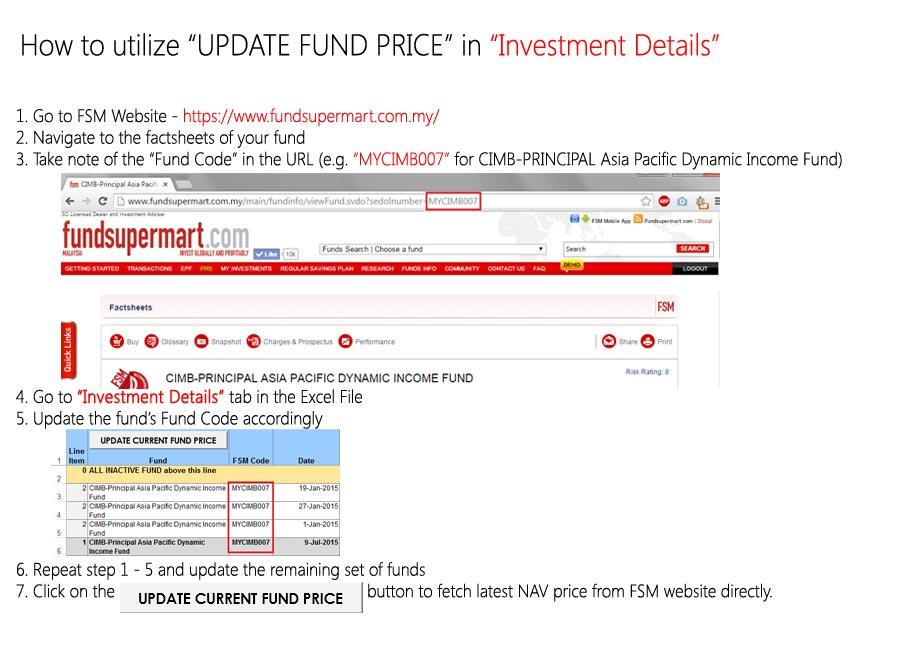
Added new guide on how to utilize the "Update Current Fund Price" feature
WORKSHEET "INVESTMENT DETAILS"
Renamed column "C" in worksheet "Investment Details" from "Distributor" to "FSM Code"
Added a new column "ROI" to show ROI for active funds at Level 1 (subtotal of fund)
Added a new summary field "ROI" at Portfolio Summary section
Added a new button at Portfolio Summary section" Special Thanks: idyllrain, for providing the original macro to fetch fund prices from FSM directly. Pink Spider Need your help to update the download link in the front page The old link no longer works as I've converted the file extension, resulting in different dropbox link  |
|
|
|
|
|
woonsc
|
Jul 13 2015, 11:51 PM
|
|
|
QUOTE(polarzbearz @ Jul 13 2015, 10:26 PM) As per recommendation from idyllrain, minor-fix has been applied to the "Fund Update" feature and v2.1 of the Portfolio Summary worksheet has been pushed to Dropbox available for download. Note: This version has minor fix on the highlighted bug below, and is optional to download (if you are lazy to re-import your data to the worksheet » Click to show Spoiler - click again to hide... « Download Link: http://bit.ly/polarzbearzPortfolioSummary2Change Log:» Click to show Spoiler - click again to hide... « GENERAL
Updated "GetFundPrice()" Macro for minor bug-fix - where old method will store old data in Cache, and reuses the data, until Excel has been restarted. Due to the stored data, in the event where FSM updates the price after you click on the button in Excel (assuming you did not restart Excel), Excel will not be able to fetch the latest pricing.
New Code for Techies Only:» Click to show Spoiler - click again to hide... « CODE Sub GetFundPrices()
' ORIGINALLY CREATED BY idyllrain @ Lowyat.net
' ORIGINAL SOURCE(S):
' - https://forum.lowyat.net/index.php?showtopic=3633445&view=findpost&p=75357733
' - https://forum.lowyat.net/index.php?showtopic=3633445&view=findpost&p=75383114
' UPDATED BY polarzbearz @ Lowyat.net
' Last Updated - 13 July 2015
Set WS = Worksheets("Investment Details")
Set htm = CreateObject("htmlFile")
'Set XML = CreateObject("msxml2.xmlhttp") 'Removed on v2.1
Set XML = CreateObject("winhttp.winhttprequest.5.1") 'Added on v2.1
Dim i As Long
Dim lastRow As Long
'Search for the last line item (column A) with value 0
lastRow = WS.Range("A:A").Find(What:="0", After:=WS.Cells(1, 1), LookIn:=xlFormulas, LookAt:= _
xlPart, SearchOrder:=xlByColumns, SearchDirection:=xlPrevious, MatchCase:=False).Row
'Executing logs placeholder
Dim logs As String
logs = "Fund update has been successfully executed!" & vbNewLine & "Please refer to the status logs below:" & vbNewLine & vbNewLine
logs = logs & vbTab & "LINE" & vbTab & "FSM CODE" & vbTab & "STATUS"
'Set a Number of Updates counter, starting from zero before going into the loop
Dim successfulUpdate As Long
Dim totalUpdate As Long
sucessfulUpdate = 0
totalUpdate = 0
'From first row all the way to the last row with line item = 0
For i = 1 To lastRow
'If this row is a group header row (Column A has a value of 1)'
If WS.Cells(i, 1).Value = "1" Then
' total update counter +1
totalUpdate = totalUpdate + 1
'Get the fund code'
Dim fundName As String
fundName = WS.Cells(i, 3).Value
'Download the correct price list'
XML.Open "GET", "http://www.fundsupermart.com.my/main/fundinfo/dailyPricesHistory.tpl?id=" & fundName, False
On Error GoTo EndHandler: ' terminate if error in connecting
XML.send
'If XML.ReadyState = 4 And XML.Status = 200 Then 'Removed on v2.1
If XML.Status = 200 Then 'Added on v2.1
htm.body.innerHTML = XML.responsetext
On Error GoTo ErrHandler:
'On Error Resume Next:
'Get all 4 cells in the first row of data'
Set FirstRow = htm.getElementsByTagName("tr")(2).Children
'Update date value from 4th table cell of first row'
WS.Cells(i, 4).Value = FirstRow(3).innerText
'Update NAV value from the DIV element in the 3rd table cell of first row'
WS.Cells(i, 9).Value = FirstRow(2).FirstChild().innerText
' successful update counter +1
successfulUpdate = successfulUpdate + 1
logs = logs & vbNewLine & vbTab & i & vbTab & Left(fundName & Space(15), 15) & vbTab & "OK!"
SkipBlocks:
'skip everything above from "On Error GoTo ErrHandler:" block
End If
End If
Next i
'Add final line to logs and display to user
logs = logs & vbNewLine & vbNewLine & "If there are errors in updating the Fund Price, please double check on the FSM Codes and try again."
MsgBox logs
Exit Sub
ErrHandler:
' fail counter, messages
logs = logs & vbNewLine & vbTab & i & vbTab & Left(fundName & Space(15), 15) & vbTab & "ERROR!"
'reset date field to TODAY() - Update date value from 4th table cell of first row'
WS.Cells(i, 4).Value = "=TODAY()"
Resume SkipBlocks:
EndHandler:
MsgBox ("Unable to connect to FSM website. Please try again later.")
End Sub
» Click to show Spoiler - click again to hide... «  my funds too much to redo everything.. wait for version 3.0 sifu~  |
|
|
|
|
|
pisces88
|
Jul 14 2015, 12:26 AM
|
|
|
ahh manulife india fund very rewarding this month, +6% |
|
|
|
|



 Quote
Quote





 0.0234sec
 0.39
0.39
 6 queries
 GZIP Disabled