

 Jul 12 2015, 03:34 PM


QUOTE(j.passing.by @ Jul 12 2015, 01:30 PM)
You should stop wondering and make any further detective work on how much the ROI dropped; since the relevant info on how long the investment was held was not given. 
You should also note that the -6.5% is based on a chart with a 3 weeks old date as its starting point. If you use one-year-old date, or any other date as the starting point, the growth rate will be different. Maybe showing a huge gain instead of a negative growth.
"...his China fund's IRR dropped from 20%+ to IRR 10%"
Are you working on the wrong premise that the drop is -10%?
Be careful with the "English" in the sentences.
It only shows a 10% difference; not a "drop in percentage".
A "percentage drop" is calculated based on its initial value. Going from 20 to 10, is a -50% drop.
So you see, you have made several wrong maths logic to built up a question or maths problem. How to find a valid solution to an invalid problem?
Thank you. I think it is worthwhile to further clarify some maths logic, especially IRR, since it has implications on how we do the 'investments' in unit trusts.

You should also note that the -6.5% is based on a chart with a 3 weeks old date as its starting point. If you use one-year-old date, or any other date as the starting point, the growth rate will be different. Maybe showing a huge gain instead of a negative growth.
"...his China fund's IRR dropped from 20%+ to IRR 10%"
Are you working on the wrong premise that the drop is -10%?
Be careful with the "English" in the sentences.
It only shows a 10% difference; not a "drop in percentage".
A "percentage drop" is calculated based on its initial value. Going from 20 to 10, is a -50% drop.
So you see, you have made several wrong maths logic to built up a question or maths problem. How to find a valid solution to an invalid problem?
Thank you. I think it is worthwhile to further clarify some maths logic, especially IRR, since it has implications on how we do the 'investments' in unit trusts.
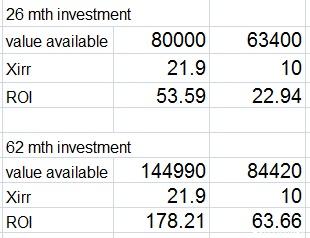
 yes,...seems like how long the investment period did have BIG play in how the ROI% moves.... you are right....
did a trial and error method.....
Attached image(s)
 Quote
Quote





 0.0324sec
 0.61
0.61
 6 queries
 GZIP Disabled