

 Jul 12 2015, 01:23 PM


QUOTE(idyllrain @ Jul 12 2015, 12:57 AM)
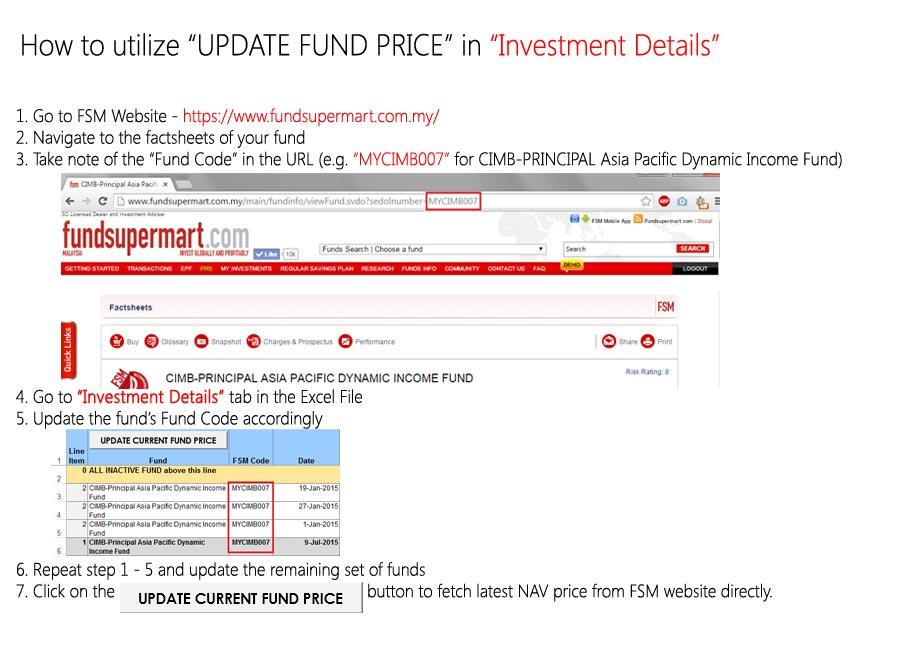
If anyone's interested, I've added the following code in polarzbearz IRR Excel sheet to obtain the latest NAV prices from FSM with just one click (I attached the macro to a button).
As this code relies on FSM's price list pages, if there's any changes to that in the future, this code will break. The only modifications done on the table was changing Column C into the Fund Codes used at FundSuperMart (You can get these from the URL: http://www.fundsupermart.com.my/main/fundi...do?sedolnumber=MYKNGGF) and adding the value "*exit*" into the final row of Column C. Like this:

Also, the formula for the Units calculation in Column M will sometimes result in an amount that doesn't reflect the value shown on FSM's website as the rounding order is different.
This is the existing rounding formula in Column M (Removed the @ coz it will trigger tagging):
Changing it to this has resulted in all my values matching the ones on FSM's website:

CODE
Sub GetFundPrices()
Set WS = Worksheets("Investment Details")
Set htm = CreateObject("htmlFile")
Set XML = CreateObject("msxml2.xmlhttp")
Dim i As Long
Dim lastRow As Long
lastRow = WS.Range("C:C").Find(What:="*exit*", LookIn:=xlValues).Row
'From first row all the way to the row containing the value *exit*'
For i = 1 To lastRow
'If this row is a group header row (Column A has a value of 1)'
If WS.Cells(i, 1).Value = "1" Then
Dim fundName As String
'Get the fund code'
fundName = WS.Cells(i, 3).Value
'Download the correct price list'
XML.Open "GET", "http://www.fundsupermart.com.my/main/fundinfo/dailyPricesHistory.tpl?id=" & fundName, False
XML.send
If XML.ReadyState = 4 And XML.Status = 200 Then
htm.body.innerHTML = XML.responsetext
On Error GoTo ErrHandler:
'Get all 4 cells in the first row of data'
Set FirstRow = htm.getElementsByTagName("tr")(2).Children
'Update date value from 4th table cell of first row'
WS.Cells(i, 4).Value = FirstRow(3).innerText
'Update NAV value from the DIV element in the 3rd table cell of first row'
WS.Cells(i, 9).Value = FirstRow(2).FirstChild().innerText
End If
End If
Next i
Exit Sub
ErrHandler:
MsgBox ("Cannot load data. Either the FSM Code is incorrect or FundSuperMart is down.")
End Sub
Set WS = Worksheets("Investment Details")
Set htm = CreateObject("htmlFile")
Set XML = CreateObject("msxml2.xmlhttp")
Dim i As Long
Dim lastRow As Long
lastRow = WS.Range("C:C").Find(What:="*exit*", LookIn:=xlValues).Row
'From first row all the way to the row containing the value *exit*'
For i = 1 To lastRow
'If this row is a group header row (Column A has a value of 1)'
If WS.Cells(i, 1).Value = "1" Then
Dim fundName As String
'Get the fund code'
fundName = WS.Cells(i, 3).Value
'Download the correct price list'
XML.Open "GET", "http://www.fundsupermart.com.my/main/fundinfo/dailyPricesHistory.tpl?id=" & fundName, False
XML.send
If XML.ReadyState = 4 And XML.Status = 200 Then
htm.body.innerHTML = XML.responsetext
On Error GoTo ErrHandler:
'Get all 4 cells in the first row of data'
Set FirstRow = htm.getElementsByTagName("tr")(2).Children
'Update date value from 4th table cell of first row'
WS.Cells(i, 4).Value = FirstRow(3).innerText
'Update NAV value from the DIV element in the 3rd table cell of first row'
WS.Cells(i, 9).Value = FirstRow(2).FirstChild().innerText
End If
End If
Next i
Exit Sub
ErrHandler:
MsgBox ("Cannot load data. Either the FSM Code is incorrect or FundSuperMart is down.")
End Sub
As this code relies on FSM's price list pages, if there's any changes to that in the future, this code will break. The only modifications done on the table was changing Column C into the Fund Codes used at FundSuperMart (You can get these from the URL: http://www.fundsupermart.com.my/main/fundi...do?sedolnumber=MYKNGGF) and adding the value "*exit*" into the final row of Column C. Like this:
Also, the formula for the Units calculation in Column M will sometimes result in an amount that doesn't reflect the value shown on FSM's website as the rounding order is different.
This is the existing rounding formula in Column M (Removed the @ coz it will trigger tagging):
CODE
(-ROUND((ROUND(([Amount]/(1+([[Sales Charge / Redemption Fee]]*(1+[[GST %]])))),2)/[[NAV Price]]),2))+[[Transaction Manual Adj.]]
Changing it to this has resulted in all my values matching the ones on FSM's website:
CODE
(-ROUND((ROUND(([Amount]/(1+([[Sales Charge / Redemption Fee]]*(1+[[GST %]]))))/[[NAV Price]],2)),2))+[[Transaction Manual Adj.]]
 Very good job! Will try it out and consolidate it into downloadable version
 Quote
Quote


 In that case then yeah, I agree its best to use your version. I'll update my posts to reflect your findings.

 The old link no longer works as I've converted the file extension, resulting in different dropbox link



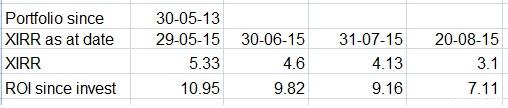

 BEST if it can be WHOLE and EACH individual fund (so can know which one NEEDS to be kicked out....OCHK


 0.0452sec
 0.88
0.88
 7 queries
 GZIP Disabled