

QUOTE(maintenance @ Jul 13 2017, 12:29 PM)
Openvpn for Android...
Maybe I didn't clear cache for open VPN connect.

You will need a VPN provider.Maybe I didn't clear cache for open VPN connect.
Xiaomi Mi Box User Club, let's talk mi box!
|
|
 Jul 13 2017, 12:57 PM Jul 13 2017, 12:57 PM
|
 
Junior Member
385 posts Joined: Sep 2009 
|
QUOTE(maintenance @ Jul 13 2017, 12:29 PM) Openvpn for Android... You will need a VPN provider.Maybe I didn't clear cache for open VPN connect. |
|
|
|
|
|
Jul 13 2017, 01:21 PM
|
|
Senior Member
1,064 posts Joined: Jan 2003 From: ***Bayan Lepas***Phase IV*** 
|
QUOTE(lleihuan @ Jul 13 2017, 12:57 PM) You will need a VPN provider. lol.... did u even read my initial question.its more of compatibality.. i can launch OpenVPN Connect. Just that i am not getting the full screen. its half screen only. i cannot access the menu button.. its outside my resolution.  This post has been edited by maintenance: Jul 13 2017, 01:23 PM |
|
|
Jul 13 2017, 05:47 PM
|

Senior Member
1,098 posts Joined: Sep 2006 
|
i tried using this with kodi.... sometimes it just boince out from kodi.... any idea why?
|
|
|
Jul 13 2017, 06:07 PM
|

Junior Member
563 posts Joined: Apr 2009 From: Where the music plays...
|
QUOTE(qqmeng @ Jul 13 2017, 05:47 PM) i tried using this with kodi.... sometimes it just boince out from kodi.... any idea why? International version works smoothly with kodi. Any other version sucks big time with kodi. |
|
|
Jul 13 2017, 06:55 PM
|
|
Senior Member
1,064 posts Joined: Jan 2003 From: ***Bayan Lepas***Phase IV***
|
Is this normal.. I cannot access the menu to import..
Attached thumbnail(s) 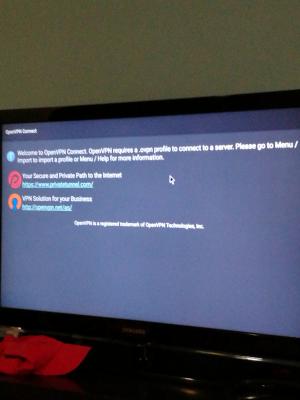
|
|
|
Jul 13 2017, 07:22 PM
|
|
Senior Member
3,026 posts Joined: Oct 2004 From: KL, Penang & JB
|
QUOTE(maintenance @ Jul 13 2017, 06:55 PM) Is this normal.. I cannot access the menu to import.. Probably your display is over scanned. Try zoom out your display at settings--> display --> screen position --> zoom outSee if u can see the menu button after u zoom out |
|
|
|
|
|
Jul 13 2017, 08:15 PM
|
|
Senior Member
1,064 posts Joined: Jan 2003 From: ***Bayan Lepas***Phase IV***
|
QUOTE(mikeeeee @ Jul 13 2017, 07:22 PM) Probably your display is over scanned. Try zoom out your display at settings--> display --> screen position --> zoom out That's the first thing I tried.. cannot.See if u can see the menu button after u zoom out Uninstall reinstall also cannot. |
|
|
Jul 15 2017, 01:06 AM
|

Junior Member
42 posts Joined: Aug 2013
|
Im sorry for my ignorance, anyone here problem with myiptv vod cant view?
change player to mx still no luck. Mibox mdz-16-ab. This post has been edited by linkinxmen: Jul 15 2017, 01:08 AM |
|
|
Jul 15 2017, 06:37 PM
|
|
Junior Member
23 posts Joined: Nov 2004 From: Melbourne
|
hey bro besides vpn is there any other way to bypass the restriction for watching china sourced media
|
|
|
Jul 16 2017, 01:18 AM
|

Senior Member
4,672 posts Joined: Nov 2016
|
QUOTE(koktsin @ Jul 15 2017, 06:37 PM) hey bro besides vpn is there any other way to bypass the restriction for watching china sourced media DNS way  |
|
|
Jul 16 2017, 05:42 PM
|

Junior Member
145 posts Joined: Aug 2007
|
I'm trying to use Ethernet with my mibox MDZ-19-AA with a USB to Ethernet adapter. The lan options in the settings are greyed out and I'm still stuck with Wi-Fi only. Is this normal?
|
|
|
Jul 17 2017, 10:25 AM
|
|
Junior Member
32 posts Joined: Jan 2010
|
Anyone can teach me how to jailbreak mi box 3S Pro and watch english series and tvb series? Thank you!
|
|
|
Jul 17 2017, 11:39 AM
|
|
Junior Member
385 posts Joined: Sep 2009
|
QUOTE(Splendour @ Jul 17 2017, 10:25 AM) Anyone can teach me how to jailbreak mi box 3S Pro and watch english series and tvb series? Thank you! why do you need to jailbreak?what is the actual problem? |
|
|
|
|
|
Jul 17 2017, 11:46 AM
|
|
Junior Member
32 posts Joined: Jan 2010
|
QUOTE(lleihuan @ Jul 17 2017, 11:39 AM) why do you need to jailbreak?what is the actual problem? To install google play and install 3rd party application. |
|
|
Jul 17 2017, 11:53 AM
|
|
Senior Member
2,262 posts Joined: Jul 2013
|
QUOTE(Splendour @ Jul 17 2017, 10:25 AM) Anyone can teach me how to jailbreak mi box 3S Pro and watch english series and tvb series? Thank you! do you follow the steps yet?https://forum.xda-developers.com/android-st...-19-aa-t3521362 This post has been edited by elmond: Jul 17 2017, 11:53 AM |
|
|
Jul 17 2017, 12:11 PM
|
|
Junior Member
385 posts Joined: Sep 2009
|
QUOTE(Splendour @ Jul 17 2017, 11:46 AM) To install google play and install 3rd party application. have you try to install FTMC? |
|
|
Jul 17 2017, 01:29 PM
|
|
Senior Member
3,026 posts Joined: Oct 2004 From: KL, Penang & JB
|
QUOTE(Splendour @ Jul 17 2017, 10:25 AM) Anyone can teach me how to jailbreak mi box 3S Pro and watch english series and tvb series? Thank you! Just install terrariumtv for English series andKakoze drama for rvb series. No need jail break QUOTE(Splendour @ Jul 17 2017, 11:46 AM) To install google play and install 3rd party application. Install 3rd party app no need JB la |
|
|
Jul 17 2017, 01:34 PM
|

Senior Member
4,735 posts Joined: Feb 2010 From: ★~Starlight~★
|
QUOTE(mikeeeee @ Jul 17 2017, 01:29 PM) Just install terrariumtv for English series and Wow thanks for this info.. Kakoze drama for rvb series. No need jail break Install 3rd party app no need JB la Anymore tips and tricks for new mi box user?  |
|
|
Jul 17 2017, 02:40 PM
|
|
Junior Member
32 posts Joined: Jan 2010
|
QUOTE(mikeeeee @ Jul 17 2017, 01:29 PM) Just install terrariumtv for English series and Hi Mike,Kakoze drama for rvb series. No need jail break Install 3rd party app no need JB la Thank for your suggestion. It helps alot! |
|
|
Jul 17 2017, 02:41 PM
|
|
Junior Member
32 posts Joined: Jan 2010
|
I had download shafa launcher.
But everytime restart mi box, it will go back to default launcher. Anybody know how to make the shafa launcher stick to the default launcher? Thank you! |
| Change to: |  0.0181sec 0.0181sec
 0.33 0.33
 6 queries 6 queries
 GZIP Disabled GZIP Disabled
Time is now: 4th December 2025 - 01:50 AM |
 Quote
Quote