Outline ·
[ Standard ] ·
Linear+
Xiaomi Mi Box User Club, let's talk mi box!
|
maintenance
|
 Jul 13 2017, 11:50 AM Jul 13 2017, 11:50 AM
|

|
Guys, can suggest which VPN apk to use. I tried using OpenVPN but some how its not compatible. I can only see half of the page. I cant access the menu button (the threelines) which is on the top right corner of the screen... Any suggesion please.
This post has been edited by maintenance: Jul 13 2017, 12:31 PM
|
|
|
|
|
|
maintenance
|
Jul 13 2017, 12:29 PM
|
|
|
QUOTE(lleihuan @ Jul 13 2017, 12:25 PM) No problem with OpenVPN on mibox3-mdz-16-ab. Which VPN are you using? Openvpn for Android... Maybe I didn't clear cache for open VPN connect. |
|
|
|
|
|
maintenance
|
Jul 13 2017, 01:21 PM
|
|
|
QUOTE(lleihuan @ Jul 13 2017, 12:57 PM) You will need a VPN provider. lol.... did u even read my initial question. its more of compatibality.. i can launch OpenVPN Connect. Just that i am not getting the full screen. its half screen only. i cannot access the menu button.. its outside my resolution.  This post has been edited by maintenance: Jul 13 2017, 01:23 PM This post has been edited by maintenance: Jul 13 2017, 01:23 PM |
|
|
|
|
|
maintenance
|
Jul 13 2017, 06:55 PM
|
|
|
Is this normal.. I cannot access the menu to import.. Attached thumbnail(s)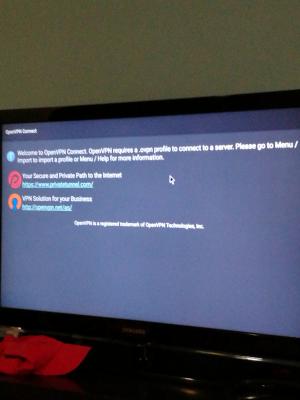
|
|
|
|
|
|
maintenance
|
Jul 13 2017, 08:15 PM
|
|
|
QUOTE(mikeeeee @ Jul 13 2017, 07:22 PM) Probably your display is over scanned. Try zoom out your display at settings--> display --> screen position --> zoom out See if u can see the menu button after u zoom out That's the first thing I tried.. cannot. Uninstall reinstall also cannot. |
|
|
|
|
|
maintenance
|
Aug 3 2017, 07:22 PM
|
|
|
Anybody facing problem where the mibox cannot detect the wireless. The router model is the unifi dkink orange white box one... Restart router and mibox still cannot detect the wireless.. other devices can detect the wireless fine.
|
|
|
|
|
|
maintenance
|
Aug 3 2017, 09:56 PM
|
|
|
QUOTE(mikeeeee @ Aug 3 2017, 09:33 PM) Try to change the router wifi channel to something less than 12. Yeah I was googling that too. But the connection was fine until just now. I remember having the issue during setup first time and resetting the router works ... Now the sakit come again... Aihhhzzz.. This post has been edited by maintenance: Aug 3 2017, 09:57 PM |
|
|
|
|
|
maintenance
|
Sep 3 2017, 04:32 PM
|
|
|
hey can anybody help.. I factory reset my mibox.. now I lost all my Mibox Recommends  How to get those back? |
|
|
|
|
|
maintenance
|
Apr 27 2020, 02:27 AM
|
|
|
QUOTE(mensa @ Apr 10 2020, 10:14 AM) hi..any user able to install and set up Disney+ account on mibox? as for the VPN, i'm using Nord. Thankss Yes. But it's quite a painful process.. I can't remmeber where I download the files from.. But you need yo get the correct version of Disney++ app. Go Redit it. Nord VPN should do the trick.. You may need a couple of times to get the correct file installed in order for you to launch disney+. This was a while back when I did it la. Not too sure now change d or not.. |
|
|
|
|



 Quote
Quote

 0.0196sec
 0.56
0.56
 7 queries
 GZIP Disabled