

QUOTE(manleong @ Jul 9 2017, 11:21 AM)
U are mibox 3 enhanced user too? Do u have fuide to flash global rom for mibox3 enhanced as well?
Thanks in advance

No mine is international version. Android tvThanks in advance
Xiaomi Mi Box User Club, let's talk mi box!
|
|
 Jul 9 2017, 07:16 PM Jul 9 2017, 07:16 PM
|
 
Junior Member
563 posts Joined: Apr 2009 From: Where the music plays...   
|
QUOTE(manleong @ Jul 9 2017, 11:21 AM) U are mibox 3 enhanced user too? Do u have fuide to flash global rom for mibox3 enhanced as well? No mine is international version. Android tvThanks in advance |
|
|
|
|
|
Jul 9 2017, 10:07 PM
|

Senior Member
2,262 posts Joined: Jul 2013
|
QUOTE(aceedburn @ Jul 6 2017, 12:54 PM) Under wifi settings, go to advanced options and change from DHCP to static. Input all the correct values. Prefix length is 24 and then use google dns. I don't see the setting from mibox, mind to share me the screen shot?I'm using mibox mdz-16-ab |
|
|
Jul 10 2017, 09:12 AM
|
|
Junior Member
563 posts Joined: Apr 2009 From: Where the music plays...
|
QUOTE(elmond @ Jul 9 2017, 10:07 PM) I don't see the setting from mibox, mind to share me the screen shot? Click on your wifi network. Then advanced options. Change dhcp to static.I'm using mibox mdz-16-ab Attached thumbnail(s) 


|
|
|
Jul 10 2017, 10:39 AM
|
|
Junior Member
534 posts Joined: Nov 2007
|
guys anyway to turn off daydream / screen saver.
it is interfering with Kodi 17. Loaded show will be stopped and needs to be re-loaded again. |
|
|
Jul 10 2017, 11:25 AM
|
|
Junior Member
563 posts Joined: Apr 2009 From: Where the music plays...
|
QUOTE(WIS9000 @ Jul 10 2017, 10:39 AM) guys anyway to turn off daydream / screen saver. You can't turn off but you can set the delay to maximum 1 hour. That's more than enough.it is interfering with Kodi 17. Loaded show will be stopped and needs to be re-loaded again. |
|
|
Jul 10 2017, 12:38 PM
|
|
Senior Member
2,262 posts Joined: Jul 2013
|
QUOTE(aceedburn @ Jul 10 2017, 09:12 AM) Click on your wifi network. Then advanced options. Change dhcp to static. Thank, finally get to change it |
|
|
|
|
|
Jul 10 2017, 04:32 PM
|
|
Junior Member
534 posts Joined: Nov 2007
|
QUOTE(aceedburn @ Jul 10 2017, 11:25 AM) You can't turn off but you can set the delay to maximum 1 hour. That's more than enough. noted and thanks for the reply.in that case, would try out SPMC later. I read on Kodi forums that Kodi 17 seems to have issue with the screen saver / daydream while other version would not. Anyone can confirm this? |
|
|
Jul 10 2017, 08:39 PM
|
|
Junior Member
18 posts Joined: Apr 2017
|
Just to share a good guide on how to expand mibox 3 enhanced (white) storage. I had been trying many method but failed, this is working good. I can install as much as the app/games i could depending on how big your pendrive is. mibox 3 enhanced (white) is rock, a very powerful and cheap box for gaming
 http://en.miui.com/forum.php?mod=viewthrea...page=1&mobile=2 This post has been edited by limsj123: Jul 10 2017, 08:40 PM |
|
|
Jul 11 2017, 04:00 PM
|

Senior Member
710 posts Joined: Aug 2009
|
VPN for Netflix can allow you to access Netflix content that are not showing in Malaysia Netflix. It is well publicized that the Netflix US catalogue offers the most extensive list of shows and movies. Reason for this strange arrangement is because the owners of the TV shows and movies only allow their content to be shown at select regions instead of completely open to every other market at the same time. This does not apply for Netflix produced content because they hold the rights for it and can stream to all regions worldwide.
From my experience, if u use Astrx On The Go with your VPN settings set in the router, you cant access to its content. keeps crashing and error. After I deleted all the VPN settings in my router then it worked properly again. Hope that helps. |
|
|
Jul 11 2017, 05:14 PM
|
|
Junior Member
563 posts Joined: Apr 2009 From: Where the music plays...
|
QUOTE(kucuboy @ Jul 11 2017, 04:00 PM) VPN for Netflix can allow you to access Netflix content that are not showing in Malaysia Netflix. It is well publicized that the Netflix US catalogue offers the most extensive list of shows and movies. Reason for this strange arrangement is because the owners of the TV shows and movies only allow their content to be shown at select regions instead of completely open to every other market at the same time. This does not apply for Netflix produced content because they hold the rights for it and can stream to all regions worldwide. Geo locked content cannot be accessed on Netflix anymore. It's been a while already.From my experience, if u use Astrx On The Go with your VPN settings set in the router, you cant access to its content. keeps crashing and error. After I deleted all the VPN settings in my router then it worked properly again. Hope that helps. |
|
|
Jul 11 2017, 09:32 PM
|
|
Senior Member
3,026 posts Joined: Oct 2004 From: KL, Penang & JB
|
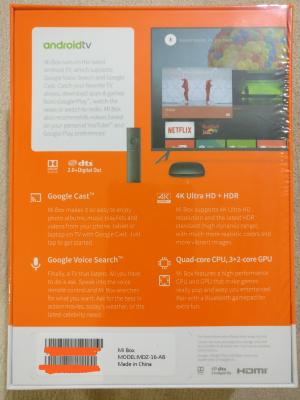
Yay, finally the mibox reach after 11 days. Purchased from zekaisi store thru Lazada on the 30th Jun
It's a mdz-16-ab and it was sold at rm236.80 what a bargain !! Too bad the merchant decided to increase the price few days after my purchase haha 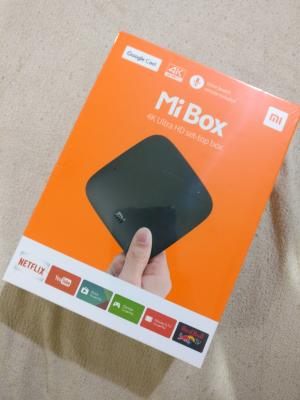
|
|
|
Jul 12 2017, 12:49 AM
|

Junior Member
430 posts Joined: Jan 2003 From: K.l Cheras
|
Hi Guys,
i'm the newbie for xiaomi box, want to check with you all how you done the unlock China IP ? some movie in xiaomi only available to watch in china.- now im using DNS to resolve the IP but sometime the DNS is unstable , need to keep change and change ... Actually i quite like Xiaomi interface/GUI , it so simply and user friendly but some movie in order to watch i need to subscript monthly fee with xiaomi. but i think is cheap but not sure how to make it done. i dont have china number. Secondly, how you guys watch Astro now ? previous i subscripted 华人电视 HDKAN for 1 year, recently no astro channel anymore, only HK/TV/US channel available. not sure how to watch now. |
|
|
Jul 12 2017, 01:18 PM
|
|
Senior Member
710 posts Joined: Aug 2009
|
QUOTE(aceedburn @ Jul 11 2017, 05:14 PM) Geo locked content cannot be accessed on Netflix anymore. It's been a while already. I tried it last in March, havent tried it since.QUOTE Yay, finally the mibox reach after 11 days. Purchased from zekaisi store thru Lazada on the 30th Jun It's a mdz-16-ab and it was sold at rm236.80 what a bargain !! Too bad the merchant decided to increase the price few days after my purchase haha Is this from Philippines Lazada? How much is delivery charge if shop from other region lazada site? This post has been edited by kucuboy: Jul 12 2017, 01:20 PM |
|
|
|
|
|
Jul 12 2017, 01:20 PM
|
|
Junior Member
563 posts Joined: Apr 2009 From: Where the music plays...
|
QUOTE(kucuboy @ Jul 12 2017, 01:18 PM) I tried it last in March, havent tried it since. Netflix has already blocked the use of vpn. Don't waste your money on vpn. Just use Netflix without any dns. Streams smoother and content is good as well. |
|
|
Jul 12 2017, 01:55 PM
|
|
Senior Member
3,026 posts Joined: Oct 2004 From: KL, Penang & JB
|
QUOTE(kucuboy @ Jul 12 2017, 01:18 PM) I tried it last in March, havent tried it since. Nope,this from Lazada Malaysia and shipping is free Is this from Philippines Lazada? How much is delivery charge if shop from other region lazada site? |
|
|
Jul 12 2017, 03:36 PM
|

Junior Member
268 posts Joined: Jul 2005 From: stuck between Hell & Heaven
|
QUOTE(yukwei @ Jul 8 2017, 04:16 PM) Anyone bought from this website? Can share? Reliable? Thanks. Bought on 7th and reached via GDex on 11th ... Darn fast! I'm happily poking it now. Confirmed orange box International version Mi box 3. |
|
|
Jul 13 2017, 11:50 AM
|
|
Senior Member
1,064 posts Joined: Jan 2003 From: ***Bayan Lepas***Phase IV***
|
Guys, can suggest which VPN apk to use. I tried using OpenVPN but some how its not compatible. I can only see half of the page. I cant access the menu button (the threelines) which is on the top right corner of the screen... Any suggesion please.
This post has been edited by maintenance: Jul 13 2017, 12:31 PM |
|
|
Jul 13 2017, 12:11 PM
|
|
Junior Member
426 posts Joined: Sep 2010
|
accidently press factory rest and my mibox gen3 stuck at igntv loading screen for more than 20min, on / off and same thing happen, any advise
|
|
|
Jul 13 2017, 12:25 PM
|
|
Junior Member
385 posts Joined: Sep 2009
|
QUOTE(maintenance @ Jul 13 2017, 11:50 AM) Guys, can suggest which VPN apk to use. I tried using OpenVPN but some how its not compatible. I can only see half of the page. I can access the menu button (the threelines) which is on the top right corner of the screen... Any suggesion please. No problem with OpenVPN on mibox3-mdz-16-ab.Which VPN are you using? |
|
|
Jul 13 2017, 12:29 PM
|
|
Senior Member
1,064 posts Joined: Jan 2003 From: ***Bayan Lepas***Phase IV***
|
QUOTE(lleihuan @ Jul 13 2017, 12:25 PM) No problem with OpenVPN on mibox3-mdz-16-ab. Openvpn for Android... Which VPN are you using? Maybe I didn't clear cache for open VPN connect. |
| Change to: |  0.0205sec 0.0205sec
 0.61 0.61
 6 queries 6 queries
 GZIP Disabled GZIP Disabled
Time is now: 2nd December 2025 - 08:31 PM |
 Quote
Quote