Outline ·
[ Standard ] ·
Linear+
Smart Home, Let's discuss
|
celciuz
|
 Jul 25 2023, 12:39 PM Jul 25 2023, 12:39 PM
|

|
QUOTE(simmarjit @ Jul 25 2023, 12:38 PM) If buying new why not go for thread devices? Wish Zigbee could just be upgraded to thread larh since they are based on similar tech What brands here locally that has Thread now btw...? |
|
|
|
|
|
celciuz
|
Jul 25 2023, 05:05 PM
|
|
|
QUOTE(simmarjit @ Jul 25 2023, 02:27 PM) Zemismart already has some thread devices, smart curtain device also i did see. The companies are slowly rolling out larh, but since new home might as well get the most future proof one but nothing really wrong with zigbee and probably for now price of zigbee stuff is going to be of better value. Awaiting for more thread products... so I don't need so many different hubs  my curtains are on lifesmart... need dedicated hub which is homekit compatible. |
|
|
|
|
|
celciuz
|
Jul 27 2023, 10:25 AM
|
|
|
QUOTE(simmarjit @ Jul 26 2023, 01:31 AM) I am personally sticking with zigbee for the foreseeable future just because i already have loads of them. Mine mostly is Zigbee too, on Aqara hub. But well, I have others like LifeSmart curtains on RF... and the rest are on wifi and some on BLE... |
|
|
|
|
|
celciuz
|
Jul 27 2023, 03:57 PM
|
|
|
QUOTE(Kiding @ Jul 27 2023, 12:36 PM) Yes, you can, it will expose all entities to HA I also configure HA to expose all entities including HomeKit controller entities back to Apple HomeKit  HA can expose all to HomeKit without need of an home hub eg. ATV4K? |
|
|
|
|
|
celciuz
|
Jul 27 2023, 10:04 PM
|
|
|
QUOTE(Kiding @ Jul 27 2023, 08:10 PM) No need home hub such as Apple TV or HomePod mini at all, HA can act as the home hub! Nice to know, I'm new to HA too. Just installed... first thing I wanna do now is for my alarm integration... Damn I'm such a noob lol, can't even find the place to addon zzz. EDIT: Damn.. HASS on docker can't have addons... tsk. This post has been edited by celciuz: Jul 27 2023, 10:22 PM |
|
|
|
|
|
celciuz
|
Jul 28 2023, 06:02 AM
|
|
|
QUOTE(alucard89 @ Jul 27 2023, 10:38 PM) Can, it’s HACS that’s not available on docker Need to grab the supervised ha install So I need to look for supervised HA for docker? QUOTE(simmarjit @ Jul 28 2023, 03:55 AM) Synology DSM 7.2, this is my 24/7 running system 😅 |
|
|
|
|
|
celciuz
|
Jul 28 2023, 09:12 AM
|
|
|
HA in Docker can't have addons  , gonna skip HA for now then. I continue troubleshooting and finally gotten Paradox Alarm Interface to login my IP150+ now  . Tonight need to figure out how to configure it... then need to tinker around to install MQTT broker on docker, then finally interface to my homebridge... I sure hope this works. With this then I can have my HomeKit auto disarm when I arrive home, and arm when everyone is away . Paradox --> PAI --> MQQT --> HomeBridge |
|
|
|
|
|
celciuz
|
Jul 28 2023, 10:24 AM
|
|
|
What is the best way to run HA? How are you guys running HA ya?
Pi4?
|
|
|
|
|
|
celciuz
|
Jul 28 2023, 10:56 AM
|
|
|
QUOTE(alucard89 @ Jul 28 2023, 10:40 AM) Just stick with the synology bro, no need to get new hardware  this is my plan too, but following the guides... cannot get access to addons ah doi. I'm using the Synology more and more now LOL, next time got reason to buy the higher end for the better processor now haha. EDIT: Running it on VM could work... need to upgrade RAM. https://community.home-assistant.io/t/insta...anagager/281608This post has been edited by celciuz: Jul 28 2023, 10:57 AM |
|
|
|
|
|
celciuz
|
Jul 29 2023, 08:18 AM
|
|
|
This MQTT is more difficult than I thought... anybody using MQTTThing homebridge for security alarm system? I did PAI to MQTT then now using MQTTThing for homebridge to control the alarm... it works, I can arm and disarm (very fast as compared to cloud). Problem now is... when I disarm the info would show up. However when I arm... it will stuck at "arming" forver. I did the mqqt explorer and the info is matching. Not sure what happened... I reconfigured another device under MQTTThing and now it works as intended.  . Next up I need to learn how to secure my MQTT broker  .. you guys using password or TLS? This post has been edited by celciuz: Jul 29 2023, 09:04 AM |
|
|
|
|
|
celciuz
|
Jul 29 2023, 01:31 PM
|
|
|
QUOTE(Max @ Jul 29 2023, 12:03 PM) Im on "recycled" hardware. Celeron J1800. With Debian. Last time I was running my antique i7-3770K PC 24/7… electricity kaolat 🤣 I then migrated my stuffs running 24/7 to my Synology DS920+, saved about RM 30-50 😅 |
|
|
|
|
|
celciuz
|
Jul 29 2023, 03:54 PM
|
|
|
QUOTE(Max @ Jul 29 2023, 03:03 PM) Good stuff u have something that run 24/7 that can install HA. I got hold of dell micro pc. i5 4590. Not sure wanna migrate to that or not.. 🤔 I manage to get my alarm homebridge now, so not going to HA now 🤣. |
|
|
|
|
|
celciuz
|
Jul 30 2023, 08:10 AM
|
|
|
I am using this plugin (https://broadlink.kiwicam.nz/#air-conditioner) for my Broadlink RM4 IR blaster to control my aircon. In the same room there is another device with temperature sensor and that temperature is exposed in HomeKit via homebridge (Xiaomi air purifier).
The aircon plugin has a temperature view... which I would want it to show the temperature from xiaomi air purifier instead... the plugin supports taking temp from MQQT but possible to have this
Xiaomi Air Purifier --> homebridge --> mqqt?
|
|
|
|
|
|
celciuz
|
Aug 3 2023, 03:05 PM
|
|
|
QUOTE(WildChai @ Aug 3 2023, 02:57 PM) New to HA also. Running it on proxmox in a n100 mini pc. Prepping it for my new home. I gave up migrating to HA... since I managed to integrate PAI to hb already. |
|
|
|
|
|
celciuz
|
Aug 4 2023, 08:38 AM
|
|
|
QUOTE(lucaswjk @ Aug 3 2023, 08:02 PM) btw ur Paradox using network interface or serial? mine old model, need serial. im thinking using Pi GPIO for it, not sure how yet. I am using IP150+ (SP6000 board), somehow after I connect to PAI the insite cloud still getting notifications. I just installed last year end... stick to Paradox as I've other location using Paradox too. But only this new house that's integrated to smart home. I tried looking for other smart wired solution, but unfortunately options is so rare... but good thing la now I'm able to integrate, and now I can live even without keypad LOL. Leave home, automatically arm... when arrive home it will disarm... morning it will auto disarm for me too before going out to work. |
|
|
|
|
|
celciuz
|
Aug 16 2023, 04:46 PM
|
|
|
QUOTE(epicure @ Aug 16 2023, 03:38 PM) Just finished making a portable zigbee rain sensor. Used a Tuya zigbee door sensor, soldered the leads of a rain sensor module to it, put it into a housing, and thats it. Now whenever it rains, i get a notification in Tuya App or Apple Home. Didnt go with the leak sensor cos that one has a loud alert, even if you mute your phone at night. Pretty pleased with the outcome 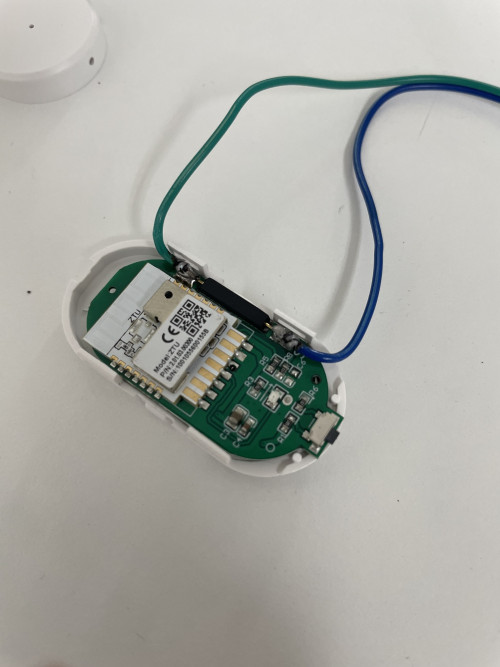 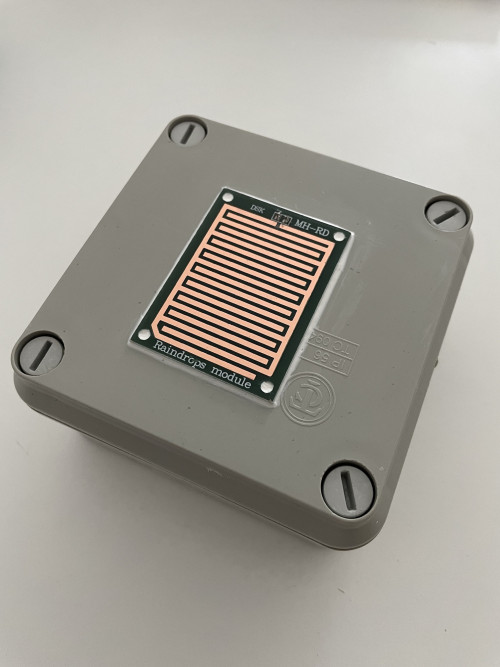 Bro, how do you integrate the Tuya into Apple Home? Which plug-in? |
|
|
|
|
|
celciuz
|
Aug 19 2023, 01:52 PM
|
|
|
QUOTE(lucaswjk @ Aug 17 2023, 10:34 PM) BTW what settings u normally set for ur switches. I did timer (plusetime) for all Washroom light n exhaust fan. scheduled sunrise n sunset time for outdoor. as for bedrooms ceilings fan, I planned to add temperatures sensors to speed up or down the speed... but since I use air-conditioning more, I didn't implement it yet I have similar set up as you too. Exhaust fan turns on with toilet light, when light turns off then exhaust fan continue to run for 15 minutes before shutting off. Good idea for the fan speed and temp, I didn’t think of that 😄. |
|
|
|
|
|
celciuz
|
Aug 30 2023, 09:47 PM
|
|
|
QUOTE(alucard89 @ Aug 30 2023, 08:21 PM) I tumpang the power outlet neutral, didn’t realise it was on different breaker until last month. Running fine for the last 2 years so i guess I’m in the clear? If sharing same RCCB is ok, but usually light and power different RCCB though. |
|
|
|
|
|
celciuz
|
Sep 3 2023, 07:17 AM
|
|
|
QUOTE(dest9116 @ Sep 3 2023, 06:55 AM) You need a Google nest mini. U can get one at shopee now for about RM100 after using their coins cashback voucher. Then you connect your aqara zigbee hub to Google home via matter and works with Google then connect the Google speakers to the same "home" using Google home. Then connect tuya to Google home using works for Google. Basically everything in 1 home, then it will just work. You need spend time to rename all the sensors and D1 switches though. Then you add those switches to the right home and room. Then u can use the automation lo. Eg. When aqara door sensor shows room oor is opened, then turn on room light which is using tuya cheapo switches. There's not much options for now, but it's a start Exactly what I need for my Tuya to work with my HomeKit. Been trying to do local control via homebridge but it’s really wonky. |
|
|
|
|
|
celciuz
|
Sep 4 2023, 06:55 AM
|
|
|
QUOTE(trespasser @ Sep 3 2023, 05:55 PM) Thanks for the confirmation. It gave me confidence to move forward. Many contractor not willing to pull the neutral wiring from DB saying it involves massive hacking works, so this is the best alternative I can think of. Separately, if I have 3G or 2G switch I just need one (1) neutral wire to power all the switches? All my switch point at home has neutral from lighting point back to switch, so far so good using since December. Got about 40+ switches. |
|
|
|
|



 Quote
Quote
 0.0361sec
 0.39
0.39
 7 queries
 GZIP Disabled