Welcome Guest ( Log In | Register )

46 Pages « < 25 26 27 28 29 > » Bottom

Outline · [ Standard ] · Linear+

 Smart Home, Let's discuss

views
     
Zot
post Aug 15 2019, 05:08 PM

Look at all my stars!!
*******
Senior Member
7,938 posts

Joined: Mar 2014
QUOTE(dannygoh @ Aug 15 2019, 04:49 PM)
voice start , temperature and fan control
*
I think if using voice command, more likely you need to change your unit with new one that can accept voice command, but controlling from your phone or WiFi there are many that are doing this.
Zot
post Aug 19 2019, 02:11 PM

Look at all my stars!!
*******
Senior Member
7,938 posts

Joined: Mar 2014
QUOTE(Fubar20 @ Aug 19 2019, 01:41 PM)
Using one right now. Working fine with eWeLink app
*
Wow.. Now the No Neutral WiFi switch starts emerging. At least can start motivating me biggrin.gif
Zot
post Aug 19 2019, 02:21 PM

Look at all my stars!!
*******
Senior Member
7,938 posts

Joined: Mar 2014
QUOTE(Fubar20 @ Aug 19 2019, 02:14 PM)
dry.gif  See first lah. You talk only, no action.
*
laugh.gif laugh.gif laugh.gif

NATO still powerful

Last time I search found only by one company but not in AliExpress, Shopee, or whatever.

I use similar looking touch switch, double blue ring but the LED no more light but still functioning. Lazy to replace the LED. Right now have other project. smile.gif
Zot
post Aug 20 2019, 11:42 AM

Look at all my stars!!
*******
Senior Member
7,938 posts

Joined: Mar 2014
QUOTE(fahmietalife @ Aug 20 2019, 11:30 AM)
Sonoff just release smart switch that work without neutral. Only single gang at the moment. It use anti flicker module that need to be install in between fixture load and neutral wire.

https://www.itead.cc/sonoff-t4eu1c-wi-fi-sm...all-switch.html
*
How do you control with LAN when there is not WiFi?
Zot
post Aug 20 2019, 07:45 PM

Look at all my stars!!
*******
Senior Member
7,938 posts

Joined: Mar 2014
QUOTE(yfyap69 @ Aug 20 2019, 04:24 PM)
If you are refering to "LAN control devices under no Wi-Fi internet", it mean the switch can still work in local LAN mode without any access to the cloud server. However, you will not be able to use Google Assistant to control because that will need internet access
*
You mean need to install LAN cable or use electrical wire as connection medium?
Zot
post Aug 21 2019, 09:31 AM

Look at all my stars!!
*******
Senior Member
7,938 posts

Joined: Mar 2014
QUOTE(yfyap69 @ Aug 21 2019, 09:25 AM)
No, no necessary. All use wifi.
*
I was confused when said if no WiFi can still work with LAN. First thing that comes to my mind was LAN cable, but no WiFi meant no external connection and use LAN WiFi. When Fubar20 explain, I realized my misunderstanding smile.gif
Zot
post Aug 24 2019, 05:59 PM

Look at all my stars!!
*******
Senior Member
7,938 posts

Joined: Mar 2014
QUOTE(dannygoh @ Aug 24 2019, 12:10 PM)
anyone here have good soldering skill? will pay for the service
*
Just google ans see how easy it is and investment is not expensive unlike buying power tools smile.gif
Zot
post Aug 26 2019, 02:30 PM

Look at all my stars!!
*******
Senior Member
7,938 posts

Joined: Mar 2014
QUOTE(ozak @ Aug 26 2019, 10:08 AM)
Soldering not easy and freaking difficult if in serious business.  biggrin.gif
*
Agreed, in electronics, probably, especially if dealing with high frequency stuff.

Anyway, the lead free solder is harder to make it nice compares to leaded solder wire laugh.gif
Zot
post Aug 27 2019, 08:48 AM

Look at all my stars!!
*******
Senior Member
7,938 posts

Joined: Mar 2014
QUOTE(proff89 @ Aug 26 2019, 08:17 PM)
Thanks for all the suggestions and tips.
Ya, I think I do need soldering iron with temperature control.
I had bought these 5 meters LED strip that I planned to do an airplane-runway-parking-assist kinda thing that is now kaput because of bad soldering gun. biggrin.gif
*
The temperature controlled soldering iron is not cheap. It is mostly for electronics industries. The iron tip is very expensive too since it has sensor to measure the tip temperature. For general use, I think you just need a dual wattage soldering iron.

The reason the iron tip is not hot is because you were soldering a bigger copper mass like a switch tab for example. With low power wattage, it takes time to heat the copper. However, the longer you heat, the heat traveled further to plastic part of the switch and starts to melt it and probably damage the switch. This is the problem.

For electronics component and small wire, you want to use low power iron like 20~30W and finish soldering in about 3s. For large copper area such as the switch contact or probably ground point on the PCB, you want to heat the solder point as short as possible also, thus need high power rating.

I would recommend something like this. I has a Hakko but it was less than half the price now laugh.gif . Many China copy (much cheaper) also nowadays if you like. You can easily find tip replacement for Hakko.

https://www.lelong.com.my/hakko-presto-dual...7-01-Sale-I.htm

Zot
post Aug 29 2019, 10:09 AM

Look at all my stars!!
*******
Senior Member
7,938 posts

Joined: Mar 2014
QUOTE(D3vilsim @ Aug 28 2019, 04:47 PM)

Ic .. make senses. So which is more prefer ? with the Neutral model or without ? or probably just for the sake of safety which model we should use ? i'm current installed 2 switch without Neutral model. And put a stop there after notice there is some small current remain even after OFF.
*

Not sure where you detect small current after OFF. The fact is with or without N, the unit need power to operate. It is like TV on standby mode smile.gif

The one with N, the unit is lowly powered directly from L and N. For the one without N, the power goes through L to the unit and back to N wire at the ceiling. This lowly powered the unit in standby waiting for an action. smile.gif
Zot
post Aug 29 2019, 12:45 PM

Look at all my stars!!
*******
Senior Member
7,938 posts

Joined: Mar 2014
QUOTE(D3vilsim @ Aug 29 2019, 12:12 PM)
I'm in the new house also without N. Unless i i pull/connect to those 20A right beside the Switch. Btw how to determine N & ground ? (in the scenario that the wiring installer did not follow the color standard)

hmm.gif  If you power a device between L and E, the device (or bulb) will light up too, but you can find that the E wire anywhere else in your house will light up your test pin. I'm not sure but probably the MCB will trip. Then you know you are connecting using E. That is what I  can think of right now  biggrin.gif

yape agree. the current is direct from the L even is power off already. Dont have mutilmeter to test how many Watt come through. should plan to get 1 multimeter if want continues this project. lol
Just not sure which is safer to use if there is any different. If with N is a must for safety reason then i will plan to pull the N. if with or without N make no different in terms of safety. then will just leave it.

There is no difference as far as I know. Usually the unit that require N wire is able to handle higher load compare to the same brand that require no N. The reason is that the resistance between your load and control unit has to split within certain range so that current flow to the control unit is maintained above minimum to keep it operational.

*
Zot
post Sep 5 2019, 11:49 AM

Look at all my stars!!
*******
Senior Member
7,938 posts

Joined: Mar 2014
QUOTE(nabilishes @ Sep 5 2019, 11:38 AM)
Hi sifus, what do i need in order to connect an IP camera to our home wiring AC 230V . I'm pretty sure the IP camera uses DC voltage input, so i cant hook it up straight to the wires right?
*
There are AC powered IP camera (of course it will have build-in adapter to change AC to DC). DC powered IP camera comes with AC adapter (Yes, still connect to AC). POE IP Camera is powered through LAN cable, which use power injector (yes, still powered by AC line).
Zot
post Sep 5 2019, 12:04 PM

Look at all my stars!!
*******
Senior Member
7,938 posts

Joined: Mar 2014
QUOTE(nabilishes @ Sep 5 2019, 11:51 AM)
can you recommend me a good AC powered IP camera or DC powered IP camera?
*
I only have virtual Smart Home laugh.gif No IP camera. Please someone help smile.gif
Zot
post Sep 20 2019, 08:21 AM

Look at all my stars!!
*******
Senior Member
7,938 posts

Joined: Mar 2014
QUOTE(youliang @ Sep 19 2019, 06:56 PM)
maybe you could set a bigtimer to the front to allow yourself to switch off the doorbell whenever needed.. i.e someone triggering your doorbell to check for occupancy when you are on holidays.
*
I have a switch to disable doorbell (a gate bell actually). It was on disabled for very very long time and now when I enabled it, the bell is not functioning doh.gif laugh.gif laugh.gif
Zot
post Sep 25 2019, 12:59 PM

Look at all my stars!!
*******
Senior Member
7,938 posts

Joined: Mar 2014
QUOTE(ozak @ Sep 25 2019, 12:46 PM)
Guys, what different between SONOFF BASICR3 and SONOFF BASICR2 ?

I want to makeover upgrade my oven with sonoff.

Suddenly got new model and check the spec, look same.
*
Maybe this clear things up


Zot
post Sep 26 2019, 08:57 AM

Look at all my stars!!
*******
Senior Member
7,938 posts

Joined: Mar 2014
QUOTE(akarsan @ Sep 26 2019, 01:24 AM)
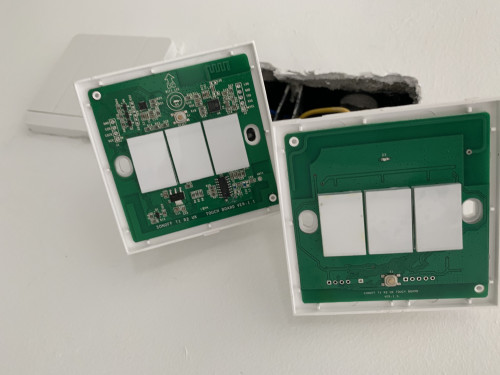
hey guys, just wanna see if anyone using sonoff t1 touch having issues.

My sonoff isn't responding to any touches to on or off the devices it connected to. Service was offline as well.

I tried to re-pair the sonoff back on to my ewekink app, but didn't seems to be detecting it at all.

I can hear the sound beeping if I hold it long enough to enter the pairing process. But I don't see the WiFi light blinking. nor I can detect it in the pairing process.

When I try to switch on the light. No response. I took off the cover and tried it also nothing. But once a while it'll register the touch and it'll switch on the lights, but if I touch it again no response again.

Its the one on the right. V1.0 in the attached image. Running on the latest stock firmware.

user posted image
*
In another word, I think the switch is partially kaput biggrin.gif Intermittently operating.

Have you tried moving the switch somewhere else and see if it is working. I do not have Sonoff but other chap ayam ( smile.gif ) touch switch that require no N. I think the sensitivity of my switch is self calibrated. Sensitivity changes with cover removed.

How long have you installed before it is giving problem?
Zot
post Oct 11 2019, 03:22 PM

Look at all my stars!!
*******
Senior Member
7,938 posts

Joined: Mar 2014
QUOTE(Max @ Oct 11 2019, 11:40 AM)
hi guys.
anyone using sonoff RM433 RF remote ?

wanted to know, if all the 8 button can control 8 devices. ?  unsure.gif
i wan to consolidate 2 remotes (4btn) into this 1 remote.

» Click to show Spoiler - click again to hide... «

*
You can read here some of the weaknesses of the device

https://www.itead.cc/sonoff-rm433-remote-co...oller-base.html
Zot
post Oct 12 2019, 07:46 PM

Look at all my stars!!
*******
Senior Member
7,938 posts

Joined: Mar 2014
QUOTE(glades @ Oct 12 2019, 01:38 PM)
any recommendation for 1 gang 2 way switch? wanted to install for staircase light. closed i found was the RF remote type but i prefer switch type.
*
Your house have wiring ready for that?
Zot
post Oct 13 2019, 02:49 PM

Look at all my stars!!
*******
Senior Member
7,938 posts

Joined: Mar 2014
QUOTE(glades @ Oct 12 2019, 08:57 PM)
currently its just 1 way. thinking of possibilities for 1 RF switch to communicate with the main switch that is wire-connected to the light.
*
Yes, using one RF to communicate with the other switch is possible. This was done by someone in this forum. Maybe someone can help here.
Zot
post Oct 14 2019, 11:49 AM

Look at all my stars!!
*******
Senior Member
7,938 posts

Joined: Mar 2014
QUOTE(TheLegend27 @ Oct 14 2019, 11:09 AM)
can recommend any LED strip? rgb control
*
I guess plenty in Shopee like

https://shopee.com.my/USB-RGB-LED-STRIP-WIT...0389.1770437894

46 Pages « < 25 26 27 28 29 > » Top
 

Change to:
| Lo-Fi Version
0.3326sec    0.36    7 queries    GZIP Disabled
Time is now: 5th December 2025 - 09:00 AM