Welcome Guest ( Log In | Register )

656 Pages « < 572 573 574 575 576 > » Bottom

Outline · [ Standard ] · Linear+

 Smart Home, Let's discuss

views
     
celciuz
post May 23 2023, 11:23 AM

10k Club
********
All Stars
14,035 posts

Joined: Nov 2004
QUOTE(alucard89 @ May 22 2023, 11:11 AM)
With HA, can skip homebridge
HA will expose all those device entities to homekit
*
Nice!

QUOTE(epicure @ May 23 2023, 08:48 AM)
With HomeAssistant, u no longer need Homebridge. You can control everything from HA. I installed it before, but was too over my head for the tweaking of each setting. I think im getting old, so homebridge to just route the items into Homekit is easier for me. Besides, home minister will prefer homekit, and not HA.

But if you do have the time, HA opens up a whole world of monitoring, automation and etc. Not to mention things like NodeRed.
*
Somehow I still prefer HomeKit's interface, I'm used to it laugh.gif . Wife also used to it.

But I mainly want more conditions etc when doing the automations... HomeKit quite limited... some things I want like on switch for 1 hour and turn off, I have to install homebridge dummy, then expose a dummy switch to enable to do that... very stupid sweat.gif

I guess eventually I will look into HA... just solely for automation.. but still use HomeKit when I want to manually on and off certain areas or certain scenes.
celciuz
post May 27 2023, 08:58 AM

10k Club
********
All Stars
14,035 posts

Joined: Nov 2004
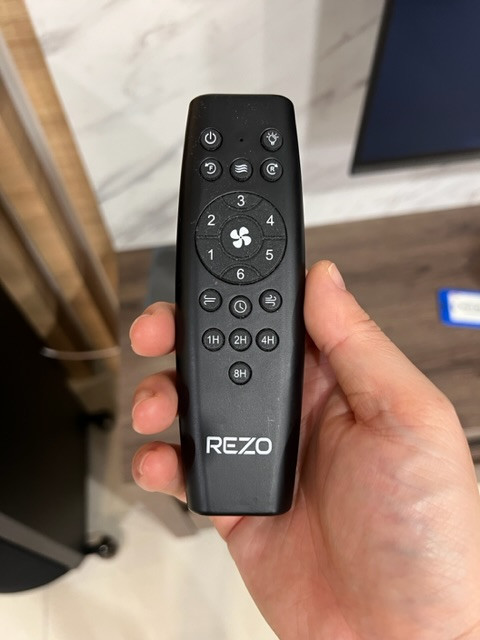
Broadlink RM4 Pro arrived, so I tried to pair RF to my fans (which doesn’t have any template unfortunately).

First fan I tried is the Rezo fan, so it kinda worked. These pretty much 1 instruction per button. Except the light when on or off need separate actions.

user posted image

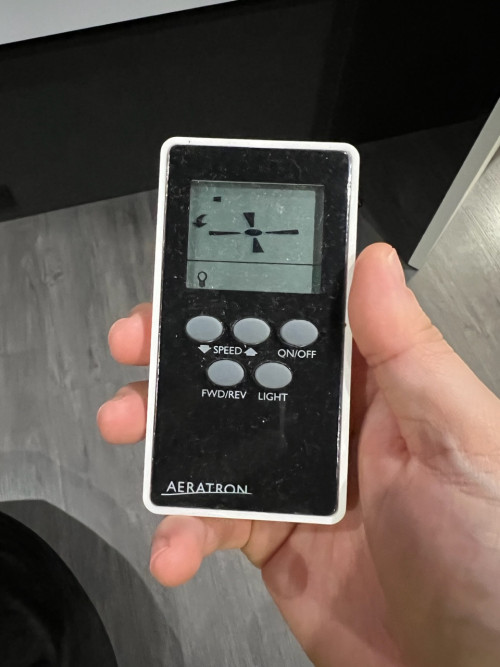
Now for this other type of remote where I can’t even learn the frequency band yet… how to proceed? 😅

user posted image

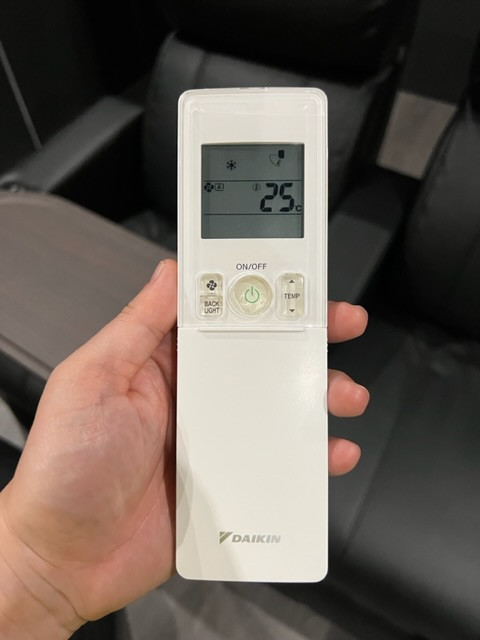
I tried with my Daikin IR remote also having same issue aiyo 😅

user posted image

And to expose to HomeBridge also not so straight forward (but before that need let it work natively first 🤣)
alucard89
post May 27 2023, 10:00 AM

Look at all my stars!!
*******
Senior Member
4,454 posts

Joined: Apr 2006
QUOTE(celciuz @ May 27 2023, 08:58 AM)
Broadlink RM4 Pro arrived, so I tried to pair RF to my fans (which doesn’t have any template unfortunately).

First fan I tried is the Rezo fan, so it kinda worked. These pretty much 1 instruction per button. Except the light when on or off need separate actions.

user posted image

Now for this other type of remote where I can’t even learn the frequency band yet… how to proceed? 😅

user posted image

I tried with my Daikin IR remote also having same issue aiyo 😅

user posted image

And to expose to HomeBridge also not so straight forward (but before that need let it work natively first 🤣)
*
Feels like this might be easier to do on homeassistant with smartir & tasmota irhvac addons.

Daikin IR should be no issue, i have the same brand ac integrated

That fan remote, still can't learn the command with broadlink?
celciuz
post May 27 2023, 04:45 PM

10k Club
********
All Stars
14,035 posts

Joined: Nov 2004
QUOTE(alucard89 @ May 27 2023, 10:00 AM)
Feels like this might be easier to do on homeassistant with smartir & tasmota irhvac addons.

Daikin IR should be no issue, i have the same brand ac integrated

That fan remote, still can't learn the command with broadlink?
*
bruce.gif now I'm keen to learn HASS sweat.gif

Side now some how after trying multiple times finally the thing gotten the frequency... seems I need to do every "state" for those controls. Which will do for now la, since my main thing is to automate so my AC turns on cooling the room down before I go inside.

Now need to figure out how to work with this homebridge plugin...
alucard89
post May 28 2023, 03:16 PM

Look at all my stars!!
*******
Senior Member
4,454 posts

Joined: Apr 2006
QUOTE(celciuz @ May 27 2023, 04:45 PM)
bruce.gif now I'm keen to learn HASS  sweat.gif

Side now some how after trying multiple times finally the thing gotten the frequency... seems I need to do every "state" for those controls. Which will do for now la, since my main thing is to automate so my AC turns on cooling the room down before I go inside.

Now need to figure out how to work with this homebridge plugin...
*
Just give it a try, install on the same device running homebridge

For ir device, I'd recommend getting this
Broadlink's ok since it has official ha integration but you can do more with esp based remote.
celciuz
post May 28 2023, 04:50 PM

10k Club
********
All Stars
14,035 posts

Joined: Nov 2004
QUOTE(alucard89 @ May 28 2023, 03:16 PM)
Just give it a try, install on the same device running homebridge

For ir device, I'd recommend getting this
Broadlink's ok since it has official ha integration but you can do more with esp based remote.
*
My homebridge is hosted on my Synology NAS, I kinda surveyed a bit but seems a bit trickier to do it on DSM for HASS.

Tuya based items works ok with HASS? It was pretty difficult to do local control on HomeBridge (which I can’t get it on local tsk, gave up!).

I bought the Broadlink cause it has RF for my fans.
alucard89
post May 28 2023, 06:04 PM

Look at all my stars!!
*******
Senior Member
4,454 posts

Joined: Apr 2006
QUOTE(celciuz @ May 28 2023, 04:50 PM)
My homebridge is hosted on my Synology NAS, I kinda surveyed a bit but seems a bit trickier to do it on DSM for HASS.

Tuya based items works ok with HASS? It was pretty difficult to do local control on HomeBridge (which I can’t get it on local tsk, gave up!).

I bought the Broadlink cause it has RF for my fans.
*
Seems not that hard, follow this instruction since it’s for supervised hass with extra settings

https://mariushosting.com/how-to-install-ho...r-synology-nas/

There’s tuya integration, localtuya.
Haven’t really used those since i just flash custom firmware on the wifi devices, and pair with zigbee2mqtt for the zigbee ones.

For the tuya ir/rf remotes, you’ll need to set up tap to run and the command will show up in scenes.
celciuz
post May 28 2023, 08:02 PM

10k Club
********
All Stars
14,035 posts

Joined: Nov 2004
QUOTE(alucard89 @ May 28 2023, 06:04 PM)
Seems not that hard, follow this instruction since it’s for supervised hass with extra settings

https://mariushosting.com/how-to-install-ho...r-synology-nas/

There’s tuya integration, localtuya.
Haven’t really used those since i just flash custom firmware on the wifi devices, and pair with zigbee2mqtt for the zigbee ones.

For the tuya ir/rf remotes, you’ll need to set up tap to run and the command will show up in scenes.
*
The tuya integration is it need to look for the local key from developer account type?

Or the plug-in settle it for you?
alucard89
post May 28 2023, 08:26 PM

Look at all my stars!!
*******
Senior Member
4,454 posts

Joined: Apr 2006
QUOTE(celciuz @ May 28 2023, 08:02 PM)
The tuya integration is it need to look for the local key from developer account type?

Or the plug-in settle it for you?
*
Need to manually grab those info

https://www.home-assistant.io/integrations/tuya/
simmarjit
post Jun 3 2023, 01:08 PM

Enthusiast
*****
Junior Member
980 posts

Joined: Dec 2011


QUOTE(celciuz @ May 23 2023, 11:23 AM)
Nice!
Somehow I still prefer HomeKit's interface, I'm used to it  laugh.gif . Wife also used to it.

But I mainly want more conditions etc when doing the automations... HomeKit quite limited... some things I want like on switch for 1 hour and turn off, I have to install homebridge dummy, then expose a dummy switch to enable to do that... very stupid  sweat.gif

I guess eventually I will look into HA... just solely for automation.. but still use HomeKit when I want to manually on and off certain areas or certain scenes.
*
Thats what my setup is like, everything goes to HA automation scripts etc and then to HomeKit which all my family members interact with. Just even started using scrypted to get cameras to use HKSV
adamw
post Jun 3 2023, 02:26 PM

Back to serve justice to those PKHKC corrupted Ex-ministers!
*******
Senior Member
3,352 posts

Joined: Dec 2006


QUOTE(simmarjit @ Jun 3 2023, 01:08 PM)
Thats what my setup is like, everything goes to HA automation scripts etc and then to HomeKit which all my family members interact with. Just even started using scrypted to get cameras to use HKSV
*
Did you encountered any missing motions detection when using HKSV as highlighted by the article below? Or already solved?
HKSV issues
simmarjit
post Jun 3 2023, 06:31 PM

Enthusiast
*****
Junior Member
980 posts

Joined: Dec 2011


QUOTE(adamw @ Jun 3 2023, 02:26 PM)
Did you encountered any missing motions detection when using HKSV as highlighted by the article below? Or already solved?
HKSV issues
*
Well those issues are for HKSV cameras no? I am using 24/7 recorded Hikvision cameras which Scrypted uses the substream to detect motion and tell HomeKit, so now it records in two places, i like the face recognition which is decent.
adamw
post Jun 4 2023, 12:43 AM

Back to serve justice to those PKHKC corrupted Ex-ministers!
*******
Senior Member
3,352 posts

Joined: Dec 2006


QUOTE(simmarjit @ Jun 3 2023, 06:31 PM)
Well those issues are for HKSV cameras no? I am using 24/7 recorded Hikvision cameras which Scrypted uses the substream to detect motion and tell HomeKit, so now it records in two places, i like the face recognition which is decent.
*
thumbsup.gif Yes, HKSV capable camera.
celciuz
post Jun 4 2023, 02:40 PM

10k Club
********
All Stars
14,035 posts

Joined: Nov 2004
Anyone with experience with broadlink homebridge plug-in? Need some help with the json config.

I set up my audio video receiver under “tv” type, but only on and off appears. The volume, remote options didn’t appear. Not sure what am I doing wrong 😅.

The AVR is located in another room and my crappy processor don’t support Wi-Fi control, Bluetooth is quite finicky hence plan to use RF control instead.
simmarjit
post Jun 4 2023, 11:11 PM

Enthusiast
*****
Junior Member
980 posts

Joined: Dec 2011


QUOTE(adamw @ Jun 4 2023, 12:43 AM)
thumbsup.gif Yes, HKSV capable camera.
*
Those dont run 24/7 thats the ones that have issues i think.
K4iz3n
post Jun 5 2023, 04:33 PM

Getting Started
**
Junior Member
212 posts

Joined: May 2010
Any good company that can set up smart home?
ZeneticX
post Jun 5 2023, 05:02 PM

stars for what
********
All Stars
12,413 posts

Joined: Jan 2008
From: KL - Cardiff - Subang - Sydney


QUOTE(K4iz3n @ Jun 5 2023, 04:33 PM)
Any good company that can set up smart home?
*
Best is learn yourself and setup. Once you know how to do it, you will know its not worth paying the exorbitant prices these companies charge just to do a simple smart home setup. Its not rocket science
alucard89
post Jun 5 2023, 06:53 PM

Look at all my stars!!
*******
Senior Member
4,454 posts

Joined: Apr 2006
QUOTE(ZeneticX @ Jun 5 2023, 05:02 PM)
Best is learn yourself and setup. Once you know how to do it, you will know its not worth paying the exorbitant prices these companies charge just to do a simple smart home setup. Its not rocket science
*
yeah, also if one of those companies have their own smart home app. Then a few years later that company dies along with the server & apps making the smart devices installed useless/dumb.

I’ve seen a fair share of those including some smart bulbs I bought a few years back. Had to flash custom firmware on those
ZeneticX
post Jun 5 2023, 07:56 PM

stars for what
********
All Stars
12,413 posts

Joined: Jan 2008
From: KL - Cardiff - Subang - Sydney


QUOTE(alucard89 @ Jun 5 2023, 06:53 PM)
yeah, also if one of those companies have their own smart home app. Then a few years later that company dies along with the server & apps making the smart devices installed useless/dumb.

I’ve seen a fair share of those including some smart bulbs I bought a few years back. Had to flash custom firmware on those
*
and most of the hardware are rebranded Tuya stuff with marked up prices anyway
SIEWBAO
post Jun 6 2023, 11:32 AM

Casual
***
Junior Member
330 posts

Joined: Jan 2013
Is there anything I nid to take note if i purchase Tuya related product from taobao?

656 Pages « < 572 573 574 575 576 > » Top
 

Change to:
| Lo-Fi Version
0.0337sec    0.70    6 queries    GZIP Disabled
Time is now: 9th December 2025 - 03:56 PM