Welcome Guest ( Log In | Register )

Bump Topic Topic Closed RSS Feed
37 Pages « < 24 25 26 27 28 > » Bottom

Outline · [ Standard ] · Linear+

 The SSD Thread V5, Solid State Drive

views
     
horns
post Aug 30 2016, 05:45 PM

\m/
*******
Senior Member
3,038 posts

Joined: Nov 2009
QUOTE(svfn @ Aug 29 2016, 04:08 PM)
hey thanks. it's already in AHCI though, with the latest f6 drivers from intel. i didnt bother with Magician anymore since TRIM is enabled and other benchmark software show it is in AHCI mode.

» Click to show Spoiler - click again to hide... «


went back to to check my Win 10 build 1607 on HDD, which was upgraded from Win 8.1 previously, and Magician can detect AHCI. the problem seems not from Windows 1607 itself but Samsung's MagicianSataModeReader service not digitally signed, according to my Event Viewer. saw many with the same problem with clean installs of 1607.
*
well, it's supposed to work out-of-box without issues. not sure what happened to yours.

i am waiting for a new laptop. i will install samsung 850 evo m.2 sata ssd, do a direct clean install on it (from stock w10.home.sl to w10.pro 1607), install its stock drivers (intel.rst.14.6.1.1030), and install samsung magician 4.9.7 on it (turn on maximum reliability optimizations; rapid mode on; over provisioning set to default 10%).

i will post results here for reference.
horns
post Aug 30 2016, 07:50 PM

\m/
*******
Senior Member
3,038 posts

Joined: Nov 2009
QUOTE(svfn @ Aug 30 2016, 06:10 PM)
what do you mean by clean install from w10 home to win 10 pro 1607? if you update/upgrade from other builds to 1607, Magician will able to detect AHCI.

i upgraded from w8.1 to w10 1607 and Magician can detect without problem.

what i meant was clean installing build 1607 straight from Win10_1607_English_x64.iso: https://www.microsoft.com/en-us/software-do...d/windows10ISO/

» Click to show Spoiler - click again to hide... «

*
yes, i am doing exactly what you said that didn't work: do a clean install directly with w10 pro 1607 (with the same iso, Win10_1607_English_x64.iso from the link you provided). if it doesn't work i can use 1511.

the stock os that comes with the laptop is w10 home single language; here we need w10 pro for work.
horns
post Aug 30 2016, 11:19 PM

\m/
*******
Senior Member
3,038 posts

Joined: Nov 2009
QUOTE(svfn @ Aug 30 2016, 08:11 PM)
oo icic, thanks for trying that.

maybe i should try 1511 ISO, not sure where to find a clean 1511 ISO now. i know it's a small issue but it kinda bugs me when see red text like something is not working haha.
*
Attached Image

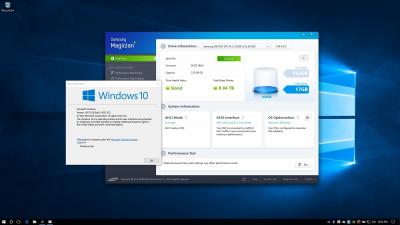
first of all, i apologize for everything i said previously. what you reported were right, and i was wrong all this while smile.gif it's all about the leak of ms' scureboot golden keys. don't bother to try w10 1511. your system is all good biggrin.gif (don't be fooled by the screen shot above; it's taken when the laptop has its secureboot DISABLED)

you're right that for a clean install of w10 1607, if your system has secureboot turned on, the ahci mode in samsung magician is indeed shown as deactivated. kernel-mode drivers from samsung magician 4.9.7 were affected, and they could not be loaded because of the new secureboot enforcement. why did i say previously that my machines were unaffected and worked fine? it's because i disabled secureboot for those machines after reading the news about the golden key leak (i forgot all about it, and told you i had secureboot enabled in them)

despite samsung magician reporting ahci mode as deactivated (due to failure to load their kernel mode drivers so as to detect ahci mode properly; it's just a misleading eye sore), ahci mode is actually enabled and working fine. i think we will get an update from samsung for updated drivers and have this resolved.


horns
post Aug 30 2016, 11:51 PM

\m/
*******
Senior Member
3,038 posts

Joined: Nov 2009
QUOTE(svfn @ Aug 30 2016, 11:24 PM)
eh no need to apologize bro! appreciate your sharing and trying it out.

i'm just OCD about minor issue haha, and also curious about these things. i wanted to disable Secure Boot but it has so many option for key in BIOS i'm not sure how to turn off properly, or if it will cause Windows to not boot so i didnt try in the end tongue.gif

yeah just ignore for now and wait Samsung update it.
*
haha i rather admit my mistakes than giving nonsense to people.

secureboot can be turned off anytime. it's only useful if you wanna run windows that is secureboot-aware.

horns
post Aug 31 2016, 12:33 AM

\m/
*******
Senior Member
3,038 posts

Joined: Nov 2009
QUOTE(XeactorZ @ Aug 30 2016, 11:47 PM)
if you want 1511 ISO I can give you the media creation tool setup to you smile.gif
*
i suggest using this little utility, https://www.heidoc.net/joomla/technology-sc...o-download-tool

horns
post Aug 31 2016, 01:11 AM

\m/
*******
Senior Member
3,038 posts

Joined: Nov 2009
QUOTE(XeactorZ @ Aug 31 2016, 12:40 AM)
wow this tool is amazing thumbup.gif
*
yeah all are official .iso files. just grab what you need just in case smile.gif
horns
post Aug 31 2016, 04:42 AM

\m/
*******
Senior Member
3,038 posts

Joined: Nov 2009
QUOTE(Maxieos @ Aug 31 2016, 02:37 AM)
Actually what is the different on reading files on Sata I port for old laptop SSD vs 5400rpm ? There no plan for tranfering to a new laptop but currently do you think SSD UV400 will work well vs compare to Intel 320 ?
*
https://www.youtube.com/watch?v=O0rb8RJWoyw
https://www.youtube.com/watch?v=oaPNHIl7Mx8
https://www.youtube.com/watch?v=rsOL8iebGoI
https://www.youtube.com/watch?v=3y2_lR2jssc

(.. and many more at youtube)

you can still benefit from the much higher iops in ssd.
horns
post Aug 31 2016, 05:21 PM

\m/
*******
Senior Member
3,038 posts

Joined: Nov 2009
samsung sm961 has been reported that when it's overheated, data loss occurred. (note that these are extreme cases; normal use cases usually don't exceed its max operating temperature of 70c)

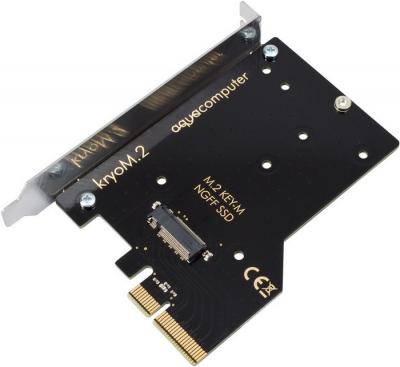
if you're using these high-performance m.2 ssds for long-hour work processing, forget about putting it in m.2 slot, and use an adapter with heatsink. well, now there is a water-cooled option also.
Attached Image
Attached Image
Attached Image
Attached Image
Attached Image

horns
post Sep 8 2016, 12:46 AM

\m/
*******
Senior Member
3,038 posts

Joined: Nov 2009
QUOTE(flexus90 @ Sep 7 2016, 06:19 PM)
Beside Samsung SSD are there any other SSD using 3D NAND? Have most of SSD manufactures moved to 3D NAND?
*
3d tlc nand is just going mainstream. there are a few announced recently (e.g. crucial, intel) but they will take some time to populate.

horns
post Sep 8 2016, 08:10 PM

\m/
*******
Senior Member
3,038 posts

Joined: Nov 2009
QUOTE(g104 @ Sep 8 2016, 04:22 PM)
http://www.pcper.com/reviews/Storage/Intel...ow-Cost-M2-NVMe

unfortunately, my mobo don't support NVMe  cry.gif
*
if you want you can still use pcie adapter to use nvme ssds.

QUOTE(kianweic @ Sep 8 2016, 05:29 PM)
Awesome, more brands mean more competition. More competition, more options for consumers.
*
yes, these ssds will also be more affordable, and with larger capacities smile.gif

although my first choice is still mlc ssds for work purposes, ssds with 3d tlc nand is more than sufficient for normal use. as long as you don't go beyond its limits, they do work very well.

QUOTE(flexus90 @ Sep 8 2016, 06:08 PM)
Other companies so left behind. Samsung have announced its 4th gen 3D NAND on August. They market it as V-NAND.
http://www.anandtech.com/show/10560/samsun...igger-ssds-zssd
*
samsung had an early lead, so they have a year or two of advantages in time. along the line samsung have also established reference points for us. hopefully other brands can catch up, and their tlc products can have similar or better characteristics.
horns
post Sep 8 2016, 09:58 PM

\m/
*******
Senior Member
3,038 posts

Joined: Nov 2009
QUOTE(g104 @ Sep 8 2016, 08:26 PM)
horns the pci-e adapter support any mobo's? any cons? if no mistake haswell might not able to boot OS if using NVMe. correct if i'm wrong.
*
as long as your mobo has a free pcie port (x4 at least), and supports uefi boot, you can run pcie x4 nvme ssd at full speed, as boot drive. haswell mobos should work. i have tested to set a pcie ssd up for z97 using pcie slot before (samsung xp941; this pcie ssd doesn't have boot oprom, it work well).

as for os, it's better to run w8.1 and up, because they have built-in native nvme driver.
horns
post Sep 9 2016, 04:03 AM

\m/
*******
Senior Member
3,038 posts

Joined: Nov 2009
QUOTE(g104 @ Sep 8 2016, 11:23 PM)
as long we update the latest bios on mobo. impossible i'm running W7 or W8.x cos W10 served me well. icon_rolleyes.gif
*
if that's the case, everything should work for you smile.gif


horns
post Sep 12 2016, 01:51 AM

\m/
*******
Senior Member
3,038 posts

Joined: Nov 2009
QUOTE(sHawTY @ Sep 12 2016, 01:31 AM)
I'm not a Kingston hater but truthfully, V300 & HyperX Fury is a piece of crap
My stepmother bought a HyperX Fury 120GB & it dies in less than 6 month
She only use her laptop for work purposes. After waiting 1 month for RMA, Kingston replaced it with a new unit & then the new unit died again after 2 months

Their SAVAGE SSD lineup on are much more reliable albeit at a higher price
*
wow.

here i have 3 machines with kingston.hyperx.fury 240gb. (few months old) just in case i have regular backups for the os and stuff.
horns
post Sep 12 2016, 01:08 PM

\m/
*******
Senior Member
3,038 posts

Joined: Nov 2009
QUOTE(Songchien @ Sep 12 2016, 01:53 AM)
Hi sifus. Sorry if this is a bit off topic.

I wonder if all optical drive candy fit into any laptops models? Is there a standard size? For example, all optical drive candy comes with the same dimensions?

And what is 7mm, 9.5mm, and 12.7mm ? is that the thickness for the HDD & SSD or the candy itself?

Recently, I'm thinking of installing a SSD into my laptop and planning to buy the following optical drive candy:

http://www.lazada.com.my/newest-95mm-optic...03106.html?mp=1

Would this fit into my laptop (Asus N56vz) ?

I'm thinking of getting a PNY CS1311 SSD. So far this is the best budget SSD I can find. If there's any suggestion, do please tell me.  smile.gif

Thanks sifus!!
*
7mm, 9.5mm, .. are thickness of your ssd/hdd. use 12.7mm.

use ssd with the hdd bay in laptop (so that ssd can run at full sata3 speed), and put the existing hdd into the new caddy.
horns
post Sep 12 2016, 05:21 PM

\m/
*******
Senior Member
3,038 posts

Joined: Nov 2009
QUOTE(Songchien @ Sep 12 2016, 01:20 PM)
So you mean the standard laptop HDD in my laptop is 12.7mm?
*
No i mean if you go search the internet about 'your laptop model replacement hdd caddy', it will tell you that.

I use hdd caddy in my aw's and asus g55 laptops. All are 12.7mm.
horns
post Sep 15 2016, 08:31 AM

\m/
*******
Senior Member
3,038 posts

Joined: Nov 2009
QUOTE(flexus90 @ Sep 13 2016, 09:54 PM)
New performance segment SATA SSD using MLC NAND flash from OCZ(Toshiba), OCZ VX500
http://bit.ly/2cK5XN7
*
this one looks good. it's rare to find a new sata ssd with mlc nand for mainstream market these days (mostly are going tlc).


horns
post Sep 15 2016, 01:29 PM

\m/
*******
Senior Member
3,038 posts

Joined: Nov 2009
QUOTE(sHawTY @ Sep 15 2016, 11:26 AM)
Who on earth need LEDs on SSD? sweat.gif
http://www.avexir.com/product/s100.html

If on RAM then normal la, but on SSD?

user posted image
*
.. is this even necessary? i think these days people like led everywhere
horns
post Sep 15 2016, 04:07 PM

\m/
*******
Senior Member
3,038 posts

Joined: Nov 2009
QUOTE(sHawTY @ Sep 15 2016, 01:56 PM)
Like I said earlier, LED's on SSD is useless really. For RAMs, ok la but only to those RAMs with LED that show the activity of the PC such as Crucial Ballistix Tracer & Crucial Ballistix Tactical Tracer

Those with static LEDs are useless, more to bling only whistling.gif
*
different people have different taste.

i am not a fan of led stuff. when i use my pc, i am always looking at computer screen, not once at my pc cases hehe

QUOTE(zulfadliwahab @ Sep 15 2016, 02:14 PM)
think positive...maybe can use as indicator SSD being access or like ASUS STRIX GC showing Temperature ahahahhahaha
*
with so many indicators to tell us what might go wrong, we will spend more time looking at them than to do what we want (at least i will do that hahaha)
horns
post Sep 15 2016, 06:50 PM

\m/
*******
Senior Member
3,038 posts

Joined: Nov 2009
QUOTE(zulfadliwahab @ Sep 15 2016, 04:17 PM)
somehow breathing LED look like hypnotize machine......you will look at it more than play your game. for temperature indicator, purposely run benchmark just to compare temperature reading with color ahahahhaha again and again and again..........
*
haha! maybe they are cool for the first (few) times; then eventually you get bored, and might even forget about them. another thing is when some of the led is somehow spoiled either by nature or accident. that happened to me already. (i once treated my corsair k70 rgb half a bottle of coke lol; luckily after cleaning it up, led still work fine biggrin.gif)

now i rather spend on performance than look.


horns
post Sep 15 2016, 09:45 PM

\m/
*******
Senior Member
3,038 posts

Joined: Nov 2009
finally. samsung.960.evo/pro are coming biggrin.gif

960.evo is like pm961 for oem; while 960.pro is like sm961

http://www.guru3d.com/news-story/samsung-p...chitecture.html
http://www.techradar.com/news/computing-co...-corner-1328575


37 Pages « < 24 25 26 27 28 > » Top
Topic ClosedOptions
 

Change to:
| Lo-Fi Version
0.0710sec    0.16    7 queries    GZIP Disabled
Time is now: 8th December 2025 - 05:48 PM