

QUOTE(ngkhanmein @ Mar 13 2015, 11:50 AM)
This can backup our current system image and create a bootable? 
The SSD Thread V5, Solid State Drive
|
|
 Mar 13 2015, 11:58 AM Mar 13 2015, 11:58 AM
|
 
All Stars
17,467 posts Joined: May 2008 From: Lazada   
|
QUOTE(ngkhanmein @ Mar 13 2015, 11:50 AM) This can backup our current system image and create a bootable? |
|
|
|
|
|
Mar 13 2015, 12:18 PM
|

Senior Member
7,727 posts Joined: Jan 2010 From: Ara Damansara, Petaling Jaya & Batu Pahat, Johor.
|
guys, should i enable or disable? Optimize Start Menu Cache Files
can cause any harm to ssd? did u guys disable superfetch & prefetch on win8.1? This post has been edited by ngkhanmein: Mar 13 2015, 12:22 PM |
|
|
Mar 13 2015, 12:38 PM
|

Senior Member
3,038 posts Joined: Nov 2009
|
QUOTE(ngkhanmein @ Mar 13 2015, 12:18 PM) guys, should i enable or disable? Optimize Start Menu Cache Files tbh there is no serious harm done without disabling this. without it the system still runs fine and as speedy as what i want. to me it's better to disable them. (save some writes)can cause any harm to ssd? did u guys disable superfetch & prefetch on win8.1?  yes i have disabled those too. apart from that, i move user temporary folder to ram disk. there are a lot of background writes that make use of temp folders that we are not aware of in daily use. these temp files are usually can be discarded safely upon reboot. |
|
|
Mar 13 2015, 02:06 PM
|
|
Senior Member
7,727 posts Joined: Jan 2010 From: Ara Damansara, Petaling Jaya & Batu Pahat, Johor.
|
QUOTE(horns @ Mar 13 2015, 12:38 PM) tbh there is no serious harm done without disabling this. without it the system still runs fine and as speedy as what i want. to me it's better to disable them. (save some writes) but i thought it auto disable for ssd on win8.1 whereas we still got hdd that need superfetch & prefetch rite? i know no improvement for ssd but hdd got different.yes i have disabled those too. apart from that, i move user temporary folder to ram disk. there are a lot of background writes that make use of temp folders that we are not aware of in daily use. these temp files are usually can be discarded safely upon reboot. |
|
|
Mar 13 2015, 02:21 PM
|

Senior Member
6,012 posts Joined: Feb 2007 
|
QUOTE(NightFelix @ Mar 13 2015, 11:58 AM) This can backup our current system image and create a bootable? Juse use Acronis TrueImage WD edition, or windows own backup utility.The Rufus one only can create bootable disk from Windows 7/8 disc or Linux discs. |
|
|
Mar 13 2015, 02:35 PM
|
|
All Stars
17,467 posts Joined: May 2008 From: Lazada
|
QUOTE(horns @ Mar 13 2015, 12:38 PM) tbh there is no serious harm done without disabling this. without it the system still runs fine and as speedy as what i want. to me it's better to disable them. (save some writes) Maybe I should move my temporary file to ram too. I got 16GB RAM while with 128GB SSD as my primary SSD partition. yes i have disabled those too. apart from that, i move user temporary folder to ram disk. there are a lot of background writes that make use of temp folders that we are not aware of in daily use. these temp files are usually can be discarded safely upon reboot. QUOTE(1024kbps @ Mar 13 2015, 02:21 PM) Juse use Acronis TrueImage WD edition, or windows own backup utility. Thank you. I will look into it.The Rufus one only can create bootable disk from Windows 7/8 disc or Linux discs. |
|
|
|
|
|
Mar 13 2015, 04:31 PM
|
|
Senior Member
3,038 posts Joined: Nov 2009
|
QUOTE(ngkhanmein @ Mar 13 2015, 02:06 PM) but i thought it auto disable for ssd on win8.1 whereas we still got hdd that need superfetch & prefetch rite? i know no improvement for ssd but hdd got different. I am not sure because it's my routine to disable them first after fresh install, along with system restore.QUOTE(NightFelix @ Mar 13 2015, 02:35 PM) Maybe I should move my temporary file to ram too. I got 16GB RAM while with 128GB SSD as my primary SSD partition. I think you should. You can start with 1 or 2gb ram disk. You should also move web browser cache locations to it.I suggest softperfect ramdisk, free, very easy to set it up, one of the fastest. |
|
|
Mar 13 2015, 04:45 PM
|
|
Senior Member
7,727 posts Joined: Jan 2010 From: Ara Damansara, Petaling Jaya & Batu Pahat, Johor.
|
QUOTE(horns @ Mar 13 2015, 04:31 PM) I am not sure because it's my routine to disable them first after fresh install, along with system restore. by the way, i also disable superfetch & prefetch I think you should. You can start with 1 or 2gb ram disk. You should also move web browser cache locations to it. I suggest softperfect ramdisk, free, very easy to set it up, one of the fastest.  This post has been edited by ngkhanmein: Mar 13 2015, 04:45 PM |
|
|
Mar 14 2015, 09:15 AM
|
|
Senior Member
3,038 posts Joined: Nov 2009
|
off-topic notes: how to set up a ram disk with softperfect ram disk. this is for those who are interested in doing so.
what you need and do is very simple: 1. install the software and create a ramdisk, and set it up accordingly; the size is up to you. you can start with a small one, then adjust it when it's insufficient for your usage. 

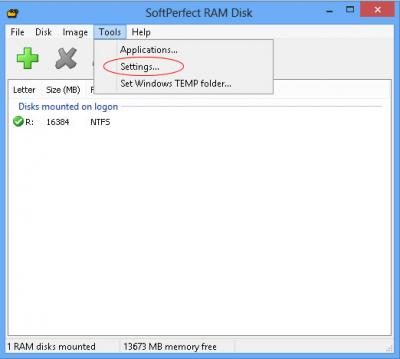
 
 2. map user temporary folder, and web broswer cache folders to ram disk. note that i use the option that creates the ramdisk and directory structures on-the-fly; i do not create a ramdisk image that can be reused (i.e. preserve the state of ram disk contents and reloaded upon next boot). to me, this is good enough. please consult the user manual for more complex setups. |
|
|
Mar 14 2015, 10:00 AM
|

Junior Member
392 posts Joined: Dec 2010
|
QUOTE(horns @ Mar 14 2015, 09:15 AM) off-topic notes: how to set up a ram disk with softperfect ram disk. this is for those who are interested in doing so. Thanks. So your pagefile is still in c:?» Click to show Spoiler - click again to hide... « |
|
|
Mar 14 2015, 10:12 AM
|
|
Senior Member
3,038 posts Joined: Nov 2009
|
QUOTE(slimfox @ Mar 14 2015, 10:00 AM) Thanks. So your pagefile is still in c:? my pagefile is 0. i haven't faced any issues for some years now without pagefile. i have 32gb of ram. i do adjustments according to my ram usage, i.e. i turn my ram disk, ram cache off if i need to. so far so good.edit: to be safer, you can adjust the pagefile size accordingly until the level that you don't have problems running anything (in this case, the pagefile is in ssd). you can start with a minimal 1gb. or, you can also move it to hdd. (less optimal but you can put it as large as you want  ) )This post has been edited by horns: Mar 14 2015, 10:25 AM |
|
|
Mar 14 2015, 10:24 AM
|

All Stars
11,251 posts Joined: Jul 2005
|
Lolz. Looks like i need 2 add more ram 4 trying out this ram disk thing. The more the merrier.
 |
|
|
Mar 14 2015, 10:34 AM
|
|
Senior Member
3,038 posts Joined: Nov 2009
|
QUOTE(skylinelover @ Mar 14 2015, 10:24 AM) Lolz. Looks like i need 2 add more ram 4 trying out this ram disk thing. The more the merrier. yeah the idea is to make full use of excess resources in the system to make it run smoother, but please don't do this for the sake of using ram disk only. to me ram disk is a bonus when i don't use a lot of ram for my work. my common usage only requires 8gb, so i have plenty to play with hehe edit: finally, they are all dead now, http://techreport.com/review/27909/the-ssd...theyre-all-dead This post has been edited by horns: Mar 14 2015, 10:40 AM |
|
|
|
|
|
Mar 14 2015, 12:58 PM
|

Junior Member
307 posts Joined: Aug 2012
|
I plan to get a liteon s900 256gb next week, and put inisde my laptop.
The question is since my laptop is dos version, after i replace my hdd to ssd and insert a win7 dvd to fresh install, do i need to optimize any things to fully utilize the ssd?? |
|
|
Mar 14 2015, 03:24 PM
|
|
Senior Member
7,727 posts Joined: Jan 2010 From: Ara Damansara, Petaling Jaya & Batu Pahat, Johor.
|
QUOTE(skylinelover @ Mar 14 2015, 10:24 AM) Lolz. Looks like i need 2 add more ram 4 trying out this ram disk thing. The more the merrier. currently i got 8gb ram only. wait i add another 8gb only can try with dataram ramdisk but it is worth? http://www.ghacks.net/2010/06/10/use-a-ram...d-state-drives/ This post has been edited by ngkhanmein: Mar 14 2015, 03:40 PM |
|
|
Mar 14 2015, 03:38 PM
|
|
Senior Member
3,038 posts Joined: Nov 2009
|
QUOTE(icecreamcake @ Mar 14 2015, 12:58 PM) I plan to get a liteon s900 256gb next week, and put inisde my laptop. yes you do. check out the first post for more information. actually, the first few posts have all the basic but good information that you can learn about ssd.The question is since my laptop is dos version, after i replace my hdd to ssd and insert a win7 dvd to fresh install, do i need to optimize any things to fully utilize the ssd?? |
|
|
 Mar 14 2015, 07:44 PM Mar 14 2015, 07:44 PM
|
|
All Stars
11,251 posts Joined: Jul 2005
|
QUOTE(ngkhanmein @ Mar 14 2015, 03:24 PM) currently i got 8gb ram only. wait i add another 8gb only can try with dataram ramdisk but it is worth? itchy hands here http://www.ghacks.net/2010/06/10/use-a-ram...d-state-drives/  so i create this already with RAMDISK utility haha so i create this already with RAMDISK utility haha[attachmentid=4372609] This post has been edited by skylinelover: Mar 14 2015, 07:45 PM |
|
|
Mar 14 2015, 08:41 PM
|
|
Senior Member
7,727 posts Joined: Jan 2010 From: Ara Damansara, Petaling Jaya & Batu Pahat, Johor.
|
QUOTE(skylinelover @ Mar 14 2015, 07:44 PM) itchy hands here haha lazy but now i enable superfetch & prefetch. since ssd can last quite long so i don't care. so i create this already with RAMDISK utility haha[attachmentid=4372609] |
|
|
Mar 14 2015, 09:30 PM
|

Junior Member
275 posts Joined: Sep 2011
|
is it ok if i use 2GB from 4GB ram available?
i use old laptop with sata2 port only.. This post has been edited by air_pull91: Mar 14 2015, 09:30 PM |
|
|
Mar 14 2015, 09:37 PM
|
|
Senior Member
3,038 posts Joined: Nov 2009
|
QUOTE(air_pull91 @ Mar 14 2015, 09:30 PM) is it ok if i use 2GB from 4GB ram available? no it's better don't :/ you must have more than enough system ram first, then you can consider using ram disk.i use old laptop with sata2 port only.. |
|
Topic ClosedOptions
|
| Change to: |  0.0202sec 0.0202sec
 0.33 0.33
 6 queries 6 queries
 GZIP Disabled GZIP Disabled
Time is now: 4th December 2025 - 03:06 AM |
 Quote
Quote