Welcome Guest ( Log In | Register )

10 Pages « < 3 4 5 6 7 > » Bottom

Outline · [ Standard ] · Linear+

 The Official Maxis FTTH Thread | v5, Maxis Home Fibre Internet, from RM89

views
     
PRSXFENG
post Mar 1 2022, 03:11 PM

Look at all my stars!!
*******
Senior Member
2,611 posts

Joined: Nov 2020


QUOTE(zeronova @ Mar 1 2022, 02:14 PM)
how's the experience with gaming? stable? Thinking of switching over from Unifi. Planning to get 300mbps plan (from Unifi 100mbps plan),  both plans are 50mbps upload, just that the download speed is faster on Maxis. I play alot of competitive FPS so quite worried about latency for gaming
*
My experience ok but depends on the game lah
Expect to see only 280Mbps max depending on infrastructure (blame TM)

Possibly that Private IP might affect gaming but you can just ask CS for Public IP
PRSXFENG
post Mar 6 2022, 10:32 PM

Look at all my stars!!
*******
Senior Member
2,611 posts

Joined: Nov 2020


QUOTE(Cybuster @ Mar 6 2022, 09:42 PM)
Hi All the Expert,
Not sure If anyone ask this question before.

I'm using Maxis Fiber and the original Router KAON I replace to TPLINK AX73.
Due to TPLINK AX73 do not have RJ16 port, I'm unable to use my current Panasonic Dect Phone.

The Modem (GPON) is HG8240H.

Reason: I would like to use the VOIP Service due to my old man at home want to use....

Is there any way I can use the VOIP Service?

1) Is there possible to set the GPON (HG8240H) to use the telephone only as there got RJ16.
  (Just like when using Unifi that time, the RJ16 is connect to HG8240H and router just act as internet)

Any configuration need to change?
(Original Setting carried from Unifi and without any changes and now using MAXIS)
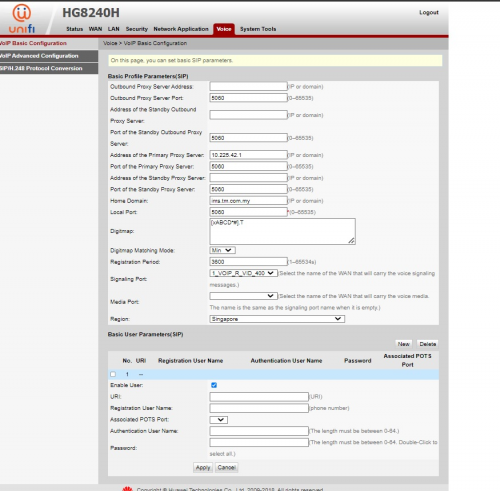
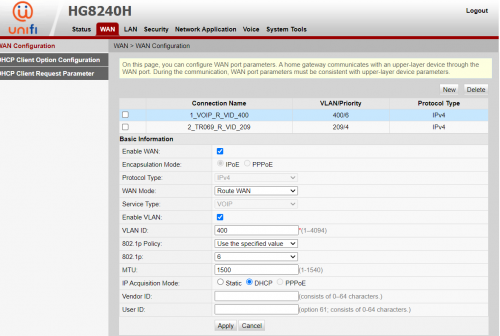
user posted image
user posted image
2) If Option one cant work, how about option 2. Can I perform some changes or way to make either 2x router working on the same time.

KAON as Telephone as got RJ16 port
AX73 as Router for Internet
KAON (PHONE) ---- HG8240H ---- AX73 (Internet)
3) If Option 1 and 2 not working, can I use VOIP Phone and direct plug in to AX73 LAN Port and direct use the VOIP Service?

Any VOIP Dect phone can recommend... AX73...not sure if this work or got such.

Need all the expertise advice. Thanks.

*
Option 1 is not possible due to Unifi/Maxis not allowing

Option 2 maybe can be done maybe but not sure if you want direct to modem
The usual way is
Huawei -> TP-Link -> Kaon -> Phone
So a daisy chain, using Kaon only for phone

Option 3 yes, see https://forum.lowyat.net/topic/5243640
PRSXFENG
post Mar 8 2022, 12:08 PM

Look at all my stars!!
*******
Senior Member
2,611 posts

Joined: Nov 2020


QUOTE(Cybuster @ Mar 8 2022, 10:31 AM)
For the Option 2 Daisy Chain setting, What mode should i change for KAON router? As current it work as Router model to DIAL PPOE to the Huawei GPON. So after I replace it with my AX73 as Router Mode and connect to GPON, the Kaon mode should change to what? Bridge? or how? So the IP Address for the Kaon should be same range as my main AX73 then? So once connect to LAN4 , the Kaon site i just plug in RJ11 to my connect my current home phone? Any additional setting required?
*
I've never done it before but I think you leave it in normal router mode but just disable all the other unneeded vlans like internet or tv and only leave voip on
PRSXFENG
post Mar 26 2022, 03:26 PM

Look at all my stars!!
*******
Senior Member
2,611 posts

Joined: Nov 2020


QUOTE(andrekua2 @ Mar 26 2022, 03:08 PM)
Maxis public ip also shared liao unlike those days. Nowadays very easy to detect ip sharing when browsing lazada. It will kept complaining that too much traffic from your side even though you only used 1 devices to browse their site.

Anyway, goodbye Maxshit... request transfer out to Unifi. After transfer baru mau counter offer tv or RM89 100mbps for a year. Last time when I accepted, said can call them asking for offer after a year. Tried calling but kept saying no offer. Might as well port out to unifi since Unifi randomly offer upgrade to users. Cousin 500mbps only RM179 since he only used Unifi since beginning.
*
Lazada always complains for me, for me it seems related to ad blocker usage

do note that unifi is also removing public ip from lower plans
PRSXFENG
post Mar 27 2022, 12:28 PM

Look at all my stars!!
*******
Senior Member
2,611 posts

Joined: Nov 2020


for me a public ip user I also always get the slide thing, I think lazada is just very trigger happy on showing that notice
PRSXFENG
post Mar 29 2022, 12:20 PM

Look at all my stars!!
*******
Senior Member
2,611 posts

Joined: Nov 2020


I never used this promo but I wonder if there's like some small terms and condition like "oh the free 6 months will be in the form of RM X rebates over your 24 month contract"

As for the random phone bill cost it might be physical paper mail tax, sign up for e-billing

This post has been edited by PRSXFENG: Mar 29 2022, 12:21 PM
PRSXFENG
post Apr 9 2022, 02:36 PM

Look at all my stars!!
*******
Senior Member
2,611 posts

Joined: Nov 2020


QUOTE(mADmAN @ Apr 9 2022, 12:08 PM)
urgently need feedback on switching from 100mbps unifi to maxis as well (especially in ara damansara area - but general feedback appreciated as well)

they called me with the offer to switch and will provide wifi 6 router and unlimited data for my phone.

my main usage is online gaming as well as torrents. im worried about line stability and speed stability. im also concerned on website blocks etc.

also if there is any data cap or something like that. any advise? what do u guys think? to switch or maintain current unifi with the current hardware.

aside from the wifi 6 upgrade, any other advantages? what are the disadvantages?

thanks in advance!
*
depending on your area expect either slightly below 100Mbps or normal
wifi6 router, can buy your own
gaming, should be fine but of course that depends on the game, torrents, ask for public ip from cs
website blocks other than the usual I don't think anything else is
no data cap as far as i can know

up to you to decide if you want to move
PRSXFENG
post Apr 9 2022, 08:19 PM

Look at all my stars!!
*******
Senior Member
2,611 posts

Joined: Nov 2020


QUOTE(A573154 @ Apr 9 2022, 05:23 PM)
Hi how I know already change public IP can’t find the email
*
they should message or call you, and if you are using the stock router they could remotely change the settings on it

to check, login to the router and edit the eInternet vlan, for username, check if it's @home or @public
@home is private, @public is public
PRSXFENG
post Apr 12 2022, 10:53 PM

Look at all my stars!!
*******
Senior Member
2,611 posts

Joined: Nov 2020


QUOTE(A573154 @ Apr 12 2022, 08:51 PM)
I login inside can’t find the email column😅
*
Not a real email, depending on the model of router, find the eInternet profile and either edit it to check the username or check the ip listed there, if it's 10.X.X.X, private, if it's 121.121.X.X or something else not 10.X, then public
PRSXFENG
post Apr 19 2022, 08:59 PM

Look at all my stars!!
*******
Senior Member
2,611 posts

Joined: Nov 2020


QUOTE(plsharevme @ Apr 19 2022, 01:26 PM)
Today sudden my torrents speed drop so much, even test with fastest linux torrent  , ....anyone same this today?
*
I'm getting my expected speeds of 30Mbps with Ubuntu Desktop 20.04 LTS

PRSXFENG
post May 1 2022, 12:41 PM

Look at all my stars!!
*******
Senior Member
2,611 posts

Joined: Nov 2020


QUOTE(shaktiv8 @ May 1 2022, 02:38 AM)
Hello everyone

Today I set up my deco to use as access point with maxis default Wi-Fi 6 router. This new maxis router cannot change dns and I can’t see any options for ipv6 too. I don’t mind that

Today I got a err failed error when I was trying to access some website.

Then just now I got a warning from cloud flare that says my warp is misconfigured and need to open app. I open app everything seems normal but in the logs there was an issue trying to find a tunnel as the configuration is invalid.

In the log can see it fixed itself too after a few minutes, I’m not sure how. It just says “satisfied”

My question is, is this something to do with the fact that my connection is using private ip or is it something to do with the dns issues? Because right now on my phone the default dns with deco as access point shows the IP address of my maxis router and for ipv6 it just shows fe80::1

Is this normal ?

I can’t take away the router yet because I need the voip

I do have a switch that can do vlan tagging with the deco, wonder if can use that just for the voip on maxis router
*
Try

MaxARSysOpr
!!bestHOME!!XXXX

Where XXXX is last 4 digits of serial
For more settings in the Maxis router (Assuming Kaon Router)

Could consider doing vlan tagging, or depending on the infrastructure you could use the voip on modem or on another device (there's a thread here somewhere)

Not sure on the cloud flare/ipv6 stuff

This post has been edited by PRSXFENG: May 1 2022, 12:41 PM
PRSXFENG
post May 1 2022, 04:12 PM

Look at all my stars!!
*******
Senior Member
2,611 posts

Joined: Nov 2020


QUOTE(YoungMan @ May 1 2022, 03:00 PM)
Yes Maxis is the most efficient when it comes to blocking xxx website, unlike TM or others, change DNS already can bypass.
*
I think all 3 have their ways now

TM Blocks via IP also I think
Maxis used to not but I guess they do now
TIME hijacks dns on their stock router so it always goes to their dns

well, just use a VPN and done biggrin.gif
PRSXFENG
post Jun 6 2022, 03:27 PM

Look at all my stars!!
*******
Senior Member
2,611 posts

Joined: Nov 2020


When the option is available, go for TIME
PRSXFENG
post Jun 27 2022, 09:00 AM

Look at all my stars!!
*******
Senior Member
2,611 posts

Joined: Nov 2020


QUOTE(gvr @ Jun 26 2022, 11:11 PM)
Hi everyone, is there anyone able to set the new stock Maxis router (Huawei LG8245X6) to bridge mdoe and uses its VOIP function only? I wanted to use my own router but keep the VOIP function from the stock router, but whenever I set the new router to bridge mode, the VOIP function is not able to up.
*
I think most go with the route of

ONT -> New Router -> Stock Router for Voip only

Alternatively, depending on your area's infrastructure, it may be possible to setup voip on the ONT
PRSXFENG
post Jun 28 2022, 10:19 AM

Look at all my stars!!
*******
Senior Member
2,611 posts

Joined: Nov 2020


maybe this thread can provide some info on voip setup

https://forum.lowyat.net/index.php?showtopic=5243640&hl=
PRSXFENG
post Jul 5 2022, 10:36 PM

Look at all my stars!!
*******
Senior Member
2,611 posts

Joined: Nov 2020


QUOTE(shaktiv8 @ Jul 5 2022, 03:29 PM)
Why is maxis dns so bad??

i keep needing to switch back to the maxis stock router because we need the house phone working, and when i switch back i instantly notice so many websites not loading properly

maxis also blocks us from changing dns on the newer routers they provide

https://www.jdsports.my/

and

https://www.marksandspencer.com/my/l/men/all-footwear/

all load weirdly slow or only half

the M&S one loads the first 4 photos and then just gets stuck there
*
Try using technician login

Assuming Kaon wifi 6 router

MaxARSysAdm
!!bestHOME!!XXXX

Where XXXX is last 4 digits of SN

Alternatively, you could daisy chain your stock router to your new router for voip
Or, there is a guide on this forum to setup with an ethernet voip phone, or ONT if you're on Maxis own Infra
PRSXFENG
post Aug 8 2022, 10:23 PM

Look at all my stars!!
*******
Senior Member
2,611 posts

Joined: Nov 2020


QUOTE(street @ Aug 8 2022, 09:30 PM)
Last June 2022 upgraded to 300Mbps. I'm still waiting for my new WiFi 6 router. They told me it was gonna be available in July due to high demand. Now already August.

Still using the ol Archer C5v from back when I first had Maxis 30Mbps @ RM89 plan (the 2018 cheap internet era).

Anyone knows what kind of  WiFi 6 router brand(s) I might get?
*
Looks like either Huawei or Kaon
PRSXFENG
post Aug 14 2022, 12:54 PM

Look at all my stars!!
*******
Senior Member
2,611 posts

Joined: Nov 2020


QUOTE(rayfoo @ Aug 14 2022, 12:34 PM)
not too familiar with maxis fiber setup so asking here, is it possible to have setup consist of 1 unit fiber modem (maxis) with the voip attached to this main modem and router using 3rd party router..does maxis using 2-1 modem like TIME nowadays?
*
Depends on your area
If your area is using Maxis own infrastructure, you could but it takes quite a bit of configuration manually.
If your area is using TM infrastructure, not possible to use as far as I know.

I think for 30Mbps there is a chance of 2in1

Some alternative solutions if your area is using TM infra is to use an Ethernet VOIP phone that connects via Ethernet to your 3rd party router instead.
Or MicroSIP software on PC

There is a thread somewhere in this forum on how to set those devices/applications up
PRSXFENG
post Aug 14 2022, 02:44 PM

Look at all my stars!!
*******
Senior Member
2,611 posts

Joined: Nov 2020


QUOTE(rayfoo @ Aug 14 2022, 01:05 PM)
i believe this is Maxis own infra, located at Four Seasons, this is a business line..currently having this setup MAXIS ONU -> MAXIS ROUTER -> WATCHGUARD FIREWALL, recently the connection seems just down like that until reset of both ONU and Router, not sure what the issue, would like to get rid and just MAXIS ONU - > WATCHGUARD, , i believe ONU is HGH8240H with VOIP port but unsure why the VOP was tagged to the router instead(cant remember what model, black color one), possible to have the VOIP on the main ONU with bridge mode connect with my watchguard
*
voip is tagged to the router because at other places tm wont let them use the voip ports on the modem

https://forum.lowyat.net/index.php?showtopic=5243640&hl=
Look into this thread for more info on setting this up

I successfully got my HG8240H5 connected up but your mileage may vary depending on the setup
PRSXFENG
post Aug 27 2022, 08:39 PM

Look at all my stars!!
*******
Senior Member
2,611 posts

Joined: Nov 2020


QUOTE(genzi0401 @ Aug 27 2022, 07:25 PM)
Recently was approached by an agent stating my condo will finally have fibre infra in few months time as they have confirmed TM has already plan in hand to setup fibre infra at my condo.

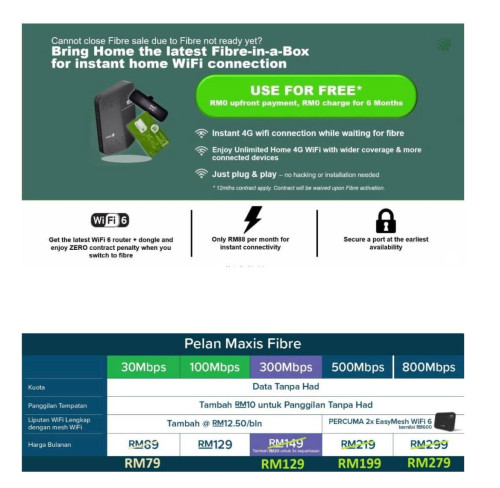
Now the agent, who has been contacted me since a year back, proposed me to sign up Maxi Fibre In Box package now at price of RM88 per month with 1 year contract but free for first 6 months. It's a temporary package that will automatically convert to Maxis Fibre once my condo has the infra.

It seems attractive but my question is, this current Fibre In Box is like pre Fibre plan using 4G data. Does this have any speed cap? Any FUP like speed limit after certain quota being used up? Is it recommend to subscribe? I think this should be the Maxis Home 4G WiFi 4G plan, right?

I knew this could be an old and noob question but hopefully somebody can help me to answer this. As I am in urgent to give my feedback to the agent and has no time to look into a bunch of threads and post.

Anyway, thanks, for those who is going to answer me. Thanks.

user posted image
*
I never used it before but im pretty sure the speed is basically as best as they can offer, i think a friend of mine was using it during mco and got maybe 15 to 25mbps?
highly depends on the load of your area and also the location of where you put the router though as the small 4g dongle isnt very powerful.
Supposedly has a 1TB FUP for streaming sites I've heard

also btw the "6 months free" isnt actually 6 months free afaik, its basically just 6 months worth of rebates credited to your bill over the contract term.

10 Pages « < 3 4 5 6 7 > » Top
 

Change to:
| Lo-Fi Version
0.2537sec    0.81    7 queries    GZIP Disabled
Time is now: 14th December 2025 - 11:20 PM