Welcome Guest ( Log In | Register )

10 Pages « < 5 6 7 8 9 > » Bottom

Outline · [ Standard ] · Linear+

 The Official Maxis FTTH Thread | v5, Maxis Home Fibre Internet, from RM89

views
     
PRSXFENG
post Mar 26 2023, 09:34 PM

Look at all my stars!!
*******
Senior Member
2,608 posts

Joined: Nov 2020


QUOTE(skyp @ Mar 26 2023, 04:31 PM)
Need help on my router configuration for CCTV.
I am using no-ip provider, trying to setup Dynamic DNS in my new wifi6 router.
For Interface, should I pick eInternet?
Still trying to find out why can't access cctv externally via mobile.

Under D-DNS list, it show status as Success.

Thanks
*
are you on private ip or public ip?
PRSXFENG
post Mar 30 2023, 09:34 PM

Look at all my stars!!
*******
Senior Member
2,608 posts

Joined: Nov 2020


QUOTE(kgb0y @ Mar 30 2023, 01:59 PM)
Hi guys,

I have a problem with Maxis Fibre Biz :-
1. My company have 2 Maxis Fibre Biz account 100 Mbps and 30 Mbps respectively.
2. If we run speedtest or download file on both link at the same time, the speed dropped to 70 Mbps and 20 Mbps.
3. We've lodged complaint with Maxis and the so called Maxperts have visited our premise few times but no solution available.
4. Maxperts claimed that if speedtest at different time on individual line able to achive the subscribe speed then it is not their problem anymore.
5. Both line is sharing same modem from TM.

Anybody face similar problem? Maxis technical is a bunch of idiots! Wasting time to talk to them.
*
Both lines connect to same modem? That's kinda rare
As for speeds... It is known that TM does throttle Maxis users intentionally at times, but usually not this bad (eg, down to 28Mbps while giving 33Mbps for their Unifi customers)

70 and 20 is too big of a drop though

I guess try MCMC?
PRSXFENG
post Apr 13 2023, 10:14 PM

Look at all my stars!!
*******
Senior Member
2,608 posts

Joined: Nov 2020


QUOTE(Oltromen Ripot @ Apr 13 2023, 07:38 PM)
because i have bought additional Easymesh nodes that matches my existing Huawei router model. And I have the top-most admin login so I can configure as I need.
The last thing I want is replace with an unknown Kaon router with unknown level of configurability.
Maxis staff say new one is "Huawei" as well as shown on website, but where is this new Huawei featured? All i see is the unknown Kaon.
And, this the time to lock people on old prices, before they announce revision post MSAP reduction.
*
the root password is floating around somewhere in the forums for that Kaon
not sure on how good/reliable it is but there is a rant thread in this forum thats kinda far back now

easymesh is an open standard, regardless of brand, can connect.
PRSXFENG
post May 11 2023, 08:34 PM

Look at all my stars!!
*******
Senior Member
2,608 posts

Joined: Nov 2020


Hi I'm on Hotlink Postpaid Fiber 99

Has anyone tried porting out from this plan?
I would like to keep the phone number by jumping to another telco but terminate fiber so i can have TIME installed

is it possible?
Since its a combo plan it seems weird, not sure if I can follow normal procedures of just going to other telco and request port out
since need to return equipment to maxis
PRSXFENG
post May 11 2023, 08:56 PM

Look at all my stars!!
*******
Senior Member
2,608 posts

Joined: Nov 2020


QUOTE(ronnie @ May 11 2023, 08:38 PM)
make sure you have zero contract.
But I think the Hotlink Flex Fibre may not allow port out...is my guess. best to ask Maxis.
*
Contract has ended, guess ill ask maxis

really hope can because the phone number is quite old, dont want to lose it
PRSXFENG
post May 11 2023, 09:54 PM

Look at all my stars!!
*******
Senior Member
2,608 posts

Joined: Nov 2020


QUOTE(jsnhoh @ May 11 2023, 09:44 PM)
Terminate the current plan is possible, just walk into maxis service centre and ask for it.
*
I contacted Maxis CS

They will move the phone plan to Postpaid 98 and terminate the fiber

And I will need to quickly port away to not pay too much of the Postpaid 98 fees
PRSXFENG
post Jun 8 2023, 03:38 PM

Look at all my stars!!
*******
Senior Member
2,608 posts

Joined: Nov 2020


Relative recontracted for a router upgrade and got a TP-Link EX510
Anyone know the password for using it with the Aginet app?

the usual credentials work on the web ui, but the app doesn't even ask for a username, just password and the ones I've tried don't work
PRSXFENG
post Jun 27 2023, 04:17 PM

Look at all my stars!!
*******
Senior Member
2,608 posts

Joined: Nov 2020


QUOTE(wjleong15 @ Jun 26 2023, 09:08 PM)
which usual credentials work on you?
i tried a few all cannot use
hmm.gif
*
MaxSysAdm
!!bestHOME!!XXXX
where XXXX is last 4 of Serial

works for me
PRSXFENG
post Jun 28 2023, 09:11 AM

Look at all my stars!!
*******
Senior Member
2,608 posts

Joined: Nov 2020


QUOTE(wjleong15 @ Jun 28 2023, 08:43 AM)
tp-link Model EX510 AX3000 Dual-Band Wifi 6 router

username: administrator
password: router serial number

username: MaxSysAdm
password: Ng88Mxs@2019!

username: MaxARSysOpr
password: !!bestHOME!!XXXX (last 4 s/n)

username: MaxDNSprUsr
password: !!bestHOME!!XXXX (last 4 s/n)

username: user
password: user

none of the above working for me  doh.gif  doh.gif
*
MaxSysAdm with the bestHOME password should work
The old Ng88 password doesn't work for MaxSysAdm anymore

MaxARSysOpr is for Kaon model, MaxDNSprUsr is for Huawei model
PRSXFENG
post Jul 7 2023, 09:31 PM

Look at all my stars!!
*******
Senior Member
2,608 posts

Joined: Nov 2020


So far as far as I know

MaxSysAdm
!!bestHOME!!XXXX (SN) should work for the web ui

App, you're supposed to use Aginet
Password to use in app is unknown at the moment, so cant use it
PRSXFENG
post Jul 11 2023, 02:39 PM

Look at all my stars!!
*******
Senior Member
2,608 posts

Joined: Nov 2020


I recently got this flyer at my door

1Gbps plan?

also cheaper than TIME

Any more info about this plan?

Note: my area is on maxis own infra


Attached thumbnail(s)
Attached Image
PRSXFENG
post Jul 12 2023, 11:05 PM

Look at all my stars!!
*******
Senior Member
2,608 posts

Joined: Nov 2020


QUOTE(Natsukashii @ Jul 12 2023, 08:04 PM)
Can we check online whether an area has maxis own infra?
*
Not really, if its installed, it will be using LAN1 instead of LAN2, and VLAN 11 (and also slightly faster)

I suppose you could look around and see if you see any Maxis branded Fiber Distribution Boxes
PRSXFENG
post Jul 24 2023, 09:37 AM

Look at all my stars!!
*******
Senior Member
2,608 posts

Joined: Nov 2020


QUOTE(aniq8676 @ Jul 24 2023, 12:04 AM)
user posted image

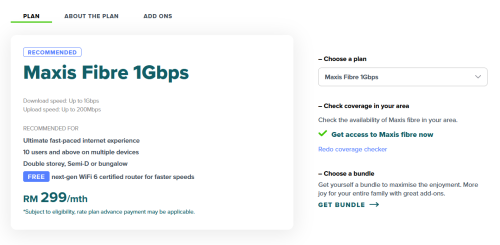
Is this plan available on TM HSBB or Maxis infra only?
It seems that Maxis 1Gbps plan only provides 200mbps upload speed.
*
The price is the same as their 800Mbps plan, so I'll assume this plan is for TM HSBB
for Maxis Infra, see the pic of a flyer I posted a while back
PRSXFENG
post Aug 12 2023, 10:24 AM

Look at all my stars!!
*******
Senior Member
2,608 posts

Joined: Nov 2020


QUOTE(BeadsCrazee @ Aug 12 2023, 08:42 AM)
two months ago we switched from unifi to maxis fibre at RM89 for 30mbps. the agent that whatsapp us said to help apply for conversion at 3 months free service. However last night suddenly no internet connection. Called maxis and was told there has been 2m outstanding bill so got suspended due to non payment and there is no 3m free service attached with our account. When applying, that guy also told us we dont have to contact unifi to get service terminated as maxis will convert and unifi auto terminate. But in fact we have to personally went to unifi to terminate the service that time. Checking back the application email, it was the review application email from 'signuplah' that has the written 3months free wording. The email from maxis did not indicate any such info. The hello from maxis email stated that the physical bill will be sent to our registered address at RM5 charges. That time we overlooked that and did not click on the register for ebill button. But so far we did not received any physical bill nor emailed bill.

So we are guessing that agent did not apply conversion correctly and therefore maxis has no free 3m service recorded. That agent did not pick up our calls.

We are wondering if there is any workaround for this issue? Anyone has any experience on this? Or we just have to pay up the sum and got stuck to the 24 months contract and treated it as lesson learnt?

Thank you
*
Am unsure of the t&c for this promo, since usually they are 6 months...

But it may be a "rebate" in which the "free 3 months" is the cost of those 3 months applied as rebates over the course of your 24 months
PRSXFENG
post Aug 26 2023, 03:22 PM

Look at all my stars!!
*******
Senior Member
2,608 posts

Joined: Nov 2020


QUOTE(petpenyubobo @ Aug 26 2023, 02:06 PM)
After 5 years+ close to 6 years with Maxis Fibre if nothing is done soon to keep existing customers I will be one of the leavers soon.
Paying RM105 now for a slow 30M with public IP subscription, the recent 5G plans from uMobile and YES are so enticing.

For that kind of speed and price close to double that of 5G plans with speeds upto 1Gbps, why still faithfully paying so much every month when seldom used?

The recent 5G plans introduced by Maxis also not attractive at all.
*
Well you wouldn't get a public IP with those 5G plans

But still, it's time for the 30Mbps plan to die or prices to drop
PRSXFENG
post Aug 31 2023, 09:50 AM

Look at all my stars!!
*******
Senior Member
2,608 posts

Joined: Nov 2020


QUOTE(alexander3133 @ Aug 31 2023, 09:21 AM)
Is there a page that can check which area is under Maxis own fibre infra and which area is under TM HSBB?
*
Not really
However, if you know anyone nearby your area that has Maxis fiber installed, you can see if the router is connected to modem port 1 or port 2
Port 1 is Maxis infra, port 2 is TM infra
Or, go walk around your Taman and see if you see and FDP with Maxis logo
Or, check with agents, on Maxis own infra the deals are super good
PRSXFENG
post Sep 25 2023, 01:32 PM

Look at all my stars!!
*******
Senior Member
2,608 posts

Joined: Nov 2020


QUOTE(mlamlam @ Sep 25 2023, 12:38 PM)
Consider unifi if you need public IP

Actually since Maxis changed my public IP to private one... got more issue than previous but I don't want to pay RM10 extra for non-sense.
I will going to port to Unifi after contract finish or move to 5G
*
Unifi public IP is on special request and you need to have a good reason that they can verify onsite to get it (I think currently the high speed plans like 500+ still have it but the plan is to move everyone over to private at some point)

Maxis is RM10 monthly which is a bit ouchy

Allo/City Broadband is RM100 one time

TIME, for 100 it is on request, 500/1gbps default

as for 5G, no public IP

you may be asking, why are all these ISPs charging for public ip?
It's simply because the world has run out of ipv4 addresses
PRSXFENG
post Oct 5 2023, 07:59 PM

Look at all my stars!!
*******
Senior Member
2,608 posts

Joined: Nov 2020


QUOTE(sadlyfalways @ Oct 5 2023, 11:27 AM)
basically this issue with icloud i think boils down to dns

maxis own equipment is dns locked, no way to change dns

own router most of the time when setup people use google dns, will not have the same issues
*
It can be changed with the root account, MaxSysAdm (and variants on other models)

can search this forum for them
PRSXFENG
post Oct 5 2023, 08:00 PM

Look at all my stars!!
*******
Senior Member
2,608 posts

Joined: Nov 2020


QUOTE(epicure @ Oct 5 2023, 03:53 PM)
Since im using Maxis router, nothing i can do about it (by myself i mean) ? Need them to fix?

Im using google DNS on my i-devices but i read somewhere maxis routers cant change dns
*
My guess, this is a ROUTING issue and not a DNS issue

TIME had this issue opening some specific sites

My solution was to simply reboot the router many many many times (10+ even some times) until I got an IP that worked

But since Maxis is on Private IP not sure will that trick work or not
PRSXFENG
post Oct 5 2023, 08:52 PM

Look at all my stars!!
*******
Senior Member
2,608 posts

Joined: Nov 2020


QUOTE(Quanta @ Oct 5 2023, 08:02 PM)
My TNB app not able to login if I am on Cloudflare DNS. No issue if I change to Google/Quad9 DNS.  A bit odd yea?
*
It seems like CloudFlare did have an outage yesterday

https://blog.cloudflare.com/1-1-1-1-lookup-...tober-4th-2023/

But another consideration could be ECS (basically sending some of your info alongside to be able to be directed to a local server)
But CloudFlare and Quad9 doesn't do ECS, Google does, so that doesn't match up

10 Pages « < 5 6 7 8 9 > » Top
 

Change to:
| Lo-Fi Version
0.0471sec    1.05    7 queries    GZIP Disabled
Time is now: 14th December 2025 - 07:26 AM