Welcome Guest ( Log In | Register )

10 Pages « < 2 3 4 5 6 > » Bottom

Outline · [ Standard ] · Linear+

 The Official Maxis FTTH Thread | v5, Maxis Home Fibre Internet, from RM89

views
     
PRSXFENG
post Nov 1 2021, 08:29 AM

Look at all my stars!!
*******
Senior Member
2,611 posts

Joined: Nov 2020


QUOTE(lonewalker @ Nov 1 2021, 01:22 AM)
Just keep in mind this mesh stuff does not have a standard; mesh stuff from manufacturer A, cant work with manufacturer B; heck sometimes even manufacturer A's older stuff don't work with their newer stuff.
*
There is actually a standard but it's pretty new so not yet supported much
https://www.wi-fi.org/discover-wi-fi/wi-fi-easymesh

Wi-Fi EasyMesh

So far the only devices I've seen that support it is the Maxis Wi-Fi 6 stock router and a D-Link COVR model
PRSXFENG
post Nov 10 2021, 04:21 PM

Look at all my stars!!
*******
Senior Member
2,611 posts

Joined: Nov 2020


QUOTE(Singh93 @ Nov 9 2021, 09:26 PM)
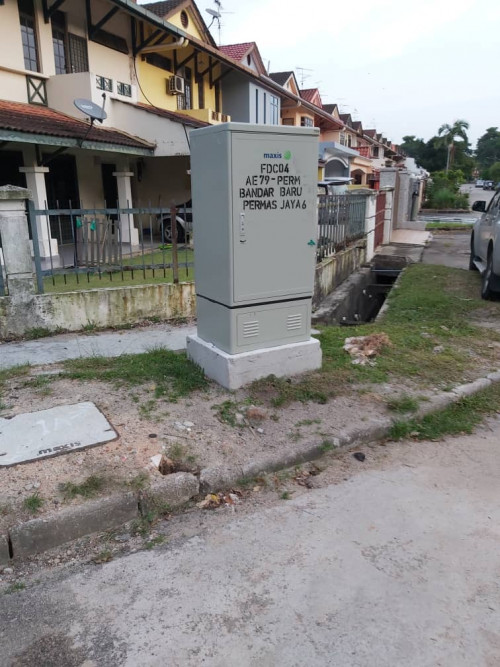
Hi today new pole being installed in JB area... Contractor saying by maxis, maxis got greenlight to pull fiber on their own poles? The same lane already has TM fiber
*
Pretty rare but yeah some areas Maxis got their own infra
PRSXFENG
post Nov 14 2021, 02:07 PM

Look at all my stars!!
*******
Senior Member
2,611 posts

Joined: Nov 2020


Is there a way to get the firmware update without enabling remote access again?

Maxis messed up their remote config and will always set wrong PPPoE credentials if I enable remote, at the same time I wish to update to newer firmware (2021) so that I can change IPv6 dns

EDIT: ended up just leaving cwmp on, letting it update, change settings back again

This post has been edited by PRSXFENG: Nov 15 2021, 03:32 PM
PRSXFENG
post Nov 30 2021, 01:52 PM

Look at all my stars!!
*******
Senior Member
2,611 posts

Joined: Nov 2020


QUOTE(fruitie @ Nov 30 2021, 12:14 PM)
How easy it is to get public IP? Need to beg and whatnot? I won't prefer this way. I already bought my own router - Asus TUF-AX3000, so I supposed I can configure myself. I need public IP for my Switch gaming.
*
just ask them on customer support and give a reason, they will change some stuff and then you can change your PPPoE ID on router for public IP

Note that 4G Backup and VOIP Phone wont work on other routers.
PRSXFENG
post Dec 18 2021, 10:17 AM

Look at all my stars!!
*******
Senior Member
2,611 posts

Joined: Nov 2020


QUOTE(QuantumEdge @ Dec 18 2021, 12:40 AM)
Going to terminate Unifi on sunday and get Maxis 100mbps with One prime
What's the provided router if subbed to plan with 4g backup?
*
Supposedly for 100Mbps and up it's the new KaonMedia AR2140 router
on paper specs are supposedly good

However there are a few threads here and there complaining about some issues and lack of settings

With that said the root account credentials are floating out there on the internet

I'm still using the old TP-Link Archer c5v
PRSXFENG
post Dec 18 2021, 01:56 PM

Look at all my stars!!
*******
Senior Member
2,611 posts

Joined: Nov 2020


QUOTE(QuantumEdge @ Dec 18 2021, 01:51 PM)
But I don't think kaon support 4G backup, since their website never mention it
*
Could be the Maxis branded one is customized with that feature
I think there's a usb port at the back used for it

PRSXFENG
post Dec 20 2021, 01:26 PM

Look at all my stars!!
*******
Senior Member
2,611 posts

Joined: Nov 2020


QUOTE(QuantumEdge @ Dec 20 2021, 08:59 AM)
Thanks, and at the moment Maxis is only providing Kaon as their wifi 6 router?
*
Nope, their site also shows a different looking wifi 6 router (possibly for buisness) and also some people here have gotten some Huawei OptiXStar or something
PRSXFENG
post Jan 12 2022, 11:00 PM

Look at all my stars!!
*******
Senior Member
2,611 posts

Joined: Nov 2020


QUOTE(Singh93 @ Jan 12 2022, 07:49 PM)
Is maxis using Allo network? Recently got their sms maxis is available in your area. To be honest they been here sejak zaman TM adađŸ¤£
*
Got, saw before inside the stock router profiles, got 1 called Maxis-TNB
PRSXFENG
post Jan 18 2022, 04:52 PM

Look at all my stars!!
*******
Senior Member
2,611 posts

Joined: Nov 2020


QUOTE(Singh93 @ Jan 18 2022, 12:09 PM)
user posted image

Maxis own infra
*
Ooh that's rare, but good, you can get ~38Mbps on a 30Mbps subscription (personal experience on Maxis own infra)
PRSXFENG
post Jan 20 2022, 03:34 PM

Look at all my stars!!
*******
Senior Member
2,611 posts

Joined: Nov 2020


QUOTE(fruitie @ Jan 20 2022, 12:31 PM)
Hi guys, I will be subscribing to Maxis Fibre soon for RM 129 - 300Mbps (24 months promo). I was torn between Celcom and Maxis until I was informed about Maxis promo, so I have decided on Maxis and pray hard TIME will not come to my condo in 2 years time. tongue.gif

Is there any issue for following items? I saw mixed feedback on this thread.

i) YouTube
ii) Throttled speed at night
iii) IoT stuff
iv) China sites/apps
v) Technical support
*
in my personally experience
1 and 2 nope, seems fine though someone mentioned youtube problems just above this
3, my tmall genie (chinese ai assitant) sometimes hicks up a bit and also leading into 4, it's internal speedtest is only getting 2 to 12Mbps depending on it's mood
china sites, the big ones like taobao no problems, but a forum I visit (mydigit.cn) is rather painfully slow, but other than that it's alright (mi.com, bilibili, baidu tieba)
5. no comment but my tech did mess up my router config so it's pushing wrong config over (incorrect PPPoE password), disabled remote, later then replaced with own router.
outside of that support has been okay
also note that if you replace router with your own you do loose 4G backup and VoIP phone. (for 4g, can change hostname of router/device to a specific name to reuse[ircc something Archer_c5v], as for voip you will have to chain the stock router to your new router to use that)
as other's have mentioned if you are subscribed to Maxis on Unifi infra and if the fibre side of things have problem it will be slower to resolve since maxis has to contact tm.

Also regarding 3, Maxis by default puts you on private ip (so no port forwarding), can ask cs to move you to public ip, no charges

also also, if you're using Maxis on Unifi infra, expect to only see 28Mbps on a 30Mbps subscription (and 280 on a 300 sub)
Blame TM, not Maxis. There's some throttling by Unifi applied on the modem for an unfair advantage

I'm using maxis on maxis own infra, so I get 38Mbps on 30Mbps subscription

PRSXFENG
post Feb 4 2022, 08:18 PM

Look at all my stars!!
*******
Senior Member
2,611 posts

Joined: Nov 2020


QUOTE(Feliex @ Feb 4 2022, 03:35 PM)
Want ask Siri here, is maxis router 6 good or suggest to upgrade using ASUS router?

Thank You
*
On paper the specs looks good but there's a thread over on the networks subforum complaning about lack of settings and such

So asus probably better...

In general your own router is better than what ISP provides (unless you're using ancient Wifi-N era router)
PRSXFENG
post Feb 5 2022, 08:42 AM

Look at all my stars!!
*******
Senior Member
2,611 posts

Joined: Nov 2020


QUOTE(Feliex @ Feb 5 2022, 12:16 AM)
What ASUS router would you recommend? I currently using ASUS AX55
*
AX55 is already a pretty fine router
PRSXFENG
post Feb 8 2022, 02:45 PM

Look at all my stars!!
*******
Senior Member
2,611 posts

Joined: Nov 2020


QUOTE(QuantumEdge @ Feb 6 2022, 11:31 PM)
Got something I wanna ask ya...
Did Maxis block Prawnhub?
Cant access it with custom DNS on both ipv4 and ipv6
*
Cant either with Custom DNS over DNSCrypt

looks like they probably followed TM and now blocks IP...
Time for VPN or proxy I suppose
PRSXFENG
post Feb 9 2022, 01:23 PM

Look at all my stars!!
*******
Senior Member
2,611 posts

Joined: Nov 2020


QUOTE(QuantumEdge @ Feb 8 2022, 10:12 PM)
Darn it, I tried modifying the registry... doesn't work either
In this case I'll 100% switch to Allo once they're ready
Saw them pulling cables onto poles behind my house last week
*
Probably at some point all ISPs could be forced by MCMC to comply

Cause all ISPs are supposed to block those sites via DNS
For example TIME's stock router doesn't reveal dns settings to you AND hijacks port 53 so if you change the DNS on your PC it will still be forcibly redirected to their DNS servers, have to use DoH or DoT or use own router.

This post has been edited by PRSXFENG: Feb 9 2022, 01:24 PM
PRSXFENG
post Feb 9 2022, 04:28 PM

Look at all my stars!!
*******
Senior Member
2,611 posts

Joined: Nov 2020


QUOTE(QuantumEdge @ Feb 9 2022, 02:58 PM)
When I request for public ip, they accidentally missed typed a 1 when setting it up remotely. Had to modify it myself.
*
Oh they also messsed this up for me, and their remote kept pushing the incorrect configuration over killing the connection. Had to login as root and disable it

Now I use my own asus router

PRSXFENG
post Feb 16 2022, 02:56 PM

Look at all my stars!!
*******
Senior Member
2,611 posts

Joined: Nov 2020


QUOTE(AaIto @ Feb 16 2022, 01:51 PM)
If regret, then stuck for 2 years.... Any negative news on Maxis fibre connection , i wonder
*
In my experience ok lah
BUT my area is Maxis own Infra

Since you are coming from Unifi, then you are probably using Maxis on Unifi infrastructure

In that case, please do expect to not see as expected speeds (eg, subscribe 30Mbps get 28Mbps)
Blame TM for unfairly caping speeds on the modem to make users think that Unifi is better

Other things to note
You are on Private IP by default, can contact CS to switch to Public
Provided wifi 6 router on paper sounds good but some threads here say it ain't great

With that said routing wise Maxis should be better

PRSXFENG
post Feb 17 2022, 11:19 PM

Look at all my stars!!
*******
Senior Member
2,611 posts

Joined: Nov 2020


QUOTE(eddyann2 @ Feb 17 2022, 10:55 PM)
got 280mbps++ from 300mbps plan. my friend got 500mbps speedtest from 500mbps plan. not sure if tm capping for 300mbps and below
*
Ask them what VLAN ID is shown on router page

if ircc 621 is using TM infra, if 11 is Maxis own infra
PRSXFENG
post Feb 18 2022, 09:06 AM

Look at all my stars!!
*******
Senior Member
2,611 posts

Joined: Nov 2020


QUOTE(QuantumEdge @ Feb 18 2022, 07:54 AM)
What router are you using? Is the test performed on a wired connection?
*
I think that 280Mbps is expected for Maxis riding on TM infra. Thanks tm.
PRSXFENG
post Feb 21 2022, 06:15 PM

Look at all my stars!!
*******
Senior Member
2,611 posts

Joined: Nov 2020


QUOTE(YoungMan @ Feb 21 2022, 02:56 PM)
Are they serious? CS can check your fibre reading? I thought only the TM technician can access the BTU and check fibre reading. It is speed cap on the BTU that causes you unable to reach 300mbps thanks to TM.
So have to find ways to get their TM tech to reconfigure the BTU.
*
Not sure on what stuff does Maxis tech have access to, but you yourself can check the fibre reading too

Depending on model
For Huawei, plug a lan cable from pc to modem, then in settings assign yourself an ip in the 192.168.100.X range, subnet 255.255.255.0, gateway 192.168.100.1

Then visit 192.168.100.1
Login with telecomadmin/admintelecom

Somewhere inside the UI got section that displays reading.

For other brand ONT I'm not sure

Some older Huawei ONT's might require unplugging the fibre cable
An even older one requires a autohotkey script to keep sending commands so that it wont kick you out.
PRSXFENG
post Feb 23 2022, 05:00 PM

Look at all my stars!!
*******
Senior Member
2,611 posts

Joined: Nov 2020


QUOTE(AdrianS_99 @ Feb 23 2022, 02:45 PM)
but this model Huawei LG8245X6
username was administrator
passowrd was the this router serial number full type in
*
edit: that’s the router, modem is the other box that the Fibre cable connects to

This post has been edited by PRSXFENG: Feb 23 2022, 05:02 PM

10 Pages « < 2 3 4 5 6 > » Top
 

Change to:
| Lo-Fi Version
0.2074sec    0.31    7 queries    GZIP Disabled
Time is now: 15th December 2025 - 10:03 AM