QUOTE(sitescope @ Oct 12 2020, 07:12 AM)
LOL lucky you. Right now, Maxis doesn't allow existing Maxis Fibre customers to migrate to Astro & Broadband until the 24 mths contract period is over.
Last time can, now cannot already.
The Official Maxis FTTH Thread | v5, Maxis Home Fibre Internet, from RM89
|
|
Oct 12 2020, 10:10 AM
Return to original view | Post
#41
|
![]() ![]() ![]() ![]() ![]() ![]() ![]()
Senior Member
7,799 posts Joined: Dec 2014 From: Malaysia |
QUOTE(sitescope @ Oct 12 2020, 07:12 AM) LOL lucky you. Right now, Maxis doesn't allow existing Maxis Fibre customers to migrate to Astro & Broadband until the 24 mths contract period is over. Last time can, now cannot already. |
|
|
|
|
|
Nov 8 2020, 04:26 PM
Return to original view | IPv6 | Post
#42
|
![]() ![]() ![]() ![]() ![]() ![]() ![]()
Senior Member
7,799 posts Joined: Dec 2014 From: Malaysia |
Lol... You choose Maxis Fibre just because of the TV, is it? π
The TV become your deciding factor now? This post has been edited by joshhd: Nov 8 2020, 04:28 PM |
|
|
Dec 2 2020, 09:11 PM
Return to original view | IPv6 | Post
#43
|
![]() ![]() ![]() ![]() ![]() ![]() ![]()
Senior Member
7,799 posts Joined: Dec 2014 From: Malaysia |
QUOTE(jusbella @ Nov 30 2020, 09:54 PM) Nope, actually maxis does lease their Fibre to astro. So if you use astro broadband, you'll use astro infrastructure, not maxis infra. To be exact, technically the network itself will still be under Maxis Fibre even when you're on Astro & Broadband. Astro don't operate its own Internet infra or whatsoever. So if your broadband have issue. You'll need contact astro, not maxis. Eventually astro need to liaise with maxis and tm if it's Fibre issue. Astro is just "pinjam" over Maxis Fibre network only. The concept is pretty much like MVNO telco. It's just that any after sales support, such as when you want to report network issue or check bill details, you will have to contact Astro & Broadband / Astro IPTV customer service at 03-95431543, NOT Maxis Home Fibre hotline at 1800-82-4663 or even the usual Astro customer service hotline at 03-95433838. In the case of network issue or network down, Astro receives your complaint report, and then they will escalate to Maxis to follow up. Especially if your area is under TM HSBB, and the particular matter requires TM to check, then Maxis will escalate to TM to follow up. Then when Maxis person-in-charge replies to Astro, then Astro would convey that information/update back to customer. You can see, the complaint process would have to go through many parties, like a lot of "levels". Basically Astro becomes the "middleman" of everything and they have to know whatever issues you face when you use their service, and escalate to relevant parties whenever necessary. You cannot "deal directly" with Maxis anymore like how you can with Maxis Fibre. This post has been edited by joshhd: Dec 2 2020, 09:23 PM jusbella liked this post
|
|
|
Dec 2 2020, 10:20 PM
Return to original view | IPv6 | Post
#44
|
||||||||
![]() ![]() ![]() ![]() ![]() ![]() ![]()
Senior Member
7,799 posts Joined: Dec 2014 From: Malaysia |
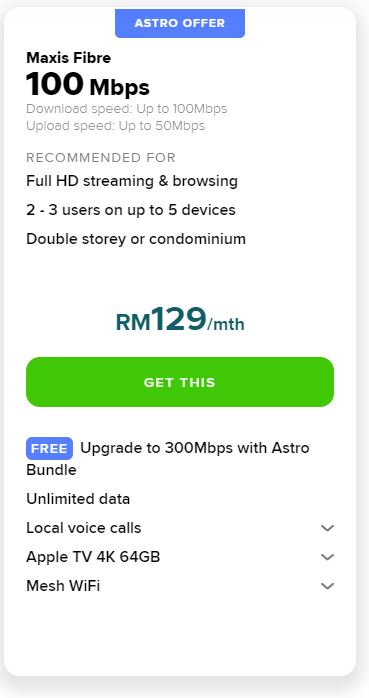
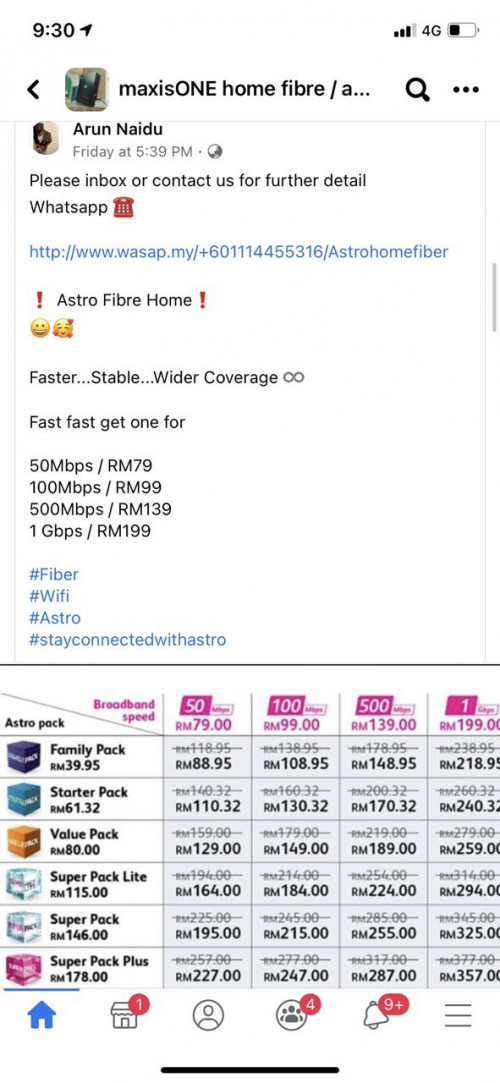
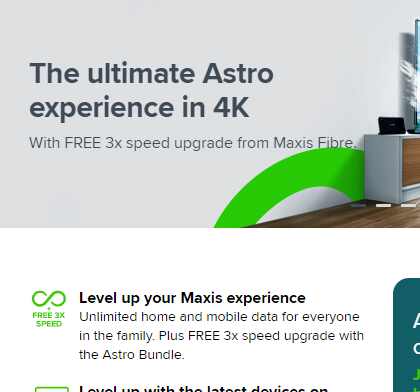
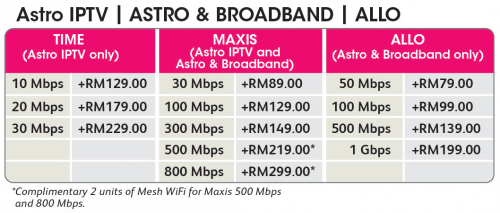
QUOTE(YoungMan @ Dec 1 2020, 08:08 PM) Not really. If you do the calculation, it's pretty much the "same thing" πFor this post, let's focus on this "FREE 3x speed upgrade" thing, and compare the difference with Astro & Broadband offerings: ![]() QUOTE This Campaign: Sign up to any of the following selected Astro TV packages (βSelected Astro Packagesβ)* through Maxis to enjoy the following: Source from Maxis T&C page: https://www.maxis.com.my/terms-conditions/p...d/astro-bundle/if you sign up to or currently on the Maxis Fibre 100Mbps plan, you will get a Maxis Fibre plan upgrade to 300Mbps plan for RM129 (exclusive of any applicable tax) a month; if you sign up to or currently on Maxis Fibre 500Mbps at RM219 or 800Mbps at RM299 a month, you will get a RM20 monthly rebate for 24 months on your Maxis Fibre bill; and/or if the monthly subscription fee for your Selected Astro TV Package is more than RM100 (exclusive of any applicable tax), you will get an upgrade from the Astro HD Box to Astro Ultra Box for free. *The Selected Astro TV Packages applicable under this Campaign are: Starter Pack β Bahasa Malaysia Starter Pack β Mandarin Starter Pack β Tamil Value Pack β Bahasa Malaysia Value Pack β Mandarin Value Pack β Tamil Value Pack β English Super Pack Lite Sports β Bahasa Malaysia Super Pack Lite Sports β Mandarin Super Pack Lite Sports β Tamil Super Pack Lite Sports - English Maxis Fibre with Astro TV 100Mbps RM129 + Astro Starter Pack RM61.32 = RM190.30/month yet you get the so-called "3x speed bump" to 300Mbps Astro & Broadband You will get (RM20 x 24 months) or (RM30 x 24 months) rebate when you subscribe to Astro & Broadband OR Astro IPTV depending on eligibility below:
Since existing Astro subscribers are NOT eligible for this Maxis Fibre with Astro TV offer, therefore let's consider it as "new Astro customer" rate, which is RM20/month x 24 months. 100Mbps RM129 + Astro Starter Pack RM61.32 = RM190.30/month - Discount RM20 x 24 months = RM170.30/month 300Mbps RM149 + Astro Starter Pack RM61.32 = RM210.30/month - Discount RM20 x 24 months = RM190.30/month So, what is the difference? It seems to me, with all those adding and discounts here and there, roti canai flip here and there, the result are pretty much the same, which is both Astro and Maxis in the same house, and you still get 300Mbps and Astro Starter Pack for a total of RM190.30/month no matter you choose Maxis Fibre with Astro TV or Astro & Broadband/Astro IPTV. ![]() It seems to me is: Maxis Fibre with Astro TV is, you subscribe to Maxis Fibre, and then you add on Astro service. Astro & Broadband is, you subscribe to Astro, and then you add on Internet broadband service (which you can choose either Maxis Fibre, Allo, or TIME Fibre depending on your area). ![]() From what I see, this Maxis Fibre with Astro TV compared to Astro & Broadband offerings is merely just to seek public attention, and nothing else. Seriously, the only difference is the way they do the marketing and promoting to customers, that's all. ** All prices shown above excludes 6% SST This post has been edited by joshhd: Dec 2 2020, 10:24 PM numbertwo liked this post

|
||||||||
|
|
Dec 3 2020, 11:09 PM
Return to original view | IPv6 | Post
#45
|
![]() ![]() ![]() ![]() ![]() ![]() ![]()
Senior Member
7,799 posts Joined: Dec 2014 From: Malaysia |
QUOTE(Cubed1437 @ Dec 3 2020, 10:00 PM) Hi, I'm trying to install Maxis Fibre at my new house. When I check the coverage and ask a reseller, it says that the max speed is 800 Mbps. But when I apply for Unifi, they say that the max is only 30 Mbps which is weird since Maxis uses Unifi's port. If your apartment/condo block unit uses VDSL copper, then maximum speed is 30Mbps. On top of that, my friend living in another block can get up to 100 Mbps. My question is are these discrepancies normal? If it has FTTH fibre, then you have the option to subscribe to the highest speed package of 800Mbps. It might happen to some people, where the fibre infra for your building OR floor is fibre port full, while the only one that has port for you is VDSL copper infra. That leaves you no choice but to go for VDSL copper instead of FTTH fibre, which eventually means 30Mbps is the maximum speed for you. If that happens to you, then consider yourself very unlucky lo Sad to say, fibre port availability are first come first serve basis. If your neighbours sign up fibre Internet service earlier than you, and then ended up fibre port insufficient or full, and then VDSL copper could become your only choice by then. You can ask the reseller to request Demand List for you, but usually the success rate of getting approve are low. However, this doesn't apply if your apartment/condo's fibre infra is under Maxis NGBB instead of TM HSBB. Let's say if your apartment/condo is covered under Maxis NGBB, then when you subscribe to Maxis Fibre, of course they will use their own Maxis NGBB fibre infra instead of using TM HSBB's fibre infra. TM HSBB = fibre infra by TM Maxis NGBB = fibre infra by Maxis ---- You said you have a friend that lives in another block, and he can subscribe to 100Mbps. It seems to me that his apartment/condo block unit may be using FTTH fibre. Maybe, if you could tell us, what is your apartment/condo name, then maybe someone here can help you check? This post has been edited by joshhd: Dec 3 2020, 11:10 PM |
|
|
Dec 6 2020, 09:31 PM
Return to original view | IPv6 | Post
#46
|
![]() ![]() ![]() ![]() ![]() ![]() ![]()
Senior Member
7,799 posts Joined: Dec 2014 From: Malaysia |
QUOTE(Halfhearted04 @ Dec 6 2020, 05:13 PM) Is it possible to request router upgrade to newer model free of charge ? Even if it's possible to be done for free, they might renew your contract for another 24 months. I have been using the original one they give me since in 2016 Contact Maxis directly for more info. |
|
|
|
|
|
Dec 24 2020, 01:51 PM
Return to original view | IPv6 | Post
#47
|
![]() ![]() ![]() ![]() ![]() ![]() ![]()
Senior Member
7,799 posts Joined: Dec 2014 From: Malaysia |
QUOTE(utusan@gmail @ Dec 24 2020, 09:44 AM) I've explained about this previously. Refer to this post: https://forum.lowyat.net/index.php?showtopi...post&p=99138268 |
|
|
Jan 12 2021, 01:36 PM
Return to original view | IPv6 | Post
#48
|
![]() ![]() ![]() ![]() ![]() ![]() ![]()
Senior Member
7,799 posts Joined: Dec 2014 From: Malaysia |
QUOTE(alfredhow78 @ Jan 12 2021, 01:55 AM) If not mistaken, from my experience, TM less likely will open their newly launch network for wholesale purpose. Tm only open to wholesale for the less demand areas or addresses. And idk if they are playing trick or not, I never see full address in their wholesale system. There are always missing addresses in the wholesale portal compared to their own unifi coverage portal. Correct me if i am wrong. Yes. Just because that particular newly TM available areas, it doesn't mean they will immediately open access to other ISP like Maxis. My friend's house also like that. Many years of waiting, now that area has fibre TM FTTH, yet can only sign up Unifi but Maxis Fibre still cannot. This is normal. Don't be surprised. TM can use the excuse that "it is a newly open area; system haven't update yet" all those nonsense. According to someone I know that has access to TM Wholesale portal https://wholesalepremium.tm.com.my/ Addresses that suddenly become missing for some time, especially after customer terminates their Unifi, is a common thing to happen too. When addresses (unit number) that went missing, salesperson will unable to create new order to sign up Maxis Fibre and would need to wait for some time (don't know how long) for the unit number to reappear back. Yeah, you can assume it is TM's dirty tricks to discourage/give more obstacles for salesperson and customer to sign up Maxis Fibre. Plus, the website will often down (502 Bad Gateway) and page that takes long time to load, is a very normal daily thing as well. Normal la, TM mah... Own network sure give ownself priority first one... π |
|
|
Mar 7 2021, 04:15 PM
Return to original view | IPv6 | Post
#49
|
![]() ![]() ![]() ![]() ![]() ![]() ![]()
Senior Member
7,799 posts Joined: Dec 2014 From: Malaysia |
|
|
|
Mar 7 2021, 09:53 PM
Return to original view | IPv6 | Post
#50
|
![]() ![]() ![]() ![]() ![]() ![]() ![]()
Senior Member
7,799 posts Joined: Dec 2014 From: Malaysia |
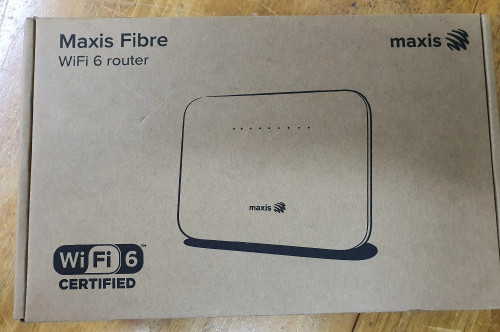
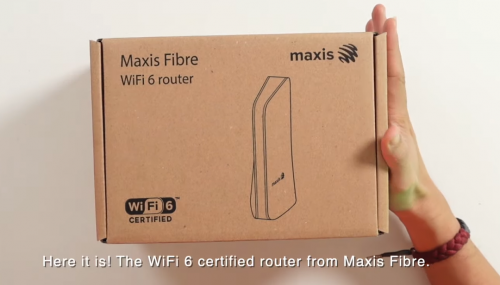
QUOTE(kwai_83 @ Mar 7 2021, 03:20 PM) Wait a second....![]() Source: https://www.youtube.com/watch?v=mUcAGO621Q0There's 2 models of Maxis Fibre WiFi 6 router?? How can we decide which one to take? |
|
|
Mar 8 2021, 01:21 AM
Return to original view | IPv6 | Post
#51
|
![]() ![]() ![]() ![]() ![]() ![]() ![]()
Senior Member
7,799 posts Joined: Dec 2014 From: Malaysia |
QUOTE(skyp @ Mar 7 2021, 11:20 PM) Need recommendation on router to replace existing c5v router Refer to this post: Need good 5G connection coverage for Semi D. Non wifi6 device at home. But I don't remember the credential, can we get from Maxis support? QUOTE(ad2000 @ Mar 7 2021, 06:54 PM) I did call up Maxis. It seems that after the new subscriber sign up campaign end this month, they will call existing subscriber if they want to upgrade to the new wifi6 router....at a price ..new 2 year contract.Β Hmm, why not just get a new WiFi 6 router from Maxis? I mean, provided if you don't plan to terminate your Maxis Fibre service in the next 2 years.Btw ad2000, besides recontract 24 months, it is FREE of charge, right? This post has been edited by joshhd: Mar 8 2021, 01:23 AM |
|
|
Mar 8 2021, 01:11 PM
Return to original view | IPv6 | Post
#52
|
![]() ![]() ![]() ![]() ![]() ![]() ![]()
Senior Member
7,799 posts Joined: Dec 2014 From: Malaysia |
QUOTE(PRSXFENG @ Mar 8 2021, 08:26 AM) Some people on here also got TP-Link AX10/AX20 (No VOIP) too Hah...? How come? So which is better then? So it's a random lucky draw of which router you get? QUOTE(kwai_83 @ Mar 8 2021, 11:27 AM) Black one is from Kaon Broadband. I read some people say the black one is the better than the white Huawei one... But if compare with TP-link AX10/AX20, then I'm not sure which is better.... QUOTE(ad2000 @ Mar 8 2021, 11:47 AM) yes aside from the 2 year contract, it's F.O.C installation. Maxis is really sucker.. All along is like that one mah... Once u relocate, confirm will trigger new 24 months contract. Any fibre ISP also like that one, so don't be surprised. Next time read the T&C before you apply anything. Just a friendly reminder. No hard feelings ya. |
|
|
Mar 14 2021, 09:42 AM
Return to original view | IPv6 | Post
#53
|
![]() ![]() ![]() ![]() ![]() ![]() ![]()
Senior Member
7,799 posts Joined: Dec 2014 From: Malaysia |
|
|
|
|
|
|
May 14 2021, 10:28 PM
Return to original view | IPv6 | Post
#54
|
![]() ![]() ![]() ![]() ![]() ![]() ![]()
Senior Member
7,799 posts Joined: Dec 2014 From: Malaysia |
QUOTE(Singh93 @ May 14 2021, 10:13 AM) Yes it is actually still possible even till today. However, not everywhere can do the same. It really depends whether TM themselves want your address / area to be open up for using multiple ISPs or not. Let's say if you've already have Unifi Fibre at home. So your fibre modem (BTU/ONU) is connected via LAN 1 port. If TM says multiple ISP is possible for your address (by using back your existing fibre BTU/ONU modem), the installer will connect another LAN cable (usually through LAN 2 port on the fibre modem) to the Maxis Fibre's WiFi router. QUOTE(aniq8676 @ May 14 2021, 01:08 PM) It is understood that Telekom Malaysia no longer allows a single fiber to be used by more than one ISP. That means you can only subscribe to one ISP at a time. The term one single fiber one ISP also applies to any other ISP as well. It depends also. If the sales agent submit a "straight through" order without going any validation by relevant parties, installation can still be proceed as usual. If TM does not open up the address or area for having multiple ISPs, yet you already subscribed to Unifi, then you'll have terminate Unifi in order to migrate to another ISP by undergoing the process called "Transfer Request", which the account holder have to walk in to any TMpoint branch to do that. No representatives is allowed. Singh93 liked this post
|
|
|
May 17 2021, 12:34 AM
Return to original view | IPv6 | Post
#55
|
![]() ![]() ![]() ![]() ![]() ![]() ![]()
Senior Member
7,799 posts Joined: Dec 2014 From: Malaysia |
QUOTE(monyetgila @ May 16 2021, 03:38 PM) hi..currently using maxis 30mbps on vdsl.. recently my apartment already upgrade unifi ftth..a few neighbours already enjoying ftth speed under unifi.. is there any way to get unifi release the ftth port for maxis users?? prefer to stay with maxis to enjoy maxis one prime rather than change to unifi been to maxis centre but they say ftth not available at my apartment. QUOTE(aniq8676 @ May 16 2021, 03:45 PM) For other ISPs have to wait 2-3 months until the migration process of Unifi users to fiber optics is completed. Yeah... If the infra is under TM, definitely priority will be given to their own TM customers first. Like it or not, TM is the big boss here. Meanwhile for Maxis Fibre or others, will have to wait longer before TM release the fibre ports to HSBA customers. Since your apartment has both VDSL and FTTH working fine, so if you want to get fibre, you must upgrade to a minimum of 100Mbps, then only TM installer will proceed your installation. If you tell the Maxis Fibre sales agent insist to submit the order for 30Mbps on FTTH cable infra (even if your building has TM VDSL copper, and is working fine), then during installation day, TM installer will still come over to your house, to tell you, "Opps sorry, wrong order. If you want FTTH, you must be on 100Mbps and above. Bye..." Even if you are new customer who just sign up Unifi or Maxis Fibre and if you subscribe 30Mbps, they will still use copper VDSL even if your apartment has FTTH. |
|
|
Jun 18 2021, 01:30 PM
Return to original view | Post
#56
|
![]() ![]() ![]() ![]() ![]() ![]() ![]()
Senior Member
7,799 posts Joined: Dec 2014 From: Malaysia |
|
|
|
Jun 27 2021, 04:07 PM
Return to original view | Post
#57
|
![]() ![]() ![]() ![]() ![]() ![]() ![]()
Senior Member
7,799 posts Joined: Dec 2014 From: Malaysia |
QUOTE(mustang @ Jun 27 2021, 03:37 PM) What's the regular procedure after an application is submitted? Try call the sales agent to follow up, or contact customer service right away.I lived in a condo and submitted for an application on 18 June and an agent followed up with me on 21st to get my address details. Till now, there is no further follow up. My address is covered as I checked the details in maxis fibre coverage checker. |
|
|
Jul 12 2021, 02:10 AM
Return to original view | Post
#58
|
![]() ![]() ![]() ![]() ![]() ![]() ![]()
Senior Member
7,799 posts Joined: Dec 2014 From: Malaysia |
|
|
|
Aug 6 2021, 09:57 PM
Return to original view | IPv6 | Post
#59
|
![]() ![]() ![]() ![]() ![]() ![]() ![]()
Senior Member
7,799 posts Joined: Dec 2014 From: Malaysia |
QUOTE(kernel123 @ Aug 6 2021, 08:33 PM) Anyone with unifi contract moving on to maxis fibre? Do I need pay rm500 or remaining months of contract to move on to maxis fibre? Any agent here to pm? If you terminate before contract period ends, the penalty amount you'll have to pay will be the total monthly amount of the remaining months, OR just a fixed RM500, whichever is higher. For example if you subscribed to 100Mbps RM129 plan, and you have 9 months left before your 24 months contract ends. Therefore, the total penalty amount you'll have to pay upon terminating the service is: RM129 x 9 months = RM1,161 However, if the grand total penalty amount is less than RM500, then you'll just have to pay a fixed price of RM500 penalty fee. For example, if you subscribe to 100Mbps RM129 plan, and you have 2 months left before your 24 months contract ends. Therefore, the total penalty amount you'll have to pay upon terminating the service is: RM129 x 2 months = No no no... Because the total penalty amount would be less than RM500, therefore the penalty fees that they will impose you, will be fixed at RM500 instead. If your contract period already over, then there'll be no penalty fees whatsoever. Hope the explanation above clarifies. |
|
|
Aug 7 2021, 11:53 PM
Return to original view | IPv6 | Post
#60
|
![]() ![]() ![]() ![]() ![]() ![]() ![]()
Senior Member
7,799 posts Joined: Dec 2014 From: Malaysia |
QUOTE(Maxis @ Aug 7 2021, 04:46 PM) Hi TheLegend27, kindly DM us your queries for further assistance. Moreover, if you wish to know more about the Maxis Fibre services, you may visit the link below. Suddenly Maxis admin pops out of nowhere https://www.maxis.com.my/en/broadband/maxis-fibre/ TQ - Aman |
| Change to: | 0.0462sec
0.78
7 queries
GZIP Disabled
Time is now: 14th December 2025 - 05:43 PM |