Welcome Guest ( Log In | Register )

5 Pages « < 2 3 4 5 >Bottom

Outline · [ Standard ] · Linear+

 The Official Maxis FTTH Thread | v5, Maxis Home Fibre Internet, from RM89

views
     
joshhd
post Aug 9 2021, 10:04 PM

Look at all my stars!!
*******
Senior Member
7,799 posts

Joined: Dec 2014
From: Malaysia


QUOTE(lwk523 @ Aug 9 2021, 03:18 PM)
HI,

For new Wifi6 router .. can come with 4G backup sim ?
*

Maxis's WiFi 6 router itself does not have SIM card slot.
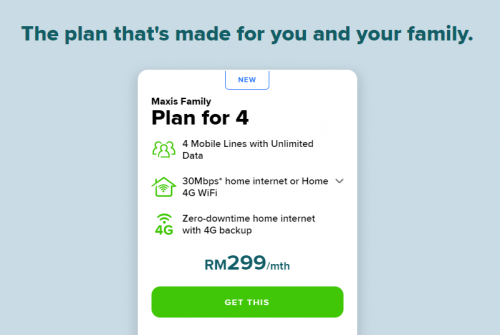
As long you subscribe to Maxis Family plan, they'll usually give you a 4G dongle (that has SIM card in it) for the 4G backup, which you can plug it into the USB slot of the WiFi router provided by Maxis.
user posted image
You won't get the 4G backup if you sign up the normal Maxis Fibre only.
QUOTE(danieltay @ Aug 9 2021, 07:21 PM)
Bila ada sales byk cepat
Bila ada problem hilang entah ke mana
*

Sales agent be like: Of course. Anything not happy, please contact customer service, don't come to me. I can't do much to layan those fussy customers anyway.

This post has been edited by joshhd: Aug 9 2021, 10:04 PM
joshhd
post Aug 27 2021, 02:14 PM

Look at all my stars!!
*******
Senior Member
7,799 posts

Joined: Dec 2014
From: Malaysia


QUOTE(Takashi1978 @ Aug 26 2021, 03:51 PM)
Maxis screw you la, previous told or advertised will upgrade existing customers to Wifi6 router.

So i put in request in April.
Called in June said need to wait "at least 3-4months"

I just called them, and now the fella on the phone said, oh its only for customers who finish their contract only we will upgrade.

Seriously screw you Maxis!
This is how you treat a customer of 20yrs +

When my contract is due, i am going back to Unifi
*

https://aduan.skmm.gov.my
Tell them you're not happy with this, and you want that WiFi 6 router because you are a loyal Maxis customer, and you don't mind to restart your 24 months contract.
You're welcome smile.gif
And do tell us the outcome too.

I believe you've subscribed to speeds 100Mbps and above, right?

This post has been edited by joshhd: Aug 27 2021, 02:23 PM
joshhd
post Aug 27 2021, 02:18 PM

Look at all my stars!!
*******
Senior Member
7,799 posts

Joined: Dec 2014
From: Malaysia


QUOTE(BayuDroidz @ Aug 26 2021, 09:25 PM)
Hi guys,
Got some concern here.

I’ve just requested to transfer from Unifi to Maxis Fiber and its currently under progress.
I’m currently using Asus AX11000 router with AX55U as Aimesh node.

I noticed that Maxis would provide 1 Wi-Fi 6 router with 2 free mesh Wi-Fi.
My concern is, can I use my Asus router as the main router and the rest as repeater and nodes.
Is it possible? Thanks.
*

That free 2 mesh WiFi, is only applicable for those who subscribe to 500Mbps and 800Mbps only.

And yes, you can still Asus router as your main router as long you know how to configure it yourself later once the Maxis installer left your house.
joshhd
post Sep 5 2021, 05:44 PM

Look at all my stars!!
*******
Senior Member
7,799 posts

Joined: Dec 2014
From: Malaysia


QUOTE(Reyz @ Aug 30 2021, 08:00 PM)
i just installed the maxis fibre on saturday and they sms me with this.

Your Maxis Fibre - Voice was successfully completed on 30/08/2021 07:25:39. Your VoIP number is 6092XXXXXX

i just subscribed 30Mbps package without unlimited voip call which i need to top up another rm10 per month.is it true they just give phone number even we dont want to use it?
*

What WiFi router model did you get? Is Maxis still providing the TP-Link Archer C5v to those who subscribe to 30Mbps?
Or Maxis have stop giving TP-Link Archer C5v model already?
joshhd
post Sep 10 2021, 02:16 PM

Look at all my stars!!
*******
Senior Member
7,799 posts

Joined: Dec 2014
From: Malaysia


QUOTE(sitescope @ Sep 10 2021, 07:28 AM)
How about this kaon perf ?
5ghz range still weak compare 2.4ghz ?
*

The Kaonmedia router has WiFi beam forming technology, so the overall WiFi performance should be better compared to the Maxis previously used TP-Link Archer c5v, including both 2.4GHz and 5GHz performance.
joshhd
post Sep 13 2021, 06:06 PM

Look at all my stars!!
*******
Senior Member
7,799 posts

Joined: Dec 2014
From: Malaysia


QUOTE(prosibu @ Sep 13 2021, 05:47 PM)
Hi, i have just installed maxis fiber at my house.
They provided fiberhome modem and huawei router.
Now im having issue to connect digi vowifi when my phone is connected to the fiber internet.

Is there any setting required to change at router side?
Or maxis is not allow digi vowifi via their access?
*

You tried connecting to other WiFi network? Tried reboot your phone and router too?
joshhd
post Sep 13 2021, 08:53 PM

Look at all my stars!!
*******
Senior Member
7,799 posts

Joined: Dec 2014
From: Malaysia


QUOTE(prosibu @ Sep 13 2021, 07:01 PM)
Yea, after awhile the digi vowifi is available.
But when i monitor closely, it is not the digi vowifi issue. It is the router issue as the digi vowifi wont registered due to intermittent huawei router ...
now my router nvr up more than 5 min....
already get the report number and hope it can be fixed soon...
mad.gif

2021-09-13 18:41:21 [5G] [vap4] hmac_config_down_vap: WLAN DOWN success
2021-09-13 18:41:22 [5G] [vap4] hmac_config_down_vap: WLAN DOWN success
2021-09-13 18:41:24 [5G] [vap4] hmac_config_down_vap: WLAN DOWN success
2021-09-13 18:41:26 [2G] [vap0] hmac_config_start_vap: WLAN UP success
2021-09-13 18:41:26 [2G] [vap0] hmac_config_down_vap: WLAN DOWN success
2021-09-13 18:41:27 [2G] [vap0] hmac_config_start_vap: WLAN UP success
2021-09-13 18:41:27 [2G] [vap0] hmac_config_down_vap: WLAN DOWN success
2021-09-13 18:41:28 [2G] [vap0] hmac_config_start_vap: WLAN UP success
2021-09-13 18:41:29 [2G] [vap0] hmac_config_down_vap: WLAN DOWN success
2021-09-13 18:41:29 [2G] [vap0] hmac_config_start_vap: WLAN UP success
2021-09-13 18:41:30 [2G] [vap0] hmac_config_down_vap: WLAN DOWN success
2021-09-13 18:41:30 [2G] [vap0] hmac_config_start_vap: WLAN UP success
2021-09-13 18:41:31 [5G] [vap4] hmac_config_down_vap: WLAN DOWN success
*

Hmmm... Try Reset Factory Settings on the WiFi router, and configure the router again?
joshhd
post Sep 15 2021, 05:45 PM

Look at all my stars!!
*******
Senior Member
7,799 posts

Joined: Dec 2014
From: Malaysia


QUOTE(aniq8676 @ Sep 15 2021, 05:38 PM)
yes you can, as long as you know the VLAN ID for astro IPTV
*

VLAN ID for Astro IPTV is 823.
joshhd
post Sep 19 2021, 04:57 PM

Look at all my stars!!
*******
Senior Member
7,799 posts

Joined: Dec 2014
From: Malaysia


QUOTE(prosibu @ Sep 13 2021, 05:47 PM)
Hi, i have just installed maxis fiber at my house.
They provided fiberhome modem and huawei router.
Now im having issue to connect digi vowifi when my phone is connected to the fiber internet.

Is there any setting required to change at router side?
Or maxis is not allow digi vowifi via their access?
*
QUOTE(prosibu @ Sep 19 2021, 03:11 PM)
The technician has replaced 2nd router by KAON AR2140. Now it looks stable for 1 hour usage d.
complaint ad lodged at Friday. will request the refund/discount after few days monitoring  bruce.gif
*

So now you're using the Kaon AR2140 router... How about the Digi VoWiFi? Is it working on your phone?

One of my friend that uses Maxis Fibre, he previously uses the TP-Link Archer C5v router for many years, and VoWiFi works just fine on his Android phone. Recently when he request to swap to Kaon AR2140, the VoWiFi icon just won't appear on his phone anymore whenever he connects to that Kaon AR2140 router. He's using Digi, and his phone just connects to VoLTE as usual. He tried reboot router and all the basic troubleshooting steps, yet issue persists.

Weirdly, now when he connect to other router models (e.g. TP-Link Archer C5v at different place), VoWiFi logo appears on his phone and it works as usual. So now he connects to his home's Kaon router, VoWiFi icon just won't appear. WiFi calling simply just won't work.
I highly suspects that this occur due to some sort of settings in the Kaon router, but I couldn't find any settings related to that on 192.168.1.254

https://www.tp-link.com/uk/support/faq/1259/
I did some Google search, I only found the troubleshooting steps for TP-link, but I couldn't find any related to Kaon AR2140 router.

If any of you know how to solve this VoWiFi connectivity issue on Maxis Kaon AR2140 router, do share it here.
joshhd
post Sep 19 2021, 05:25 PM

Look at all my stars!!
*******
Senior Member
7,799 posts

Joined: Dec 2014
From: Malaysia


QUOTE(jsnhoh @ Sep 19 2021, 05:06 PM)
Maxis just installed the kaon router for me yesterday. And Digi vowifi is working as usual. I found something weird abt Digi vowifi, sometime it will appear but sometime no. Sometime I need to disable the wifi calling feature then turn on again,  I will get the vowifi again .
*

Oh? Can you check what is the firmware version of your Kaon router? Is it v1.2.50.r09 ? You can check it at 192.168.1.254

I tried to turn off/on the WiFi calling on his phone, and even reboot his phone, still the same.

EDIT: He told me that suddenly the VoWiFi works on his phone now, without doing anything. Maybe Maxis have done something on their side... 🤔

This post has been edited by joshhd: Sep 19 2021, 08:16 PM
joshhd
post Sep 19 2021, 11:19 PM

Look at all my stars!!
*******
Senior Member
7,799 posts

Joined: Dec 2014
From: Malaysia


QUOTE(jsnhoh @ Sep 19 2021, 10:25 PM)
Digi vowifi memang gila gila a bit one, some time can some time can not one... Biasa la.
*

Is that a once in a blue moon thing, for Digi VoWiFi? Or it could be related to the Maxis provided WiFi router?
How about VoWiFi from other telco like U Mobile? Any U Mobile VoWiFi user here, feel free to comment...
joshhd
post Sep 20 2021, 12:30 PM

Look at all my stars!!
*******
Senior Member
7,799 posts

Joined: Dec 2014
From: Malaysia


QUOTE(youngwolf2k @ Sep 20 2021, 11:52 AM)
Hi sifu's, I have a question:

Do you get the same base KAON wifi router with 100/300/500/800, while with the 500/800 get the additional Air Ties mesh wifi units?
*

Yes, that's correct.
joshhd
post Sep 29 2021, 01:40 PM

Look at all my stars!!
*******
Senior Member
7,799 posts

Joined: Dec 2014
From: Malaysia


So I guess is Astro don't want Maxis Fibre to be their middlemen for its Astro & Broadband service anymore, or what?
https://www.facebook.com/181965961825598/po...85340074821476/
joshhd
post Oct 3 2021, 12:05 AM

Look at all my stars!!
*******
Senior Member
7,799 posts

Joined: Dec 2014
From: Malaysia


QUOTE(hafiez @ Sep 29 2021, 01:35 PM)
300mbps, manage to get around 170-220 only

laugh.gif
*
QUOTE(westlife @ Oct 2 2021, 11:45 PM)
so jialat??
*

hafiez You use WiFi to speed test, is it? What WiFi router model and phone model are you using?
Otherwise, try use LAN cable to do the speed test.
joshhd
post Oct 3 2021, 12:28 AM

Look at all my stars!!
*******
Senior Member
7,799 posts

Joined: Dec 2014
From: Malaysia


QUOTE(hafiez @ Oct 3 2021, 12:14 AM)
ya hahaha dont know. didnt report yet.

LAN, wifi same. 5ghz.
*

Download the Speedtest.net app to your computer (not from browser), and run speed test from there.
https://www.speedtest.net/apps/windows
https://www.microsoft.com/en-us/p/speedtest...vot:overviewtab

This post has been edited by joshhd: Oct 3 2021, 12:29 AM
joshhd
post Oct 15 2021, 12:25 AM

Look at all my stars!!
*******
Senior Member
7,799 posts

Joined: Dec 2014
From: Malaysia


QUOTE(jsnhoh @ Oct 14 2021, 03:20 PM)
Hi, currently my home fibre is using copper wire and max speed is only 30mbps. Is that possible to ask maxis to pull the fibre optics cable to my unit.
Currently unifi already upgraded the building infra, and now optics cable is available.
*

Just because TM Unifi fibre is now available in your building unit, it doesn't guarantee TM would open up their port to Maxis or other ISPs (though TM HSBA) that soon.

If you contact Maxis, and they say something like "your building is not fibre ready" but you clearly knows that Unifi fibre is already available for your building block, that means TM might have somehow "hide" your unit number for the fibre port from showing in Maxis's system.
Indirectly it means the Unifi fibre port is made exclusively for TM Unifi customers only. Only after a certain period of time, then they might open up their fibre port to other ISP.
Yes, TM do practice such "dirty business tactics". But we have no say about that, since the fibre infra is theirs.

NOTE: Applicable for high rise buildings (MDU) only:
And even if you want Maxis to lay fibre cable to your unit, they'll tell you that you'll have to upgrade to at least 100Mbps and above.
Otherwise, Maxis would not allow you to proceed (because TM would reject Maxis's order).
If you don't mind with 100Mbps package, plus with recontract of 24 months, then go ahead la.

Unless for certain exceptional cases, TM might allow some high rise building customers to proceed with fibre 30Mbps, such as if the entire building's copper cable is faulty/unrepairable and only fibre cable is available.

For those who stay in landed houses (SDU), you're unlikely to face such situation, and you can proceed with fibre 30Mbps without restrictions like what high rise buildings customers would face.

joshhd
post Jan 24 2022, 02:11 PM

Look at all my stars!!
*******
Senior Member
7,799 posts

Joined: Dec 2014
From: Malaysia


QUOTE(Gregar Forte @ Jan 24 2022, 01:58 PM)
May i know when waiting for maxis to install, does your current unifi internet will usable until maxis is installed? Thank you
*

As what I know is, the Transfer Request will lasts up to 10 days from successful date, then your Unifi service will be terminated after that.

So yeah, usable up to 10 days from the day your Transfer Request is approved. If there's any unfortunate incidents where your Maxis Fibre can't be successfully installed within the 10 days window, you may request them to extend your Transfer Request until a specific date, with a valid reason of course.
joshhd
post Feb 9 2022, 01:52 PM

Look at all my stars!!
*******
Senior Member
7,799 posts

Joined: Dec 2014
From: Malaysia


QUOTE(YoungMan @ Feb 9 2022, 12:50 PM)
Actually, they will just change it on your router with TR-069 I think. Was helping a friend to request public IP and it was done over at their side without any user intervension.
*
QUOTE(fruitie @ Feb 9 2022, 01:48 PM)
This is even better. thumbup.gif Maybe let them change first and only I shift it to my own router.
*

If you use your own third party router, then they don't guarantee that they'll be able to configure it remotely without your intervention.

This post has been edited by joshhd: Feb 9 2022, 01:52 PM
joshhd
post Mar 28 2022, 11:41 PM

Look at all my stars!!
*******
Senior Member
7,799 posts

Joined: Dec 2014
From: Malaysia


QUOTE(Andrewtst @ Mar 28 2022, 08:01 PM)
My Maxis Fibre just down. 😭😭😭 Now waiting Maxis call me back.

So in the same time I request change to Public then. I notice the Maxis router setting is change to Public now.
The problem is I still cannot use. 😭😭😭
*

If you're using the normal Astro, you can still continue watching Astro via satellite dish even when your Internet is down. 🙃
Anyway, hope you'll get your service back up soon...
joshhd
post Apr 7 2022, 01:10 PM

Look at all my stars!!
*******
Senior Member
7,799 posts

Joined: Dec 2014
From: Malaysia


QUOTE(pisanq @ Apr 7 2022, 12:02 PM)
this promo still available?

want to subscribe for 30mbps package now. download is 30mbps and upload is 30mbps is it? public ip available on request?
*

Yes. For Maxis Fibre, 30Mbps speed applies to both download and upload.

And Public IP is available upon request.

5 Pages « < 2 3 4 5 >Top
 

Change to:
| Lo-Fi Version
0.3455sec    0.68    7 queries    GZIP Disabled
Time is now: 16th December 2025 - 02:00 AM