QUOTE(khainiz94 @ Aug 22 2022, 06:56 PM)
Guys.
Any help?
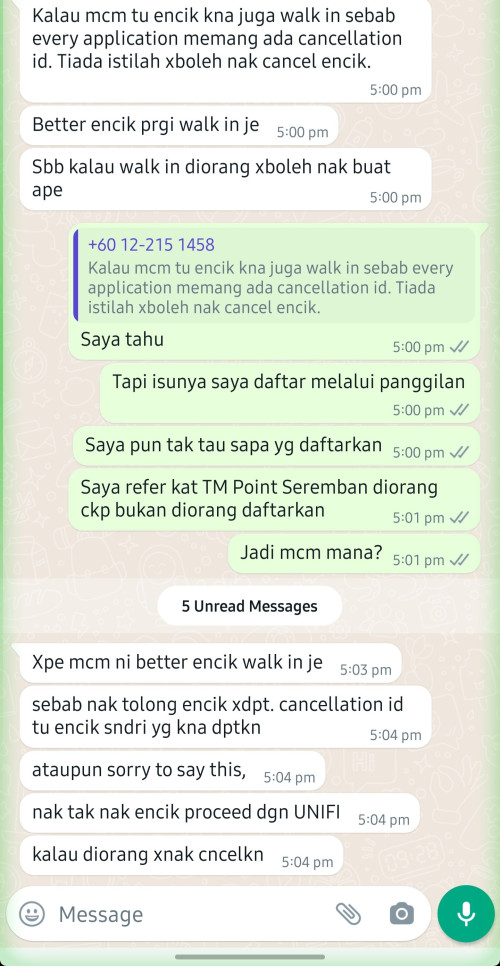
It seems TM does not want to release my port and Maxis ask me to go to TM Point to cancel my order but I already rejected my installation.
TM should have cancelled my order rite?
And this is the first time I get a CS that does not want my money.
He suggested me to continue proceed installation to Unifi.
It seems that you are trying to port out from Unifi to Maxis Fibre, right?
Since your area is under TM, then there's this process called
"Transfer Request". The term itself is self-explanatory, which means customer "requests" to "transfer" from an existing ISP to another ISP without losing DP port in the process.
You want to migrate from your existing ISP (Unifi) to another ISP (Maxis), so here's what the agent would do:
They will check service availability in TM Portal whether your house address can either perform Transfer Request or not. This is what it'll look like in TM portal:
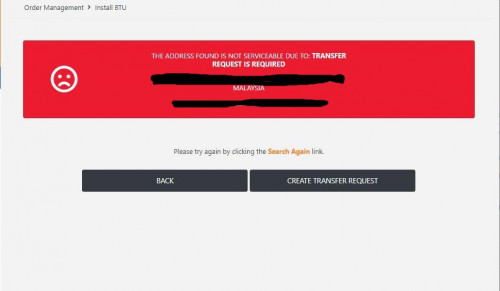
Picture source:
https://forum.lowyat.net/index.php?showtopi...ost&p=103102473After giving them the necessary details like TM account number and User ID (e.g. khainiz94@unifi), the agent will provide you with the
Transfer Request ID, which looks something like
1-xxxxxxxxxxxOnce the ID is generated, you will be given up to 10 days time to
walk in to your existing ISP's service centre (TMpoint) to complete the Transfer Request process.
Like it or not, it has to be walk-in, there's no other way than that. It is strongly advised that the account holder is present, and all outstanding payments have been cleared before walking in. This is to prevent TM from giving "excuses" to reject your Transfer Request (as a tactic to make you stay on their service; making your life difficult to port out to other ISP, hoping that you'll give up).
If you don't walk in to TMpoint within that 10 days window, the Transfer Request ID will be automatically rejected. Your Unifi service won't be affected, and still can use it as usual.
If you're still interested to subscribe to Maxis Fibre, tell that agent to create a new Transfer Request ID again.
Once TM approves your Transfer Request, the Maxis agent would proceed with your order and arrange an installation appointment date for you.
But don't drag too long, cuz by default, your Unifi service will be permanently terminated 10 days after your Transfer Request approves, so make sure you got your Maxis Fibre installed within that 10 days.
If however, your Maxis Fibre installation somehow fails within that 10 days, you may chase that Maxis agent or customer service and tell them to extend the transfer request period beyond the default 10 days, so that your TM Unifi internet service won't get interrupted and still can use the Internet while waiting for your next Maxis Fibre installation appointment date.
Do note that if it is a Transfer Request order, you will be using back the same BTU (TM fibre modem); and no new fibre modem will be provided by TM.
That's pretty much how TM HSBA's Transfer Request process works, and the same applies to Celcom Fibre, Digi Fibre, Astro Fibre, etc.
=======
You might think, why not just terminate Unifi, and then subscribe to Maxis Fibre as a new customer?
The thing is, the moment you terminate Unifi service, it also means you will surrender your fibre DP port to your neighbours who wants to get their internet installed.
The moment you want to subscribe Maxis Fibre later on, who knows your neighbour who's waiting for fibre port after so long, they will be the ones to take away your port that you just "surrendered" earlier, therefore end up no more fibre port for you.
And when the Maxis agent search your address in TM portal, it shows that your area is currently "Port Full". When that happens, you cry also no use.

That is also one of the reasons why Transfer Request is here to prevent this from happening.


 Jun 6 2022, 01:38 PM


 Quote
Quote


 0.1797sec
 0.56
0.56
 7 queries
 GZIP Disabled