

QUOTE(QuantumEdge @ Aug 7 2024, 05:53 PM)
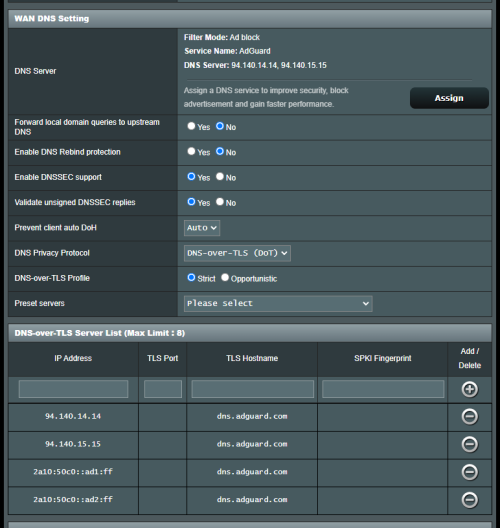
First thing to do when I'm back home
* Funny thing, I cant get Adguard DoT to work
But Cloudflare no problem at all


https://adguard-dns.io/en/public-dns.html
tls://dns.adguard-dns.com
The Official Maxis FTTH Thread | v5, Maxis Home Fibre Internet, from RM89
|
|
 Aug 7 2024, 07:46 PM Aug 7 2024, 07:46 PM
Return to original view | IPv6 | Post
#161
|
 
Senior Member
2,608 posts Joined: Nov 2020  
|
QUOTE(QuantumEdge @ Aug 7 2024, 05:53 PM) First thing to do when I'm back home * Funny thing, I cant get Adguard DoT to work But Cloudflare no problem at all https://adguard-dns.io/en/public-dns.html tls://dns.adguard-dns.com |
|
|
|
|
|
Aug 7 2024, 07:47 PM
Return to original view | IPv6 | Post
#162
|
|
Senior Member
2,608 posts Joined: Nov 2020
|
QUOTE(mrfique @ Aug 3 2024, 02:28 PM) Hi all, Personally I'll go with TP-LinkA noobies question. Currently i am using 100 Mbps Maxis Fibre. I managed to find 3 Huawei (LG8245X6) and 3 TP-Link (EX-510) router. I am thinking of using a Mesh Wifi at my new house (3 Storey, 2700 sq ft). Which brand is better in terms of stability, security and coverage, Huawei or TP-Link? TQ In advance. |
|
|
Aug 30 2024, 07:44 AM
Return to original view | IPv6 | Post
#163
|
|
Senior Member
2,608 posts Joined: Nov 2020
|
And also, note where originally the stock router connected to, if it used LAN2 of the modem, use LAN2 to the WAN of your Linksys
if it is on LAN1 originally, please try VLAN ID 11 instead |
|
|
Sep 5 2024, 07:27 AM
Return to original view | IPv6 | Post
#164
|
|
Senior Member
2,608 posts Joined: Nov 2020
|
QUOTE(Oltromen Ripot @ Sep 5 2024, 07:22 AM) i can understand the intent and the benefit when it comes to blocking malware, scams, gambling, adult contents, and criminals, but i don't trust MCMC will limit itself to just those, and i don't trust the ISPs will stop at just Google's and Clodflare's DNS. the problem is... cloudflare security or quad9 will do a farrrrrrrrrrrrrrrrr better job at blocking malware than MCMCalso for adult content, over on the Unifi thread someone noticed that them blocking CleanBrowsing Adult resulted in less sites being blocked lol, since cleanbrowsing's list covers more domains |
|
|
Sep 10 2024, 08:36 AM
Return to original view | IPv6 | Post
#165
|
|
Senior Member
2,608 posts Joined: Nov 2020
|
QUOTE(dev/numb @ Sep 9 2024, 11:32 PM) If switching from Unifi to Maxis Fibre (500Mbps), will they let me keep the old white Huawei box (EchoLife HG8240H GPON Terminal printed on underside label) or will they replace it? Depends, should be yes?My understanding is that the installer will just plug a CAT cable into a different port on the old Huawei and attach their Maxis Kaon thing (which I plan to replace with an Asus unit anyway), but it’s possible my knowledge is outdated already. Unless you are using 2Gbps plan, of which you should get a Skyworth 2.5Gbps Modem or, if you're in one of those areas where Maxis has it's own infrastructure instead of riding on TM you'll know you're on those infra if you receive offers for RM99 for 300Mbps Also have expectations for not quite reaching 500Mbps in some areas dev/numb liked this post
|
|
|
Sep 10 2024, 05:11 PM
Return to original view | Post
#166
|
|
Senior Member
2,608 posts Joined: Nov 2020
|
QUOTE(dev/numb @ Sep 10 2024, 02:27 PM) Thanks for the input PRSXFENG && YoungMan not sure who/what/where gets thatHoping I don’t end up with some newcrap all-in-one box that will give problems if I try to put in bridge mode to my own router. I've also seen TP-Link routers being given besides the Kaon EX510 and EX230v EDIT: Removed incorrect info This post has been edited by PRSXFENG: Dec 7 2024, 09:16 PM dev/numb liked this post
|
|
|
|
|
|
Sep 11 2024, 05:55 PM
Return to original view | IPv6 | Post
#167
|
|
Senior Member
2,608 posts Joined: Nov 2020
|
QUOTE(coolkidz @ Sep 11 2024, 10:32 AM) Just subscribed to Maxis 300Mbps yesterday. seems like Kaon may be reserved for those on higher end plans nowWas provided with TP-Link co-branded Maxis model EX230v. They no longer provided Kaon model?  EX230v looks like the sucessor to the old c5v, with VoIP port for a while they also give some TP-Link EX510 or something like that |
|
|
Sep 12 2024, 08:29 AM
Return to original view | Post
#168
|
|
Senior Member
2,608 posts Joined: Nov 2020
|
QUOTE(wjleong15 @ Sep 12 2024, 05:26 AM) After upgraded from 30mbps to 100mbps speed not increase much like from 30 to 55 like that only sounds like you are using Wifi?How long it can go to 90-100mbps? Restarted router and modem several times might be old N Wireless Wifi card inside your device being the bottleneck what device is this? if pc, screenshot wifi card in task manager/device manager if phone. give phone model |
|
|
Nov 22 2024, 07:37 PM
Return to original view | IPv6 | Post
#169
|
|
Senior Member
2,608 posts Joined: Nov 2020
|
QUOTE(vez @ Nov 22 2024, 06:40 PM) we can replace maxis router with our own? or just disable the wifi and add on our own router beside through LAN cable? can, just set up VLAN and PPPoE on your router but you lose VoIP and 4G Backup if you have/use those (VoIP could be setup again by connecting stock router to your router) |
|
|
Nov 23 2024, 01:31 PM
Return to original view | IPv6 | Post
#170
|
|
Senior Member
2,608 posts Joined: Nov 2020
|
QUOTE(vez @ Nov 23 2024, 10:05 AM) setup vlan means? not just replace new router and remove maxis router then choose maxis profile and input ppoe username and password? yes, choosing that profile = setting up vlanthe profiles are just preconfigured for you, otherwise you would manually key in vlan id |
|
|
Dec 8 2024, 05:26 PM
Return to original view | IPv6 | Post
#171
|
|
Senior Member
2,608 posts Joined: Nov 2020
|
QUOTE(kart @ Dec 8 2024, 09:27 AM) I am going to subscribe to Maxis Home Fibre 100 Mbps service. So, as you said, I have to lower my expectation, and accept the Maxis-supplied router and modem are of lower quality. Eh, not like TM Unifi or TIME is giving anything that's good anywaysD-Link isn't great, just look at their recent issues where despite significant security flaws were found, they just say go buy a new router. For the modem, it really doesn't matter, they all work basically the same So far I've seen the following routers being given, it may depend on their stock and your plan TP-Link EX510 TP-Link EX230v Huawei OptiXstar LG8245X6 Kaon AR2140 and Another model of Kaon only for 2Gbps users They're fine enough for casual home use, and 100Mbps isn't challenging to process kart liked this post
|
|
|
Dec 9 2024, 10:46 AM
Return to original view | IPv6 | Post
#172
|
|
Senior Member
2,608 posts Joined: Nov 2020
|
QUOTE(mystvearn @ Dec 9 2024, 06:36 AM) I just migrated from Unifi to Maxis. Got the free modem router, usb dongle and sim card for the dongle. When configuring the maxis tp link router, the technician and I noticed that the usb dongle only works with the router. I have a tp link ax73 at home, the usb dongle doesn't work,even though there is a USB port on the router as well. Tried the dongle at different usb devices, it doesn't work as well. Tried the sim in my tablet, no 4g. I also have subscribe to Maxis data sim, that one works well with my android devices. Yes, specificallySo this sim, dongle is only meant for the router? The dongle checks for "Maxis_Archer_c5v" hostname All of the Maxis provided routers report themselves as that model to the dongle If it's not that, the dongle refuses to connect However, it is not SIM locked, you could insert other SIM cards in there and use it for internet, if you pair it with their router. The SIM is probably SIM locked to dongle as well but I have not investigated it. mystvearn liked this post
|
|
|
Dec 20 2024, 09:46 AM
Return to original view | Post
#173
|
|
Senior Member
2,608 posts Joined: Nov 2020
|
QUOTE(kart @ Dec 20 2024, 09:07 AM) For my Maxis Home Fibre subscription, Maxis gave me TP Link EX230v router. There's no DoH on this router, you're just using standard DNSIn order to enable DNS over HTTPS (Secure DNS), I tried to type the following Cloudflare DNS in the router’s gateway IP address. Advanced > Network > LAN Settings > DHCP Server Primary DNS : 1.1.1.1 Secondary DNS: 1.0.0.1 However, https://dnsleaktest.com shows that the DNS assigned to me is 162.15X.XX.XX (X represents a number). Is my method incorrect? Please advise the correct steps to implement DNS over HTTPS. Thank you.  [attachmentid=11507820] you censored too many bits of the IP, so that's not useful information, give at least the first 2 chunks uncensored. Anyways, you probably need to change IPv6 DNS as well to fully use Cloudflare DNS Just look around for a IPv6 setting EDIT: Another thing is, DHCP doesn't immediately push the changes, there's no way for your router to tell your devices that settings have to change, instead it has to wait for your devices need to ask again, but usually it's set to like, 12 or 24 hours cycle Best way to force devices to ask again is simply restart router so your devices are disconnected and will ask on reconneect This post has been edited by PRSXFENG: Dec 20 2024, 09:53 AM kart liked this post
|
|
|
|
|
|
Dec 20 2024, 10:56 AM
Return to original view | Post
#174
|
|
Senior Member
2,608 posts Joined: Nov 2020
|
QUOTE(kart @ Dec 20 2024, 10:37 AM) PRSXFENG Most consumer routers dont support DoH/DoT, even though they could in theoryThank you for your reply. Is it actually the limitation of TP Link EX230v router that does not allow DNS over HTTPS, rather than the restriction imposed by Maxis? https://dnsleaktest.com shows that the DNS assigned to me is 162.158.25.XX (X represents a number). I did change Primary DNS and Secondary DNS a few days ago, and restarted my router a few times. However, dnsleaktest did not show 1.1.1.1 as the DNS assigned to me. Some TP-Link routers do, All Asus routers do DoT, and custom firmware like OpenWRT do It's basically just they didnt implement this feature anyways, that 162.158.25.xx range appears to be on cloudflare, so you are using 1.1.1.1, just that you're routed to their local nearest server you can test with https://one.one.one.one/help/ and https://www.dnscheck.tools/ You should be on Cloudflare kart liked this post
|
|
|
Dec 20 2024, 04:03 PM
Return to original view | Post
#175
|
|
Senior Member
2,608 posts Joined: Nov 2020
|
QUOTE(jasontanky @ Dec 20 2024, 03:29 PM) Anyone knows if the RM99 300Mbps Maxis Fibre promotion is available to new subscribers under TM infra? I think that promo is basically for their own infra customers because their cost is lower and to attract more customersDon't quote me on this but I think it *may* be available under the condition you have to bundle it with their postpaid The promo flyer was posted here before I think And I think the prices also increase after 2 years |
|
|
Dec 30 2024, 06:05 PM
Return to original view | IPv6 | Post
#176
|
|
Senior Member
2,608 posts Joined: Nov 2020
|
QUOTE(kart @ Dec 30 2024, 03:46 PM) For my Maxis Home Fibre subscription (under TM infra), Maxis gave me ZTE ZXHN F620 GPON ONT, and TP-Link EX230v router. Alright, the TP-Link is on 192.168.1.254The Gateway IP address of TP-Link router is http://192.168.1.XXX (X represents a number). What is the IP address of ZTE ONT (for accessing the ONT setting)? Thank you. It's the same for everyone, that's what Maxis configured For the ZTE, according to this video It is 192.168.1.1 However, you cannot access it from behind the TP-Link router you must connect a LAN Cable from your device to the ZTE directly Is there any reason why you need to access the ZTE? Generally there isn't much to do there kart liked this post
|
|
|
Dec 31 2024, 10:03 AM
Return to original view | IPv6 | Post
#177
|
|
Senior Member
2,608 posts Joined: Nov 2020
|
QUOTE(kart @ Dec 31 2024, 09:50 AM) Thank you for your information, PRSXFENG. Might need to use specific LAN ports, or setup static ipIt is for me to understand the setting of ZTE ONT. However, I will not change the setting, because I am not knowledgeable in networking. I tried to plug a LAN cable between LAN2 port of ZTE ONT, and the LAN port of my computer, but my computer shows that 192.168.1.1 IP address is unreachable. Since I am using TM infra, the username and password of ZTE ONT should be same, as mentioned in the video you shared, right? Not sure since I've never used ZTE ONU before But try static ip of like IP 192.168.1.2 Subnet 255.255.255.0 Gateway 192.168.1.1 kart liked this post
|
|
|
Apr 17 2025, 10:26 PM
Return to original view | IPv6 | Post
#178
|
|
Senior Member
2,608 posts Joined: Nov 2020
|
QUOTE(fruitie @ Apr 16 2025, 08:38 PM) 3 years contract is something new to me. Yeah Unifi is starting to offer 3 year contracts to keep you in for longerthe recent campaign was to get a free tv, but 3 years contract |
|
|
Jun 11 2025, 10:36 AM
Return to original view | Post
#179
|
|
Senior Member
2,608 posts Joined: Nov 2020
|
QUOTE(jsnhoh @ Jun 11 2025, 09:22 AM) how to get this ?? tq I believe it's a promo inside the app, 2 days only, yesterday and todayOnly at like, a few selected branches and they're very far away branches If you live near one, great! Otherwise for most people it's too far away |
|
|
Aug 19 2025, 08:24 PM
Return to original view | IPv6 | Post
#180
|
|
Senior Member
2,608 posts Joined: Nov 2020
|
My relative recently accepted a free upgrade of the router (with recontract)
They swapped the TP-Link EX510 with a Huawei LG8245X6-12 Now, I was under the impression that after the contract, the old router is your's to keep and you get the new Huawei However, the technician took away the old TP-Link I thought we are supposed to keep it? Technican says policy is like that to take back. |
| Change to: |  0.0321sec 0.0321sec
 0.59 0.59
 7 queries 7 queries
 GZIP Disabled GZIP Disabled
Time is now: 14th December 2025 - 05:03 PM |
 Quote
Quote