Welcome Guest ( Log In | Register )

Outline · [ Standard ] · Linear+

 [FAQ] PC Restart/Auto Restart Problems, all question relating to these problems

views
     
TSAsenDURE
post Sep 29 2006, 04:35 PM, updated 20y ago

je suis desole. je n'y crois pas a ces conneries!!
Group Icon
VIP
2,496 posts

Joined: Jan 2003
From: LowYatDotNet Status:Agast
Isolating problems thru elimination process. - the BASIC tech support 101 prerequisite.
1. When you are not sure what the problem is, remove everything from the chasis. Set up your PC with minimum configuration, that is, Mobo (motherboard), CPU, RAM and GC and see if it POST and boots. If it doesn't then, beg, borrow or steal, try to swap these components with working ones (make sure it's working and it's compatible as well). See which component fails.

2. If it POST properly then slowly add your other components (Hard Drive, Optical Drive, Modem, etc) and repeat process 1 for each. Don't forget that the connectors (IDE cables, SATA cables, etc) should be swapped and tested too as any regular components).

If you press the power button and nothing happens (no lights, no sound, no fans, etc.) then this issue is not a NO POST but is an power related issue. If you are uncertain if the computer is turning on or not, this can be easily checked by locating any fans in the computer or visible from the outside of the computer. If these fans are spinning, the computer is receiving power and this document may not apply to your issue. Some motherboards also have a LED light that indicates that there is power coming from the PSU (Power Supply Unit).

1. Connections connected properly - check you are plugged in lah >_>
Verify that the power connection is connected properly to the wall and the back of the computer. If you have a power strip (surge protector) or switch used to turn everything on at once, temporarily disconnect the computer from that switch and connect that cable directly to the wall. This will help verify that the strip or switch is not bad. Verify that the outlet works by connecting a different device like a TV, Radio to it.

2. New hardware
If additional hardware has been recently added to the computer it is recommend that you temporarily disconnect that device or devices from the computer to verify they are not preventing your computer from turning on.

3. Bad power cable
Verify that the cable supplying your computer is not bad or damaged by using another power cable. Borrow the cable from your CRT monitor or even your electric cooker/kettle.

4. PSU, power button, and/or power board or inverter
If problem still persists then try to test with another PSU. beg, borrow or steal too. Check that your power button to mobo (motherboard) is not faulty (you may swap it with the reset button).

Troubleshooting POST Problems [New Assembly]
1. Check that no part of your motherboard is touching the casing bare metal or motherboard tray. It is a good idea to layer a piece of foam/sponge between the motherboard and the casing to prevent any contact. You can also opt to layer duct tape for the screw holders/motherboard mount brackets. This is to prevent a short circuit which can lead to anything from the PC not switching on to restart or even damaged mobo.

2. Refer to elimination process steps above.

Troubleshooting POST Problems ["old" pc] - "old" here refers to a PC that is up and running before as opposed to one that is currently being assembled.

1. Did your computer beep at you when you tried to start it?
almost all computers run a series of diagnostic tests called a "Power On Self Test" ( POST) when they start up. Only after POST is passed does the computer try to load the OS (operating system). When the POST is successfully completed, the computer beeps once.

If the computer beeps more than once, or if it doesn't beep at all, it means POST has failed and never even got to the OS loading. That indicates a problem with the hardware, or occasionally the BIOS . Multiple beeps means that the computer is trying to tell you what's wrong. Each BIOS vendor (such as AMI and VIA) has their own "Beep Codes", but here are some common examples of what the codes mean. There are some common beeps though,

a. one long continious beep - RAM is loose/lost contact.
b. multiple beeps with pause in betwen - GC (graphics card) is loose.

p.s-some of the newer computers have LED's that light up that indicate the error or have a sound file to indicate the error. RTFM (read the freaking manual - yes. your mobo manual!) !

To rectify, take a eraser and rub along the gold fingers. Use compressed air and blow the slots clear of dirt/dust. Replace and make sure the contacts are not loose.
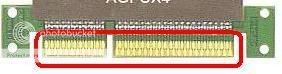
user posted image

2. Check that your Capacitors not bloated/leaking. Technicians call this big nose. If it is get it changed/replace or it's time to get it changed.

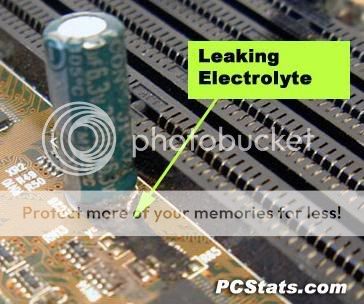
user posted image user posted image

4. Clear your CMOS. Locate the jumper by RTFM or remove the CMOS battery for a couple of minutes.

user posted image

other forumers, please feel free to contribute. Once this thred gains momentum, it'll be unpinned and tagged official.

This post has been edited by AsenDURE: Sep 29 2006, 05:54 PM
TSAsenDURE
post Sep 29 2006, 04:58 PM

je suis desole. je n'y crois pas a ces conneries!!
Group Icon
VIP
2,496 posts

Joined: Jan 2003
From: LowYatDotNet Status:Agast
Further info on Bad Capacitors, please refer to Lex's thread here:

http://forum.lowyat.net/index.php?showtopic=341368
binks
post Nov 6 2006, 05:20 PM

I'm BINKS ...
*****
Senior Member
761 posts

Joined: Jan 2003
From: Kuala Lumpur


hie there, just wanna check wit your guyz. ..

i recently change my PSU fan form iCUTE to a cap ayam (due to spoil edi) ...
aftre changing that thing my Computer alwis seems to be havign this auto restard issues ..
izzit happen bcuz of the PSU overheated issues?
Peanutz
post Nov 6 2006, 05:43 PM

Casual
***
Junior Member
423 posts

Joined: Sep 2006


QUOTE(binks @ Nov 6 2006, 05:20 PM)
hie there, just wanna check wit your guyz. ..

i recently change my PSU fan form iCUTE to a cap ayam (due to spoil edi) ...
aftre changing that thing my Computer alwis seems to be havign this auto restard issues ..
izzit happen bcuz of the PSU overheated issues?
*
Stick to your thread please.
mosfet
post Dec 4 2006, 11:02 AM

Getting Started
**
Junior Member
93 posts

Joined: Jan 2003
From: Seoul


I'm not sure if my question relevent to this post
What if the PC just turn off suddenly and occurs after several minutes of usage every time you start your PC?
No restart just shutdown .. like when blackout occurs ...
Is it the same symptoms?
Edi8888
post Dec 9 2006, 09:46 AM

MyViVa Owner
******
Senior Member
1,242 posts

Joined: Jan 2003
From: malaysia not under BN


QUOTE(mosfet @ Dec 4 2006, 11:02 AM)
I'm not sure if my question relevent to this post
What if the PC just turn off suddenly and occurs after several minutes of usage every time you start your PC?
No restart just shutdown .. like when blackout occurs ...
Is it the same symptoms?
*
your on off switch sort? i hav same case b4... and i found out is my button sort....

This post has been edited by Edi8888: Dec 9 2006, 09:46 AM
sam240
post Dec 11 2006, 03:50 PM

Look at all my stars!!
*******
Senior Member
3,657 posts

Joined: Jan 2003


QUOTE(Edi8888 @ Dec 9 2006, 09:46 AM)
your on off switch sort? i hav same case b4... and i found out is my button sort....
*
Sometime is just your software problem....format and re-install can check this out....after fresh instllation, just ghost and back up for all (next time can re-ghost back)
For hardware problem, should be your mobo problem like mention above...or maybe is your PSU power problem, what kind of PSU you are using it now?
Hope this would help something on your mind smile.gif

spr173
post Dec 12 2006, 01:07 PM

Getting Started
**
Junior Member
68 posts

Joined: Nov 2004
i have almost similar problem but mine kept restarting after like 5 min booted up. 1st thought software problem but half way installing windows restarted again.
Anyone can help me with this problem? i already tried ticking off the automatically restart as suggested in the system tab. But it still restart so maybe hardware problem liao?

i am using cooler master 400w psu
athlon 64 3000+ ( 754)
512mb ram x 2 ( kingston )
asus K8N4-E SE
gigabyte X1650 pro
-=nexus=-
post Dec 17 2006, 10:09 PM

Casual
***
Junior Member
350 posts

Joined: Apr 2006
From: PETALING JAYA
i'm not sure what happen to my pc... it just restart automatic when i restart the router
-vip3rleon9-
post Dec 18 2006, 12:31 AM

.:νιÏÑÑıÑои9:.
*******
Senior Member
7,516 posts

Joined: Jun 2005
From: Petaling Jaya


ok. my RAMS are fine. PSU is good. HDD and optical drives functioning properly. why does my pc still reboot by itself?

and everytime it does, the settings in the BIOS will change by itself. doh.gif and only the boot sequence settings will be affected. is it my mobo cuz i suspect it to be burnt after that big thunderstorm.

and besides rebooting itself, my pc has this problem of not bring able to boot into Windows at all. it just hangs after the BIOS and memory test screen. then i cannot do anything. only to restart and wish for Windows to load. not too sure if this is the proper section. sorry if it isn't.

anyone can help me cuz this is getting annoying.

thanx. wink.gif
Valiant
post Dec 21 2006, 03:11 PM

Getting Started
**
Junior Member
75 posts

Joined: Jan 2003
From: Long River


Hi all,

i've recently opened up my office pc's PSU which is a chap ayam one. I was shock because the power supply is really a save cost one, it uses only 2 or 3 caps rated <1000uF for the 12V n 5V. And further more, it replaced the coil/inductor which is possible with a jumper.

then after i changed the PSU oredi, the system went smooth. No more restart or power down. Because last time when i connect 2 hdd with cdrom it does not start, when i disconnect 1 of the hdd then it started but when i put a cd in my drive it restart and won't start...

Lessons: Please buy a decent PSU when u CAN.

biggrin.gif
Kay
post Dec 21 2006, 08:43 PM

New Member
*
Junior Member
30 posts

Joined: Jan 2003


Can anyone help me with my minidump file?


here its the my pc history: http://forum.lowyat.net/topic/383847

This post has been edited by Kay: Dec 21 2006, 09:04 PM


Attached File(s)
Attached File  minidump.zip ( 161.07k ) Number of downloads: 104
samliang
post Dec 29 2006, 11:25 AM

â¤â¤â¤â¤â¤
****
Senior Member
649 posts

Joined: Dec 2004
From: Selangor,Puchong


the auto restart onli comes when i am playing warcraft III dota .... i dunno why sometimes it restart and sometimes it doesnt restart ... anyone have clue to solve it ? thx in advance
loveyourenemy
post Jan 4 2007, 09:20 AM

Getting Started
**
Junior Member
94 posts

Joined: Jan 2006
From: Malaysia


QUOTE(-vip3rleon9- @ Dec 18 2006, 12:31 AM)
ok. my RAMS are fine. PSU is good. HDD and optical drives functioning properly. why does my pc still reboot by itself?

and everytime it does, the settings in the BIOS will change by itself. doh.gif and only the boot sequence settings will be affected. is it my mobo cuz i suspect it to be burnt after that big thunderstorm.

and besides rebooting itself, my pc has this problem of not bring able to boot into Windows at all. it just hangs after the BIOS and memory test screen. then i cannot do anything. only to restart and wish for Windows to load. not too sure if this is the proper section. sorry if it isn't.

anyone can help me cuz this is getting annoying.

thanx. wink.gif
*
Hi there,

Few possibility, for my own case. What i did is to change a new power supply. Cost around RM130 - RM 200, and now my problem fixed. For what i know power supply do play a big part in the CPU stability. Cheers thumbup.gif
EmperorMeng
post Jan 5 2007, 02:23 AM

Jom Whaling
*******
Senior Member
2,021 posts

Joined: Dec 2006
From: Malaysia


my com.. syok syok will blackout..
then the led all flicker gila
then i kick kick bang bang
off power, on again. ok d
a few mins/hrs/days more same prob again.. haha
Dennos
post Jan 8 2007, 07:25 PM

Look at all my stars!!
*******
Senior Member
2,736 posts

Joined: Dec 2006


QUOTE(-vip3rleon9- @ Dec 18 2006, 12:31 AM)
ok. my RAMS are fine. PSU is good. HDD and optical drives functioning properly. why does my pc still reboot by itself?

and everytime it does, the settings in the BIOS will change by itself. doh.gif and only the boot sequence settings will be affected. is it my mobo cuz i suspect it to be burnt after that big thunderstorm.

and besides rebooting itself, my pc has this problem of not bring able to boot into Windows at all. it just hangs after the BIOS and memory test screen. then i cannot do anything. only to restart and wish for Windows to load. not too sure if this is the proper section. sorry if it isn't.

anyone can help me cuz this is getting annoying.

thanx. wink.gif
*
try check ur hard disk!! use Active Smart software to scan ur SMART value.
Musta1987
post Jan 15 2007, 01:27 AM

New Member
*
Junior Member
7 posts

Joined: Jan 2007
im playing this game

http://www.tantra.ph/gameguide2/gam.htm

and im using radeonx700 can o not?

suddenly auto-restart,y ah???

sum1 help me lor....
DigitalKL
post Jan 15 2007, 05:49 PM

Regular
******
Senior Member
1,360 posts

Joined: Jan 2003


My problem began when I had a power failure. The power from Tenaga went off. Since I have a UPS, I began a shutdown and when Tenaga came back on, I on back my pc but it keeps rebooting itself. It got as far as showing the Windows Welcome logo but thats it, it will reboot itself from there.

I cant enter safe mode either. Eventually I got fedup and try repairing windows by inserting my windows xp cd in and boot from cd. I think it didnt detected i had a previous version of XP in there because it didnt give me any option to Repair. Never mind, I reinstall again. Guess what?

After many many tries, I think I might have install altogether 4 Windows XP in my PC. Is that possible?

Anyway it showed me boot from a selection of 4 Windows XP - all the same name. So far I can boot from one of those selection but when I went in, its a totally new install.

I looked in File Explorer and sure enough there is 3 sets Administrator and 4 sets of User and 4 sets of Windows folder.

How do I uninstall the rest of them?

What must I do? I never encounter such problems before - Please HELP icon_question.gif

This post has been edited by DigitalKL: Jan 15 2007, 05:50 PM
DigitalKL
post Jan 16 2007, 10:40 AM

Regular
******
Senior Member
1,360 posts

Joined: Jan 2003


the above problem was caused by this program that i installed a day earlier - Nitro PDF

Beware!!!
chua83
post Jan 19 2007, 12:30 PM

Getting Started
**
Junior Member
173 posts

Joined: Nov 2004
From: Puchong


wow... thanks for the info...
karom
post Feb 6 2007, 03:16 AM

Hello everybody
******
Senior Member
1,262 posts

Joined: Aug 2006
From: Butterworth, Penang


RAM might cause PC to restart to. Sometime because of the wrong timing setup, PC wont boot.


tylaxng
post Feb 7 2007, 02:57 PM

New Member
*
Junior Member
27 posts

Joined: Dec 2006
From: P.Pinang


QUOTE(AsenDURE @ Sep 29 2006, 04:35 PM)

4. Clear your CMOS. Locate the jumper by RTFM or remove the CMOS battery for a couple of minutes.

user posted image

other forumers, please feel free to contribute. Once this thred gains momentum, it'll be unpinned and tagged official.
*
Thanks for your sharing....

I js want to highlight clear cmos item.

I'm highly recommend remove ur batt 1st before doing CMOS reset, especially ASUS motherboard.

My experienced, motherboard is A7V333. I doing CMOS reset for this board, i didn't take batt out. And, problem come, everytimes when i turn on my pc, it automatic go BIOS mode. After verify and check my MB manual, manual highlight remove batt before doing CMOS clear... cry.gif ... My MB go back claim warranty and need waiting > 2 months...

Now i used A7V800.... it still mention same things abt batt remove and CMOS clear...
karom
post Feb 7 2007, 02:59 PM

Hello everybody
******
Senior Member
1,262 posts

Joined: Aug 2006
From: Butterworth, Penang


Yep. remove battery first is as the manual's guide always mentioned.
pcboy
post Feb 14 2007, 09:39 PM

1,2,3,4.... Hi-5
*****
Senior Member
800 posts

Joined: Dec 2006
From: No.22, Jalan-jalan Cari Makan, 46150 PJ


i wonder why the batt is important to be removed..
vailance
post Feb 22 2007, 11:21 PM

wat??
*****
Senior Member
841 posts

Joined: Feb 2005
From: Melaka>KL


my pc wont restart/shut down.. it stuck at the windows is shutting down screen.. wat should i do?
karom
post Feb 23 2007, 02:21 AM

Hello everybody
******
Senior Member
1,262 posts

Joined: Aug 2006
From: Butterworth, Penang


it is removed so that the circuit is not connected to the power source.

Hence the stored setting will be back to default factory setup.

If im not mistaken, the factory setup is some type of ROM.
Neo18
post Feb 27 2007, 04:10 PM

Regular
******
Senior Member
1,850 posts

Joined: Jan 2003


Hello Guys,

I need your Help. I am using my computer with the spec under my Signature. I'm also using Windows Vista Ultimate.

I'm facing problem after leaving my computer overnight bout 4 hours or more.
I'm unable to get my computer to do anything but i can c that it's On and functioning, maybe its sleeping

When i try to restart my PC, it gives a sound BEEP BEEP BEEP BEEP BEEP BEEP BEEP , very annoying. then I'm force to shut it off again and restart and the same thing happen. I can only reuse my pc if i off it for more than 15 minutes

After encountering this problem many times, I found out my PC power management is set under BALANCED.. meaning after 10 minutes Screen saver and after 1 hour, put my computer to sleep.

But this does not solve my problem because when my computer goes to sleep, i cannot resume work when i want too!!


ashraful
post Mar 13 2007, 12:38 PM

Getting Started
**
Junior Member
205 posts

Joined: Mar 2006
From: Shah Alam


hello there,
i wanna ask some help from u guys~!!
b4 this, my comp is in good condition, but then atarting last week my comp always hang then restart everytime i play games (esp. guildwars).
but it's OK when i just use it for like surfing etc.
i don't know what to do tho..

my specs is just in my sig...

thnx~!!!!
suwari
post Mar 13 2007, 12:43 PM

New Member
*
Junior Member
11 posts

Joined: Jan 2007
You might want to try to restore your setting to previous setting.Go to safe mode and system restore.

Or you also need to try repair your system maybe one or more of your file is corrupt.
ashraful
post Mar 13 2007, 03:37 PM

Getting Started
**
Junior Member
205 posts

Joined: Mar 2006
From: Shah Alam


so can formatting my HDD will fix this?

thnx~!!
kayap00
post Mar 15 2007, 12:00 PM

Getting Started
**
Junior Member
152 posts

Joined: Feb 2006


HELP NEEDED URGENTLY!!!!

i juz slot in a new network card.. then my pc will auto restart or hang randomly..
then i try on another pci slot.. is still the same...

i tot is the card problem so i change it .. but it still the same..
then i try put the pci 56k modem n pci sound card ... then the pc ok pula...

so i try format n reinstall the os.. but it run smoothly even i install all the application into it. (the network card is slot-in when i reinstall os)...

the problem come again when i go ON-LINE.. keep restarting n hang...

wats is the problem!!!??? any PRO can help me??? PLS!!!!!!!

This post has been edited by kayap00: Mar 15 2007, 12:04 PM
Vint
post May 4 2007, 06:58 PM

ºI'm ♫♪♫♪♫♪..
******
Senior Member
1,492 posts

Joined: Dec 2005
From: Penang Islandâ„¢


If no one reply just pm them and they might help you
tinbaktu
post May 4 2007, 07:17 PM

Getting Started
**
Junior Member
65 posts

Joined: Feb 2006


QUOTE(Neo18 @ Feb 27 2007, 04:10 PM)
Hello Guys,

I need  your Help. I am using my computer with the spec under my Signature. I'm also using Windows Vista Ultimate.

I'm facing problem after leaving my computer overnight bout 4 hours or more.
I'm unable to get my computer to do anything but i can c that it's On and functioning, maybe its sleeping

When i try to restart my PC, it gives a sound BEEP BEEP BEEP BEEP BEEP BEEP BEEP , very annoying. then I'm force to shut it off again and restart and the same thing happen. I can only reuse my pc if i off it for more than 15 minutes

After encountering this problem many times, I found out my PC power management is set under BALANCED.. meaning after 10 minutes Screen saver and after 1 hour, put my computer to sleep.

But this does not solve my problem because when my computer goes to sleep, i cannot resume work when i want too!!
*
Changing your power setting might help. Set "never" sleep on hdd also uncheck hibernation. Hibernate could be the cause if it's enable.


Added on May 4, 2007, 7:28 pm
QUOTE(ashraful @ Mar 13 2007, 12:38 PM)
hello there,
i wanna ask some help from u guys~!!
b4 this, my comp is in good condition, but then atarting last week my comp always hang then restart everytime i play games (esp. guildwars).
but it's OK when i just use it for like surfing etc.
i don't know what to do tho..

my specs is just in my sig...

thnx~!!!!
*
the problem might be the game your playing(guildwars) try looking for latest patch.
also check your hdd for bad sector

This post has been edited by tinbaktu: May 4 2007, 07:28 PM
phamtom X
post May 5 2007, 10:44 PM

Getting Started
**
Junior Member
54 posts

Joined: Apr 2006


hi guys,

i have a problem with my PC, and i dunno which part that make my PC restart by itself or maybe another.

sometime it restart before the POST screen and sometime it restart during windows is loading. and it also restart when i was doing my work.

i was really in need of help and i am really grateful for your support and suggestions.

here is my spec:
Pentium 4 2.0GHz
MSI Intel 845 Ultra-C
GeForce 6600
apacer 512MB (PC-2100)
PSU 400W

terng~n~o_mania
post May 15 2007, 01:02 AM

I walk! do you?
******
Senior Member
1,716 posts

Joined: Jan 2003
if the pc restart randomly without any symptoms, usually what would be the problem?
got a new system for friend, built by the shop.
the restart problem starts to happen when i am installing windows xp for the system, but without symptoms such as beep tone or any overheating signals. it just happen randomly. usually short circuit system wouldn't even start right?
cause i had short circuit problem with my psu before when i was switching the case, the power run for a second then whole system down. that's what i encounter for short circuit.

the system specs:
Intel C2D E4300 1.80Ghz
Asus P5LD2 SE Mobo
Kingston 1GB DDR2 PC667
Seagate SATA2 160GB
Asus ATI X1550

suggestions on what should do?
codex
post May 15 2007, 01:38 PM

Getting Started
**
Junior Member
231 posts

Joined: Jan 2003
From: Old Klang Road


QUOTE(ashraful @ Mar 13 2007, 03:37 PM)
so can formatting my HDD will fix this?

thnx~!!
*
i dont think that you need to format ur hdd
for me i`ll do this step :-

1. check temp inside pc when idle and max usage (check idle & when you run the game)
2. check thermal paste, if possible .. clear all the dust at the heatsink
3. check psu fan, sometimes it`s stuck coz of lizard (kena this before)

for me, if my pc restart normally coz of tempeture, dunno yours, maybe can try
styloe
post May 15 2007, 09:51 PM

6 sTaR wORkaHOLic JuNKie
******
Senior Member
1,242 posts

Joined: Aug 2005
From: Sila Mampir,JB sTaTus:GTX 680 SLI


hi to all,..

im having this problem it began when i watch my dvd then my pc suddenly restarted itself the cant login even to bios.

what i've done so far..
1.clear cmos
2.plug in only my proc + hsf ,ram mobo and vga---still cant boot
3.change psu----still same

the symptom is when i turn on my pc the psu powers up then shut down itself and restart and restart again!Anyone have any idea wats causing this?thnx a mill im kinda run out of idea wat to do huhuhu
hafiez
post May 25 2007, 11:21 PM

Look at all my stars!!
*******
Senior Member
2,980 posts

Joined: Jan 2007
From: Mount Chiliad


try check ur hardware connection. and try check LCF/CRT cable connector to the CPU.
duncan880409
post May 26 2007, 02:24 AM

Like Working in My Lab ^^
*******
Senior Member
3,700 posts

Joined: May 2007
From: KT/UTM Skudai


QUOTE(codex @ May 15 2007, 01:38 PM)
i dont think that you need to format ur hdd
for me i`ll do this step :-

1. check temp inside pc when idle and max usage (check idle & when you run the game)
2. check thermal paste, if possible .. clear all the dust at the heatsink
3. check psu fan, sometimes it`s stuck coz of lizard (kena this before)

for me, if my pc restart normally coz of tempeture, dunno yours, maybe can try
*
err..
can i knw how to check CPU temp?
hafiez
post May 27 2007, 07:41 PM

Look at all my stars!!
*******
Senior Member
2,980 posts

Joined: Jan 2007
From: Mount Chiliad


do some google, duncan880409. maybe u find one.. there's tonnes of software for it.
ashraful
post Jun 2 2007, 10:46 PM

Getting Started
**
Junior Member
205 posts

Joined: Mar 2006
From: Shah Alam


hello there,
i wanna ask some help from u guys again laugh.gif~!!
b4 this, my comp is in good condition, but then, always hang, and then restart everytime i play games (esp. online), but it doesn't happen when i
play Footbal Manager 2007 though.

but it's OK when i just use it for like surfing etc.

I don't know what to do tho..
This Mobo is Biostar T6100 - 939. is it due to the ram?
or hdd?

n i dont think its the mobo cuz i just send for RMA.

thnx~!!!!

This post has been edited by ashraful: Jun 2 2007, 10:50 PM
shyjohn
post Jun 2 2007, 11:58 PM

Getting Started
**
Junior Member
108 posts

Joined: May 2007


There are so many possibilities that causing to this problem. Check event log by right click on My Computer, Manage, Event Viewer. Look for red symbol and details inside, there's a link that tells you to "click for more details". It'll take you to the Microsoft site with some possible causes and solutions.
ashraful
post Jun 3 2007, 01:02 AM

Getting Started
**
Junior Member
205 posts

Joined: Mar 2006
From: Shah Alam


if the comp restart first? then, how to check?
does it have history of the problem?

Thnx
shyjohn
post Jun 3 2007, 02:53 AM

Getting Started
**
Junior Member
108 posts

Joined: May 2007


You need to test each part (RAM, PSU, HDD, GPU) by removing or replacing them one at the time. This will help you to find faulty hardware. Also, check all cable if properly connected.

Yes, it has - if windows successfully log on and restart may happen.

karom
post Jun 3 2007, 11:43 AM

Hello everybody
******
Senior Member
1,262 posts

Joined: Aug 2006
From: Butterworth, Penang


QUOTE(ashraful @ Jun 2 2007, 10:46 PM)
hello there,
i wanna ask some help from u guys again laugh.gif~!!
b4 this, my comp is in good condition, but then, always hang, and then restart everytime i play games (esp. online), but it doesn't happen when i
play Footbal Manager 2007 though.

but it's OK when i just use it for like surfing etc.

I don't know what to do tho..
This Mobo is Biostar T6100 - 939. is it due to the ram?
or hdd?

n i dont think its the mobo cuz i just send for RMA.

thnx~!!!!
*
As the expert mentioned, it is cause by various problems. Do not forget about the applications you have installed as well.

It might because of complication with other software that might lead to this problem.

Sorry if this is not helping you.
hafiez
post Jun 5 2007, 12:27 PM

Look at all my stars!!
*******
Senior Member
2,980 posts

Joined: Jan 2007
From: Mount Chiliad


from my experiance, this problem happened when my computer has not have enough power. so i change my power supply. and it solved after that.
karom
post Jun 10 2007, 12:44 PM

Hello everybody
******
Senior Member
1,262 posts

Joined: Aug 2006
From: Butterworth, Penang


Good news to know you already able to solve the problem.
bobmarley
post Jun 10 2007, 03:54 PM

303M@R79Y
****
Senior Member
585 posts

Joined: May 2006
From: @@@TAIPING,PERAK@@@


i always got this problem with my old pc. then i make same like
a state topic and i resolve the problem smile.gif
laut
post Jun 11 2007, 08:45 AM

Casual
***
Junior Member
450 posts

Joined: Jul 2005


i got a prob here, just tonite happened
i want to format my windows back,due to missing file in the system
but when i switch on the PC,suddenly the boot up words are scattered everywhere
and after i success format up the windows
i cannot set up the resolution and color depth
whats the prob anyway??
karom
post Jun 11 2007, 11:10 PM

Hello everybody
******
Senior Member
1,262 posts

Joined: Aug 2006
From: Butterworth, Penang


Is it because of display driver?

Or maybe you have hardware error in the first place.
Jayken
post Jun 14 2007, 01:01 AM

New Member
*
Junior Member
42 posts

Joined: Jul 2005
From: Malaysia
hmm.gif help~

My pc keep shutting down, it didn't restart.

I don't really sure what cause of it......

while i play online games for about 5 to 10 minutes, it shutdown (close)
pc doesn't shut down for 1-2 hours while i went out for basketball and open for bit-torrent download.

now, i wish to reformat it. but while running cd-rom problem, my pc shut down.

is that cause by my powersupply? i'm usng 450W PSU. with 2 rams 2 rom 2 hd 1 graphiccard - p4 cpu

or it caused by my CPU? or motherboard?
shyjohn
post Jun 17 2007, 10:05 PM

Getting Started
**
Junior Member
108 posts

Joined: May 2007


QUOTE(Jayken @ Jun 14 2007, 01:01 AM)
hmm.gif  help~

My pc keep shutting down, it didn't restart.

I don't really sure what cause of it......

while i play online games for about 5 to 10 minutes, it shutdown (close)
pc doesn't shut down for 1-2 hours while i went out for basketball and open for bit-torrent download.

now, i wish to reformat it. but while running cd-rom problem, my pc shut down.

is that cause by my powersupply? i'm usng 450W PSU. with 2 rams 2 rom 2 hd 1 graphiccard - p4 cpu

or it caused by my CPU? or motherboard?
*
Maybe... but its sound like underpowered psu to me. What size of your ram? Have you check cpu temperature?
t3chn0m4nc3r
post Jun 18 2007, 12:23 PM

Teh Necron Lord
*******
Senior Member
4,139 posts

Joined: Sep 2006
From: Internet


auto restart also can be caused by failed Stock OC... check ur mobo BIOS and disable all those speed step and EIST stuff... smile.gif
bobmarley
post Jun 21 2007, 01:54 AM

303M@R79Y
****
Senior Member
585 posts

Joined: May 2006
From: @@@TAIPING,PERAK@@@


mobo cant support the power..smile.gif
chewannboon
post Jun 26 2007, 11:55 PM

Getting Started
**
Junior Member
92 posts

Joined: Apr 2007
QUOTE(-vip3rleon9- @ Dec 18 2006, 12:31 AM)
ok. my RAMS are fine. PSU is good. HDD and optical drives functioning properly. why does my pc still reboot by itself?

and everytime it does, the settings in the BIOS will change by itself. doh.gif and only the boot sequence settings will be affected. is it my mobo cuz i suspect it to be burnt after that big thunderstorm.

and besides rebooting itself, my pc has this problem of not bring able to boot into Windows at all. it just hangs after the BIOS and memory test screen. then i cannot do anything. only to restart and wish for Windows to load. not too sure if this is the proper section. sorry if it isn't.

anyone can help me cuz this is getting annoying.

thanx. wink.gif
*
Hi forumer, probably I can help to solve your problem.

My name is Edmund, from I-EM Solution Enterprise. Probably you can pay a visit to my homepage, http://innovate-em.page.tl/

As what you can see in the page, my company is actually doing and aiming for IT One Stop Outsourcing solution to the public.

You can drop me a message, and I will present myself to onsite to your place.

Best Regards,
Edmund Chew
I.T. Manager
Innovate-EM Solution Enterprise(ca001030332-w)
http://innovate-em.page.tl/

Fax / Phone: 03-7968 8846
Mobile: 016-566 1707


keisukex
post Jul 11 2007, 12:35 PM

Getting Started
**
Junior Member
204 posts

Joined: Mar 2006
From: kl(cheras),setapak


it happen to me also..
i checked to the log....
it appear a log called save dump...


The computer has rebooted from a bugcheck. The bugcheck was: 0x1000008e (0xc0000005, 0xf68bfbee, 0xb96ae71c, 0x00000000). A dump was saved in: C:\WINDOWS\Minidump\Mini070707-03.dmp.
karom
post Jul 14 2007, 05:28 PM

Hello everybody
******
Senior Member
1,262 posts

Joined: Aug 2006
From: Butterworth, Penang


may let me know whether there is some software or hardware installed before the incident occur?
shyjohn
post Jul 21 2007, 01:46 AM

Getting Started
**
Junior Member
108 posts

Joined: May 2007


QUOTE(keisukex @ Jul 11 2007, 12:35 PM)
it happen to me also..
i checked to the log....
it appear a log called save dump...
The computer has rebooted from a bugcheck.  The bugcheck was: 0x1000008e (0xc0000005, 0xf68bfbee, 0xb96ae71c, 0x00000000). A dump was saved in: C:\WINDOWS\Minidump\Mini070707-03.dmp.
*
this can be caused by anything from hardware, software or malware. zip minidump folder and post here http://forum.lowyat.net/topic/346230/+300
tootong84
post Aug 6 2007, 09:16 PM

New Member
*
Newbie
2 posts

Joined: Jul 2007
ai yoo i need help..
my pc wont start.. the monitor lights ok. usb mouse ok. thier lights turn on. ok. but just cant start the pc. done a few things but still wont start.. help plss
ragereaver
post Aug 7 2007, 07:08 PM

Getting Started
**
Junior Member
298 posts

Joined: Aug 2007
From: Kuala Lumpur

QUOTE(tootong84 @ Aug 6 2007, 09:16 PM)
ai yoo i need help..
my pc wont start.. the monitor lights ok. usb mouse ok. thier lights turn on. ok. but just cant start the pc. done a few things but still wont start.. help plss
*
can you be more detail?
can't start or start but hang halfway?
any beep sound heard?
biggrin.gif biggrin.gif biggrin.gif
tcboy
post Aug 8 2007, 04:55 PM

New Member
*
Newbie
3 posts

Joined: Aug 2007
QUOTE(tylaxng @ Feb 7 2007, 03:57 PM)
Thanks for your sharing....

I js want to highlight clear cmos item.

I'm highly recommend remove ur batt 1st before doing CMOS reset, especially ASUS motherboard.

My experienced, motherboard is A7V333. I doing CMOS reset for this board, i didn't take batt out. And, problem come, everytimes when i turn on my pc, it automatic go BIOS mode. After verify and check my MB manual, manual highlight remove batt before doing CMOS clear...  cry.gif ... My MB go back claim warranty and need waiting > 2 months...

Now i used A7V800.... it still mention same things abt batt remove and CMOS clear...
*
May I know what is CMOS reset?


Added on August 8, 2007, 5:05 pm
QUOTE(AsenDURE @ Sep 29 2006, 05:35 PM)
Isolating problems thru elimination process. - the BASIC tech support 101 prerequisite.
1. When you are not sure what the problem is, remove everything from the chasis. Set up your PC with minimum configuration, that is, Mobo (motherboard), CPU, RAM and GC and see if it POST and boots. If it doesn't then, beg, borrow or steal, try to swap these components with working ones (make sure it's working and it's compatible as well). See which component fails.

2. If it POST properly then slowly add your other components (Hard Drive, Optical Drive, Modem, etc) and repeat process 1 for each. Don't forget that the connectors (IDE cables, SATA cables, etc) should be swapped and tested too as any regular components).

If you press the power button and nothing happens (no lights, no sound, no fans, etc.) then this issue is not a NO POST but is an power related issue. If you are uncertain if the computer is turning on or not, this can be easily checked by locating any fans in the computer or visible from the outside of the computer. If these fans are spinning, the computer is receiving power and this document may not apply to your issue. Some motherboards also have a LED light that indicates that there is power coming from the PSU (Power Supply Unit).

1. Connections connected properly - check you are plugged in lah >_>
Verify that the power connection is connected properly to the wall and the back of the computer. If you have a power strip (surge protector) or switch used to turn everything on at once, temporarily disconnect the computer from that switch and connect that cable directly to the wall.  This will help verify that the strip or switch is not bad. Verify that the outlet works by connecting a different device like a TV, Radio to it.

2. New hardware
If additional hardware has been recently added to the computer it is recommend that you temporarily disconnect that device or devices from the computer to verify they are not preventing your computer from turning on.

3. Bad power cable
Verify that the cable supplying your computer is not bad or damaged by using another power cable. Borrow the cable from your CRT monitor or even your electric cooker/kettle.

4. PSU, power button, and/or power board or inverter
If problem still persists then try to test with another PSU. beg, borrow or steal too. Check that your power button to mobo (motherboard) is not faulty (you may swap it with the reset button).

Troubleshooting POST Problems [New Assembly]
1. Check that no part of your motherboard is touching the casing bare metal or motherboard tray. It is a good idea to layer a piece of foam/sponge between the motherboard and the casing to prevent any contact. You can also opt to layer duct tape for the screw holders/motherboard mount brackets. This is to prevent a short circuit which can lead to anything from the PC not switching on to restart or even damaged mobo.

2. Refer to elimination process steps above.

Troubleshooting POST Problems ["old" pc] - "old" here refers to a PC that is up and running before as opposed to one that is currently being assembled.

1. Did your computer beep at you when you tried to start it?
almost all computers run a series of diagnostic tests called a "Power On Self Test" ( POST) when they start up. Only after POST is passed does the computer try to load the OS (operating system). When the POST is successfully completed, the computer beeps once.

If the computer beeps more than once, or if it doesn't beep at all, it means POST has failed and never even got to the OS loading. That indicates a problem with the hardware, or occasionally the BIOS . Multiple beeps means that the computer is trying to tell you what's wrong. Each BIOS vendor (such as AMI and VIA) has their own "Beep Codes", but here are some common examples of what the codes mean. There are some common beeps though,

a. one long continious beep - RAM is loose/lost contact.
b. multiple beeps with pause in betwen - GC (graphics card) is loose.

p.s-some of the newer computers have LED's that light up that indicate the error or have a sound file to indicate the error. RTFM (read the freaking manual - yes. your mobo manual!) !

To rectify, take a eraser and rub along the gold fingers. Use compressed air and blow the slots clear of dirt/dust. Replace and make sure the contacts are not loose.

user posted image

2. Check that your Capacitors not bloated/leaking. Technicians call this big nose. If it is get it changed/replace or it's time to get it changed.

user posted image user posted image

4. Clear your CMOS. Locate the jumper by RTFM or remove the CMOS battery for a couple of minutes.

user posted image

other forumers, please feel free to contribute. Once this thred gains momentum, it'll be unpinned and tagged official.
*
Do you know which component supply power to processor??

its mobo or psu ?


This post has been edited by tcboy: Aug 8 2007, 05:05 PM
waruna
post Aug 18 2007, 09:32 PM

On my way
****
Junior Member
543 posts

Joined: Mar 2005
From: Cyberjaya | Kota Bharu | Republic of Terengganu


my pc seems like got electric shock at the back of the casing.. wats the problem do u all think?

first i thought it was caused by my extension but same happen even i change a new one.

i think this electrical shock make my pc always restart but btw, please see this thread for more details http://forum.lowyat.net/topic/506396
ihatechonglin
post Aug 22 2007, 04:22 PM

New Member
*
Junior Member
29 posts

Joined: Feb 2007
found the solution . ^^ nod.gif

This post has been edited by ihatechonglin: Aug 23 2007, 02:53 AM
karom
post Aug 24 2007, 12:40 AM

Hello everybody
******
Senior Member
1,262 posts

Joined: Aug 2006
From: Butterworth, Penang


great to hear that. This is why LYN is come in handy for all IT enthusiast.


Added on August 24, 2007, 12:41 amgreat to hear that. This is why LYN is come in handy for all IT enthusiast.

This post has been edited by karom: Aug 24 2007, 12:41 AM
darrenboy
post Sep 3 2007, 10:06 AM

Enthusiast
*****
Senior Member
733 posts

Joined: Jan 2007
QUOTE(DigitalKL @ Jan 15 2007, 05:49 PM)
My problem began when I had a power failure. The power from Tenaga went off. Since I have a UPS, I began a shutdown and when Tenaga came back on, I on back my pc but it keeps rebooting itself. It got as far as showing the Windows Welcome logo but thats it, it will reboot itself from there.

I cant enter safe mode either. Eventually I got fedup and try repairing windows by inserting my windows xp cd in and boot from cd. I think it didnt detected i had a previous version of XP in there because it didnt give me any option to Repair. Never mind, I reinstall again. Guess what?

After many many tries, I think I might have install altogether 4 Windows XP in my PC. Is that possible?

Anyway it showed me boot from a selection of 4 Windows XP - all the same name. So far I can boot from one of those selection but when I went in, its a totally new install.

I looked in File Explorer and sure enough there is 3 sets Administrator and 4 sets of User and 4 sets of Windows folder.

How do I uninstall the rest of them?

What must I do? I never encounter such problems before - Please HELP  icon_question.gif
*
Digital KL,

I have the same problem as you wrote. Please kindly tell me whther what you did is the best option or not. But only thing is I don't have the original Windows XP boot disk. The shop where I bought my PC never gave it to me.

Anyway, please tell me how and whether you uninstall you 3 other versions of windows XP or not?

This post has been edited by darrenboy: Sep 3 2007, 10:07 AM
karom
post Sep 3 2007, 02:59 PM

Hello everybody
******
Senior Member
1,262 posts

Joined: Aug 2006
From: Butterworth, Penang


Owh. One solution is to backup the data in the partition and format the Hard Disk back to zero.

You can do clean deletion by using Hard Disk manufacturer utility.
skeleton^king
post Sep 4 2007, 03:11 AM

Getting Started
**
Junior Member
73 posts

Joined: Sep 2007
maybe ur rams
tracyjz
post Sep 7 2007, 10:07 PM

-Jay Jay-
******
Senior Member
1,059 posts

Joined: Jan 2007
From: Petaling jaya
last time i oso faced the same problem,after upgraded my com,everythings work fine and Great!!!
darrenboy
post Sep 8 2007, 12:06 AM

Enthusiast
*****
Senior Member
733 posts

Joined: Jan 2007
QUOTE(karom @ Sep 3 2007, 02:59 PM)
Owh. One solution is to backup the data in the partition and format the Hard Disk back to zero.

You can do clean deletion by using Hard Disk manufacturer utility.
*
I donot know how to backup in a partition and ended up deleting the whole C drive data. mad.gif icon_question.gif

But anyway, I think it's too late now. Now I have installed back my Windows XP and microsoft office but my PC and speaker has no sound coming from it. When I play windows media player, or youtube, the movies and pctures can move but no sound at all. What happened? cry.gif icon_question.gif

This post has been edited by darrenboy: Sep 8 2007, 05:49 PM
karom
post Sep 8 2007, 09:47 AM

Hello everybody
******
Senior Member
1,262 posts

Joined: Aug 2006
From: Butterworth, Penang


Sound driver i suspect.
Please check in Device manager whether the sound driver is properly installed.
darrenboy
post Sep 8 2007, 11:35 AM

Enthusiast
*****
Senior Member
733 posts

Joined: Jan 2007
QUOTE(karom @ Sep 8 2007, 09:47 AM)
Sound driver i suspect.
Please check in Device manager whether the sound driver is properly installed.
*
sound driver? icon_question.gif Is it a CD I need to install? Can I buy it from somewhere?

OK..Under Sound and Audio devices in the Control Panel, I have theses items:

1. ATAPI CD ROM
2. BENQ DVD ROM
3. Audio Codecs
4. Legacy Audio drivers
5. Media Control Devices
6. Legacy Video Capture Devices
7. Video Codecs

Is any of these my sound device? How do I know which one or none of them?

This post has been edited by darrenboy: Sep 8 2007, 05:55 PM
heero24
post Sep 12 2007, 02:36 PM

New Member
*
Junior Member
22 posts

Joined: Jan 2003
My PC restart when i run certain programs's function (for eg. opening an example file in the help menu will restart my PC). Only happened 100% rate when i am using LabView (help menu stuff) and visual studio (creation of website using VB.net). For the other gaming programs, it happens once in a blue moon...

After using MEMTEST, found out that memory has some errors (haven't change my stupid apacer RAM yet). Is there other possible hardware malfunction other than the DDR2 RAM ? I am planning to have checklist of all the possible problems though.

Thanks~~


Added on September 12, 2007, 7:24 pmOH GOD... PROBLEM still persist even i change a new RAM.... sad.gif
anyone can help me please.. thanks...

This post has been edited by heero24: Sep 12 2007, 07:24 PM
skeleton^king
post Sep 18 2007, 12:59 AM

Getting Started
**
Junior Member
73 posts

Joined: Sep 2007
izit ur ram ok?
karom
post Sep 18 2007, 08:58 AM

Hello everybody
******
Senior Member
1,262 posts

Joined: Aug 2006
From: Butterworth, Penang


QUOTE(darrenboy @ Sep 8 2007, 11:35 AM)
sound driver?  icon_question.gif Is it a CD I need to install? Can I buy it from somewhere?

OK..Under Sound and Audio devices in the Control Panel, I have theses items:

1. ATAPI CD ROM
2. BENQ DVD ROM
3. Audio Codecs
4. Legacy Audio drivers
5. Media Control Devices
6. Legacy Video Capture Devices
7. Video Codecs

Is any of these my sound device? How do I know which one or none of them?
*
Legacy Audio drivers ----> try to update driver to the latest version.

It can be found on ur vendor website.

StratOS
post Sep 24 2007, 07:09 AM

Berries~ Mmmm~
*********
All Stars
20,901 posts

Joined: Jan 2003
From: Miri, Sarawak


My computer, old rig.. occurs recent auto restart but i dunno what causes it.. after reformat and replug everything still same thing happen.. tried everything on the 1st post but doesnt relate anything to my comp..

Any other causes that may lead to auto restart..?
someone_stupid
post Oct 10 2007, 11:40 PM

Regular
******
Senior Member
1,205 posts

Joined: May 2007


umm guys i'd like to know if there's any tool that'll identify our motherboard, chipset and VGA or AGP cards? i remember there was something like this but.. I can't seem to remember what was it called someone?
I'd like to identify my gf's pc's mobo and all those


Added on October 12, 2007, 8:05 pmumm anybody?

This post has been edited by someone_stupid: Oct 12 2007, 08:05 PM
Pumpkin_G
post Oct 14 2007, 04:18 AM

Casual
***
Junior Member
348 posts

Joined: Sep 2006
From: Puchong/Subang


hi guys, lately, 1 of my fren's rig also kept restarting after tenaga nasional keep cutting out the power supply for 3 times in a short period of time in a day. my fren'z comp since then suffered from this restarting point till ultimately stop loading, no beep, no sound. cant even load to BIOS. I tried stripping it to bare to find out what could be the prob, however, at 1st i tot was the PSU/GC, but after testing with my own Functional, Compatible PSU, Graphic cards and seemingly everything. still fail to locate the prob. and i do notice the Mobo's fan is making some weird noise.. could this indicate that my fren'z mobo suffered from some kind of mechanical failure?

Thank you all in advance and happy Holiday
RenzLaw
post Oct 14 2007, 03:42 PM

New Member
*
Junior Member
30 posts

Joined: Aug 2007
what if autorestart with a blue screen very fast i couldn't even see anything >_>
1024kbps
post Oct 14 2007, 03:49 PM

æŽç´ è£³
*******
Senior Member
6,015 posts

Joined: Feb 2007


BSOD faq thread is here >_>
http://forum.lowyat.net/topic/346230
waruna
post Oct 24 2007, 01:29 AM

On my way
****
Junior Member
543 posts

Joined: Mar 2005
From: Cyberjaya | Kota Bharu | Republic of Terengganu


izzit possible the auto restart problem occurred due to viruses?

because last night my pc keep restarting continuesly right after the windows boot display.. and then i take off my hdd and put into my other pc as secondary hdd to scan for viruses.. "got 4 worms".. and put in back the hdd..

Then, the problem solved.. now i can switch on my pc without any error..

once again, izzit possible the auto restart / keep restarting problem occurred due to viruses?

thanks in advance

This post has been edited by waruna: Oct 24 2007, 01:32 AM
lelong2007
post Oct 26 2007, 05:25 AM

arissto premium coffee looking for experience salesman / salesg
*****
Senior Member
704 posts

Joined: Apr 2007


QUOTE(waruna @ Oct 24 2007, 01:29 AM)
izzit possible the auto restart problem occurred due to viruses?

because last night my pc keep restarting continuesly right after the windows boot display.. and then i take off my hdd and put into my other pc as secondary hdd to scan for viruses.. "got 4 worms".. and put in back the hdd..

Then, the problem solved.. now i can switch on my pc without any error..

once again, izzit possible the auto restart / keep restarting problem occurred due to viruses?

thanks in advance
*
yes tat is posible also cos virus
parr
post Oct 27 2007, 02:35 AM

New Member
*
Newbie
3 posts

Joined: Mar 2007
From: Pahang


Hi everyone,

I got 1 problem on my PC once i shut it down using the windows---> shut down, it just wont shut but keeps on restarting and happens each time want to turn off my PC. I have to switch off the power to shut it.

Can you please guide whats the major mistake by this error? Does it hardware or software issue?
fixcomm
post Nov 5 2007, 11:16 AM

New Member
*
Junior Member
31 posts

Joined: Feb 2005
From: KHI-KUL


Dear all, need your help & opinion on this matter,

my laptop (acer aspire 5560-year 2006) just shuts off without warning. first i tot it was the heat, so i placed the fan board under it but the 'blackout' still happens. btw it only happens when i'm playing flight simx. however since last friday, the thing got real bad (again, when i'm trying to play the sim) that i have to reinstall my xp. after reinstalling, the 'blackout' still there but now not just when playing with the fsx, but with any other games (last nite, it even happend while i was browsing).

so, sure appreciate the advice on this issue. understandable that laptop is not suitable for gaming but it cant be this unsuitable (start wondering why they're install the ati x1600 for?).
hakimy1982
post Nov 6 2007, 06:43 AM

New Member
*
Junior Member
15 posts

Joined: Mar 2007
From: di dunia siber


i had a same problem with my friend pc. his P4 478 always shut down after 1~3 hours

first i suspect it related 2 the heat in the pc, but if the casing are left open 4 more air flow, it still shuts down

so i do some checking on the bios

what i found is the ram timing is set to 3 3 3 8 2T

he uses DDR2 533 Kingston value ram

i adjust the timing to 2 2 2 5 1T

finally the problem ended and the PC running 24/7 with no problem thumbup.gif

i don't actually have crossed in my mind that the RAM is the culprit shakehead.gif

This post has been edited by hakimy1982: Nov 6 2007, 06:44 AM
lluvt4ever
post Nov 8 2007, 04:58 PM

New Member
*
Junior Member
6 posts

Joined: Nov 2007


my pc go into bluescreen n show igxprd32 error... may i noe wat is tat prob??
yngwie
post Nov 10 2007, 05:09 PM

| Ãøñ'¯|¯ G|v€ Â ÃðmÑ!
*******
Senior Member
3,092 posts

Joined: Nov 2007
From: |{µð£ð £µmPµ®


QUOTE(parr @ Oct 27 2007, 02:35 AM)
Hi everyone,

I got 1 problem on my PC once i shut it down using the windows---> shut down, it just wont shut but keeps on restarting and happens each time want to turn off my PC. I have to switch off the power to shut it.

Can you please guide whats the major mistake by this error? Does it hardware or software issue?
*
nOObie advice here sweat.gif ...... can you recall what was the last thing you've done before the problem happened?
it could be some program running in the background that prevent your pc from shutting down properly.
go to BIOS setting; usually by pressing the F2 or Del key. check if the ACPI 2.0 or something is enable.

if reinstalling your windows cannot solved, it could be the hardware problem.


Added on November 10, 2007, 5:25 pm
QUOTE(fixcomm @ Nov 5 2007, 11:16 AM)
Dear all, need your help & opinion on this matter,

my laptop (acer aspire 5560-year 2006) just shuts off without warning. first i tot it was the heat, so i placed the fan board under it but the 'blackout' still happens. btw it only happens when i'm playing flight simx. however since last friday, the thing got real bad (again, when i'm trying to play the sim) that i have to reinstall my xp. after reinstalling, the 'blackout' still there but now not just when playing with the fsx, but with any other games (last nite, it even happend while i was browsing).

so, sure appreciate the advice on this issue. understandable that laptop is not suitable for gaming but it cant be this unsuitable (start wondering why they're install the ati x1600 for?).
*
not sure if this will help but you may try.
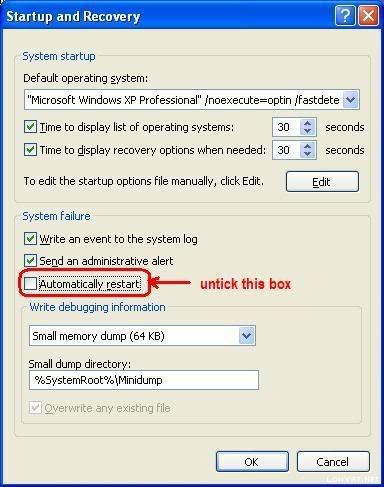
right click my computer > system properties > advanced > startup and recovery > click on the setting >
under the system recovery, uncheck the automatically restart > ok.

did your laptop plugged into the power source or running on battery during the the problem occured?


Added on November 10, 2007, 5:31 pm
QUOTE(lluvt4ever @ Nov 8 2007, 04:58 PM)
my pc go into bluescreen n show igxprd32 error... may i noe wat is tat prob??
*
igxprd32 are graphic related issue. apparently your system has some graphic driver problem. try updating your graphic driver and direct x to the current one.
you may uninstall the older graphic display driver before proceed with the new driver installation. make sure it''s the correct one.

This post has been edited by yngwie: Nov 10 2007, 05:31 PM
NewbieBetta
post Nov 17 2007, 12:00 PM

The Sexy Man
*******
Senior Member
3,706 posts

Joined: Aug 2005


what does BAD_POOL_HEADER can mean here?

i got this once in the morning..

sorry wrong section..

This post has been edited by NewbieBetta: Nov 17 2007, 12:06 PM
Jibek
post Nov 20 2007, 07:43 PM

Getting Started
**
Junior Member
262 posts

Joined: Nov 2007
From: K.Lumpur


Hi all., i got problem with my pc.,i'm using intel 33FBC mainboard with kingston hyper x 2Gb kit.,my problem is the system always keep restarting during windows installation..

my rig..
C2D 6750
intel 33FBC
kingston 2GB ddr-800 hyper x..
my44
post Nov 28 2007, 05:52 PM

Look at all my stars!!
*******
Senior Member
2,493 posts

Joined: Jan 2003
From: Cheras
Dear sifoos and otais,

Guess what, I also have this bewildering auto-restart problem (with 'clacking' sound from inside the PC right before it restarts). Please refer right away to my minidump attachment which runs from 2th Nov to about an hour ago (28th Nov).

From my side, here are some observations/info on this 'problem':

Info: The PC is a P4 with 1GB DDR RAM. Two IDEs connected to two Western Digital hard disks. Another two IDEs were connected to Samsung DVD ROM and TDK CDRW. Oddly, only one of the two CD/DVD drives can be detected by Windows. I removed the IDE from TDK CDRW so that I can use the Samsung DVD ROM to play movies. The movies were often found sluggish and stuttering, and worse, resulted in auto-restart.
My step: I disconnected both the IDEs for Samsung DVD ROM and TDK CDRW. So the PC IDEs are only connected to the two HDDs. Auto-restart still occurs.

Info: One of the auto-restarts gave me a Windows error message "Your computer has just recovered from a serious error" and when I clicked "Send Report to Microsoft", there is a Microsoft website diagnostic page that says some problem related to my CA eTrust Antivirus.
My step: I uninstalled CA eTrust Antivirus and put in !Avast Home Edition, which is said to be the best AV software out there. The random auto-restart still occurs although the Windows error message "Your computer has just recovered from a serious error" no longer appears.

Info: Suspected of virus/worm/trojan problem which can also result in random auto-restart.
My step: I did a comprehensive scan by !Avast Home Edition and it did find a Win32:Trojan of some sort. I quarantined the infected file(s) but auto-restart still occurs. I decided to delete the infected files afterwards. Auto-restart still occurs.

Awaiting for a saviour smile.gif


Attached File(s)
Attached File  minidump_my44.zip ( 229.53k ) Number of downloads: 17
ckho924
post Nov 29 2007, 07:43 PM

Getting Started
**
Junior Member
291 posts

Joined: Oct 2007
From: Pulau Piang


QUOTE(sam240 @ Dec 11 2006, 03:50 PM)
Sometime is just your software problem....format and re-install can check this out....after fresh instllation, just ghost and back up for all (next time can re-ghost back)
For hardware problem, should be your mobo problem like mention above...or maybe is your PSU power problem, what kind of PSU you are using it now?
Hope this would help something on your mind smile.gif
*
yaya..better u check your software or setting first b4 u format
realshinjae
post Dec 9 2007, 10:03 PM

Getting Started
**
Junior Member
88 posts

Joined: Jul 2006


laptop pc startup problem:
if switch on,there'll be balck screen to choose normal mode or safe mode.
no matter what i do, the same screen will appear.
please help

winrainbow
post Dec 10 2007, 03:24 PM

New Member
*
Junior Member
16 posts

Joined: Jul 2006
my comp keep auto restart and sometimes autou shut down.

besides that, it hangs most of the time.

usually the whole vision will jz stop like this and everything can't move at all, but the power still on, coz the led still lightened and i need 2 press the restart button to restart the system again.

may i know whether tht's my psu problem or any other possible problems causing this?

my comp is
400w PSU - ProLogic
pentium 4 3.0G
MSI Neo3 motherboard
2 X 512M RAM
80G + 240G HDD
samsung dvd writer
samsung dvd-rom
9250 ATI Radeon

This post has been edited by winrainbow: Dec 10 2007, 03:25 PM
aztechx
post Dec 15 2007, 03:17 PM

~Aviation Freak~
*******
Senior Member
3,854 posts

Joined: Mar 2006
QUOTE
If you press the power button and nothing happens (no lights, no sound, no fans, etc.) then this issue is not a NO POST but is an power related issue. If you are uncertain if the computer is turning on or not, this can be easily checked by locating any fans in the computer or visible from the outside of the computer. If these fans are spinning, the computer is receiving power and this document may not apply to your issue. Some motherboards also have a LED light that indicates that there is power coming from the PSU (Power Supply Unit).


guys..my pc suddenly started to auto off/auto restart a few days back..the first time it happened was when i left the pc on and it goes into screensaver mode as usual..but when i came back,no movement of the mouse would turn my screen on..it was just a blanks screen but the monitor is on as the 'blank black screen' is slightly illuminated..noticed this because the lights were off in my room dat time..so i restart my pc la..then it started restarting over and over..but after a few times i managed to enter windows..but after a few hours,it will auto off..

when it auto offs,pressing the 'on' button wont work..i must off the switch on the plug and on again..funny thing is,once i on the plug,the pc ons straight away without me having to press the on button..so is my problem the same as the explanation quoted above?

thanks in advance.. smile.gif
super macgyver
post Dec 15 2007, 04:09 PM

★~13k Spam Club~★
********
All Stars
19,324 posts

Joined: Jan 2003


QUOTE(aztechx @ Dec 15 2007, 03:17 PM)
guys..my pc suddenly started to auto off/auto restart a few days back..the first time it happened was when i left the pc on and it goes into screensaver mode as usual..but when i came back,no movement of the mouse would turn my screen on..it was just a blanks screen but the monitor is on as the 'blank black screen' is slightly illuminated..noticed this because the lights were off in my room dat time..so i restart my pc la..then it started restarting over and over..but after a few times i managed to enter windows..but after a few hours,it will auto off..

when it auto offs,pressing the 'on' button wont work..i must off the switch on the plug and on again..funny thing is,once i on the plug,the pc ons straight away without me having to press the on button..so is my problem the same as the explanation quoted above?

thanks in advance.. smile.gif
*
wat is ur cpu tempature tat time?
aztechx
post Dec 15 2007, 04:42 PM

~Aviation Freak~
*******
Senior Member
3,854 posts

Joined: Mar 2006
QUOTE(super macgyver @ Dec 15 2007, 04:09 PM)
wat is ur cpu tempature tat time?
*
temperature is idle at 36-40 degrees celcius...thats very normal right?

ok just noticed another thing..after my pc auto-offs..
-i will have to turn off the switches where my plugs are connected,and then turn it on again..this will cause my pc to on without pressing the 'on' button

-but when i turned off the 'main' power supply,and turn it on again,my pc will not on until i press the 'on' button.. rclxub.gif


another thing i noticed is..when my pc auto-offs..the optical mouse and keyboard lights are on while the fans,LEDS on my cpu and just about everything else is off..

however when i press the on button for 6 seconds,the lights on the keyboard and mouse turns off..i looked around in the cpu when this problem occured..and noticed this led on my mobo..it stays on all the time..
user posted image

hope this info helps.. smile.gif

This post has been edited by aztechx: Dec 16 2007, 02:16 AM
afosz
post Dec 16 2007, 02:15 AM

Justice, My Foot!
******
Senior Member
1,413 posts

Joined: Jun 2006
From: Shah Alam
i can't reformat my cousin's Compaq NX6320 laptop with any OS cd. whenever i reformat it, after windows setup, copying files, reboot, then there's stop error. this one if i try to reformat its hdd as external (after taking it out). if from internal, after windows setup, there's msg saying that no hdd found or something has to do with manufacturer diagnostic or something.

i tried reformat the hdd on another laptop, it works. then i switch the hdd back, but after bios, there's a msg saying 'disk read error, press ctrl+alt+del to restart'.

i dont know where to post, so i decided to post here since there's stop error related

EDITED: problem solved

This post has been edited by afosz: Dec 16 2007, 10:04 AM
super macgyver
post Dec 16 2007, 11:21 AM

★~13k Spam Club~★
********
All Stars
19,324 posts

Joined: Jan 2003


QUOTE(aztechx @ Dec 15 2007, 04:42 PM)
QUOTE
temperature is idle at 36-40 degrees celcius...thats very normal right?

ok just noticed another thing..after my pc auto-offs..
-i will have to turn off the switches where my plugs are connected,and then turn it on again..this will cause my pc to on without pressing the 'on' button

-but when i turned off the 'main' power supply,and turn it on again,my pc will not on until i press the 'on' button..  rclxub.gif
another thing i noticed is..when my pc auto-offs..the optical mouse and keyboard lights are on while the fans,LEDS on my cpu and just about everything else is off..

however when i press the on button for 6 seconds,the lights on the keyboard and mouse turns off..i looked around in the cpu when this problem occured..and noticed this led on my mobo..it stays on all the time..
user posted image

hope this info helps.. smile.gif

*
tat light is MB light indicator lah. laugh.gif it is used to indicate tat ur MB is connected to ur electric plug mar successfull.
i wonder is the psu or mb got sumthing wrong.
Scandal
post Dec 16 2007, 12:09 PM

๑۩۞۩๑ 努力 ๑۩۞۩๑
*****
Senior Member
902 posts

Joined: Jun 2005
From: Negeri Sembilan Current Location: Johor


now my pc keep restart/shutdown few days ago. dunno why.

Event Type: Error
Event Source: Service Control Manager
Event Category: None
Event ID: 7000
Date: 2007-12-16
Time: 12:01:33
User: N/A
Computer: SCANDAL
Description:
The 7F560762 service failed to start due to the following error:
The system cannot find the file specified.

Event Type: Error
Event Source: Service Control Manager
Event Category: None
Event ID: 7000
Date: 2007-12-16
Time: 12:01:33
User: N/A
Computer: SCANDAL
Description:
The npkcrypt service failed to start due to the following error:
The system cannot find the path specified.

Event Type: Information
Event Source: Save Dump
Event Category: None
Event ID: 1001
Date: 2007-12-16
Time: 12:00:36
User: N/A
Computer: SCANDAL
Description:
The computer has rebooted from a bugcheck. The bugcheck was: 0x100000ea (0x81a6e190, 0x82236d80, 0xf8373cb4, 0x00000001). A dump was saved in: C:\WINDOWS\Minidump\Mini121607-01.dmp.

can anyone help me ?? i noob in system one yawn.gif blink.gif

This post has been edited by Scandal: Dec 16 2007, 12:10 PM
fcuk90
post Dec 24 2007, 08:15 PM

ef eg ek es
*******
Senior Member
7,863 posts

Joined: May 2007
From: highbury


when me open the nfs pro street game ..the computer will auto restart .can some1help me?
SUSfred_lee
post Jan 11 2008, 02:44 PM

New Member
*
Junior Member
6 posts

Joined: Jan 2008
From: KL


QUOTE(fcuk90 @ Dec 24 2007, 08:15 PM)
when me open the nfs pro street game ..the computer will auto restart .can some1help me?
*
i also have this problem, but is when i playing DOTA on my pc, please help.
Createmous
post Jan 11 2008, 07:14 PM

On my way
****
Senior Member
638 posts

Joined: Nov 2007
QUOTE(fred_lee @ Jan 11 2008, 02:44 PM)
i also have this problem, but is when i playing DOTA on my pc, please help.
*
u guys must b using pirated copy of d game no doubt.
afosz
post Jan 11 2008, 07:40 PM

Justice, My Foot!
******
Senior Member
1,413 posts

Joined: Jun 2006
From: Shah Alam
urgent !!

i keep on getting the blue screen saying "driver_irql_not_less_or_equal". what's the solution?
zubai
post Jan 12 2008, 12:44 AM

Casual
***
Junior Member
347 posts

Joined: Nov 2006
From: Kangar


QUOTE(afosz @ Jan 11 2008, 07:40 PM)
urgent !!

i keep on getting the blue screen saying "driver_irql_not_less_or_equal". what's the solution?
*
Could b ram issue. Try placing 1 stick at a time. icon_rolleyes.gif

Anyway here's my prob, sometimes after saving the overclock setting, my pc will power down for about 2 sec instead of restart. Izzit coz of my psu? I've already rma the psu, now only using cap ayam brand cry.gif
payies
post Jan 12 2008, 09:07 PM

New Member
*
Junior Member
36 posts

Joined: Apr 2006
From: Kuala Lumpur


need some help here..
actually i dont know where to post this problem,hope it is ok with this topic.

my prob is about my pc always hang when shakes(gegaran) occured..so i restart the pc but fail to progress into windows and bsod occured display msg something like system32 file is missing..so i need to reformat it again,this problem always happened even little shaking occured(kekadang tersepak cpu ckit j)..i think this all related to hardisk problem..hope some helps from experts here..

zubai
post Jan 13 2008, 01:58 AM

Casual
***
Junior Member
347 posts

Joined: Nov 2006
From: Kangar


QUOTE(payies @ Jan 12 2008, 09:07 PM)
need some help here..
actually i dont know where to post this problem,hope it is ok with this topic.

my prob is about my pc always hang when shakes(gegaran) occured..so i restart the pc but fail to progress into windows and bsod occured display msg something like system32 file is missing..so i need to reformat it again,this problem always happened even little shaking occured(kekadang tersepak cpu ckit j)..i think this all related to hardisk problem..hope some helps from experts here..
*
Try tukar hard disk, pinjam kawan punye jap ke. Hard disk ada bunyi pelik2 tak?
skymyxe
post Jan 13 2008, 06:26 PM

Enthusiast
******
Senior Member
1,047 posts

Joined: Dec 2006
From: GKL/KV


QUOTE(zubai @ Jan 12 2008, 12:44 AM)
Could b ram issue. Try placing 1 stick at a time. icon_rolleyes.gif

Anyway here's my prob, sometimes after saving the overclock setting, my pc will power down for about 2 sec instead of restart. Izzit coz of my psu? I've already rma the  psu, now only using cap ayam brand cry.gif
*
Aiya, cap ayam very risky in OCing sweat.gif

Haven't try changing the PSU?
payies
post Jan 13 2008, 10:59 PM

New Member
*
Junior Member
36 posts

Joined: Apr 2006
From: Kuala Lumpur


QUOTE(zubai @ Jan 13 2008, 01:58 AM)
Try tukar hard disk, pinjam kawan punye jap ke. Hard disk ada bunyi pelik2 tak?
*
hmm...hard disk br j gune dlm 3 bln,xde plk bnyi plik yg kuar....tp kalo ade gegaran ckit trus pc jd hang..pastu kompom kene format..tp nt trt tkr hdisk,tgk cmne ade effect x kalo ade gegaran..
dark^^sora
post Jan 15 2008, 12:05 PM

New Member
*
Junior Member
6 posts

Joined: Oct 2007
From: buTTerWorTH


need help...really2 need help here...

my pc problem :
when i'm playing dota or cz, about 20-25min, my pc hang!!but my pc never hang when i'm playing other games like cod4,tiberium wars and hellgate london..i cant do nothing xcept restart my pc..then after restart, at the bios, an error occured--->'overclocking or overvoltage failed'...but i never try to overclock my pc..anyone,please help me.
blue16
post Jan 22 2008, 11:25 PM

Metal Box-Blue16
****
Senior Member
618 posts

Joined: Dec 2006
From: Metal Box Enterprise JB
help me ~
link to tis ~plz

http://forum.lowyat.net/index.php?showtopi...t=0&p=15292157&
Cyphereza
post Jan 26 2008, 12:16 PM

Jedi Catâ„¢
Group Icon
Moderator
2,311 posts

Joined: Jan 2003
From: Dark Zone, NYC


Hi, not sure if this is the right place to ask, but what the heck eh.

I recently bought a PC, spec:
AMD Athlon X2 4400+, stock cooler, Asus M2N-E bios 1102, 1GBx2 Mushkin EM2 DDR800 RAM, XFX GeForce 8600GT (650m), Cooler Master 430w Extreme Power, Microsoft Windows XP Home (SP2) original

What I've encountered:
- Windows hanged once for no particular reason (it went to blank screen because it was left for more than 20 mins). Tried to move the mouse or keyboard (after 1 hour, went somewhere), nothing happen. Had to cold restart. Even tried the Numlock key, always on no matter how many times I pressed it.

- Windows shutdowned by itself (freaky). This, too, happened when I left the PC for more than an hour (went to bed).

For both incidents, there are NO BSoD, NO Kernel Dump/Minidump.
Both only happened once.

If it's Windows, I've installed all the latest patches. If it's the motherboard, I've just had it switched a couple days ago. So, it might be the CPU or the PSU. I don't think it's the graphics card.

It didn't happen (restarts, shutdowns, BSoDs, etc.) when I:
- play games (CPU/GPU intensive games like Oblivion)
- benchmark using 3DMark06 1.1.0
- surf
- doing work

It only happens when I go to sleep. shocking.gif
Need icon_question.gif

Thanks in advanced!
Kenon79
post Feb 6 2008, 05:09 PM

New Member
*
Newbie
1 posts

Joined: Feb 2008


can someone help me? i own a Compaq presario 3412TU notebook, when i on the pc it directly show "104-Unsupported wireless network device detected. System halted. Remove devive and restart.". i only can enter to setup for bios and i try to run from cdrom also cannot...same screen showing that error occur...
super macgyver
post Feb 6 2008, 07:39 PM

★~13k Spam Club~★
********
All Stars
19,324 posts

Joined: Jan 2003


try check the temp from time to time.

QUOTE(Cyphereza @ Jan 26 2008, 12:16 PM)
Hi, not sure if this is the right place to ask, but what the heck eh.

I recently bought a PC, spec:
AMD Athlon X2 4400+, stock cooler, Asus M2N-E bios 1102, 1GBx2 Mushkin EM2 DDR800 RAM, XFX GeForce 8600GT (650m), Cooler Master 430w Extreme Power, Microsoft Windows XP Home (SP2) original

What I've encountered:
- Windows hanged once for no particular reason (it went to blank screen because it was left for more than 20 mins). Tried to move the mouse or keyboard (after 1 hour, went somewhere), nothing happen. Had to cold restart. Even tried the Numlock key, always on no matter how many times I pressed it.

- Windows shutdowned by itself (freaky). This, too, happened when I left the PC for more than an hour (went to bed).

For both incidents, there are NO BSoD, NO Kernel Dump/Minidump.
Both only happened once.

If it's Windows, I've installed all the latest patches. If it's the motherboard, I've just had it switched a couple days ago. So, it might be the CPU or the PSU. I don't think it's the graphics card.

It didn't happen (restarts, shutdowns, BSoDs, etc.) when I:
- play games (CPU/GPU intensive games like Oblivion)
- benchmark using 3DMark06 1.1.0
- surf
- doing work

It only happens when I go to sleep. shocking.gif
Need icon_question.gif

Thanks in advanced!
*
Cyphereza
post Feb 9 2008, 03:23 PM

Jedi Catâ„¢
Group Icon
Moderator
2,311 posts

Joined: Jan 2003
From: Dark Zone, NYC


It happened again last night.

Well, the temperature shouldn't be a problem. If temperature was the cause of the shutdown, my pc would have shutdown when I was playing intense games like Oblivion, Gears of War, etc. Correct?

The thing is, I left it in Locked Mode (Win+L) and went to sleep. When I woke up, it was off. shocking.gif

Can a power surge do this? This doesn't happen when I bring my pc to my place. Only happens when I'm at my parents'. dry.gif
zeist
post Feb 9 2008, 03:42 PM

Mivec 1800cc
********
All Stars
15,182 posts

Joined: Jan 2003
From: Damansara Heights


Dudes, wanna ask how do I remove the CMOS battery carefully? I'm using P5LD2 SE mobo. I can see "two" pins there, what should I do? Press it down?

And then later on, how do I fix it back with a new battery?

Never tried replacing cmos battery before, so I'm quite scared. sad.gif

This post has been edited by zeist: Feb 9 2008, 03:43 PM
super macgyver
post Feb 11 2008, 12:10 AM

★~13k Spam Club~★
********
All Stars
19,324 posts

Joined: Jan 2003


QUOTE(Cyphereza @ Feb 9 2008, 03:23 PM)
It happened again last night.

Well, the temperature shouldn't be a problem. If temperature was the cause of the shutdown, my pc would have shutdown when I was playing intense games like Oblivion, Gears of War, etc. Correct?

The thing is, I left it in Locked Mode (Win+L) and went to sleep. When I woke up, it was off. shocking.gif

Can a power surge do this? This doesn't happen when I bring my pc to my place. Only happens when I'm at my parents'. dry.gif
*
try avr at ur parents place and c.
NewKid
post Feb 11 2008, 05:31 AM

Getting Started
**
Junior Member
296 posts

Joined: Oct 2007

QUOTE(my44 @ Nov 28 2007, 05:52 PM)
Dear sifoos and otais,

Guess what, I also have this bewildering auto-restart problem (with 'clacking' sound from inside the PC right before it restarts). Please refer right away to my minidump attachment which runs from 2th Nov to about an hour ago (28th Nov).

From my side, here are some observations/info on this 'problem':

Info: The PC is a P4 with 1GB DDR RAM. Two IDEs connected to two Western Digital hard disks. Another two IDEs were connected to Samsung DVD ROM and TDK CDRW. Oddly, only one of the two CD/DVD drives can be detected by Windows. I removed the IDE from TDK CDRW so that I can use the Samsung DVD ROM to play movies. The movies were often found sluggish and stuttering, and worse, resulted in auto-restart.
My step: I disconnected both the IDEs for Samsung DVD ROM and TDK CDRW. So the PC IDEs are only connected to the two HDDs. Auto-restart still occurs.

Info: One of the auto-restarts gave me a Windows error message "Your computer has just recovered from a serious error" and when I clicked "Send Report to Microsoft", there is a Microsoft website diagnostic page that says some problem related to my CA eTrust Antivirus.
My step: I uninstalled CA eTrust Antivirus and put in !Avast Home Edition, which is said to be the best AV software out there. The random auto-restart still occurs although the Windows error message "Your computer has just recovered from a serious error" no longer appears.

Info: Suspected of virus/worm/trojan problem which can also result in random auto-restart.
My step: I did a comprehensive scan by !Avast Home Edition and it did find a Win32:Trojan of some sort. I quarantined the infected file(s) but auto-restart still occurs. I decided to delete the infected files afterwards. Auto-restart still occurs.

Awaiting for a saviour smile.gif
*
I got the same prob. 2 days ago. Found out its a trojan. Scanned. Delete. Repaired. Still restart. reinstalled windows without formating. Now all is ok.
Cyphereza
post Feb 12 2008, 05:35 PM

Jedi Catâ„¢
Group Icon
Moderator
2,311 posts

Joined: Jan 2003
From: Dark Zone, NYC


QUOTE(super macgyver @ Feb 11 2008, 12:10 AM)
try avr at ur parents place and c.
*
Yeah, I'm using AVR all the time. Unless the power at my parents' place is really unstable. But I doubt that.

super macgyver
post Feb 13 2008, 07:14 PM

★~13k Spam Club~★
********
All Stars
19,324 posts

Joined: Jan 2003


QUOTE(Cyphereza @ Feb 12 2008, 05:35 PM)
Yeah, I'm using AVR all the time. Unless the power at my parents' place is really unstable. But I doubt that.
*
all the time at where? ur parents' place? hmm.gif
Cyphereza
post Feb 14 2008, 02:34 PM

Jedi Catâ„¢
Group Icon
Moderator
2,311 posts

Joined: Jan 2003
From: Dark Zone, NYC


All the time I'm using my PC. No matter where. Is there a software which could log EVERYTHING a pc does?
Nelson88
post Feb 14 2008, 04:54 PM

On my way
****
Senior Member
522 posts

Joined: Jun 2007
From: Klang, Selangor


QUOTE
hi... noobie here... juz wanna rectify my prob... my pc auto restart everytime i switch it on... initially, it was like once den l8ly it had worsen and now everytime i switch on the pc, it will automatically restart like 4-5 times before i get to start the windows... if dis prob had been posted b4 den i'm very sry but i dun hav the time to flip bac 20+ pages in this thread to rectify my prob... some1 plz help


referring to my earlier post in another thread... still haven't get any replies till now... try posting in here to c if any1 can help me... anybody has any idea about my problem icon_question.gif icon_question.gif another thing is notice is that my cpu 'sound' is getting a lil' louder than usual... thx in advance...
matyrze
post Feb 15 2008, 11:23 PM

Historical tears
****
Senior Member
678 posts

Joined: Dec 2007
From: Shah Alam


greetings..wanna ask..i OCed my pc(e6750 2gb ram)..then i run stability test with everest..but during the test there is an error..the blue screen error.."memory dump" something like that..what does it mean??i got hardware probs here??thx
super macgyver
post Feb 17 2008, 08:08 PM

★~13k Spam Club~★
********
All Stars
19,324 posts

Joined: Jan 2003


QUOTE(Nelson88 @ Feb 14 2008, 04:54 PM)
referring to my earlier post in another thread... still haven't get any replies till now... try posting in here to c if any1 can help me... anybody has any idea about my problem  icon_question.gif  icon_question.gif  another thing is notice is that my cpu 'sound' is getting a lil' louder than usual... thx in advance...
*
even after format also the same?
ykw_86
post Feb 18 2008, 10:55 PM

Getting Started
**
Junior Member
85 posts

Joined: Jan 2008


QUOTE(samliang @ Dec 29 2006, 11:25 AM)
the auto restart onli comes when i am playing warcraft III dota .... i dunno why sometimes it restart and sometimes it doesnt restart ... anyone have clue to solve it ? thx in advance
*
Hey guys. I also having the same problem like samliang. It pop out bluescreen n restart when i am playing warcraft III dota............ sometimes only it happen but not everytime.
Any idea??? can anyone help me out???
I try to reinstall d but still having the same problem.
Other than that my pioneer dvd-rom cant work after i install vista...... it hanged....
I using 2 OS with partition. xp and vista
My spec are
AMD2 5200+
MSI K9N NEO V3
NVIDIA 8600GT
ACBEL 390wAtt
4x1gb Corsair
320gb HDD
Pioneer dvdrw

The temp is ok. N i try 3DMARK also fine.


Nelson88
post Feb 19 2008, 05:19 PM

On my way
****
Senior Member
522 posts

Joined: Jun 2007
From: Klang, Selangor


QUOTE(super macgyver @ Feb 17 2008, 08:08 PM)
even after format also the same?
*
nope... i din reformat it yet... should i do dat?? If wanna reformat very troublesome coz there's lot's of stuff in my pc now... any other way 2 overcome it or should i trouybleshoot the problem 1st??

below are my pc spec:-
- mobo: Asus P5B-E Plus
- Intel Core 2 Duo E6400 (2.13GHz)
- ATI Radoen X700
- 512MB Kingston ram (x2)
- 250GB HDD
- Sony Combo Drive


This post has been edited by Nelson88: Feb 19 2008, 05:20 PM
shyjohn
post Feb 19 2008, 10:47 PM

Getting Started
**
Junior Member
108 posts

Joined: May 2007


QUOTE(Nelson88 @ Feb 19 2008, 05:19 PM)
nope... i din reformat it yet... should i do dat?? If wanna reformat very troublesome coz there's lot's of stuff in my pc now... any other way 2 overcome it or should i trouybleshoot the problem 1st??

below are my pc spec:-
- mobo: Asus P5B-E Plus
- Intel Core 2 Duo E6400 (2.13GHz)
- ATI Radoen X700
- 512MB Kingston ram (x2)
- 250GB HDD
- Sony Combo Drive
*
If its hardware.. check your ram first, take out one and test after another, each slot...
Nelson88
post Feb 20 2008, 12:44 AM

On my way
****
Senior Member
522 posts

Joined: Jun 2007
From: Klang, Selangor


QUOTE(shyjohn @ Feb 19 2008, 10:47 PM)
If its hardware.. check your ram first, take out one and test after another, each slot...
*
ok... thx a lot... will try and post it here again 2 let u noe k notworthy.gif
Nelson88
post Feb 21 2008, 02:25 PM

On my way
****
Senior Member
522 posts

Joined: Jun 2007
From: Klang, Selangor


QUOTE(shyjohn @ Feb 19 2008, 10:47 PM)
If its hardware.. check your ram first, take out one and test after another, each slot...
*
QUOTE
ya check the ram first
yea... i did wat u guys said and dis is wat i've found out:-
- took out the 1st ram and it restarts only like once/twice after the 'beep' sound...
- den after that i put back the 1st ram and took out the 2nd... it became worse, it restarts like twice before the 'beep' and a few times more after the 'beep' sound...
- finally, i run wif the 2 rams and it still restarts like twice...

can u guys verify wat's the prob?? izzt bcoz my ram is spoil??


This post has been edited by Nelson88: Feb 21 2008, 02:25 PM
shyjohn
post Feb 21 2008, 05:14 PM

Getting Started
**
Junior Member
108 posts

Joined: May 2007


QUOTE(Nelson88 @ Feb 21 2008, 02:25 PM)
yea... i did wat u guys said and dis is wat i've found out:-
- took out the 1st ram and it restarts only like once/twice after the 'beep' sound...
- den after that i put back the 1st ram and took out the 2nd... it became  worse, it restarts like twice before the 'beep' and a few times more after the 'beep' sound...
- finally, i run wif the 2 rams and it still restarts like twice...

can u guys verify wat's the prob?? izzt bcoz my ram is spoil??
*
rub the golden contact of the ram with eraser, blow the remnant... also clean ram slot from from dust... if still... stress test ram with memtest.
Nelson88
post Feb 22 2008, 01:25 AM

On my way
****
Senior Member
522 posts

Joined: Jun 2007
From: Klang, Selangor


QUOTE(shyjohn @ Feb 21 2008, 05:14 PM)
rub the golden contact of the ram with eraser, blow the remnant... also clean ram slot from from dust... if still... stress test ram with memtest.
*
sry bro... i'm noobie here... dun reli understand wat u're trying to say... can u plz explain further by answering my ques below:-
1. What's remnant?? When u say blow do u mean blowing it physically, i mean using mouth??
2. How to clean slot from dust?? Any proper method to do it??
3. How to stress test ram with memtest??

sry for the trouble, i know the ques sounds noob but juz wanna be careful before i try to figure out myself and might end up 'harming' my pc... i'll be very thankful if u could answer all my ques here... thx in advance 1st notworthy.gif

This post has been edited by Nelson88: Feb 22 2008, 01:27 AM
shyjohn
post Feb 22 2008, 02:57 AM

Getting Started
**
Junior Member
108 posts

Joined: May 2007


QUOTE(Nelson88 @ Feb 22 2008, 01:25 AM)
sry bro... i'm noobie here... dun reli understand wat u're trying to say... can u plz explain further by answering my ques below:-
1. What's remnant?? When u say blow do u mean blowing it physically, i mean using mouth??
2. How to clean slot from dust?? Any proper method to do it??
3. How to stress test ram with memtest??

sry for the trouble, i know the ques sounds noob but juz wanna be careful before i try to figure out myself and might end up 'harming' my pc... i'll be very thankful if u could answer all my ques here... thx in advance 1st  notworthy.gif
*
The remnant is what is left behind by eraser when you rubbed the golden contact of ram... blow the remnant away, then the dust build up inside the slot or any surface on your mobo can cause components to overheat or malfunction e.g. display card shows display rubbish. Find any soft brush and clean it up and put back your ram and test... If you have another with known good and working ram, just swap to test.
To stress test the ram, first you have to do is download memtest from http://www.memtest.org/, burn it to bootable cd, boot from cd and follow the instruction. The process will take the whole night, not 1 or 2 hours...

Nelson88
post Feb 25 2008, 12:47 AM

On my way
****
Senior Member
522 posts

Joined: Jun 2007
From: Klang, Selangor


QUOTE(shyjohn @ Feb 22 2008, 02:57 AM)
The remnant is what is left behind by eraser when you rubbed the golden contact of ram... blow the remnant away, then the dust build up inside the slot or any surface on your mobo can cause components to overheat or malfunction e.g. display card shows display rubbish. Find any soft brush and clean it up and put back your ram and test... If you have another with known good and working ram, just swap to test.
To stress test the ram, first you have to do is download memtest from http://www.memtest.org/, burn it to bootable cd, boot from cd and follow the instruction. The process will take the whole night, not 1 or 2 hours...
*
oh... dat remnant... ok... thx a lot, i'll try 2 follow ur steps and c wat i'll get when i'm free coz i'm quite bz l8ly...
maxfreak86
post Feb 29 2008, 07:41 PM

New Member
*
Junior Member
7 posts

Joined: Feb 2008


i have the same problem like samling and ykw_86....
my pc will auto restart when i am playing war3 DOTA.....

this is my case:
about 3 weeks ago my pc was burn due to the unstable current at my place here and my mainboard and power supply are burnt, so i replaced both mainboard and power supply.

previously my specs were:
Pentium D 3.0Ghz
asus P5WD2-E intel lga 775 cpu FSB 1066/800/533
x2 512 ddr-533 kingstone ram
asus 7600GT 256mb
120WD HD
and i used to overclock it 5% using Asus on-board system and the temperature were 50+.

after the replacement take place my pc specs are:
Pentium D 3.0
MSI P35 NEO mainboard
2x 1GB DDR-667 kingstone
Asus 7600GT 256MB
120GB HD
with no overclocking and my temperature was 65-75 once i start my pc...

my pc nvr restart when i am playing other game like NFS PRO street, FEAR, and BIO SHOCK with full effect on....

so does anyone know whats the problem here??
pls help me... i am suffer!!!!


Added on February 29, 2008, 7:43 pmBTW i am using windows XP SP2....

This post has been edited by maxfreak86: Feb 29 2008, 07:43 PM
ashraful
post Feb 29 2008, 09:04 PM

Getting Started
**
Junior Member
205 posts

Joined: Mar 2006
From: Shah Alam


hi there all, can some 1 please help me..
i dunno what happen to my computer,
it always get the BSOD and it restarted itself after load the windows..

anyway, here is attached my minidump... thnx guys~!
wackyflik
post Mar 2 2008, 02:13 PM

Casual
***
Junior Member
347 posts

Joined: Oct 2004
From: Klang


Guys, I have 2 questions. I just built up back my dad's old pc. the specs are as follow:

P3 933MHz
384 SD RAM PC133 (256MB + 128MB)
10GB HDD
ASUS 52X CD ROM
LG DVD Burner 20X (GSA-H55N) - new
LAN Card - new

This morning, while i was do some surfing, it suddenly restarted without any notice. previously, i have checked the system for any virus/spyware/malware and found nothing. another thing is, when i switch on this old pc, my tv will get some effect, i mean the screen got many lines and the picture becomes blurry because of that lines. if i switch this pc off, then everything is back to normal. so,

1. does the PSU caused the pc to auto restart?

2. does the PSU caused the tv becomes like that?

i need to know before i buy a new PSU for this old pc.

thank you.

This post has been edited by wackyflik: Mar 2 2008, 02:43 PM
Nelson88
post Mar 5 2008, 01:01 AM

On my way
****
Senior Member
522 posts

Joined: Jun 2007
From: Klang, Selangor


icon_question.gif
QUOTE(shyjohn @ Feb 22 2008, 02:57 AM)
The remnant is what is left behind by eraser when you rubbed the golden contact of ram... blow the remnant away, then the dust build up inside the slot or any surface on your mobo can cause components to overheat or malfunction e.g. display card shows display rubbish. Find any soft brush and clean it up and put back your ram and test... If you have another with known good and working ram, just swap to test.
To stress test the ram, first you have to do is download memtest from http://www.memtest.org/, burn it to bootable cd, boot from cd and follow the instruction. The process will take the whole night, not 1 or 2 hours...
*
referring to my earlier post... i did wat u said and de prob now seems to be worse... now i can't even on the pc... everytime i try 2 switch it on, it'll off by itself even before the 'beep' sounds and the same process will repeat until i off the switch/power supply... it happened after i took out the ram to rub it wif eraser and after i put it back, this problem occur... i din stress test the ram oso since i can on it now... Wat am i suppose 2 do now?? Pls help icon_question.gif icon_question.gif
super macgyver
post Mar 5 2008, 07:39 PM

★~13k Spam Club~★
********
All Stars
19,324 posts

Joined: Jan 2003


QUOTE(Nelson88 @ Mar 5 2008, 01:01 AM)
icon_question.gif

referring to my earlier post... i did wat u said and de prob now seems to be worse... now i can't even on the pc... everytime i try 2 switch it on, it'll off by itself even before the 'beep' sounds and the same process will repeat until i off the switch/power supply... it happened after i took out the ram to rub it wif eraser and after i put it back, this problem occur... i din stress test the ram oso since i can on it now... Wat am i suppose 2 do now?? Pls help  icon_question.gif  icon_question.gif
*
Did u clean it gentle with care? sweat.gif
Nelson88
post Mar 5 2008, 10:24 PM

On my way
****
Senior Member
522 posts

Joined: Jun 2007
From: Klang, Selangor


QUOTE(super macgyver @ Mar 5 2008, 07:39 PM)
Did u clean it gentle with care?  sweat.gif
*
yea... i tink so... anyway, problem solve oredi... got help from some technician and it's power supply prob... change the power supply and now it's running like normal oredi... thx a lot 2 those who've helped me here notworthy.gif
0137807102
post Mar 7 2008, 08:33 AM

Getting Started
**
Junior Member
169 posts

Joined: Jul 2007
From: german to be


can i ask about laptop auto restart problem here?

Rel Centurica
post Mar 10 2008, 09:38 AM

Getting Started
**
Junior Member
127 posts

Joined: Nov 2005


QUOTE(maxfreak86 @ Feb 29 2008, 07:41 PM)
i have the same problem like samling and ykw_86....
my pc will auto restart when i am playing war3 DOTA.....

» Click to show Spoiler - click again to hide... «

my pc nvr restart when i am playing other game like NFS PRO street, FEAR, and BIO SHOCK with full effect on....

so does anyone know whats the problem here??
pls help me... i am suffer!!!!


Added on February 29, 2008, 7:43 pmBTW i am using windows XP SP2....
*

65-75? That's pretty high. Clean your main fans? Ensure your system has proper and sufficient airflow?

And about your PC only restarting when running a certain application, do you get a BSOD before it restarts? If so, we'll need details of the BSOD before we know what happened.


QUOTE(wackyflik @ Mar 2 2008, 02:13 PM)
» Click to show Spoiler - click again to hide... «

This morning, while i was do some surfing, it suddenly restarted without any notice. previously, i have checked the system for any virus/spyware/malware and found nothing. another thing is, when i switch on this old pc, my tv will get some effect, i mean the screen got many lines and the picture becomes blurry because of that lines. if i switch this pc off, then everything is back to normal. so,

» Click to show Spoiler - click again to hide... «

thank you.
*
Doesn't sound like anything to do with your PSU. Its more likely that your onboard VGA/dedicated video card is damaged or has incorrect drivers installed.

This post has been edited by Rel Centurica: Mar 10 2008, 09:42 AM
super macgyver
post Mar 10 2008, 06:09 PM

★~13k Spam Club~★
********
All Stars
19,324 posts

Joined: Jan 2003


QUOTE(Nelson88 @ Mar 5 2008, 10:24 PM)
yea... i tink so... anyway, problem solve oredi... got help from some technician and it's power supply prob... change the power supply and now it's running like normal oredi... thx a lot 2 those who've helped me here  notworthy.gif
*
wat brand is ur psu? still got warranty? hmm.gif
blue16
post Mar 10 2008, 09:38 PM

Metal Box-Blue16
****
Senior Member
618 posts

Joined: Dec 2006
From: Metal Box Enterprise JB
my pc keep restart in random time~

how do i know if it is a software problem or a hardware problem?

is it PSU will cause auto restart?

yea,tat is not any restart when i play game~

my rig is

64x2 3800
corsair 512*2
DFI infinity ultra-m2
250 gb hitachi
and a name ZEON PSU 450+( i no remenber >.<)watt


plz help me out!!


Added on March 10, 2008, 9:42 pmyea
another is
is it the almost 90% usage of ram will cause restart?

This post has been edited by blue16: Mar 10 2008, 09:42 PM
super macgyver
post Mar 11 2008, 12:21 AM

★~13k Spam Club~★
********
All Stars
19,324 posts

Joined: Jan 2003


QUOTE(blue16 @ Mar 10 2008, 09:38 PM)
my pc keep restart in random time~

how do i know if it is a software problem or a hardware problem?

is it PSU will cause  auto restart?

yea,tat is not any restart when i play game~

my rig is

64x2 3800
corsair 512*2
DFI infinity ultra-m2
250 gb hitachi
and a name ZEON PSU 450+( i no remenber >.<)watt
plz help me out!!


Added on March 10, 2008, 9:42 pmyea
another is
is it the almost 90% usage of ram will cause restart?
*
almost 90% usage of ram will not be the cause of restart.

Did u install any software recently before tis happened?

How old is ur psu?
blue16
post Mar 11 2008, 11:04 PM

Metal Box-Blue16
****
Senior Member
618 posts

Joined: Dec 2006
From: Metal Box Enterprise JB
QUOTE(super macgyver @ Mar 11 2008, 12:21 AM)
almost 90% usage of ram will not be the cause of restart.

Did u install any software recently before tis happened?

How old is ur psu?
*
it's about 1 year~

i have not idea y my pc keep restart in random time
man, i gonna MAD rclxub.gif rclxub.gif rclxub.gif
super macgyver
post Mar 11 2008, 11:45 PM

★~13k Spam Club~★
********
All Stars
19,324 posts

Joined: Jan 2003


QUOTE(blue16 @ Mar 11 2008, 11:04 PM)
it's about 1 year~

i have not idea y my pc keep restart in random time
man, i gonna MAD rclxub.gif  rclxub.gif  rclxub.gif
*
Did u try with other psu yet? try slot in other ram yet?
blue16
post Mar 13 2008, 09:21 AM

Metal Box-Blue16
****
Senior Member
618 posts

Joined: Dec 2006
From: Metal Box Enterprise JB
i try to move the ram to other slot

and becoz my psu have only one, so dont know how to test it out ..
super macgyver
post Mar 13 2008, 12:17 PM

★~13k Spam Club~★
********
All Stars
19,324 posts

Joined: Jan 2003


QUOTE(blue16 @ Mar 13 2008, 09:21 AM)
i try to move the ram to other slot

and becoz my psu have only one, so dont know how to test it out ..
*
try borrow one from ur fren for few hours and c.
Spitzer
post Mar 13 2008, 09:21 PM

Casual
***
Junior Member
376 posts

Joined: Jul 2005
From: K.Hills


My comp could go on for days if i'm not playing games, does fine while browsing, watching movies, mp3s,but when im in a game(Company of Heroes/nfs-pro) it will have random restart (no nothing. just a swift restart like when u pressed the "Reset" button). This is really annoying and i've tried basically everything that i could find with google. Updated EVERYTHING, windows update webpage is empty - latest nvidia driver 169.32 etc etc. And im pretty sure that it didn't restart because of the high resource taken for those games since i've checked my process and i still can open more programs in the background to reach 100% load + max settings for those games.(yes tried lowering setting and still restart with no error/warning)

specs are -
core2quad q6600
500gb WD HD
2*2gb some corsair brand ram - tried swapping method and proved pointless
xfx 8800gts alpha dog edition - tried old driver and latest driver - no cure
p7n diamond lga775 780iSLI - mobo
Silverstone SST-ST56f 560watt - PSU <---- is it psu prob?
windows xp oem - fully updated
xi-fi extreme audio sound card

some google search says that my system dosen't fully support SATA yet. Any instruction on how to remove or identify what is SATA in my pc?
blue16
post Mar 14 2008, 06:13 PM

Metal Box-Blue16
****
Senior Member
618 posts

Joined: Dec 2006
From: Metal Box Enterprise JB
QUOTE(super macgyver @ Mar 13 2008, 12:17 PM)
try borrow one from ur fren for few hours and c.
*
By using tis calcualate
http://www.extreme.outervision.com/PSUEngine


i found out that mayb is my PSU nealy its dying time >.<


it only spent 239 watt i think ~


or someone help me calcualate it , becoz i dont know certain selection and doesnt select it rclxub.gif rclxub.gif
super macgyver
post Mar 18 2008, 12:44 PM

★~13k Spam Club~★
********
All Stars
19,324 posts

Joined: Jan 2003


QUOTE(Spitzer @ Mar 13 2008, 09:21 PM)
My comp could go on for days if i'm not playing games, does fine while browsing, watching movies, mp3s,but when im in a game(Company of Heroes/nfs-pro) it will have random restart (no nothing. just a swift restart like when u pressed the "Reset" button). This is really annoying and i've tried basically everything that i could find with google. Updated EVERYTHING, windows update webpage is empty - latest nvidia driver 169.32 etc etc. And im pretty sure that it didn't restart because of the high resource taken for those games since i've checked my process and i still can open more programs in the background to reach 100% load + max settings for those games.(yes tried lowering setting and still restart with no error/warning)

specs are -
core2quad q6600
500gb WD HD
2*2gb some corsair brand ram - tried swapping method and proved pointless
xfx 8800gts alpha dog edition - tried old driver and latest driver - no cure
p7n diamond lga775 780iSLI - mobo
Silverstone SST-ST56f 560watt - PSU <---- is it psu prob?
windows xp oem - fully updated
xi-fi extreme audio sound card

some google search says that my system dosen't fully support SATA yet. Any instruction on how to remove or identify what is SATA in my pc?
*
Did u try to monitor ur cpu temp during gaming?
stevenkhoo
post Mar 19 2008, 11:34 AM

New Member
*
Newbie
1 posts

Joined: Mar 2008


QUOTE(afosz @ Dec 16 2007, 05:15 AM)
i can't reformat my cousin's Compaq NX6320 laptop with any OS cd. whenever i reformat it, after windows setup, copying files, reboot, then there's stop error. this one if i try to reformat its hdd as external (after taking it out). if from internal, after windows setup, there's msg saying that no hdd found or something has to do with manufacturer diagnostic or something.

i tried reformat the hdd on another laptop, it works. then i switch the hdd back, but after bios, there's a msg saying 'disk read error, press ctrl+alt+del to restart'.

i dont know where to post, so i decided to post here since there's stop error related

EDITED: problem solved
*
hi afosz,

u said problem solved. Well, I'm having the same problem with Compaq nx6320 laptop, trying to reformat the hdd. Any idea how to solve it? Please advise. Appreciate that.....urgently need your help!

rgds, skyline
super macgyver
post Mar 22 2008, 03:37 PM

★~13k Spam Club~★
********
All Stars
19,324 posts

Joined: Jan 2003


QUOTE(blue16 @ Mar 14 2008, 06:13 PM)
By using tis calcualate
http://www.extreme.outervision.com/PSUEngine
i found out that mayb is my PSU nealy its dying time >.<
it only spent 239 watt i think ~
or someone help me calcualate it , becoz i dont know certain selection and doesnt select it  rclxub.gif  rclxub.gif
*
which selection u duno?
happychai
post Mar 23 2008, 09:56 PM

Regular
******
Senior Member
1,867 posts

Joined: Jan 2003
From: Kuala Lumpur
my pc recently auto restart and come out with a msg "Overclock fail" but i didnt overclock my PC. The pc cant be open for long, once awhile it will auto restart. Any idea?
babeadeline
post Mar 23 2008, 11:33 PM

Casual
***
Junior Member
324 posts

Joined: Mar 2008
QUOTE(happychai @ Mar 23 2008, 09:56 PM)
my pc recently auto restart and come out with a msg "Overclock fail" but i didnt overclock my PC. The pc cant be open for long, once awhile it will auto restart. Any idea?
*
Possibly motherboard spoil. My friend had similar problem as you.

Check for bad capacitors. http://badcaps.net/
Jason5877
post Mar 26 2008, 03:19 PM

Getting Started
**
Junior Member
205 posts

Joined: Oct 2007
i having a problem here, my pc cannot restart when i open any program or software. But if i open the pc and open nothing on start up, just open and restart it. then it was no problem to restart. But if i open up some program like game or microsoft office, then it cant be restart. i try to uninstall the game and some software, even i reformat also like that. So i decided to reflash my bios, after reflash it go normally... no problem at all. But i really not sure it a software, firmware or hardware problem... Can any pro can tell me what the problem is?? i really noob on this... my pc mobo is asus p5k pro, c2d e8200, 2gb kingston value ram, and a 8800GTS gc. thank you.
Disciple
post Apr 2 2008, 08:55 AM

Master of Disaster
*******
Senior Member
2,272 posts

Joined: Sep 2007
hello guys,

im having some problems with my computer here. anyone knows why my computer keep shutting down on its own?...at first it happened only when i was playing games (Counter-Strike, Warcraft III)...then i stopped playing games sweat.gif ...

but the problem got worst...it shuts down automatically even when i was watching youtube doh.gif and it got even worse....everytime after automatically shutting down, when i switch it on, it will shut down on its own when windows is loading...i gotta wait about 10 minutes to on it back doh.gif ...

to describe how it shuts down...its like when theres a power blackout...off just like that without restarting or stuff like that....can someone shed some light here? this have been going on for a year plus and its getting worse sweat.gif thanks in advance

super macgyver
post Apr 5 2008, 06:46 PM

★~13k Spam Club~★
********
All Stars
19,324 posts

Joined: Jan 2003


QUOTE(Disciple @ Apr 2 2008, 08:55 AM)
hello guys,

im having some problems with my computer here. anyone knows why my computer keep shutting down on its own?...at first it happened only when i was playing games (Counter-Strike, Warcraft III)...then i stopped playing games sweat.gif ...

but the problem got worst...it shuts down automatically even when i was watching youtube doh.gif and it got even worse....everytime after automatically shutting down, when i switch it on, it will shut down on its own when windows is loading...i gotta wait about 10 minutes to on it back doh.gif ...

to describe how it shuts down...its like when theres a power blackout...off just like that without restarting or stuff like that....can someone shed some light here? this have been going on for a year plus and its getting worse sweat.gif thanks in advance
*
try check ur hardware temp and ur psu too.
noknok
post Apr 12 2008, 02:19 PM

New Member
*
Junior Member
7 posts

Joined: Dec 2007
Hi

My pc often hangs recently. When starting up the pc, it usually crashes 3 times during xp loading screen. When it freezes, the reset button does not respond. After 30 minutes to 40 minutes of playing the pc, the computer freezes. However, it does not seem to hang when I'm playing games.

Reformatted the pc, but no difference. It's quite an old cpu. Hopefully someone can help.
p_jay
post Apr 13 2008, 05:51 AM

New Member
*
Newbie
2 posts

Joined: Mar 2008


i want to ask. i have already removed my hdd and dvdrw. my pc can switch on (it boots).but only when i connected my hdd, then my pc start to restart again and again.but if i let my pc for a while or a day, it will be ok.but sometime after a while im using my pc then the problem occur or some other time,it is hard to switch on my pc. all this problem happens after i have change my psu with icute one.
super macgyver
post Apr 20 2008, 11:16 PM

★~13k Spam Club~★
********
All Stars
19,324 posts

Joined: Jan 2003


QUOTE(noknok @ Apr 12 2008, 02:19 PM)
Hi

My pc often hangs recently. When starting up the pc, it usually crashes 3 times during xp loading screen. When it freezes, the reset button does not respond. After 30 minutes to 40 minutes of playing the pc, the computer freezes. However, it does not seem to hang when I'm playing games.

Reformatted the pc, but no difference. It's quite an old cpu. Hopefully someone can help.
*
30minutes using the pc or gaming?
LordSparda
post Apr 23 2008, 09:25 AM

Getting Started
**
Junior Member
136 posts

Joined: Feb 2007


Just started having this problem the past two days: -

My PC will constantly reboot during startup, sometimes just one or two seconds in. Don't think it's a Windows problem, since it won't even reach the windows loading screen most of the time. Though when it finally manages to boot and reach the desktop, the PC will work fine. rclxub.gif

Hence I think this problem only occurs during a cold boot. I suspect it is a PSU problem (it's 2+ years old) but why does it work fine when it manages to reach the desktop? blink.gif
icy_polar08
post Apr 23 2008, 03:40 PM

Getting Started
**
Junior Member
90 posts

Joined: Jun 2007
From: Australia / Malaysia


If the laptop automatically restarts, it is possible of a macro virus already... try updating your virus scan definitions and scan the whole laptop... it may not even be a hardware or software issue - just something running and causing it to restart automatically. Try this first.
dmc0105
post Apr 24 2008, 01:14 AM

Getting Started
**
Junior Member
173 posts

Joined: Oct 2007
From: Shah Alam


My pc wont shutdown...

Whats the prob??

Everytime i press shutdown or restart the process finish at the end screen then hang...(like boot screen de)

Everytime need to restart use power button...
super macgyver
post Apr 25 2008, 08:18 PM

★~13k Spam Club~★
********
All Stars
19,324 posts

Joined: Jan 2003


QUOTE(dmc0105 @ Apr 24 2008, 01:14 AM)
My pc wont shutdown...

Whats the prob??

Everytime i press shutdown or restart the process finish at the end screen then hang...(like boot screen de)

Everytime need to restart use power button...
*
Did u install a new antivirus recently before occur tis problem?
LordSparda
post Apr 27 2008, 06:40 PM

Getting Started
**
Junior Member
136 posts

Joined: Feb 2007


QUOTE(LordSparda @ Apr 23 2008, 09:25 AM)
Just started having this problem the past two days: -

My PC will constantly reboot during startup, sometimes just one or two seconds in. Don't think it's a Windows problem, since it won't even reach the windows loading screen most of the time. Though when it finally manages to boot and reach the desktop, the PC will work fine.  rclxub.gif

Hence I think this problem only occurs during a cold boot. I suspect it is a PSU problem (it's 2+ years old) but why does it work fine when it manages to reach the desktop?  blink.gif
*
As an update, I've confirmed that's a PSU problem. Changed to a new Enermax 480W and now it's running smoothly thumbup.gif
someone_stupid
post May 1 2008, 09:12 PM

Regular
******
Senior Member
1,205 posts

Joined: May 2007


umm sifus i wanna ask recently i assembled my sis's pc which im using for the time being and the prob is tat sometimes whn i press the power button it'll boot as in it'll show the Biotsar logo (i'm using biostar) thn the windows xp loading screen thn after piffff...thn restart thn it'll show tat windows has recovered from a serious error bla bla bla n ask if i wana boot normally or the last know good config thn most of the times it'll restart again during the windows xp loading screen if still no beep (yes there wasnt any beep during the first post) thn it'lll be happen again till there is a beep.
please advice im really at my wits end
note tat it doesnt happen everytime just most of the time
sukatra_aicaca
post May 2 2008, 05:46 PM

Forever Alone
******
Senior Member
1,180 posts

Joined: Feb 2007
From: Earth of Alone
wanna ask here...
my mom's pc xnak shut down lor...
when i shut down, it restart...
dunno what happen.. rclxub.gif
jonuslee
post May 2 2008, 06:05 PM

Simple Guy with a Simple Life
******
Senior Member
1,167 posts

Joined: Nov 2006
hi guys , just now when my laptop run CATIA software, it hangs and then auto restart.after tha when i open the program , it BSOD twice .what happen?

super macgyver
post May 3 2008, 10:10 AM

★~13k Spam Club~★
********
All Stars
19,324 posts

Joined: Jan 2003


QUOTE(someone_stupid @ May 1 2008, 09:12 PM)
umm sifus i wanna ask recently i assembled my sis's pc which im using for the time being and the prob is tat sometimes whn i press the power button it'll boot as in it'll show the Biotsar logo (i'm using biostar) thn the windows xp loading screen thn after piffff...thn restart thn it'll show tat windows has recovered from a serious error bla bla bla n ask if i wana boot normally or the last know good config thn most of the times it'll restart again during the windows xp loading screen if still no beep (yes there wasnt any beep during the first post) thn it'lll be happen again till  there is a beep.
please advice im really at my wits end
note tat it doesnt happen everytime just most of the time
*
my sister biostar also like tis, but after i set it to optimised in bios, it can boot normally already. reason unknown yet. laugh.gif
zHo3
post May 4 2008, 01:22 PM

Knowledge is power, guard it well
*****
Senior Member
709 posts

Joined: Apr 2008
From: Subang Ber-Jaya


hey guys.. my computer can't start unless i whack the power supply.. so i changed the supply but still same problem.. can it be other hardware? icon_question.gif
godofsquirrel
post May 4 2008, 03:21 PM

Getting Started
**
Junior Member
191 posts

Joined: Feb 2008
erm my pc shut down suddenly when i playing game lik rakion and nostale..is it cos of overheat?when using IE or mozilla this problem dont occur
super macgyver
post May 5 2008, 07:10 PM

★~13k Spam Club~★
********
All Stars
19,324 posts

Joined: Jan 2003


QUOTE(godofsquirrel @ May 4 2008, 03:21 PM)
erm my pc shut down suddenly when i playing game lik rakion and nostale..is it cos of overheat?when using IE or mozilla this problem dont occur
*
try check ur HW temp.
godofsquirrel
post May 5 2008, 07:39 PM

Getting Started
**
Junior Member
191 posts

Joined: Feb 2008
HW temp?Wad izit?sry i noob in comp
evolution.dl
post May 6 2008, 06:56 PM

New Member
*
Junior Member
14 posts

Joined: May 2008
From: ampang/klcc


wow...i thank you for starting this thread....
i searched for some help on google and it brought me here...
had to register and viola....
my laptop works....

THANKS TECH GUYS OF LOWYAT
super macgyver
post May 7 2008, 08:03 AM

★~13k Spam Club~★
********
All Stars
19,324 posts

Joined: Jan 2003


QUOTE(godofsquirrel @ May 5 2008, 07:39 PM)
HW temp?Wad izit?sry i noob in comp
*
hardware tempeture.
~hunter~
post May 7 2008, 11:43 AM

PLsS bE PatiEnT (I'm FasTinG)
****
Senior Member
684 posts

Joined: Apr 2006
From: FPSO kwame nkrumah


QUOTE(jonuslee @ May 2 2008, 06:05 PM)
hi guys , just now when my laptop run CATIA software, it hangs and then auto restart.after tha when i open the program , it BSOD twice .what happen?
*
software problem looo...try uninstall n install it back..

if problem still persist then mite by hw prob....
weikeat
post May 9 2008, 01:06 AM

Getting Started
**
Junior Member
172 posts

Joined: Oct 2005
sifu here can help me?
i just service my computer..and i jz take off the cpu fan and clean it and reapply the themal paste..after that..i on the computer back..
my comp seem cant load into window, whn come to the window logo.it automatic restart..and i try to enter the safe mode..it also same..
what is the problem?is it cos by overheating?or my mobo got problem le..anyway my pc is around 2year 5 month liao..
^^
kbb2481
post May 11 2008, 03:08 PM

New Member
*
Junior Member
15 posts

Joined: Jun 2006


Good day,

I dunno is it correct thread to post.
Currently I'm upgrading my pc from 754 socket to am2 socket mobo.
The prob is, when I try to shutdown windows xp, the mobo will boot instead of turn off. Can some one help me with this kind of prob. Kindly PM me.
iamzacky
post May 23 2008, 11:00 AM

Casual
***
Junior Member
300 posts

Joined: Jan 2003
From: kjg


QUOTE(godofsquirrel @ May 4 2008, 03:21 PM)
erm my pc shut down suddenly when i playing game lik rakion and nostale..is it cos of overheat?when using IE or mozilla this problem dont occur
*
i have the same problem, but with higher end game. first i change the cpu fan, after months without problem, it occurs again. so i decided to change the PSU and the graphic card....so now no problem wink.gif
super macgyver
post May 24 2008, 03:02 PM

★~13k Spam Club~★
********
All Stars
19,324 posts

Joined: Jan 2003


QUOTE(weikeat @ May 9 2008, 01:06 AM)
sifu here can help me?
i just service my computer..and i jz take off the cpu fan and clean it and reapply the themal paste..after that..i on the computer back..
my comp seem cant load into window, whn come to the window logo.it automatic restart..and i try to enter the safe mode..it also same..
what is the problem?is it cos by overheating?or my mobo got problem le..anyway my pc is around 2year 5 month liao..
^^
*
try check ur cpu temp.
triads418
post Jun 2 2008, 09:41 AM

Getting Started
**
Junior Member
82 posts

Joined: Apr 2005
my pc recently shutdown and didnt boot up....i checked the automatically restart option in the start up and recovery window....
so i dont think it bsod problem...

i am using window xp sp3, c2d 6750 stock speed, 8800gt stock speed, just change psu (b4 also got happen), 2gb ram, 3 hard disks, casing with open side panel

i check my 8800gt temp....around 61 celcius idle, cpu temp not more than 50 celcius. i think i left my pc on for almost 3 days sometimes even longer....but that shouldnt be a problem rite? last time no problem...but just recently will shutdown and didnt boot up automatically
any suggestions to diagnose ?

This post has been edited by triads418: Jun 2 2008, 09:43 AM
blue16
post Jun 12 2008, 09:58 AM

Metal Box-Blue16
****
Senior Member
618 posts

Joined: Dec 2006
From: Metal Box Enterprise JB
my pc still automatically restart..
even the worker in pc shop take my graphic card to warranty
at started , he said is graphic card problem..
now the graphic card back with a new one, but problem still..
anyone got idea?
iamzacky
post Jun 12 2008, 11:00 AM

Casual
***
Junior Member
300 posts

Joined: Jan 2003
From: kjg


change to a new power supply.
that will possibly solve your problem.
earl-ku
post Jun 14 2008, 01:10 AM

Chlorophiliac
*******
Senior Member
4,587 posts

Joined: Jan 2003
From: Golden Meadow
new setup, was ok installed vista and watched a few video last nite ... all fine until today, it kept on restarting, went into a reboot loop

somtimes will be able to login, after 5mins it will just restart again, will then go into the boot mode, safe mode selection screen, restart then it will loop again

at this point i think it could be too hot or virus or something ...

went into safe mode, ran nod32 to scan, then 4 - 5 mins, restart again, so used HWMonitor to check the cpu temp, it was 184 celsius(in bios its normal temp of 34 - 36) ... quickly print screen and shut down

user posted image

opened up the procs heat sink, saw the thermal paste not evenly spread ...

but now opened edy, dunno how to put back and lazy to check manual ...

will bring back to the shop tomoro ... lazy to see edy ... blardy hell!

proc = e7200
mobo = gigabyte ep35
ram = 1 x 2gb
gpu = xfx 8600gt

any other suggestions?

This post has been edited by earl-ku: Jun 14 2008, 01:11 AM
lightonokira
post Jun 20 2008, 06:33 PM

Enthusiast
*****
Senior Member
788 posts

Joined: Nov 2007
From: 127.0.0.1


hello lyners

i have a problem

when i try to start my pc it just try to boot up for 5 second then switch back off and try again

tried replacing the cpu with pentium 4 but this time it goes beep continously

i have a
Foxconn Mars
Gecube HD3870 < (Working fine)
Team Elite 1GBX2 Rams < (Working Fine)
E8400
ODIN GT 580W
suftflash
post Jun 24 2008, 12:08 PM

New Member
*
Newbie
2 posts

Joined: Jun 2008
QUOTE(lightonokira @ Jun 20 2008, 06:33 PM)
hello lyners

i have a problem

when i try to start my pc it just try to boot up for 5 second then switch back off and try again

tried replacing the cpu with pentium 4 but this time it goes beep continously

i have a
Foxconn Mars
Gecube HD3870 < (Working fine)
Team Elite 1GBX2 Rams < (Working Fine)
E8400
ODIN GT 580W
*
maybe you can the basic process which is scandisk and defragmenting maybe it could help a bit. i try one before and it work fine after i do that. thumbup.gif

Playground's Kid
post Jul 11 2008, 11:36 PM

Getting Started
**
Junior Member
111 posts

Joined: Jul 2008


i'm having the same problem..my PC suddenly restart while i'm doing my work or playing games..but there is no blue screen appear..i've send my pc to computer center and they say the problem is from my motherboard..but after i bought a new motherboard..the same thing still happen..please help me.. cry.gif
carlis
post Jul 26 2008, 02:07 AM

Getting Started
**
Junior Member
81 posts

Joined: Apr 2007
hye guys.can u help me.likes this my pc problem.when i start my pc and then come to window(about 30s or 1minit),my pc suddenly restart.i saw blue screen b4 it restart.the blue screen appear juz a 2@3 second only and then restart.n sumtime microsoft send an error to my pc..4 ur information.b4 this already likes this.n then i format my pc.this is 2nd time..
what it mean ya?...
help me.....
critical.............
even i already format da pc..........
blue screen stiil appear........

its is what in blue screen.........


PAGE_FAULT_IN_NONPAGED_AREA

if this is the furst time you are seen this stop error screen,restart your computer.if this screen appear again,follow these step:
check to make sure any new hardware@software is properly installed.if this this is a new installation,ask your hardware@software manufacturer for any window updates you might need.
if problems contineuw,disable@remove any nemly installed hardware@software.disable BIOS memory option such as caching@shadowing.if you need to use safe mode to remove or disable components,restart your computer,press F8 to select advanced startup options,and then select safe mode.

technical information:

***STOP : 0X00000050(0XA602D85D,0X00000000,0X8052AB28,0X00000000)
beginning dump of physical memory. [COLOR=blue]
help me .
critical
cyaoping
post Jul 27 2008, 03:56 AM

Getting Started
**
Junior Member
108 posts

Joined: Apr 2008
From: penang


i using window xp service pack 2.

Lately duno why, my pc will auto restart sometime even cannot restart.
It just beep sound with pause continue.

Unless i turn off the switch ignore it about 1 hour then it will be fine.

It happen only after i open my pc 5 min.

Hope some pro here can lend me a hand.

Thanks a lot. If u require advertise help, i may help u too.
eprince
post Aug 22 2008, 09:08 AM

Getting Started
**
Junior Member
260 posts

Joined: Oct 2007


hi

recently i found this error from my fren pc...

C000021 unknown hard error
\systemroot\system32\ntdll.dll

any idea?
kurtkob78
post Aug 23 2008, 10:48 AM

Do your best
*******
Senior Member
3,833 posts

Joined: Oct 2006
From: Shah Alam


my pc always auto off when i on the pc. Then I take out the motherboard, take out all the graphic card, memory and hdd and all the power cord, then put it back again. But then it wont even beep when on. What may be the cause. Help ANyone know where to repair or service a pc. I live in Shah Alam
super macgyver
post Aug 31 2008, 11:32 AM

★~13k Spam Club~★
********
All Stars
19,324 posts

Joined: Jan 2003


QUOTE(kurtkob78 @ Aug 23 2008, 10:48 AM)
my pc always auto off when i on the pc. Then I take out the motherboard, take out all the graphic card, memory and hdd and all the power cord, then put it back again. But then it wont even beep when on. What may be the cause. Help ANyone know where to repair or service a pc. I live in Shah Alam
*
Do u sure connect all item cable with connector fit nicely?
BaeM
post Sep 8 2008, 06:02 AM

New Member
*
Junior Member
42 posts

Joined: Aug 2008
From: Shah Alam


i just bought this pc :

Core 2 Duo e7200
1gb ram
80gb + 500gb hdd
gigabyte 945gcm-s2l
azurra 2000 powerlogic atx casing
drd-rw
19" 943bw samsung

after installed all the drivers,softwares, i start pc, all works and looking good..
but almost the times(not every times) when i start the pc,it will loading like always,bla3, show windows n automatically restart and its happened repeatedly...
when i start,show desktop,auto restart,show window,auto restart(so many times its repeat),and at last after 10-20mint,its show windows and no more restart..then i can use my pc like always..
so sien laa,every time i wan start my pc need to wait at least 10 mntt..zzz

wats ur opinion? its the mobo prob? or its operating system(xp) prob? u hv any idea?

help me~
and thx
paradoxie
post Sep 8 2008, 02:16 PM

New Member
*
Junior Member
7 posts

Joined: Aug 2008
most of the time if pc keep restarting , it is due to the ram. try unplug it then plug in back. in other cases , it is also due to the start button/reboot button stucked. Try manually start the pc then unplug both start/reboot connector on the motherboard. IF problem persist , after everything else too , then the best solution is reformat !!.. yay
BaeM
post Sep 8 2008, 06:38 PM

New Member
*
Junior Member
42 posts

Joined: Aug 2008
From: Shah Alam


QUOTE(paradoxie @ Sep 8 2008, 02:16 PM)
most of the time if pc keep restarting , it is due to the  ram. try unplug it then plug in back. in other cases , it is also due to the start button/reboot button stucked. Try manually start the pc then unplug both start/reboot connector on the motherboard. IF problem persist , after everything else too , then the best solution is reformat !!.. yay
*
i think i format 5 times already since last week..
but its not solve the problem..
i will try to replug the ram..

thx for da idea smile.gif
murzark
post Sep 9 2008, 09:04 PM

Casual
***
Junior Member
305 posts

Joined: Aug 2008
just want to share .
last time my friend's computer encountered problem.
his pc sometimes will auto restart.
even after reinstall win XP the problem still occured.
but there was no BSOD.then...he took out all components and he noticed there was one cable not properly fit.
after put the components back....the problem never occured .

Lefty
post Sep 13 2008, 12:15 AM

Designer Piece
*****
Senior Member
750 posts

Joined: Jul 2006
From: Interior Design World !


QUOTE(murzark @ Sep 9 2008, 09:04 PM)
just want to share .
last time my friend's computer encountered problem.
his pc sometimes will auto restart.
even after reinstall win XP the problem still occured.
but there was no BSOD.then...he took out all components and he noticed there was one cable not properly fit.
after put the components back....the problem never occured .
*
can , i know what cable is it ? cause i also facing pc auto reboot randomly. but not frequent. 1-2 times in a month only. what is the symptoms of PSU wattage not enough ?

my spec is

Cooler master extreme power 500W
Biostar TA 770
AMD 64X2 4000 brisbane stock@2.1 Ghz clocked to @ 2.78Ghz
2Gb kingston HyperX DDR 800, 4-4-4-12 ram lowered clock to DDR 667 , timing lower to 5-5-5-21
320Gb sata WD harddisk
1 immation DVD writer
Sapphire 256mb X1600XT
Asus Xonar D2 sound card (pci)
Chaintech AV710 sound card (pci)
1 wifi card (pci )

any idea why it restarts randomly ?


also another weird problem, when i added an old IDE 40gb hard disk into my pc, my pc will lag dramatically. especially when i am using the IDE hard disk like copying or running stuff there. any idea .

thx

This post has been edited by Lefty: Sep 13 2008, 12:15 AM
KoQaiN
post Sep 13 2008, 11:08 PM

New Member
*
Junior Member
18 posts

Joined: Jul 2008
From: kota kinabalu


kindly help me please!!!

my computer shut down while it's idle.
i have no problem when playing games,
it even shows no error when running prime 95 for the whole night.
i usually let winamp run to prevent it from shutting down.

my spec is

AMD X2 6000; revision JH-F3 (3.25GHz)
Msi k9a2 plat v2
2Gb kingston HyperX 1066, (running at 929MHz 5-5-5-15)
2x500Gb seagate (raid 0)
IDE Sony DVD writer
corsair tx650


francischuahcw
post Sep 15 2008, 02:45 AM

Retired. Do Not Disturb
*******
Senior Member
2,152 posts

Joined: Feb 2006
QUOTE(KoQaiN @ Sep 13 2008, 11:08 PM)
kindly help me please!!!

my computer shut down while it's idle.
i have no problem when playing games,
it even shows no error when running prime 95 for the whole night.
i usually let winamp run to prevent it from shutting down.

my spec is

AMD X2 6000; revision JH-F3 (3.25GHz)
Msi k9a2 plat v2
2Gb kingston HyperX 1066, (running at 929MHz 5-5-5-15)
2x500Gb seagate (raid 0)
IDE Sony DVD writer
corsair tx650
*
check your power properties.

from dekstop -> just right click and browse for the power option.
make sure that you did not set it to turn off after specific of time for both harddisk and monitor.
thanks
KoQaiN
post Sep 15 2008, 05:58 AM

New Member
*
Junior Member
18 posts

Joined: Jul 2008
From: kota kinabalu


QUOTE
check your power properties.

from dekstop -> just right click and browse for the power option.
make sure that you did not set it to turn off after specific of time for both harddisk and monitor.
thanks


thus the turn off option for monitor will affect the system?
i'll try to set all the turn off option to never and wait

thanks for the tip francischuahcw.
kevinlim001
post Sep 15 2008, 10:50 PM

Ethical Hacker
*******
Senior Member
6,142 posts

Joined: May 2006
From: Planet called "EARTH"


guys my pc cant boot into windows... It halt after POST before the windows XP logo appear. I try to restore my windows i format and setup. during the first restart the pc boot till bios and after detecting my drive then it stop..n auto restart and run bios again after that auto restart again... i check back my bios i have detected all the drives.

Any1 know where my problem lies? I never install new hardware or software.. is it hardware failure or software failure?
francischuahcw
post Sep 15 2008, 11:01 PM

Retired. Do Not Disturb
*******
Senior Member
2,152 posts

Joined: Feb 2006
check ur ram.
unplug the ram and use a rubber to clean the gold plate area.
if you have more than one..
test one by one.
kevinlim001
post Sep 16 2008, 09:20 PM

Ethical Hacker
*******
Senior Member
6,142 posts

Joined: May 2006
From: Planet called "EARTH"


QUOTE(francischuahcw @ Sep 15 2008, 11:01 PM)
check ur ram.
unplug the ram and use a rubber to clean the gold plate area.
if you have more than one..
test one by one.
*
but my ram was detected on bios do u have any other solution on this... cry.gif
francischuahcw
post Sep 17 2008, 01:31 AM

Retired. Do Not Disturb
*******
Senior Member
2,152 posts

Joined: Feb 2006
QUOTE(kevinlim001 @ Sep 16 2008, 09:20 PM)
but my ram was detected on bios do u have any other solution on this...  cry.gif
*
it can be detected but doesnt mean it is not faulty/damage.
btw..wat you experience is more to hardware failure since in BIOS stage your pc already halted.
Kyoukei
post Sep 18 2008, 01:29 AM

New Member
*
Junior Member
27 posts

Joined: May 2008
From: Alor Setar


I just bought a new pc.. Then i plug in my old CRT Monitor to a new comp, but the CRT does not work. But.. sometimes it work.
And then when i play about 1hr+ my cpu will auto restart. I dunno what a problem with my pc.. coz just bought about last week. Is it cause of my PSU ?

Here my spec:

Intel C2Q Q6600
MSI P43 Neo3 MOBO
Apogee GT DDRII 1066 2GB kit PC2 8500 RAM
MSI R4870 512MB DDR5 GPU
500GB HDD
Cooler Master 550W Real Power PSU
Cooler Master Aquagate Viva Cooler

francischuahcw
post Sep 18 2008, 01:59 AM

Retired. Do Not Disturb
*******
Senior Member
2,152 posts

Joined: Feb 2006
Hi there,
1st of all please let me know if you are able to log into windows,
2nd is did you encounter BSOD (Blue Screen Of Death) before your pc shuts down?
if you did encounter BSOD, please update the minidump file here so that we can analyze what actually causes the auto restart and BSOD.
the file can be located at C:\windows\minidump

but with your information above i might suspect it is overheating issue that results your auto restart.
anyway, your CRT works with your old pc and not the new pc?

your computer still running and did not hang when the monitor suddenly off? if yes, that is your monitor faulty. if not, have to troubleshoot your gc.

Thanks


Kyoukei
post Sep 18 2008, 02:12 AM

New Member
*
Junior Member
27 posts

Joined: May 2008
From: Alor Setar


QUOTE(francischuahcw @ Sep 18 2008, 01:59 AM)
Hi there,
1st of all please let me know if you are able to log into windows,
2nd is did you encounter BSOD (Blue Screen Of Death) before your pc shuts down?
if you did encounter BSOD, please update the minidump file here so that we can analyze what actually causes the auto restart and BSOD.
the file can be located at C:\windows\minidump

but with your information above i might suspect it is overheating issue that results your auto restart.
anyway, your CRT works with your old pc and not the new pc?

your computer still running and did not hang when the monitor suddenly off? if yes, that is your monitor faulty. if not, have to troubleshoot your gc.

Thanks
*
I able to log into windows. At first i didnt encounter BSOD, then about 3-4 times encounter BSOD.
Now when i on PC no display in my monitor, sometimes only can on.
My CRT works with my old PC with no problem.

My computer still runinng when the monitor suddenly off..

This post has been edited by Kyoukei: Sep 18 2008, 02:24 AM
francischuahcw
post Sep 18 2008, 02:29 AM

Retired. Do Not Disturb
*******
Senior Member
2,152 posts

Joined: Feb 2006
there are two main issue here.

one is your monitor issue which can be identified as below
1. resolution for new rig too high until old monitor not able to support
2. faulty graphic card
3. faulty monitor

For BSOD,
1. check your ram, remove and reinstall it to mobo
2. probably it is related to your graphic card and as a result, your monitor off.
3. faulty graphic card driver

please upload your minidump file here so that i can analyze it for you and found the exact problem for your BSOD
thanks
Kyoukei
post Sep 18 2008, 02:32 AM

New Member
*
Junior Member
27 posts

Joined: May 2008
From: Alor Setar


Thanks.. I will try if i can on my PC with my old CRT.
I think resolution for new rig too high until old monitor not able to support.. wait I get my new LCD, then try. Thanks bro.
ficxky
post Sep 19 2008, 05:44 AM

On my way
****
Senior Member
533 posts

Joined: Jan 2003


having memtest and hddtest cd which is bootable should help user to check their ram or hdd which is the most high possible having auto restart / shutdown or BSOD issue.

Kyoukei : after several hours it went restart its mean overheat issue, try to check your heatsink and the fan also, try to clean it up and put thermal paste on it. when u said got BSOD suspect your ram try to reseat your ram means remove and slot it back, if u having more than 1 ram, try to use 1 ram for few hours or left it when u sleep or better try to folding/primetest on it, to do stress test for your cpu and ram. if the same problem still persist, try to use another ram on it, test it on other slot also. about no screen on your crt, i dont think its problem with ur crt since u use it with old pc its running fine, if ur graphic card having s-video try to connect it to your tv see if u having same problem, if yes try to test with other graphic card. hope this help.
wkphang
post Sep 30 2008, 11:29 AM

Getting Started
**
Junior Member
264 posts

Joined: Jan 2003
Dear All,

My PC's problem only started last week.

1) Sometimes the computer cannot be switch on
2) When the computer can be switch on, there is no beep at all.
3) When the computer can be switch on, and there is beep, but after going through the OS loading halfway, it auto shut down.
4) and finally sometimes the computer are able to switch on, there is beep, and able to go into the windows... but after 1 hour of using it to listen to music, and play games, it auto shutdown, and are not able to switch it back on.

** Sometimes the pc auto restart by itself, and then when it goes to OS loading screen, it auto shutdown by itself.

====

For all the scenarios that happen above, i have open the pc casing, and take out the fan, the ram, the graphic cards, and mobo, to check each of the cable, and clean it... but it still doesn't solve the problems permanently.

Anyway, i have used this pc (maintaining it) since 2002. about 7 years of using it and maintaining it, i have never encounter this problem before. The last time the pc auto restart by itself, i took out the mobo, graphic cards, ram, and clean it, then it solve the problem permanently... but now i can't even solve it permanently sad.gif

=========

Another question (is not related to this topic, but since it is the same computer)
1) Should i upgrade my computer of 7 years or should i buy a new pc instead?
my specs are 256ram, 64mb graphic ge force 440mmx, soltek mobo, 40gb sata maxtor., sound blaster live ver 2001, Monitor is samsung syncmaster 19".

2) If i upgrade my pc, what are the parts which i can reuse?

3) If i get a new pc, then can i put some of the old parts in the new pc such as the 40gb sata maxtor, sound blaster live ver 2001... will it be compatible with the new parts?

4) my pc is use for entertainment and games (such as online games).. before the computer got the problems, i was playing online text based games due to the low specs of my pc.

Thanks in advance.

This post has been edited by wkphang: Sep 30 2008, 11:30 AM
francischuahcw
post Sep 30 2008, 12:55 PM

Retired. Do Not Disturb
*******
Senior Member
2,152 posts

Joined: Feb 2006
Hi there,
check your PSU. might have faulty

2nd question:
Buy new one would be my recommendation. New rig are cheap with more powerful spec. The thing that you can continue to use in your old rig is your HDD.

Thanks
neostalker
post Oct 11 2008, 12:02 PM

Getting Started
**
Junior Member
84 posts

Joined: Sep 2006


Hi there, i had encountered pc sudden freeze and auto-restart randomly problems. Would like to have some opinion from you guys.

My pc rig is an old p4 system, 2.4ghz, mobo p4vmm2 elitegroup, ram 512+256mb apacer, AGP card ATI Radeon 9250 128mb 64bit.

Firstly, i had tested my ram. By plugging out the ram, let the system ran in 512mb for the first time, and 256mb for another time. However, the pc freeze and auto-restart problems still occured.

Secondly, i tested the graphic card, by plugging it out and let my system ran with integrated graphic on MOBO. Seem like the freeze and auto-restart still occured.

I had even defrag the HDD. Tested it with S.M.A.R.T. Seem like ok.

So, i suppect it is caused by the overheating of my CPU. So, i clean all the dust of the HSF and replace with some new thermal paste.
After that, I monitor the temperature change of my processor by EVEREST home edition. No-load average temperature is about 44-46oC, and full load temp is about 55-56oC. When the processor is at no-load, the freeze and auto-restart seem like not so obvious but still occuring randomly. However, when at full-load, the freeze and auto-restart happened significantly(freeze may occur from 1-10 minutes).

Finally, i switch on my air-cond in my room and let my pc run at full-load and monitor the temperature changes. The temperature went down a bit and maintain at about 53-54oC. But i can see that my pc running very smooth, with full-load running about 30 mins. After that, I switch off the air-cond and do some internet surfing while monitoring the temperature changes of my processor(47-48oC). About 20 minutes, the pc started to freeze again.....

So, you guys think that the freezing is caused by the overheating of processor or PSU???

This post has been edited by neostalker: Oct 11 2008, 12:05 PM
francischuahcw
post Oct 11 2008, 10:21 PM

Retired. Do Not Disturb
*******
Senior Member
2,152 posts

Joined: Feb 2006
Check your BIOS,
see what is the tolerance level of temperature allowed for your mobo.

Thanks
memkingdom
post Oct 12 2008, 04:22 AM

On my way
****
Senior Member
529 posts

Joined: Dec 2007
From: +(6016)-2329987


Seen like you didn't consider it is your mobo problem, do you test it before ?

» Click to show Spoiler - click again to hide... «

neostalker
post Oct 12 2008, 10:29 AM

Getting Started
**
Junior Member
84 posts

Joined: Sep 2006


Pls advise how to check whether it is mobo problems?? and how to check the tolerance temperature?? Basically, my motherboard temperature will not exceed 42-43oC, monitored from EVEREST.

This post has been edited by neostalker: Oct 12 2008, 11:03 AM
francischuahcw
post Oct 12 2008, 12:35 PM

Retired. Do Not Disturb
*******
Senior Member
2,152 posts

Joined: Feb 2006
go to your BIOS,
surf around and you shall come over with something that mentioned the system shutdown temperature for your system.
You can set your system to shut down when the temperature exceed certain level there.

neostalker
post Oct 12 2008, 02:07 PM

Getting Started
**
Junior Member
84 posts

Joined: Sep 2006


I did surfed around the BIOS, but i dont see any setting like tat. Beside that, my pc also experience freeze(lockup) problems, there is ntg to do with BIOS setting right??
francischuahcw
post Oct 12 2008, 02:13 PM

Retired. Do Not Disturb
*******
Senior Member
2,152 posts

Joined: Feb 2006
temperature should be the main concern.
you use EVEREST to monitor your temperature. Does it shows the fire icon beside the temperature?

Please use memtest+86 to test since you have tested other hardware and found no problem.

This post has been edited by francischuahcw: Oct 12 2008, 02:14 PM
neostalker
post Oct 12 2008, 02:28 PM

Getting Started
**
Junior Member
84 posts

Joined: Sep 2006


well, i dun see any fire icon beside the temperature. emm, memtest86 is a software which use to test memory, izzit??
francischuahcw
post Oct 12 2008, 02:38 PM

Retired. Do Not Disturb
*******
Senior Member
2,152 posts

Joined: Feb 2006
QUOTE(neostalker @ Oct 12 2008, 02:28 PM)
well, i dun see any fire icon beside the temperature. emm, memtest86 is a software which use to test memory, izzit??
*
Yes. If RAM still no problem. Suspect your mobo or PSU. troubleshoot one by one.
neostalker
post Oct 12 2008, 02:41 PM

Getting Started
**
Junior Member
84 posts

Joined: Sep 2006


ok, thanks a lot. Suppose i shall buy a PSU to test it. Any PSU is suitable right???


Added on October 13, 2008, 2:21 pmNeed help again....Seem like it is not PSU problems....Juz borrow a power supply from my fren...The freeze and auto-restart happened also...But when i switch on my air-cond at room, the pc can run very smooth without any freeze and auto-restart..., I really dont know what had happened right now. Motherboard, processor, power supply, ram or graphic card overheat =.=.....

I check my processor juz now and reapply the thermal compound....

This post has been edited by neostalker: Oct 13 2008, 02:21 PM
ben3003
post Oct 13 2008, 02:31 PM

10k Club
********
All Stars
10,859 posts

Joined: Jan 2003
From: Sarawak


How about if the computer keep on restarting but screen doesnt show anything? It is like when start, after 5secs, then will restart again and again. Fan and led all got, just nothing come out. Tried replug everything except reinstall the cpu, it wont work. Tried only 1 ram, also wont work.
francischuahcw
post Oct 13 2008, 02:36 PM

Retired. Do Not Disturb
*******
Senior Member
2,152 posts

Joined: Feb 2006
QUOTE(neostalker @ Oct 12 2008, 02:41 PM)
ok, thanks a lot. Suppose i shall buy a PSU to test it. Any PSU is suitable right???


Added on October 13, 2008, 2:21 pmNeed help again....Seem like it is not PSU problems....Juz borrow a power supply from my fren...The freeze and auto-restart happened also...But when i switch on my air-cond at room, the pc can run very smooth without any freeze and auto-restart..., I really dont know what had happened right now. Motherboard, processor, power supply, ram or graphic card overheat =.=.....

I check my processor juz now and reapply the thermal compound....
*
Did you monitor your temperature?
Please monitor your temperature.
If possible, try go into window and look at the event viewer. Check there and see what error you have.


Added on October 13, 2008, 2:39 pm
QUOTE(francischuahcw @ Oct 13 2008, 02:36 PM)
Did you monitor your temperature?
Please monitor your temperature.
If possible, try go into window and look at the event viewer. Check there and see what error you have.
*
I might need you to do this.

(Window XP)
  • Right click at My Computer
  • Go to Properties
  • Look at Advanced tab then go for Startup and Recovery
  • Look at Settings and untick Automatic Restart
  • Make sure that write debugging information is Small Memory Dump (64kb)
[Window Vista)
  • Right click at My Computer
  • Go to Properties
  • Look at Advanced System Properties tab then go for Startup and Recovery
  • Look at Settings and untick Automatic Restart
  • Make sure that write debugging information is Small Memory Dump (64kb)
user posted image

By doing above, everytime your system hang or restart, please search for your minidump file

Looking for minidump file

Go to My Computer and locate C:\Windows\Minidump or C:\Minidump. Once you have the minidump folder, please zipped the whole folder and upload it here (using add attachement function).

This post has been edited by francischuahcw: Oct 13 2008, 02:40 PM
francischuahcw
post Oct 13 2008, 02:37 PM

Retired. Do Not Disturb
*******
Senior Member
2,152 posts

Joined: Feb 2006
QUOTE(ben3003 @ Oct 13 2008, 02:31 PM)
How about if the computer keep on restarting but screen doesnt show anything? It is like when start, after 5secs, then will restart again and again. Fan and led all got, just nothing come out. Tried replug everything except reinstall the cpu, it wont work. Tried only 1 ram, also wont work.
*
What is the specification of your rig and how old?
It might be mobo issue.
Please let me know the age of your rig and PSU.
How long you have been experiencing this?


This post has been edited by francischuahcw: Oct 13 2008, 02:39 PM
ben3003
post Oct 13 2008, 02:39 PM

10k Club
********
All Stars
10,859 posts

Joined: Jan 2003
From: Sarawak


Everything is new.. New mobo, new cpu. CPU is e8400 e0 stepping, mobo is dfi blood iron p35-t2l..
francischuahcw
post Oct 13 2008, 02:43 PM

Retired. Do Not Disturb
*******
Senior Member
2,152 posts

Joined: Feb 2006
QUOTE(ben3003 @ Oct 13 2008, 02:39 PM)
Everything is new.. New mobo, new cpu. CPU is e8400 e0 stepping, mobo is dfi blood iron p35-t2l..
*
Full spec please!!!
  • Motherboard = dfi blood iron p35-t2l
  • RAM = ???
  • CPU = e8400 e0 stepping
  • HDD = ??
  • PSU = ??
  • GC = ??

By the way, did you managed to load into window? or pass the POST screen?

This post has been edited by francischuahcw: Oct 13 2008, 02:43 PM
ben3003
post Oct 13 2008, 02:49 PM

10k Club
********
All Stars
10,859 posts

Joined: Jan 2003
From: Sarawak


No, just on comp, then wait 5 secs like that will restart... RAM=kingston 667mhz ram. HDD= seagate 200gb. PSU= antec 450w Intelligent power. GC= sapphire hd4850.


Added on October 13, 2008, 2:52 pmNOt everything is new la.. only mobo and CPU. Ran e6300 no prob le.. haiz... dunno how troubleshoot also..

This post has been edited by ben3003: Oct 13 2008, 02:52 PM
francischuahcw
post Oct 13 2008, 02:55 PM

Retired. Do Not Disturb
*******
Senior Member
2,152 posts

Joined: Feb 2006
QUOTE(ben3003 @ Oct 13 2008, 02:49 PM)
No, just on comp, then wait 5 secs like that will restart... RAM=kingston 667mhz ram. HDD= seagate 200gb. PSU= antec 450w Intelligent power. GC= sapphire hd4850.
*
Hi there,
450w is way under power for hd4850.
You should have ask in hardware section for how much PSU watt you need for your rig.
You need to have at least 550w for that card but i would suggest you get 600watt.

Anyhow, i am no expert in hardware recommendation. You might go to ask in hardware section.
Provide full specification for them. The informatiion you give above is sufficient. But please tell them how much Gb is your RAM.
thanks
neostalker
post Oct 13 2008, 02:56 PM

Getting Started
**
Junior Member
84 posts

Joined: Sep 2006


ok, untick the "automatically restart" already. I will upload the minidump to you if my pc starting hang. Thanks a lot....

I keep monitoring the temperature changes. Sometimes, it hang at 46-47C, which is no load. Sometimes, it hang at 55-57C, which is full load. When listening to some music, it hang again at 50oC which at work load.

I had run memtest86 again juz now, and the result is ok.

This post has been edited by neostalker: Oct 13 2008, 02:59 PM
francischuahcw
post Oct 13 2008, 02:57 PM

Retired. Do Not Disturb
*******
Senior Member
2,152 posts

Joined: Feb 2006
QUOTE(francischuahcw @ Oct 13 2008, 02:55 PM)
Hi there,
450w is way under power for hd4850.
You should have ask in hardware section for how much PSU watt you need for your rig.
You need to have at least 550w for that card but i would suggest you get 600watt.

Anyhow, i am no expert in hardware recommendation. You might go to ask in hardware section.
Provide full specification for them. The informatiion you give above is sufficient. But please tell them how much Gb is your RAM.
thanks
*
QUOTE
NOt everything is new la.. only mobo and CPU. Ran e6300 no prob le.. haiz... dunno how troubleshoot also.

Previously you use the same PSU for hd4850?
ben3003
post Oct 13 2008, 03:01 PM

10k Club
********
All Stars
10,859 posts

Joined: Jan 2003
From: Sarawak


2gb ram. 450w can use la... there the box say 450w. As long as the 12v rail enuf ampere, then can use edi. NOw i plug in 1 gb ram, keep on restarting.. haiz.. do i need to set those jumper thing?

Yea, i am using my 450w psu for the hd4850 for months edi.

This post has been edited by ben3003: Oct 13 2008, 03:02 PM
neostalker
post Oct 13 2008, 03:02 PM

Getting Started
**
Junior Member
84 posts

Joined: Sep 2006


try tis. http://support.asus.com/PowerSupplyCalcula...SLanguage=en-us
Tis is the calculator tat use to estimate how much watt of your PSU is needed for your spec.


QUOTE(francischuahcw @ Oct 13 2008, 02:57 PM)
Previously you use the same PSU for hd4850?
*
ben3003
post Oct 13 2008, 03:04 PM

10k Club
********
All Stars
10,859 posts

Joined: Jan 2003
From: Sarawak


Even with my new e8400, the power needed is like 300w only. So i dont see why my psu cant support my rig, just it keep on rebooting...

francischuahcw
post Oct 13 2008, 03:19 PM

Retired. Do Not Disturb
*******
Senior Member
2,152 posts

Joined: Feb 2006
Since you have done everything, except your CPU, then you should check your CPU if the POST screen does not appear.
neostalker
post Oct 13 2008, 03:25 PM

Getting Started
**
Junior Member
84 posts

Joined: Sep 2006


my pc freeze for 3 times juz now. uploaded the minidump file. pls analyze for me what the problems. Thanks a lot.


Attached File(s)
Attached File  Minidump.zip ( 130.82k ) Number of downloads: 12
francischuahcw
post Oct 13 2008, 04:01 PM

Retired. Do Not Disturb
*******
Senior Member
2,152 posts

Joined: Feb 2006
QUOTE(neostalker @ Oct 13 2008, 03:25 PM)
my pc freeze for 3 times juz now. uploaded the minidump file. pls analyze for me what the problems. Thanks a lot.
*

I have go through your debug log and found something inside.

QUOTE
100908-01 = ntoskrnl.exe
101008-01 = Dr71WU
101008-02 = klif.sys - Kaspersky Anti Virus
101308-01 = Memory corruption
Error found on outdated driver
Wireless driver (2006) - Ralink 802.11 Wireless Adapter Driver - Ralink 802.11 Wireless Adapters - Ralink Technology Inc.
VIA audio driver (2001) - VIA AC97

Suggestion: Update your driver. For VIA AC97, you might try to update to Realtek latest driver

Issue on software
Kaspersky AV

Please refer below link for Kaspersky AV issue
http://forum.lowyat.net/topic/346230/+840
QUOTE(luvjim @ Sep 23 2008, 12:28 PM)
hi, not sure whether anyone have posted regarding this Kaspersky problem anot..
but jz for sharing...
last week my windows vista BSOD also...after figuring it out...it is the latest kaspersky problem..

solution:
try boot ur pc in safe mode with networking... and update again Kaspersky antivirus...
then reboot ur pc in normal mode..it should working fine...

kaspersky team already know this bug and have solve this problem...
*
neostalker
post Oct 13 2008, 04:23 PM

Getting Started
**
Junior Member
84 posts

Joined: Sep 2006


Icic. So, i will try and update my sound driver. Btw, my debug log also showed the memory corruption. I had run memory diagnose test already(seem like ok), so do i need to test it again??

juz for your info, my pc never happen any BSOD problems. Freezing happened most frequently, auto-restart several times onli, BSOD never happened before.

Not so understand, this error has anything to do with the overheating problems of the pc??

This post has been edited by neostalker: Oct 13 2008, 04:27 PM
francischuahcw
post Oct 13 2008, 04:54 PM

Retired. Do Not Disturb
*******
Senior Member
2,152 posts

Joined: Feb 2006
QUOTE(neostalker @ Oct 13 2008, 04:23 PM)
Icic. So, i will try and update my sound driver. Btw, my debug log also showed the memory corruption. I had run memory diagnose test already(seem like ok), so do i need to test it again??

juz for your info, my pc never happen any BSOD problems. Freezing happened most frequently, auto-restart several times onli, BSOD never happened before.

Not so understand, this error has anything to do with the overheating problems of the pc??
*
I am not sure. It maybe yes. But we shall look it stage by stage.
Bear in mind that BSOD not 100% accurate but it helps sometimes.
If all the things within your system is correct, then we will look at the hardware problem.

By the way, are you using Kaspersky?
It tends to have BSOD but since you did not untick Auto restart, it might has been BSOD and restart in a very fast way.
Just concentrate on the few item i mentioned above. Especially your wireless adapter.

Thanks
neostalker
post Oct 13 2008, 06:26 PM

Getting Started
**
Junior Member
84 posts

Joined: Sep 2006


Hi there, i juz change the position of my CPU, i'm thinking that the air-flowing is bad in the previous position. Will keep observe the condition of the pc after changing the position.

yeap, I'm using kaspersky. Juz now i perform a virus scan and the BSOD appeared. I think it is the main problem causing my pc to restart becoz almost everytime when i performed anti virus scan, my pc would automatically restart. Juz like you said, after i untick the "automatically restart", the BSOD will remain at there without restart.

However, the freezing problems not yet solved. I will try to observe the condition of my pc after i solved the kaspersky problems.

Well, thanks a lot, francischuahcw. You really help me a lot. Appreciated it very very much :-). Will tell ya the situation later.


ben3003
post Oct 13 2008, 07:39 PM

10k Club
********
All Stars
10,859 posts

Joined: Jan 2003
From: Sarawak


Damn, is need to update the bios only can support e8400 e0... anyway, thanks for the help!
SUSKambingPuteh
post Oct 13 2008, 10:21 PM

New Member
*
Junior Member
33 posts

Joined: Sep 2008
Hey, guys i had this problem quite annoying me .. !!
First, i install I.E 8 then suddenly the blue screen pop out and auto restart i already check my hardware and i clean up the dust too but still not working ..
Can enter safe mode but after for windows, after finish loading it's pop out again and auto-restart..

Whats going on?? any 1 maybe can help me..
neostalker
post Oct 13 2008, 10:42 PM

Getting Started
**
Junior Member
84 posts

Joined: Sep 2006


u try uninstall IE8 and see. If cant uninstall, system restore may can do the work.

If can't solve the problems, then follow the step below. I believe francischuahcw can help you with tis.
QUOTE(francischuahcw @ Oct 13 2008, 02:36 PM)


Added on October 13, 2008, 2:39 pm

I might need you to do this.

(Window XP)

  • Right click at My Computer
  • Go to Properties
  • Look at Advanced tab then go for Startup and Recovery
  • Look at Settings and untick Automatic Restart
  • Make sure that write debugging information is Small Memory Dump (64kb)
[Window Vista)

  • Right click at My Computer
  • Go to Properties
  • Look at Advanced System Properties tab then go for Startup and Recovery
  • Look at Settings and untick Automatic Restart
  • Make sure that write debugging information is Small Memory Dump (64kb)
user posted image

By doing above, everytime your system hang or restart, please search for your minidump file

Looking for minidump file

Go to My Computer and locate C:\Windows\Minidump or C:\Minidump. Once you have the minidump folder, please zipped the whole folder and upload it here (using add attachement function).
*
francischuahcw
post Oct 13 2008, 10:49 PM

Retired. Do Not Disturb
*******
Senior Member
2,152 posts

Joined: Feb 2006
hi there neostalker,
thanks for helping.
You can call me francis. That is better. hehe.

@Kambing Puteh, please follow what neostalker has ask you to do.
smile.gif
SUSKambingPuteh
post Oct 13 2008, 11:18 PM

New Member
*
Junior Member
33 posts

Joined: Sep 2008
eh.. so far Ok but can check for me ?? This problem did appear recently after i reboot my PC


Attached File(s)
Attached File  Minidump.zip ( 931.68k ) Number of downloads: 9
francischuahcw
post Oct 13 2008, 11:41 PM

Retired. Do Not Disturb
*******
Senior Member
2,152 posts

Joined: Feb 2006
Hi there,

Your dump all pointed to error 0XA IRQ_NOT_LESS_OR_EQUAL
False on NVTcp.sys
Information on the file is at below link
http://www.runscanner.net/filelibrary/nvtcp.sys.html

Can you let me know your full specification? Some of the google let me know that it is somekind of Nvidia firewall or the Nvidia Ethernet driver.
http://www.nforcershq.com/forum/p5nd2-bsod...2p-vt60738.html

If you have that Nvidia firewall on your system. Suggest you to remove it.

Thanks

This post has been edited by francischuahcw: Oct 13 2008, 11:43 PM
SUSKambingPuteh
post Oct 14 2008, 12:03 AM

New Member
*
Junior Member
33 posts

Joined: Sep 2008
QUOTE(francischuahcw @ Oct 13 2008, 11:41 PM)
Hi there,

Your dump all pointed to error 0XA IRQ_NOT_LESS_OR_EQUAL
False on NVTcp.sys
Information on the file is at below link
http://www.runscanner.net/filelibrary/nvtcp.sys.html

Can you let me know your full specification? Some of the google let me know that it is somekind of Nvidia firewall or the Nvidia Ethernet driver.
http://www.nforcershq.com/forum/p5nd2-bsod...2p-vt60738.html

If you have that Nvidia firewall on your system. Suggest you to remove it.

Thanks
*
Yes, i had nvidia firewall on my program because this come together during my motherboard s/w installed ..

Ok.. I just removed it .. Thank You very much~ smile.gif

So far my system work well now ~

AMD athlon 64 Processor
3000+
1.81 Ghz, 768 MB of RAM
Mixed brand power supply 300w
MSI, NX8500GT ,512mb DDR 2
francischuahcw
post Oct 14 2008, 12:06 AM

Retired. Do Not Disturb
*******
Senior Member
2,152 posts

Joined: Feb 2006
That is the only thing bothering you.
Remove it if you have any other problem in the future.

Case closed.
Thanks
neostalker
post Oct 14 2008, 10:16 PM

Getting Started
**
Junior Member
84 posts

Joined: Sep 2006


Hi Francis. After i change the postion of my CPU, the freeze problem seem like not so obvious already, but still will happen once in a while. So, i conclude that the freezing is mainly caused by the temperature.

Would like to ask you at here. If the pc encountered freezed problem, will it create the minidump file??

This post has been edited by neostalker: Oct 14 2008, 10:17 PM
kuai_chai
post Oct 14 2008, 10:38 PM

good luck malaysia
******
Senior Member
1,987 posts

Joined: Sep 2004
From: Kepong


Hi Guys,
I have this PC that keeps restarting during the Windows XP Logo loading screen... It just started today..
I tried safemode, also same... load half way then restart by itself..
What should I do??

My PC specs:
AMD Barton 2600++
1GHZ PC3200 Kingston DDR RAM
128mb Asus 9200 ATI Radeon
80GB WDD HDD
MSI K7N2 Delta Motherboard

I have important data in the PC, don't wanna reformat...
Please HELP!

Edit:
1. Changed PSU with another PSU, problem still same, so don't think it's PSU problem?
2. Used another Adapter to turn it on, still same, so don't think it's electricity unstable problem?

This post has been edited by kuai_chai: Oct 14 2008, 11:02 PM
francischuahcw
post Oct 14 2008, 11:00 PM

Retired. Do Not Disturb
*******
Senior Member
2,152 posts

Joined: Feb 2006
QUOTE(neostalker @ Oct 14 2008, 10:16 PM)
Hi Francis. After i change the postion of my CPU, the freeze problem seem like not so obvious already, but still will happen once in a while. So, i conclude that the freezing is mainly caused by the temperature.

Would like to ask you at here. If the pc encountered freezed problem, will it create the minidump file??
*
No, i dont think so.
But you can have a look at your Event Viewer.
If your system freezed, your event viewer will show.
francischuahcw
post Oct 14 2008, 11:02 PM

Retired. Do Not Disturb
*******
Senior Member
2,152 posts

Joined: Feb 2006
QUOTE(kuai_chai @ Oct 14 2008, 10:38 PM)
Hi Guys,
I have this PC that keeps restarting during the Windows XP Logo loading screen... It just started today..
I tried safemode, also same... load half way then restart by itself..
What should I do??

My PC specs:
AMD Barton 2600++
1GHZ PC3200 Kingston DDR RAM
128mb Asus 9200 ATI Radeon
80GB WDD HDD
MSI K7N2 Delta Motherboard

I have important data in the PC, don't wanna reformat...
Please HELP!
*
Hi there,
it might be your harddisk or motherboard.
Please run ScanDisk chkdsk from your window cd using the Recovery Console to check your hdd.
follow below tutorial
http://commandwindows.com/recovery.htm
kuai_chai
post Oct 14 2008, 11:29 PM

good luck malaysia
******
Senior Member
1,987 posts

Joined: Sep 2004
From: Kepong


QUOTE(francischuahcw @ Oct 14 2008, 11:02 PM)
Hi there,
it might be your harddisk or motherboard.
Please run ScanDisk chkdsk from your window cd using the Recovery Console to check your hdd.
follow below tutorial
http://commandwindows.com/recovery.htm
*
Hmm, after using chkdsk, i get the message:
Found one or more errors on the volume.

What should i do now??
can i repair it?? or what does that indicate ??

Edit:
Nvm, problem solved.
i used this command: chkdsk /r

and it repaired the errors i think o.o
Thanks !!

This post has been edited by kuai_chai: Oct 15 2008, 12:54 AM
francischuahcw
post Oct 15 2008, 01:39 AM

Retired. Do Not Disturb
*******
Senior Member
2,152 posts

Joined: Feb 2006
Hi there,
by pressing chkdsk/r
you are actually repairing the HDD.

So your problem should solve now.
ivanchin99
post Oct 15 2008, 04:46 PM

Enthusiast
*****
Senior Member
813 posts

Joined: Oct 2004
From: Miri


Hi im back.. rclxms.gif

Sounds like processor flying to heaven?

Attached File  Mini101508_03.zip ( 19.58k ) Number of downloads: 11


Attached Image
Check out the +12 voltage

Attached File  Mini101508_03.zip ( 19.58k ) Number of downloads: 11

Spoken too soon, back to square 1

This post has been edited by ivanchin99: Oct 15 2008, 05:08 PM


Attached thumbnail(s)
Attached Image
francischuahcw
post Oct 15 2008, 05:12 PM

Retired. Do Not Disturb
*******
Senior Member
2,152 posts

Joined: Feb 2006
From the debug,
it points to your processor error.

» Click to show Spoiler - click again to hide... «


Reduce your CPU heat might have overcome this problem. But i still doubt whether your CPU is damaged!
Please check your power supply. Unstable power supply to your board might have cause this fault.
Monitor your voltage for your system.

This post has been edited by francischuahcw: Oct 15 2008, 05:17 PM
neostalker
post Oct 16 2008, 09:58 PM

Getting Started
**
Junior Member
84 posts

Joined: Sep 2006


Hi francis, regarding my problem. I think i had found wat had caused the freezing of my computer. Basically, the problem came out from my USB wireless adapter D-link DWA-110. I had just bought the D-link wireless usb product few weeks ago. I dun know whether the USB wifi adapter overheated, driver error or incompatibility problems.

U see. When the transfer rate through the adapter is large, let say i copying something from another computer via wireless lan, the freeze will happen. When i unplug the USB adapter, the freezing problem definitely is solved.

I did search on google and found that the D-link DWA-110 normal operating temperature is from 0-40oC. So, i think that the main problems is the overheat. What do you think??

This post has been edited by neostalker: Oct 16 2008, 10:01 PM
francischuahcw
post Oct 16 2008, 10:21 PM

Retired. Do Not Disturb
*******
Senior Member
2,152 posts

Joined: Feb 2006
Hi there neostalker,
you have a point there. Since one of the debug i mentioned to you show that you are having trouble with your driver and another one is on ntoskrnl.exe which is related to hardware issue.

But your hang does not really creates BSOD arent they?
I cant make judgement for you as i am not there with you together with your system. But those trial and error that you made does make sense.

My advice at this moment to you is that continue to monitor the behavior for a longer period of time, the it will be obvious.

I do came across issue of overheat adapter create BSOD for user pc therefore i do not deny the possibility for your issue too.

Overheat adapter will surely have impact on the USB port and end up freezing your system.

You can have more idea on what is happening in your system by looking into your Event Viewer in Administrator Tools in Control Panel. That should provide sufficient information to you. smile.gif
neostalker
post Oct 17 2008, 10:00 AM

Getting Started
**
Junior Member
84 posts

Joined: Sep 2006


Icic, thanks for your advise ya. Yeap, the hang didn't create BSOD. Obviously, it is caused by the overheated of the adapter. I do gaze upon the event viewer and found some error on the USB adapter.

Something really dont making any sense, how can a adapter overheat so fast....?? Is it caused by the faulty or bad quality of the product =.=....?? I had googled the review about D-link DWA-110 USD wireless adapter yesterday, but not much result coming out. I think becoz it is a new product.


francischuahcw
post Oct 17 2008, 11:58 AM

Retired. Do Not Disturb
*******
Senior Member
2,152 posts

Joined: Feb 2006
Many reason will brings to the overheat issue, the design of the product itself include the casing, or like what you have said. the faulty product. We did not eventually know what happen inside the chipset right? it could be unstable chipset too. If you are concern about it, i would suggest you to send it back for RMA informing them about this issue so that they might overcome it.

smile.gif
neostalker
post Oct 17 2008, 03:34 PM

Getting Started
**
Junior Member
84 posts

Joined: Sep 2006


icic, but i dun gonna send it back to RMA....D-link service is suck... I did send my D-link wireless router for warranty as the wifi light had cut off. From the day i send to the place that I bought the router till today already 2 months and i dint get any news about my router and I keep chasing my retailer evday.

Btw, thanks a lot for helping. My problem is solved then. Appreciated your help very much. cheers.gif

This post has been edited by neostalker: Oct 17 2008, 07:58 PM
Mrx_Rf
post Oct 18 2008, 04:22 AM

Getting Started
**
Junior Member
119 posts

Joined: Jul 2008


plz help

i've problem with my pc...

Will suddenly shutdown when playing games ONLY, no blue screen

my spec as in my sig

tq
francischuahcw
post Oct 18 2008, 06:23 PM

Retired. Do Not Disturb
*******
Senior Member
2,152 posts

Joined: Feb 2006
Over heating of your GC might have caused system halt and restart.
Please check your Event Viewer in Administration Tool under Control Panel. It should provide you with sufficient information.
Thanks
freyastyle
post Oct 18 2008, 07:48 PM

Casual
***
Junior Member
303 posts

Joined: Apr 2008
Guys, my pc went auto shutdown and sometime auto restart, no blue screen just blank. I try to change PSU, CMOS battery, unplug and re-plug all cable, clean processor fan add thermal paste. Still the same happen. What could it be? My MoBo??
Help please T_T

Btw, could it be causing by virus?

This post has been edited by freyastyle: Oct 18 2008, 07:49 PM
francischuahcw
post Oct 18 2008, 08:41 PM

Retired. Do Not Disturb
*******
Senior Member
2,152 posts

Joined: Feb 2006
Please check your Event Viewer in Administration Tool under Control Panel. It should provide you with sufficient information.

You can do below setting.

Looking for minidump file

Go to My Computer and locate C:\Windows\Minidump or C:\Minidump. Once you have the minidump folder, please zipped the whole folder and upload it here (using add attachement function) or other web hosting page mentioned below. Please provide the link to download your file.

No minidump file available!!!How??
Do the following if you did not find your minidump file

(Window XP)
  • Right click at My Computer
  • Go to Properties
  • Look at Advanced tab then go for Startup and Recovery
  • Look at Settings and untick Automatic Restart
  • Make sure that write debugging information is Small Memory Dump (64kb)

(Window Vista)
  • Right click at My Computer
  • Go to Properties
  • Look at Advanced System Properties tab then go for Startup and Recovery
  • Look at Settings and untick Automatic Restart
  • Make sure that write debugging information is Small Memory Dump (64kb)

user posted image

Further tutorial are available at http://forum.lowyat.net/topic/346230


Thanks

Mrx_Rf
post Oct 20 2008, 07:16 PM

Getting Started
**
Junior Member
119 posts

Joined: Jul 2008


http://rapidshare.com/files/155782279/Minidump.rar.html

here my minidump...

still dont understand what happen
francischuahcw
post Oct 20 2008, 10:15 PM

Retired. Do Not Disturb
*******
Senior Member
2,152 posts

Joined: Feb 2006
QUOTE(Mrx_Rf @ Oct 20 2008, 07:16 PM)
http://rapidshare.com/files/155782279/Minidump.rar.html

here my minidump...

still dont understand what happen
*
What GC you are using? What is your system specification?
You have only one BSOD on the 6th of October and it is regarding your graphic card..

QUOTE
THREAD_STUCK_IN_DEVICE_DRIVER_M (100000ea)
The device driver is spinning in an infinite loop, most likely waiting for
hardware to become idle. This usually indicates problem with the hardware
itself or with the device driver programming the hardware incorrectly.
refer below link for issue of atikmdag.sys with Vista
http://support.ati.com/ics/support/KBAnswe...uestionID=26591
http://support.ati.com/ics/support/default.asp?deptID=894
Mrx_Rf
post Oct 20 2008, 10:32 PM

Getting Started
**
Junior Member
119 posts

Joined: Jul 2008


Tq thumbup.gif

but i just having shut down prob before i post (around 7:06 pm 20/10/2008)

my system spec: as my signiture

i can generate this prob again and repost minidump if u want

This post has been edited by Mrx_Rf: Oct 20 2008, 10:32 PM
francischuahcw
post Oct 20 2008, 11:12 PM

Retired. Do Not Disturb
*******
Senior Member
2,152 posts

Joined: Feb 2006
Check your Event Viewer under Administrator Tool in Control Panel.

You are using Vista, under your Event Viewer, look for Window Log. See folder System Log and Application Log. You can refer other folder too. Look for Error. There should have information on why your system cannot shut down.

Thanks
Mrx_Rf
post Oct 20 2008, 11:50 PM

Getting Started
**
Junior Member
119 posts

Joined: Jul 2008


hmm my prob is auto shutdown not cannot shutdown...

the msg written:

The previous system shutdown at 7:06:45 PM on 10/20/2008 was unexpected.

error 6008

This post has been edited by Mrx_Rf: Oct 21 2008, 12:00 AM
francischuahcw
post Oct 21 2008, 12:02 AM

Retired. Do Not Disturb
*******
Senior Member
2,152 posts

Joined: Feb 2006
hi there,

http://support.microsoft.com/kb/326564
Mrx_Rf
post Oct 21 2008, 01:29 AM

Getting Started
**
Junior Member
119 posts

Joined: Jul 2008


thanks
francischuahcw
post Oct 21 2008, 01:41 AM

Retired. Do Not Disturb
*******
Senior Member
2,152 posts

Joined: Feb 2006
QUOTE(Mrx_Rf @ Oct 21 2008, 01:29 AM)
thanks
*
Did your problem solved?
Hopefully it does.
Thanks
Mrx_Rf
post Oct 21 2008, 11:35 AM

Getting Started
**
Junior Member
119 posts

Joined: Jul 2008


sory dont quite understand and dont know how to solve....noob

francischuahcw
post Oct 21 2008, 04:01 PM

Retired. Do Not Disturb
*******
Senior Member
2,152 posts

Joined: Feb 2006
Call Microsoft and let them know that you are having EVENT ID 6008 and request for a hotfix from them.
http://www.experts-exchange.com/OS/Microso...Q_21917572.html


They will assist you on the issue.
http://support.microsoft.com/contactus/?ws=support
http://support.microsoft.com/contactus/cu_...tory?ws=support
Mrx_Rf
post Oct 22 2008, 04:02 PM

Getting Started
**
Junior Member
119 posts

Joined: Jul 2008


tq

hahaha...I guess i'm not qualify to get their support

I'll try to change back to xp and see either it working or not

Thank you very much notworthy.gif

This post has been edited by Mrx_Rf: Oct 22 2008, 04:31 PM
nimrod
post Oct 23 2008, 11:53 PM

Look at all my stars!!
*******
Senior Member
2,218 posts

Joined: Jan 2003
From: pulau glades
My laptop auto-restart when i play farm frenzy II and sometimes even when i'm not playing, just surfing the internet. It happened just recently only. I need help to solve this problem. anyway here's the minidump files. minidump
Thanks alot smile.gif
99 Members
post Oct 24 2008, 05:53 PM

New Member
*
Junior Member
5 posts

Joined: Oct 2008


QUOTE(mosfet @ Dec 4 2006, 11:02 AM)
I'm not sure if my question relevent to this post
What if the PC just turn off suddenly and occurs after several minutes of usage every time you start your PC?
No restart just shutdown .. like when blackout occurs ...
Is it the same symptoms?
*
maybe ur processor overheated....ur system will shutdown immediately
my44
post Oct 24 2008, 11:26 PM

Look at all my stars!!
*******
Senior Member
2,493 posts

Joined: Jan 2003
From: Cheras
Referring to my old post last year (darn, long time ago!):

I found the solution purely by chance. It was caused by the 'faulty' 1GB DDR RAM. To make the story short, I replaced it with a fresh 1GB stick and the problem disappear. Never thought a RAM stick can be faulty.

Troubleshooting that was done:
I combined the two DDR RAM sticks in the slot (1 new + 1 old). The dump still occurred. Then try only 1 old stick, still the same problem. Then put in only the newly-bought DDR stick, no dump occurs until today.

Hope the sharing info helps some of us here. Key thing to consider is whether you use 2 different RAM sticks of different brand, it may cause similar problem as mine.

Thanks!


QUOTE(my44 @ Nov 28 2007, 05:52 PM)
Dear sifoos and otais,

Guess what, I also have this bewildering auto-restart problem (with 'clacking' sound from inside the PC right before it restarts). Please refer right away to my minidump attachment which runs from 2th Nov to about an hour ago (28th Nov).

From my side, here are some observations/info on this 'problem':

Info: The PC is a P4 with 1GB DDR RAM. Two IDEs connected to two Western Digital hard disks. Another two IDEs were connected to Samsung DVD ROM and TDK CDRW. Oddly, only one of the two CD/DVD drives can be detected by Windows. I removed the IDE from TDK CDRW so that I can use the Samsung DVD ROM to play movies. The movies were often found sluggish and stuttering, and worse, resulted in auto-restart.
My step: I disconnected both the IDEs for Samsung DVD ROM and TDK CDRW. So the PC IDEs are only connected to the two HDDs. Auto-restart still occurs.

Info: One of the auto-restarts gave me a Windows error message "Your computer has just recovered from a serious error" and when I clicked "Send Report to Microsoft", there is a Microsoft website diagnostic page that says some problem related to my CA eTrust Antivirus.
My step: I uninstalled CA eTrust Antivirus and put in !Avast Home Edition, which is said to be the best AV software out there. The random auto-restart still occurs although the Windows error message "Your computer has just recovered from a serious error" no longer appears.

Info: Suspected of virus/worm/trojan problem which can also result in random auto-restart.
My step: I did a comprehensive scan by !Avast Home Edition and it did find a Win32:Trojan of some sort. I quarantined the infected file(s) but auto-restart still occurs. I decided to delete the infected files afterwards. Auto-restart still occurs.

Awaiting for a saviour smile.gif
*
francischuahcw
post Oct 24 2008, 11:51 PM

Retired. Do Not Disturb
*******
Senior Member
2,152 posts

Joined: Feb 2006
QUOTE(nimrod @ Oct 23 2008, 11:53 PM)
My laptop auto-restart when i play farm frenzy II and sometimes even when i'm not playing, just surfing the internet. It happened just recently only. I need help to solve this problem. anyway here's the minidump files. minidump
Thanks alot  smile.gif
*
You might have a bad sector on HDD and have a faulty RAM.
Suggest you to check your RAM and clear it by using a rubber to rub the gold finger of the RAM.
Try running +memtest86+ to test your RAM and run a disk scan to check your HDD for bad sector.

Run Scan disk
Launch Command Prompt/CMD and type chkdsk/r for repair and let the system run for each partition you have.

As for memory testing,
Information are available here.
http://forum.lowyat.net/topic/346230

Thanks
edu
post Nov 13 2008, 08:36 PM

Getting Started
**
Junior Member
287 posts

Joined: Jan 2003
From: Kay Ell
i got this problem...my pc can't shutdown...whenever i shutdown, it keep restart...so, i have to turn off tha main power plug...& this is my minidump...

http://rapidshare.com/files/163356045/minidump.rar.html


my specs pc as my sig...i'm using xp sp3

This post has been edited by edu: Nov 13 2008, 08:37 PM
francischuahcw
post Nov 13 2008, 09:37 PM

Retired. Do Not Disturb
*******
Senior Member
2,152 posts

Joined: Feb 2006
your minidump file does not captured your latest crash.
It should not be a BSOD case.

Try look at your Event Viewer for errors that cause you unable to shut down. That should have something to do with the services running in your system.
Thanks
edu
post Nov 21 2008, 03:58 PM

Getting Started
**
Junior Member
287 posts

Joined: Jan 2003
From: Kay Ell
Thanks...already looked at Event Viewer, but nothing suspicious...& if i'm not mistaken, it happen after i add new 1 Gb RAM (PC 3200 400Mhz), my old RAM is 2 X 512 Mb (PC 2700)...i already take out that RAM but the problem still happens...& most of the time when it autorestart, my processor (AMD Barton 2500), it clock changes from 166 Mhz to 100 Mhz...which downgrade my processor's speed from 1.8 Ghz (166 X 11) to 1.1 Ghz (100 X 11)...any idea? Thanks in advance...
Eight_8
post Nov 21 2008, 10:48 PM

Getting Started
**
Junior Member
142 posts

Joined: Jan 2003


I faced this weird problems, my computer keep restarting whenever i connected to the internet or i on my router/modem.

When i off my router/modem, my computers work well and won`t restart but once i turn on my router /modem, its keep restart zzzzzzzzzzzzzzzzz

Any 1 faced this kind of problems b4 and anyone can help?

Already scanned , no virus/spyware detected and used sdfix but still facing this kind of weird issue
eviljonz
post Nov 21 2008, 10:49 PM

Newbie
*****
Senior Member
770 posts

Joined: Oct 2005
have u ever try to use another modem?
Eight_8
post Nov 21 2008, 11:09 PM

Getting Started
**
Junior Member
142 posts

Joined: Jan 2003


Ya tried with another modem and without using router aslo make my computers restart ! but it happend whenever make a connection to internet


Added on November 21, 2008, 11:15 pmi Had tried to stop the restarting and i get blue screen, this is the technical information i got from the blue screen:

***STOP: 0x0000008E, 0xC0000005, 0x8052D76D, 0xA7217A00, 0x00000000)

Really appreciate the help from your guys!

This post has been edited by Eight_8: Nov 21 2008, 11:15 PM
cupz
post Nov 24 2008, 11:52 AM

Getting Started
**
Junior Member
248 posts

Joined: Aug 2005


Hi,

My com turns off when it is starting up. It happens after 5-10s when the windows xp bar starts moving. Can happen a few times before the com finally enters into windows. Any ideas?
FoxNope
post Nov 25 2008, 10:14 AM

On my way
****
Senior Member
571 posts

Joined: Jun 2008
From: Perth


Hi all pro,
i got a PC restart problem here, but its not restart quite often, just when sometimes i installing somethings or when i transfer photo from my camera to pc.
I cant give much error message, because everytimes the screen run through so fast, what i can only see is the "pyshical memory :" then run from 0 to 100.... when get 100 the pc will restart. All this just happen in like 1or2 sec. so the number run very quick.

can anyone tell me what wrongs?
Altair19
post Nov 26 2008, 06:07 PM

New Member
*
Junior Member
16 posts

Joined: Sep 2008


If you encountered blue screen or windows crash, you will remember how difficult and paintful to reinstall your OS, program and setting !!!

Now with this software, it will ease off your problem within a minute !!!


PC Vaccine software is able to recover your entire HDD, include your OS, Programs and files (data), you can decide which pointer (date and time) to roll back even when your windows crash.

It creates a Linux OS in your HDD and the virus or hacker will not be able to see it, all your system information will be stored in the hidden partition in Linux environment. It take away only 10% of your hard disk space, but with the 10% space you can keep up to 2 week HDD information.

Another best thing is that it allow you to view the contains in the pointer, meaning you can open any pointer to view what you have in your HDD during that moment, and it allow you to click and drop the files that you wanted to recover.


The software consist Complete Backup, File Backup, Clone Drive and Partition and Rescue Disk.

There are some video clips in metacafe site, you can get more information from there.

metacafe.com/watch/2052239/rest...in_pre_os_mode

or

fsn.com.my
anonymous111
post Dec 9 2008, 04:00 PM

New Member
*
Junior Member
49 posts

Joined: Sep 2008


anyone pls help, ydy i installed new buy gigabyte ODIN Pro 550W, after that i saw molex(not confirm casing molex or psu cable molex) little blow up and i switch off and change the cable, afterthat i on the psu on/off switch, the computer automatic run then nothing was appear in my monitor ,and i press either reset or on/off switch...also not respond , the psu blue light fans still spinning , AND all cpu coller, fans,and gc fans also spin

pls refer this topic as below link, i copy to here to seek more help ,tqvm
http://forum.lowyat.net/index.php?showtopic=869654&hl=
nash_ph_41
post Dec 14 2008, 09:36 AM

Getting Started
**
Junior Member
216 posts

Joined: Aug 2007
I also face the same problem too..My PSU is a silver stone 400 watt..
wat is happen is when ever i accidentally bump to my CPU, it automatically restart .Even a small vibration it also restart. HAve u face any problem with this?

XiuKeong
post Dec 15 2008, 04:03 AM

[OMG] Sweetieâ„¢
*******
Senior Member
9,441 posts

Joined: Oct 2006
From: Oz


I bought a new ram. It's 2GB DD2800Mhz. After I insert the ram, the cpu can start but the bios didn't appear. How come? Is it the ram sizes problem or the slot got problem?
anonymous111
post Dec 15 2008, 05:41 PM

New Member
*
Junior Member
49 posts

Joined: Sep 2008


QUOTE(nash_ph_41 @ Dec 14 2008, 09:36 AM)
I also face the same problem too..My PSU is a silver stone 400 watt..
wat is happen is when ever i accidentally bump to my CPU, it automatically restart .Even a small vibration it also restart. HAve u face any problem with this?
*
wa, ur pc so "sensative", anyway, i never meet such situation
nash_ph_41
post Dec 17 2008, 02:50 PM

Getting Started
**
Junior Member
216 posts

Joined: Aug 2007
QUOTE(anonymous111 @ Dec 15 2008, 05:41 PM)
wa, ur pc so "sensative", anyway, i never meet such situation
*
ya.. suspicious the power cable problem lo..
want to take back to low yat

jcyl2
post Dec 18 2008, 12:01 AM

Casual
***
Junior Member
320 posts

Joined: Dec 2008
From: Subang Jaya


i think most of the causes of auto restart is due to overheating... check ur system whether it is overheating or not.. it simple.. as soon as it restart.. try touching major hardware components, such as graphic card, ram, processor.. (i meant touch the heatsink, not literally touching the chip.. haha.. overheating also will cause hang. soo i think its either hang or auto restart..
bapak_cicak
post Dec 18 2008, 08:28 AM

New Member
*
Junior Member
15 posts

Joined: Sep 2008


Hey guys.... and girls...

my problem is this, I have checked all the hardware including connections - motherboard, psu, dvd-rom all ok. processor, harddisk and ram seem ok (no burnt mark whatsoever) since I dont really know how to check them.

and yet, my pc wouldnt boot pass the windows logo. I couldnt even boot from cd. then again maybe my cd is faulty (ehem-ehem cd) but I installed my windows from this cd.

so help me guys...... notworthy.gif
lordragos
post Dec 18 2008, 05:09 PM

Getting Started
**
Junior Member
100 posts

Joined: May 2008
QUOTE(bapak_cicak @ Dec 18 2008, 08:28 AM)
Hey guys.... and girls...

my problem is this, I have checked all the hardware including connections - motherboard, psu, dvd-rom all ok. processor, harddisk and ram seem ok (no burnt mark whatsoever) since I dont really know how to check them.

and yet, my pc wouldnt boot pass the windows logo. I couldnt even boot from cd. then again maybe my cd is faulty (ehem-ehem cd) but I installed my windows from this cd.

so help me guys...... notworthy.gif
*
Other than CD you can try boot using external HDD or CD attached to your USB, however, you need to configure your BIOS to boot from it.. this problem usually due to HDD or Windows system corrupted... however, I would suggest that you find another CD drive (usable one) and try to boot using the ehem ehem CD and try to re-install the OS..
bapak_cicak
post Dec 20 2008, 04:29 PM

New Member
*
Junior Member
15 posts

Joined: Sep 2008


I really dont think my dvd-drive is faulty, less than a year old. it could run, I mean light blinking and so on.

however, I am going to try your advice. haiya now where do i find another dvd-drive???....... (not really rich here, anybody want to donate their unuse cd-drive??? perhaps not.... btw I am living in sarawak......... quite far ehhhh......)

anyway, thanks lordragos....
kojai
post Dec 22 2008, 02:31 AM

New Member
*
Newbie
4 posts

Joined: Mar 2007


i've buy the 2nd hand mobo brand asus p4pe-x/se...the problem is...when i've done installing this device and turn on the power button...my monitor don't show anything..but fan processor and led mobo can running...please help me anyone know about that problem...
lordragos
post Dec 22 2008, 05:00 PM

Getting Started
**
Junior Member
100 posts

Joined: May 2008
Have u check every cables attached to the mobo? maybe one of the cables is not attached properly.. check also your GC.. biggrin.gif
catsefer
post Dec 23 2008, 03:01 AM

Getting Started
**
Junior Member
143 posts

Joined: May 2007


nice and informative thread !!
bapak_cicak
post Dec 23 2008, 05:42 PM

New Member
*
Junior Member
15 posts

Joined: Sep 2008


hey guys..... and girls....

I have checked my ehem-ehem cd and it turned out to be ok. forgot to let u all know that my graphic card is broken already. this problem started happening when I took out my gc.

my system is pretty much outdated. so thinking of buying a new system.

thinking of:

1. processor - e5200 (rm308)
2. ram - value ram (rm 100)
3. motherboard - gigabyte P45UD3L (rm415)
4. graphic card - gigabyte 4670 (rm 385)

I dont need other hardware as I have them already.

so, please be kind enough to let me know how much I can have the items above in KL or in your place.

btw, price above is before discount. maybe can get RM 50 discount (I hope)
slayerz
post Dec 27 2008, 11:48 PM

New Member
*
Junior Member
29 posts

Joined: Aug 2006


Hi all,

I have problem with pc restart....

The problem happen during I'm playing game only..after i play around 5 minutes, my pc suddenly restarted.

I'm using new gfx and psu. Don't know which one cause it..

Any idea?

kyers
post Dec 28 2008, 11:46 AM

New Member
*
Newbie
1 posts

Joined: Dec 2008
hi all..i have same problem as slayerz above..
but i use laptop and my laptop doesnt restart, it goes shutdown itself suddenly when im playing games and also when im watching movies with full screen mode..and also no blue screen appeared..it came black so suddened

im using 2gb rams and NVIDIA GeForce Go 7200 graphic card..is it my motherboard problems?

This post has been edited by kyers: Dec 28 2008, 11:47 AM
Raezyr
post Dec 28 2008, 03:36 PM

New Member
*
Junior Member
31 posts

Joined: Dec 2008
QUOTE(slayerz @ Dec 27 2008, 11:48 PM)
Hi all,

I have problem with pc restart....

The problem happen during I'm playing game only..after i play around 5 minutes, my pc suddenly restarted.

I'm using new gfx and psu. Don't know which one cause it..

Any idea?
*
QUOTE(kyers @ Dec 28 2008, 11:46 AM)
hi all..i have same problem as slayerz above..
but i use laptop and my laptop doesnt restart, it goes shutdown itself suddenly when im playing games and also when im watching movies with full screen mode..and also no blue screen appeared..it came black so suddened

im using 2gb rams and NVIDIA GeForce Go 7200 graphic card..is it my motherboard problems?
*
I have d same problem, whenever running graphics intensive program (but dota also this problem happens...) the problem is the screen will suddenly split into many squares, then become blank blue screen and finally turn black. It's my first time builting a new rig so I really have no idea. Attached some pic of the problem. Really appreciate any help from sifus notworthy.gif , tis problem making me very headache.

Attached Image Attached Image

This post has been edited by Raezyr: Dec 28 2008, 03:37 PM
CalvinCLK
post Dec 28 2008, 07:15 PM

Regular
******
Senior Member
1,563 posts

Joined: Jan 2003
From: peejay


Hi all, I encounter a problem on and off since last night.. My PC will suddenly restart, but just stuck there with the monitor light blinking, showing nothing on the screen, and the CPU just stop there (fan still running, but idle activity).

Power off and on again after a few mins, it goes fine. Sometimes can run for few hours w/o any problem, sometimes it just wun run when I start it..
Satosh
post Dec 29 2008, 04:40 PM

New Member
*
Junior Member
4 posts

Joined: Dec 2008
Not sure...
But I think you're having a problem with your RAM...

CalvinCLK
post Dec 29 2008, 07:00 PM

Regular
******
Senior Member
1,563 posts

Joined: Jan 2003
From: peejay


QUOTE(Satosh @ Dec 29 2008, 04:40 PM)
Not sure...
But I think you're having a problem with your RAM...
*
Thanks.. That's what I am thinking too.. Too bad no RAM to test it out... Got to wait till CNY to be back to my hometown to test it.
moniqee
post Jan 10 2009, 07:06 PM

Look at all my stars!!
*******
Senior Member
7,864 posts

Joined: Oct 2006
From: Klang


Good day everyone

I need help. Could any sifus here please help me.

I have open a thread below ( thinking its virus problem )

http://forum.lowyat.net/topic/902554

My problem is whenever I do a virus scan...whether its Kaspersky or Anti Byte Malware...whether in normal or safe mode...halfway through my pc would just auto/forced shut down ( not even restart )...and it states that its due to thermal overheating problem.

The thing is its when I do a virus scan at c and e ( backup where windows restore points are located ) drive, the auto shutdown problem pops up.

I am really a newbie...whenever I have problem, I would get someone to reformat my pc. Between, I just formated my pc three days ago.

I would appreciate if someone could guide me.

Thank you

xiaosin
post Jan 13 2009, 10:36 AM

Getting Started
**
Junior Member
86 posts

Joined: Mar 2007
hey guys, I've been having random lockup and restarts at times but recently it got worst.

It seems it will only lockup/restart during when I'm playing WoW or CoD4. I've tried updating all my drivers including windows but no luck so far.

icon_question.gif

thanks
prongs182
post Jan 15 2009, 12:05 AM

New Member
*
Newbie
1 posts

Joined: Jan 2009
i got this problem with my PC when i played online games.. it frequently restart without any symptoms.. i did everything i read on the website but it doesnt help.. and i dunno what the problem is.. >.<
can anyone please help me.. i'm really tired with this problem..

FYI,my PC specs are :

Processor : Core 2 Quad CPU Q9450 @2.66GHz 2.67GHz
Memory (RAM) : 8GB (Corsair Dominator TWIN2X2048-8500C5D x4)
Motherboard : Gigabyte GA X48 DQ6
VGA Card : LEADTEK WinFast PX9800GT
OS : Windows Vista Ultimate 64 Bit

Please Help Me..... sad.gif(
motherboard_barai
post Jan 16 2009, 02:54 PM

Getting Started
**
Junior Member
98 posts

Joined: Jan 2009
might be infected with virus ...have to scan with another pc with updated AV..then try to check wheter it's still reatart or not
davidgoh0610
post Jan 17 2009, 11:23 PM

New Member
*
Junior Member
15 posts

Joined: Jan 2007
From: Sibu <--> Kuching


hi guys...
i hav a pc now, using socket 478, very old liao la...
the prob i facing now is my pc always hang at the POST screen there, or sometimes lucky enuf to make it to windows xp loading screen but it will never goes in the windows become it will still hang after tis...
i think is my mobo's prob so i change to a new one but the same prob remain...
can anyone tell me wat happen? is it processor prob? o ram can cause tis too? i hav changed my psu, harddisk, and gc... the remain untouched is my processor and ram now...

pls help!
thx!
dremus
post Feb 23 2009, 06:14 PM

New Member
*
Junior Member
5 posts

Joined: Nov 2008
my pc is working fine except for whenever i reboot it, the cpu light will still be on, but no display at all. i have to turn off the plug power, and wait for maybe 1-2 minutes, then only i can turn it back on. what can be the cause of this?
Maddox27
post Feb 27 2009, 01:44 PM

New Member
*
Junior Member
6 posts

Joined: Feb 2009
Hi
There are so many possibilities that causing to this problem. Check event log by right click on My Computer, Manage, Event Viewer. Look for red symbol and details inside, there's a link that tells you to "click for more details". It'll take you to the Microsoft site with some possible causes and solutions.
thanks
ahsong
post Apr 2 2009, 08:20 AM

New Member
*
Junior Member
42 posts

Joined: Dec 2008
From: Selangor


hi, my problem is pc auto restart by itself(without BSOD)...
this auto restart problem occur only i formatted my pc to windows vista or windows 7 beta. it doesnt happen in window XP.

why is this happen?
Help me pls cry.gif

Thank You...
chewchew
post Apr 5 2009, 10:06 PM

On my way
****
Senior Member
545 posts

Joined: Feb 2009


pls help me with this....


in the morning, whenever i start my computer, it tends to restart by itself for two times or sometime restart till three times...before i can enter to the windows page..


then at the windows welcome page, it displayed the message that it " The Computer Recovered from a serious error, Do u wish to send error report" ..which i normally click as "NO, don't sent"...


it usually happen in the morning only....then in the afternoon or evening when i switch it on, then it enter the windows welcome page immediately without restarting by itself or displaying the "Error message"...


it somehow gives me the impression that the computer needs to warm up in the morning...like a car engine that is cold over the night....when warmed then it function properly throughout the usage time...

sometime when i off it for the whole day and on it in the evening, which i suspect it oredy cold, then it happen again ( restart again for 2 to 3 times) and the "Error message" get displayed again....


i'm using:

Windows XP SP2 ( updates disabled)

the computer is 6/7 years old...but only recently used it moderately only..


pls advice me on this...thank you for reading this~~~ smile.gif
zombie24
post Apr 13 2009, 03:50 AM

Enthusiast
*****
Senior Member
805 posts

Joined: Jul 2005
From: zombieville..puncakJalil


can a faulty monitor like short out and restart your pc?
azamfuat
post Apr 20 2009, 07:45 PM

New Member
*
Newbie
3 posts

Joined: Dec 2007
From: pj


hello,
im not sure if my problem is in the right forum but pls help me if you know something about it pls.

everytime i start my computer and enter my password.
there will be a problem related to the mouse and the taskbar.
the mouse will freeze. sometimes it doesnt. but if it doesnt freeze, there will be a problem aswell.

i cant point my mouse to any of the minimized windows at my taskbar.
the only solution i found so far is by restarting my pc a few times.
im using windows vista btw. please help. tq.
blonely
post Apr 24 2009, 11:29 AM

Getting Started
**
Junior Member
212 posts

Joined: May 2007
From: PJ


Hi guys and girls...
icon_question.gif icon_question.gif icon_question.gif

My com spec is as my siggy and i experienced auto restart without BSOD everytime when i'm running CABAL Online for a while..
sometimes it will successfully restart.. sometimes will stuck b4 loading window.
This is the ss of task manager when i running Cabal:
user posted image

The temperature everytime running the game is :
CPU: 3xC
GPU: 5xC
MB: 4xC
HD: around 40C


in bios, at 1st is everything auto.
i tried to set the ram frequency to 1066.
ram freq to 800.
ram freq to 800 and ram V to 2V.
ram freq to 1066 and ram V to 2.1V.

all these attempt it restarted while i'm running cabal (as it problem while running it, so use it as test).

so i start to wonder will it because of FSB termination voltage?
or because the compatibility issue of the ram?

oh ya.. there is 1 more thing. when i exit the Cabal, the wlmcomm prompt out window:
user posted image


Added on April 24, 2009, 1:50 pmBesides, jz changed the ram to value ram (Kingmax 1x1gb 800mhz)
in bios everything set to auto, disable express gate.
when using orthos to stress, the test "large, stress ram" the test had run till test 5 without problem.. the cpu usage 100% while PF usage 3xx (b4 use dominator 2x till test 3-4 restart aldi).
then i open another orthos with test "blend, stress cpu and ram" jz a while later it restarted. the cpu is 100% and ram is run till 1.05Gb.


Added on April 25, 2009, 5:33 pmtested using my fren's 750W PSU... same problem occured.. sweat.gif
been tested with diff ram, diff psu, naked system with only 1 hdd gc 1 value ram, updated bios, updated driver... when run orthos... restart again.. LoL..


Added on April 26, 2009, 3:02 amfound cause: Processor.

This post has been edited by blonely: Apr 26 2009, 03:02 AM
unsight
post Jun 15 2009, 01:44 AM

New Member
*
Newbie
1 posts

Joined: Dec 2007
From: Sri Damansara


Sorry if wrong forum, But need to ask, my pc keeps on restarting and from what i think might be due to mobo temp. please help my spec as per below. any suggestion ?? asus pc probe registered my mobo more than 48degrees. its already give warning.


Got the problem solved after my windows crashed, Bring the pc to the shop to check and found out it is ok, and the temp are normal, as per the technician recomendation, i change the socket outlet of the pc to singe use only by the pc, last time one socket with the lcd tv, amplifier, digital player, dvd player, digital clock,cpu, wireless router, adsl modem, lcd monitor. now already ok.

My advice is to use single socket for pc.

This post has been edited by unsight: Jun 17 2009, 12:34 AM
zagary
post Jun 15 2009, 10:20 AM

Getting Started
**
Junior Member
217 posts

Joined: Nov 2008


QUOTE(bapak_cicak @ Dec 23 2008, 05:42 PM)
hey guys..... and girls....

I have checked my ehem-ehem cd and it turned out to be ok. forgot to let u all know that my graphic card is broken already. this problem started happening when I took out my gc.

my system is pretty much outdated. so thinking of buying a new system.

thinking of:

1.  processor       -     e5200  (rm308)
2.  ram               -     value ram (rm 100)
3.  motherboard  -     gigabyte P45UD3L (rm415)    
4.  graphic card   -     gigabyte 4670 (rm 385)

I dont need other hardware as I have them already.

so, please be kind enough to let me know how much I can have the items above in KL or in your place.

btw, price above is before discount. maybe can get RM 50 discount (I hope)
*
You can check out these items at Low Yat Plaza. I would recommend compuzone or cycom for your purchases. Their price are much more reasonable compared to others(in my own opinion)


Added on June 15, 2009, 10:21 am
QUOTE(CalvinCLK @ Dec 28 2008, 07:15 PM)
Hi all, I encounter a problem on and off since last night.. My PC will suddenly restart, but just stuck there with the monitor light blinking, showing nothing on the screen, and the CPU just stop there (fan still running, but idle activity).

Power off and on again after a few mins, it goes fine. Sometimes can run for few hours w/o any problem, sometimes it just wun run when I start it..
*
Might be related to your PSU.


Added on June 15, 2009, 10:25 am
QUOTE(slayerz @ Dec 27 2008, 11:48 PM)
Hi all,

I have problem with pc restart....

The problem happen during I'm playing game only..after i play around 5 minutes, my pc suddenly restarted.

I'm using new gfx and psu. Don't know which one cause it..

Any idea?
*
Try updating your motherboard and graphics card drivers, might be the PCIe slot drivers is not compatible with your graphics card. Check to see if your machine's temperature is high. Average should be running at around 45-50 degrees. See if your CPU fan is blocked. Also check if your ram is enough, some resident program might be hogging too much memory.


Added on June 15, 2009, 10:26 am
QUOTE(Raezyr @ Dec 28 2008, 03:36 PM)
I have d same problem, whenever running graphics intensive program (but dota also this problem happens...) the problem is the screen will suddenly split into many squares, then become blank blue screen and finally turn black. It's my first time builting a new rig so I really have no idea. Attached some pic of the problem. Really appreciate any help from sifus notworthy.gif , tis problem making me very headache. 

Attached Image Attached Image
*
Try updating your motherboard and graphics card drivers, might be the PCIe slot drivers is not compatible with your graphics card. Check to see if your machine's temperature is high. Average should be running at around 45-50 degrees. See if your CPU fan is blocked. Also check if your ram is enough, some resident program might be hogging too much memory.

You can also try setting the display to a lower resolution for your game.


This post has been edited by zagary: Jun 15 2009, 10:26 AM
steveoh67
post Jun 17 2009, 11:59 AM

New Member
*
Junior Member
5 posts

Joined: Apr 2008


Hey guys,

Please help.

Im facing problem with my Presario V3203 that Im unable to shutdown in normal way or by pressing the power button as once the shutdown process is done the comp will automatically restart.

Im not having any problem while it is on only unable to shutdown.

Any kind of help appreciated.

zagary
post Jun 17 2009, 12:55 PM

Getting Started
**
Junior Member
217 posts

Joined: Nov 2008


QUOTE(steveoh67 @ Jun 17 2009, 11:59 AM)
Hey guys,

Please help.

Im facing problem with my Presario V3203 that Im unable to shutdown in normal way or by pressing the power button as once the shutdown process is done the comp will automatically restart.

Im not having any problem while it is on only unable to shutdown.

Any kind of help appreciated.
*
Something might be wrong with the power switch. You know wear and tear. If still in warranty, bring it back to the manufacturer

This post has been edited by zagary: Jun 17 2009, 12:57 PM
Feliex
post Jun 17 2009, 02:07 PM

Enthusiast
*****
Junior Member
838 posts

Joined: Oct 2006


zagary did you understand chinese...
cause it complicated to explain
zagary
post Jun 17 2009, 07:45 PM

Getting Started
**
Junior Member
217 posts

Joined: Nov 2008


QUOTE(Feliex @ Jun 17 2009, 02:07 PM)
zagary did you understand chinese...
cause it complicated to explain
*
You can type in Chinese if you want
Scissorshand
post Jun 19 2009, 11:16 PM

Regular
******
Senior Member
1,691 posts

Joined: Nov 2008
Sifus

I'm a NooB on PC but my 2 yrs old Dell XPSM1330 dunno what spec just shut down and never to switch on again even w/o batt or only with batt. Its totally dead and hence i had sent it to a shop in Subang Parade. I was inform that the motherboard kaput and Dell quoted RM1.2k to replace but the shop owner mentioned he could repair it for under RM600. I think needed to change some power chip on the motherboard.

The power adapter is ok and so is the batt. The incident occurs in the nite & there's no rain nor thunderstorm.

Have any1 experience this on Dell and adv what could be the cause and the real estimates? I luv that XPS & i dun use it for games just for chats and surfing only at home.
super macgyver
post Jul 4 2009, 03:41 PM

★~13k Spam Club~★
********
All Stars
19,324 posts

Joined: Jan 2003


QUOTE(Scissorshand @ Jun 19 2009, 11:16 PM)
Sifus

I'm a NooB on PC but my 2 yrs old Dell XPSM1330 dunno what spec just shut down and never to switch on again even w/o batt or only with batt. Its totally dead and hence i had sent it to a shop in Subang Parade. I was inform that the motherboard kaput and Dell quoted RM1.2k to replace but the shop owner mentioned he could repair it for under RM600. I think needed to change some  power chip on the motherboard.

The power adapter is ok and so is the batt. The incident occurs in the nite & there's no rain nor thunderstorm.

Have any1 experience this on Dell and adv what could be the cause and the real estimates? I luv that XPS & i dun use it for games just for chats and surfing only at home.
*
Since tat shop offer u rm600 is cheap enough but u need to ask him regarding the after service warranty period is how long for making the final decision loh.
uzaimy
post Jul 4 2009, 06:43 PM

Getting Started
**
Junior Member
86 posts

Joined: Aug 2006


hi, need helps here....

last week i add 1 more 1GB 667 ram to my 1GB + 1GB ram makin it total of 3GB.....
all those 3 are corsair value ram 667 1GB....

now, it suddenly hang(just blue screen without any words)....
then i've to restart it by myself.....

i've tried to remove all the rams and use only 1 stick making it 1GB at a time...
but still this problem occur....

this problem occur faster when i watch movies or video clips....
but if i just use my pc to online, it will only occur after 30mins - 1hour...

so, what is the problem actually?
kding2
post Jul 7 2009, 12:34 PM

Regular
******
Senior Member
1,007 posts

Joined: Apr 2007
Well I have experienced the sudden Window Shutdown/Error (blue screen of doom) for 2 days ..

I wonder is there any easy way for me to identify the problem?
oyama
post Jul 13 2009, 07:58 PM

Enthusiast
*****
Senior Member
925 posts

Joined: Jan 2006
From: Penang


hey guys..

This my problem..i think related with POST..but dunno exactly the problem..
power supply no prob i think as my computer can be powered up..but the prob is..blank in my screen and long beep after few seconds i pressed my power button..then it shut off its power automatically..then powered back automatically with the same long beep..n it repetitive all the time..


It happen after i shared my celcom broadband with my ps3 using LAN cable..after few hours of online gaming..off my ps3.. then back to my computer..ok for few mins..then freeze.. i forcefully shut down my window..then restart..the problem occurs...

may i know what i have to do?'

EDITED: PRoblem solve..after few googling, found that most probably my RAM..i did check my RAM even did not found any loose on it..then i plug out my mobo lithium battery for few minutes..restart..n it solve! thanks for all guidelines here..it helps me alot..

This post has been edited by oyama: Jul 13 2009, 08:59 PM
Franklin12
post Jul 13 2009, 09:33 PM

New Member
*
Newbie
3 posts

Joined: Jul 2009
Hello everyone! Just wanna check with you guys!!!
I recently change my PSU fan form iCUTIES to a cap ayam.
after changing that thing my Computer alwis seems to be having this auto restart issues .. Is it happen because of the PSU overheated issues?
izualevil
post Jul 14 2009, 12:28 AM

New Member
*
Junior Member
8 posts

Joined: Feb 2009
tolong.....

im bad in english...

masalah saya ialah...

pc saya akan restart bila dah masuk OS lebih kurang 5minit..dan apabila saya off power supply lebih kurang 5~10 minit dan on balik pc saya..masalah restart tuh akan mengambil masa yang lama sikit sebelum dia nak jadi auto restart...
saya dah tanya kawan saya dan dia berpendapat yang sama ada pc saya ada virus yang dah detect boot.ini atau masalah hard disk...
dan saya pula berpendapat yang pagi tadi saya download file torrent..dan saya tinggalkan pc saya sebab anda semua pun tahu torrent file mengambil masa yang lama untuk complete...petang tadi bila saya on skrin,dan tengok yang pc saya dah auto restart...and that the beginning this problem guys....

then saya try format balik hard disk...the format is ok...tapi bila nak install window,it beginning to auto restart...as you know,the install window method take some time to load right...

then,sampai sekarang saya masih lagi tak boleh nak install window.....

dan lagi satu,saya baru convert cpu lama ke CM HAF932..dan HAF guna banyak fan...saya takut sama ada PSU jugak yang bermasalah utk support power bagi fan2 tersebut..dan saya guna ACbel 510W E2 Power...

boleh sesiapa tolong x??
ape masalahnya..

1.hard disk
2.PSU
raven143
post Jul 18 2009, 08:24 AM

Casual
***
Junior Member
312 posts

Joined: Apr 2006


hi, ive the a problem where my pc abruptly restarts after logged on to windows. is it software related problem?
SUSTC_Boy
post Aug 6 2009, 05:56 AM

Getting Started
**
Junior Member
259 posts

Joined: Oct 2006


Just to add. Random restart problem can also be caused by a faulty reset switch. To fix this, just unplug the reset switch cable from the motherboard.
myaho2
post Aug 7 2009, 01:35 AM

On my way
****
Senior Member
504 posts

Joined: Jul 2005
From: P.D


Gents,

Hoping someone can help me on my PC rebooting problems. My unit was built last year & was working fine. I recently got trasnfered to another location & my PC was shipped to my new location. The unit has been in not used for about 4-5 months until recently. When I reconnect my PC, I had rebooting issue once I turned it on. It will run upon turning on for about 10-15 secs before shutting down & restarting again. I don't hear any beeps & the rebooting will keep repeating itself unitl I turn off the mains power, POST is not even completed. It only was able to work after i unplug everything from the back (USB, monitor, etc) & turn it on with just the ac plug in. It will work as normal after that. However, It kept on doing this for the next few days, & unplugging everything form the back its the only things that would help it.

However, it has finally decided to just keep rebooting upon turning on now. Removing the conneciton at the back didn't work. I have unplug the HDD, RAM, cdrom, g/c......& the same thing happens.... it keeps rebooting when it doing the POST, with no beeps heard. The only thing I noticed that prevents it from rebooting is it when I unplug the 8 pin power from the m/b with the 24 pin still plugged in. It stops rebooting but off course it just stay on as there is no power to the CPU now. I don't think its an overheating problem as the cpu fan is still running & i am turning it on for the 1st time so the cpu is till cold. is the problem due to my m/b or my psu faulty?unsure.gif I don't think is my psu problem as i can see power to my fans etc. Hope somebody can help me on this. I plan to take out my m/b from the casing & run it to see if is a short circuit......I hope somebody can help me sad.gif
midnest
post Aug 8 2009, 08:14 AM

Getting Started
**
Junior Member
62 posts

Joined: Jan 2003
From: Kedah or Butterworth, Malaysia


it is a useful information for me since I am working in MIS department. thanks for sharing anyway.
leomike87
post Aug 10 2009, 12:18 PM

New Member
*
Junior Member
38 posts

Joined: Aug 2009


QUOTE(spr173 @ Dec 12 2006, 01:07 PM)
i have almost similar problem but mine kept restarting after like 5 min booted up. 1st thought software problem but half way installing windows restarted again.
Anyone can help me with this problem? i already tried ticking off the automatically restart as suggested in the system tab. But it still restart so maybe hardware problem liao?

i am using cooler master 400w psu
athlon 64 3000+ ( 754)
512mb ram x 2 ( kingston )
asus K8N4-E SE
gigabyte X1650 pro
*
1st - you need to check and makesure all your fan was running when u power on ur cpu
2nd - check whether ur mainboard cap got spoid (swollened) or not
3rd - change a psu with your psu whether it still have the same problem or not


Added on August 10, 2009, 1:10 pmhey guys..... and girls....

I have checked my ehem-ehem cd and it turned out to be ok. forgot to let u all know that my graphic card is broken already. this problem started happening when I took out my gc.

my system is pretty much outdated. so thinking of buying a new system.

thinking of:

1. processor - e5200 (rm308)
2. ram - value ram (rm 100)
3. motherboard - gigabyte P45UD3L (rm415)
4. graphic card - gigabyte 4670 (rm 385)

I dont need other hardware as I have them already.

so, please be kind enough to let me know how much I can have the items above in KL or in your place.

btw, price above is before discount. maybe can get RM 50 discount (I hope)


you can get the following item at PC zone lowyat
1- Pentium Dual Core E5200 2.5Ghz proccessor (RM 240)
2- Gigabyte EP$%-UD3L 16xVGA main board (RM 375)
3- Gigabyte 4670 512MB DDR3 128bit 800ram Graphic Card (RM 280)
Gigabyte 4670 Zalman 1GB DDR3 128bit 800ram Graphic Card (RM 295)

by the way can you specify wat brand and wt modal of ram you looking for? is SD ram, DDR ram, or DDR2 ram?


Added on August 10, 2009, 1:16 pm
QUOTE(-=nexus=- @ Dec 17 2006, 10:09 PM)
i'm not sure what happen to my pc... it just restart automatic when i restart the router
*
when you start having this problem? this might be your setting in your computer


Added on August 10, 2009, 1:21 pm
QUOTE(-vip3rleon9- @ Dec 18 2006, 12:31 AM)
ok. my RAMS are fine. PSU is good. HDD and optical drives functioning properly. why does my pc still reboot by itself?

and everytime it does, the settings in the BIOS will change by itself. doh.gif and only the boot sequence settings will be affected. is it my mobo cuz i suspect it to be burnt after that big thunderstorm.

and besides rebooting itself, my pc has this problem of not bring able to boot into Windows at all. it just hangs after the BIOS and memory test screen. then i cannot do anything. only to restart and wish for Windows to load. not too sure if this is the proper section. sorry if it isn't.

anyone can help me cuz this is getting annoying.

thanx. wink.gif
*
1st - check and makesure all your fan is functional
2nd - check your main board cap whether gt spoid (swollened) or not
3rd - try to reinstall your system


Added on August 10, 2009, 1:29 pm
QUOTE(samliang @ Dec 29 2006, 11:25 AM)
the auto restart onli comes when i am playing warcraft III dota .... i dunno why sometimes it restart and sometimes it doesnt restart ... anyone have clue to solve it ? thx in advance
*
check your fan and graphic card
^^


Added on August 12, 2009, 10:53 am
QUOTE(vailance @ Feb 22 2007, 11:21 PM)
my pc wont restart/shut down.. it stuck at the windows is shutting down screen.. wat should i do?
*
do a disk checking, it might be have some prob in your hard disk


Added on August 12, 2009, 11:07 am
QUOTE(Neo18 @ Feb 27 2007, 04:10 PM)
Hello Guys,

I need  your Help. I am using my computer with the spec under my Signature. I'm also using Windows Vista Ultimate.

I'm facing problem after leaving my computer overnight bout 4 hours or more.
I'm unable to get my computer to do anything but i can c that it's On and functioning, maybe its sleeping

When i try to restart my PC, it gives a sound BEEP BEEP BEEP BEEP BEEP BEEP BEEP , very annoying. then I'm force to shut it off again and restart and the same thing happen. I can only reuse my pc if i off it for more than 15 minutes

After encountering this problem many times, I found out my PC power management is set under BALANCED.. meaning after 10 minutes Screen saver and after 1 hour, put my computer to sleep.

But this does not solve my problem because when my computer goes to sleep, i cannot resume work when i want too!!
*
1st - replug-in all the ram n graphic card
2nd - check properly hw the beep sound (short, long, stop), cz diff sound gt diff meaning


Added on August 12, 2009, 11:14 am
QUOTE(kayap00 @ Mar 15 2007, 12:00 PM)
HELP NEEDED URGENTLY!!!!

i juz slot in a new network card.. then my pc will auto restart or hang randomly..
then i try on another pci slot.. is still the same...

i tot is the card problem so i change it .. but it still the same..
then i try put the pci 56k modem n pci sound card ... then the pc ok pula...

so i try format n reinstall the os.. but it run smoothly even i install all the application into it. (the network card is slot-in when i reinstall os)...

the problem come again when i go ON-LINE.. keep restarting n hang...

wats is the problem!!!??? any PRO can help me??? PLS!!!!!!!
*
try slot in the network card into other pci slot, it might slot into the wrong pci slot d


Added on August 12, 2009, 11:22 am
QUOTE(laut @ Jun 11 2007, 08:45 AM)
i got a prob here, just tonite happened
i want to format my windows back,due to missing file in the system
but when i switch on the PC,suddenly the boot up words are scattered everywhere
and after i success format up the windows
i cannot set up the resolution and color depth
whats the prob anyway??
*
after you reinstall the windows, do you install your display driver? it might affected by your driver

you try to plug-in your display cable into on-board display port

This post has been edited by leomike87: Aug 12 2009, 11:22 AM
Pis
post Aug 19 2009, 06:37 AM

Casual
***
Junior Member
479 posts

Joined: Dec 2008

QUOTE(izualevil @ Jul 14 2009, 12:28 AM)
tolong.....

im bad in english...

masalah saya ialah...

pc saya akan restart bila dah masuk OS lebih kurang 5minit..dan apabila saya off power supply lebih kurang 5~10 minit dan on balik pc saya..masalah restart tuh akan mengambil masa yang lama sikit sebelum dia nak jadi auto restart...
saya dah tanya kawan saya dan dia berpendapat yang sama ada pc saya ada virus yang dah detect boot.ini atau masalah hard disk...
dan saya pula berpendapat yang pagi tadi saya download file torrent..dan saya tinggalkan pc saya sebab anda semua pun tahu torrent file mengambil masa yang lama untuk complete...petang tadi bila saya on skrin,dan tengok yang pc saya dah auto restart...and that the beginning this problem guys....

then saya try format balik hard disk...the format is ok...tapi bila nak install window,it beginning to auto restart...as you know,the install window method take some time to load right...

then,sampai sekarang saya masih lagi tak boleh nak install window.....

dan lagi satu,saya baru convert cpu lama ke CM HAF932..dan HAF guna banyak fan...saya takut sama ada PSU jugak yang bermasalah utk support power bagi fan2 tersebut..dan saya guna ACbel 510W E2 Power...

boleh sesiapa tolong x??
ape masalahnya..

1.hard disk
2.PSU
*
Dah berapa lama ko pakai pc ni?

Aku rasa ini masalah psu..

Xelok format pc ni banyak kali...

This post has been edited by Pis: Aug 19 2009, 06:38 AM
gnush85
post Aug 21 2009, 10:49 AM

Customizy
******
Senior Member
1,012 posts

Joined: Aug 2007
From: Heaven of Hell


QUOTE(izualevil @ Jul 14 2009, 12:28 AM)
tolong.....

im bad in english...

masalah saya ialah...

pc saya akan restart bila dah masuk OS lebih kurang 5minit..dan apabila saya off power supply lebih kurang 5~10 minit dan on balik pc saya..masalah restart tuh akan mengambil masa yang lama sikit sebelum dia nak jadi auto restart...
saya dah tanya kawan saya dan dia berpendapat yang sama ada pc saya ada virus yang dah detect boot.ini atau masalah hard disk...
dan saya pula berpendapat yang pagi tadi saya download file torrent..dan saya tinggalkan pc saya sebab anda semua pun tahu torrent file mengambil masa yang lama untuk complete...petang tadi bila saya on skrin,dan tengok yang pc saya dah auto restart...and that the beginning this problem guys....

then saya try format balik hard disk...the format is ok...tapi bila nak install window,it beginning to auto restart...as you know,the install window method take some time to load right...

then,sampai sekarang saya masih lagi tak boleh nak install window.....

dan lagi satu,saya baru convert cpu lama ke CM HAF932..dan HAF guna banyak fan...saya takut sama ada PSU jugak yang bermasalah utk support power bagi fan2 tersebut..dan saya guna ACbel 510W E2 Power...

boleh sesiapa tolong x??
ape masalahnya..

1.hard disk
2.PSU
*
kindly provide full specification of your pc ("specifikasi penuh komputer")

This post has been edited by gnush85: Aug 21 2009, 10:50 AM
zyrl
post Aug 21 2009, 12:19 PM

Thunder buddies for life, right, Johnny?
*****
Senior Member
885 posts

Joined: Mar 2006
From: Johor Bahru


Currently I'm using a 6 year old PC.

Specs:
Pentium 4 2.4GHz
ECS P4VMM2 Motherboard
Onboard graphic
Onboard sound
80GB HDD

Recently i just bought a TP-Link TL-WN552AG Wireless PCI Adapter. Everything was smooth. Installation of hardware and software.

When i turned on the TP-Link to connect to my home wireless router, everything was all right. I can browse the internet and everything.

So i set to download a file from rapidshare. It will take around 2hrs. So while waiting for it to finish, i proceed to watch drama / movie.

When i was watching around 10~20minutes, the PC hanged or sometimes it restarts.

This only happens when my TP-Link is enabled. If it is not enabled, it will not restart.

So i borrowed a TL-WN422G High-Gain Wireless USB Adapter from my fren to test.

Enable the USB Adapter, download something, watch movie. It didnt restart or hang.

Summary
-----------
1. Installed hardware & software TP-Link TL-WN552AG Wireless PCI Adapter.
2. Enabled the hardware.
3. Surf Internet as usual.
4. Leave the connection on.
5. Proceed to watch movie
6. 10 ~ 20 mins later, PC hanged or restart.
7. Further testing. Disable the Wireless PCI Adapter.
8. watch movie.
9. No restart or watever. Smooth
10. Borrow TL-WN422G High-Gain Wireless USB Adapter from friend.
11. Installed hardware and software
12. Enable the Adapter. Surf Internet. Leave the connection on
13. Watch movie.
14. no restart or watever

Conclusion
Is it my Power Supply not enuf juice to power the PCI adapter? The PSU is 6 years old. as old as my system.
jackkms
post Sep 10 2009, 11:35 PM

New Member
*
Junior Member
17 posts

Joined: Apr 2009
From: Melaka


can anyone help me with this problems?T.T

here's my minidump file http://forum.lowyat.net/topic/346230/+1500#entry28555160
leomike87
post Sep 16 2009, 11:51 AM

New Member
*
Junior Member
38 posts

Joined: Aug 2009


QUOTE(-vip3rleon9- @ Dec 18 2006, 12:31 AM)
ok. my RAMS are fine. PSU is good. HDD and optical drives functioning properly. why does my pc still reboot by itself?

and everytime it does, the settings in the BIOS will change by itself. doh.gif and only the boot sequence settings will be affected. is it my mobo cuz i suspect it to be burnt after that big thunderstorm.

and besides rebooting itself, my pc has this problem of not bring able to boot into Windows at all. it just hangs after the BIOS and memory test screen. then i cannot do anything. only to restart and wish for Windows to load. not too sure if this is the proper section. sorry if it isn't.

anyone can help me cuz this is getting annoying.

thanx. wink.gif
*
hii~
about your problem, it most posible will be your mother board problem. since the BIOS setting will reset every time it reboot, so it either might be the battery out of power or the main board already damage by the thunderstorm as you mention. hope my info get help to solve your problem. ^^
azmie09
post Sep 22 2009, 03:06 PM

New Member
*
Junior Member
4 posts

Joined: Sep 2009
thanks for info
keanzteoh
post Sep 23 2009, 10:48 AM

Getting Started
**
Junior Member
112 posts

Joined: Aug 2008
From: Monte-Carlo, Monaco


Guys, I'm using an Acer comp, running on Vista..

One day I turn on the comp, the screen is black and the Cpu got
a sharp sound, its the Ram rite? I checked and tightened it, but turn
on again still same problem.. My Cpu looks ok, Just the monitor blackout
and sharp sound fromthe Cpu.

Help!! smile.gif
cj7
post Sep 24 2009, 10:02 PM

Casual
***
Junior Member
357 posts

Joined: Mar 2008
my computer will blackout when playin games. sad.gif First,the lcd blackout,up to tis point my bottom part pc still running(i know by hear the music/sound that still normal).Then sounds jammed too.so, i reset my computer,its restarted.one of the condition is,when comes to the same game and same scenes,it go blackout again.basically i have 3 types of blackout doh.gif depending on what games.

1.blackout after playing few hours.
Exp. dota
*on one times, the graphic in the games comes appear some word,number..here there like sort of programming.The colour also changing.

2.blackout at same place in games regardless computer is cool or otherwise
Exp. Alien Shooter 2(Mission 14), STALKER,Mercenaries 2 world in flames(within 1 minutes enter the games),...

3.Blackout when Anti-analysis activate
Exp. Crysis,Far Cry 2,and all the 3d games have this features.

My com spec.
MB-KN9 SLI abit
RAM-DDr2 2x1gb kingston
PCIE-9600GT OC colourful
HDD-1TB and 10k rpm
LCD-E2200HD Benq
PSU-430watt CM Real Power

My previous com. share same problem,but less.Its annoyin bcoz i cant max out or do anything yet.
What r the problem?Could it be power supply or mobo problem hmm.gif ?If so,what i should buy?i plan to play sli later.HELP!!! icon_question.gif


Added on September 24, 2009, 10:04 pmOh ya,i`m using athlon x2 4800

This post has been edited by cj7: Sep 24 2009, 10:04 PM
SkywalkerxX
post Sep 26 2009, 06:56 AM

Protection & Control
****
Senior Member
590 posts

Joined: Feb 2008
From: Ampang


cj7 most probably is ur graphic card problem. 9600 really have this kind of problem. we call it as Black Screen of Death. my friend have Forsa 9600GT, same problem. if u dont believe me, try replace some PCIE gc with ur current gc.
lipton tea
post Oct 7 2009, 11:31 AM

Getting Started
**
Junior Member
71 posts

Joined: Oct 2009


My desktop has been working fine everyday til recently, when i on the power button etc and my pc starts up, the screen is blank.....but the monitor power button is blinking.......the CPU also is still running......my keyboard NUMLOCK also got light.....so shouldnt be a problem rite?

After about 20 minutes.....the screen appear and everything is ok d.....then i just leave the PC on when i go for lunch, shower etc.....my PC become blank again.......then after 15-20 min....the screen come back again....??

Whats the problem with my PC? I have also disabled the screensaver.
keanzteoh
post Oct 10 2009, 09:59 PM

Getting Started
**
Junior Member
112 posts

Joined: Aug 2008
From: Monte-Carlo, Monaco


QUOTE(keanzteoh @ Sep 23 2009, 10:48 AM)
Guys, I'm using an Acer comp, running on Vista..

One day I turn on the comp, the screen is black and the Cpu got
a sharp sound, its the Ram rite? I checked and tightened it, but turn
on again still same problem.. My Cpu looks ok, Just the monitor blackout
and sharp sound fromthe Cpu.

Help!! smile.gif
*

Anyone??

aspire2oo6
post Oct 10 2009, 10:15 PM

Banned
*********
All Stars
35,468 posts

Joined: Oct 2006

QUOTE(lipton tea @ Oct 7 2009, 11:31 AM)
My desktop has been working fine everyday til recently, when i on the power button etc and my pc starts up, the screen is blank.....but the monitor power button is blinking.......the CPU also is still running......my keyboard NUMLOCK also got light.....so shouldnt be a problem rite?

After about 20 minutes.....the screen appear and everything is ok d.....then i just leave the PC on when i go for lunch, shower etc.....my PC become blank again.......then after 15-20 min....the screen come back again....??

Whats the problem with my PC? I have also disabled the screensaver.
*
How old is your pc? Or can u provide us your specification?


Added on October 10, 2009, 10:16 pm
QUOTE(keanzteoh @ Sep 23 2009, 10:48 AM)
Guys, I'm using an Acer comp, running on Vista..

One day I turn on the comp, the screen is black and the Cpu got
a sharp sound, its the Ram rite? I checked and tightened it, but turn
on again still same problem.. My Cpu looks ok, Just the monitor blackout
and sharp sound fromthe Cpu.

Help!! smile.gif
*
take out the ram then take rubber to rub the metal pin part. Then clear and dust u find if its a desktop machine

This post has been edited by aspire2oo6: Oct 10 2009, 10:16 PM
shinzhizu
post Oct 19 2009, 02:35 PM

Regular
******
Senior Member
1,298 posts

Joined: Aug 2006


this is wat it's going

my pc auto restart when i was gaming.. it shut down auto as normal..got the sound come out ,show that it ready to shut down..and it reboot..but, after shut down..i cant see the bios menu there..it keep rebooting..and u can see the fan spin and it off again.-keep repeat unless u switch off the power..

the 2nd problem is
at nite, i turn off the pc when i was asleep..but, sometime, it boot auto itself and the pc keep reboot and the screen of bios menu didnt out..

this pc never bsod..and it just auto shut down sometimes and after shut down, it will reboot and it never got (beep sound)..and keep reboot (repeat)..

so, wat is the problem? psu, mobo? i suspect these two..anyway to check it?
Poseidon
post Nov 1 2009, 01:05 PM

New Member
*
Junior Member
7 posts

Joined: May 2008
Power ON ....(No beep) but fans are running, everything are running for about 3 seconds.....AUTO-OFF for 1 more seconds, then it REBOOT again...then here comes the sound of Beep Beep Beep Beep....

So any SIFUs here got any clue on what is going on ?

Tried to unplug everything and try to boot but the problem still the same, so i guess not the HDD, Graphic cards nor RAM.

Is this because of the MOBO ? or the PSU ?

Thanks for helping

[Problem solved- something to do with the CMOS setting]

This post has been edited by Poseidon: Nov 1 2009, 03:25 PM
mars85
post Nov 3 2009, 07:46 PM

Blur2 jor..........
******
Senior Member
1,175 posts

Joined: Sep 2006
From: Mercury Planet!!


I recently encounter this problem......... My hard disk cannot detected anymore....... So what can i do to make it back normal??


Hard disk History

2004 IDE connected and never been having any problem, virus clean ,cable in proper condition.

My Solution. -----> Unplug the the hardisk power cable and IDE cable and plug in back. Calbe is tested for the others hard disk and it detected it So the problem is surely coming frm the harddisk.
Result ---------> Same undetected

This post has been edited by mars85: Nov 3 2009, 07:48 PM
leomike87
post Nov 4 2009, 03:37 PM

New Member
*
Junior Member
38 posts

Joined: Aug 2009


QUOTE(mars85 @ Nov 3 2009, 07:46 PM)
I recently encounter this problem......... My hard disk cannot detected anymore....... So what can i do  to make it back normal??
Hard disk History

2004 IDE connected and never been having any problem, virus clean ,cable in proper condition.

My Solution. -----> Unplug the the hardisk  power cable  and IDE cable and plug in back. Calbe is tested for the others hard disk and it detected it So the problem is surely coming frm the harddisk. 
Result ---------> Same undetected
*
hi,
about ur problem, do the following happened before u unplug ur hardisk power & IDE cable
1. slow loading
2. file corrupt or file missing

and after unplug the hardisk, do it remove out for any other purpose?

and i suspected it might be ur hardisk oled reach the limit of it's life time
*normally will be 3 - 5 years life time for a new hardisk

hope my info can giv u sum help and hope can hear from ur reply soon
^^"
saw2001
post Dec 6 2009, 12:52 AM

Chelsea Chelsea
******
Senior Member
1,192 posts

Joined: Jan 2009
From: Malaysia


just change my psu and gc. both of them is a good brand. and my computer will auto restart when i play games. or in max load. what is the problem? should i take to shop for a check?
lex
post Dec 6 2009, 07:45 AM

Old Am I?
Group Icon
VIP
18,182 posts

Joined: Jan 2005
From: Dagobah
QUOTE(saw2001 @ Dec 6 2009, 12:52 AM)
just change my psu and gc. both of them is a good brand. and my computer will auto restart when i play games. or in max load. what is the problem? should i take to shop for a check?
Look at the motherboard for signs of badcaps... Also, if I'm not mistaken.. I have suggest before changing the heatsink and see.. hmm.gif

This post has been edited by lex: Dec 6 2009, 07:46 AM
Aznlova
post Dec 12 2009, 11:56 AM

New Member
*
Junior Member
33 posts

Joined: Jun 2008


actually I almost give up with my pc but then I saw this thread so here I am...

Here is my spec:
Mobo: Gigabyte GA-EP31-DS3L
Proc: E8400 E0 @3.00ghz (333*9)
PSU: 550W pure power(forget the brand)
OS: Win 7 Ultimate x64

prologue to the problem:

I saw easy guide to OC E8400, the step were:
1. Make sure my proc is in between 30-50c(check)
2, go to bios change value fsb to 400 and multiplier to 9 while voltage value is unchanged due to E8400 E0(check)
3. Save and exit(check)
to be continued..

Main story:

After I restarted, I heard the computer twice restarting and the screen status on POST stated that the proc speed is changed to 3.00ghz intstead of 3.6ghz(400*9). After I saw that, I entered BIOS again to make sure that my set up was correct. Suprisingly, the value I have changed has been changed back to previous defaults so I configured it again for OC. This event is repeated three times because the POST screen still stated 3.00ghz. Aftter it recurring for the three times, I realized that my PC might not be stable for OC so I had turn it to defaults setting then I safe and exit. After awhile I waited(longer than usual), login screen appears I entered pass. It took almost thrice longer time than usual load time. Eventually many applications were booted up but having longer time to process so out of stupidity I restarted the PC again...

This time I'm not so lucky because I got stuck on the screen that stated "verifying DMI Pool status........" for longgggg time. I restarted again, this time after damn long delayed I got through and windows was loading but new screen appeared asking me two options, whether I want to starts to repair windows or starts normally. I chose the 1st option, the samee creen reoccurred., i tried thrice, same thing happened so I chose to starts windows normally on the fourth time but then nothing happened, only black screen. I waited for 10minutes, it still the same.

From then onwards, I tried restarting numerous time but so far I couldn't get through. I tried booting from CD which my win 7 CD is insterted on the CD Drive still nothing happened. A week ago I created full backup from win7 application and stored it to my external HDD. I tried to boot from it but I hasn't got any clue where to starts or whether it could starts.

Ending:
Despair finally arouse and completed my mind that I will just have to bring this to lowyat to get repaired but one thing crossed my mind, would all the data on C: will be erased??lol....

My questions:

1. Supposed I bring it to get repaired, after the OS starts normally, can I restore my pc settings, data, etc, with backup image from my external HD given the OS is same?

2. What the hell happened to my PC? Was it because I tried to OCed it?

3. Is there any way to format it from BIOS or I mean to get repaired at home..?


Pretty pretty thanks for reading my problems and of course, answering it =P..
Endless9930
post Dec 12 2009, 02:43 PM

Enthusiast
*****
Senior Member
757 posts

Joined: Aug 2007


Hi all

I do have a problem of keep restarting.

My com is able to pass the post , beep once , but it just wont boot into OS ( Window XP ) , not even the Window loading screen, then it just keep reborting on and on and on.

I was able to enter into its bios , it detects all the hardware ( hard disk , DVD rom , ram etc etc )

Please help , thanks in advance
dlwl
post Dec 14 2009, 12:44 PM

Look at all my stars!!
*******
Senior Member
4,789 posts

Joined: Aug 2005
From: Ipoh <---> Kuala Lumpur


@Aznlova
1. Yes you can.
2. Not sure, maybe. It happened to my friend before, he too tried to OC, though i'm not sure exactly what values did he change.
3. Try resitting all the hardware, means unplugging and replug them in again. Try clearing the CMOS too, or just take out the battery for a few minutes and turn on again. Everything should be reverted back to default.

@Endless9930
Check in the bios if it's correctly detected. Try loading the XP safe mode. press F8 before you come to the loading screen.


AlexZai123
post Dec 14 2009, 01:43 PM

Dream, Plan, Achieve
*****
Senior Member
950 posts

Joined: Oct 2009
From: Kuala Lumpur


QUOTE(SkywalkerxX @ Sep 26 2009, 06:56 AM)
cj7 most probably is ur graphic card problem. 9600 really have this kind of problem. we call it as Black Screen of Death. my friend have Forsa 9600GT, same problem. if u dont believe me, try replace some PCIE gc with ur current gc.
*
Sry boss, I been using 9600GT for almost 1 year on my second rig, is ASUS brand. No problem at all. BSOD=Black Screen of Death or Blue Screen of Death hmm.gif ?
eddie2020
post Dec 25 2009, 04:23 PM

Trusted
*******
Senior Member
3,127 posts

Joined: Jun 2008
From: Mars


My p4 sometimes will auto restart when i play.. Can i know the problem? Psu are good. .
Usually it restart when i open many program such as gaming, with msn, firefox and wlm . . My ram 512mb only smile.gif
izzit it over load? Or over heating? Cause it happen after few hours . . My room bo air cond . .
Endless9930
post Dec 29 2009, 09:52 PM

Enthusiast
*****
Senior Member
757 posts

Joined: Aug 2007


QUOTE(dlwl @ Dec 14 2009, 12:44 PM)
@Aznlova
1. Yes you can.
2. Not sure, maybe. It happened to my friend before, he too tried to OC, though i'm not sure exactly what values did he change.
3. Try resitting all the hardware, means unplugging and replug them in again. Try clearing the CMOS too, or just take out the battery for a few minutes and turn on again. Everything should be reverted back to default.

@Endless9930
Check in the bios if it's correctly detected. Try loading the XP safe mode. press F8 before you come to the loading screen.
*
Thanks for the reply , but i tried that , and sadly , its no use , it wont load into safe mode. Its like there is no Hard disk , and it just keep looping the bios scree, no window load up screen.

Every hard ware is detected in the bios settings , tried to boot via cds , not working as well.

Can this problem occurred due to motherboard malfunction?
dlwl
post Dec 30 2009, 01:03 AM

Look at all my stars!!
*******
Senior Member
4,789 posts

Joined: Aug 2005
From: Ipoh <---> Kuala Lumpur


QUOTE(eddie2020 @ Dec 25 2009, 04:23 PM)
My p4 sometimes will auto restart when i play.. Can i know the problem? Psu are good. .
Usually it restart when i open many program such as gaming, with msn, firefox and wlm . . My ram 512mb only smile.gif
izzit it over load? Or over heating? Cause it happen after few hours . . My room bo air cond . .
*
Mind listing your specs here?
it might be due to overheating, since you mentioned that it happens after a few hours.

QUOTE(Endless9930 @ Dec 29 2009, 09:52 PM)
Thanks for the reply , but i tried that , and sadly , its no use , it wont load into safe mode. Its like there is no Hard disk , and it just keep looping the bios scree, no window load up screen.
Every hard ware is detected in the bios settings , tried to boot via cds , not working as well.
Can this problem occurred due to motherboard malfunction?
*
I don't think it's the motherboard, coz if it is, it wouldn't be booting at all.
Have you tried testing the hard disk in another pc?
Hawarizmi
post Jan 5 2010, 09:38 PM

Getting Started
**
Junior Member
81 posts

Joined: Aug 2006
From: Taman Melawati


i dunno and sorry if this question already being ask;

when turns ON my PC, this error message appeared;
'Bootmgr missing, Please restart by Ctrl + Alt + Delete..'

I restart my PC, and walla.. the pc is OK, but takes long time to load..

weird, happen after doing small cable management yesterday..
forgetful
post Jan 6 2010, 07:40 AM

Getting Started
**
Junior Member
223 posts

Joined: Jun 2009


QUOTE(Hawarizmi @ Jan 5 2010, 10:38 PM)
i dunno and sorry if this question already being ask;

when turns ON my PC, this error message appeared;
'Bootmgr missing, Please restart by Ctrl + Alt + Delete..'

I restart my PC, and walla.. the pc is OK, but takes long time to load..

weird, happen after doing small cable management yesterday..
*
repair your window.
SC79
post Jan 9 2010, 12:15 AM

Getting Started
**
Junior Member
112 posts

Joined: Jan 2005
From: Kota Kinabalu


My pc sometimes will power up by itself..i mean when i shut down pc, after it totally shut down within 2 second it will power on by itself.Any idea?
My pc spec:
Intel E7500
Intel 43NB mainboard
Kingston 2gb ddr800
500GB seagate
Liteon dvdrw
Gigabyte Odin 800w
Window XP pro srv pck2

This post has been edited by SC79: Jan 9 2010, 12:22 AM
hipopotomose001
post Jan 10 2010, 01:12 AM

Casual
***
Senior Member
499 posts

Joined: Jul 2009
I have a problem here , when i play game , it will restart itself , but if internet surfing is ok..

can help me?
hikari85
post Jan 11 2010, 10:05 PM

GTech Solutions
******
Senior Member
1,869 posts

Joined: Oct 2006
From: Penang


QUOTE(SC79 @ Jan 9 2010, 12:15 AM)
My pc sometimes will power up by itself..i mean when i shut down pc, after it totally shut down within 2 second it will power on by itself.Any idea?
My pc spec:
Intel E7500
Intel 43NB mainboard
Kingston 2gb ddr800
500GB seagate
Liteon dvdrw
Gigabyte Odin 800w
Window XP pro srv pck2
*
have u check your power button and the cable connection(power switch)?

QUOTE(hipopotomose001 @ Jan 10 2010, 01:12 AM)
I have a problem here , when i play game , it will restart itself , but if internet surfing is ok..

can help me?
*
play game auto restart... mostly is psu no enough power,
pls list ur pc spec especially gc and psu
SC79
post Jan 11 2010, 11:53 PM

Getting Started
**
Junior Member
112 posts

Joined: Jan 2005
From: Kota Kinabalu


[quote=hikari85,Jan 11 2010, 10:05 PM]
have u check your power button and the cable connection(power switch)?

i had checked on the power button and switch..nothing wrong..the problem sometimes happen...sometimes not, really headache to troubleshoot..
k-ying
post Jan 12 2010, 12:10 PM

New Member
*
Newbie
1 posts

Joined: Jun 2009
Dear all expert,

Sorry if i repeat d same question here. Yesterday there is a electricity blackout in my house for about 1 min. After the electricity reconnect back, i power on bac my desktop. After some time, my desktop suddenly auto power off without give any warning. It like power blackout then restart. After a few mins, it auto power off and restart a few time continuously even when havent get to enter into the window. I observe the CPU and i found the the processor fan will suddenly stop for a milisecond then the pc restart. I off my desktop for a few hours then power on back it seems normal d. But after 2 hours d same problem occur. however , it seems ok fr this morning till now.

Any idea of what happen ? is it because d power supply smthgwrong d? or Ram problem ? or worst is the motherboard?

My desktop spec-

P4 3.0
Ram - 4*512mb
Window XP
Intel motherboard with on board graphic card

Thank for your advance help.

skylark_zans
post Jan 12 2010, 06:22 PM

New Member
*
Junior Member
5 posts

Joined: Jan 2009
the prob is when start the computer.. only wallpaper je keluar.. toolbar xkuar kne restart many time.. u know wat the prob there???

dlwl
post Jan 25 2010, 10:36 AM

Look at all my stars!!
*******
Senior Member
4,789 posts

Joined: Aug 2005
From: Ipoh <---> Kuala Lumpur


QUOTE(k-ying @ Jan 12 2010, 12:10 PM)
Dear all expert,
Sorry if i repeat d same question here. Yesterday there is a electricity blackout in my house for about 1 min. After the electricity reconnect back, i power on bac my desktop. After some time,  my desktop suddenly auto power off without give any warning. It like power blackout then restart. After a few mins, it auto power off and restart a few time continuously even when havent get to enter into the window. I observe the CPU and i found the the processor fan will suddenly stop for a milisecond then the pc restart. I off my desktop for a few hours then power on back it seems normal d. But after  2 hours d same problem occur. however , it seems ok fr this morning till now.
Any idea of what happen ? is it because d power supply smthgwrong d? or Ram problem ? or worst is the motherboard?
My desktop spec-
P4 3.0
Ram - 4*512mb
Window XP
Intel motherboard with on board graphic card

Thank for your advance help.
*
try checking your power supply. switch it with another power supply and see what happens.
also might be due to the power outlet that your desktop is using.
cofin
post Jan 29 2010, 10:12 PM

Finally
******
Senior Member
1,727 posts

Joined: Nov 2004
From: Planet Earth


I tried to install window 7 32bit using my USB pendrive on my new system. But when it reach 'Starting Window' it juz reboot/restart. Anyway to solve this problem?

My spec are:

Gigabyte P55A-UD3P
Core i5 750
Corsair XMS3 4gb 1333mhz
Samsung Spinpoint F3 1TB
Huntkey 80 Master
Gigabyte ATI 5770 1GB
Destro89
post Feb 3 2010, 09:17 PM

New Member
*
Junior Member
32 posts

Joined: Feb 2010
From: KL


Hai my laptop sometime auto restart after shuddown.What is the problem?
leyley
post Feb 7 2010, 09:49 PM

Look at all my stars!!
*******
Senior Member
2,096 posts

Joined: May 2008
auto restart after shuddown

Cannot shutdown? Or when press shutdown it goes to restart? Your question is a bit confusing~
goldi_locks22
post Feb 9 2010, 10:17 PM

Getting Started
**
Junior Member
72 posts

Joined: Jan 2010


QUOTE(Destro89 @ Feb 3 2010, 09:17 PM)
Hai my laptop sometime auto restart after shuddown.What is the problem?
*
Your problem was a bit confusing but eventually, auto restart or a sudden shutdown on a PC or Laptop is generally caused by different factors like computer worms/viruses,Overheating,Bad memory connection or a newly installed hardware.Basically, you need to install an antivirus like those from bitdefender cause it works good for me or you could also try comodo antivirus for free. If overheating was your problem then you can put a solution to this by manually cleaning the clogged dirt and dust on the laptop's heatsink and vents or buy a laptop cooler which can be bought cheap in stores.If it still didn't fixed the problem then you can try removing and reinserting again its memory, checking its proper contact to the slots. Also try to remember if a recent hardware installation was made and try to plug or unplug it to check if it's the cause of the problem.
::.chiobu.::
post Feb 11 2010, 11:51 AM

New Member
*
Junior Member
26 posts

Joined: Oct 2008


Hi, I have the following problem: When I press the 'on' button nothing happens, no beep , but my USB dongle's LED will be lit. However, it will power up out of sudden on its own after sometime. When it does, the clock is out of sync with real time.

Issit the PSU gg liao? or MB? Thx in advance!


PS. I accidentally started a new topic outside.... m(__)m
hazril
post Feb 14 2010, 07:18 PM

.: This Is Brazil! :.
*******
Senior Member
3,070 posts

Joined: Dec 2006
From: Damansara


need some help....my pc when turned on it will power up for a few seconds that power off than power back after that...whats the problem of my pc...???i even tried taking out everything and leave only the psu,proc and hsf....
zaizaii
post Feb 28 2010, 05:08 PM

New Member
*
Junior Member
21 posts

Joined: Nov 2009
From: Cheras


hi
my cousin pc is like that
when he start the computer
after loading the starting there it auto restart
any 1 know how to fix this problem?
Patriot Boy
post Mar 1 2010, 10:11 PM

New Member
*
Junior Member
10 posts

Joined: Oct 2009
From: K.L
Hi , i m a noobie . my pc kena trojan for quite long , everything is ok just can't view hidden files . i added a pci adapter , but i just tested online for around 2 minutes like that . the next 2 days cannot log in to windows already . it always show the windows logo than auto restart . i've try rub the ram , but havnt try exchange harddisk . is there any solution ?? beside format . . cry.gif
loon1031
post Mar 4 2010, 10:59 AM

Photography, ICE, Die Cast & Gundam Crazy
******
Senior Member
1,105 posts

Joined: Jan 2005
From: Chapalang & Hampalang Land


Yesterday My pc suddenly direct restart itself. While it load to Window XP loading screen it restart again.
It keep restart and restart while load to Window loading screen and never end.
Even I use Win setup CD to repair it also can't....T.T

Any solution?
tayhaithian
post Mar 4 2010, 11:14 AM

Casual
***
Junior Member
460 posts

Joined: Jan 2006
From: Malaysia , Melaka


^ try safe mode ?
loon1031
post Mar 4 2010, 11:10 PM

Photography, ICE, Die Cast & Gundam Crazy
******
Senior Member
1,105 posts

Joined: Jan 2005
From: Chapalang & Hampalang Land


QUOTE(tayhaithian @ Mar 4 2010, 11:14 AM)
^ try safe mode ?
*
try already... same result. cry.gif
Patriot Boy
post Mar 5 2010, 08:46 PM

New Member
*
Junior Member
10 posts

Joined: Oct 2009
From: K.L
QUOTE(loon1031 @ Mar 4 2010, 11:10 PM)
try already... same result. cry.gif
*
can't even log in to safe mode too cry.gif
darkshadow
post Mar 5 2010, 09:39 PM

New Member
*
Junior Member
36 posts

Joined: Jun 2009


QUOTE(loon1031 @ Mar 4 2010, 10:59 AM)
Yesterday My pc suddenly direct restart itself. While it load to Window XP loading screen it restart again.
It keep restart and restart while load to Window loading screen and never end.
Even I use Win setup CD to repair it also can't....T.T

Any solution?
*
seems that certain windows system files are either corrupted or lost hence Windows cant complete the loading of files.
reinstall your windows and if still having problems, last resort is to format your HDD.
ajay67
post Mar 8 2010, 12:33 PM

Look at all my stars!!
*******
Senior Member
2,960 posts

Joined: Jan 2003


my desktop pc also frequently restarts.. but only when use internet or play games online. if just watch movies or play offline games it's ok. thinking of re-installing windows. or should i do something else first?
cschun86
post Mar 11 2010, 12:07 AM

Heading towards 2000~
******
Senior Member
1,972 posts

Joined: Oct 2006
From: Seberang Perai


Anyone got any ideas of my problems below:

I am running the rig as in my signature but now in default mode,
means no OC no ram timing tightening.
I facing random restart, usually happened after few hours later running the PC.
Tested with other PSU, Ram (by my friend com shop, tested for few days), no problem occur.
He helped me tested with his HDD, no problem occur also.

Thus, I think is my main hdd that contain windows got problem.
I reformat, faced the same problem.
Then I buy a new HDD, 1TB also.
Face the same problem now.
Thus, I wondering why my friend tested with his hdd no problem but I got problem when test with new hdd.

Any other possible cause?
If motherboard problem, would it have random restart like my case?
it is not random restart in 30mins or 1 hour. Usually is more than 1 hour.
Like in between 2-4 hours. This make me very hard to tackle the issue =.="

Please advice...

This post has been edited by cschun86: Mar 11 2010, 12:12 AM
ky_ler
post Mar 11 2010, 02:27 AM

Getting Started
**
Junior Member
74 posts

Joined: Dec 2006
From: Cat City, Borneo.
Hi guys. My dad's computer turns off even after replacing a new PSU. I'm suspecting its either the motherboard or the processor is spoiled, I have verified that the Hard disks are fine.

So~ Any idea on how do I tell if its the mobo or the processor is spoiled?
xmattx
post Mar 12 2010, 10:23 AM

Getting Started
**
Junior Member
63 posts

Joined: Jan 2008


my komputer keep restarting it self when i start to play Football Manger is it the software or just my computer hate's running Football manager??
ky_ler
post Mar 13 2010, 10:04 PM

Getting Started
**
Junior Member
74 posts

Joined: Dec 2006
From: Cat City, Borneo.
QUOTE(xmattx @ Mar 12 2010, 10:23 AM)
my komputer keep restarting it self when i start to play Football Manger is it the software or just my computer hate's running Football manager??
*
What's your PC's spec? Most probably it's your graphic card is causing the problem. Maybe the drivers aren't updated.
ravi6662
post Mar 13 2010, 10:10 PM

Enthusiast
*****
Senior Member
927 posts

Joined: Nov 2007

random on off shutdown typically caused by system overheat..
use speedfan , see how much temp is..

60-65C is already too high
and bios (if configured) will shut down pc.

try and see..


Added on March 13, 2010, 10:11 pmYesterday My pc suddenly direct restart itself. While it load to Window XP loading screen it restart again.
It keep restart and restart while load to Window loading screen and never end.
Even I use Win setup CD to repair it also can't....T.T

Any solution?

>>>>>>>>>>> seems ur NTDETECT file got deleted... lol..


This post has been edited by ravi6662: Mar 13 2010, 10:11 PM
SUSWinniekhoo89
post Mar 16 2010, 11:15 AM

Getting Started
**
Junior Member
59 posts

Joined: Feb 2010


whoa, this helped me alot.
thanks man
although its a little bit confusing for dumb like me
shakiraa
post Apr 17 2010, 07:28 PM

hips dont lie
*****
Senior Member
785 posts

Joined: Mar 2007
From: Kuala Lumpur
Hi all, i'm so glad that i found this thread. Browsed through the whole thread and did some checking on my hardware yesterday. Did not find anything wrong so far.

Today i went to purchase Kaspersky Anti Virus, i ran it just now, found some trojan and somehow the anti virus scan always stopped ard 35%.

therefore, i believe mine is more on virus/trojan issue.

Since my anti virus scan is stuck. how should i proceed?

Please advice me guys as i have been frustrated by this issue a few months already. My PC will just reboot without giving any notice, sometimes it just keep restart looping on the window start up screen sad.gifsad.gifsad.gif

thanks alot in advance
samquah
post Apr 19 2010, 11:45 PM

On my way
****
Senior Member
603 posts

Joined: Aug 2005


QUOTE(ky_ler @ Mar 11 2010, 02:27 AM)
Hi guys. My dad's computer turns off even after replacing a new PSU. I'm suspecting its either the motherboard or the processor is spoiled, I have verified that the Hard disks are fine.

So~ Any idea on how do I tell if its the mobo or the processor is spoiled?
*
i wASTED money buying new psu also..but since 3 of my pc also same problem likt his, i think must be virus oh virus...

all this problem started after i update my windows to xp 3 .....
so headache....or could it be the microsoft antivirus that is causing the problem..... because i just install this in all my pc
simonho09
post Apr 26 2010, 02:01 AM

Getting Started
**
Junior Member
125 posts

Joined: Aug 2007
here is my prob
ocasionally my screen will blink awhile (turn into black screen)(happens quite often) then sometimes it will just turn black and shut down. at first i thought it was due to overheat. but there was once i just on my pc after 10 mins it automatic turned off. so i doubt it. so the only reason i can think of is my gc faulty. im using a sapphire hd4830. previously i was using h233h using converter vga to hdmi connects dont have this problem. recently ive changed to a 32" tv using panasonic hdmi cable and the problem start occuring. any solutions?
samquah
post Apr 27 2010, 06:25 PM

On my way
****
Senior Member
603 posts

Joined: Aug 2005


my pc keep shutting down ..i cannot solve

is it the psu? but if i leave it in bios mode... i wont shut down...only if load windows it shut down

i try use another power supply from another pc also same problem

how tol solve?
apisonline
post Apr 29 2010, 05:13 PM

New Member
*
Newbie
4 posts

Joined: Sep 2008


Hi guys..

I dont know where to ask this, then i came accross this thread.. and its awesome

ok guys this is an entry level pc :

E5700 processor
Gigabyte GA-41MT-ES2L MOBO
3 GB kingston general RAM
E2 510w PSU
9500GT
Windows 7

actually i just upgraded the mobo and processor plus the GC
but suddenly after finishing MW2 for the 3rd time the pc restarted itself
then when the booting process arriving at windows logo
it abruptly shutdown. Then i try to turn it on again it fails..
i have to shut the main power outlet for couple of minutes it
eventually turned on but after around 10mins.. it turn off again

i suspected the power suppy aint receive enough power to distribute
so i switch to single power outlet. not sharing with my other stuff..
still the problem presist.

Then i start disassembling the pc.. i take ram,gc swap it and even boot it with out
any HDD.. i even take out the CMOS battery to reset the bios..
YEAH it turn on.. but ater couple of minutes it shut it self again..
then the last thing i do is i swap the PSU itself with my older 400w psu..

then walla! like my ma's cooking.. it runs well until now..
Then i bring the PSU to Thundermatch JB for claiming..
the psu runs ok for couple of minutes, due lack of time
i ask em test run the PSU for a day..

The thing is.. what really happen..? i can run this pc with my OLD psu..
but i cant run it with E2..?
And if the test prove nothing is damaged on the PSU, what should i do..?
Is Gigabyte mobo sucks.. or i mean damaged?

Thanks guys for reading.. I'm really pening now.. so hopefully you guys
can blast me with some idea..?
acid_head
post May 1 2010, 02:47 PM

Enthusiast
*****
Senior Member
809 posts

Joined: Jun 2007
Juz bought a new fujitsu lappy last week. And it started auto shut down itself after i use it for few days. My "shut down" is as in off the power supply directly. So may i know what happen to my lappy?
shuhong90
post May 8 2010, 10:28 PM

Casual
***
Junior Member
310 posts

Joined: Dec 2009


Hi, I just assemble all pc part, then turn it on.. But then after a few minutes, it shut down by itself.. what should I do ?
abbychan87
post May 12 2010, 05:41 PM

Casual
***
Junior Member
382 posts

Joined: Mar 2010


why window 7 dun hav the function of "sleep"
Nelson88
post Jun 4 2010, 02:00 AM

On my way
****
Senior Member
522 posts

Joined: Jun 2007
From: Klang, Selangor


Hi there, I've got a problem with my 2 year old Toshiba laptop (model - Satellite A200). It restarts by itself occasionally even when I'm not running anything and the thing is the problem only occur when it's running with the power adapter attached. I've tried several methods to troubleshoot it and the problem still occur. Here's what I've done:-
- Unchecked the 'Auto Restart' box in the 'Start-up and Recovery' setting. It still restart by itself without any BSOD or whatsoever.
- Took out each of the rams simultaneously and run it but it still restarts by itself after some time.
- Tried to run in 'Safe Mode' and it's fine. Never restart at all after I left it for like about 2 hours (If it ever restarts it usually happen within half an hour)..
(Note that all the three steps above are done with the power adapter/cable attached).

So, thought it might be the power adapter fault so I took out the power adapter/cable to run with just the battery and it's fine as in like it never restart at all - Tried this three times to give myself ensure it. Then thought it was the cable's fault so I borrowed my friend's laptop power cable (also Toshiba's brand but different model) and tried. The same problem occur again. Now I'm puzzled on what could be the cause of the problem. Could someone please help icon_question.gif icon_question.gif ??

This post has been edited by Nelson88: Jun 4 2010, 02:01 AM
leyley
post Jun 6 2010, 11:39 AM

Look at all my stars!!
*******
Senior Member
2,096 posts

Joined: May 2008
What is the possible problem if pc restarts itself while playing games?
ikramos
post Jun 7 2010, 11:03 AM

New Member
*
Junior Member
37 posts

Joined: Jun 2010


you should change your power supply
Nelson88
post Jun 7 2010, 03:06 PM

On my way
****
Senior Member
522 posts

Joined: Jun 2007
From: Klang, Selangor


QUOTE
Hi there, I've got a problem with my 2 year old Toshiba laptop (model - Satellite A200). It restarts by itself occasionally even when I'm not running anything and the thing is the problem only occur when it's running with the power adapter attached. I've tried several methods to troubleshoot it and the problem still occur. Here's what I've done:-
- Unchecked the 'Auto Restart' box in the 'Start-up and Recovery' setting. It still restart by itself without any BSOD or whatsoever.
- Took out each of the rams simultaneously and run it but it still restarts by itself after some time.
- Tried to run in 'Safe Mode' and it's fine. Never restart at all after I left it for like about 2 hours (If it ever restarts it usually happen within half an hour)..
(Note that all the three steps above are done with the power adapter/cable attached).

So, thought it might be the power adapter fault so I took out the power adapter/cable to run with just the battery and it's fine as in like it never restart at all - Tried this three times to give myself ensure it. Then thought it was the cable's fault so I borrowed my friend's laptop power cable (also Toshiba's brand but different model) and tried. The same problem occur again. Now I'm puzzled on what could be the cause of the problem. Could someone please help


Regarding my quastion earlier.. Nobody can help?? icon_question.gif icon_question.gif icon_question.gif

This post has been edited by Nelson88: Jun 7 2010, 03:07 PM
seankks
post Jun 8 2010, 04:49 PM

Getting Started
**
Junior Member
57 posts

Joined: Nov 2008


what is the problem with my pc when every time i play a game it will shutdown by itself and every time when im using the computer the screen will suddenly blank and after awhile it will show up?
leyley
post Jun 8 2010, 09:38 PM

Look at all my stars!!
*******
Senior Member
2,096 posts

Joined: May 2008
QUOTE(ikramos @ Jun 7 2010, 11:03 AM)
you should change your power supply
*
You mean PSU not enough power? hmm.gif
beelze
post Jun 15 2010, 02:43 AM

New Member
*
Junior Member
10 posts

Joined: May 2010
@Nelson88
Pardon my limitations, as i cannot see the laptop myself i am limited to just taking an educated guess- but it appears that the socket for the adaptor, where you plug the adaptors into, may already be faulty and does not provide a steady connection between the adaptor plug and the laptop. Please take note that if i am right, prolonged use in this state may result in shortened lifespan for the laptop's mainboard.

@leyley, Nelson88, and seankks
For PC's restarting, whether laptop or desktop, apart from the possibility of the PSU being the culprit as mentioned by ikramos, another possibility is overheating issues- the processor may be shutting down due to overheating, particularly if the PC shuts down in "high-demand" situations wherein the Processor Usage is higher than otherwise normal.


ikramos
post Jun 21 2010, 10:28 AM

New Member
*
Junior Member
37 posts

Joined: Jun 2010


QUOTE(leyley @ Jun 8 2010, 09:38 PM)
You mean PSU not enough power? hmm.gif
*
i think so..what type of power supply you use?
s|dE
post Jun 21 2010, 11:13 AM

Out Of My Mind
*****
Senior Member
715 posts

Joined: Jan 2008
From: Jupiter


this is my problem...my pc keep restart until i dulan already..

i change PSU,MOBO & RAM all new..

after i back home..my pc still restart like my previous mobo,ram & psu.

old cpu:

old psu: enermax liberty 500w
mobo: foxconn mars
ram:crucial ballistix 2 gig

new cpu

psu:cooler master 550w
mobo:gigabyte p43
ram:gaming ram corsair 2 gig

the problem still same..so mysterious..i send to moderno ss15 also he pening..

what happen to my pc..plzz..sombody help me..until now..only HDD,GCard and cdrom only i didnt change..

no money already..problem still same..all the test i already done it..

sometime can enter window.. sometime at bios also can restart..
vendetta87
post Jul 13 2010, 10:41 AM

New Member
*
Junior Member
47 posts

Joined: Dec 2005


QUOTE(Nelson88 @ Jun 7 2010, 03:06 PM)
Regarding my quastion earlier.. Nobody can help??  icon_question.gif  icon_question.gif  icon_question.gif
*
Erm....nelson have u tried to format it ?
yiyin
post Jul 13 2010, 05:57 PM

New Member
*
Junior Member
7 posts

Joined: Apr 2010


my pc automatically restarts after sometime if i dont use it. how to fix it?
Shinichi
post Jul 28 2010, 01:49 AM

◆【 真一 】◆
*******
Senior Member
4,051 posts

Joined: Jan 2003
From: 槟城


Hi all, need help here.

I think my desktop 4 years old graphic card is having problem. How can I further test to confirm if its defective?

Graphic Card = NVIDIA GeForce 7300 GT
OS = Windows 7
Desktop connected to 2 monitors

Yesterday when I'm watching movie, first my pc hanged then I got message says my display driver stopped working and recovered. This happens 1-2 times...

I continue watching movie, then everything hanged, I force restart my PC and then nothing showed on monitor. Restarted few times and same outcome - no signal detected on both monitors...

Then next day I tried to turn on PC and seems fine for a while, then unable to detect signal again. Unplugged my secondary monitor and able to turn on my PC.

But my PC will still hang after playing video file for a while.

Hope experts can advice if this has to do with my graphic card.

Thanks in advance. smile.gif
SuperJunior
post Aug 1 2010, 07:18 PM

Getting Started
**
Junior Member
207 posts

Joined: Oct 2008


my computer can restart almost 3 times in a day, i dun know y, but sometimes it comes out blue screen, i see some msg on the blue screen, is dump physical memory~

my pc spec:
core i3-530
mobo gigabyte h55m s2
sapphire HD5670 1GB
2x team elite 2GB DDR3 1333mhz
lite on 24x DVDRW
FSP true power 400W

does the PSU no enought watts to support my spec or..? really my RAM is corrupt? i just bought it not more than 2 months...

help me pls....
pc noob
post Aug 1 2010, 11:05 PM

Getting Started
**
Junior Member
148 posts

Joined: Sep 2009
i faced a weird problem..whenever i play dota(flying spaghetti monster) and listen to music with wmp at the same time, my pc will freeze or sometime will auto restart?

HDD:160gb
Ram: 2GB
Pentium Core Dual
Window XP
256mb graphic card

This post has been edited by pc noob: Aug 1 2010, 11:07 PM
sang_karim
post Aug 13 2010, 10:22 PM

:: sάής ЌάЯÎм ::
******
Senior Member
1,557 posts

Joined: Dec 2005
From: Batu Pahat, Johor Status: ..: Y N W A ::.


* Opening my own thread due to this problem ..

This post has been edited by sang_karim: Aug 13 2010, 10:40 PM
lowstate
post Oct 23 2010, 12:14 PM

Getting Started
**
Junior Member
281 posts

Joined: Jan 2009


QUOTE(ikramos @ Jun 21 2010, 10:28 AM)
i think so..what type of power supply you use?
*
it can also cause by overheat yoo
ralph9898
post Oct 23 2010, 09:44 PM

New Member
*
Junior Member
44 posts

Joined: Sep 2010
From: Pontian, Johor/Bukit Beruang, Melaka


Im having this on off problem... when i successfully upgraded my pc and doubled check all connections, i tried 1st boot today. but without the chance to see any screen, the whole system off itselves, then after a few seconds on again,then off...keep on repeating. this supernatural phenomena keeps on troubling me, any high level exorcist there can help me solve it?

cpu: i5 (new)
mobo: p55a ud4p rev 2.0 (new)
ram: hyperx lovo (new)
gc: 8800gt (used)
dvd rom: used
hdd: wd 500gb (used)
psu: odin pro 800w (used)

the used components are working fine before i transfer them to new system.

today i went to pc spec for them to check, they said bcoz i din reformat my hdd.. yet after reformat the same problem continues... rclxub.gif i wonder how did they check@@

absolutely not mobo short circuit as i tested the whole setting on eletrostatic bags~

grateful for those having same experience before and willing to help thumbup.gif


Added on October 24, 2010, 10:08 am
QUOTE(ralph9898 @ Oct 23 2010, 09:44 PM)
Im having this on off problem... when i successfully upgraded my pc and doubled check all connections, i tried 1st boot today. but without the chance to see any screen, the whole system off itselves, then after a few seconds on again,then off...keep on repeating. this supernatural phenomena keeps on troubling me, any high level exorcist there can help me solve it?

cpu: i5 (new)
mobo: p55a ud4p rev 2.0 (new)
ram: hyperx lovo (new)
gc: 8800gt (used)
dvd rom: used
hdd: wd 500gb (used)
psu: odin pro 800w (used)

the used components are working fine before i transfer them to new system.

today i went to pc spec for them to check, they said bcoz i din reformat my hdd.. yet after reformat the same problem continues... rclxub.gif i wonder how did they check@@

absolutely not mobo short circuit as i tested the whole setting on eletrostatic bags~

grateful for those having same experience before and willing to help thumbup.gif
*
problem solved, thanks rclxms.gif

This post has been edited by ralph9898: Oct 24 2010, 10:08 AM
lowstate
post Oct 24 2010, 10:33 AM

Getting Started
**
Junior Member
281 posts

Joined: Jan 2009


QUOTE(ralph9898 @ Oct 23 2010, 09:44 PM)
» Click to show Spoiler - click again to hide... «


Added on October 24, 2010, 10:08 am
problem solved, thanks rclxms.gif
*
so what's wrong with it? ram?
wxqnyjs
post Oct 27 2010, 01:59 PM

New Member
*
Junior Member
22 posts

Joined: Oct 2010


QUOTE(pc noob @ Aug 1 2010, 11:05 PM)
i faced a weird problem..whenever i play dota(flying spaghetti monster) and listen to music with wmp at the same time, my pc will freeze or sometime will auto restart?

HDD:160gb
Ram: 2GB
Pentium Core Dual
Window XP
256mb graphic card
*
Ur PC only running DotA & WMP at the same time? No other application running on background like antivirus or etc?
onetupai_zr
post Nov 29 2010, 05:28 PM

New Member
*
Junior Member
10 posts

Joined: Jan 2009
From: AmpanG


QUOTE(hazril @ Feb 14 2010, 07:18 PM)
need some help....my pc when turned on it will power up for a few seconds that power off than power back after that...whats the problem of my pc...???i even tried taking out everything and leave only the psu,proc and hsf....
*
My pc also became like this.. can somebody help about this??
number8
post Dec 2 2010, 08:50 AM

It's Not About The Number, It's About The Position...
******
Senior Member
1,220 posts

Joined: Aug 2005
From: Selangor Darul Ehsan


hi sifus... my PC suddenly restarted because of power failure / black out at my house... so, upon restarting it, the screen which ask you whether to start normally, last known configuration and safe mode comes out... after numerous times choosing different options, my PC wouldn't log in to windows... and keep restarting.... asking whether to start normally, last known configuration and safe mode... kindly ask for help smile.gif
mau_lana84
post Dec 2 2010, 10:59 PM

New Member
*
Newbie
1 posts

Joined: Jul 2008


QUOTE(ralph9898 @ Oct 23 2010, 09:44 PM)
Im having this on off problem... when i successfully upgraded my pc and doubled check all connections, i tried 1st boot today. but without the chance to see any screen, the whole system off itselves, then after a few seconds on again,then off...keep on repeating. this supernatural phenomena keeps on troubling me, any high level exorcist there can help me solve it?

cpu: i5 (new)
mobo: p55a ud4p rev 2.0 (new)
ram: hyperx lovo (new)
gc: 8800gt (used)
dvd rom: used
hdd: wd 500gb (used)
psu: odin pro 800w (used)

the used components are working fine before i transfer them to new system.

today i went to pc spec for them to check, they said bcoz i din reformat my hdd.. yet after reformat the same problem continues... rclxub.gif i wonder how did they check@@

absolutely not mobo short circuit as i tested the whole setting on eletrostatic bags~

grateful for those having same experience before and willing to help thumbup.gif


Added on October 24, 2010, 10:08 am
problem solved, thanks rclxms.gif
*
i'm having the same problem too
all things new... assamble by me..

first, the bios show.. all hardware are working... then it ask me to enter setup to set CMOS time/date
after i set time/date in bios and save exit... the computer keep on and off... and dont show anything

someone plzz help... maybe i will send to seller shop tomorrow at lowyat... sad.gif


Added on December 3, 2010, 7:04 pm
QUOTE(mau_lana84 @ Dec 2 2010, 10:59 PM)
i'm having the same problem too
all things new... assamble by me..

first, the bios show.. all hardware are working... then it ask me to enter setup to set CMOS time/date
after i set time/date in bios and save exit... the computer keep on and off... and dont show anything

someone plzz help... maybe i will send to seller shop tomorrow at lowyat...  sad.gif
*
problem already solved brows.gif

problem with memory... not all DDR3 memory suitable with mobo

lesson of the day -> check the list of memory in mobo book rclxms.gif


Added on December 3, 2010, 7:15 pmthe problem is i'm buying 4GB DDR3 1333 one slot memory... but my mobo only support up to 2GB DDR3 1333 for one slot memory

it can only support 4GB DDR3 one slot memory for unbuffered ECC tongue.gif


This post has been edited by mau_lana84: Dec 3 2010, 07:15 PM
kubing
post Dec 17 2010, 01:10 PM

Getting Started
**
Junior Member
263 posts

Joined: Dec 2008
i have same experience before with my 2 years old pc....after 1 year in my utilities room unused...one day i have electronic project need me to use push button switch..i dissemble this pc to get the switch. Then you know what? push button pc ni rosakl...damn.after switch replacement he alive.
sfjong
post Dec 18 2010, 12:48 PM

New Member
*
Newbie
3 posts

Joined: Jan 2003


i hope this is the right forum.

my pc, a pentium d tend to shutdown by itself. i am not sure what causes it. my suspect is probably overheating or caused by my trendmicro antivirus? most time it is okay if i am not surfing but at times, it shutdown by itself as well. when i go online, it will shutdown after a few minutes but sometimes after a few hours. i can't find any viruses on my pc which would cause that.

anyone has any idea how to fix the problem? i replaced an ide harddisk which i thought is the culprit since it malfunction at times (cannot recognize) but was no.
OFFSPRING
post Dec 20 2010, 10:33 PM

Getting Started
**
Junior Member
54 posts

Joined: Jul 2010
My laptop keep rebooting.... when i click "START WINDOWS NORMALLY" nothing happen. Can anyone tell me what the problem?
lampapalan
post Dec 29 2010, 01:16 AM

New Member
*
Newbie
1 posts

Joined: Sep 2005


Hi guys,

I have an issue with the pc that I built myself. I am running Windows 7 Home Premium. Whenever I try to restart through Windows it successfully logs out and reboots. However a blank screen follows after the reboot. I would then have to cut off the power supply and press the power button to turn it back on.

After each restart I have never received the message saying the computer was not shut down properly.

It would be greatly appreciated if someone can point out what are the common causes for this issue.


This post has been edited by lampapalan: Dec 29 2010, 01:18 AM
ApostLes`
post Jan 4 2011, 10:28 PM

Casual
***
Junior Member
409 posts

Joined: Jul 2006


hi guys, i need your help here.. i've already disabled auto restart when failure from System settings

my pc keep on restart after 30mins-1 hour.. sometimes while im surfing lowyat also suddenly restart.. i dont know whats really going on since most of the parts are still brand new

my motherboard : DFI lanpartyJR - NEW

my processor : AMD Phenom 9950 Quad-Core Processor - OLD

my ram : Corsair DDR2-800mhz 1GB x4 = 4GB - NEW

my hdd : WD green caviar 320GB - NEW

my graphic : ATI Radeon 4350 - NEW

my OS : Windows 7 Ultimate 64 Bit <-- i've formatted few times using win XP and 7 32 bit all same still restart restart restart till i go crazy

it keeps on restarting when im running some programs.. just little also restart.. if i left it idle it wont restart..

my question is :

1) is it my RAM failure?

2) is it my HDD corrupt?

3) is it my MOBO fails?

thank you for ur time

This post has been edited by ApostLes`: Jan 4 2011, 10:30 PM
rajurajz
post Jan 23 2011, 01:36 AM

Provide iPhone Jailbreak and Etc Service
****
Senior Member
686 posts

Joined: Feb 2010
From: I know where I'm


My CMOS got problem
k59
post Feb 11 2011, 02:32 AM

Getting Started
**
Junior Member
172 posts

Joined: Jul 2010
hi guys

when i start the pc
everything's normal..
until..window XP main page appear..
then monitor display gone..black screen..only have this symbol "-"

monitor LED also turn to standby mode..

any idea to help me ..please

rifles
post Feb 11 2011, 02:36 AM

Look at all my stars!!
*******
Senior Member
2,284 posts

Joined: Jun 2008
QUOTE(k59 @ Feb 11 2011, 02:32 AM)
hi guys

when i start the pc
everything's normal..
until..window XP main page appear..
then monitor display gone..black screen..only have this symbol "-"

monitor LED also turn to standby mode..

any idea to help me ..please
*
windows or display driver problem.Try press F8 during pc startup and choose low resolution display.
k59
post Feb 11 2011, 03:27 AM

Getting Started
**
Junior Member
172 posts

Joined: Jul 2010
blue screen
'beginning dump fysical memory.."

is it my RAM already kaput?
tech1718
post Feb 21 2011, 02:53 PM

New Member
*
Newbie
1 posts

Joined: Feb 2011
QUOTE(AsenDURE @ Sep 29 2006, 04:35 PM)
Isolating problems thru elimination process. - the BASIC tech support 101 prerequisite.
1. When you are not sure what the problem is, remove everything from the chasis. Set up your PC with minimum configuration, that is, Mobo (motherboard), CPU, RAM and GC and see if it POST and boots. If it doesn't then, beg, borrow or steal, try to swap these components with working ones (make sure it's working and it's compatible as well). See which component fails.

2. If it POST properly then slowly add your other components (Hard Drive, Optical Drive, Modem, etc) and repeat process 1 for each. Don't forget that the connectors (IDE cables, SATA cables, etc) should be swapped and tested too as any regular components).

If you press the power button and nothing happens (no lights, no sound, no fans, etc.) then this issue is not a NO POST but is an power related issue. If you are uncertain if the computer is turning on or not, this can be easily checked by locating any fans in the computer or visible from the outside of the computer. If these fans are spinning, the computer is receiving power and this document may not apply to your issue. Some motherboards also have a LED light that indicates that there is power coming from the PSU (Power Supply Unit).

1. Connections connected properly - check you are plugged in lah >_>
Verify that the power connection is connected properly to the wall and the back of the computer. If you have a power strip (surge protector) or switch used to turn everything on at once, temporarily disconnect the computer from that switch and connect that cable directly to the wall.  This will help verify that the strip or switch is not bad. Verify that the outlet works by connecting a different device like a TV, Radio to it.

2. New hardware
If additional hardware has been recently added to the computer it is recommend that you temporarily disconnect that device or devices from the computer to verify they are not preventing your computer from turning on.

3. Bad power cable
Verify that the cable supplying your computer is not bad or damaged by using another power cable. Borrow the cable from your CRT monitor or even your electric cooker/kettle.

4. PSU, power button, and/or power board or inverter
If problem still persists then try to test with another PSU. beg, borrow or steal too. Check that your power button to mobo (motherboard) is not faulty (you may swap it with the reset button).

Troubleshooting POST Problems [New Assembly]
1. Check that no part of your motherboard is touching the casing bare metal or motherboard tray. It is a good idea to layer a piece of foam/sponge between the motherboard and the casing to prevent any contact. You can also opt to layer duct tape for the screw holders/motherboard mount brackets. This is to prevent a short circuit which can lead to anything from the PC not switching on to restart or even damaged mobo.

2. Refer to elimination process steps above.

Troubleshooting POST Problems ["old" pc] - "old" here refers to a PC that is up and running before as opposed to one that is currently being assembled.

1. Did your computer beep at you when you tried to start it?
almost all computers run a series of diagnostic tests called a "Power On Self Test" ( POST) when they start up. Only after POST is passed does the computer try to load the OS (operating system). When the POST is successfully completed, the computer beeps once.

If the computer beeps more than once, or if it doesn't beep at all, it means POST has failed and never even got to the OS loading. That indicates a problem with the hardware, or occasionally the BIOS . Multiple beeps means that the computer is trying to tell you what's wrong. Each BIOS vendor (such as AMI and VIA) has their own "Beep Codes", but here are some common examples of what the codes mean. There are some common beeps though,

a. one long continious beep - RAM is loose/lost contact.
b. multiple beeps with pause in betwen - GC (graphics card) is loose.

p.s-some of the newer computers have LED's that light up that indicate the error or have a sound file to indicate the error. RTFM (read the freaking manual - yes. your mobo manual!) !

To rectify, take a eraser and rub along the gold fingers. Use compressed air and blow the slots clear of dirt/dust. Replace and make sure the contacts are not loose.

user posted image

2. Check that your Capacitors not bloated/leaking. Technicians call this big nose. If it is get it changed/replace or it's time to get it changed.

user posted image user posted image

4. Clear your CMOS. Locate the jumper by RTFM or remove the CMOS battery for a couple of minutes.

user posted image

other forumers, please feel free to contribute. Once this thred gains momentum, it'll be unpinned and tagged official.
*

Added on February 21, 2011, 2:55 pm[quote=tech1718,Feb 21 2011, 02:53 PM]

*

[/qu


This post has been edited by tech1718: Feb 21 2011, 02:55 PM
Predatorazor84
post Feb 25 2011, 03:12 PM

Getting Started
**
Junior Member
280 posts

Joined: Nov 2007
From: Subang Jaya
I have encounter a problem, when play game,(so far SC2) it will restart itself after fem minutes of play, and then ask whether to restart normally or safe mode. However when play PES2010 it will run normally except FM(once) i leave the game running for a nap for 2 hours, then my PC stuck, after that try reboot it cannot load the OS, and i think(not sure) that time no 'beep' heard. But after leave overnight, next morning reboot normally....

anyone have any idea about this? hmm.gif

I suspect it's overheating problem but how to know which one? GPU or CPU?

My Spec:

Intel C2D E7300
Team Elite 2 x 1Gb RAM
ASUS P451-C mobo
Sapphire HD5770
Huntkey GreenStar 500W PSU

This post has been edited by Predatorazor84: Feb 25 2011, 03:14 PM
tobleroneberyls
post Mar 24 2011, 01:02 AM

Getting Started
**
Junior Member
212 posts

Joined: Jan 2009
From: Nowhere


waaaa!!!! thx for the info!!!
lengchai86
post Mar 24 2011, 06:55 AM

P90
******
Senior Member
1,162 posts

Joined: Oct 2007
From: 8.8.4.4


QUOTE(sfjong @ Dec 18 2010, 12:48 PM)
i hope this is the right forum.
my pc, a pentium d tend to shutdown by itself. i am not sure what causes it. my suspect is probably overheating or caused by my trendmicro antivirus? most time it is okay if i am not surfing but at times, it shutdown by itself as well. when i go online, it will shutdown after a few minutes but sometimes after a few hours. i can't find any viruses on my pc which would cause that.

anyone has any idea how to fix the problem? i replaced an ide harddisk which i thought is the culprit since it malfunction at times (cannot recognize) but was no.
*
try check your temp by using hardware monitor. it can cause by the overheating. if you never clean the hsf, try have a look at that. maybe its time to clean it up

QUOTE(OFFSPRING @ Dec 20 2010, 10:33 PM)
My laptop keep rebooting.... when i click "START WINDOWS NORMALLY" nothing happen. Can anyone tell me what the problem?
*
windows corrupt or hdd kong? how long U use it

QUOTE(rajurajz @ Jan 23 2011, 01:36 AM)
My CMOS got problem
*
replace it wit new one smile.gif

QUOTE(Predatorazor84 @ Feb 25 2011, 03:12 PM)
I have encounter a problem, when play game,(so far SC2) it will restart itself after fem minutes of play, and then ask whether to restart normally or safe mode. However when play PES2010 it will run normally except FM(once) i leave the game running for a nap for 2 hours, then my PC stuck, after that try reboot it cannot load the OS, and i think(not sure) that time no 'beep' heard. But after leave overnight, next morning reboot normally....

anyone have any idea about this?   hmm.gif

I suspect it's overheating problem but how to know which one? GPU or CPU?
» Click to show Spoiler - click again to hide... «

are U oc your system (gpu cpu)? or have you check the temp?

This post has been edited by lengchai86: Mar 24 2011, 07:02 AM
NickAiman
post Apr 3 2011, 10:47 PM

New Member
*
Newbie
5 posts

Joined: Jul 2010
From: Kota Bharu


Hello...
I've problem with my PC...
When I turn on my pc and it will automatic restart even in cmos setting..
I don't know what happen..
Could someone help me...I really2 need the help..

[/QUOTE]My PC Spec is Rampage Formula motherboard + Intel Q8200 + OCZ Reaper PC2-8500 + Asus GTX460 1GB Top..
I already overclock my CPU from 2.3GHz to 3.2GHz..and also overclock My GTX460..
max temperature of my CPU is 60 celcius and max temperature of my GPU is 80 celcius[QUOTE]
LazyChildren
post Apr 14 2011, 10:05 AM

Getting Started
**
Junior Member
259 posts

Joined: Aug 2008


months ago, my pc will auto restart at the begining of the day.. it will restart and sometime got the sound beep for a long or beep for multiple..
everything i hav to off my pc off all the power and reopen again.. after reopen everything smooth and fine...
for that moment i ignore bout the restart and beep becoz i going outstation at tat time..

so now.. i came back from outstation.. now my pc not even beep..

what i've done...

unplus all cable and replug again..
remove hardware and plug again...
remove the cmos battery...
erase my ram, clean the slot...
test on the ram.. remove and put another slot, put one by one.. ><

still the same.. not even beep right now..

wat i saw is CPU fan running, all fans running, DVD room can open, GPU fan running...

only no BEEP at all .. can anyone help me??? cry.gif


aishahtahir
post Apr 14 2011, 10:52 AM

New Member
*
Newbie
3 posts

Joined: Apr 2011


got a problem with my pc cry.gif no pic on screen only blank

what happen????
Umi Kalsom
post Apr 15 2011, 02:28 AM

New Member
*
Junior Member
26 posts

Joined: Oct 2009
From: TRONOH,ipoH


i got a problem with my pc
my pc keep restarting by itself. it just go blank (black) then it auto restart without any blue screen.this problem occured since i change my casing from cap ayam casing to CM 430 black casing.
fyi, i'm using crossfire XFX ATI RADEON HD5770 X 2
AMD phenom x4 965 BE
psu: 600w-720w gigabyte
mobo: asus m4a77td pro
ram: 4gb ddr3 kingston
window 7 ultimate 64 bit

i dont know what to do. i thought if i change the casing i will never get any problem because my old casing is so small. what do you think is the problem? i have disable the overclock to stabilise my system, but still the problem repeated. and why are no blue screen at all,i cant see my problem? do u know how to see my actual problem as i have untick auto restart but still it auto restart.
SUSi love you
post Apr 15 2011, 06:05 PM

New Member
*
Newbie
2 posts

Joined: Mar 2011


this is useful
Umi Kalsom
post Apr 16 2011, 07:07 AM

New Member
*
Junior Member
26 posts

Joined: Oct 2009
From: TRONOH,ipoH


1 thing that i notice b4 my screen turn black is that my RAM usage is so high about 80% something
fyi my total RAM is 4gb ddr3
is there is a chance that my RAM is the cause for the auto restart?
i think my RAM works perfectly fine as memory diagnostic said there are errors at all
pliz help me.

leyley
post Apr 22 2011, 04:11 PM

Look at all my stars!!
*******
Senior Member
2,096 posts

Joined: May 2008
Why your ram usage so high? Maybe posting your task manager screenshots to see which applications is using all of your RAM
huruhara
post May 1 2011, 07:54 PM

5 star porn
******
Senior Member
1,045 posts

Joined: Jan 2003
From: gombak, subang, setapak, canberra,


hi xperts,

my pc auto restart after 2mins, 10mins, 30mins or 60mins it depends. i've unticked at
startup n recovery ---> auto restart. when auto shuttingdown, no msg, warning or
Bsod. this happened in normal or safe mode. scanned using symantec endpoint wit
latest defination, done, nothing found.
what should i do? pls help,
pc spec:

win xp sp2
3gb ddr2 ram
amd athlon x2 5600
mobo gigabyte s series
gigabyte 8600 gts
250gb sata hdd, new hdd, new Os
dvd combo

whre can i find my minidump, ?


This post has been edited by huruhara: May 2 2011, 01:59 AM
skylinestan
post May 11 2011, 11:02 PM

New Member
*
Junior Member
27 posts

Joined: Mar 2011


My laptop sometimes will restart or shutdown itself when i try to left it downloading stuff from the web @ nite time...would it be some kind of virus already infect my laptop??
fiqir
post May 11 2011, 11:06 PM

BE YOURSELF
*******
Senior Member
3,810 posts

Joined: Jan 2006


got many factor that cause the problem, like overheating, hardware failed, virus/trojan etc
rockyrocky
post May 18 2011, 10:52 PM

New Member
*
Junior Member
5 posts

Joined: May 2011


QUOTE(huruhara @ May 1 2011, 08:54 PM)
hi xperts,

my pc auto restart after 2mins, 10mins, 30mins or 60mins it depends. i've unticked at
startup n recovery ---> auto restart. when auto shuttingdown, no msg, warning or
Bsod. this happened in normal or safe mode. scanned using symantec endpoint wit
latest defination, done, nothing found.
what should i do? pls help,
pc spec:

win xp sp2
3gb ddr2 ram
amd athlon x2 5600
mobo gigabyte s series
gigabyte 8600 gts
250gb sata hdd, new hdd, new Os
dvd combo

whre can i find my minidump, ?
*
Could be the power board
CalvinKS
post Jun 6 2011, 08:47 PM

Getting Started
**
Junior Member
175 posts

Joined: Jun 2011
QUOTE(-=nexus=- @ Dec 17 2006, 10:09 PM)
i'm not sure what happen to my pc... it just restart automatic when i restart the router
*
i'm not sure what happen to my pc... it just restart automatic when i restart the router

----

1) first u try to clean the dust from CPU Fan, sometime the dust will efect the CPU.

2) Second try to use anti-virus to scan it

3) Third try to change hardware (Power Supply)

4) final....check your motherboard

sometimes need to check one by one smile.gif

craze fad
post Jul 3 2011, 06:02 PM

Getting Started
**
Junior Member
81 posts

Joined: Jan 2011
From: Kuala Lumpur


jeez...thanks for all these info (although i don't understand most of them sweat.gif , i realised i need to send my laptop to the expert already...) sad.gif
jay8393
post Jul 12 2011, 07:13 PM

New Member
*
Junior Member
41 posts

Joined: Jun 2009
From: Kuala Lumpur


Hello there. My PC has been behaving a litle erratically a few days ago. It is performing really slow, with bad lag when starting up and clicking on something (like internet browser). Then it will at times hang and auto restart itself. Any ideas on what is causing this?
Eagle1
post Aug 12 2011, 07:38 AM

New Member
*
Junior Member
15 posts

Joined: Jun 2010
hi all,

need help when in window , the monitor screen become black and it start restart itself over and over. replace with new ram also same..

my pc spec
mobo = assus p7p55d-e pro
cpu = intel i5 760
hdd = 1t
psu = 750 watt
gc= assus hd 5770
trisx
post Aug 15 2011, 02:15 PM

Life is Full of BS eyh !
******
Senior Member
1,198 posts

Joined: Nov 2008
From: ~~BacK FroM HelL~~ Status: R.I.P
QUOTE(huruhara @ May 1 2011, 07:54 PM)
hi xperts,

my pc auto restart after 2mins, 10mins, 30mins or 60mins it depends. i've unticked at
startup n recovery ---> auto restart. when auto shuttingdown, no msg, warning or
Bsod. this happened in normal or safe mode. scanned using symantec endpoint wit
latest defination, done, nothing found.
what should i do? pls help,
pc spec:

win xp sp2
3gb ddr2 ram
amd athlon x2 5600
mobo gigabyte s series
gigabyte 8600 gts
250gb sata hdd, new hdd, new Os
dvd combo

whre can i find my minidump, ?
*
u can find ur .dmp file here
C:/windows/minidump

http://support.microsoft.com/kb/315263

But how can u get dump file if u are not having BSOD? hmm.gif
adriansyc
post Aug 16 2011, 11:20 PM

New Member
*
Junior Member
47 posts

Joined: Dec 2006
hi i have a problem whenever i on some website with lot flash player video for example while playing fb game my monitor will automatically shut plus key board and mouse will no more power, but the weird thing is my desktop stil gt light n in function mood....


sifu sifu pls help... i consult few IT guy they said myb motheboard or power supply.. beside tis 2 what possible will it be? can solve by any software?

This post has been edited by adriansyc: Aug 16 2011, 11:35 PM


Attached thumbnail(s)
Attached Image Attached Image Attached Image Attached Image Attached Image Attached Image
trisx
post Aug 26 2011, 12:41 PM

Life is Full of BS eyh !
******
Senior Member
1,198 posts

Joined: Nov 2008
From: ~~BacK FroM HelL~~ Status: R.I.P
ur monitor connected to psu or stand alone? if stand alone then not power problem i think
Savor_Savvy
post Sep 17 2011, 07:09 AM

Look at all my stars!!
*******
Senior Member
2,776 posts

Joined: Jul 2006


My pc will auto restart when playing games or when downloading stuff, sometimes even when idle. The frequency is around 2 hours or more. Now with new bios, and turn off c state and power technology in bios still like that. Is my ram causing the prob or mb?
cyberforce
post Sep 27 2011, 10:53 PM

Getting Started
**
Junior Member
62 posts

Joined: Dec 2009
erm.. i m nt asking about the pc restart.. jz i open certain folder.. it will pop out window explorer is not responding.. den auto restart my window explorer.. i cnt even access into the folder.. anyone can help me about this?

trisx
post Oct 25 2011, 11:21 AM

Life is Full of BS eyh !
******
Senior Member
1,198 posts

Joined: Nov 2008
From: ~~BacK FroM HelL~~ Status: R.I.P
QUOTE(cyberforce @ Sep 27 2011, 10:53 PM)
erm.. i m nt asking about the pc restart.. jz i open certain folder.. it will pop out window explorer is not responding.. den auto restart my window explorer.. i cnt even access into the folder.. anyone can help me about this?
*
What folder r u opening exactly? Did it happen when u try to open other folder/file?

Maybe ur folder got infected. Perhaps u should scan the folder 1st
Prothero
post Oct 27 2011, 05:33 PM

Getting Started
**
Junior Member
239 posts

Joined: Aug 2010


O' great computer geeks, please advise me on http://forum.lowyat.net/topic/2085778
aza13
post Oct 30 2011, 12:08 PM

New Member
*
Junior Member
27 posts

Joined: Aug 2007


Hi all, need some advice here. My pc cannot start and made a one beep sound and then stop and then continue again. I have tried to take out the ram and cmos battery and assemble again but same problem exist. Any idea on the problem? Im using biostar ta690 g motherboard with athlon processor.
shaff
post Nov 6 2011, 09:18 AM

Getting Started
**
Junior Member
127 posts

Joined: Jul 2006
From: Seremban


oh wow, same problem with me at this moment, pc continuously keep on and off , but nothing appear on screen, not even bios page... i did try to replace the power supply with other new 1, and the problem still there, is that mean my mobo is dying ?
ken.cl0ud
post Nov 14 2011, 01:26 AM

New Member
*
Newbie
1 posts

Joined: Nov 2011
I'm having this problem where my PC keeps restarting itself. I was away from home for a few days and suddenly when I'm back, i turned on the PC and it was installing some windows update. After installing the updates, windows suddenly got stuck in startup and won't budge. I restarted the PC and it says "windows is loading files.." and got stuck again. After the second reboot, the CPU started to restart itself without even loading anything. The screen is all black. However, there are time when I could access the recovery by pressing F8. At first, I tried reformating windows and restoring it to a previous point, unfortunately it didn't work and the problem still persists. After several tries, I managed to get back into recovery ( the CPU is still restarting itself ). The was a warning message that says "Warning!! Previous overclock has failed!" But since I've never overclocked anything before, it was weird to have that message. So I tried resetting the BIOS and even loading it back to fail-safe default but the problem's still there.

I have no idea what to do and I can't seem to get relevant info from the internet. I'm using a MSI Gigabyte X58 pro motherboard with an AMD HD5870 and i7 core. Could it be that the mobo is malfunctioning? Is there anything I could do?
Owweichieh91
post Nov 17 2011, 03:01 AM

Getting Started
**
Junior Member
86 posts

Joined: Aug 2011
From: Georgetown ,Penang ,Malaysia


my pc is also the same ..my pc is new only half month i play some game and it suddenly restarting and i bring it to my friend working place .n test for me.he say he say to me is that my psu is broken and i call him change for me ....but after change is also the same ..then he check ..and check and know the problem my motherboard also got problem he help me do rma ...mobo asus p8p67 and psu cm 750dun noe need to take how long....
prestigio
post Jan 8 2012, 04:14 PM

On my way
****
Senior Member
549 posts

Joined: Aug 2009


Yes!! that true my pc was restart rapidly without enter window..
at last i take out ram and use rubber to remove dirt..
and put it again.. at last succes..

nice thread
leoyew
post Jan 11 2012, 05:34 PM

Don't suffer your limited life ; Enjoy every moment!
*******
Senior Member
2,021 posts

Joined: May 2009
From: Kℓαทg å§ç”Ÿ


wow... thanks for the info...
asthrophils
post Jan 15 2012, 03:40 PM

New Member
*
Junior Member
1 posts

Joined: Mar 2011
nice thread..thanks for sharing the info
pcminc
post Jan 21 2012, 09:48 AM

Casual
***
Junior Member
313 posts

Joined: Jun 2010
From: JB to Shah Alam


without proper memory access, computer might facing a problem to reach until window..
NaomiG
post Jan 26 2012, 11:06 PM

New Member
*
Newbie
1 posts

Joined: Jan 2012


So much to talk about! I want to discuss everything with you guys!
You're so well trained in all this computer stuff! biggrin.gif
syarih
post Apr 10 2012, 10:57 PM

New Member
*
Junior Member
4 posts

Joined: Oct 2009
From: Taman Setia Alor Setar


computer always restart sometime because of the bad sector of the hard disk...just run scandisk and see...

http://blogsyarih.com/non-system-disk-or-d...-your-computer/
hairi.ariff_11
post Apr 21 2012, 07:51 AM

Getting Started
**
Junior Member
229 posts

Joined: Feb 2011
hello.. today my pc keep making a lot problems.. my pc become stuck and can't do anything except to restart the pc to use.. the problem appears again after 10minutes of using.. this problem keep repeating until 3-4 times..
so I would to ask you what is my pc problem?
FYI, i already test the ram with working using 1 stick instead of 2.. but the same problem appear.. I also tried using memtest software to detect error on ram but no error shown..
PLS HELP...
Hilmax
post Apr 21 2012, 08:41 AM

Look at all my stars!!
*******
Senior Member
4,042 posts

Joined: Jan 2011
From: Alor Gajah, Melaka


QUOTE(hairi.ariff_11 @ Apr 21 2012, 07:51 AM)
hello.. today my pc keep making a lot problems.. my pc become stuck and can't do anything except to restart the pc to use.. the problem appears again after 10minutes of using.. this problem keep repeating until 3-4 times..
so I would to ask you what is my pc problem?
FYI, i already test the ram with working using 1 stick instead of 2.. but the same problem appear.. I also tried using memtest software to detect error on ram but no error shown..
PLS HELP...
*
Have you check HDD health?
hairi.ariff_11
post Apr 21 2012, 09:18 AM

Getting Started
**
Junior Member
229 posts

Joined: Feb 2011
QUOTE(Hilmax @ Apr 21 2012, 08:41 AM)
Have you check HDD health?
*
how to check? sorry noob here
Hilmax
post Apr 21 2012, 10:11 AM

Look at all my stars!!
*******
Senior Member
4,042 posts

Joined: Jan 2011
From: Alor Gajah, Melaka


Try download and install HD Tune. Run Error scan.
Alexinator
post May 13 2012, 07:46 PM

New Member
*
Junior Member
16 posts

Joined: Feb 2010


Hi all, not sure if this is a place to post this, but please bear with me and do correct me if I posted in the wrong place. Thanks.

Everytime I turn my PC power on, the system starts, but never goes into the bios. It just restarts over and over. Is this a Mobo related issue or a PSU related one? Seriously need help here. Thanks.
super macgyver
post May 13 2012, 11:24 PM

★~13k Spam Club~★
********
All Stars
19,324 posts

Joined: Jan 2003


QUOTE(Alexinator @ May 13 2012, 07:46 PM)
Hi all, not sure if this is a place to post this, but please bear with me and do correct me if I posted in the wrong place. Thanks.

Everytime I turn my PC power on, the system starts, but never goes into the bios. It just restarts over and over. Is this a Mobo related issue or a PSU related one? Seriously need help here. Thanks.
*
do u able to enter to bios setup screen after press delete or f12?
Alexinator
post May 13 2012, 11:35 PM

New Member
*
Junior Member
16 posts

Joined: Feb 2010


Nope, not at all. My screen is blank the whole time. It switches on, never even gets to the MoBo BIOS startup (part with the mobo manufactirer's logo, before post) , then restarts. I know it restarts itself because my DVD-ROM just keeps blind reading just like on normal startups.
super macgyver
post May 14 2012, 11:11 PM

★~13k Spam Club~★
********
All Stars
19,324 posts

Joined: Jan 2003


QUOTE(Alexinator @ May 13 2012, 11:35 PM)
Nope, not at all. My screen is blank the whole time. It switches on, never even gets to the MoBo BIOS startup (part with the mobo manufactirer's logo, before post) , then restarts. I know it restarts itself because my DVD-ROM just keeps blind reading just like on normal startups.
*
have u tried to swap it with another psu so far?
Alexinator
post May 15 2012, 03:09 AM

New Member
*
Junior Member
16 posts

Joined: Feb 2010


Fixed. Apparently one of my ram sticks was not well connected enough. Thanks for reading. smile.gif
super macgyver
post May 15 2012, 06:54 AM

★~13k Spam Club~★
********
All Stars
19,324 posts

Joined: Jan 2003


QUOTE(Alexinator @ May 15 2012, 03:09 AM)
Fixed. Apparently one of my ram sticks was not well connected enough. Thanks for reading. smile.gif
*
did u recently just upgrade u ram? blink.gif
Alexinator
post May 16 2012, 06:21 AM

New Member
*
Junior Member
16 posts

Joined: Feb 2010


Nope. Just installed a new cooler. Removed my ram for some light cleaning/dusting, then didn't realise when I replaced them back, one of them didn't fit in exactly. Thanks for all your concerns, really appreciate them. smile.gif
siew14
post Jul 11 2012, 04:55 PM

Enthusiast
*****
Senior Member
845 posts

Joined: Jan 2006
Dear Sifus,

I sent my pc to repair and technician told me that auto restart is might because of driver issue... possible??

I mean my auto restart is not because of BSOD, is just auto restart la ( like press reset button straight )...

I have this auto restart issue after this problem .

and i asked them to check PSU and motherboard and they said both part is function properly..

any ideas???

This post has been edited by siew14: Jul 11 2012, 04:55 PM
cm04
post Jul 19 2012, 04:22 PM

Getting Started
**
Junior Member
93 posts

Joined: May 2012
From: Kuching, Sarawak, MY.


QUOTE(siew14 @ Jul 11 2012, 04:55 PM)
Dear Sifus,

I sent my pc to repair and technician told me that auto restart is might because of driver issue... possible??

I mean my auto restart is not because of BSOD, is just auto restart la ( like press reset button straight )...

I have this auto restart issue after this problem .

and i asked them to check PSU and motherboard and they said both part is function properly..

any ideas???
*
Have you checked the CPU temp whenever it restarted?

This post has been edited by cm04: Jul 19 2012, 04:37 PM
property4uinvest
post Jul 19 2012, 04:38 PM

New Member
*
Junior Member
10 posts

Joined: Jul 2012
hahaha
pandah
post Aug 20 2012, 11:47 AM

Enthusiast
*****
Senior Member
719 posts

Joined: Jul 2011

hello, i have encountered a dell laptop, about 5 years old, when on the laptop, it will run for some time, then shutdown and restart, sometimes restart before enter windows, sometimes, just 1-2 second on restart itself. and it just keep on looping, restart many many times.

it can't be a software problem right? since the machine haven't enter windows sometimes, but it restarts.

i check the temperature, about 40+ idle, with some programs may reach 50+, no air con surrounding, no cooler. i guess it is still ok with the heat.

does this mean the mobo have some problem? or HDD?
mhdfzjml
post Oct 7 2012, 04:50 PM

New Member
*
Junior Member
7 posts

Joined: Apr 2011


hi forumer and fellow technical support..im not sure weather my problem here is suitable on this thread or not..i hope u guys can help me..

im having this problem where my windows always restart and sometimes pop-out BSOD with various error..ive run the memory test as well as sfc/scannow..so far not found anything..i have reformatted my windows n the problem still there..keep on restarting..ive check all the hardware and everything is plugged in accordingly..

just wondering what might cause this problem..or is it some harware failure? sad.gif
KkKuno
post Oct 26 2012, 03:39 PM

New Member
*
Junior Member
9 posts

Joined: Jun 2012


Hi there, any ideas if my desktop pc keep on rebooting itself nonstop even before it reach the Post? Which means I just see black screen on monitor and nth else. Also, sometimes, it will boot into windows successfully. But if the windows freeze, if I ever try to restart, the same rebooting issue will happens again. Please help!
Pui Yee
post Nov 1 2012, 08:14 AM

New Member
*
Newbie
1 posts

Joined: Aug 2011
QUOTE(pandah @ Aug 20 2012, 11:47 AM)
hello, i have encountered a dell laptop, about 5 years old, when on the laptop, it will run for some time, then shutdown and restart, sometimes restart before enter windows, sometimes, just 1-2 second on restart itself. and it just keep on looping, restart many many times.

it can't be a software problem right? since the machine haven't enter windows sometimes, but it restarts.

i check the temperature, about 40+ idle, with some programs may reach 50+, no air con surrounding, no cooler. i guess it is still ok with the heat.

does this mean the mobo have some problem? or HDD?
*
Also having the same problem. doh.gif
pandah
post Nov 1 2012, 10:59 AM

Enthusiast
*****
Senior Member
719 posts

Joined: Jul 2011

QUOTE(Pui Yee @ Nov 1 2012, 08:14 AM)
Also having the same problem.  doh.gif
*
sent to check, it was the chipset fried, repaired for about rm300, now still can use.
wenching87
post Nov 5 2012, 11:50 PM

Getting Started
**
Junior Member
277 posts

Joined: Feb 2009
From: KUCHING


nice sharing of info
Saurabh_A
post Nov 7 2012, 04:55 PM

Getting Started
**
Junior Member
55 posts

Joined: Oct 2012
From: India


QUOTE(Pui Yee @ Nov 1 2012, 05:44 AM)
Also having the same problem.  doh.gif
*
Pui Yee,

Randomly restarting laptop can be either a software or a hardware issue. I recommend you to run 'hardware diagnostics' to check 'hardware functionality'. If the 'hardware diagnostic test' passes successfully, you may restore factory default settings/re-install Windows to fix 'software related issues'.

Use the following steps to run 'Diagnostics' on the machine:
- Power off the laptop
- Power it back on and at 'Dell splash screen' repeatedly tap < F12 > (If Windows logo appears, repeat the steps)
- Highlight 'Diagnostics' and tap < Enter >
- Capture error message(s) if any
Note: You may refer to this web page for more details on Dell Diagnostics: PSA (Pre-boot System Assessment)

If the 'Diagnostics' pass, you may want to explore the 'software restore' options available: Restore options for Dell Computers

Hope this helps. Do reply if you have any further questions. Glad to assist. smile.gif
wee813
post Nov 10 2012, 03:04 PM

New Member
*
Junior Member
6 posts

Joined: Nov 2012
My old laptop has this auto restart problem. I can enter into Windows 7 normally but it will auto-restart. I try putting another hard disk, it will also auto-restart. Sometimes it hangs so I have to press the power button to force shut down. Any idea what problem this laptop has?

But if I log into Safe Mode then no problem happens. Anyone have any ideas?


Clovisius
post Nov 11 2012, 03:21 PM

New Member
*
Junior Member
9 posts

Joined: Nov 2012
From: Malaysia


Is this applicable to my laptop when it shut down when its power adapter gets to hot?
Saurabh_A
post Nov 14 2012, 04:44 PM

Getting Started
**
Junior Member
55 posts

Joined: Oct 2012
From: India


QUOTE(wee813 @ Nov 10 2012, 12:34 PM)
My old laptop has this auto restart problem. I can enter into Windows 7 normally but it will auto-restart. I try putting another hard disk, it will also auto-restart. Sometimes it hangs so I have to press the power button to force shut down. Any idea what problem this laptop has?

But if I log into Safe Mode then no problem happens.  Anyone have any ideas?
*
Hi wee813,

Laptop may auto-restart due to a hardware failure and also due to corrupt/infected software installed on it. Good that you tried replacing the hard drive; it eliminates software as the cause of the issue. On the contrary, system working fine in 'safe mode' indicates the issue as software related. Both steps produce results that look contradictory to each other. Please share some more information in regards to the issue for better understanding:

- When you start the computer, at what stage does the laptop auto restart? Does it restart before reaching the 'Desktop screen' or later? Is there any specific program installed in the laptop that causes the system tor restart?
- Does the laptop exhibit signs of overheating before shutting down?
- Have you tried booting into system setup (BIOS) to see if it restarts in that environment also? If not, please try it. To enter the BIOS, repeatedly tap <F2> at Dell splash screen when you power on the laptop
- Please tell what software' you installed in the replaced hard drive? Did you transfer any data from the old hard drive to the replaced one? Did you install any common programs? If yes, uninstall the program and recheck status.
- Have you tried doing a factory reset/windows re-install to check software corruption is the root of the issue (Note: Factory reset/Windows re-install results in data loss; please back up all personal data on an external media before attempting these tools)

I also recommend you to run 'hardware diagnostic test' on the laptop to verify 'hardware functionality'. You may refer to the steps in my previous post to initiate Dell Diagnostics on the Dell laptop.

Do reply with the findings. I would be glad to assist.
Saurabh_A
post Nov 14 2012, 06:37 PM

Getting Started
**
Junior Member
55 posts

Joined: Oct 2012
From: India


QUOTE(Clovisius @ Nov 11 2012, 12:51 PM)
Is this applicable to my laptop when it shut down when its power adapter gets to hot?
*
Hi Clovisius,

Please share some more information for better understanding:
- Does your laptop also gets overheated or only the adapter?
- Do you have a battery plugged in? If yes, how old is it? How much is the battery backup time (approximately)?
- If available, try using a known-good adapter to see if that works better; else, re-seat the adapter and power cable to ensure proper connectivity

You may also try the following steps:

1. Use a can of compressed air to clean the laptop vents; please ensure that they are not blocked
2. You may use the steps in my previous post to run 'hardware diagnostics'; it will check the system for any component failures
3. Flash system BIOS to update the main firmware
Note: Before flashing the BIOS please check the following:-
- Battery should have 10% or greater charge
- Adapter should be connected
- No external devices should be connected
- All other programs should be closed and documents saved

- Click Drivers and Downloads to access the 'drivers section' of your Dell laptop
- Enter 'Service Tag' of your laptop and select the 'operating system' installed
- Download the latest 'BIOS' and install (System may produce beep sounds and may restart)

Hope this helps. Do reply if you have any further questions. I would be glad to assist.
darkeater
post Nov 16 2012, 12:54 AM

New Member
*
Junior Member
32 posts

Joined: Jul 2008


help me pliss...
my pc keep restart when i use around 10-15min..
after check at Event Viewer..i got dis:-
Attached Image

here is my pc temp.
Attached Image

my pc spec at my siggy,with PSU cooler master GX 550w.
nodeffect
post Nov 26 2012, 05:53 PM

Your past does not equal your future.
******
Senior Member
1,281 posts

Joined: Jan 2003
From: Private


QUOTE(darkeater @ Nov 16 2012, 12:54 AM)
help me pliss...
my pc keep restart when i use around 10-15min..
after check at Event Viewer..i got dis:-
Attached Image

here is my pc temp.
Attached Image

my pc spec at my siggy,with PSU cooler master GX 550w.
*
Change power supply... Cooler master GX is well known to have such problems...
lonelyhouse
post Nov 26 2012, 07:06 PM

Getting Started
**
Junior Member
163 posts

Joined: Dec 2009
From: Kuala Lumpur


Should I change my PSU as well?

Based on the problem below,
http://forum.lowyat.net/topic/2603249
darkeater
post Dec 3 2012, 12:01 AM

New Member
*
Junior Member
32 posts

Joined: Jul 2008


QUOTE(nodeffect @ Nov 26 2012, 05:53 PM)
Change power supply... Cooler master GX is well known to have such problems...
*
yeah,,u right sir.. my psu problem.... now change normal psu (bluewolf brand) my pc ok already..
a.y
post Dec 20 2012, 01:22 AM

Getting Started
**
Junior Member
86 posts

Joined: Mar 2008
Hey all the sifu here, my PC 3 years + desktop gone crazy few months ago. It would auto restart multiple times without any BSOD. Sometimes it can load into windows, sometimes not. Sometimes it would load into windows and will auto restart once you start some browser for about few minutes.

Eventually, when it's stable it would be okay for the use of whole day.

Tried reformat, reset and changed cmos battery but still no result from it. It would still occur sometimes and the pattern will be restart non stop.

I was thinking that it can be my CPU is too hot or power supply cacat ed.

Any ideas?
notfair
post Dec 22 2012, 12:14 PM

Getting Started
**
Junior Member
117 posts

Joined: Mar 2009
From: Non-Management 97th World


To all sifu here, my pc will auto restart after open a while, before it restart, a full speed/power of fan spinning can be heard.

Suspect is power supply cause having same issue as darkeater, but i got 2 unit of PSU both also having same issue. Below is my eventviewer

current PSU: Cooler Master Real 450W
previous PSU: SilverStone SST-ST60F < RMA be4, after 6month encounter this issue.
Attached Image

This post has been edited by notfair: Dec 22 2012, 12:17 PM
RockStar05
post Dec 24 2012, 09:55 AM

Getting Started
**
Junior Member
59 posts

Joined: Nov 2012
Hi,


my laptop DEll 14, the display will go black and appear again.
the message will pop up as "graphic card error"
This problem started just after i formatted my laptop.

ive installed all the drivers.

What would be the problem here?

Thanks
Saurabh_A
post Dec 24 2012, 03:22 PM

Getting Started
**
Junior Member
55 posts

Joined: Oct 2012
From: India


QUOTE(RockStar05 @ Dec 24 2012, 07:25 AM)
Hi,


my laptop DEll 14, the display will go black and appear again.
the message will pop up as "graphic card error"
This problem started just after i formatted my laptop.

ive installed all the drivers.

What would be the problem here?

Thanks
*
Hi RockStar05,

It appears to be an issue with the 'graphic drivers'. Please check if your laptop was shipped with a 'Discrete Video Card' also; if yes, try updating the 'display drivers' in the following sequence:

1. Integrated graphic drivers
- Click Drivers and Downloads to access 'drivers section' on 'Dell Support Website'
- Enter 'Service Tag' of your system to access all drivers pertinent to your notebook
- Filter 'Search Results' with the 'Operating System' installed
- Expand 'Video' to find 'Graphic Drivers'

2. Discrete graphic drivers
(Note: Few Dell systems may not have 'Discreet Display Solutions'; you may ignore this step in such a case)

3. If the issue persists, try flashing BIOS
- Expand 'BIOS' and install the latest available BIOS for the unit
Note: Before flashing the BIOS please check the following:-
- Battery should have 10% or greater charge; Adapter should be connected; No external devices should be connected; All other programs should be closed and documents saved

If you face any confusion in locating the drivers, please share the exact 'System Model' and 'Operating System' installed; also share the details of 'graphic cards' installed in the system.

Hope this helps. Do reply if you have any further questions. I would be glad to assist.
RockStar05
post Dec 24 2012, 04:16 PM

Getting Started
**
Junior Member
59 posts

Joined: Nov 2012
Thanks mate - will try this out when get back home.

Bless.

2 Pages  1 2 >Top
 

Change to:
| Lo-Fi Version
0.4203sec    0.58    6 queries    GZIP Disabled
Time is now: 21st December 2025 - 03:14 AM