

 Aug 8 2007, 04:55 PM


QUOTE(tylaxng @ Feb 7 2007, 03:57 PM)
Thanks for your sharing....
I js want to highlight clear cmos item.
I'm highly recommend remove ur batt 1st before doing CMOS reset, especially ASUS motherboard.
My experienced, motherboard is A7V333. I doing CMOS reset for this board, i didn't take batt out. And, problem come, everytimes when i turn on my pc, it automatic go BIOS mode. After verify and check my MB manual, manual highlight remove batt before doing CMOS clear... ... My MB go back claim warranty and need waiting > 2 months...
Now i used A7V800.... it still mention same things abt batt remove and CMOS clear...

May I know what is CMOS reset?I js want to highlight clear cmos item.
I'm highly recommend remove ur batt 1st before doing CMOS reset, especially ASUS motherboard.
My experienced, motherboard is A7V333. I doing CMOS reset for this board, i didn't take batt out. And, problem come, everytimes when i turn on my pc, it automatic go BIOS mode. After verify and check my MB manual, manual highlight remove batt before doing CMOS clear...
... My MB go back claim warranty and need waiting > 2 months...Now i used A7V800.... it still mention same things abt batt remove and CMOS clear...
Added on August 8, 2007, 5:05 pm
QUOTE(AsenDURE @ Sep 29 2006, 05:35 PM)
Isolating problems thru elimination process. - the BASIC tech support 101 prerequisite.
1. When you are not sure what the problem is, remove everything from the chasis. Set up your PC with minimum configuration, that is, Mobo (motherboard), CPU, RAM and GC and see if it POST and boots. If it doesn't then, beg, borrow or steal, try to swap these components with working ones (make sure it's working and it's compatible as well). See which component fails.
2. If it POST properly then slowly add your other components (Hard Drive, Optical Drive, Modem, etc) and repeat process 1 for each. Don't forget that the connectors (IDE cables, SATA cables, etc) should be swapped and tested too as any regular components).
If you press the power button and nothing happens (no lights, no sound, no fans, etc.) then this issue is not a NO POST but is an power related issue. If you are uncertain if the computer is turning on or not, this can be easily checked by locating any fans in the computer or visible from the outside of the computer. If these fans are spinning, the computer is receiving power and this document may not apply to your issue. Some motherboards also have a LED light that indicates that there is power coming from the PSU (Power Supply Unit).
1. Connections connected properly - check you are plugged in lah >_>
Verify that the power connection is connected properly to the wall and the back of the computer. If you have a power strip (surge protector) or switch used to turn everything on at once, temporarily disconnect the computer from that switch and connect that cable directly to the wall. This will help verify that the strip or switch is not bad. Verify that the outlet works by connecting a different device like a TV, Radio to it.
2. New hardware
If additional hardware has been recently added to the computer it is recommend that you temporarily disconnect that device or devices from the computer to verify they are not preventing your computer from turning on.
3. Bad power cable
Verify that the cable supplying your computer is not bad or damaged by using another power cable. Borrow the cable from your CRT monitor or even your electric cooker/kettle.
4. PSU, power button, and/or power board or inverter
If problem still persists then try to test with another PSU. beg, borrow or steal too. Check that your power button to mobo (motherboard) is not faulty (you may swap it with the reset button).
Troubleshooting POST Problems [New Assembly]
1. Check that no part of your motherboard is touching the casing bare metal or motherboard tray. It is a good idea to layer a piece of foam/sponge between the motherboard and the casing to prevent any contact. You can also opt to layer duct tape for the screw holders/motherboard mount brackets. This is to prevent a short circuit which can lead to anything from the PC not switching on to restart or even damaged mobo.
2. Refer to elimination process steps above.
Troubleshooting POST Problems ["old" pc] - "old" here refers to a PC that is up and running before as opposed to one that is currently being assembled.
1. Did your computer beep at you when you tried to start it?
almost all computers run a series of diagnostic tests called a "Power On Self Test" ( POST) when they start up. Only after POST is passed does the computer try to load the OS (operating system). When the POST is successfully completed, the computer beeps once.
If the computer beeps more than once, or if it doesn't beep at all, it means POST has failed and never even got to the OS loading. That indicates a problem with the hardware, or occasionally the BIOS . Multiple beeps means that the computer is trying to tell you what's wrong. Each BIOS vendor (such as AMI and VIA) has their own "Beep Codes", but here are some common examples of what the codes mean. There are some common beeps though,
a. one long continious beep - RAM is loose/lost contact.
b. multiple beeps with pause in betwen - GC (graphics card) is loose.
p.s-some of the newer computers have LED's that light up that indicate the error or have a sound file to indicate the error. RTFM (read the freaking manual - yes. your mobo manual!) !
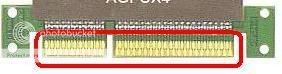
To rectify, take a eraser and rub along the gold fingers. Use compressed air and blow the slots clear of dirt/dust. Replace and make sure the contacts are not loose.
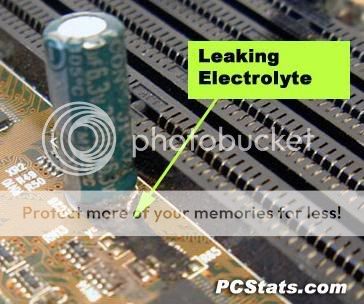
2. Check that your Capacitors not bloated/leaking. Technicians call this big nose. If it is get it changed/replace or it's time to get it changed.

4. Clear your CMOS. Locate the jumper by RTFM or remove the CMOS battery for a couple of minutes.

other forumers, please feel free to contribute. Once this thred gains momentum, it'll be unpinned and tagged official.
Do you know which component supply power to processor??1. When you are not sure what the problem is, remove everything from the chasis. Set up your PC with minimum configuration, that is, Mobo (motherboard), CPU, RAM and GC and see if it POST and boots. If it doesn't then, beg, borrow or steal, try to swap these components with working ones (make sure it's working and it's compatible as well). See which component fails.
2. If it POST properly then slowly add your other components (Hard Drive, Optical Drive, Modem, etc) and repeat process 1 for each. Don't forget that the connectors (IDE cables, SATA cables, etc) should be swapped and tested too as any regular components).
If you press the power button and nothing happens (no lights, no sound, no fans, etc.) then this issue is not a NO POST but is an power related issue. If you are uncertain if the computer is turning on or not, this can be easily checked by locating any fans in the computer or visible from the outside of the computer. If these fans are spinning, the computer is receiving power and this document may not apply to your issue. Some motherboards also have a LED light that indicates that there is power coming from the PSU (Power Supply Unit).
1. Connections connected properly - check you are plugged in lah >_>
Verify that the power connection is connected properly to the wall and the back of the computer. If you have a power strip (surge protector) or switch used to turn everything on at once, temporarily disconnect the computer from that switch and connect that cable directly to the wall. This will help verify that the strip or switch is not bad. Verify that the outlet works by connecting a different device like a TV, Radio to it.
2. New hardware
If additional hardware has been recently added to the computer it is recommend that you temporarily disconnect that device or devices from the computer to verify they are not preventing your computer from turning on.
3. Bad power cable
Verify that the cable supplying your computer is not bad or damaged by using another power cable. Borrow the cable from your CRT monitor or even your electric cooker/kettle.
4. PSU, power button, and/or power board or inverter
If problem still persists then try to test with another PSU. beg, borrow or steal too. Check that your power button to mobo (motherboard) is not faulty (you may swap it with the reset button).
Troubleshooting POST Problems [New Assembly]
1. Check that no part of your motherboard is touching the casing bare metal or motherboard tray. It is a good idea to layer a piece of foam/sponge between the motherboard and the casing to prevent any contact. You can also opt to layer duct tape for the screw holders/motherboard mount brackets. This is to prevent a short circuit which can lead to anything from the PC not switching on to restart or even damaged mobo.
2. Refer to elimination process steps above.
Troubleshooting POST Problems ["old" pc] - "old" here refers to a PC that is up and running before as opposed to one that is currently being assembled.
1. Did your computer beep at you when you tried to start it?
almost all computers run a series of diagnostic tests called a "Power On Self Test" ( POST) when they start up. Only after POST is passed does the computer try to load the OS (operating system). When the POST is successfully completed, the computer beeps once.
If the computer beeps more than once, or if it doesn't beep at all, it means POST has failed and never even got to the OS loading. That indicates a problem with the hardware, or occasionally the BIOS . Multiple beeps means that the computer is trying to tell you what's wrong. Each BIOS vendor (such as AMI and VIA) has their own "Beep Codes", but here are some common examples of what the codes mean. There are some common beeps though,
a. one long continious beep - RAM is loose/lost contact.
b. multiple beeps with pause in betwen - GC (graphics card) is loose.
p.s-some of the newer computers have LED's that light up that indicate the error or have a sound file to indicate the error. RTFM (read the freaking manual - yes. your mobo manual!) !
To rectify, take a eraser and rub along the gold fingers. Use compressed air and blow the slots clear of dirt/dust. Replace and make sure the contacts are not loose.
2. Check that your Capacitors not bloated/leaking. Technicians call this big nose. If it is get it changed/replace or it's time to get it changed.
4. Clear your CMOS. Locate the jumper by RTFM or remove the CMOS battery for a couple of minutes.
other forumers, please feel free to contribute. Once this thred gains momentum, it'll be unpinned and tagged official.
its mobo or psu ?
This post has been edited by tcboy: Aug 8 2007, 05:05 PM
 Quote
Quote








 0.0278sec
 1.31
1.31
 6 queries
 GZIP Disabled