Outline ·
[ Standard ] ·
Linear+
[FAQ] PC auto restart/Blue Screen (BSOD), All questions go here please.
|
lighter
|
 Aug 14 2008, 09:06 PM Aug 14 2008, 09:06 PM
|

|
QUOTE(jackal1950 @ Aug 13 2008, 04:35 PM) I got this BSOD error saying IRQL_NOT_LESS_OR_EQUAL Product Windows Problem Shut down unexpectedly Date 13/8/2008 4:13 PM Status Not Reported Problem signature Problem Event Name: BlueScreen OS Version: 6.0.6001.2.1.0.256.1 Locale ID: 17417 Files that help describe the problem (some files may no longer be available) Mini081308-01.dmp sysdata.xml Version.txt Extra information about the problem BCCode: a BCP1: 00000054 BCP2: 0000001B BCP3: 00000001 BCP4: 821D6FE9 OS Version: 6_0_6001 Service Pack: 1_0 Product: 256_1 Windows Server 2008? Did you plug in any external HDD or any other external storage? What i found in your dump file it was caused by RTSTOR.SYS. I've google around found this file is related to Storage driver. |
|
|
|
|
|
The Silent Killer
|
Aug 14 2008, 11:24 PM
|
|
|
may i know wats this?
[attachmentid=558900]
happens when i insert more than 1 piece of ram onto my mobo..
|
|
|
|
|
|
lighter
|
Aug 15 2008, 02:37 AM
|
|
|
QUOTE(The Silent Killer @ Aug 14 2008, 11:24 PM) may i know wats this? [attachmentid=558900] happens when i insert more than 1 piece of ram onto my mobo.. dude.. can you please provide your full computer specs? what ram did you insert? |
|
|
|
|
|
SUSmcsiaw
|
Aug 15 2008, 06:34 AM
|
Getting Started

|
helo, i having this problem:
'the computer has rebooted from a bugcheck. The bugcheck was: 0x100000d1 (0x00000000, 0x00000002, 0x00000000, 0x00000000). '
so i do the analysis:
*******************************************************************************
* *
* Bugcheck Analysis *
* *
*******************************************************************************
Use !analyze -v to get detailed debugging information.
BugCheck 100000D1, {0, 2, 0, 0}
***** Kernel symbols are WRONG. Please fix symbols to do analysis.
*** WARNING: Unable to verify timestamp for tcpip.sys
*** ERROR: Module load completed but symbols could not be loaded for tcpip.sys
Unable to load image wanarp.sys, Win32 error 0n2
*** WARNING: Unable to verify timestamp for wanarp.sys
*** ERROR: Module load completed but symbols could not be loaded for wanarp.sys
*************************************************************************
*** ***
*** ***
*** Your debugger is not using the correct symbols ***
*** ***
*** In order for this command to work properly, your symbol path ***
*** must point to .pdb files that have full type information. ***
*** ***
*** Certain .pdb files (such as the public OS symbols) do not ***
*** contain the required information. Contact the group that ***
*** provided you with these symbols if you need this command to ***
*** work. ***
*** ***
*** Type referenced: nt!_KPRCB ***
*** ***
*************************************************************************
*************************************************************************
*** ***
*** ***
*** Your debugger is not using the correct symbols ***
*** ***
*** In order for this command to work properly, your symbol path ***
*** must point to .pdb files that have full type information. ***
*** ***
*** Certain .pdb files (such as the public OS symbols) do not ***
*** contain the required information. Contact the group that ***
*** provided you with these symbols if you need this command to ***
*** work. ***
*** ***
*** Type referenced: nt!_KPRCB ***
*** ***
*************************************************************************
*********************************************************************
* Symbols can not be loaded because symbol path is not initialized. *
* *
* The Symbol Path can be set by: *
* using the _NT_SYMBOL_PATH environment variable. *
* using the -y <symbol_path> argument when starting the debugger. *
* using .sympath and .sympath+ *
*********************************************************************
*********************************************************************
* Symbols can not be loaded because symbol path is not initialized. *
* *
* The Symbol Path can be set by: *
* using the _NT_SYMBOL_PATH environment variable. *
* using the -y <symbol_path> argument when starting the debugger. *
* using .sympath and .sympath+ *
*********************************************************************
Probably caused by : wanarp.sys ( wanarp+5232 )
i disable the wanarp.sys, but the programme still continue
|
|
|
|
|
|
The Silent Killer
|
Aug 15 2008, 05:39 PM
|
|
|
QUOTE(lighter @ Aug 15 2008, 02:37 AM) dude.. can you please provide your full computer specs? what ram did you insert? P4 2.8Ghz HT Gigabyte GIPE1000-G 80GB maxtor HDD radeon 9250 128mb no matter wat ram i try...if more than 1 this prob will occur |
|
|
|
|
|
lighter
|
Aug 16 2008, 02:06 AM
|
|
|
QUOTE(The Silent Killer @ Aug 15 2008, 05:39 PM) P4 2.8Ghz HT Gigabyte GIPE1000-G 80GB maxtor HDD radeon 9250 128mb no matter wat ram i try...if more than 1 this prob will occur previously my ex-company about 50 units of Acer desktops having the same problem as well.. after few months troubleshooting i found out it was caused by motherboard integrated graphic card driver issue.. if i install a fresh windows without GC driver i can run my windows smoothly without any problem. In order to run the system properly with GC driver installed i have to unplug 1 of the RAM stick.. haha.. I've tried everything i can.. updating bios, install latest driver, reset CMOS blablabla... so for your case.. i suggest you to update your BIOS first.. |
|
|
|
|
|
jackal1950
|
Aug 17 2008, 01:33 AM
|
|
|
QUOTE(lighter @ Aug 14 2008, 09:06 PM) Windows Server 2008? Did you plug in any external HDD or any other external storage? What i found in your dump file it was caused by RTSTOR.SYS. I've google around found this file is related to Storage driver. actually the problem occurred when i try to wake up my laptop from sleep mode. it is a COMPAQ CQ50-104AU laptop. 100% BSOD even without any usb devices plug in. it is running windows vista sp1 This post has been edited by jackal1950: Aug 17 2008, 01:34 AM |
|
|
|
|
|
Pmc
|
Aug 18 2008, 04:49 PM
|
|
|
 Erm, i get this error when i was playing game, only this specific game will trigger this error.. It's Ragnarok online 2 and my computer spec is as follows xp service pack 2 p4 2.8 ghz 1 gb RAM nvidia 7300 GT Only happened when i play this game tho.. Anyone knows why? after the error i restart computer then it's fine again..  This post has been edited by Pmc: Aug 18 2008, 04:50 PM This post has been edited by Pmc: Aug 18 2008, 04:50 PM |
|
|
|
|
|
jackal1950
|
Aug 19 2008, 04:31 PM
|
|
|
QUOTE(Pmc @ Aug 18 2008, 04:49 PM) Erm, i get this error when i was playing game, only this specific game will trigger this error.. It's Ragnarok online 2 and my computer spec is as follows xp service pack 2 p4 2.8 ghz 1 gb RAM nvidia 7300 GT Only happened when i play this game tho.. Anyone knows why? after the error i restart computer then it's fine again.. seems like your driver having problem. please update your nvidia driver, network card driver and motherboard chipset driver. download those driver from original manufacturer. like nvidia is www.nvidia.com like intel motherboard then chipset driver is from www.intel.com network chipset from broadcom then download from www.broadcom.com normally those brand like gigabyte or asus motherboard CD has old driver and their website driver seems to be old too. |
|
|
|
|
|
Pmc
|
Aug 19 2008, 08:35 PM
|
|
|
QUOTE(jackal1950 @ Aug 19 2008, 05:31 PM) seems like your driver having problem. please update your nvidia driver, network card driver and motherboard chipset driver. download those driver from original manufacturer. like nvidia is www.nvidia.com like intel motherboard then chipset driver is from www.intel.com network chipset from broadcom then download from www.broadcom.com normally those brand like gigabyte or asus motherboard CD has old driver and their website driver seems to be old too. okie i'll try.. |
|
|
|
|
|
wen9x88
|
Aug 22 2008, 11:36 AM
|
|
|
can i ask why my friend laptop hang when logon to windows?
|
|
|
|
|
|
Nekochan
|
Aug 24 2008, 11:40 PM
|
|
|
My laptop just restarted on its own and I will like to know what is wrong with it. I attached a minidump file here. I hope someone can help me. http://www.sendspace.com/file/s51y4r |
|
|
|
|
|
lordnirrajim
|
Aug 29 2008, 04:26 PM
|
New Member
|
Hallo all sifu in LY.net. I have a problem with my pc here. Cannot acces win xp and keep restart. Tried to boot using cd, a stop error appears. Below is the stop error:
A problem has been detected and windows has been shut down to prevent damage to your computer.
If this the first time you've seen this stop error screen, restart our computer. If this screen appears again, follow these steps.
Check for viruses on your computer. Remove any newly installed hard drives or hard drive controllers. Check your hard drive to make sure it is properly configured and terminated. Run CHKDSK /f to check for hard drive corruption and then restart your computer.
Technical information:
*** STOP: 0x0000007B (0xF78D2524, 0xc0000034, 0x0000000, 0x0000000)
Please help me since I'm a newby in this IT thingy. My PC was a ACER ASPIRE M1641. Bought directly from ACER. All CD that given is the original one. Thanx in advance.
|
|
|
|
|
|
rayzel
|
Aug 31 2008, 11:29 PM
|
|
|
Hi all,
I keep on getting BSOD after upgrading from my proc from AM2 X2 3800 to AM2 X2 6000+.
The message displayed was:
IRQL_NOT_LESS_OR_EQUAL...
Anyway to fix this?
Thanks man
|
|
|
|
|
|
SUSmcsiaw
|
Sep 4 2008, 09:15 PM
|
Getting Started
|
after 4mat, i solve the blue screen problem...
|
|
|
|
|
|
dan137
|
Sep 4 2008, 10:11 PM
|
|
|
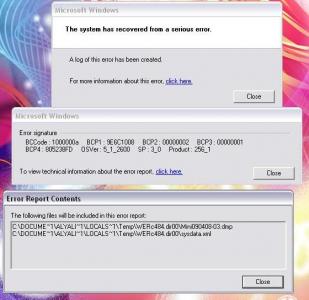
i need sifus help.. 1st i dunno this is the rite place to ask or not.. my cousin computer always auto restart then after boot in windows, error "The System has recovered from a serious error" It occur 3 times b4 i post this... Sys Spec are: AMD X2 5000+ Gigabyte GA-MA69G-S3H 1 GB Kingston Value RAM WD 320GB 450Watt iCute PSU LG DVD-RW optical drive i've just reformat, but the problem still persist..  This post has been edited by dan137: Sep 4 2008, 10:13 PM This post has been edited by dan137: Sep 4 2008, 10:13 PM |
|
|
|
|
|
tracyjz
|
Sep 4 2008, 10:40 PM
|
|
|
the error msg or screen ?
|
|
|
|
|
|
lighter
|
Sep 5 2008, 12:00 AM
|
|
|
QUOTE(lordnirrajim @ Aug 29 2008, 04:26 PM) Hallo all sifu in LY.net. I have a problem with my pc here. Cannot acces win xp and keep restart. Tried to boot using cd, a stop error appears. Below is the stop error: A problem has been detected and windows has been shut down to prevent damage to your computer. If this the first time you've seen this stop error screen, restart our computer. If this screen appears again, follow these steps. Check for viruses on your computer. Remove any newly installed hard drives or hard drive controllers. Check your hard drive to make sure it is properly configured and terminated. Run CHKDSK /f to check for hard drive corruption and then restart your computer. Technical information: *** STOP: 0x0000007B (0xF78D2524, 0xc0000034, 0x0000000, 0x0000000) Please help me since I'm a newby in this IT thingy. My PC was a ACER ASPIRE M1641. Bought directly from ACER. All CD that given is the original one. Thanx in advance. STOP: 0x0000007B INACCESSIBLE_BOOT_DEVICE This Stop error indicates that Windows XP has lost access to the system partition or boot volume during the startup process. Installing incorrect device drivers when installing or upgrading storage adapter hardware typically causes this Stop error. This error could also indicate a possible virus infection. I already mentioned on my first post in this thread. |
|
|
|
|





 Quote
Quote











 0.0387sec
 0.56
0.56
 6 queries
 GZIP Disabled