Outline ·
[ Standard ] ·
Linear+
[FAQ] PC auto restart/Blue Screen (BSOD), All questions go here please.
|
dan137
|
 Sep 4 2008, 10:11 PM Sep 4 2008, 10:11 PM
|

|
i need sifus help.. 1st i dunno this is the rite place to ask or not.. my cousin computer always auto restart then after boot in windows, error "The System has recovered from a serious error" It occur 3 times b4 i post this... Sys Spec are: AMD X2 5000+ Gigabyte GA-MA69G-S3H 1 GB Kingston Value RAM WD 320GB 450Watt iCute PSU LG DVD-RW optical drive i've just reformat, but the problem still persist..  This post has been edited by dan137: Sep 4 2008, 10:13 PM This post has been edited by dan137: Sep 4 2008, 10:13 PM |
|
|
|
|
|
dan137
|
Sep 5 2008, 03:00 PM
|
|
|
cousin's computer just got BSOD.. Technical information: *** STOP: 0x00000050 (0xDD08CA37, 0x00000008, 0xDD08CA37) i attached the minidump.zip
Added on Aug 5 2008, 03:28pmrunning on Microsoft Windows XP Pro SP3 This post has been edited by dan137: Sep 5 2008, 03:30 PM Attached File(s) Minidump.zip
 ( 82.14k )
Number of downloads: 17 |
|
|
|
|
|
dan137
|
Sep 5 2008, 09:24 PM
|
|
|
wow!! can u tell me what should i do next?
should i uninstall SP3 and reinstall it?
this problem also happened b4 i used SP3 which is b4 i reformat this comp..
|
|
|
|
|
|
dan137
|
Sep 6 2008, 11:39 PM
|
|
|
this problem occureed b4 i update to SP3, which is when i running on XP PRO SP2...
thought after update to SP3 it will ok...
but it still persist...i even reformat b4 update to SP3
|
|
|
|
|
|
dan137
|
Sep 7 2008, 12:19 AM
|
|
|
QUOTE(eclectice @ Sep 6 2008, 11:48 PM) Try to attack other possible vectors which do appear in your attached crash dumps: which version are you using? Is there any documented issue with service packs? 1. Windows Media Player 2. Internet Explorer Other than that, are you using any third-party codec pack? Try to remove the pack and use the default codecs provided by Windows. The above exercise is to isolate the problem. See any error coming or not. ok yesterday, i reformat my comp once again..running windows media player ver 11 & Internet Explorer ver 7 and SP3. with no 3rd-party codec pack. no MoBo unility program (EasyTune5 Pro). Everything running fine. this morning, when i install MoBo utility program (EasyTune5 Pro), BSOD STOP: 0x0000000A occured. when i uninstall, everything fine. i'm going to install 3rd party codec, and see if BSOD occured or not... will let u know then.. |
|
|
|
|
|
dan137
|
Sep 8 2008, 12:59 AM
|
|
|
so far my system running find...no BSOD occur..
even after install 3rd-party codec...
EasyTune5 Pro triggers BSOD..not the 3rd party codec..
thanks to all who help..
|
|
|
|
|
|
dan137
|
Apr 29 2010, 02:04 PM
|
|
|
I have this problem, laptop Aspire 5020 (Win XP Pro). The problem is reboot loop. i can see the blue screen before the laptop reboot.
The thing is, i cant enter save mood in any way, using recovery console to restore to factory setting also not working.
I tried to install Win XP Pro in the same partition without deleting the original partition, the reboot loop still occured.
Is the reboot loop problem really rely on the OS? I've tried to change the RAM and switched the RAM slot using the different RAM and different slot. Or the HDD is going to die soon?
|
|
|
|
|
|
dan137
|
May 17 2012, 01:47 AM
|
|
|
need help. formatted the HDD and changed RAM, still get BSOD. Its a Toshiba L510
Minidump.zip ( 253.95k )
Number of downloads: 5 |
|
|
|
|
|
dan137
|
May 17 2012, 12:06 PM
|
|
|
changed HDD also BSOD. attached is minidump after changed HDD and fresh window 7 installed
Minidump.zip ( 113.54k )
Number of downloads: 9 |
|
|
|
|
|
dan137
|
May 30 2012, 04:46 PM
|
|
|
QUOTE(super macgyver @ May 30 2012, 11:44 AM) may i ask did ur pc installed with avira at the moment? Nope. no Apps installed. Just fresh OS Win7 |
|
|
|
|
|
dan137
|
Jun 1 2012, 10:11 PM
|
|
|
QUOTE(super macgyver @ May 31 2012, 02:44 PM) i just dl ur first minidump zip, i think u really need to do one round of scandisk (www.hddscan.com) before u try swap ur ram.  thanks for your reply. I myself already tired of troubleshooting the problem. Sent it to my friend who has the proper tools in motherboard repairing. I changed the controller chip. Problem solved now. |
|
|
|
|
|
dan137
|
Jun 3 2012, 06:02 PM
|
|
|
QUOTE(super macgyver @ Jun 2 2012, 06:33 PM) what kind of controller chip u have swap ar? ur mainboard if still got warranty, u can just send it to rma actually.  can't remember but is got something to do with usb port controller. Its a 4 years old laptop. no more warranty.  |
|
|
|
|
|
dan137
|
May 27 2013, 11:56 PM
|
|
|
BSOD occurred when laptop on idle mode. works fine when in used. I dont know how to troubleshoot anymore. Attached is the minidump. Hope somebody can point me the correct direction to fix this problem. Lenovo Y580 running on Window7
Minidump.zip ( 1.29mb )
Number of downloads: 14 |
|
|
|
|




 Quote
Quote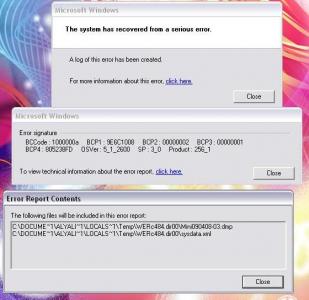


 0.0205sec
 0.64
0.64
 7 queries
 GZIP Disabled