Welcome Guest ( Log In | Register )

9 Pages « < 2 3 4 5 6 > » Bottom

Outline · [ Standard ] · Linear+

 [FAQ] PC auto restart/Blue Screen (BSOD), All questions go here please.

views
     
francischuahcw
post Oct 23 2008, 12:51 PM

Retired. Do Not Disturb
*******
Senior Member
2,152 posts

Joined: Feb 2006
QUOTE(davidwee1987 @ Oct 22 2008, 03:02 AM)
HI... regarding my problem.. u ask me to give u my motherboard model, its msi p45 Diamond. bios was 1.0
i have updated it to 1.4 the latest.
i get still get a bsod but different error.
i attached my minidump.
Your help is very much appreciated
*
David,
Did you refer the ati link i give you?
http://support.ati.com/ics/support/default.asp?deptID=894

Please go through what is mentioned in the link above.
You have to run a system test yourself to see if your mobo, bios is compatible with your graphic card.
That is what i can help you at this moment.
Other than that you have to follow the instruction from ATI website that i give you above.
Refer this topic

737-26591: Blue Screen error (BSoD) referencing ATIKMDAG.SYS in Microsoft Windows Vista

Thanks


Added on October 23, 2008, 1:20 pm
QUOTE(anarchy04 @ Oct 23 2008, 01:56 AM)
hello
im having a problem that my pc will autorestart after 3-5 minutes

im using asus p5p800 mobo
ati 9550 graphic card
corsair 3200 ddr

here is my minidump file
really hope u can help me
thnks a lot

[attachmentid=639928]
*
Hi there,
You have variety of driver ranging from 2001 to 2008.
There might be some fault/conflict in your driver especially one of the bsod pointed specifically to your ATI GC driver and another one is your system driver atapi.sys
I could not identified exactly what's the actual problem you are having with your system.
Are you previously using NVIDIA GC? I hope you can uninstall fully the previous driver to avoid conflict with your current driver.
Also, please update your ATI driver and see if problem persist.

Can you tell me what other thing you have done to your system previously that on yesterday you have 3 BSOD? you install any application or driver?

This post has been edited by francischuahcw: Oct 23 2008, 01:20 PM
francischuahcw
post Oct 24 2008, 01:59 PM

Retired. Do Not Disturb
*******
Senior Member
2,152 posts

Joined: Feb 2006
i will help you debug your minidump file soon,
At the mean time please run scandisk for error of your harddisk. Afraid that your hdd might have bad sector.

At the mean time, If possible please clean up your RAM too.
Detailed information i will let you know soon.

By the way, please upload the whole folder here if possible. if those two you upload just now is new one, then is ok.

Thanks
Francis

This post has been edited by francischuahcw: Oct 26 2008, 07:07 PM
francischuahcw
post Oct 24 2008, 11:15 PM

Retired. Do Not Disturb
*******
Senior Member
2,152 posts

Joined: Feb 2006
QUOTE(Kyoukei @ Oct 24 2008, 04:42 PM)
I just encounter BSOD with my old PC.

Help me see what wrong with it..  Thank you.

Another BSOD encounter to my new PC.

Please help.. thanks.
*
I am not sure which one is your new pc and which one is your old pc.
Therefore i assume that the pc with SP3 is the new one and with SP2 is the old one.

Your SP3 pc is having some conflict with you GCard. Please check your driver or your hardware for possible failure.
QUOTE
Cause
Bug check 0x50 usually occurs after the installation of faulty hardware or in the event of failure of installed hardware (usually related to defective RAM, be it main memory, L2 RAM cache, or video RAM).

Another common cause is the installation of a faulty system service.

Antivirus software can also trigger this error, as can a corrupted NTFS volume.
As for your SP2 pc, you are having some hardware failure.
(Bugcheck 0*8E with IP misaligned)
Mind to let me know what you are doing to your pc at the time the system crash? Did you plug or unplug any external hardware such as USB pendrive or HDD?
Anyway, if you did nothing when system crash, i would suggest you to run +Memtest86+ for your RAM and scandisk chkdsk for your hdd for error.
You can try to clean your RAM and see if problem persist.

Other Suggestion
1. Check the temperature of the CPU and make sure that it is not overheat (ie temperature < 60C)
2. Reseat the memory stick to another memory slot
3. Downclock the ram
4. Clean the dust inside the computer case
5. Make sure that the ram is compatible to the motherboard
If it still crashes, diagnostic which memory stick is faulty
1. Take out one memory stick. If windows does not crash, the removed memory stick is faulty.
2. If you have only one memory stick, replace the ram

Thanks


Added on October 24, 2008, 11:23 pm
QUOTE(anarchy04 @ Oct 24 2008, 01:05 AM)
i've checked my graphic card and found out my gpu's fan is not moving due to dusty blade
i've took out the fan, cleaned it and then reattached the fan. After that, the fan is smoothly running
but the BSOD still occur with

IRQL_IS_NOT_LESS_OR_EQUAL message

i've downloaded and installed the latest ati driver
is there any possibility that my GC is broken?

you also mention that conflict/faulty with atapi.sys
i've already removed my optical drive
maybe faulty with my hard drive?

for your info, i'm not do any recent modification to my hardware or install application
the BSOD is happen after 3-5minutes usage.repeatedly...

this is my latest minidump file
i pick two only

[attachmentid=641442]
*
The latest 2 minidump indicates that the problem comes from your RAM.
Bugcheck: 0X8E & 0xA all pointed to your RAM.
Try clean up your RAM and run +memtest86+ for your memory or you can manually clean it up using a rubber.
Make sure that your system have a good airflow and temperature not too high.

Thanks

This post has been edited by francischuahcw: Oct 24 2008, 11:23 PM
francischuahcw
post Oct 26 2008, 07:05 PM

Retired. Do Not Disturb
*******
Senior Member
2,152 posts

Joined: Feb 2006
Hi there anarchy,
nice to hear that.
It might be your RAM slot faulty.
If you still having problem with your application such as hang,
You can run scandisk to scan for harddisk error.

Using Window CD, enter Window Recovery Console and type chkdsk/r. Scan disk will scan your system.

Next thing you can do is have a look at your EventViewer.
Click Start, then Run and type eventvwr
Refer at System Log and Application Log for error.

Or you can post the Log here and i will help you to look over.
But please run scandisk 1st.

Thanks

This post has been edited by francischuahcw: Oct 26 2008, 07:08 PM
francischuahcw
post Oct 27 2008, 12:19 AM

Retired. Do Not Disturb
*******
Senior Member
2,152 posts

Joined: Feb 2006
QUOTE(zAciX @ Oct 26 2008, 10:27 PM)
erm...
i having PC auto-restart problem too....
its auto-restart at certain time, in few times keep on too.
my PC is originally untick the 'auto restart'

im a PC noob,
im dont really understand the complicated stuff which u all had posted,
anyone can show me the way to solve it?
(in easy direction way)

pls...

* my frenz suggested me to reformat PC,
   izit its is the most good choice?
*
Alright,
you already mentioned that your system is original untick the "auto restart"
Change your "write debugging information" to Small Dump 64kb

Check at your C:\Windows\minidump and the minidump folder is available,
zipped and upload the whole folder here.
I will have a look on it to see what is your problem.
It might not be 100% precise, but it at least show some symptom.
Thanks


Added on October 27, 2008, 12:57 am
QUOTE(anarchy04 @ Oct 26 2008, 11:18 PM)
i entered window rcovery console and it ask me to choose window installation i like to log onto and then admin password.
after that the monitor show C:\WINDOWS>
i type chkdsk/r and the system replied with
The command is not recognized Type HELP for a list bla bla bla
i type chksdsk and system replied with:
Volume created bla bla bla
The volume serial number is ec75-d621

The volume appears to be in good condition and was not checked
Use /p if u want to check anyway

then i type chkdsk/p but system said cannot recognized also

ive already scandisk all partition using windows..is it differ with recovery console?
i restart and open yahoo messenger,firefox and jetaudio
after a while,firefox crash and then bsod with MEMORY_MANAGEMENT message
this is my system log,application log and minidump
my cpu temp is 44'C to 60'C

i think my ram both broken...haiyaa....


[attachmentid=645626]
*
hi anarchy,
looking through your minidump the error shows about MEMORY_MANAGEMENT and i am sure that you are having a faulty ram. At the mean time looking at your system log and application log, one of your system file is not running.
the file name is ssport.sys. i not sure what it is. Some google search here told me it is Samsung Driver while other says it has something to do with Serial Solution driver by Brain Boxes Limited.

Since you mentioned that there is no error with your RAM,
try do this.
Move your paging file from C:\ to D:\

You can set it by right click at My Computer>Advance Tab>Performance Setting.
Under the Advance Tab in Performance Setting
Look for Virtual Memory then click Change
Then click on other drive and change the paging file to other drive.
Hopefully, this help.

Thanks


This post has been edited by francischuahcw: Oct 27 2008, 12:57 AM
francischuahcw
post Oct 27 2008, 11:23 AM

Retired. Do Not Disturb
*******
Senior Member
2,152 posts

Joined: Feb 2006
QUOTE(zAciX @ Oct 27 2008, 01:46 AM)
erm...
could it possible tat,
ntg inside ?!?!
*
If you just change your write debugging information to 64KB,
you have to wait for next BSOD then only your crash will be captured.
By the way,
If you encounter only restart and no BSOD, probably you are having power failure or overheating issue.
Please have a look at your Event Viewer for system error.
It might be some of the services halted and your system restart.

Thanks


Added on October 28, 2008, 1:03 am
QUOTE(Fuji-San88 @ Oct 27 2008, 09:07 AM)
hi..thanks for the help last day...
my pc is ok now...
its all because the ATI driver that i installed...
just replace the driver and everything turns ok.. rclxm9.gif

thanks to francischuahcw for helping... rclxms.gif  thumbup.gif
*
You are most welcome.
My pleasure to help and to learn.

Thanks
Francis

This post has been edited by francischuahcw: Oct 28 2008, 01:03 AM
francischuahcw
post Oct 28 2008, 01:38 AM

Retired. Do Not Disturb
*******
Senior Member
2,152 posts

Joined: Feb 2006
Hi there anarchy,
Thanks for the update. So now you recognize which is the faulty ram?
It might be the slot too.
Put the ram aside first and let the system runs with the ram that you think is good. Monitor if it crash.
Then update here.

I will be around to see your reply tomorrow.
Thanks
francischuahcw
post Oct 28 2008, 06:00 PM

Retired. Do Not Disturb
*******
Senior Member
2,152 posts

Joined: Feb 2006
If that is the case,
I can assure you you are having problem with your processor.
Send it for checkup is advisable since you cant even boot your pc now.
Dont worry, as long as harddisk not damage,
your data still safe.

Thanks
francischuahcw
post Oct 30 2008, 12:59 AM

Retired. Do Not Disturb
*******
Senior Member
2,152 posts

Joined: Feb 2006
Lycosa.sys

Are you using Razer Tarantula Keyboard Driver?
Your keyboard driver conflict with your operating system.
francischuahcw
post Oct 30 2008, 10:17 AM

Retired. Do Not Disturb
*******
Senior Member
2,152 posts

Joined: Feb 2006
QUOTE(doom89757 @ Oct 30 2008, 06:06 AM)
Razer Lycosa Keyboard driver to be exact, so I should uninstall the driver for it now??? rclxub.gif , haiz wat is the problem with my PC doh.gif , pls enlighten me Francis
So RAM no problem ar???
*
The Error 0X8E is caused by hardware incompatibility and faulty driver/system driver. Bad RAM can be part of this issue but you just mentioned that you have changed your RAM, i will exclude the possibility for now.

Try to update your driver from Razer website. Looks for the latest driver and make sure that it is compatible with the current OS platform that you are using.
If problem persist, then we check further.

Vice versa, if you just update the driver, remove it. Use back the original one from the CD.

Thanks
francischuahcw
post Nov 6 2008, 01:49 AM

Retired. Do Not Disturb
*******
Senior Member
2,152 posts

Joined: Feb 2006
Send to them for troubleshooting wont cost you much.
Unless you really need to change all the hardware.
francischuahcw
post Nov 6 2008, 11:56 PM

Retired. Do Not Disturb
*******
Senior Member
2,152 posts

Joined: Feb 2006
Is it possible for you to enter window now?
If possible,
please do the following

Go to My Computer and locate C:\Windows\Minidump or C:\Minidump. Once you have the minidump folder, please zipped the whole folder and upload it here (using add attachement function) or other web hosting page mentioned below. Please provide the link to download your file.
By the way, bugcheck code 0X7E SYSTEM_THREAD_EXCEPTION_NOT_HANDLED

Exception code: 0xC0000005: STATUS_ACCESS_VIOLATION indicates a memory access violation occurred.


QUOTE
But the weird thing is, i can go into the safe mode. does it kind of meaning that it was "some" driver which crash it? (since safe mode load less driver and services)


You are correct. That's why i need your minidump file for analysis. Will have a look on which driver is actually crash.

Thanks

This post has been edited by francischuahcw: Nov 6 2008, 11:57 PM
francischuahcw
post Nov 7 2008, 12:30 AM

Retired. Do Not Disturb
*******
Senior Member
2,152 posts

Joined: Feb 2006
Its ok,
Please do the below.

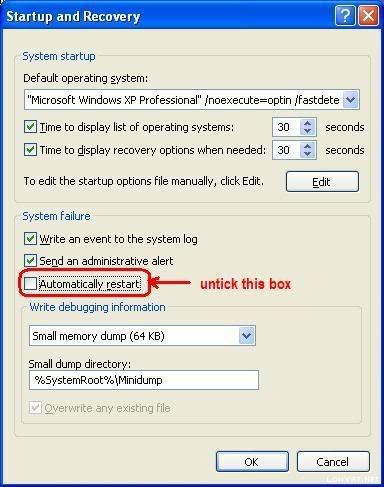
(Window XP)
  • Right click at My Computer
  • Go to Properties
  • Look at Advanced tab then go for Startup and Recovery
  • Look at Settings and untick Automatic Restart
  • Make sure that write debugging information is Small Memory Dump (64kb)

user posted image

The next time around, the system crash, a minidump file will be captured. Upload it whenever it is available.

Thanks
francischuahcw
post Nov 7 2008, 11:21 AM

Retired. Do Not Disturb
*******
Senior Member
2,152 posts

Joined: Feb 2006
Bug Check 0xA5: ACPI_BIOS_ERROR
Parameter 1 equals 0x11, the system could not enter ACPI mode

You are not having problem with your RAM, you are having problem with your ACPI.This bug check indicates that the Advanced Configuration and Power Interface (ACPI) BIOS of the computer is not fully compliant with the ACPI specification.

You can try reset your BIOS by taking out your CMOS battery. if that does not help, you need to update your BIOS.


francischuahcw
post Nov 7 2008, 06:36 PM

Retired. Do Not Disturb
*******
Senior Member
2,152 posts

Joined: Feb 2006
QUOTE(nlks @ Nov 7 2008, 02:26 PM)
I had change the configuration as u mentioned..
and restarted the PC for the error to be captured,
however when I go into the safe mode again, I still cant get any minidump file/folder.
I tried to search in my harddisk using the keyword "minidump",
but still cant see it.
May I know what extension this minidump file is using?
anythings else I cant do to get the dump file?
*
The minidump file will only appear when you experience another Blue Screen


Added on November 7, 2008, 6:37 pm
QUOTE(Ahsin1987 @ Nov 7 2008, 06:04 PM)
Help me my system crash ... something like win32-kys bla bla .~~ icon_question.gif

Damn why i can't upload minidump.rar
*
Please use other web hosting page mentioned below. Please provide the link to download your file.

Thanks


This post has been edited by francischuahcw: Nov 7 2008, 06:37 PM
francischuahcw
post Nov 7 2008, 06:55 PM

Retired. Do Not Disturb
*******
Senior Member
2,152 posts

Joined: Feb 2006
Thanks for the file.
I will look into it.
Meanwhile please be patient while i look at your file and analyze it for your.

Note:
It will not be 100% accurate as i will just tell you what error has been captured in the system.

You need to compare the analysis with the actual condition that you are having as you are the one who is infront of your system.
Please provide me with sufficient information of your system behavior when is requested.
Hopefully, we can solve the problem together.
Your cooperation will be highly appreciated.

francischuahcw
post Nov 7 2008, 07:01 PM

Retired. Do Not Disturb
*******
Senior Member
2,152 posts

Joined: Feb 2006
QUOTE(Ahsin1987 @ Nov 7 2008, 06:44 PM)
Hi, here my minidump file .. crash few time just now and something like win32-kys error bla bla ~

Help me check please..
*
Hi there,
Two bugcheck code in your dump file
0X24 NTFS_FILE_SYSTEM
0X8E KERNEL_MODE_EXCEPTION_NOT_HANDLED. Exception code: 0xC0000005: STATUS_ACCESS_VIOLATION indicates that a memory access violation occurred.

Please scan your HDD for bad sector. I suspect your HDD is having bad sector which influence your file paging. Once the page file accessing the bad sector in your HDD as the Virtual Memory, it can result instability and crash.

I would suggest you to use window cd and enter Window Recovery Console then run CHKDSK/r to scan your HDD for bad sector.
Thanks

Next thing you can do is to clear the dust in your PC, make sure you have a good airflow.

Thanks

This post has been edited by francischuahcw: Nov 7 2008, 07:06 PM
francischuahcw
post Nov 7 2008, 07:05 PM

Retired. Do Not Disturb
*******
Senior Member
2,152 posts

Joined: Feb 2006
QUOTE
ya I did purposely restart my PC and let it to go in the blue screen again.. (the blue screen appear everytimes boot up windows normally)
after the error appear, I restart my pc and goes into the safe mode to look for the file.
but unfortunately there is still no minidump file there..
*
That is weird. What is the error code of the crash?
is it similar everytime?
Please tell me what driver did you modified recently?

francischuahcw
post Nov 7 2008, 07:22 PM

Retired. Do Not Disturb
*******
Senior Member
2,152 posts

Joined: Feb 2006
QUOTE(nlks @ Nov 7 2008, 07:16 PM)
no I din intall any driver recently.. actually this is wat happened,
the symptom before is my harddisk sometimes will suddenly not turning..
so i think there is bad sector there,
so i take out the harddisk and format it under another PC..and do chkdsk for all partition also..
as well as installing windows is in another PC.. (I don't know maybe drivers in this PC has been installed..)

after that I place back the harddisk to the original PC..
and it come out this error..
the error is exactly the same everytimes i boot up windows normally..
not sure what happen and no dump file generated...  sad.gif

by the way I found that my network port which come along with motherboard is not working now..
*
Good

QUOTE
by the way I found that my network port which come along with motherboard is not working now..

That should be the sign. Check your BIOS if its enable. If its enable and its not working now, turn it off in BIOS and try boot window in normal mode.
When you boot in Safe Mode. Networking is not running. Therefore you are not crashing.

QUOTE
as well as installing windows is in another PC.. (I don't know maybe drivers in this PC has been installed..)

If driver is preinstalled from other PC, driver incompatibility will lead to crash. error 0X7E is the symptom.
If you wish to run scandisk, i will suggest you to run from Window CD using the Recovery Console/
Instruction is CHKDSK/ r

QUOTE
the symptom before is my harddisk sometimes will suddenly not turning..

Check your PSU cable. Hopefully is power failure and not HDD failure.

Thanks

This post has been edited by francischuahcw: Nov 7 2008, 07:24 PM
francischuahcw
post Nov 7 2008, 07:51 PM

Retired. Do Not Disturb
*******
Senior Member
2,152 posts

Joined: Feb 2006
Try turn it on and see if your system stable again.
Why you disable it?

9 Pages « < 2 3 4 5 6 > » Top
 

Change to:
| Lo-Fi Version
0.0248sec    0.16    7 queries    GZIP Disabled
Time is now: 3rd December 2025 - 03:34 PM