Welcome Guest ( Log In | Register )

Outline · [ Standard ] · Linear+

 [FAQ] PC auto restart/Blue Screen (BSOD), All questions go here please.

views
     
francischuahcw
post Mar 5 2009, 12:18 PM

Retired. Do Not Disturb
*******
Senior Member
2,152 posts

Joined: Feb 2006
QUOTE(mav910623 @ Mar 5 2009, 09:26 AM)
Guys My Frends Pc kept restarting, so i uninstalled the GPU driver and it would turn on ok, but now there is a problem with the was the screen displays, with colour chance and such ... when i try to install any drivers to the GPU the pc will restart help me out here ... many thanks ..

My minidump file attached
*
From the debug i can see that you are using a Nvidia graphic card and you are having problem with your nv4_mini.sys in which it could not be loaded with the system.
Make sure you download the latest driver and the most compatible driver to your friend PC.

If problem keep occuring, it could be the hardware failure itself.
Before installing any new driver, make sure you fully uninstalled all the previous version of driver.
DO NOT let window automatically reinstall the driver after you remove it.

QUOTE
Bug Check 0X7E SYSTEM_THREAD_EXCEPTION_NOT_HANDLED

Hardware incompatibility. Make sure that any new hardware that is installed is listed in the Microsoft Windows Marketplace Tested Products List.

Faulty device driver or system service. A faulty device driver or system service might be responsible for this error. Hardware issues, such as BIOS incompatibilities, memory conflicts, and IRQ conflicts can also generate this error.


» Click to show Spoiler - click again to hide... «

francischuahcw
post Mar 6 2009, 12:39 AM

Retired. Do Not Disturb
*******
Senior Member
2,152 posts

Joined: Feb 2006
QUOTE(mav910623 @ Mar 6 2009, 12:24 AM)
Thx bro ... how do i uninstall the driver fully?? nt just press uninstall frm the device manager there??
*
Yes it is,
But if you have install various version of driver,
You need to make sure you remova all the version.
francischuahcw
post Mar 6 2009, 12:59 PM

Retired. Do Not Disturb
*******
Senior Member
2,152 posts

Joined: Feb 2006
QUOTE(XiuKeong @ Mar 6 2009, 12:57 PM)
Anyone still can solve my problem here?
*
Please upload the latest minidump file..all together.
francischuahcw
post Mar 6 2009, 01:04 PM

Retired. Do Not Disturb
*******
Senior Member
2,152 posts

Joined: Feb 2006
Does he having the problem now?
The dump file is almost a month ago based on the date.

If he is encountering the problem still...
he should have the latest minidump file.

Thanks
francischuahcw
post Mar 7 2009, 08:08 PM

Retired. Do Not Disturb
*******
Senior Member
2,152 posts

Joined: Feb 2006
QUOTE(R a D ! c 4 L @ Mar 7 2009, 08:23 AM)
guys, i need ur help urgently. Im having this BSOD code:

Registry Error blah blah blah...

0x00000051 (0x00000003, 0x00000001, 0x00003000, 0xE1261030)

Its when im trying to format my com, when ever i hit F8 during the agreement screen i get this. Even with the recovery console. Its the same damn thing. =/

So any ideas?
*
Try another window XP cd.
0X51 is all about registry. I wonder how could a registry affect a new installation of your system.
You might having other hardware failure i suspect.

Regards
francischuahcw
post Mar 7 2009, 08:10 PM

Retired. Do Not Disturb
*******
Senior Member
2,152 posts

Joined: Feb 2006
QUOTE(Auriel @ Mar 7 2009, 08:26 AM)
Vista user here.

Recently my laptop went into BSOD whenever I do stuffs like playing some computer games, where it will stress up my display driver as the games are quite high-ended.

It says that my display driver has gotten into an infinite loop.

I wonder anyone here can explain what does infinite loop means and is there any solution to solve this problem.

FYI, my display card is Mobility Radeon HD 2600.
*
Before giving any comment,
Could you update your minidump file here?

Looking for minidump file

Go to My Computer and locate C:\Windows\Minidump or C:\Minidump. Once you have the minidump folder, please zipped the whole folder and upload it here (using add attachement function) or other web hosting page mentioned below. Please provide the link to download your file.


Regards.
francischuahcw
post Mar 9 2009, 10:17 PM

Retired. Do Not Disturb
*******
Senior Member
2,152 posts

Joined: Feb 2006
QUOTE(darth6 @ Mar 9 2009, 02:36 PM)
Hi,i get this BSOD so many times.The error name is

IRQL_NOT_LESS_OR_EQUAL

the BSOD comes occasionally,i'm not sure what makes it happen
i just bought this pc from another forumer,and he says it never happened to him.He also said that he has been using Ubuntu,and now i installed XP,updated to SP3 and all but the error still comes

what should i do ?
*
Hi there
Please upload your minidump folder here and i will help you to debug and let you know the reason for BSOD.

Looking for minidump file

Go to My Computer and locate C:\Windows\Minidump or C:\Minidump. Once you have the minidump folder, please zipped the whole folder and upload it here (using add attachement function) or other web hosting page mentioned below. Please provide the link to download your file.

No minidump file available!!!How??
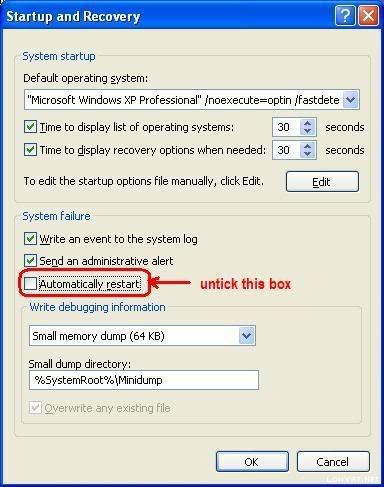
Do the following if you did not find your minidump file

(Window XP)
  • Right click at My Computer
  • Go to Properties
  • Look at Advanced tab then go for Startup and Recovery
  • Look at Settings and untick Automatic Restart
  • Make sure that write debugging information is Small Memory Dump (64kb)

(Window Vista)
  • Right click at My Computer
  • Go to Properties
  • Look at Advanced System Properties tab then go for Startup and Recovery
  • Look at Settings and untick Automatic Restart
  • Make sure that write debugging information is Small Memory Dump (64kb)

user posted image

The next time BSOD occurs, a minidump file will be created.

Further tutorial are available at http://forum.lowyat.net/topic/346230


Thanks

francischuahcw
post Mar 10 2009, 11:29 AM

Retired. Do Not Disturb
*******
Senior Member
2,152 posts

Joined: Feb 2006
QUOTE(yanouchi @ Mar 10 2009, 11:22 AM)
Elop there,

i'm having BSOD from sysdata.xml. Here is my dump file, hope anyone will help me... Keep restart pc everytime i want to click like recyle bin, my computer n etc....

Heres my win debuggers result..kinda newbie in this thing, thanks...

Hi there,
You are having conflicts with your Nvidia driver.
Please remove the current version of your driver from your system and download the latest version for your system.
Please update the information and status after you install a new version of your Nvidia driver.

Thanks and regards.
francischuahcw
post Mar 11 2009, 11:53 AM

Retired. Do Not Disturb
*******
Senior Member
2,152 posts

Joined: Feb 2006
QUOTE(Dickong @ Mar 11 2009, 10:00 AM)
I reinstall the whole window but now it seem to me when booting up become quiet slow, but no more bsod, wonder how long it take to boot window, i mean 1min or more. tq
*
Run a ScanDisk for your HDD.
Bad sector may be the cause for slow boot up.

francischuahcw
post Mar 12 2009, 09:56 PM

Retired. Do Not Disturb
*******
Senior Member
2,152 posts

Joined: Feb 2006
Possible for you to upload your minidump file here for me to assist?
I would suspect problem with your graphic cards.

Looking for minidump file

Go to My Computer and locate C:\Windows\Minidump or C:\Minidump. Once you have the minidump folder, please zipped the whole folder and upload it here (using add attachement function) or other web hosting page mentioned below. Please provide the link to download your file. No minidump file available!!!How??
Do the following if you did not find your minidump file

(Window XP)
  • Right click at My Computer
  • Go to Properties
  • Look at Advanced tab then go for Startup and Recovery
  • Look at Settings and untick Automatic Restart
  • Make sure that write debugging information is Small Memory Dump (64kb)
(Window Vista)
  • Right click at My Computer
  • Go to Properties
  • Look at Advanced System Properties tab then go for Startup and Recovery
  • Look at Settings and untick Automatic Restart
  • Make sure that write debugging information is Small Memory Dump (64kb)
user posted image

The next time BSOD occurs, a minidump file will be created.

Further tutorial are available at http://forum.lowyat.net/topic/346230
francischuahcw
post Mar 13 2009, 12:09 AM

Retired. Do Not Disturb
*******
Senior Member
2,152 posts

Joined: Feb 2006
QUOTE(yanouchi @ Mar 12 2009, 10:21 PM)
Okay heres the attachment minidump. Right now i'm uninstall the nvidia driver, But the problem still there. Please help...thanks
*
A few thing to clarified with me here.
Please let me know are you using a PC or a laptop.

QUOTE
STACK_COMMAND:  kb

FOLLOWUP_IP:
nt!MiMakeSystemAddressValid+94
805fb93a cc              int    3

SYMBOL_STACK_INDEX:  1

SYMBOL_NAME:  nt!MiMakeSystemAddressValid+94

FOLLOWUP_NAME:  MachineOwner

MODULE_NAME: nt

DEBUG_FLR_IMAGE_TIMESTAMP:  4418c079

IMAGE_NAME:  memory_corruption

FAILURE_BUCKET_ID:  0x7a_c0000005_nt!MiMakeSystemAddressValid+94

BUCKET_ID:  0x7a_c0000005_nt!MiMakeSystemAddressValid+94

Followup: MachineOwner
---------
QUOTE
STACK_COMMAND:  kb

FOLLOWUP_IP:
nv4_disp+ac7d1
bf0be7d1 0bbf6a0c8944    or      edi,dword ptr [edi+44890C6Ah]

SYMBOL_STACK_INDEX:  0

SYMBOL_NAME:  nv4_disp+ac7d1

FOLLOWUP_NAME:  MachineOwner

MODULE_NAME: nv4_disp

IMAGE_NAME:  nv4_disp.dll

BUCKET_ID:  WRONG_SYMBOLS

Followup: MachineOwner
QUOTE
STACK_COMMAND:  kb

FOLLOWUP_IP:
nt!ExDeferredFreePool+107
80550ae2 893b            mov    dword ptr [ebx],edi

SYMBOL_STACK_INDEX:  0

SYMBOL_NAME:  nt!ExDeferredFreePool+107

FOLLOWUP_NAME:  Pool_corruption

IMAGE_NAME:  Pool_Corruption

DEBUG_FLR_IMAGE_TIMESTAMP:  0

MODULE_NAME: Pool_Corruption

FAILURE_BUCKET_ID:  0x8E_nt!ExDeferredFreePool+107

BUCKET_ID:  0x8E_nt!ExDeferredFreePool+107

Followup: Pool_corruption
---------
QUOTE
ERROR_CODE: (NTSTATUS) 0xc0000005 - The instruction at "0x%08lx" referenced memory at "0x%08lx". The memory could not be "%s".

BUGCHECK_STR:  0x7a_c0000005

CUSTOMER_CRASH_COUNT:  3

DEFAULT_BUCKET_ID:  INTEL_CPU_MICROCODE_ZERO

PROCESS_NAME:  dwwin.exe
Above stated is the result from some of your minidump file.
From what i can observe here you are having problem on your hardware and it is not your graphic card driver.
Instead i would have suspect you are having a faulty motherboard or a defect ram.

Some of the minidump file show you have a memory corruption and pointed to the INTEL_CPU_MICROCODE_ZERO which is something related to the processor cache memory.

Would suggest you to run memtest86+ to check your RAM for stability.
Please do a few round of full test and let me know the outcome of your RAM test before we troubleshoot further.

Regards.

francischuahcw
post Mar 15 2009, 04:08 PM

Retired. Do Not Disturb
*******
Senior Member
2,152 posts

Joined: Feb 2006
QUOTE(yanouchi @ Mar 13 2009, 09:59 PM)
okay already run the memtest86+, each of ram tested and 4 pcs tested together (3GB), passed all the 8 test. no error. I'm using pc.

i found some solution for problem like this such as clean the dust on gc card, use eraser to rub at metal parts ram but still have that serious error message
*
Most probably is motherboard failure or CPU failure.
Else, did you monitor your system temperature? Is it normal?
francischuahcw
post Mar 15 2009, 04:09 PM

Retired. Do Not Disturb
*******
Senior Member
2,152 posts

Joined: Feb 2006
QUOTE(naq_saviola @ Mar 15 2009, 03:17 PM)
elo..
my pc keep restat with this error,
IRQL_NOT_LESS_OR_EQUAL
wat is problem?how to overcome?
*
Please follow my instruction in post #1368.

Regards
francischuahcw
post Jun 5 2009, 07:34 PM

Retired. Do Not Disturb
*******
Senior Member
2,152 posts

Joined: Feb 2006
QUOTE(AhLun @ Jun 5 2009, 12:28 PM)
I am using Vista Ultimate. It keep on change to the blue screen when i doing some web surfing . I didnt install any new hardware. What is the problem?? Just bought my pc 2 weeks ago.... cry.gif

http://img.photobucket.com/albums/v441/AhL...IMAGE_00023.jpg
http://img.photobucket.com/albums/v441/AhL...IMAGE_00022.jpg
http://img.photobucket.com/albums/v441/AhL...IMAGE_00021.jpg

Stop : 0x0000008E (0xC0000005 , 0x81BEB6EF , 0x815907CC , 0x00000000)
*
Hi there
Please upload your minidump folder here and i will help you to debug and let you know the reason for BSOD.

Looking for minidump file

Go to My Computer and locate C:\Windows\Minidump or C:\Minidump. Once you have the minidump folder, please zipped the whole folder and upload it here (using add attachement function) or other web hosting page mentioned below. Please provide the link to download your file.

No minidump file available!!!How??
Do the following if you did not find your minidump file

(Window XP)
  • Right click at My Computer
  • Go to Properties
  • Look at Advanced tab then go for Startup and Recovery
  • Look at Settings and untick Automatic Restart
  • Make sure that write debugging information is Small Memory Dump (64kb)

(Window Vista)
  • Right click at My Computer
  • Go to Properties
  • Look at Advanced System Properties tab then go for Startup and Recovery
  • Look at Settings and untick Automatic Restart
  • Make sure that write debugging information is Small Memory Dump (64kb)

user posted image

The next time BSOD occurs, a minidump file will be created.

Further tutorial are available at http://forum.lowyat.net/topic/346230

francischuahcw
post Jun 6 2009, 02:04 AM

Retired. Do Not Disturb
*******
Senior Member
2,152 posts

Joined: Feb 2006
Upload the file here using WinZip

Or

You are using Vista. Go to the minidump file, Right click Properties, rename the file to Minidump060509.dmp.
The crucial point is .dmp

If you see the file now. It will list as only FILE. So you need to change the file format

Thanks
francis

This post has been edited by francischuahcw: Jun 6 2009, 02:06 AM

9 Pages « < 7 8 9Top
 

Change to:
| Lo-Fi Version
0.0721sec    0.56    7 queries    GZIP Disabled
Time is now: 8th December 2025 - 12:13 PM