Outline ·
[ Standard ] ·
Linear+
[FAQ] PC auto restart/Blue Screen (BSOD), All questions go here please.
|
dragon528
|
 Nov 20 2013, 07:45 PM Nov 20 2013, 07:45 PM
|

|
Hi everyone, I happen to encounter BSOD but it not frequent I can say. I used to play game, watch movie or normal usage it work great. But when i start work at home, it start BSOD. I only open : TT Player, 2 Remote Desktop Control, Firefox, VPN connection software I'm not sure what's the issue but it seem started after I installed a SSD to my PC.  Edit: Another BSOD  This post has been edited by dragon528: Nov 20 2013, 10:00 PM Attached File(s) This post has been edited by dragon528: Nov 20 2013, 10:00 PM Attached File(s) 112013_18642_01.zip
 ( 33.64k )
Number of downloads: 13
112013_15132_01.zip ( 32.02k )
Number of downloads: 8 |
|
|
|
|
|
damien.c
|
Nov 22 2013, 11:52 AM
|
Getting Started

|
anyone can help me out here? Attached File(s)
filing.zip ( 502.96k )
Number of downloads: 8 |
|
|
|
|
|
ntw
|
Nov 23 2013, 05:07 PM
|
|
|
Hi, i have been having problems with my computer for some time, BSOD a few times, after every restart the computer will ask me to run CHKDSK for Drive D. even after finishing CHKDSK, the next restart will ask me to run again. attached minidump files for pipul that can
111913_346993_01.zip ( 19.76k )
Number of downloads: 9
112313_11762_01.zip ( 23.89k )
Number of downloads: 8 |
|
|
|
|
|
super macgyver
|
Dec 2 2013, 11:36 AM
|
|
|
QUOTE(ntw @ Nov 23 2013, 05:07 PM) Hi, i have been having problems with my computer for some time, BSOD a few times, after every restart the computer will ask me to run CHKDSK for Drive D. even after finishing CHKDSK, the next restart will ask me to run again. attached minidump files for pipul that can
111913_346993_01.zip ( 19.76k )
Number of downloads: 9
112313_11762_01.zip ( 23.89k )
Number of downloads: 8So far u only face two time of bsod? have u run 1 round of hddscan on ur pc yet? |
|
|
|
|
|
super macgyver
|
Dec 2 2013, 01:49 PM
|
|
|
QUOTE(damien.c @ Nov 22 2013, 11:52 AM) anyone can help me out here? Try this free video stress test at http://www.ozone3d.net/benchmarks/fur/ |
|
|
|
|
|
ntw
|
Dec 3 2013, 08:49 AM
|
|
|
QUOTE(super macgyver @ Dec 2 2013, 11:36 AM) So far u only face two time of bsod? have u run 1 round of hddscan on ur pc yet? not just once, quite a number of times d. always BSOD when i stress it, eg: play games, copy files. i have tried these 3 tests nia: hdtune, 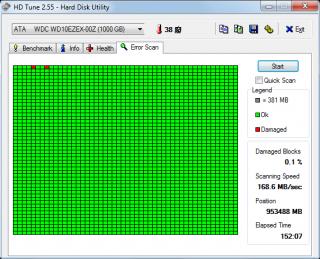
hddscan surface test - read, 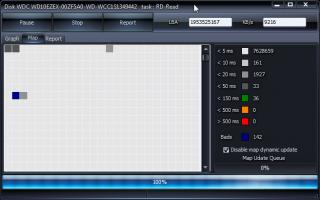
hddscan smart extended 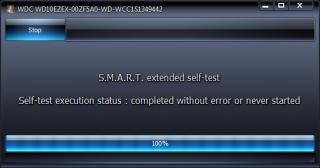
|
|
|
|
|
|
super macgyver
|
Dec 3 2013, 11:14 PM
|
|
|
QUOTE(ntw @ Dec 3 2013, 08:49 AM) not just once, quite a number of times d. always BSOD when i stress it, eg: play games, copy files. i have tried these 3 tests nia: hdtune,
hddscan surface test - read,
hddscan smart extended
bro, ur hdd can send for warranty liao.  |
|
|
|
|
|
ntw
|
Dec 4 2013, 02:03 AM
|
|
|
QUOTE(super macgyver @ Dec 3 2013, 11:14 PM) bro, ur hdd can send for warranty liao. i thought 2 small blocks still can use... so WD will honor the warranty with these condition? |
|
|
|
|
|
hidelun
|
Dec 4 2013, 08:43 PM
|
Getting Started
|
QUOTE(ntw @ Dec 4 2013, 02:03 AM) i thought 2 small blocks still can use... so WD will honor the warranty with these condition? Backup ur data, and send for warranty. |
|
|
|
|
|
xiphius
|
Dec 13 2013, 11:28 AM
|
New Member
|
Hi all. So here's my problem. I'm getting the BSOD after updating my lappie. Error they gave me was "System Thread Exception Not Handled". I googled for solutions and they said it might be my graphic card that's causing the problem and updating it should fix it. Updating didnt fix anything for me as this is my second time having this problem. The first was when i wanted to update to windows 8.1. It gave me the blue screen and was forced to restore it back to factory settings. It's soo not cool as i've just bought this lapp early this year. Now i cant even restore my computer to previous state as it's saying some file is missing and cant restore. I refreshed the comp using the auto repair on my computer and it did fix the problem but everything's screwed up now. My files are all gone and everything's acting weird. Anyone with solutions or ideas as to why this is happening? Or should i just send it back for warranty? If it helps, here's my lapp's specs. Lenovo Z410. Intel Core i5 4200M 2.5 Ghz 4GB Ram 1 TB HDD VGA nVidia Geforce GT740 2GB Windows 8 |
|
|
|
|
|
soR
|
Jan 20 2014, 03:15 AM
|
|
|
Could u guys check mine? got bsod right after fresh install a latest nvidia driver.. https://www.mediafire.com/?e9nn7egblotucjb |
|
|
|
|
|
5p3ak
|
Jan 22 2014, 06:42 PM
|
|
|
Good day Ladies and Gentlemen, I recently encountered BSOD problem but manage to restart back into windows. This is my first time encountering BSOD on a windows 7 machine. I have not change/modify any hardware recently. I am really lost TBH, the last time I had a BSOD was around 5 years ago on a Windows XP machine. Here's the link to the dmp file https://www.dropbox.com/s/84ga1ru61is8hii/0...14-18205-01.dmp Thank You for your time!  |
|
|
|
|
|
maggies
|
Feb 4 2014, 09:08 PM
|
New Member
|
Hi
|
|
|
|
|
|
maggies
|
Feb 4 2014, 09:22 PM
|
New Member
|
QUOTE(lighter @ Oct 12 2006, 10:05 PM) Can you please state your PC & your friend's PC specification here? Include Operating system.... I do not know how to troubleshoot! What should I do?Please post your minidump files with .ZIP and attach it here. Minidump files are located in C:\Windows\MinidumpYou can go Start > Run > type %systemroot%\minidump > Hit Enter My reply |
|
|
|
|
|
yongsim
|
Feb 5 2014, 11:18 AM
|
New Member
|
Hi everyone, I just bought this new PC last month and often happen BSOD...now it almost happening daily... now my solution is re-seat Processor only it can start up again... been tried to search on google and a lot method but doesnt fix my issue.. maybe my direction is not right? :/ Anyone Please Help! Spec (Original window) : » Click to show Spoiler - click again to hide... « i3 4130
Asus H81M-C
2x 2GB PC1333 D3 ram
Sapphire HD5770
500GB WD Blue
FSP Hexa 500W
Wireless Adapter - TL-WN851ND
BSOD message: » Click to show Spoiler - click again to hide... « Problem signature: Problem Event Name: BlueScreen OS Version: 6.1.7601.2.1.0.256.48 Locale ID: 1033 Additional information about the problem: BCCode: 124 BCP1: 0000000000000000 BCP2: FFFFFA80047B8028 BCP3: 00000000BA000000 BCP4: 0000000058000402 OS Version: 6_1_7601 Service Pack: 1_0 Product: 256_1 Files that help describe the problem: C:\Windows\Minidump\011814-14757-01.dmp C:\Users\Jeremy\AppData\Local\Temp\WER-42401-0.sysdata.xml Read our privacy statement online: http://go.microsoft.com/fwlink/?linkid=104288&clcid=0x0409 If the online privacy statement is not available, please read our privacy statement offline: C:\Windows\system32\en-US\erofflps.txt Will look for dump file if require..thanks in advance!  |
|
|
|
|
|
#aten
|
Feb 10 2014, 11:27 AM
|
Getting Started
|
QUOTE(yongsim @ Feb 5 2014, 11:18 AM) Hi everyone, I just bought this new PC last month and often happen BSOD...now it almost happening daily... now my solution is re-seat Processor only it can start up again... been tried to search on google and a lot method but doesnt fix my issue.. maybe my direction is not right? :/ Anyone Please Help! Spec (Original window) : » Click to show Spoiler - click again to hide... « i3 4130
Asus H81M-C
2x 2GB PC1333 D3 ram
Sapphire HD5770
500GB WD Blue
FSP Hexa 500W
Wireless Adapter - TL-WN851ND
BSOD message: » Click to show Spoiler - click again to hide... « Problem signature: Problem Event Name: BlueScreen OS Version: 6.1.7601.2.1.0.256.48 Locale ID: 1033 Additional information about the problem: BCCode: 124 BCP1: 0000000000000000 BCP2: FFFFFA80047B8028 BCP3: 00000000BA000000 BCP4: 0000000058000402 OS Version: 6_1_7601 Service Pack: 1_0 Product: 256_1 Files that help describe the problem: C:\Windows\Minidump\011814-14757-01.dmp C:\Users\Jeremy\AppData\Local\Temp\WER-42401-0.sysdata.xml Read our privacy statement online: http://go.microsoft.com/fwlink/?linkid=104288&clcid=0x0409 If the online privacy statement is not available, please read our privacy statement offline: C:\Windows\system32\en-US\erofflps.txt Will look for dump file if require..thanks in advance! Yes, please upload the dump file C:\Windows\Minidump\011814-14757-01.dmp |
|
|
|
|
|
#aten
|
Feb 10 2014, 11:44 AM
|
Getting Started
|
QUOTE(5p3ak @ Jan 22 2014, 06:42 PM) Good day Ladies and Gentlemen, I recently encountered BSOD problem but manage to restart back into windows. This is my first time encountering BSOD on a windows 7 machine. I have not change/modify any hardware recently. I am really lost TBH, the last time I had a BSOD was around 5 years ago on a Windows XP machine. Here's the link to the dmp file https://www.dropbox.com/s/84ga1ru61is8hii/0...14-18205-01.dmp Thank You for your time! QUOTE EXCEPTION_CODE: (NTSTATUS) 0xc0000005 - The instruction at 0x%08lx referenced memory at 0x%08lx. The memory could not be %s.
FAULTING_IP:
cdd!DrvAssociateSharedSurface+3a
9b6e37ca 83beac05000000 cmp dword ptr [esi+5ACh],0
TRAP_FRAME: a5cbdbe8 -- (.trap 0xffffffffa5cbdbe8)
ErrCode = 00000000
eax=00000000 ebx=fbb93a60 ecx=fc7788e8 edx=00000001 esi=00000000 edi=ffa25018
eip=9b6e37ca esp=a5cbdc5c ebp=a5cbdc70 iopl=0 nv up ei ng nz na pe cy
cs=0008 ss=0010 ds=0023 es=0023 fs=0030 gs=0000 efl=00010287
cdd!DrvAssociateSharedSurface+0x3a:
9b6e37ca 83beac05000000 cmp dword ptr [esi+5ACh],0 ds:0023:000005ac=????????
Resetting default scope
CUSTOMER_CRASH_COUNT: 1
DEFAULT_BUCKET_ID: VISTA_DRIVER_FAULT
BUGCHECK_STR: 0x8E
PROCESS_NAME: dwm.exe
CURRENT_IRQL: 0
LAST_CONTROL_TRANSFER: from 9b4d9d9f to 9b6e37ca
STACK_TEXT:
a5cbdc70 9b4d9d9f fbb93a70 80001640 c21218f7 cdd!DrvAssociateSharedSurface+0x3a
a5cbdc9c 9b4c1d00 ffb92748 c21218f7 80001640 win32k!GreSetRedirectionSurfaceSignaling+0xbf
a5cbdd1c 82c5c42a c21218f7 00000005 02e6f864 win32k!NtGdiHLSurfSetInformation+0x158
a5cbdd1c 76ef64f4 c21218f7 00000005 02e6f864 nt!KiFastCallEntry+0x12a
WARNING: Frame IP not in any known module. Following frames may be wrong.
02e6f878 00000000 00000000 00000000 00000000 0x76ef64f4
STACK_COMMAND: kb
FOLLOWUP_IP:
cdd!DrvAssociateSharedSurface+3a
9b6e37ca 83beac05000000 cmp dword ptr [esi+5ACh],0
SYMBOL_STACK_INDEX: 0
SYMBOL_NAME: cdd!DrvAssociateSharedSurface+3a
FOLLOWUP_NAME: MachineOwner
MODULE_NAME: cdd
IMAGE_NAME: cdd.dll
DEBUG_FLR_IMAGE_TIMESTAMP: 4a5bd992
FAILURE_BUCKET_ID: 0x8E_cdd!DrvAssociateSharedSurface+3a
BUCKET_ID: 0x8E_cdd!DrvAssociateSharedSurface+3a
Followup: MachineOwner
---------
Bugcheck code 1000008E
Arguments c0000005 9b6e37ca a5cbdbe8 00000000
ChildEBP RetAddr Args to Child
a5cbdc70 9b4d9d9f fbb93a70 80001640 c21218f7 cdd!DrvAssociateSharedSurface+0x3a
a5cbdc9c 9b4c1d00 ffb92748 c21218f7 80001640 win32k!GreSetRedirectionSurfaceSignaling+0xbf
a5cbdd1c 82c5c42a c21218f7 00000005 02e6f864 win32k!NtGdiHLSurfSetInformation+0x158
a5cbdd1c 76ef64f4 c21218f7 00000005 02e6f864 nt!KiFastCallEntry+0x12a
WARNING: Frame IP not in any known module. Following frames may be wrong.
02e6f878 00000000 00000000 00000000 00000000 0x76ef64f4
0: kd> lmvm cdd
start end module name
9b6e0000 9b6fe000 cdd (pdb symbols) C:\ProgramData\dbg\sym\cdd.pdb\04571C8E4CA24882BAF7F7AB533653D91\cdd.pdb
Loaded symbol image file: cdd.dll
Mapped memory image file: C:\ProgramData\dbg\sym\cdd.dll\4A5BD9921e000\cdd.dll
Image path: \SystemRoot\System32\cdd.dll
Image name: cdd.dll
Timestamp: Tue Jul 14 09:04:18 2009 (4A5BD992)
CheckSum: 0001F9C9
ImageSize: 0001E000
File version: 6.1.7600.16385
Product version: 6.1.7600.16385
File flags: 0 (Mask 3F)
File OS: 40004 NT Win32
File type: 3.4 Driver
File date: 00000000.00000000
Translations: 0000.04b0
CompanyName: Microsoft Corporation
ProductName: Microsoft® Windows® Operating System
InternalName: cdd.dll
OriginalFilename: cdd.dll
ProductVersion: 6.1.7600.16385
FileVersion: 6.1.7600.16385 (win7_rtm.090713-1255)
FileDescription: Canonical Display Driver
LegalCopyright: © Microsoft Corporation. All rights reserved.
>seems like an outdated drivers >run sfc /scannow >run windows update hope this helps This post has been edited by #aten: Feb 10 2014, 11:45 AM |
|
|
|
|
|
5p3ak
|
Feb 10 2014, 11:50 AM
|
|
|
QUOTE(#aten @ Feb 10 2014, 11:44 AM) >seems like an outdated drivers >run sfc /scannow >run windows update hope this helps ahh finally a reply, thank you for your time!  Will do it once I'm back home, run sfc /scannow through command prompt right ? |
|
|
|
|
|
#aten
|
Feb 10 2014, 11:55 AM
|
Getting Started
|
QUOTE(soR @ Jan 20 2014, 03:15 AM) Could u guys check mine? got bsod right after fresh install a latest nvidia driver.. https://www.mediafire.com/?e9nn7egblotucjbQUOTE FAULTING_IP:
nt!ExEnterCriticalRegionAndAcquireFastMutexUnsafe+26
fffff800`0349c77e f00fba3100 lock btr dword ptr [rcx],0
CONTEXT: fffff880079740b0 -- (.cxr 0xfffff880079740b0)
rax=fffffa80096d4b60 rbx=0000000000000000 rcx=0000000000000000
rdx=00000000400027c0 rsi=fffff900c0160380 rdi=fffffa80096d4b60
rip=fffff8000349c77e rsp=fffff88007974a80 rbp=0000000000000000
r8=0000000069121706 r9=0000000000000040 r10=000000000383f3c0
r11=fffff88007974b08 r12=0000000069121706 r13=00000000400027c0
r14=000000000514a5c0 r15=0000000000000001
iopl=0 nv up ei ng nz na po nc
cs=0010 ss=0018 ds=002b es=002b fs=0053 gs=002b efl=00010286
nt!ExEnterCriticalRegionAndAcquireFastMutexUnsafe+0x26:
fffff800`0349c77e f00fba3100 lock btr dword ptr [rcx],0 ds:002b:00000000`00000000=????????
Resetting default scope
CUSTOMER_CRASH_COUNT: 1
DEFAULT_BUCKET_ID: VISTA_DRIVER_FAULT
BUGCHECK_STR: 0x3B
PROCESS_NAME: dwm.exe
CURRENT_IRQL: 0
LAST_CONTROL_TRANSFER: from fffff960006b6d3f to fffff8000349c77e
STACK_TEXT:
fffff880`07974a80 fffff960`006b6d3f : 00000000`00000000 00000000`00000000 00000000`69121712 00000000`00000020 : nt!ExEnterCriticalRegionAndAcquireFastMutexUnsafe+0x26
fffff880`07974ab0 fffff960`00277ec9 : 00000000`00000000 fffff900`c08fd2e0 00000000`0383f460 00000040`00000280 : cdd!DrvAssociateSharedSurface+0x7b
fffff880`07974b10 fffff960`0029b05d : 00000000`00000001 fffff880`07974c60 00000000`0383f460 00000000`000086c5 : win32k!GreSetRedirectionSurfaceSignaling+0x125
fffff880`07974b60 fffff800`034d1993 : fffffa80`096d4b60 00000000`0383f538 00000000`00000020 00000000`00000000 : win32k!NtGdiHLSurfSetInformation+0x209
fffff880`07974be0 000007fe`feac4efa : 00000000`00000000 00000000`00000000 00000000`00000000 00000000`00000000 : nt!KiSystemServiceCopyEnd+0x13
00000000`0383f398 00000000`00000000 : 00000000`00000000 00000000`00000000 00000000`00000000 00000000`00000000 : 0x7fe`feac4efa
FOLLOWUP_IP:
cdd!DrvAssociateSharedSurface+7b
fffff960`006b6d3f ba0c000000 mov edx,0Ch
SYMBOL_STACK_INDEX: 1
SYMBOL_NAME: cdd!DrvAssociateSharedSurface+7b
FOLLOWUP_NAME: MachineOwner
MODULE_NAME: cdd
IMAGE_NAME: cdd.dll
DEBUG_FLR_IMAGE_TIMESTAMP: 4bf4408a
STACK_COMMAND: .cxr 0xfffff880079740b0 ; kb
FAILURE_BUCKET_ID: X64_0x3B_cdd!DrvAssociateSharedSurface+7b
BUCKET_ID: X64_0x3B_cdd!DrvAssociateSharedSurface+7b
Followup: MachineOwner
---------
3: kd> .cxr 0xfffff880079740b0
rax=fffffa80096d4b60 rbx=0000000000000000 rcx=0000000000000000
rdx=00000000400027c0 rsi=fffff900c0160380 rdi=fffffa80096d4b60
rip=fffff8000349c77e rsp=fffff88007974a80 rbp=0000000000000000
r8=0000000069121706 r9=0000000000000040 r10=000000000383f3c0
r11=fffff88007974b08 r12=0000000069121706 r13=00000000400027c0
r14=000000000514a5c0 r15=0000000000000001
iopl=0 nv up ei ng nz na po nc
cs=0010 ss=0018 ds=002b es=002b fs=0053 gs=002b efl=00010286
nt!ExEnterCriticalRegionAndAcquireFastMutexUnsafe+0x26:
fffff800`0349c77e f00fba3100 lock btr dword ptr [rcx],0 ds:002b:00000000`00000000=????????
3: kd> lmvm cdd
start end module name
fffff960`006b0000 fffff960`006d7000 cdd (pdb symbols) C:\ProgramData\dbg\sym\cdd.pdb\5ACDF17B965E4796B5FFE7DA9990149D1\cdd.pdb
Loaded symbol image file: cdd.dll
Mapped memory image file: C:\ProgramData\dbg\sym\cdd.dll\4BF4408A27000\cdd.dll
Image path: \SystemRoot\System32\cdd.dll
Image name: cdd.dll
Timestamp: Thu May 20 03:48:26 2010 (4BF4408A)
CheckSum: 00024F49
ImageSize: 00027000
File version: 6.1.7600.16595
Product version: 6.1.7600.16595
File flags: 0 (Mask 3F)
File OS: 40004 NT Win32
File type: 3.4 Driver
File date: 00000000.00000000
Translations: 0000.04b0
CompanyName: Microsoft Corporation
ProductName: Microsoft® Windows® Operating System
InternalName: cdd.dll
OriginalFilename: cdd.dll
ProductVersion: 6.1.7600.16595
FileVersion: 6.1.7600.16595 (win7_gdr.100518-2047)
FileDescription: Canonical Display Driver
LegalCopyright: © Microsoft Corporation. All rights reserved. same too.. cdd.dll >seems like an outdated drivers >run sfc /scannow >run windows update hope this helps |
|
|
|
|
|
#aten
|
Feb 10 2014, 11:57 AM
|
Getting Started
|
QUOTE(5p3ak @ Feb 10 2014, 11:50 AM) ahh finally a reply, thank you for your time! Will do it once I'm back home, run sfc /scannow through command prompt right ? yes, through elevated command prompt (right-click cmd.exe - run as administrator) btw, run a windows update & update necessary drivers & let us know if this resolved your issue |
|
|
|
|





 Quote
Quote




 0.0380sec
 0.46
0.46
 6 queries
 GZIP Disabled