Welcome Guest ( Log In | Register )

123 Pages « < 66 67 68 69 70 > » Bottom

Outline · [ Standard ] · Linear+

 [FAQ] PC auto restart/Blue Screen (BSOD), All questions go here please.

views
     
francischuahcw
post Mar 5 2009, 01:07 AM

Retired. Do Not Disturb
*******
Senior Member
2,152 posts

Joined: Feb 2006
QUOTE(Dickong @ Feb 28 2009, 06:28 AM)
Hi, my pc recently have intermittern bsod, this happen during boot up, need help from sifu, the bsod stated, STOP,c0000218, registry file failure, the registry cannot load the hive ( file ) or its log or alternate.  It is corrupt, absent or not writeable
*
You have missing registry file which results your window failed to operate correctly.
Try to use a Window CD and do a system repair to recover the damage and corrupted registry and it will be fine.

http://www.geekstogo.com/forum/How-to-repa...ws-XP-t138.html

Thanks


This post has been edited by francischuahcw: Mar 5 2009, 01:10 AM
francischuahcw
post Mar 5 2009, 01:09 AM

Retired. Do Not Disturb
*******
Senior Member
2,152 posts

Joined: Feb 2006
QUOTE(Luckz @ Mar 4 2009, 10:28 PM)
hi guys, i need help with my new m300 e435. i just bought it for 3 days and it comes wif free another Kingston 2GB RAM. in total now i have 4 GB RAM.

I was about to instal adobe flash and suddenly the blue screen appears n at the bottom, it says dumping physical memory.. Does it have to do wif the Kingston Memory? Coz the Original memory in my laptop is Samsung. i'm suspecting the kingston is not compatible..

Any Help??? N i just ran the memory diagnostic tool n it detected a hardware probs also..
*
Hi there
Please upload your minidump folder here and i will help you to debug and let you know the reason for BSOD.

Looking for minidump file

Go to My Computer and locate C:\Windows\Minidump or C:\Minidump. Once you have the minidump folder, please zipped the whole folder and upload it here (using add attachement function) or other web hosting page mentioned below. Please provide the link to download your file. No minidump file available!!!How??
Do the following if you did not find your minidump file

(Window XP)
  • Right click at My Computer
  • Go to Properties
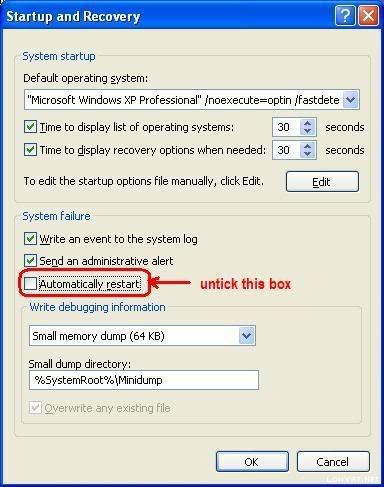
  • Look at Advanced tab then go for Startup and Recovery
  • Look at Settings and untick Automatic Restart
  • Make sure that write debugging information is Small Memory Dump (64kb)
(Window Vista)
  • Right click at My Computer
  • Go to Properties
  • Look at Advanced System Properties tab then go for Startup and Recovery
  • Look at Settings and untick Automatic Restart
  • Make sure that write debugging information is Small Memory Dump (64kb)
user posted image

The next time BSOD occurs, a minidump file will be created.

Further tutorial are available at http://forum.lowyat.net/topic/346230


This post has been edited by francischuahcw: Mar 5 2009, 01:20 AM
francischuahcw
post Mar 5 2009, 01:20 AM

Retired. Do Not Disturb
*******
Senior Member
2,152 posts

Joined: Feb 2006
QUOTE(doom89757 @ Mar 1 2009, 11:58 PM)
I suddenly got this BSOD , dunno wat happen, juz playing MSN only , suddenly whole screen freezes then BSOD
Here is my minidump:-
*
It has been numerous time that your issue is highlighted here.
The debug shows again conflict of driver to your Razer related hardware.

File name Lycosa.sys similar as previous BSOD issue that i have solved before.
Would suggest a full removal of current driver from the system and reinstall the driver

QUOTE
Bug Check 0X8E

Hardware incompatibility. Make sure that any new hardware installed is listed in the Microsoft Windows Marketplace Tested Products List.

Faulty device driver or system service. A faulty device driver or system service might be responsible for this error. Hardware issues, such as BIOS incompatibilities, memory conflicts, and IRQ conflicts can also generate this error.
mav910623
post Mar 5 2009, 09:26 AM

Dr. Antidote
******
Senior Member
1,344 posts

Joined: Jan 2007
From: Malaysia


Guys My Frends Pc kept restarting, so i uninstalled the GPU driver and it would turn on ok, but now there is a problem with the was the screen displays, with colour chance and such ... when i try to install any drivers to the GPU the pc will restart help me out here ... many thanks ..

My minidump file attached


Attached File(s)
Attached File  Mini030409_01.zip ( 25.18k ) Number of downloads: 8
francischuahcw
post Mar 5 2009, 12:18 PM

Retired. Do Not Disturb
*******
Senior Member
2,152 posts

Joined: Feb 2006
QUOTE(mav910623 @ Mar 5 2009, 09:26 AM)
Guys My Frends Pc kept restarting, so i uninstalled the GPU driver and it would turn on ok, but now there is a problem with the was the screen displays, with colour chance and such ... when i try to install any drivers to the GPU the pc will restart help me out here ... many thanks ..

My minidump file attached
*
From the debug i can see that you are using a Nvidia graphic card and you are having problem with your nv4_mini.sys in which it could not be loaded with the system.
Make sure you download the latest driver and the most compatible driver to your friend PC.

If problem keep occuring, it could be the hardware failure itself.
Before installing any new driver, make sure you fully uninstalled all the previous version of driver.
DO NOT let window automatically reinstall the driver after you remove it.

QUOTE
Bug Check 0X7E SYSTEM_THREAD_EXCEPTION_NOT_HANDLED

Hardware incompatibility. Make sure that any new hardware that is installed is listed in the Microsoft Windows Marketplace Tested Products List.

Faulty device driver or system service. A faulty device driver or system service might be responsible for this error. Hardware issues, such as BIOS incompatibilities, memory conflicts, and IRQ conflicts can also generate this error.


» Click to show Spoiler - click again to hide... «

Dickong
post Mar 5 2009, 05:55 PM

Regular
******
Senior Member
1,689 posts

Joined: Jan 2003
QUOTE(francischuahcw @ Mar 5 2009, 01:07 AM)
You have missing registry file which results your window failed to operate correctly.
Try to use a Window CD and do a system repair to recover the damage and corrupted registry and it will be fine.

http://www.geekstogo.com/forum/How-to-repa...ws-XP-t138.html

Thanks
*
Thanks bro, i will try later.
doom89757
post Mar 5 2009, 11:45 PM

Casual
***
Junior Member
372 posts

Joined: Sep 2008
From: Klang


QUOTE(francischuahcw @ Mar 5 2009, 01:20 AM)
It has been numerous time that your issue is highlighted here.
The debug shows again conflict of driver to your Razer related hardware.

File name Lycosa.sys similar as previous BSOD issue that i have solved before.
Would suggest a full removal of current driver from the system and reinstall the driver
*
Thx bro , man i already uninstall it, it think this happen randomly,haiz, as long it not my other hardware problem should be ok
Anyways thx a lot for the assessment on the problem

mav910623
post Mar 6 2009, 12:24 AM

Dr. Antidote
******
Senior Member
1,344 posts

Joined: Jan 2007
From: Malaysia


QUOTE(francischuahcw @ Mar 5 2009, 12:18 PM)
From the debug i can see that you are using a Nvidia graphic card and you are having problem with your nv4_mini.sys in which it could not be loaded with the system.
Make sure you download the latest driver and the most compatible driver to your friend PC.

If problem keep occuring, it could be the hardware failure itself.
Before installing any new driver, make sure you fully uninstalled all the previous version of driver.
DO NOT let window automatically reinstall the driver after you remove it.
» Click to show Spoiler - click again to hide... «

*
Thx bro ... how do i uninstall the driver fully?? nt just press uninstall frm the device manager there??
francischuahcw
post Mar 6 2009, 12:39 AM

Retired. Do Not Disturb
*******
Senior Member
2,152 posts

Joined: Feb 2006
QUOTE(mav910623 @ Mar 6 2009, 12:24 AM)
Thx bro ... how do i uninstall the driver fully?? nt just press uninstall frm the device manager there??
*
Yes it is,
But if you have install various version of driver,
You need to make sure you remova all the version.
XiuKeong
post Mar 6 2009, 12:57 PM

[OMG] Sweetie™
*******
Senior Member
9,441 posts

Joined: Oct 2006
From: Oz


QUOTE(XiuKeong @ Feb 11 2009, 09:54 PM)
http://rapidshare.com/files/196628167/Mini021009-01.zip.html

Anyone can help me analyze this BSOD problem? Thanks.
*
Anyone still can solve my problem here?
francischuahcw
post Mar 6 2009, 12:59 PM

Retired. Do Not Disturb
*******
Senior Member
2,152 posts

Joined: Feb 2006
QUOTE(XiuKeong @ Mar 6 2009, 12:57 PM)
Anyone still can solve my problem here?
*
Please upload the latest minidump file..all together.
XiuKeong
post Mar 6 2009, 01:00 PM

[OMG] Sweetie™
*******
Senior Member
9,441 posts

Joined: Oct 2006
From: Oz


That's the only my friend sent to me. Cannot download?
francischuahcw
post Mar 6 2009, 01:04 PM

Retired. Do Not Disturb
*******
Senior Member
2,152 posts

Joined: Feb 2006
Does he having the problem now?
The dump file is almost a month ago based on the date.

If he is encountering the problem still...
he should have the latest minidump file.

Thanks
R a D ! c 4 L
post Mar 7 2009, 08:23 AM

Linc | Nox
Group Icon
Elite
4,744 posts

Joined: Jan 2003
From: Kuala Lumpur


guys, i need ur help urgently. Im having this BSOD code:

Registry Error blah blah blah...

0x00000051 (0x00000003, 0x00000001, 0x00003000, 0xE1261030)

Its when im trying to format my com, when ever i hit F8 during the agreement screen i get this. Even with the recovery console. Its the same damn thing. =/

So any ideas?

This post has been edited by R a D ! c 4 L: Mar 7 2009, 08:25 AM
Auriel
post Mar 7 2009, 08:26 AM

Getting Started
**
Junior Member
97 posts

Joined: Jun 2008
From: Kuantan, Pahang
Vista user here.

Recently my laptop went into BSOD whenever I do stuffs like playing some computer games, where it will stress up my display driver as the games are quite high-ended.

It says that my display driver has gotten into an infinite loop.

I wonder anyone here can explain what does infinite loop means and is there any solution to solve this problem.

FYI, my display card is Mobility Radeon HD 2600.
francischuahcw
post Mar 7 2009, 08:08 PM

Retired. Do Not Disturb
*******
Senior Member
2,152 posts

Joined: Feb 2006
QUOTE(R a D ! c 4 L @ Mar 7 2009, 08:23 AM)
guys, i need ur help urgently. Im having this BSOD code:

Registry Error blah blah blah...

0x00000051 (0x00000003, 0x00000001, 0x00003000, 0xE1261030)

Its when im trying to format my com, when ever i hit F8 during the agreement screen i get this. Even with the recovery console. Its the same damn thing. =/

So any ideas?
*
Try another window XP cd.
0X51 is all about registry. I wonder how could a registry affect a new installation of your system.
You might having other hardware failure i suspect.

Regards
francischuahcw
post Mar 7 2009, 08:10 PM

Retired. Do Not Disturb
*******
Senior Member
2,152 posts

Joined: Feb 2006
QUOTE(Auriel @ Mar 7 2009, 08:26 AM)
Vista user here.

Recently my laptop went into BSOD whenever I do stuffs like playing some computer games, where it will stress up my display driver as the games are quite high-ended.

It says that my display driver has gotten into an infinite loop.

I wonder anyone here can explain what does infinite loop means and is there any solution to solve this problem.

FYI, my display card is Mobility Radeon HD 2600.
*
Before giving any comment,
Could you update your minidump file here?

Looking for minidump file

Go to My Computer and locate C:\Windows\Minidump or C:\Minidump. Once you have the minidump folder, please zipped the whole folder and upload it here (using add attachement function) or other web hosting page mentioned below. Please provide the link to download your file.


Regards.
R a D ! c 4 L
post Mar 8 2009, 03:25 AM

Linc | Nox
Group Icon
Elite
4,744 posts

Joined: Jan 2003
From: Kuala Lumpur


QUOTE(francischuahcw @ Mar 7 2009, 08:08 PM)
Try another window XP cd.
0X51 is all about registry. I wonder how could a registry affect a new installation of your system.
You might having other hardware failure i suspect.

Regards
*
i suspect so too, but i do not know which, it might be a HD failure or a mobo failure. =/
darth6
post Mar 9 2009, 02:36 PM

Getting Started
**
Junior Member
146 posts

Joined: Oct 2008
From: Anfield


Hi,i get this BSOD so many times.The error name is

IRQL_NOT_LESS_OR_EQUAL

the BSOD comes occasionally,i'm not sure what makes it happen
i just bought this pc from another forumer,and he says it never happened to him.He also said that he has been using Ubuntu,and now i installed XP,updated to SP3 and all but the error still comes

what should i do ?


francischuahcw
post Mar 9 2009, 10:17 PM

Retired. Do Not Disturb
*******
Senior Member
2,152 posts

Joined: Feb 2006
QUOTE(darth6 @ Mar 9 2009, 02:36 PM)
Hi,i get this BSOD so many times.The error name is

IRQL_NOT_LESS_OR_EQUAL

the BSOD comes occasionally,i'm not sure what makes it happen
i just bought this pc from another forumer,and he says it never happened to him.He also said that he has been using Ubuntu,and now i installed XP,updated to SP3 and all but the error still comes

what should i do ?
*
Hi there
Please upload your minidump folder here and i will help you to debug and let you know the reason for BSOD.

Looking for minidump file

Go to My Computer and locate C:\Windows\Minidump or C:\Minidump. Once you have the minidump folder, please zipped the whole folder and upload it here (using add attachement function) or other web hosting page mentioned below. Please provide the link to download your file.

No minidump file available!!!How??
Do the following if you did not find your minidump file

(Window XP)
  • Right click at My Computer
  • Go to Properties
  • Look at Advanced tab then go for Startup and Recovery
  • Look at Settings and untick Automatic Restart
  • Make sure that write debugging information is Small Memory Dump (64kb)

(Window Vista)
  • Right click at My Computer
  • Go to Properties
  • Look at Advanced System Properties tab then go for Startup and Recovery
  • Look at Settings and untick Automatic Restart
  • Make sure that write debugging information is Small Memory Dump (64kb)

user posted image

The next time BSOD occurs, a minidump file will be created.

Further tutorial are available at http://forum.lowyat.net/topic/346230


Thanks


123 Pages « < 66 67 68 69 70 > » Top
 

Change to:
| Lo-Fi Version
0.0210sec    0.87    6 queries    GZIP Disabled
Time is now: 24th December 2025 - 06:31 PM