

i'm having the BSOD from KL1.sys below is my dump file, any help will be much appreciated.
http://rapidshare.com/files/207189187/Mini030809-02.zip.html
Attached File(s)
 Mini030809_02.zip ( 26.3k )
Number of downloads: 8
Mini030809_02.zip ( 26.3k )
Number of downloads: 8[FAQ] PC auto restart/Blue Screen (BSOD), All questions go here please.
|
|
 Mar 9 2009, 11:44 PM Mar 9 2009, 11:44 PM
|
 
Newbie
1 posts Joined: Mar 2009  
|
Hello There,
i'm having the BSOD from KL1.sys below is my dump file, any help will be much appreciated. http://rapidshare.com/files/207189187/Mini030809-02.zip.html Attached File(s)
Mini030809_02.zip ( 26.3k )
Number of downloads: 8 |
|
|
|
|
|
Mar 10 2009, 11:22 AM
|

Junior Member
89 posts Joined: Aug 2005 From: Kota Bharu 
|
Elop there,
i'm having BSOD from sysdata.xml. Here is my dump file, hope anyone will help me... Keep restart pc everytime i want to click like recyle bin, my computer n etc.... Heres my win debuggers result..kinda newbie in this thing, thanks... » Click to show Spoiler - click again to hide... « This post has been edited by yanouchi: Mar 10 2009, 11:23 AM Attached File(s)
Minidump.zip ( 18.68k )
Number of downloads: 8 |
|
|
Mar 10 2009, 11:29 AM
|

Senior Member
2,152 posts Joined: Feb 2006
|
QUOTE(yanouchi @ Mar 10 2009, 11:22 AM) Elop there, Hi there,i'm having BSOD from sysdata.xml. Here is my dump file, hope anyone will help me... Keep restart pc everytime i want to click like recyle bin, my computer n etc.... Heres my win debuggers result..kinda newbie in this thing, thanks... You are having conflicts with your Nvidia driver. Please remove the current version of your driver from your system and download the latest version for your system. Please update the information and status after you install a new version of your Nvidia driver. Thanks and regards. |
|
|
Mar 10 2009, 12:53 PM
|
|
Junior Member
89 posts Joined: Aug 2005 From: Kota Bharu
|
QUOTE(francischuahcw @ Mar 10 2009, 11:29 AM) Hi there, already update new driver...try to update information with WinDBG, its not working..status say Debugee not connected. After restart for new driver no more BSODYou are having conflicts with your Nvidia driver. Please remove the current version of your driver from your system and download the latest version for your system. Please update the information and status after you install a new version of your Nvidia driver. Thanks and regards.  |
|
|
Mar 11 2009, 10:00 AM
|
|
Senior Member
1,689 posts Joined: Jan 2003
|
QUOTE(francischuahcw @ Mar 5 2009, 01:07 AM) You have missing registry file which results your window failed to operate correctly. I reinstall the whole window but now it seem to me when booting up become quiet slow, but no more bsod, wonder how long it take to boot window, i mean 1min or more. tqTry to use a Window CD and do a system repair to recover the damage and corrupted registry and it will be fine. http://www.geekstogo.com/forum/How-to-repa...ws-XP-t138.html Thanks |
|
|
Mar 11 2009, 11:53 AM
|
|
Senior Member
2,152 posts Joined: Feb 2006
|
QUOTE(Dickong @ Mar 11 2009, 10:00 AM) I reinstall the whole window but now it seem to me when booting up become quiet slow, but no more bsod, wonder how long it take to boot window, i mean 1min or more. tq Run a ScanDisk for your HDD.Bad sector may be the cause for slow boot up. |
|
|
|
|
|
Mar 12 2009, 08:53 PM
|
|
Junior Member
89 posts Joined: Aug 2005 From: Kota Bharu
|
QUOTE(yanouchi @ Mar 10 2009, 12:53 PM) already update new driver...try to update information with WinDBG, its not working..status say Debugee not connected. After restart for new driver no more BSOD today it got worst....BSOD..i try in safe mode, still BSOD...here the error: IRQL_NOT_LESS_OR_EQUAL after that i try in safe mode, it error like this: nv4_disp.dll i think something with updating the new driver... then after that i try to restart again here the error: PAGE_FAULT_IN_NONPAGE_AREA |
|
|
Mar 12 2009, 09:56 PM
|
|
Senior Member
2,152 posts Joined: Feb 2006
|
Possible for you to upload your minidump file here for me to assist?
I would suspect problem with your graphic cards. Looking for minidump file Go to My Computer and locate C:\Windows\Minidump or C:\Minidump. Once you have the minidump folder, please zipped the whole folder and upload it here (using add attachement function) or other web hosting page mentioned below. Please provide the link to download your file. No minidump file available!!!How?? Do the following if you did not find your minidump file (Window XP)
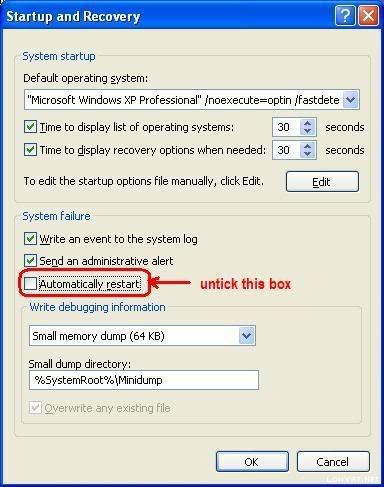 The next time BSOD occurs, a minidump file will be created. Further tutorial are available at http://forum.lowyat.net/topic/346230 |
|
|
Mar 12 2009, 10:21 PM
|
|
Junior Member
89 posts Joined: Aug 2005 From: Kota Bharu
|
Okay heres the attachment minidump. Right now i'm uninstall the nvidia driver, But the problem still there. Please help...thanks
Attached File(s)
Minidump.zip ( 197.32k )
Number of downloads: 12 |
|
|
Mar 13 2009, 12:09 AM
|
|
Senior Member
2,152 posts Joined: Feb 2006
|
QUOTE(yanouchi @ Mar 12 2009, 10:21 PM) Okay heres the attachment minidump. Right now i'm uninstall the nvidia driver, But the problem still there. Please help...thanks A few thing to clarified with me here.Please let me know are you using a PC or a laptop. QUOTE STACK_COMMAND: kb FOLLOWUP_IP: nt!MiMakeSystemAddressValid+94 805fb93a cc int 3 SYMBOL_STACK_INDEX: 1 SYMBOL_NAME: nt!MiMakeSystemAddressValid+94 FOLLOWUP_NAME: MachineOwner MODULE_NAME: nt DEBUG_FLR_IMAGE_TIMESTAMP: 4418c079 IMAGE_NAME: memory_corruption FAILURE_BUCKET_ID: 0x7a_c0000005_nt!MiMakeSystemAddressValid+94 BUCKET_ID: 0x7a_c0000005_nt!MiMakeSystemAddressValid+94 Followup: MachineOwner --------- QUOTE STACK_COMMAND: kb FOLLOWUP_IP: nv4_disp+ac7d1 bf0be7d1 0bbf6a0c8944 or edi,dword ptr [edi+44890C6Ah] SYMBOL_STACK_INDEX: 0 SYMBOL_NAME: nv4_disp+ac7d1 FOLLOWUP_NAME: MachineOwner MODULE_NAME: nv4_disp IMAGE_NAME: nv4_disp.dll BUCKET_ID: WRONG_SYMBOLS Followup: MachineOwner QUOTE STACK_COMMAND: kb FOLLOWUP_IP: nt!ExDeferredFreePool+107 80550ae2 893b mov dword ptr [ebx],edi SYMBOL_STACK_INDEX: 0 SYMBOL_NAME: nt!ExDeferredFreePool+107 FOLLOWUP_NAME: Pool_corruption IMAGE_NAME: Pool_Corruption DEBUG_FLR_IMAGE_TIMESTAMP: 0 MODULE_NAME: Pool_Corruption FAILURE_BUCKET_ID: 0x8E_nt!ExDeferredFreePool+107 BUCKET_ID: 0x8E_nt!ExDeferredFreePool+107 Followup: Pool_corruption --------- QUOTE ERROR_CODE: (NTSTATUS) 0xc0000005 - The instruction at "0x%08lx" referenced memory at "0x%08lx". The memory could not be "%s". Above stated is the result from some of your minidump file.BUGCHECK_STR: 0x7a_c0000005 CUSTOMER_CRASH_COUNT: 3 DEFAULT_BUCKET_ID: INTEL_CPU_MICROCODE_ZERO PROCESS_NAME: dwwin.exe From what i can observe here you are having problem on your hardware and it is not your graphic card driver. Instead i would have suspect you are having a faulty motherboard or a defect ram. Some of the minidump file show you have a memory corruption and pointed to the INTEL_CPU_MICROCODE_ZERO which is something related to the processor cache memory. Would suggest you to run memtest86+ to check your RAM for stability. Please do a few round of full test and let me know the outcome of your RAM test before we troubleshoot further. Regards. |
|
|
Mar 13 2009, 09:59 PM
|
|
Junior Member
89 posts Joined: Aug 2005 From: Kota Bharu
|
QUOTE(francischuahcw @ Mar 13 2009, 12:09 AM) A few thing to clarified with me here. okay already run the memtest86+, each of ram tested and 4 pcs tested together (3GB), passed all the 8 test. no error. I'm using pc.Please let me know are you using a PC or a laptop. Above stated is the result from some of your minidump file. From what i can observe here you are having problem on your hardware and it is not your graphic card driver. Instead i would have suspect you are having a faulty motherboard or a defect ram. Some of the minidump file show you have a memory corruption and pointed to the INTEL_CPU_MICROCODE_ZERO which is something related to the processor cache memory. Would suggest you to run memtest86+ to check your RAM for stability. Please do a few round of full test and let me know the outcome of your RAM test before we troubleshoot further. Regards. i found some solution for problem like this such as clean the dust on gc card, use eraser to rub at metal parts ram but still have that serious error message This post has been edited by yanouchi: Mar 14 2009, 07:31 AM |
|
|
Mar 15 2009, 03:17 PM
|

Junior Member
394 posts Joined: Aug 2007 From: putrajaya
|
elo..
my pc keep restat with this error, IRQL_NOT_LESS_OR_EQUAL wat is problem?how to overcome? |
|
|
Mar 15 2009, 04:08 PM
|
|
Senior Member
2,152 posts Joined: Feb 2006
|
QUOTE(yanouchi @ Mar 13 2009, 09:59 PM) okay already run the memtest86+, each of ram tested and 4 pcs tested together (3GB), passed all the 8 test. no error. I'm using pc. Most probably is motherboard failure or CPU failure.i found some solution for problem like this such as clean the dust on gc card, use eraser to rub at metal parts ram but still have that serious error message Else, did you monitor your system temperature? Is it normal? |
|
|
|
|
|
Mar 15 2009, 04:09 PM
|
|
Senior Member
2,152 posts Joined: Feb 2006
|
QUOTE(naq_saviola @ Mar 15 2009, 03:17 PM) elo.. Please follow my instruction in post #1368.my pc keep restat with this error, IRQL_NOT_LESS_OR_EQUAL wat is problem?how to overcome? Regards |
|
|
Mar 16 2009, 11:22 AM
|
|
Junior Member
394 posts Joined: Aug 2007 From: putrajaya
|
here the minidump..
http://www.savefile.com/files/2042528 i hv change to my previous bios, seems better.. but can u check 1st, tq2  |
|
|
Mar 16 2009, 07:51 PM
|

Junior Member
78 posts Joined: Oct 2008
|
Hey i need some help about my BSOD. I've been getting this problem quite frequent hope you can help me with this problem. Thanks in advance
 Attached File(s)  BSOD.txt ( 16.28k )
Number of downloads: 10
BSOD.txt ( 16.28k )
Number of downloads: 10 |
|
|
Mar 16 2009, 10:05 PM
|
|
Junior Member
78 posts Joined: Oct 2008
|
Sorry, if I've posted the wrong minidump cause I translate it to .txt file. Here is the original file
Attached File(s)
Mini031609_02.zip ( 34.25k )
Number of downloads: 7 |
|
|
Mar 16 2009, 11:00 PM
|

Junior Member
47 posts Joined: Jun 2008 From: Putra World Trade Centre
|
Bro, could u help me bout my BSOD?? Here's the file...try to go to safemode also BSOD
minidump.zip ( 284.57k )
Number of downloads: 7 |
|
|
Mar 18 2009, 07:42 PM
|
|
Newbie
1 posts Joined: Mar 2009
|
hi there i have a problem too
upon installing a cracked version of Dawn of War II (this requierd me to update a certain version of direct X which i'm not sure of) then my computer began to remarkably slow down the specs are as of follows Core 2 Duo 3.0 ghtz 2gb RAM Runs on windows XP SP3 (version 2002 according to the cd) After installing the game, i managed to use the computer for 2 days (with it slowing down considerably) on the third day upon login the Window's BSoD popped up and i manage to catch a glimpse of NOT_ENOUGH_PHYSICAL_MEMORY however i have 2 gb of RAM. What is my problem? At first i had trouble logging on to safemode as the same BSoD popped up however in the end i managed and am now backing up my files and copied my dmp file on. Please help...best if you sent me an email =] Added on March 19, 2009, 7:01 pmi took it to techies and they said my HDD was damaged replaed and now works fine This post has been edited by alnk: Mar 19 2009, 07:01 PM Attached File(s)
Mini031509_01.zip ( 11.9k )
Number of downloads: 7 |
|
|
Mar 21 2009, 02:54 PM
|
|
Junior Member
148 posts Joined: Apr 2008 From: Sarawak 
|
good post.. so helpful, finally solve my problem!
|
| Change to: |  0.0329sec 0.0329sec
 0.18 0.18
 6 queries 6 queries
 GZIP Disabled GZIP Disabled
Time is now: 25th December 2025 - 01:40 AM |
 Quote
Quote