


Xiaomi Redmi 1S Discussion Thread V2, THE MID-END GODPHONE
Xiaomi Redmi 1S Discussion Thread V2, THE MID-END GODPHONE
|
|
 Sep 8 2014, 07:47 PM Sep 8 2014, 07:47 PM
Return to original view | Post
#1
|
 
Junior Member
119 posts Joined: Jan 2013 
|
TS is form 3?
|
|
|
|
|
|
Sep 18 2014, 06:22 PM
Return to original view | Post
#2
|
|
Junior Member
119 posts Joined: Jan 2013
|
What are the bugs and the bad stuff on cm11? IF it's not too bad... I would like to flash it... Thanks shifus
 |
|
|
Sep 18 2014, 06:42 PM
Return to original view | Post
#3
|
|
Junior Member
119 posts Joined: Jan 2013
|
QUOTE(Anonymous34 @ Sep 18 2014, 06:29 PM) Only two sifus flashed cm11 in dis tered I know... it's just that what are the bugs that are there still, cause I remember seeing them say there's a major bug regarding the signal or something? 1)Install TWRP recovery. 2) download cm11 and gapps 3) flash 4) enjoy   I don't know, i just want all the bugs the shifus encountered and then I will see if I can bear with them, because I have been waiting for cm11 on this phone for a very, very, very long time I don't know, i just want all the bugs the shifus encountered and then I will see if I can bear with them, because I have been waiting for cm11 on this phone for a very, very, very long time  |
|
|
Sep 18 2014, 07:43 PM
Return to original view | Post
#4
|
|
Junior Member
119 posts Joined: Jan 2013
|
QUOTE(Anonymous34 @ Sep 18 2014, 06:51 PM) Just graphic tearings / glitches. Right, mind giving the download link if you know? I googled and there are so many I don't know if they are the same... play safe la Audio works perfectly fine. Data works fine for both sim.  |
|
|
Sep 24 2014, 07:56 PM
Return to original view | Post
#5
|
|
Junior Member
119 posts Joined: Jan 2013
|
Hello all, would anybody mind posting a step-by-step tutorial on how to flash cm11 to this phone? I googled but I still do not understand... I don't wanna risk anything and end up with an expensive brick so would like to ask for advice from shifus..thank you so much
|
|
|
Sep 25 2014, 11:56 PM
Return to original view | Post
#6
|
|
Junior Member
119 posts Joined: Jan 2013
|
QUOTE(Anonymous34 @ Sep 24 2014, 09:42 PM) 1) Install Flashify from Play Store Hey, I followed your instructions but I couldn't get past step 8, when i hold power and vol down, it would bring me to fastboot and then it would just stop there, advice? 2) Download the latest TWRP from here 3) Flash the recovery using the recovery button in Flashify. (locate the recovery image you just downloaded) 4) Now download the latest CM11 package from here 5) Download your Google Apps I) Pico Modular Package - 36MB II) Nano Modular Pakcage - 65MB III) Micro Modular Package - 109MB IV) Mini Modular Package - 161MB V) Full Modular Package - 252MB VI) Google Stock Package - 302MB 6) Put both CM11 and Google Apps zip into your internal storage or Micro SD card if you have any. 7) Shut down your phone completely. 8) Get into recovery (Hold down volume down and power until you see "teamwin" appears 9) Do a Nandroid backup (Optional) 10) Press Wipe. 11) Select Data, Cache, Dalvik Cache 12) Swipe to Wipe 13) Go back to home screen and press install 14) Select CM11 zip 15) Swipe to flash zip 16) Repeat Step 13 to 15 with Google Apps Zip 17) Press reboot system after installing two zips 18) Setup 19) Post here with About Phone screenshot 20) Buy a Redmi 1S bundle from me(similar to buy a beer button in other threads) 21) Tag coklatua and say you have successfully install CM11 on your Redmi 1S 22) Enjoy!  ----EDIT---- I found a way to enter recovery! I'm now rocking cm11 on my phone, I will screenshot for you guys once i'm done customizing everything, thank you so so so much!  This post has been edited by noloveishere: Sep 26 2014, 12:25 AM |
|
|
|
|
|
Sep 26 2014, 11:44 PM
Return to original view | Post
#7
|
|
Junior Member
119 posts Joined: Jan 2013
|
So... here's my about phone after flashing cm11.
In my.experience, after 2 days of playing around The good : 1. Battery life Battery life is much better now, went through a day with about 20%, using whatsapp, fb, fb messenger, chrome and some YouTube. Not very light too, sorry I'm not good at explaining, I'll update with battery status OK?  2. RAM Yes! Ram issue is solved! The multitasking on cm11 is really better compared to miui v37(dunno about 43), I open whatsapp, fb and chrome and all were still running in the background smoothly without any issues. 3. Google play You won't know how fast google play is now compared to miui until you used cm11... It opens pages instantly, unlike miui which has a 1-2 second hesitation. Bad 1. Still buggy No doubt....its quite new so it would have some bugs, I don't know about others but my back facing camera won't start, but my front facing can, I'm puzzled with this, software issue? Note that I am not a gamer, and I am only like a medium user, so don't expect some intense testing...antutu benchmark? Don't know.... Overall cm11 is worth it and IMO the pros outweigh the cons and when you compare it to miui it really is much superior. Sorry for wall of text Attached thumbnail(s) 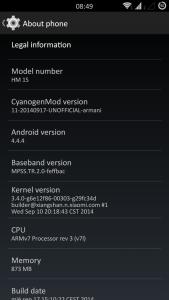
|
|
|
Oct 1 2014, 07:29 PM
Return to original view | Post
#8
|
|
Junior Member
119 posts Joined: Jan 2013
|
Anybody using cm11 r3 unable to use camera? When I open the stock camera app it will force close and say "unfortunately, camera has stopped working", I tried to download 3rd party camera, open camera and camera 360, I managed to use the front facing but the back facing won't work, I have the option to switch and it switches but it shows fully black, and if i try to press the "shoot" button it won't do anything, any ideas?
|
|
|
Nov 8 2014, 10:16 PM
Return to original view | Post
#9
|
|
Junior Member
119 posts Joined: Jan 2013
|
How can I use a 64gb microsd on my redmi 1s? Officially it only supports 32gb but seems like if I format to fat32 I can use a 64gb... How do I do this? Risky ah?
|
| Change to: |  0.0441sec 0.0441sec
 0.38 0.38
 7 queries 7 queries
 GZIP Disabled GZIP Disabled
Time is now: 7th December 2025 - 05:49 PM |
 Quote
Quote