Welcome Guest ( Log In | Register )

Bump Topic Topic Closed RSS Feed
116 Pages  1 2 3 > » Bottom

Outline · [ Standard ] · Linear+

 OnePlus One Official Thread v5, new OTA - XNPH33R (22nd Aug)

views
     
TSmydragoon
post Aug 18 2014, 09:09 AM, updated 12y ago

Look at all my stars!!
*******
Senior Member
7,044 posts

Joined: Nov 2007


Official website: http://www.oneplus.net
Official forum: http://forums.oneplus.net
Official Twitter: https://twitter.com/oneplus
Official Google+: https://plus.google.com/102032589992734862411/posts
Official Facebook: https://www.facebook.com/oneplusofficial
Official Thread on LYN: V1 | v2 | v3 | v4
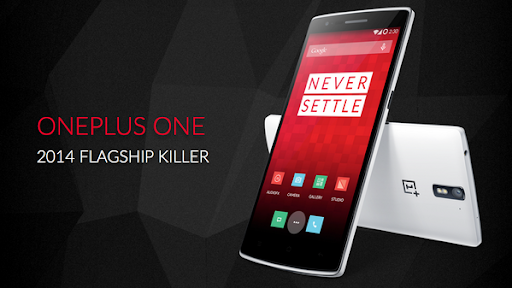

user posted image


*INTRODUCTION VIDEO*
» Click to show Spoiler - click again to hide... «


*SPECIFICATIONS*

(from GSMArena)
» Click to show Spoiler - click again to hide... «


*STYLE SWAP COVERS*

user posted image

QUOTE
It would be a shame to hide the One’s beautiful design under a bulky case just to avoid wear and tear. We've introduced our unique range of StyleSwap exchangeable back covers, so you can not only add a bit of a personality to your OnePlus One, but also easily swap out a dinged case without needing to replace the whole device. StyleSwap covers come in a range of materials and textures, including kevlar, bamboo and denim on top of standard silk and sandstone. Now you can customize your phone for the look and feel you prefer, and change it up whenever you'd like.


*AVAILABILITY & PRICING*

Official not availability for Malaysia yet.

QUOTE
But you can get it from various sources:
* official OnePlus site (see section HOW TO BUY FROM ONEPLUS & SHIP TO MALAYSIA below)
* taobao & other chinese sites
* local shops like DirectD, 1Gadget, etc...
* some LYN sellers (check Garage Sales)

Currently, the 16 launch countries are:
Austria, Belgium, Canada, Denmark, Finland, France, Germany, Hong Kong, Italy, the Netherlands, Portugal, Spain, Sweden, Taiwan, United Kingdom, and the United States.
China too.

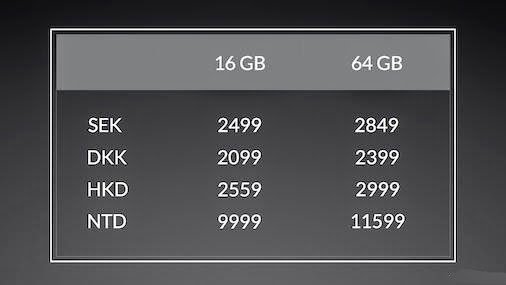
The OnePlus One will cost:
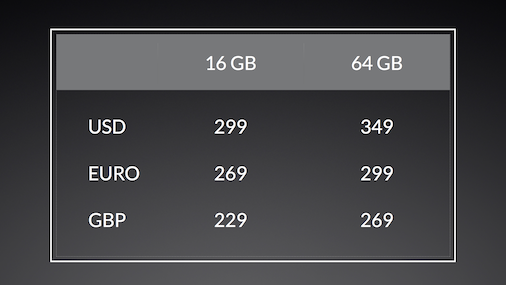
user posted image
user posted image


How can it be so cheap? One possible explanation can be found here:
http://www.androidheadlines.com/2014/04/he...nsumer-low.html

Anyway, OnePlus did say later, they will reveal the cost breakdown. It's also interesting to note that OnePlus did mention before that their financial backer (BBK) is allowing them to have no profit for the first two years of operations. So, OnePlus says the phone is being sold without profit. They will make some money from accesosries like the Swap Style cases.


*HOW TO BUY FROM ONEPLUS & SHIP TO MALAYSIA*

QUOTE(cruzzmz @ Jul 16 2014, 12:25 AM)
use hopshopgo.com ... shipped to US address and then use them to fwd to Malaysia (Int shipping fee USD25) or comgateway is the same also

user posted image
*

Cost comparison (International+ shipping vs china set from reseller)
QUOTE(NightFelix @ Jul 14 2014, 03:01 PM)
I agreed with you bro. I also would recommend anyone here buy local if you don't have invite. Because I bought the International version 64GB already. Here reason why.

349$ (64GB OPO) + 12$ (Shipping Handling) + 25$ (Forwarding) = 386$ (aprox. RM1227)

In you are in bad luck.
RM1227 + SIRIM (RM100) = RM1327


Local OPO selling RM14XX. Just slightly RM100 more. Why such hassle to get International version where you don't even have invite? Somemore local importer offer 2 year AP warranty.
*

Note: As of 4th August 2014, there are reports that some shops are now selling 64GB at rm1299.

SIRIM process
QUOTE(layzieboy @ Jul 19 2014, 11:54 PM)
Got my OPO 64gb from DHL this morning. Total damage rm1360.. after sirim.

mine got yellow banding about 0.5 cm at the bottom...  sad.gif
to anyone curious about sirim permit application.

I followed the guide found here.

https://forum.lowyat.net/topic/2637098

Make sure you have all documents.Just follow the checklist in the zip file

1. Copy of IC
2. Technical specification http://oneplus.net/one#specifications
3. Commercial invoice from courier ( call up courier to email you a copy)
4. Completed forms (for the tariff code, its 851712000)

Once done, they will email you the permit which you should forward to your courier.
*
see here for a copy of the forms, click here.

QUOTE(benny888 @ Jul 30 2014, 12:27 PM)
There is absolutely no tax or duty on mobile phone import into Malaysia. Most is you pay rm100 for Sirim permit. If DHL handle your import be prepared to pay an exborbitant rm160 for their services - this figure reported to me by PM from a forumer here. If poslaju handle for you the service fee is around rm50+ only
*
QUOTE(benny888 @ Jul 30 2014, 12:37 PM)
You can avoid paying this rm162 by telling DHL you will apply sirim permit yourself n clear it at custom yourself. DHL charges is ridiculous
*
*THE SILLY INVITE SYSTEM*

» Click to show Spoiler - click again to hide... «


This post has been edited by mydragoon: Aug 22 2014, 11:32 AM
TSmydragoon
post Aug 18 2014, 09:10 AM

Look at all my stars!!
*******
Senior Member
7,044 posts

Joined: Nov 2007


*OWNER LISTING*

» Click to show Spoiler - click again to hide... «

Note: Please PM mydragoon to be added to the list. Please don't tag me in post as I may miss it. Thanks.


*POSSIBLE ISSUES/ BUGS*

QUOTE
Yellow screen/ tint (see section below).


QUOTE
Chinese unit facing network issues after flashing to CM11s. See Quick Fix section for details).


*QUICK FIX (UNOFFICIAL FIXES)*

Note: Follow at own risk... wink.gif

Getting error when flashing to latest CM11S?
QUOTE(Gurvin Abruzzi @ Aug 13 2014, 12:03 PM)
Important
Hey those with rooted phone, if you adjusted the xml file to adjust volume or removed some crap apps like live wallpapers.
Flash won't success. Will get error. Then when power on, apps force close.
So solution is,  download the edited version of the 4.4.4
file link
Put into phone.

Restart to recovery.
1. Make sure you do nandroid backup. Very important ******

2. Select the new zip file to flash.

3. Wipe cache, then go into advance and wipe dalvik cache.

4. Restart. Some will prompt to root, just press yes.

5. Power on device, go check update again.

6. Install second update.

7. Power off, go into recovery

8. Flash the superuser file. Superuser zip

9. Power on, open superuser and update binaries.

Win liao.
*
QUOTE(lowyard @ Aug 12 2014, 11:23 PM)
Some useful tips for people experiencing problems installing 30o using twrp:

If you have xposed framework installed, please uninstall it for a while. Once updated to 30o, xposed can be enabled again and all settings still intact.

If you have root access, leave it be, after update you'll lose root, but you can flash root again. Root will not stop you from updating successfully.

If you have edited the mixer paths.xml before this (to fix Mic etc) by following the instructions on the first post, you need to download the original file and replace it.

https://www.dropbox.com/s/v1392w6mrt27ko4/mixer_paths.xml

There you go, that's what I did to get the update installed without problems. The update you can get from Android police like someone posted here earlier. Use the search function below on the left to find the link.
*
Network problems?!?
QUOTE(Chyan @ Aug 16 2014, 02:55 PM)
Hey guys.

If you haven't updated the radio files for your China OPO. You'd better do so. It is recommended. ShaneThong You might wanna flash this if your issue still persists.

I have the zip file here by Calkulin@XDA, ripped from the latest 30O AUG11 update. I've compared the 25r NON-HLOS.bin and there's 0.1MB difference. Not that it's anything of concern.

It is faster to zip it than to use fastboot right? Albeit, you've flashed everything and do not want to lose all your stuff doing the fastboot method. That is all. Your calls should be loud and clear + fixed of dropped calls. smile.gif

1. Download 30O Radio File zip
2. Flash using your preferred custom recovery
3. Wipe cache/dalvik
4. Reboot
5. Win

Admin could pin this up for convenience. mydragoon
*
QUOTE(xxdesire @ Jul 31 2014, 11:00 AM)
For those having network problem, tried before solution here? Someone posted this in last ver. thread; guess it was overlooked.
Seems like the China 1+1 have a lot of this network dropping issue?
CODE
These are the symptoms that you may encounter if your modem are not running correctly.

4G = Data connection alright, but unable to make any calls. (While trying to call, "Out of service area" will be displayed)
3G = Data connection not stable, signals are dropping, calls are dropping.
2G = Both Data and Call network are fine, but no one is going to use 2G in a high performance phone like our OPO.

*
Want to run AOSP on China-set but having issues with the installer?
QUOTE(droidtrix @ Jul 27 2014, 10:04 PM)
Yes true, because there is identification device coding 
International version coded as Bacon where else China ver coded as A0001.. There is limitation in Install script as reported by few user in XDA and One Forum respectively..
*
Just remove these lines from the updater-script:
CODE

(!less_than_int(1405805312, getprop("ro.build.date.utc"))) || abort("Can't install this package (Sat Jul 19 17:28:32 EDT 2014) over newer build (" + getprop("ro.build.date") + ").");
getprop("ro.product.device") == "bacon" || abort("This package is for \"bacon\" devices; this is a \"" + getprop("ro.product.device") + "\".");


QUOTE(DJFoo000 @ Jul 5 2014, 06:43 PM)
I'm sorry for bringing this issue up so many times over the past few days, but this time I come with a solution! Someone on the OnePlus forums posted the 'fix' for the Google Now "OK Google" hotword detection issue. Basically just increase the gain for the main mic.

https://forums.oneplus.net/threads/fixed-mi...-the-one.50234/

Now my problem is notification LED not working on latest nightly. Flashed back to 22R->25R and LED is working. Flash back to nightly and it's broken  mad.gif
*


When the call volume seems soft... (similar to the above hot-word fix)
QUOTE(Gurvin Abruzzi @ Jul 13 2014, 09:38 PM)
Use root browser. (es file explorer fails even I do 10 times)
Go to

/system/etc/mixer_paths.xml

Line 571

Code:
[bad html removed] Analog output devices -->
<path name="ear">
<ctl name="RX1 Digital Volume" value="84">

84 change to 95-100


Win so loud now.
***need root access.
*


In case USB OTG don't seem to be working... thank you sanderz
QUOTE
Ok I know whats the problem now. You can try during deep sleep insert in your USB OTG. It can't detect at all even if you remove and reinsert. Have to reboot the phone. So my guess is right I think. The phone have to screen on to insert USB OTG or else it cannot detect.
*BLUE SCREEN/ TINT*

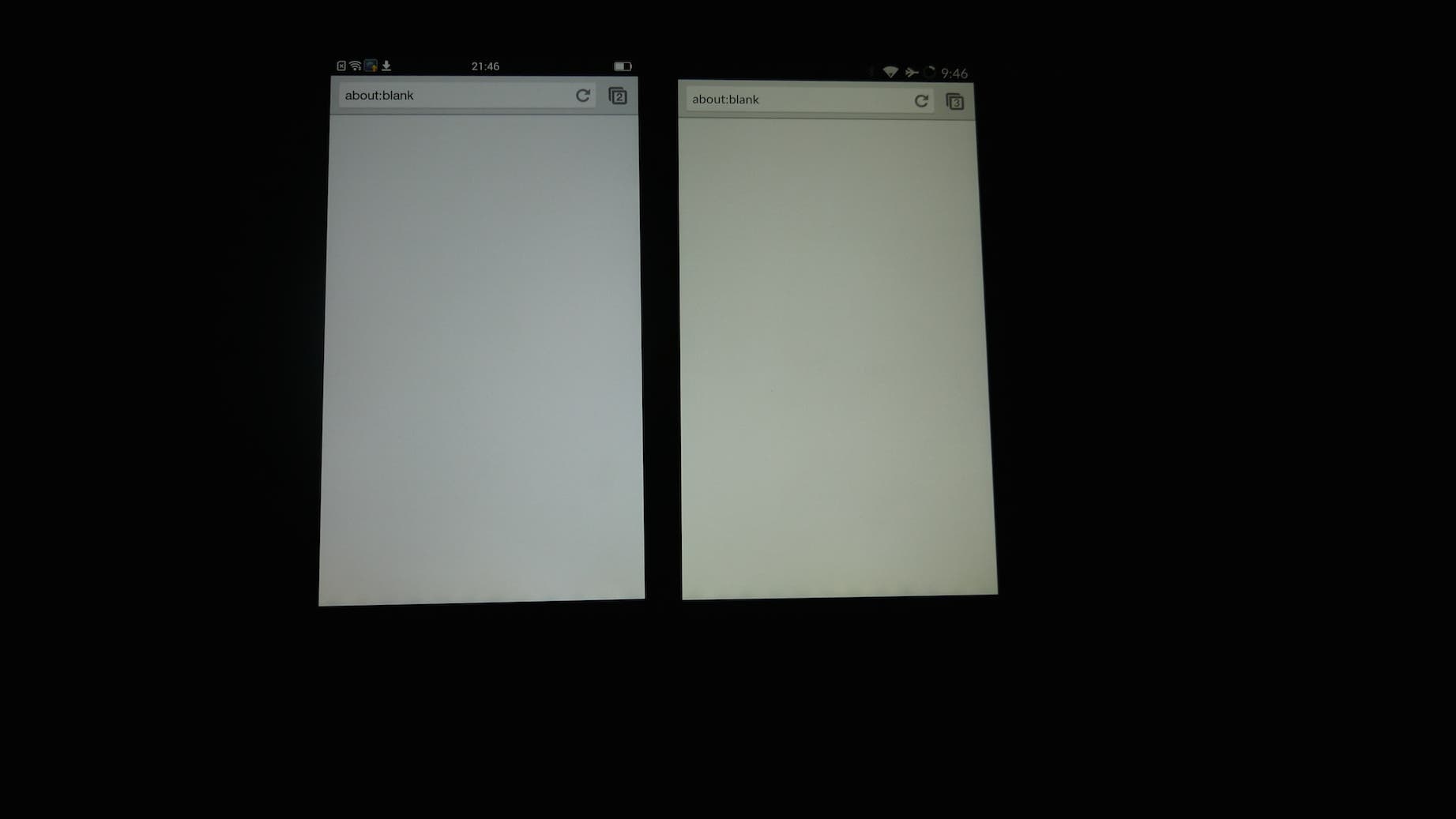
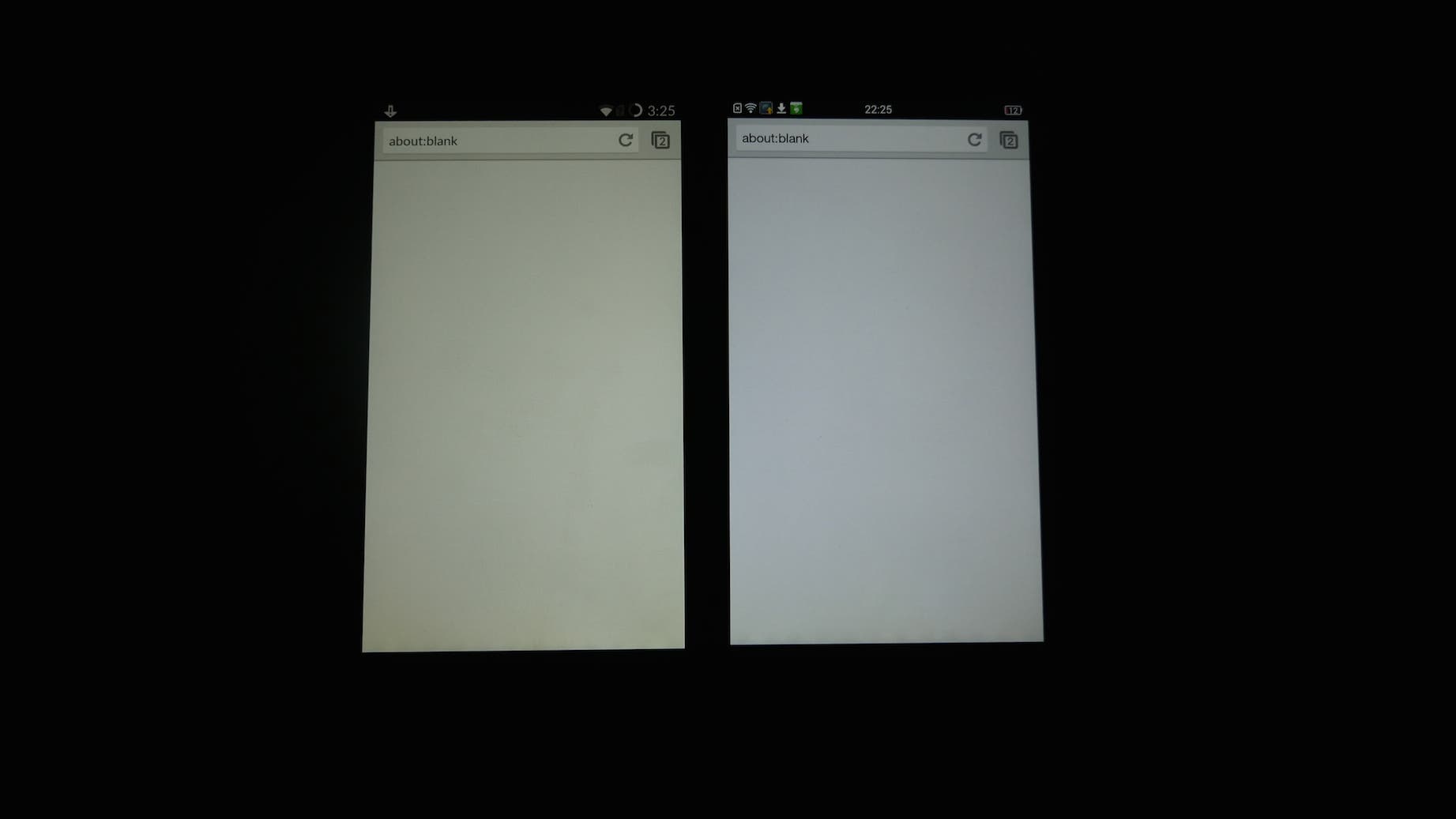
Before CM11S (XNPH30O what was pushed out (OTA) starting 12th August 2014), the screen was on the warm side (yellowish) and many people complained (see next issue as well). So, OnePlus and CM made the screen a bit cooler (blue) and now... People also complain. biggrin.gif

How ar? smile.gif

I guess they can let users customise the screen hue.


*YELLOW SCREEN/ TINT*

There's been some talk about screen being "yellow" or there's yellowish tint at the bottom part of the screen.
» Click to show Spoiler - click again to hide... «


*BUG TRACKING AND REPORTING (CM11s)*

From https://forums.oneplus.net/threads/how-to-r...cyanogen.41858/
QUOTE
Since Sunday, Jun 22, CyanogenMod has a dedicated bug tracker for the OnePlus One. To report an issue, first go to https://jira.cyanogenmod.org/ and register there, if you are not registered yet. Note that you need to specify your full name during registration and it will be publicly shown when creating an issue or commenting.

Next, look for existing issues to avoid duplicates. All current issues are listed at
https://jira.cyanogenmod.org/browse/BACON (click issues left in there).

If you find an existing issue:
You can vote on existing issues, by clicking vote on the right of the issue. Please DO NOT add comments like "Me too", as this will just annoy people.

If you cannot find an existing issue:
1. Click Create Issue -> A "window" appears
2. In the "Project" drop-down, select "OnePlus One"
3. Now in the "Issue Type" drop-down, select the type of issue you want to report:
---> Bug - something that is not working correctly
---> New feature - A new feature that needs to be developed
---> Improvement - A proposed Improvement to an existing feature

Bugs
1. In the instruction tab, select the version of CM 11S running on your OnePlus One
2. Click on "Field Tab"
3. Fill out the summary and description field. The summary should be useful. A good example: "Screen does not power on consistently after waking device using galaxysmtd. A bad summary: "Screen wont turn on." (examples copied from cyanogenmod wiki).
4. Attach possible attachments. You probably want to include a logcat.
5. Click create
Once you have filed your bug, you may be asked for more information, such as a logcat from adb (if you have not done yet, as you should have in almost all cases). For information on how to generate a logcat, see http://wiki.cyanogenmod.org/w/Doc:_debugging_with_logcat

New Features / Improvements
It's like for bugs, but all on one tab. Just fill out all the fields and click create.


This post has been edited by mydragoon: Sep 2 2014, 09:16 AM
TSmydragoon
post Aug 18 2014, 09:10 AM

Look at all my stars!!
*******
Senior Member
7,044 posts

Joined: Nov 2007


*INTERNATIONAL VS CHINESE MODEL*

see: http://www.gizchina.com/2014/06/12/differe...se-oneplus-one/
TL;DR version:
QUOTE
* International version comes with Cyanogenmod 11S. Chinese model comes with ColorOS.
* International model has got CYANOGENMOD branding/ logo on the back cover. Chinese version does not have this.
* Chinese version is much easier to find that International version (which can currently be purchased only if you have an invite).
* Price is slightly higher for Chinese model since its being sold by reseller and not directly by OnePlus. For international units, OnePlus is directly selling them (no middle person).
*4G IN MALAYSIA*

from: http://en.wikipedia.org/wiki/List_of_LTE_networks#Asia
user posted image


Network band comparison: China vs International
user posted image

Note: From Wikipedia above, Malaysia uses Band 3 and Band 7.


*FREQUENTLY ASKED QUESTIONS (FAQs)*

Developer options? I can't find it...
QUOTE
Go to Settings --> About phone/ device. Tap about 7-10 times on BUILD NUMBER.

After that, Developer Option will be enabled and you can now find it on SETTINGS.
If I buy the Chinese unit that comes with ColorOS but flash to official CM11s, can I get OTA (for CM11s)?
QUOTE(OmegaPrime @ Jul 30 2014, 09:56 AM)
yes u will receive it the OTA..
*
What is the original OS and does it come with Google Play?
QUOTE(NightFelix @ Jul 29 2014, 06:14 PM)
the phone didnt come with playstore?
- China OPO with ColorOS, NO
- China OPO flashed with CM11S, Yes
- International OPO with CM11S, Yes

is international set come with playstore & CM11?
- Yes, and is not CM11, is CM11S.
*
I bought my unit from local reseller (example: DirectD and 1Gadget). The box is still sealed (string not pulled) but it comes with CM11s. Does that mean the China unit was flashed with CM11s in the factory?
QUOTE(Gurvin Abruzzi @ Jul 19 2014, 11:54 PM)
Bro,  FYI they open bottom of the box.
I got post the pics before.

Then glue back.
*
Can I use UV lights to try and remove the yellow tint?
QUOTE(Baronic @ Jul 19 2014, 10:31 AM)
Okay guys. I just sat in a nail saloon for 15 mins + with the phone sitting in the UV nail curing device before customers came and i got booted

Is the yellow tint BETTER?
Not sure

Is it still there?
YES
*
Note: Maybe try longer... smile.gif


*TEARDOWN (IFIXIT)*

see:
https://www.ifixit.com/Teardown/OnePlus+One+Teardown/26484
QUOTE
OnePlus One Repairability Score: 5 out of 10 (10 is easiest to repair).


*TEARDOWN (CHINESE SITE)*

Part 1 @ https://forum.lowyat.net/index.php?showtopi...&#entry67831757 *
Part 2 @ https://forum.lowyat.net/index.php?showtopi...&#entry67831763 *
Part 3 @ https://forum.lowyat.net/index.php?showtopi...&#entry67831773 *

This post has been edited by mydragoon: Aug 18 2014, 09:15 AM
TSmydragoon
post Aug 18 2014, 09:11 AM

Look at all my stars!!
*******
Senior Member
7,044 posts

Joined: Nov 2007


*ACCESSORIES*

Note: Links provided on some pages is just for convenience & may not provide best deal. Please shop around for the best deal.

---> SCREEN PROTECTOR
NILLKIN Amazing Nanometer Anti-Explosion Tempered Glass Screen Protector
http://www.nillkin.com/english/proshow.asp...&id=4251&page=1

Nillkin Ultra Clear Screen Protector For Oneplus one
http://www.oppomart.com/oneplus-one-phone/...neplus-one.html

NILLKIN Matte Scratch-resistant Protective Film
http://www.nillkin.com/english/proshow.asp...&id=4249&page=1

PELOSI High Anti-Explosion Tempered Glass Screen Protector for Oneplus one
http://www.oppomart.com/oneplus-one-phone/...neplus-one.html


---> CASES
OnePlus One Clear Case
http://oneplus.net/oneplus-one-clear-case
» Click to show Spoiler - click again to hide... «


OnePlus One Flip Cover
http://oneplus.net/oneplus-one-flip-cover
» Click to show Spoiler - click again to hide... «


Official Colorful Protective Cover Shield For Oneplus one (White, Green, Orange, Yellow, Clear)
http://www.oppomart.com/oneplus-one-phone/...neplus-one.html

NILLKIN Super Frosted Shield For Oneplus one
http://www.oppomart.com/oneplus-one-phone/...neplus-one.html

Nillkin Protective Window View Leather Case For Oneplus one
http://www.oppomart.com/oneplus-one-phone/...neplus-one.html
» Click to show Spoiler - click again to hide... «


Aixuan Simple Style Protective Shield Case For OnePlus One
http://www.oppomart.com/oneplus-one-phone/...neplus-one.html

Aixuan Bright Protective Skin Cover For OnePlus One
http://www.oppomart.com/oneplus-one-phone/...neplus-one.html

Msvii Fashion Design Flip Leather Protective Smartphone Case For OnePlus One
http://www.oppomart.com/oneplus-one-phone/...neplus-one.html

PELOSI Hot Flip Leather Hard Case For OnePlus One
http://www.oppomart.com/oneplus-one-phone/...neplus-one.html

PELOSI Protective Hard Cover Case For OnePlus One
http://www.oppomart.com/oneplus-one-phone/...neplus-one.html

TORRAS Aluminum Frame Bumper Cover For Oneplus One
http://www.oppomart.com/oneplus-one-phone/...neplus-one.html

Mofi Protective Leather Case For OnePlus One
http://www.oppomart.com/oneplus-one-phone/...neplus-one.html

Walsontop™ Ultra Thin Double-View S-view Window PU Leather Protective Flip Folio Case Back Cover with stand for 1+ ONEPLUS ONE One plus one (Various colours)
http://www.amazon.com/Walsontop-Double-Vie...neplus+one+case

Walsontop™ Brand New Soft TPU Rubber Silicone Gel Transparent Matte Shell Case Cover For ONEPLUS ONE One plus one 1+ (Various colours)
http://www.amazon.com/Walsontop-Rubber-Sil...neplus+one+case


---> OTHERS
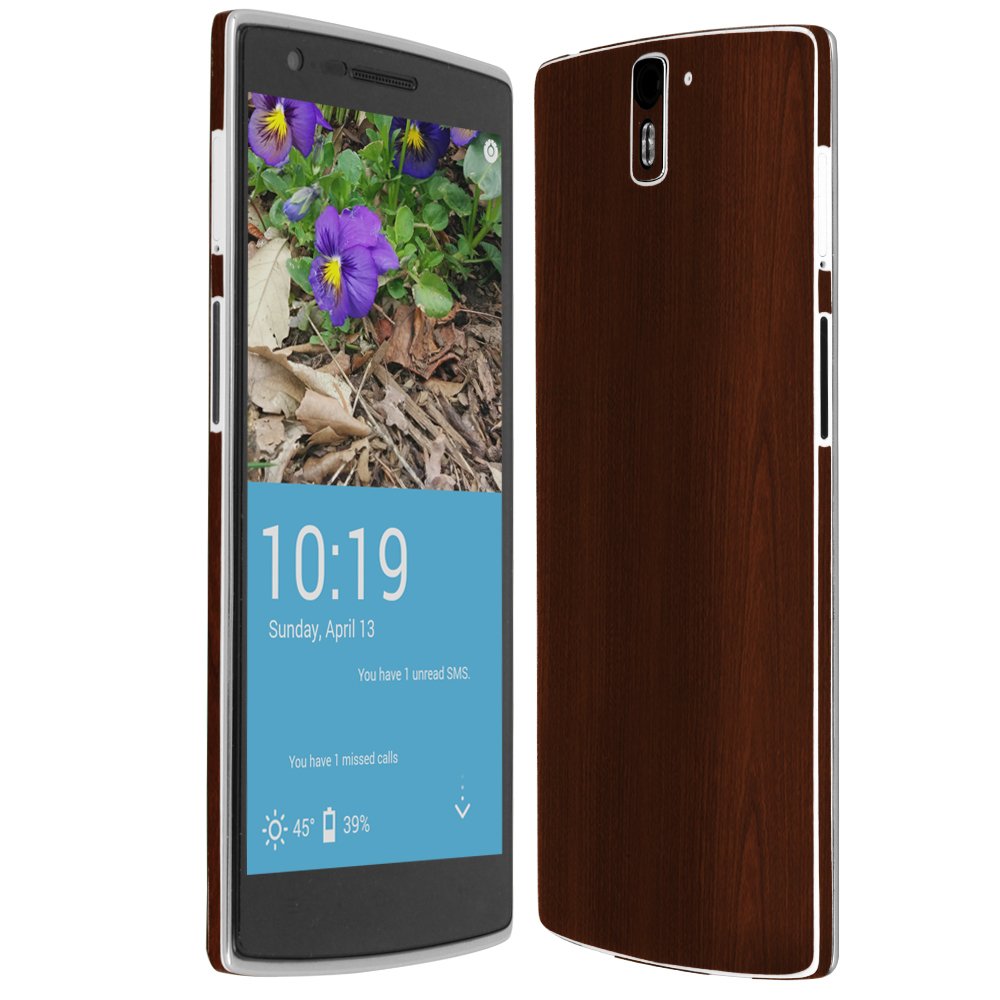
Skinomi® TechSkin - OnePlus One Screen Protector + Dark Wood Full Body Skin Protector / Front & Back Premium HD Clear Film / Ultra High Definition Invisible and Anti-Bubble Crystal Shield with Free Lifetime Replacement Warranty - Retail Packaging
http://www.amazon.com/Skinomi%C2%AE-TechSk...neplus+one+case
» Click to show Spoiler - click again to hide... «


This post has been edited by mydragoon: Aug 18 2014, 09:15 AM
TSmydragoon
post Aug 18 2014, 09:11 AM

Look at all my stars!!
*******
Senior Member
7,044 posts

Joined: Nov 2007


*ADVANCED USER: ROOTING, ETC...*


Note: It's 22nd August 2014 and CM 11S XNPH33R OTA is on the way. Fixes the battery drain issue that got introduced in 30O. See official announcement here.

» Click to show Spoiler - click again to hide... «


---> Rooting & Installing TWRP Recovery by IB Times:
http://www.ibtimes.co.uk/how-root-oneplus-...ecovery-1450708


---> Changing from ColorOS to CM11S (Method #1):
CODE
EDIT: Here is easier guide to jump from ColorOS to CM11S
1. Download first ROM from https://cyngn.com/products/oneplusone/
2. Reboot phone to recovery (power on + volume down together) choose update , choose new ROM , install , reboot , again in recovery , flush data, flush all , reboot and voilà. No PC needed, 5 min work. Thanks to @iamxray

from: http://oneplusbbs.com/forum.php?mod=viewth...&fromuid=404971


---> Changing from ColorOS to CM11S (Method #2):
https://forums.oneplus.net/threads/jumping-...to-cm11s.36408/


---> What to do if you soft-brick the phone during flashing from Color OS to CM11? Try:
» Click to show Spoiler - click again to hide... «


---> CyanogenMod recently took down the zip file that can be flashed from recovery. But fear not, fellow owner cruzzmz has got a copy here (build - XNPH25R):
QUOTE(cruzzmz @ Jul 15 2014, 11:27 PM)
Done uploading

CM11s folder

Have fun

@mydragoon  brows.gif
*
---> Flashing ColorOS:
» Click to show Spoiler - click again to hide... «


Official OnePlus One AOSP
See: https://forums.oneplus.net/threads/rom-offi...lus-aosp.65482/

Using TWRP to backup and Flash
» Click to show Spoiler - click again to hide... «


Step-by-step guide: Using Fastboot method to flash
» Click to show Spoiler - click again to hide... «


Misc reading:
* Official bootloader unlocking...
https://forums.oneplus.net/threads/guide-on...and-root.64487/

QUOTE(droidtrix @ Aug 11 2014, 05:55 PM)
For those who wants good Camera Apps, this would be ideal, i guess

http://forum.xda-developers.com/showthread.php?t=2665714

its really works wonder on my OPO which running on Liquid Smooth Rom.. brows.gif
*
This post has been edited by mydragoon: Aug 26 2014, 09:18 AM
TSmydragoon
post Aug 18 2014, 09:12 AM

Look at all my stars!!
*******
Senior Member
7,044 posts

Joined: Nov 2007


(reserved)
OK, can post after this... smile.gif

dualshock
post Aug 18 2014, 09:12 AM

Let it go...let it go!!!
******
Senior Member
1,309 posts

Joined: Dec 2004
From: The Lion City


1st in v5...congrats!!
droidtrix
post Aug 18 2014, 09:15 AM

Addicted to ANDROID
*******
Senior Member
4,852 posts

Joined: Nov 2011
From: Klang , Selangor.


V5 all hails to mydragoon notworthy.gif
jotaro12
post Aug 18 2014, 09:17 AM

On my way
****
Senior Member
541 posts

Joined: Apr 2008
V5 congrats!
TSmydragoon
post Aug 18 2014, 09:17 AM

Look at all my stars!!
*******
Senior Member
7,044 posts

Joined: Nov 2007


btw, as of last night, still no OTA...

droidtrix fail... heh heh...

maybe coz i didn't put SIM card on the phone?!? but should not be... oh well... should be today where all phones should have gotten the update.

This post has been edited by mydragoon: Aug 18 2014, 09:18 AM
Haters_Gonna_H8
post Aug 18 2014, 09:21 AM

:hehe:
*******
Senior Member
2,663 posts

Joined: Aug 2012


haha. so fast v5
shapeq91
post Aug 18 2014, 09:23 AM

Getting Started
**
Junior Member
149 posts

Joined: Jun 2012


Already V5,i still have not get my OPO yet whistling.gif
droidtrix
post Aug 18 2014, 09:26 AM

Addicted to ANDROID
*******
Senior Member
4,852 posts

Joined: Nov 2011
From: Klang , Selangor.


QUOTE(mydragoon @ Aug 18 2014, 09:17 AM)
btw, as of last night, still no OTA...

droidtrix fail... heh heh...

maybe coz i didn't put SIM card on the phone?!? but should not be... oh well... should be today where all phones should have gotten the update.
*
ok accepted that i m not good in prediction brows.gif brows.gif

My fren who brought his OPO got his OTA yesterday night hmm.gif hmm.gif

This post has been edited by droidtrix: Aug 18 2014, 09:27 AM


Attached thumbnail(s)
Attached Image
kazarboys
post Aug 18 2014, 09:30 AM

On my way
****
Senior Member
537 posts

Joined: Nov 2008


Wow so fast v5
apisfires
post Aug 18 2014, 09:30 AM

PengUlar
*******
Senior Member
3,129 posts

Joined: Jun 2011
From: Melaka/Kuching


good Ts hehehe
cograts new thread..
hope this thread give me luck for my OPO
TSmydragoon
post Aug 18 2014, 09:31 AM

Look at all my stars!!
*******
Senior Member
7,044 posts

Joined: Nov 2007


QUOTE(bestsane @ Aug 16 2014, 08:29 AM)
Hi guys,

Been reading this forum from version 1 to the latest version. The deeper I go into the forum the more headaches I get, due to all those acronyms and modification terms. Anyway, I have also undoubtedly gained a lot of knowledge.

Honestly, I have never modded a phone in my life. I am just a guy who uses a phone as it is (except installing on-the-air updates, which is just a one-click process), and I would like to stay that way.

I am planing to buy a 64GB OnePlus One China set, probably from DirectD. I have confirmed that OnePlus One sold at DirectD has CyanogenMod 11, not Cyanogenmod 11S. Just asking for second opinions, in case they don't what what they are talking about:

Once I get my hands on the phone with Cyanogenmod 11 on it, can I update to CyanogenMod 11S with the latest version using on-the-air updating? If I can't, then I can assume that I need to install CyanodenMod 11S myself, and then on-the-air updating is possible, right?

I have read that a few (maybe all) users of un-modded OnePlus One have no major issues (network, etc). I'd like to hear more from them to convince me.

Thanks.
*
QUOTE(droidtrix @ Aug 16 2014, 08:54 AM)
Really ? I dont that DD set is only comes with CM11 ?
*
QUOTE(shapeq91 @ Aug 16 2014, 08:58 AM)
DD set come with CM11 or CM11s,i already get confuse here. shakehead.gif
*
QUOTE(bestsane @ Aug 16 2014, 09:01 AM)
Yes, I have contacted them and they confirmed that all sets have CyanogenMod 11, not 11S.

Back to my original post, hope that someone can response to that.
*
very sure DD is CM11S. note that sometimes DD ppl blur... don't even know the difference between CM11 and CM11s. when i bought mine, the first sales fella who attended to be didn't even know what I was talking about when I asked if its ColorOS or CM11S.

bestsane if really it comes with CM11 (which i don't think so), then ya, just flash CM11s and you should get the OTA after that. in any case, if you are willing to try flashing, i do suggest you do that even if CM11S is already installed -- just to be safe coz you never know where they got the CM11S from. otherwise, CM11 will not get OTA that is for CM11S. think of CM11 and CM11S as different roms.

plus, OnePlus One has got many official ROMS. who knows, you may actually find something else that you like instead of CM11S.
TSmydragoon
post Aug 18 2014, 09:41 AM

Look at all my stars!!
*******
Senior Member
7,044 posts

Joined: Nov 2007


QUOTE(xxdesire @ Aug 17 2014, 01:40 AM)
Settings > Factory reset.
If you use custom recovery like TWRP > Wipe > factory reset or Wipe > advanced > tick all

LOL! Realized, thanks to Haters_Gonna_H8, better to do factory reset. Or if you just want to wipe the sdcard (music/photo/etc) then wipe > advanced > internal storage.
*
QUOTE(xxdesire @ Aug 17 2014, 01:54 AM)
Which method you use?
Wipe > advanced > tick internal storage
*
i tried this and basically it will wipe the phone storage -- including OS, etc... so, if you have the zip file inside, also gone.

i had a scare and learnt the hardway about this. and had to learn how to sideload... else, phone totally kosong. smile.gif


samliang
post Aug 18 2014, 09:44 AM

❤❤❤❤❤
****
Senior Member
649 posts

Joined: Dec 2004
From: Selangor,Puchong


i have 3 invites to share. first come first served basis. those 3 who pm me first please include ur email address. i'll send the invite to your email smile.gif
TSmydragoon
post Aug 18 2014, 09:46 AM

Look at all my stars!!
*******
Senior Member
7,044 posts

Joined: Nov 2007


QUOTE(apisfires @ Aug 18 2014, 08:51 AM)
smile.gif
well mana TS? he said he so busy..
no one wanna take over?
can i take over?  hmm.gif
*
alamak... just saw this. ok la... next v... you can take over. smile.gif

let me know if you want the codes for the first few pages... i can PM you. or you can do your own one... your call. PM me if you want any details, etc... smile.gif
xxdesire
post Aug 18 2014, 10:04 AM

Iris Heart-sama ❤
*******
Senior Member
3,354 posts

Joined: Oct 2011


Edit: Almost grats on V5~~ rclxms.gif

QUOTE(mydragoon @ Aug 18 2014, 09:41 AM)
i tried this and basically it will wipe the phone storage -- including OS, etc... so, if you have the zip file inside, also gone.

i had a scare and learnt the hardway about this. and had to learn how to sideload... else, phone totally kosong. smile.gif
*
Yeah, I also realized that in the end.
due to not much sleep, my brain that time too mushy after long day of coding at home doh.gif

Factory reset should be ok to do since it wipes /data but not /data/media (aka virtual sdcard).
But since that person was asking to wipe sdcard, wipe > format data should be good smile.gif

This post has been edited by xxdesire: Aug 18 2014, 10:05 AM

116 Pages  1 2 3 > » Top
Topic ClosedOptions
 

Change to:
| Lo-Fi Version
0.0293sec    0.34    6 queries    GZIP Disabled
Time is now: 11th December 2025 - 04:26 PM