Welcome Guest ( Log In | Register )

172 Pages « < 137 138 139 140 141 > » Bottom

Outline · [ Standard ] · Linear+

 LCD Monitor Thread v13.

views
     
Andrewtst
post Dec 19 2022, 07:43 PM

Forgiveness is Happiness
*********
All Stars
29,771 posts

Joined: Jan 2009
From: Johor, Malaysia.


QUOTE(C0ffee @ Dec 19 2022, 07:55 AM)
LG 27GP850-B or Dell S2721DGF .
Which is a better monitor? Cannot decide which to get.
*
Every single part LG 27GP850 is better than Dell S2721DGF. I will pick LG 27GP850.
Even thought the Dell came with Edge local dimming but Edge local dimming is useless and not helping at all.

I will avoid the Dell as Dell uniformity is very bad and the out of the box color accuracy is bad as well.

https://www.rtings.com/monitor/tools/compar...&threshold=0.10

This post has been edited by Andrewtst: Dec 19 2022, 07:44 PM
Andrewtst
post Dec 19 2022, 07:57 PM

Forgiveness is Happiness
*********
All Stars
29,771 posts

Joined: Jan 2009
From: Johor, Malaysia.


QUOTE(180sx @ Dec 16 2022, 12:34 PM)
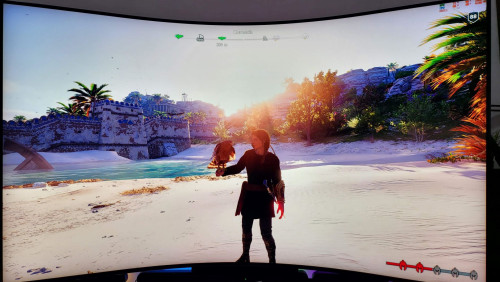
This monitor best of both worlds  devil.gif

user posted image

user posted image
*
Samsung Odyssey G8 ?

Even though it can set as 21:9 aspect ratio Ultrawide but too bad Adaptive Sync need to be off with 120hz support only.

This post has been edited by Andrewtst: Dec 19 2022, 07:59 PM
stevenhsl2512
post Dec 20 2022, 04:45 PM

Getting Started
**
Junior Member
179 posts

Joined: Jan 2014
QUOTE(tzxsean @ Jun 21 2022, 11:45 PM)
Any pros and cons for these 2 monitors?

- LG 27UP850

- Dell S2722QC
*
Currently I am reseaching either one of these two models as well, for my macbook. Have you bought any of these monitor? How is it like?
stevenhsl2512
post Dec 20 2022, 04:50 PM

Getting Started
**
Junior Member
179 posts

Joined: Jan 2014
Currently planning to upgrade my monitor to a 4k display, and looking into LG27UP850 (95% DCI-p3. ~ RM1700) and Dell S2722QC (99% sRGB, ~RM1300). Mac compatability and USB C connectivity is my main concern.

LG is slightly better on paper because of 95% DCI P3, HDR400 and 90W PD charging, since im just using it for netflix and youtube daily, is 95% DCI P3 important?

I'm comtemplating because I'm not sure if I should just settle with Dell or go for LG.

This post has been edited by stevenhsl2512: Dec 20 2022, 04:52 PM
180sx
post Dec 20 2022, 07:38 PM

Getting Started
**
Junior Member
119 posts

Joined: Jan 2003
From: Already Given
QUOTE(Andrewtst @ Dec 19 2022, 07:57 PM)
Samsung Odyssey G8 ?

Even though it can set as 21:9 aspect ratio Ultrawide but too bad Adaptive Sync need to be off with 120hz support only.
*
I see, didn't know the G8 have such limitation sad.gif

Mine is odyssey ark. Playing in 32:9 with vrr on and running at 165hz 10bit color. So far it gave me the same feel when playing on my g9. Loving it smile.gif
Andrewtst
post Dec 20 2022, 08:05 PM

Forgiveness is Happiness
*********
All Stars
29,771 posts

Joined: Jan 2009
From: Johor, Malaysia.


QUOTE(180sx @ Dec 20 2022, 07:38 PM)
I see, didn't know the G8 have such limitation sad.gif

Mine is odyssey ark. Playing in 32:9 with vrr on and running at 165hz 10bit color. So far it gave me the same feel when playing on my g9. Loving it smile.gif
*
All Samsung Odyssey special feature got limitation. The G9 Neo also where it is also 120hz if you use PIP and nearly all setting is grey out and not support HDR as well.
I did not try PIP in G8 Neo yet, I believe same limitation as well.

Wow you using Odyssey Ark, I like the concept but 55" is too big to me already and I am sure cannot accept the text clarity. I hope future got smaller Ark version. smile.gif

This post has been edited by Andrewtst: Dec 20 2022, 08:06 PM
Andrewtst
post Dec 20 2022, 09:32 PM

Forgiveness is Happiness
*********
All Stars
29,771 posts

Joined: Jan 2009
From: Johor, Malaysia.


I decide to do a little bit changes on my Samsung Odyssey G8 Neo. The main changes is Turn Off the Contrast Enhancer as I found this make the contrast over done and deep black too black.

My Samsung Odyssey G8 Neo New Setting
  • Windows - Use HDR: Off
  • Windows - SDR Content Brightness 13 (to prevent desktop over bright when switch to HDR On)
  • OSD - Black Equalizer: 13
  • OSD - Picture Mode: Custom
  • OSD - Brightness: 44 (100 in HDR mode)
  • OSD - Contrast: 63 (100 in HDR mode)
  • OSD - Color: Red 46, Green 48, Blue 52, Gamma Mode 1
  • OSD - Contrast Enhancer: Off
  • Local Dimming - Auto


This post has been edited by Andrewtst: Dec 20 2022, 11:33 PM
ben3003
post Dec 21 2022, 05:07 PM

10k Club
********
All Stars
10,859 posts

Joined: Jan 2003
From: Sarawak


Coolermaster GP27U and GP27Q getting very positive review for a budget mini led. Duno when will arrive here.

This post has been edited by ben3003: Dec 21 2022, 05:07 PM
ben3003
post Dec 21 2022, 07:29 PM

10k Club
********
All Stars
10,859 posts

Joined: Jan 2003
From: Sarawak


QUOTE(Andrewtst @ Dec 20 2022, 09:32 PM)
I decide to do a little bit changes on my Samsung Odyssey G8 Neo. The main changes is Turn Off the Contrast Enhancer as I found this make the contrast over done and deep black too black.

My Samsung Odyssey G8 Neo New Setting

  • Windows - Use HDR: Off
  • Windows - SDR Content Brightness 13 (to prevent desktop over bright when switch to HDR On)
  • OSD - Black Equalizer: 13
  • OSD - Picture Mode: Custom
  • OSD - Brightness: 44 (100 in HDR mode)
  • OSD - Contrast: 63 (100 in HDR mode)
  • OSD - Color: Red 46, Green 48, Blue 52, Gamma Mode 1
  • OSD - Contrast Enhancer: Off
  • Local Dimming - Auto

*
Btw why u get g8 instead of g7? Seems like rtings say g7 is the better of the two.

Andrewtst
post Dec 21 2022, 08:09 PM

Forgiveness is Happiness
*********
All Stars
29,771 posts

Joined: Jan 2009
From: Johor, Malaysia.


QUOTE(ben3003 @ Dec 21 2022, 07:29 PM)
Btw why u get g8 instead of g7? Seems like rtings say g7 is the better of the two.
*
Rtings said G8 is better than G7 but Hardware Unboxed said G7 better than G8 due to one reason scan line issue.

I get G8 because I want 240hz, the G7 165hz can hit 165fps which then tearing will occured. I don't want do fps limit as that sometimes did not run well.
ben3003
post Dec 22 2022, 06:41 AM

10k Club
********
All Stars
10,859 posts

Joined: Jan 2003
From: Sarawak


QUOTE(Andrewtst @ Dec 21 2022, 08:09 PM)
Rtings said G8 is better than G7 but Hardware Unboxed said G7 better than G8 due to one reason scan line issue.

I get G8 because I want 240hz, the G7 165hz can hit 165fps which then tearing will occured. I don't want do fps limit as that sometimes did not run well.
*
So is like u wan it in sync with your g9 neo. If not 165hz with VRR or freesync gsync compatible shudnt have tearing la haha. The coating wont introduce hazing? Alot review said so, owes those anti glare coating is like that.
Andrewtst
post Dec 22 2022, 10:47 AM

Forgiveness is Happiness
*********
All Stars
29,771 posts

Joined: Jan 2009
From: Johor, Malaysia.


QUOTE(ben3003 @ Dec 22 2022, 06:41 AM)
So is like u wan it in sync with your g9 neo. If not 165hz with VRR or freesync gsync compatible shudnt have tearing la haha. The coating wont introduce hazing? Alot review said so, owes those anti glare coating is like that.
*
Not related to G9. It won't impact even both different refresh rate and I not playing games across two monitor.

165hz is too easier to hit for older a bit games as I am using RTX 3080 and I do plan change to 7900 XTX in future. For 240hz no issue as barely got games can hit more than 200fps.

The coating won't introduce any hazing and I actualy like it as it is like totally no reflection issue.

This post has been edited by Andrewtst: Dec 22 2022, 11:28 AM
ben3003
post Dec 22 2022, 12:16 PM

10k Club
********
All Stars
10,859 posts

Joined: Jan 2003
From: Sarawak


QUOTE(Andrewtst @ Dec 22 2022, 10:47 AM)
Not related to G9. It won't impact even both different refresh rate and I not playing games across two monitor.

165hz is too easier to hit for older a bit games as I am using RTX 3080 and I do plan change to 7900 XTX in future. For 240hz no issue as barely got games can hit more than 200fps.

The coating won't introduce any hazing and I actualy like it as it is like totally no reflection issue.
*
I see, if got plan future upgrade then okay. I didnt play older games and 3070ti only, even 120fps is fine for me lol.

I saw alot review saying is matte type display, still will be diff compare glossy type la anyhow. Tat should be by use case basis. G7 and g8 1k diff lol.
Andrewtst
post Dec 22 2022, 01:24 PM

Forgiveness is Happiness
*********
All Stars
29,771 posts

Joined: Jan 2009
From: Johor, Malaysia.


QUOTE(ben3003 @ Dec 22 2022, 12:16 PM)
I see, if got plan future upgrade then okay. I didnt play older games and 3070ti only, even 120fps is fine for me lol.

I saw alot review saying is matte type display, still will be diff compare glossy type la anyhow. Tat should be by use case basis. G7 and g8 1k diff lol.
*
99.99% monitor is matte surface. Just this G8 is more matte than others.

Only recently released OLED monitor is glossy surface.

The more matte basically not very different than others matte surface screen, it looks like same. At least it looks very similar when compare with my Samsung Odyssey G9 Neo, LG 34GN850 and also AOC 24G2SP.

I no need very high fps, but reaching 165fps is possible and this will be tearing if your monitor is 165hz only. Even though this still can control by V-sync but this generate input lag.

So far to reach 200fps is very hard, that the reason I choose 240hz as this will hard to happen tearing.

This post has been edited by Andrewtst: Dec 22 2022, 03:49 PM
Andrewtst
post Dec 31 2022, 02:21 PM

Forgiveness is Happiness
*********
All Stars
29,771 posts

Joined: Jan 2009
From: Johor, Malaysia.


The Samsung Odyssey G8 Neo monitor has one major flaw! The color setting will be reset to the default value from time to time.

I set the RGB to 46, 48, 52, but it keeps resetting to 50, 50, 50...

This post has been edited by Andrewtst: Dec 31 2022, 02:21 PM
Duckies
post Jan 15 2023, 11:47 PM

Rubber Ducky
*******
Senior Member
9,790 posts

Joined: Jun 2008
From: Rubber Duck Pond


LG 27GP850 or Gigabyte M27Q-P?
Andrewtst
post Jan 15 2023, 11:58 PM

Forgiveness is Happiness
*********
All Stars
29,771 posts

Joined: Jan 2009
From: Johor, Malaysia.


QUOTE(Duckies @ Jan 15 2023, 11:47 PM)
LG 27GP850 or Gigabyte M27Q-P?
*
M27Q-P is using LG panel, I believe both is identical but Gigabyte overclock slighly further.

If taken Gigabyte, make sure you get is model M27Q-P not M27Q as the M27Q is BGR pixel arrangement which impact to text clarity.

This post has been edited by Andrewtst: Jan 15 2023, 11:59 PM
stinger
post Jan 18 2023, 01:10 PM

Casual
***
Junior Member
333 posts

Joined: Mar 2005
From: 夢の国


QUOTE(Duckies @ Jan 15 2023, 11:47 PM)
LG 27GP850 or Gigabyte M27Q-P?
*
I also narrowed down this 2 but M27Q-P is sold out while M27Q is everywhere with a chance of getting one with dead pixel
so will probably go for LG 27GP850

Duckies
post Jan 18 2023, 01:17 PM

Rubber Ducky
*******
Senior Member
9,790 posts

Joined: Jun 2008
From: Rubber Duck Pond


QUOTE(stinger @ Jan 18 2023, 01:10 PM)
I also narrowed down this 2 but M27Q-P is sold out while M27Q is everywhere with a chance of getting one with dead pixel
so will probably go for LG 27GP850
*
Ya I'm in the same situation as well. The M27Q-P will be restocked on March.
miyeonevermioff
post Jan 24 2023, 10:07 AM

Getting Started
**
Junior Member
295 posts

Joined: Oct 2020
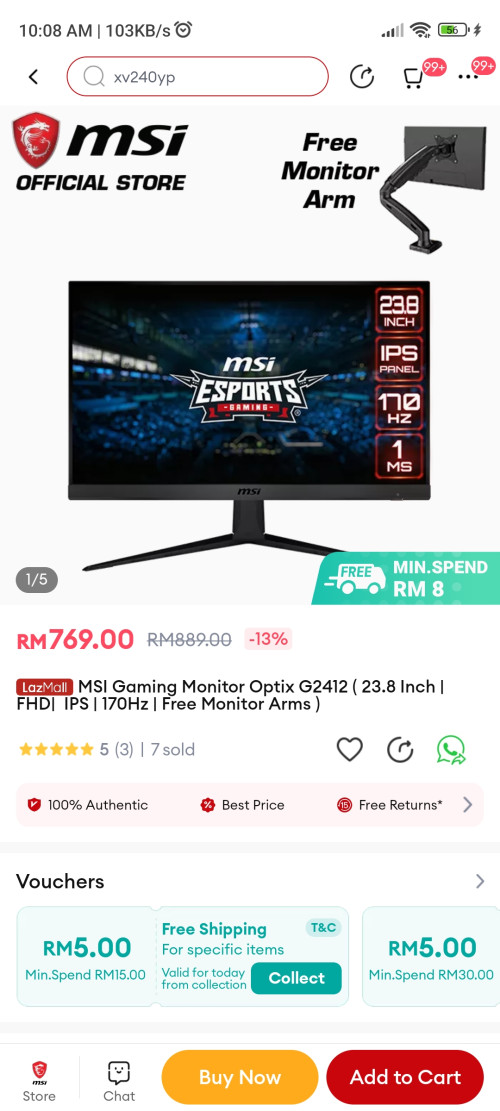
user posted image

hi... any thoughts for this monitor? cant find much reviews for this monitor.

172 Pages « < 137 138 139 140 141 > » Top
 

Change to:
| Lo-Fi Version
0.0384sec    0.58    6 queries    GZIP Disabled
Time is now: 8th December 2025 - 11:54 PM