Welcome Guest ( Log In | Register )

14 Pages « < 9 10 11 12 13 > » Bottom

Outline · [ Standard ] · Linear+

 LCD Monitor Thread v13.

views
     
Andrewtst
post Jan 15 2023, 11:58 PM

Forgiveness is Happiness
*********
All Stars
29,771 posts

Joined: Jan 2009
From: Johor, Malaysia.


QUOTE(Duckies @ Jan 15 2023, 11:47 PM)
LG 27GP850 or Gigabyte M27Q-P?
*
M27Q-P is using LG panel, I believe both is identical but Gigabyte overclock slighly further.

If taken Gigabyte, make sure you get is model M27Q-P not M27Q as the M27Q is BGR pixel arrangement which impact to text clarity.

This post has been edited by Andrewtst: Jan 15 2023, 11:59 PM
Andrewtst
post Feb 3 2023, 07:42 PM

Forgiveness is Happiness
*********
All Stars
29,771 posts

Joined: Jan 2009
From: Johor, Malaysia.


QUOTE(planaterium @ Feb 3 2023, 07:16 PM)
hi..any good 1440p monitor under RM800?for work and movies..not for gaming.
*
Gaming or not, RM 800 only can get you a 1080p monitor.
Andrewtst
post Feb 28 2023, 11:58 PM

Forgiveness is Happiness
*********
All Stars
29,771 posts

Joined: Jan 2009
From: Johor, Malaysia.


QUOTE(dav668 @ Feb 28 2023, 07:55 AM)
May i know anyone is using Viewsonic VX2882-4KP? Am considering between this model and LG 27UP850N.
I prefer 4k with USC-C (power supply) to be connected to MAC and Windows laptop.
VX2882 seems good in response time and Hz but LG's better in brightness, and contrast.
I will use the monitor for light gaming, web surfing and office work. Budget 1.5-1.8k.
Feel free to recommend other models if the specs and budget fit to my requirements.
Kindly advise. Thank you.
*
From this two, the Viewsonic VX2882-4KP came with good 150hz which was design for gaming but the HDR support will be bad as it is not even meet the minimum HDR 400. This monitor is only 300 cd/m² typ. The official website mentioned HDR10 Certified, this is marketing gimmick, and it means nothing. HDR10 is the base of HDR and every single display support HDR will need to support HDR10. Another weak point, the monitor is only 6-bit+FRC (16.7M colors) which doesn't meet another HDR requirement.

The LG 27UP850N only came with 60hz which is not design for gaming but the HDR in this monitor is actually slightly better as it meets the HDR 400 requirement, this monitor is 400 cd/m² typ which still don't put high hope on HDR performance as HDR need to be at least HDR 600 (600 cd/m² typ) to be looking good. This monitor at least is 10-bit / 8-bit+FRC (1.07B colors) which meet one of the HDR requirement.

Any display with below HDR 400 will look washed out in HDR and within HDR 400 will still facing not enough brightness in certain scenes scenario.

I will pick the LG 27UP850N from this two as every part LG is better except it is only 60hz.

This post has been edited by Andrewtst: Mar 1 2023, 12:21 AM
Andrewtst
post Mar 2 2023, 12:49 AM

Forgiveness is Happiness
*********
All Stars
29,771 posts

Joined: Jan 2009
From: Johor, Malaysia.


QUOTE(dav668 @ Mar 1 2023, 12:40 PM)
Thanks for the comment. With my budget up to 1.8k, any other model which could meet my requirements? Besides 4k, i prefer the USB-C with power delivery at least 60W to work with my macbooks. I prefer to have screen that looks vivid, sufficient brightness. How about Asus PA or DELL? i dont mind to top up a little to gain model with significant value.

Thank you in advance for suggestions.
*
Your budget up to RM 1.8k? This is not even enough for purchasing the LG 27UP850N which cost RM 2.3k
For criteria prefer the USB-C with power delivery at least 60W, you need to check yourself as I never check on this part, also not many reviewers will talk about this.

You may check below recommendation; a good 4K display is price range from RM 2.3k ~ RM 6.3k
https://www.techspot.com/bestof/gaming-monitors-q4-2022/ or
https://www.rtings.com/monitor/reviews/best...ing-monitors-4k

For Best 4K display (sorry I did not check the USB-C feature). I will only recommend below 4 model
  • Gigabyte M28U - RM 2.3k
  • Gigabyte M32U - RM 3.2k
  • Samsung Odyssey Neo G7 - RM 5.4k
  • Samsung Odyssey Neo G8 - RM 6.3k


This post has been edited by Andrewtst: Mar 2 2023, 01:06 AM
Andrewtst
post Mar 12 2023, 09:06 PM

Forgiveness is Happiness
*********
All Stars
29,771 posts

Joined: Jan 2009
From: Johor, Malaysia.


QUOTE(PJng @ Mar 12 2023, 03:38 PM)
Any budget monitor suggest
Around RM350
No need any special function
Any 1080p, 21.5 or 23.8 inch IPS
Just normal usage, not gaming
*
Here telling you - https://www.lazada.com.my/tag/monitor//?fro...r&price=350-350
In short "No" for brand new IPS monitor.

The only found new is VA panel - https://www.lazada.com.my/products/lenovo-d...2391034082.html
Andrewtst
post Mar 30 2023, 03:17 AM

Forgiveness is Happiness
*********
All Stars
29,771 posts

Joined: Jan 2009
From: Johor, Malaysia.


QUOTE(ben3003 @ Mar 29 2023, 10:27 PM)
https://m.gsmarena.com/27_red_magic_gaming_...e-amp-58040.php

any comment on this? Rm4k for 4k 27inch mini led.
*
From spec and price, it looks interesting awesome! Hope got demo unit to check out.

https://my.redmagic.gg/pages/monitor

This post has been edited by Andrewtst: Mar 30 2023, 03:17 AM
Andrewtst
post Mar 30 2023, 08:27 AM

Forgiveness is Happiness
*********
All Stars
29,771 posts

Joined: Jan 2009
From: Johor, Malaysia.


QUOTE(ben3003 @ Mar 30 2023, 06:41 AM)
yeah but alienware oled is like extra few more hundred and bigger lol. Lets wait for review.

4k at 27inch seems overkill lol. Need decent gpu to run everything at native 4k..
*
That is true, 27" is better with 1440p.

You need Nvidia RTX 3080 and above or equivalent AMD GPU.

If you not mostly use for gaming but productively, current gaming OLED monitor all is not RGB pixel alignment which will cause text fringing issue.
Andrewtst
post Mar 30 2023, 10:27 AM

Forgiveness is Happiness
*********
All Stars
29,771 posts

Joined: Jan 2009
From: Johor, Malaysia.


QUOTE(chaics85 @ Mar 30 2023, 09:21 AM)
Hi guys. Wanna ask, I've this LG ultragear 27gq50f that I bought last year. My first VA panel display. I'm noticing a lot of horizontal lines. Is it usual for va panel? Or it should be sent for RMA.
» Click to show Spoiler - click again to hide... «

*
Try change the display cable or reduce the refresh rate and check again.
Andrewtst
post Apr 1 2023, 09:57 AM

Forgiveness is Happiness
*********
All Stars
29,771 posts

Joined: Jan 2009
From: Johor, Malaysia.


QUOTE(Maxieos @ Apr 1 2023, 07:57 AM)
Andrewtst saw your post recommend AOC 24G2SP , but the problem here don't even have a single demo , how do know whether it's a good monitor for budget usage ?
Second , what is Asus dead pixel or stuck pixel exchange ? since buying from laz  , don't even have chance to test.Returning will be a problem.
When you buy a monitor , did you personally check and test them live at store ?
Those dell too expensive for ultrawide , but what is the different on dell monitor ultrawide vs other brand  ?
-8ms is fine
-Good colour gamut for photoshop or watching video
-Best viewing angle all 4 corner
-Last longer , don't want to see monitor later got dead pixel or lines later 1 year

thanks smile.gif
*
I own the AOC 24G2SP and I can assure it is a great budget SDR monitor, the only cons is the monitor OSD navigation is old fashion and not that friendly when navigation.

I also own Samsung Odyssey Neo G8 and Neo G9, when comparing, the SDR image quality of AOC 24G2SP is very closed to them, off course excluded deep black where not possible with IPS without local dimming.

I normally based on review as they is very limited demo unit to see in Malaysia. Trusted review site include Rtings.com and also YouTube channel - Monitors Unboxed.

I not sure on how Asus dead pixel exchange, this you need check with Asus. By the way Asus is the brand most expensive compare the rest. Dell depends on model, some is expensive and not worth it, some is ok. You cannot direct compare brand by brand, expensive or not also depends on the Display Panel use.
  • Value TN - the worst panel and should 100% avoid. +/- RM 400 for 24" ~ 27" wide
  • Value VA - normally slow respond time and have black smearing issue. Not recommended. RM 1k ~ RM 1.5k for 27" wide or 34" Ultrawide
  • Value IPS - if budget issue, this is the panel type you should only consider. RM 700 ~ RM 1k for 24" wide and RM 1k ~ RM 1.5k for 27" wide.
  • High-end TN - very fast respond time can up to 500hz now. Not sure price as I don't buy TN. Suggest avoid TN unless you need 500hz monitor.
  • High-end IPS - mostly from LG which LG call nano IPS which is a very great SDR monitor but HDR performance cannot match with below mentioned panel anymore now due to no local dimming or edge local dimming, it is the best 3 years ago but not now. RM 3.5k ~ RM 5.5k for 27" wide or 34" Ultrawide
  • Mini-LED IPS - get the one with at least 500+ or best 1000+ local dimming zone and HDR 600 and best HDR 1000 if you want good HDR experience. Not sure price range, I never check.
  • Mini-LED VA - get the one with at least 500+ or best 1000+ local dimming zone and HDR 600 and best HDR 1000 if you want great HDR experience. In this part mini-LED in VA is wins Mini-LED IPS as you can get OLED like deep black which not possible with any IPS (except dual layer IPS which freaking expensive and not for gaming as all with 60hz only). Currently in market only Samsung Odyssey Neo G7 (wide), Neo G8 (wide) and Neo G9 (super ultrawide) using latest gen VA panel that is very fast respond time and no black smearing issue. RM 5.5k 32" wide ~ RM 7k 32" Wide or 49" Super ultrawide.
  • OLED - the best panel currently for HDR, but if your usage is mostly productivity, I suggest avoid as currently all Gaming OLED monitor is not RGB standard pixel arrangement and this cause text fringing issue. RM 4.5k ~ RM 7k for 27" wide and 34" Ultrawide
Resolution recommendation based on screen size
    .
  • 25" and below - 1080p
  • 27" 2560x1440 Wide or 34" 3440x1440 for Ultrawide and 49" 5120x1440 for Super Ultrawide
  • 32" ~ 43" 3840x2160 (4K) for Wide.
For good HDR performance, get minimum HDR 600.
For great HDR performance, at least HDR 1000 with 1000+ local dimming zone or any OLED.

This post has been edited by Andrewtst: Apr 1 2023, 10:26 AM
Andrewtst
post Apr 4 2023, 01:14 AM

Forgiveness is Happiness
*********
All Stars
29,771 posts

Joined: Jan 2009
From: Johor, Malaysia.


QUOTE(Maxieos @ Apr 3 2023, 11:10 PM)
Thanks for the long explanation  , just for Value IPS , I check a few reviews on youtube but not much on this monitor compression with other brand.
AOC 24G2SP have few model , 24G2SPU and 24G2SPE ? I do not know what kind of panel manufacturer they use?

Asus or Dell , what panel they are using ? Dell U series but dell got 0 dead pixel exchange.
Some review said , it's like a luck to get good panel but some said if the serial number is -123 then is a good panel.I don't know which serial 24G2SP is a good panel.

Actually , what is most important is for viewing angle and Vesa.
Not for fully gaming , for workload and movie.OSD not important , jsut setting only.
Surely everyone doesn't want dead pixel or stuck pixel.
Others like Backlight Leakage , uniformity if not to much still can accept.

Can you help me to test on the monitor 24G2SP , did you notice any viewing angle , backlight and uniformity issue ?
In this osd setting ?

Computer brightness Nvidia : minus -50 brightness

On monitor
Brightness & contrast = both 45
RGB = 95,95,85
Colour temp = 5700k

Do you see any issue with it ? this is my current monitor setting for work and not to strain the eye with lower brightness on dark mode.

btw , since it's an upgrade , any good budget Value IPS for 27 inch monitor ? FHD and 2k ?
*
This monitor is well known great, I cannot spot backlight bleed, awesome uniformity and it is IPS, means great viewing angle as well.

E is Europe model, E I think is India model. Malaysia model is 24G2SP. All should be same.

Your monitor setting is too yellowish, it should set as 6500k. Also set brightness as -50 at Nvidia will impact everything include possible of black crush, suggest don't use Nvidia setting to control the brightness. You want very dim; you should set at the monitor OSD not the Nvidia control panel.

This monitor is color accuracy out of the box, and you no need to alter the software setting to make it look not accurate. It is 300 cd/m² which is quite bright, I only put 32 for for brightness and 34 contrast.

Below this review had full cover on it and it is one of the Great Budget Monitor mentioned by well-known trusted reviewer - Monitors Unboxed.


This post has been edited by Andrewtst: Apr 4 2023, 01:56 AM
Andrewtst
post Apr 5 2023, 06:51 PM

Forgiveness is Happiness
*********
All Stars
29,771 posts

Joined: Jan 2009
From: Johor, Malaysia.


QUOTE(Maxieos @ Apr 5 2023, 07:45 AM)
The yellowish is for reading white document text while dark mode is also important to read text too.I worry of black light bleed or leak , IPS white glow , viewing angle since I mount with vesa and at around 45 degree viewing.I don't see any deapth review on 24G2SP ?
The viewing angle is quite poor and colour shift and get dark on top and side.The model was U version.Can you confirm it's that poor ?
» Click to show Spoiler - click again to hide... «


Just wonder , i check there is also a 27G2SP but in 1080p.How do you think about 27 inch mode for it ?
Will it be blur for 1080p for 27 inch ?

beside , i check it's a 6bit panel for 24G2SP.Don't understand about colour stuff less knowledgeable , but at the youtube review doesn't said anything on 6bit vs those 8bit colour.
which panel does 24G2SP use ?  S-IPS, H-IPS, E-IPS , P-IPS ?

Can guide me to understand the colour graphic with youtube review explanation because i am confuse with those overdrive setting where my monitor don't even have overdrive ?

Actually 120hz and 8bit good clour for movie is enough for me but compare to price budget , i was hoping to get 27 inch 2k .As what you posted ,it's not possible currently.

If it's really 27 inch 2k or 4k , which monitor is similar and budget wise ? Not really into gaming but hope to get smooth mouse scroll with 120hz.

Now deciding which one to get , 24 inch or 27 inch , all depends on budget.
Most important , no colour shift dark and washout like TN panel on viewing angle 45 degree.
*

That kind of viewing angle if it is bad for you, you only left OLED and prepared for RM 4.5k for 27", they is no 24" OLED.
This monitor is so small and you are straight view, how bad the viewing angle can impact you? I am using mini-LED VA in 32" and I don't have issue on viewing angle at all, unless you are sharing screen always, else monitor is view straight and they is no impact on usage or color shift, it is not TN.

Here is comparison of previous generation AOC 24G2 vs my current main monitor. My main monitor had far worst viewing angle and I don't have issue because we are viewing the monitor straight, when you put the screen up, you will need to narrow down the screen right, so it is same straight view.

https://www.rtings.com/monitor/tools/compar...&threshold=0.10

It is 6bit + FRC = kind of 8-bit but not true 8-bit but output still great and you normally won't notice the differences. Against my main monitor is 12-bit but in SDR output, it is basically same output as SDR in 8-bit or 6bit+FRC is enough. In budget, this kind of quality is very awesome. Frank speaks they is not many choices in budget around RM700.

FRC - Frame Rate Control manipulates pixels, so they flash two alternating colors so quickly that you perceive any of the shades in a billion color experience.

Overdrive - overclocking the default refresh rate, this normally will impact the color quality, for example reduce from 8-bit to 6-bit, reduce the brightness, contrast and etc.

I will not buy 1080p in 27". For 27" you should go for 1440p.

Lasty you need to tolerance the cons of monitor as they is no perfect panel.
  • IPS - glow or bleeding is common, just how good or bad the glow. If you using at total dark room or very dim room, IPS is not suitable.
  • VA - slow respond time, black smearing and poor viewing angle. Good for dark room.
  • Mini-LED in latest generation VA - poor viewing angle. Good for dark room. Currently only have 3 models in market using this latest generation VA panel, Samsung Odyssey Neo G7, Neo G8 and Neo G9.
  • OLED - text fringing due to not standard RGB pixel alignment, this is Microsoft issue due to Microsoft only support clear type text in RGB pixel alighment. They do have 2 model from LG in market using RGB pixel alignment OLED, one is RM 8k for 27" and another is RM 11k for 32" and both is 60hz only.
  • TN - very poor viewing angle and color shift even straight view.


This post has been edited by Andrewtst: Apr 16 2023, 03:37 AM

Andrewtst
post Apr 15 2023, 08:44 PM

Forgiveness is Happiness
*********
All Stars
29,771 posts

Joined: Jan 2009
From: Johor, Malaysia.


QUOTE(xPrototype @ Apr 5 2023, 05:23 PM)
Worth buying monitor or wait till more OLED come out this year?
*
Depends on what spec you need for the OLED monitor.
  • If 1080p, I doubt it will have, at least not so soon.
  • If 1440p, they is some now, either using LG panel (wide) or Samsung QD-OLED panel (ultrawide), both panel also have text fringing issue as both panel is also not using standard RGB pixel alignment.
  • If 2160p, they is only 2 model (they do upgrade once but they not selling older model when new model release), both is using standard RGB pixel alignment, which means both no text fringing issue. But both is only 60hz and very expensive, RM 8k for 27" and RM 11k for 32".
I think next year will release gaming series in 32" and 4K but probably it is still not standard RGB pixel alignment, which means still text fringing but due to it is 4K, the text fringing issue will be reduce.

This post has been edited by Andrewtst: Apr 15 2023, 08:45 PM
Andrewtst
post Apr 16 2023, 02:48 PM

Forgiveness is Happiness
*********
All Stars
29,771 posts

Joined: Jan 2009
From: Johor, Malaysia.


QUOTE(Respek Wamen @ Apr 16 2023, 01:27 PM)
I wanted the M27Q but I just found out from this thread that IPS panels and their matte finish can cause eye strain which is in line with what I was experiencing sometimes with my IPS laptop. So I was wondering if there are any glossy/OLED 1440p gaming monitors? I recall an LG 27inch 1440p OLED monitor is a thing but is it in stores yet? Although Im open to recommendations.
*
If you want glossy OLED, then get the Dell AW3423DWF, Dell AW3423DW, Samsung Odyssey OLED G8 or any using QD-OLED panel. All QD-OLED is glossy surface.

The LG UltraGear 27GR95QE-B, Asus ROG Swift PG27AQDM or any using same LG 27" 1440p OLED panel all is matte finish surface.

This post has been edited by Andrewtst: Apr 16 2023, 02:52 PM
Andrewtst
post Apr 17 2023, 11:03 PM

Forgiveness is Happiness
*********
All Stars
29,771 posts

Joined: Jan 2009
From: Johor, Malaysia.


QUOTE(Respek Wamen @ Apr 17 2023, 12:58 PM)
I see. Any mini led options right now that does not have a curved screen? Thanks.
*
Here is the listing of mini LED monitor - https://www.displayninja.com/mini-led-monitor-list/
Andrewtst
post May 27 2023, 01:40 PM

Forgiveness is Happiness
*********
All Stars
29,771 posts

Joined: Jan 2009
From: Johor, Malaysia.


QUOTE(SyriuS @ May 26 2023, 01:37 AM)
Hi guys,

I've about finalized my soon to be purchased rig (i5 13600k & RTX 4080) to only play diablo 4 (maxed out at 4k) but would like recommendations for a 27 - 32" 4k monitor of around 144hz. Don't need 200hz.

Note: no OLEDs.

Thanks in advance.
*
Diablo this kind of games is much fun in 32" than 27".

I suggest you go for Samsung Odyssey Neo G7 which is 165hz mini-LED in VA at 4K resolution.
https://www.samsung.com/my/monitors/gaming/...ls32bg752nexxs/

I not suggest you Neo G8 where I am using now as that one is 240hz which you already said don't need 200hz.

This post has been edited by Andrewtst: May 27 2023, 04:16 PM
Andrewtst
post Jun 6 2023, 06:26 PM

Forgiveness is Happiness
*********
All Stars
29,771 posts

Joined: Jan 2009
From: Johor, Malaysia.


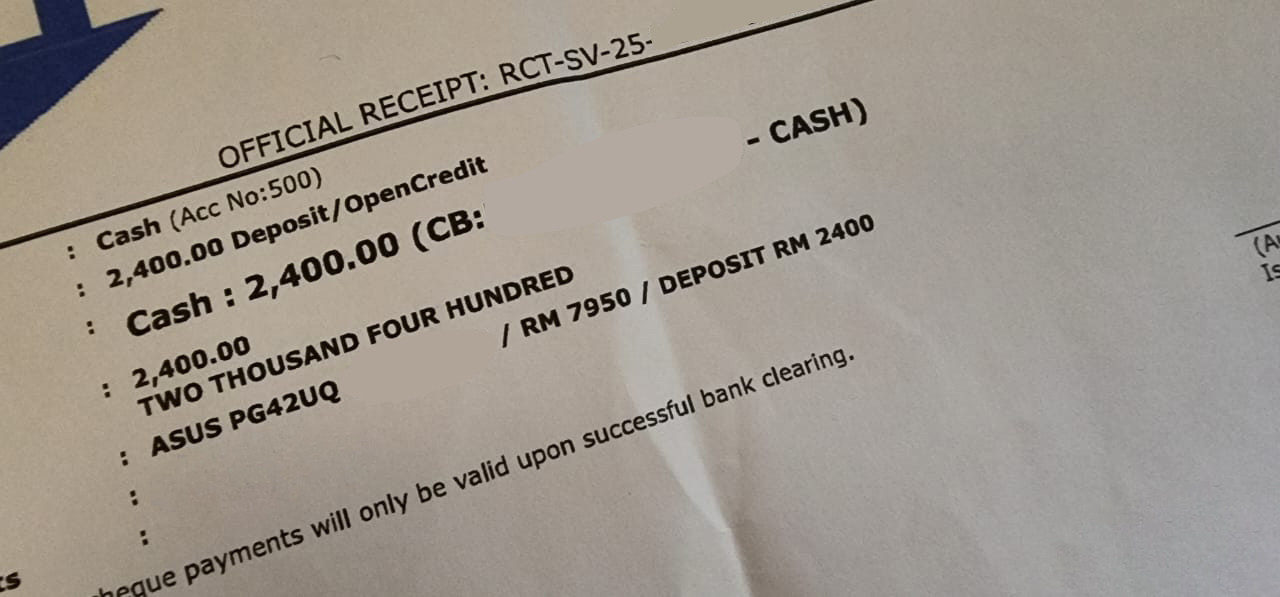
I finally purchase the Asus ROG Swift OLED PG42UQ. Haha! Can't wait it arrival, if no shipment issue, should arrived after 2 days.

user posted image

This post has been edited by Andrewtst: Jun 6 2023, 06:26 PM
Andrewtst
post Jun 6 2023, 10:39 PM

Forgiveness is Happiness
*********
All Stars
29,771 posts

Joined: Jan 2009
From: Johor, Malaysia.


QUOTE(WaNaWe900 @ Jun 6 2023, 06:41 PM)
Sifus  notworthy.gif

Is it worth to upgrade warranty for Dell Ultra-sharp monitor  sweat.gif

~MYR450 - 1 year
~MYR700 - 2 year

My U2720Q/QM warranty ended in Nov 2023...  icon_rolleyes.gif
*
I don't think it is worth to buy warranty, it is not cheap and I rather save that money as compensate for new monitor.
Andrewtst
post Jun 7 2023, 10:41 PM

Forgiveness is Happiness
*********
All Stars
29,771 posts

Joined: Jan 2009
From: Johor, Malaysia.


QUOTE(180sx @ Jun 7 2023, 09:34 PM)
Niceeee! Pls give review after using it.
Do you plan to get the new odyssey G9 oled or the 57" odyssey g9? Thinking to sell my ark to get either those...most likely the 57" one. Might need your advise when the time comes.
*
I also thinking to sell my 49" Odyssey Neo G9 and also the Neo G8.

I will not get the 57" Odyssey Neo G9, that one need change GPU and only AMD 7900 XTX support and I am not fans of AMD GPU yet.
It is more than 4K a lot, very hard to gaming, current GPU is still bottlenet on such crazy resolution.

The New Odyssey G9 OLED - maybe. Not sure yet.

I will give a short review after received it. 😊

This post has been edited by Andrewtst: Jun 7 2023, 10:42 PM
Andrewtst
post Jun 8 2023, 12:46 PM

Forgiveness is Happiness
*********
All Stars
29,771 posts

Joined: Jan 2009
From: Johor, Malaysia.


QUOTE(mois @ Jun 8 2023, 11:37 AM)
Insane price. Do give reviews and comparison with your samsung monitors.
*
Sure I will, I still waiting it delivery to me. 😅

Ya agreed very expensive. Now monitor more and more expensive nowadays.
Andrewtst
post Jun 8 2023, 09:34 PM

Forgiveness is Happiness
*********
All Stars
29,771 posts

Joined: Jan 2009
From: Johor, Malaysia.


Finally received my Asus ROG Swift OLED PG42UQ

user posted image

user posted image


14 Pages « < 9 10 11 12 13 > » Top
 

Change to:
| Lo-Fi Version
0.1017sec    0.40    7 queries    GZIP Disabled
Time is now: 9th December 2025 - 06:43 AM