

QUOTE(WaNaWe900 @ Jun 8 2023, 10:37 PM)
wah looks crispy 


It is nice 😊, review probably tomorrow, still fine tune to my liking. LCD Monitor Thread v13.
|
|
 Jun 9 2023, 12:03 AM Jun 9 2023, 12:03 AM
Return to original view | IPv6 | Post
#221
|
 
All Stars
29,764 posts Joined: Jan 2009 From: Johor, Malaysia.   
|
QUOTE(WaNaWe900 @ Jun 8 2023, 10:37 PM) wah looks crispy It is nice 😊, review probably tomorrow, still fine tune to my liking. |
|
|
|
|
|
Jun 9 2023, 10:35 AM
Return to original view | IPv6 | Post
#222
|
|
All Stars
29,764 posts Joined: Jan 2009 From: Johor, Malaysia.
|
QUOTE(WaNaWe900 @ Jun 9 2023, 12:20 AM) I'm surprise the cats looks stunning It is much better look in actual, my phone camera can't capture the actual look. 😅 WaNaWe900 liked this post
|
|
|
Jun 11 2023, 12:56 AM
Return to original view | Post
#223
|
|
All Stars
29,764 posts Joined: Jan 2009 From: Johor, Malaysia.
|
Asus ROG Swift OLED PG42UQ First Impression and Issues  First Impression
https://rog.asus.com/monitors/above-34-inch.../helpdesk_bios/  This post has been edited by Andrewtst: Jun 14 2023, 01:08 AM WaNaWe900 liked this post
|
|
|
Jun 11 2023, 10:34 AM
Return to original view | IPv6 | Post
#224
|
|
All Stars
29,764 posts Joined: Jan 2009 From: Johor, Malaysia.
|
QUOTE(WaNaWe900 @ Jun 11 2023, 01:57 AM)  nice, must enjoy it nice, must enjoy it  |
|
|
Jun 16 2023, 01:40 PM
Return to original view | IPv6 | Post
#225
|
|
All Stars
29,764 posts Joined: Jan 2009 From: Johor, Malaysia.
|
QUOTE(ben3003 @ Jun 15 2023, 10:06 PM) Anyone using samsung odyssey neo g7 43inch? I check from review and no londer interest. This model got side corder darker issue in all video review I had seen. From video also can seen, in actual use I can't imagine. 😅 Spec also not that good, but good is much cheaper. This post has been edited by Andrewtst: Jun 16 2023, 01:41 PM |
|
|
Jun 16 2023, 03:47 PM
Return to original view | IPv6 | Post
#226
|
|
All Stars
29,764 posts Joined: Jan 2009 From: Johor, Malaysia.
|
QUOTE(ben3003 @ Jun 16 2023, 03:18 PM) yeah around 3.6k can get 43inch, for normal use. but then, 48inch c2 oled is like 1k extra lol with much better screen, wanted to use as rental room secondary TV, maybe go 48inch c2 instead. If use for as TV with TV distance, then ok.If it is use as monitor, I think 48" is a bit too big. This post has been edited by Andrewtst: Jun 16 2023, 04:13 PM ben3003 liked this post
|
|
|
|
|
|
Jun 18 2023, 04:29 PM
Return to original view | IPv6 | Post
#227
|
|
All Stars
29,764 posts Joined: Jan 2009 From: Johor, Malaysia.
|
QUOTE(muman7 @ Jun 16 2023, 04:14 PM) I''m looking for a 27" 2K to replace my old 24"1080P screen, my usage percentage is roughly 50% work (vector graphic related), 35% media consumption and 15% gaming (Xbox series S). Is LG Ultra Gear 27GP850 a good choice or any other model bro here can suggest? Budgets is around RM1.5K. You may check out rtings.com best Top 5 of 1440p monitor.Rtings provide very details review and it is well known one of the best reviewer site on monitor and TV. https://www.rtings.com/monitor/reviews/best...40p-quad-hd-qhd You can also check out Monitors Unboxed YouTube channel, which is also well known good monitor reviewing channel. This post has been edited by Andrewtst: Jun 18 2023, 04:29 PM WaNaWe900 liked this post
|
|
|
Jul 6 2023, 12:42 AM
Return to original view | IPv6 | Post
#228
|
|
All Stars
29,764 posts Joined: Jan 2009 From: Johor, Malaysia.
|
QUOTE(quadcube @ Jul 6 2023, 12:26 AM) my U2515h runs 24/7 at max brightness static screen for one whole year during COVID-19 lockdown as I travelled back to MY and forgot to sleep my desktop, so it runs 24/7 until a year later when I got back to JP (2021) Salute you! 😅 max brightness, won't your eye hurt? I only put brightness 100% in HDR as HDR will adjust itself accordingly but in SDR, 100% how to see? even a very low 200 nits also crazy bright! still runs fine as of today, still uses it daily as a side monitor |
|
|
Jul 6 2023, 02:04 AM
Return to original view | IPv6 | Post
#229
|
|
All Stars
29,764 posts Joined: Jan 2009 From: Johor, Malaysia.
|
QUOTE(WaNaWe900 @ Jul 6 2023, 01:08 AM)  kinda same preference, being using U2720Q & U2720QM for almost 2 years now and luv it kinda same preference, being using U2720Q & U2720QM for almost 2 years now and luv it I put HDR on auto but SDR at 10 only  too bright too brightindeed SDR max dammed bright especially at night time  WaNaWe900 liked this post
|
|
|
Jul 8 2023, 05:48 PM
Return to original view | Post
#230
|
|
All Stars
29,764 posts Joined: Jan 2009 From: Johor, Malaysia.
|
Hi, all, left one unit only. If anyone interesting may check the link below. Thanks.
This post has been edited by Andrewtst: Jul 23 2023, 09:15 AM WaNaWe900 liked this post
|
|
|
Jul 9 2023, 01:35 PM
Return to original view | IPv6 | Post
#231
|
|
All Stars
29,764 posts Joined: Jan 2009 From: Johor, Malaysia.
|
QUOTE(AthrunIJ @ Jul 9 2023, 11:28 AM) Doesn't seems like there is many mini led monitor in the Malaysian market. They are only 58 mini-LED monitor in market now.Gotta wait I guess. https://www.displayninja.com/mini-led-monitor-list/ You may check the link and Asus and Samsung is bringing in to Malaysia market. This post has been edited by Andrewtst: Jul 9 2023, 01:41 PM |
|
|
Jul 11 2023, 04:56 PM
Return to original view | IPv6 | Post
#232
|
|
All Stars
29,764 posts Joined: Jan 2009 From: Johor, Malaysia.
|
 OMG! LG did it perfectly! The HDR is perfect, no washed out like Asus did on ROG Swift OLED PG42UQ. The default profile preset is already good. The only I change at the moment is disable the Power Saving mode. LG OLED Flex - 42LX3QPSA 1st Impression
This post has been edited by Andrewtst: Jul 11 2023, 06:44 PM WaNaWe900 liked this post
|
|
|
Jul 13 2023, 01:31 AM
Return to original view | IPv6 | Post
#233
|
|
All Stars
29,764 posts Joined: Jan 2009 From: Johor, Malaysia.
|
QUOTE(Andrewtst @ Jul 11 2023, 04:56 PM) OMG! LG did it perfectly! The HDR is perfect, no washed out like Asus did on ROG Swift OLED PG42UQ. The default profile preset is already good. The only I change at the moment is disable the Power Saving mode. LG OLED Flex - 42LX3QPSA 1st Impression Below are my preferable settings as its best suite me. 😊
This post has been edited by Andrewtst: Jul 15 2023, 10:02 AM |
|
|
|
|
|
Jul 14 2023, 01:04 AM
Return to original view | IPv6 | Post
#234
|
|
All Stars
29,764 posts Joined: Jan 2009 From: Johor, Malaysia.
|
Good news for whoever still own this monitor - Asus ROG Swift OLED PG42UQ.
V040 firmware changes - Optimize HDR color performance. https://rog.asus.com/my/monitors/above-34-i.../helpdesk_bios/ 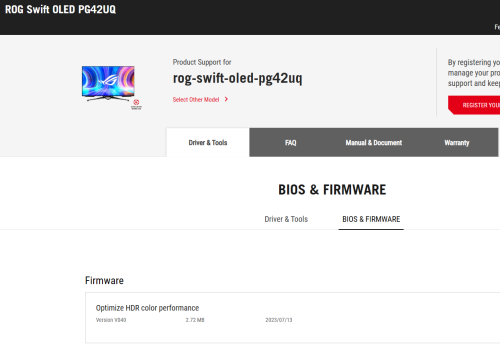 This post has been edited by Andrewtst: Jul 14 2023, 01:07 AM |
|
|
Jul 20 2023, 10:41 AM
Return to original view | IPv6 | Post
#235
|
|
All Stars
29,764 posts Joined: Jan 2009 From: Johor, Malaysia.
|
QUOTE(mois @ Jul 20 2023, 08:39 AM) Wait you just bought asus 42 oled and now you are on 42 LG oled flex already? This LG expensive wo. RM12k? I am waiting somebody buy my Asus PG42UQ OLED. 😅This original is RM 13k but I buy during 7.7 Lazada promotion. I paid only RM 8.9k. Super promotion. 😊 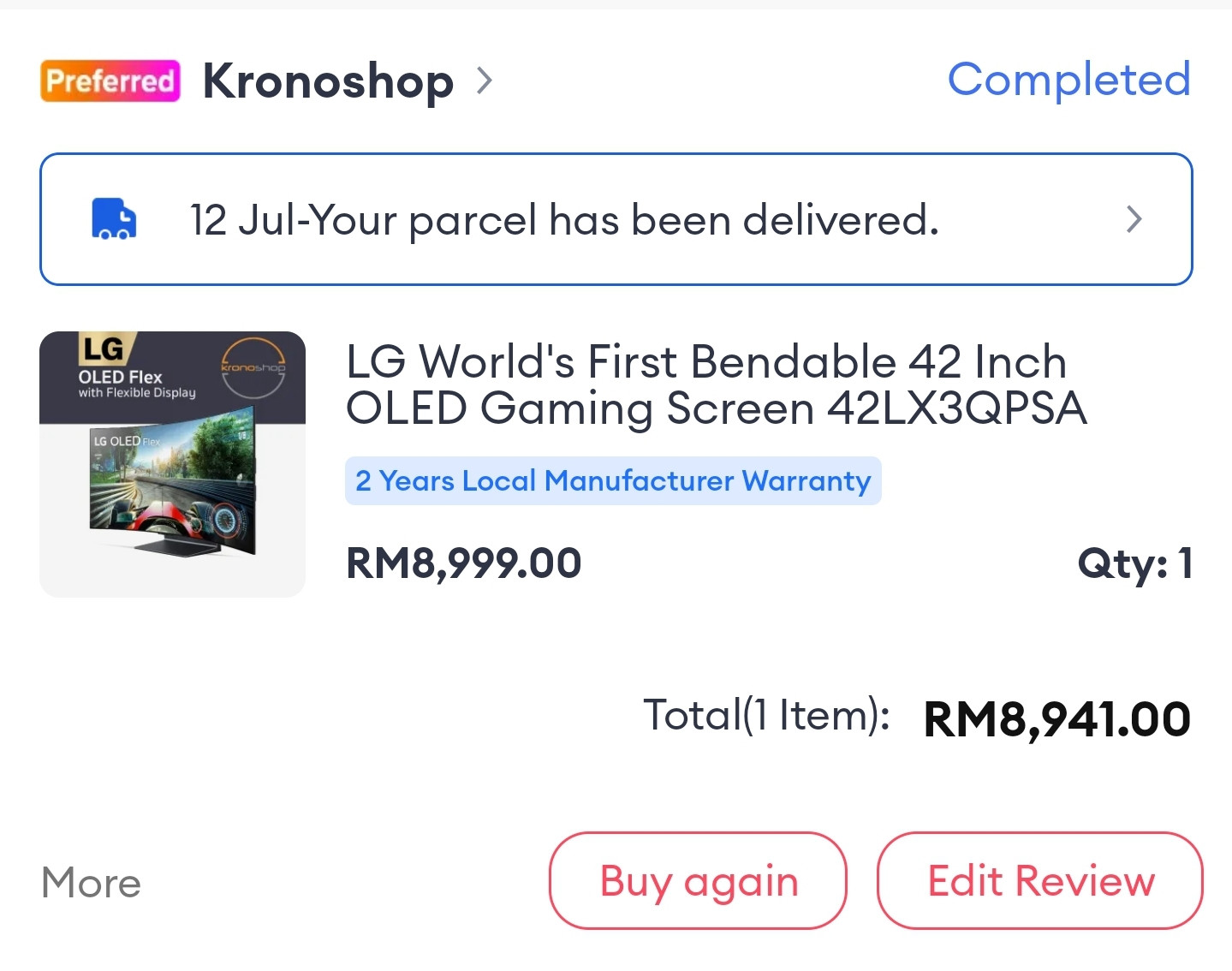 This post has been edited by Andrewtst: Jul 20 2023, 10:42 AM |
|
|
Jul 20 2023, 03:06 PM
Return to original view | IPv6 | Post
#236
|
|
All Stars
29,764 posts Joined: Jan 2009 From: Johor, Malaysia.
|
QUOTE(PJng @ Jul 20 2023, 12:49 PM) hmm. now monitor also can update, later every component on pc also need update firmware Now monitor if cannot firmware update better don't buy as many had issue especially on HDR configuration. 😅I don't might every component had firmware update, I actually prefer. 😊 Basically now most things in PC support firmware update. - Monitor - GPU - Motherboard - Sound Card - Keyboard - Mouse - SSD - Printer - Webcam The only no firmware update I think is RAM and HDD. 😅 This post has been edited by Andrewtst: Jul 20 2023, 03:18 PM |
|
|
Jul 20 2023, 06:48 PM
Return to original view | IPv6 | Post
#237
|
|
All Stars
29,764 posts Joined: Jan 2009 From: Johor, Malaysia.
|
QUOTE(180sx @ Jul 20 2023, 04:53 PM) Even my shoes also need update firmware sometimes. Really pening. You buy smart Nike shoes, so it is good to have firmware update. 😅 |
|
|
Jul 21 2023, 05:48 AM
Return to original view | IPv6 | Post
#238
|
|
All Stars
29,764 posts Joined: Jan 2009 From: Johor, Malaysia.
|
QUOTE(WaNaWe900 @ Jul 21 2023, 02:14 AM) HDD got firmware update too Oh! Then left only RAM. When RAM going to have firmware update. 😅 WaNaWe900 liked this post
|
|
|
Jul 21 2023, 11:12 AM
Return to original view | IPv6 | Post
#239
|
|
All Stars
29,764 posts Joined: Jan 2009 From: Johor, Malaysia.
|
QUOTE(AthrunIJ @ Jul 21 2023, 08:24 AM) Hmm, checked the review regarding Acer X27 OLED. I suggest don't buy the Acer X27 OLED as this is the only model that don't provide ABL control.Seems OK for the price. Any sifu comment? 👀🍿🍷 Without ABL Off is nightmare for OLED to use as a PC monitor. |
|
|
Jul 21 2023, 11:42 AM
Return to original view | IPv6 | Post
#240
|
|
All Stars
29,764 posts Joined: Jan 2009 From: Johor, Malaysia.
|
QUOTE(AthrunIJ @ Jul 21 2023, 11:28 AM) Hmm, ABL. I think only Corsair and Dell provide burn-in warranty, the rest all no.Will read up on it thanks. Most probably go back to mini LED then. Takut burn in of OLED. Acer tarak burn in warranty like others haah. Thus the price I presume Without the ABL off, the brightness will not consistent, for example when you enlarge paint to maximum will became darker than smaller screen. This is very annoying and with ABL Off, the screen brightness is consistent, but it will slightly dimmer than with on, this I no worried as it is still very bright. ABL only happen in SDR, ABL is not required in HDR. The mini-LED got many cons like blooming, hallow effect and need to on off the local dimming as local dimming work bad in productivity. Certain model like Samsung Odyssey Neo series do make local dimming auto and only kick in when in HDR content. After used mini-LED, it is better than no mini-LED but still OLED is my most preferable display now. Burn-in issue is over exaggerating, in normal usage without turn off those prevention, basically nothing to worried. This post has been edited by Andrewtst: Jul 21 2023, 11:45 AM |
| Change to: |  0.3182sec 0.3182sec
 0.54 0.54
 7 queries 7 queries
 GZIP Disabled GZIP Disabled
Time is now: 4th December 2025 - 09:41 AM |
 Quote
Quote