Welcome Guest ( Log In | Register )

14 Pages « < 5 6 7 8 9 > » Bottom

Outline · [ Standard ] · Linear+

 LCD Monitor Thread v13.

views
     
Andrewtst
post Jul 3 2022, 02:22 AM

Forgiveness is Happiness
*********
All Stars
29,767 posts

Joined: Jan 2009
From: Johor, Malaysia.


QUOTE(toffy @ Jul 3 2022, 02:12 AM)
Hi.

I am not using the latest GPU card but based on my research, it could run 2 units of QuadHD (2560 X 1440) monitors and possibly one more widescreen monitor.

I am planning to use them purely for productivity and office apps only. No gaming at all (maybe light games or old games, but gaming usage is not important here).

I do not have the QuadHD monitors yet but plan to buy them.

Should I future-proof my new monitors for new few years by buying 2 units of 4K monitors, instead of QuadHD ones?

To minimize the load on my GPU, I will downscale the 4K monitors to QuadHD resolution, until I upgrade my GPU in the future.
I read that downscaling from 4K to 1080 is a better ratio at 4:1, while downscaling from 4K to 1440p is almost 2.5:1.

If I downscale it this way, will it cause more work to the GPU and also make the picture quality more blocky/unsharp?

Or just get the QuadHD ones to run at their native resolution?
*
LCD should only use in native resolution.

It is not advice use in not native resolution as it will be not sharp especially text.

You will not notice in video and may not obvious in games but it is obvious in text.

Running downscale will not cause more heavy load in your GPU as it is running at the resolution you choose.

If 4K resolution is something you prefer, suggest only get the monitor after upgrading your GPU. 4K display still got more improvement to go and it is not that value yet, when the time you upgrading your GPU, they probably had more choices, better and much value for 4K monitor.

This post has been edited by Andrewtst: Jul 3 2022, 02:40 AM
Andrewtst
post Jul 3 2022, 02:54 PM

Forgiveness is Happiness
*********
All Stars
29,767 posts

Joined: Jan 2009
From: Johor, Malaysia.


QUOTE(toffy @ Jul 3 2022, 12:32 PM)
Aiming for 27 inches.

Ya, laptop.
I think can run both but I am saving the juice for a 3rd monitor, which is an existing ultrawide.
*
Laptop? Laptop GPU is fixed and cannot upgrade.

Normally older Laptop only have 1 HDMI and 1 VGA, which means 2 monitor maximum and one of it cannot more than 1080p (VGA connection).

Even newer laptop also normally came with 1 HDMI and may also came with 1 extra DP. In this case also 2 monitor maximum.

Unless the 3rd monitor is connected via USB-C but older laptop not came with USB-C and only USB 2.1 which required converter and it is not enough bandwidth for 4K monitor, unless you accept 30hz which is very lagging even in Windows usage only (not gaming).
Since it is laptop, just bring to shop to test it out.

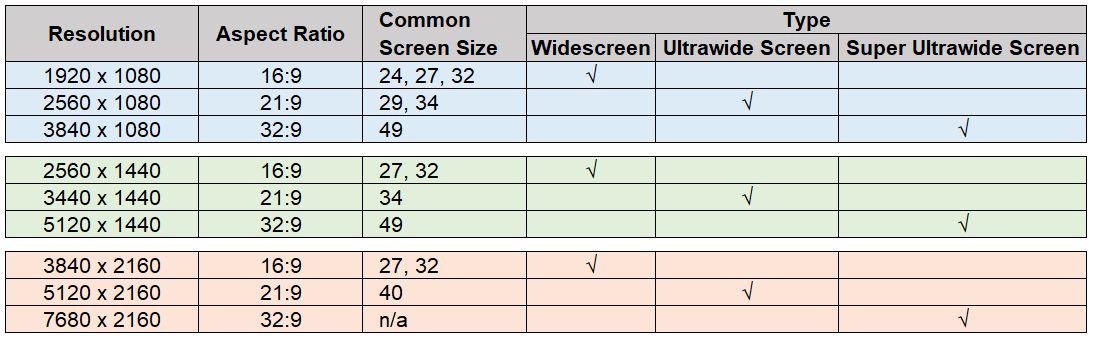
In additional, here is the common XX:9 aspect ratio screen resolution, size and type.
user posted image

This post has been edited by Andrewtst: Jul 3 2022, 04:18 PM
Andrewtst
post Jul 3 2022, 09:48 PM

Forgiveness is Happiness
*********
All Stars
29,767 posts

Joined: Jan 2009
From: Johor, Malaysia.


QUOTE(toffy @ Jul 3 2022, 09:32 PM)
Thanks for your feedback.
For the sake of completion, on top of my previous reply, I need to give one more input.

I do agree that it is better to check the new 2 monitors side-by-side at a physical shop selling them. Hope the colour issues happen rarely? At the moment, I am trying to save by buying online. I guess I have to risk it a bit, haha.
Thanks for the insights.

In short, you are saying that it is best to use native resolutions and to hold on to the 4k monitors for now?
And to get the 4k ones once I have upgraded my GPU?
I don't have immediate plans to upgrade the GPU yet.

With the above said, I was thinking that 4k monitors are much cheaper now and are slightly more expensive than 1440p monitors of the same size for a similar config (27 inches).
So my initial thought was to future-proof it, just in case I am getting a new PC/laptop end of the year (with RTX 30 series) or early next year, making me ready by having my 'new' 4k monitors. Otherwise, my 'new' 1440p may become obsolete?

The choice of whether to upgrade to the soon-to-be-released RTX 40 series as my GPU, will be another story.

Your feedback about the current 4k monitors being not 'matured' yet and not of value yet, is indeed good feedback. I am considering these seriously.
Yes, fully agree. The GPU of a laptop cannot be upgraded. Not for typical end-users unless one is a hardcore person or professional that tinkers with the soldering and has access to mobile components to break the supported factory configuration... a super-risky thing that shouldn't be done. Better to upgrade those on a desktop one instead.

Another way is to use a eGPU, right? But that's more expensive and the return of investment may not be worth it because of the limited bandwidth of the connection (maybe TB4 or TB5 connectivity may address it) and the expensive eGPU case.

When I mentioned upgrading my GPU, I meant to say either I buy a new lappy or a desktop.

The laptop in discussion is a 2018 version with GTX 1060 6GB that comes with a mini dual-mode DP, an HDMI 2.0 port, and a USB Type-C Thunderbolt that provides DP output. I hope that means it can connect to 3 external monitors via 1 HDMI port and 2 DPs? Both the DPs are of version 1.2.

I am going for a minimum of 60Hz for all my external monitors.

To clarify, I have an existing 34-inch 3440X1440 UW as the main external monitor. I am thinking of getting 2 units of 27-inch 1440p as 2nd and 3rd external monitors (portrait) for productivity reasons (or is this overkill?). Then it dawned on me that, maybe I should get 4k monitors instead of 1440p monitors for future-proofing. Hence, the question came about.

The current UW has a PPI of around 108. The corresponding 1440p monitors have similar PPI, at around 108. I prefer such parity.
If I am going to get 4k monitors instead, then I have to downscale it to maintain that parity. Hence that question also.
*
Your laptop is not very old in this cased but I don't think it worth to spend money on eGPU. It is too costly and bulky.

This post has been edited by Andrewtst: Jul 3 2022, 09:49 PM
Andrewtst
post Jul 3 2022, 09:50 PM

Forgiveness is Happiness
*********
All Stars
29,767 posts

Joined: Jan 2009
From: Johor, Malaysia.


I am selling my monitor, anyone interesting may check at Garage Sales
Andrewtst
post Jul 4 2022, 03:30 PM

Forgiveness is Happiness
*********
All Stars
29,767 posts

Joined: Jan 2009
From: Johor, Malaysia.


QUOTE(toffy @ Jul 3 2022, 09:32 PM)
Thanks for your feedback.
For the sake of completion, on top of my previous reply, I need to give one more input.

I do agree that it is better to check the new 2 monitors side-by-side at a physical shop selling them. Hope the colour issues happen rarely? At the moment, I am trying to save by buying online. I guess I have to risk it a bit, haha.
Thanks for the insights.

In short, you are saying that it is best to use native resolutions and to hold on to the 4k monitors for now?
And to get the 4k ones once I have upgraded my GPU?
I don't have immediate plans to upgrade the GPU yet.

With the above said, I was thinking that 4k monitors are much cheaper now and are slightly more expensive than 1440p monitors of the same size for a similar config (27 inches).
So my initial thought was to future-proof it, just in case I am getting a new PC/laptop end of the year (with RTX 30 series) or early next year, making me ready by having my 'new' 4k monitors. Otherwise, my 'new' 1440p may become obsolete?

The choice of whether to upgrade to the soon-to-be-released RTX 40 series as my GPU, will be another story.

Your feedback about the current 4k monitors being not 'matured' yet and not of value yet, is indeed good feedback. I am considering these seriously.
Yes, fully agree. The GPU of a laptop cannot be upgraded. Not for typical end-users unless one is a hardcore person or professional that tinkers with the soldering and has access to mobile components to break the supported factory configuration... a super-risky thing that shouldn't be done. Better to upgrade those on a desktop one instead.

Another way is to use a eGPU, right? But that's more expensive and the return of investment may not be worth it because of the limited bandwidth of the connection (maybe TB4 or TB5 connectivity may address it) and the expensive eGPU case.

When I mentioned upgrading my GPU, I meant to say either I buy a new lappy or a desktop.

The laptop in discussion is a 2018 version with GTX 1060 6GB that comes with a mini dual-mode DP, an HDMI 2.0 port, and a USB Type-C Thunderbolt that provides DP output. I hope that means it can connect to 3 external monitors via 1 HDMI port and 2 DPs? Both the DPs are of version 1.2.

I am going for a minimum of 60Hz for all my external monitors.

To clarify, I have an existing 34-inch 3440X1440 UW as the main external monitor. I am thinking of getting 2 units of 27-inch 1440p as 2nd and 3rd external monitors (portrait) for productivity reasons (or is this overkill?). Then it dawned on me that, maybe I should get 4k monitors instead of 1440p monitors for future-proofing. Hence, the question came about.

The current UW has a PPI of around 108. The corresponding 1440p monitors have similar PPI, at around 108. I prefer such parity.
If I am going to get 4k monitors instead, then I have to downscale it to maintain that parity. Hence that question also.
*

Additional information, since you got one 3440x1440 Ultrawide. It is better get another 2 in 1440p for consistency size with your current Ultrawide Monitor.

1440p won't obsolete and it will still be main steam.

Andrewtst
post Aug 22 2022, 11:12 AM

Forgiveness is Happiness
*********
All Stars
29,767 posts

Joined: Jan 2009
From: Johor, Malaysia.


QUOTE(arjumasan @ Aug 22 2022, 10:35 AM)
hi, need some recommendation.
Looking for 32 inch 1440p IPS. non gamer. (60hz - 75hz will do)
i survey is final LG 32QN600 but not sold in malaysia.
n found M32Q n 32GP850 but not required high refresh rate.
Also found VX3276-2K. Is there any other alternative to LG 32QN600.
TQVM
*
May I know what is your budget.
Andrewtst
post Aug 22 2022, 02:17 PM

Forgiveness is Happiness
*********
All Stars
29,767 posts

Joined: Jan 2009
From: Johor, Malaysia.


QUOTE(arjumasan @ Aug 22 2022, 01:44 PM)
1.5-2k
*
Your budget can get a good 27" 1440p 144hz monitor. Higher hz also means smoothly animation in Windows environment, it is not only for gaming only.

But 32 not many as 32" actually better go for 4K resolution.

I suggest following as this model for two screen size.
- LG 27GP850 for 27" or 32GP850 for 32".

This post has been edited by Andrewtst: Aug 22 2022, 02:17 PM
Andrewtst
post Aug 22 2022, 02:49 PM

Forgiveness is Happiness
*********
All Stars
29,767 posts

Joined: Jan 2009
From: Johor, Malaysia.


QUOTE(arjumasan @ Aug 22 2022, 02:40 PM)
ok tqvm for help. i go for 32" 1440p. my Gfx Card 1070 cant handle 4k i think.
i ad got 27 inch. Going to stack with 32 inch.
32GP850 better than M32Q ya?. thanks again for assistance
*
If you use different size, you will notice Windows apps or file explorer jump when drag cross over two monitor. No big deal but just let you know.

Here the comparison. The Gigabyte M32Q also a good monitor but the black uniformity is kind of bad to me. 😊

Here the comparison of two monitors review by rtings.
https://www.rtings.com/monitor/tools/compar...&threshold=0.10

This post has been edited by Andrewtst: Aug 22 2022, 02:55 PM
Andrewtst
post Sep 18 2022, 12:38 PM

Forgiveness is Happiness
*********
All Stars
29,767 posts

Joined: Jan 2009
From: Johor, Malaysia.


QUOTE(PJng @ Sep 18 2022, 12:23 PM)
I just do some survey first, not decide yet
Lowest price for...
Full HD, 22inch VA or IPS panel
120 or 144hz, not heavy gaming should need it?
HDR, if HDR very expensive then no need
Any famous brand
Is it curve needed?
Around RM500+?
*
22" ? 22" is too rare now and for 144hz even rare. Minimum 24"

HDR without RM 3k don't think about it.

RM 500 is too low also for 144hz. For 120hz normally is use in 4K TV which is not in your budget range.

For your budget, in good reputable brand, you may check out AOC G2490VX. Please ignore the HDR mode, that is fake and not a true HDR. It is VA and expected ghosting issue and black smearing issue for cheap VA panel.

PRIMS+ do have release a 22" in 144hz but I don't recommended this brand.

Curve is better for Ultrawide or Super Ultrawide or at least 32" Wide. I don't think got Curve for 22" to 24".

Sorry to said your choice is too little and never good for such price range. You need to top up 2x to 3x for a decent 144hz (without HDR) monitor.

This post has been edited by Andrewtst: Sep 18 2022, 12:44 PM
Andrewtst
post Sep 18 2022, 02:25 PM

Forgiveness is Happiness
*********
All Stars
29,767 posts

Joined: Jan 2009
From: Johor, Malaysia.


QUOTE(PJng @ Sep 18 2022, 01:33 PM)
Ok for suggest, will refer later
Have been too long i did not buy new pc thing
*
You may check review on rtings.com and YouTube Hardwareunboxednow.

Here is some tips for HDR monitor purchase.

Minimum requirement: HDR 600 (600cd/m2)

Recommended: HDR 1000 (1,000cd/m2) local dimming Mini-LED VA or HDR 400 True Black OLED / any OLED.

Anything said HDR ready is crap, it will look totally washed out. Anything with HDR 400 is also not good, and washed out in most HDR scenes, this included movies, games and desktop set as HDR.

Check below to understand more on HDR


This post has been edited by Andrewtst: Sep 18 2022, 02:53 PM
Andrewtst
post Sep 18 2022, 05:40 PM

Forgiveness is Happiness
*********
All Stars
29,767 posts

Joined: Jan 2009
From: Johor, Malaysia.


QUOTE(ben3003 @ Sep 18 2022, 03:32 PM)
seems like the cheapest hdr monitor to get is sony inzone m9, but malaysia cant find lol.
*
Sony Inzone M9 is the rareless one, by only 96 local dimming zone but manage to make it look great in HDR. I read from review, Sony did not follow traditional method when dimming where Sony did not fully dimming the light when background is black, this method seems success cover the not enough zone issue and reduce the blooming issue, the cons is black look grey in dark room.

Others Inzone device like all 3 model of headset already selling and can easily get, I think soon or later the M9 monitor will selling as well.

This post has been edited by Andrewtst: Sep 18 2022, 05:48 PM
Andrewtst
post Sep 18 2022, 06:11 PM

Forgiveness is Happiness
*********
All Stars
29,767 posts

Joined: Jan 2009
From: Johor, Malaysia.


QUOTE(ben3003 @ Sep 18 2022, 05:51 PM)
Hmm, the inzone m9 price is almost same like g7 neo thanks to currency lol. Like tat top up abit get neo g7 maybe more sensible?
*
If compare this both, then Neo G7 is better.

Inzone M9 is $ 898 = RM 4,072.00
Neo G7 is RM 5,499.00

They is still differences of RM 1,427.00, Not almost same price. 😅

If G7 then it is more cheaper but G7 is not that good and it is only HDR 400.

This post has been edited by Andrewtst: Sep 18 2022, 06:13 PM
Andrewtst
post Sep 18 2022, 07:34 PM

Forgiveness is Happiness
*********
All Stars
29,767 posts

Joined: Jan 2009
From: Johor, Malaysia.


QUOTE(ben3003 @ Sep 18 2022, 06:26 PM)
can find cheapest dotatech g7 neo 4828 at shopee lol.

https://shopee.com.my/-SAMSUNG-Odyssey-G75-...35-08166223618e

if this price then neo g7 is rm800 diff, better get neo g7 lol.
*
I mean official price compare. tongue.gif

Anyway I will pick Neo G7 in this case instead of Inzone M9. biggrin.gif
Andrewtst
post Sep 18 2022, 09:15 PM

Forgiveness is Happiness
*********
All Stars
29,767 posts

Joined: Jan 2009
From: Johor, Malaysia.


QUOTE(ben3003 @ Sep 18 2022, 08:21 PM)
me too lol. since the shopee price is quite reasonable lol. Gonna see what are the new mini-led offering until end 2022, probably will get 1 decent monitor by then.
*
I believe year 2023 will be more competitive and price reduce for Mini-LED or OLED monitor.

This year probably will not as every manufacturer just start towards release Mini-LED or OLED monitor.
Andrewtst
post Sep 19 2022, 01:50 AM

Forgiveness is Happiness
*********
All Stars
29,767 posts

Joined: Jan 2009
From: Johor, Malaysia.


QUOTE(PJng @ Sep 18 2022, 11:48 PM)
Not sure how serious ghosting issue, not extactly need 22inch, just no need too big size for 1080p
Currently use BenQ monitor also VA, but bottom screen got one line color that not go away
Just random search on lazada, acer brand ok or not
Check out Acer EI242QRP Curve 23.6" Gaming Monito...at 28% off!RM579.00
*
Every brand also got good and bad monitor, beside self check, the other options is check review but I cannot find this monitor review, so I cannot tell it is good or not.

But monitor with 250 nits is very minimum for now and it still enough for normal lighting room but if your room very bright then it will be not enough.

This model is curved right, curved in 24" will make the screen look very small. It is better go for flat in size 24".

This post has been edited by Andrewtst: Sep 19 2022, 01:59 AM
Andrewtst
post Sep 20 2022, 01:22 PM

Forgiveness is Happiness
*********
All Stars
29,767 posts

Joined: Jan 2009
From: Johor, Malaysia.


QUOTE(ben3003 @ Sep 20 2022, 09:57 AM)
Lg ultragear 48inch oled pricing same 48inch c2, seems like is around 4.6k-ish?
*
LG 48GQ900-B - RM 5,922.00

https://www.harveynorman.com.my/computing/g...48-48gq900.html

https://shopee.com.my/ergorapido/LG-Ultrage...807.21340234411

https://www.lazada.com.my/products/lg-ultra...3164603183.html

I will be superb excited if they is 32" or 42" version. 😊

This post has been edited by Andrewtst: Sep 20 2022, 01:33 PM
Andrewtst
post Sep 21 2022, 06:43 PM

Forgiveness is Happiness
*********
All Stars
29,767 posts

Joined: Jan 2009
From: Johor, Malaysia.


QUOTE(ben3003 @ Sep 21 2022, 09:54 AM)
ah damn, that price lol. i tot should be same price 48inch c2 lol, like tat buy c2 better lol got dolby vision etc. But then, some ppl just use the screen for PC la. like tat maybe can only get odyssey g7 neo. Actually, is there no decent HDR monitor at 2k-3k price range?
*
I think no. At least 4K and above.

I will not use OLED as monitor yet, current sudden bright and dark will make me crazy. 😅

This post has been edited by Andrewtst: Sep 21 2022, 06:43 PM
Andrewtst
post Sep 22 2022, 01:09 AM

Forgiveness is Happiness
*********
All Stars
29,767 posts

Joined: Jan 2009
From: Johor, Malaysia.


QUOTE(ben3003 @ Sep 21 2022, 06:50 PM)
I also think wont get oled as monitor lol. Because most the time monitor is also use for surfing those. Mini led is a more sensible choice. Unless really is solely for gamer lol. I see u use the g9 neo, seems nice also but i think my 3070ti cannot support lol
*
3070Ti should be no issue to handle it as pixel count for Neo G9 is only 7.2MP which is still less than 4K resolution of 8.3MP.

This post has been edited by Andrewtst: Sep 22 2022, 01:09 AM
Andrewtst
post Oct 8 2022, 05:34 PM

Forgiveness is Happiness
*********
All Stars
29,767 posts

Joined: Jan 2009
From: Johor, Malaysia.


QUOTE(mois @ Oct 7 2022, 02:22 PM)
https://www.techradar.com/news/lgs-27-inch-...but-at-ces-2023

Just wait for next year LG oled. 27inch and 32inch
*
Yes! They should release common size, not like this year all giant size.
Andrewtst
post Oct 8 2022, 05:36 PM

Forgiveness is Happiness
*********
All Stars
29,767 posts

Joined: Jan 2009
From: Johor, Malaysia.


QUOTE(greyshadow @ Oct 8 2022, 03:40 PM)
Dang! My viewsonic vx3258 just died, just one month over warranty doh.gif

Switch on got backlight but no display, not even the logo nor the control setting display

Tried different cables different pc/devices all the same, so conclusion it's the monitor issue

Now hunting for replacement, any recommendations for 32" 2K 144hz monitor under 1.5k?  Probably will grab it during the 10.10 sales if got good offers
*
Anything not ViewSonic. I also face such issue last time but I luckily manage to claim within one month left before it is end of warranty.

14 Pages « < 5 6 7 8 9 > » Top
 

Change to:
| Lo-Fi Version
0.1208sec    0.63    7 queries    GZIP Disabled
Time is now: 6th December 2025 - 08:23 PM