

Looks good. Damn that this didn't come out when I had my S3. But will work for DSLRs too. Now using DIY which works ok, but flimsy..... Will check this gadget out.....
Canon PowerShot S3 IS
Canon PowerShot S3 IS
|
|
 Jul 12 2007, 03:21 AM Jul 12 2007, 03:21 AM
|
 
Senior Member
7,485 posts Joined: Jun 2005 From: Kuala Lumpur   
|
Looks good. Damn that this didn't come out when I had my S3. But will work for DSLRs too. Now using DIY which works ok, but flimsy..... Will check this gadget out.....
|
|
|
|
|
|
Jul 12 2007, 09:48 AM
|

Senior Member
4,889 posts Joined: Jan 2005 From: Kelana Jaya
|
Yeah its meant for DSLRs pop-up flash
 I just decided to give it a try for the S3.. I just decided to give it a try for the S3.. |
|
|
Jul 17 2007, 10:12 PM
|

Junior Member
49 posts Joined: Jan 2006
|
Been a member for a while, but never participated.
In this section anyway. Usually surf the battlefield part. So anyway I've been testing out HDR. Pretty interesting, but leceh giler at times. Haha   This post has been edited by tulerst: Jul 17 2007, 10:12 PM |
|
|
Jul 18 2007, 12:35 AM
|

Junior Member
192 posts Joined: Dec 2005 From: P.J.
|
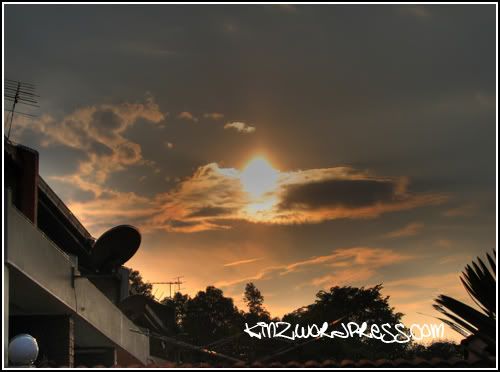 And that was my first HDR...  This post has been edited by kinz_11: Jul 19 2007, 10:24 PM |
|
|
Jul 18 2007, 02:55 AM
|

Senior Member
686 posts Joined: Jan 2003
|
very nice very nice, post to the HDR thread mah, let share share
 |
|
|
Jul 18 2007, 11:15 AM
|

Junior Member
357 posts Joined: Jan 2003
|
HOW U ALL DID IT !!!!
SO JENG 1 !!! |
|
|
|
|
|
Jul 18 2007, 11:37 AM
|
|
Senior Member
4,889 posts Joined: Jan 2005 From: Kelana Jaya
|
Take a normal exposure shot, a shot with -2EV, a shot with +2EV or maybe just +/- 1.
Use Photomatix, Photoshop or GIMP to do the HDR. Just google HDR with GIMP, can find step-by-step tutorial. Does the S3 IS have bracket shot? Then the camera will automatically take those 3 shots. |
|
|
Jul 18 2007, 03:37 PM
|
|
Senior Member
7,485 posts Joined: Jun 2005 From: Kuala Lumpur
|
QUOTE(zio @ Jul 18 2007, 11:37 AM) Take a normal exposure shot, a shot with -2EV, a shot with +2EV or maybe just +/- 1. IIRC it does and I have used it before..... Use Photomatix, Photoshop or GIMP to do the HDR. Just google HDR with GIMP, can find step-by-step tutorial. Does the S3 IS have bracket shot? Then the camera will automatically take those 3 shots.   |
|
|
Jul 19 2007, 02:06 PM
|
|
Senior Member
686 posts Joined: Jan 2003
|
QUOTE(JET @ Jul 18 2007, 11:15 AM) HOW U ALL DID IT !!!! software only lah SO JENG 1 !!! haha |
|
|
Jul 20 2007, 09:55 AM
|

Junior Member
104 posts Joined: Feb 2006 From: Coffee City 
|
QUOTE(tongyam @ Jul 19 2007, 02:06 PM) software only lah Very impressive haha Im interested to learn actually ... hmmmm |
|
|
Jul 21 2007, 10:44 PM
|

Senior Member
6,639 posts Joined: Jan 2003 From: "New Castle"
|
I need to get a 2gb SD card for the camera. Can it accept 4gb? Anyone selling it online? Thanks
|
|
|
Jul 21 2007, 10:49 PM
|

Senior Member
1,635 posts Joined: Jan 2003 From: BASF Asia Pacific
|
hdr wut ? anyway nice pic.
|
|
|
Jul 22 2007, 01:40 PM
|
 
Staff
10,459 posts Joined: Sep 2005 From: Puchong 
|
QUOTE(mystvearn @ Jul 21 2007, 10:44 PM) I need to get a 2gb SD card for the camera. Can it accept 4gb? Anyone selling it online? Thanks 2/4 GB cards, no problem. Memory card is selling cheap in lowyat plaza. You won't get much savings through buying online. |
|
|
|
|
|
Jul 22 2007, 08:19 PM
|
|
Senior Member
6,639 posts Joined: Jan 2003 From: "New Castle"
|
thanks about that, significantly cheaper?
|
|
|
Aug 3 2007, 04:34 PM
|
|
Junior Member
192 posts Joined: Dec 2005 From: P.J.
|
Why is this thread dying??
Some of my photos I took recently to BUMP this thread.. 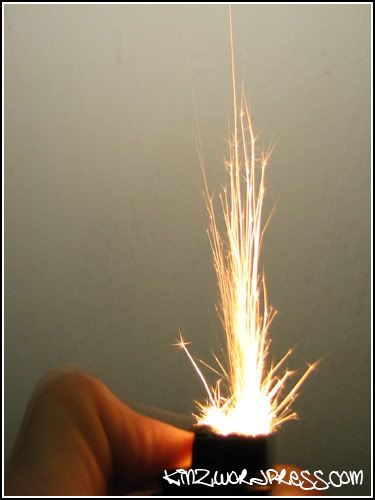 Lighter Strikes.. 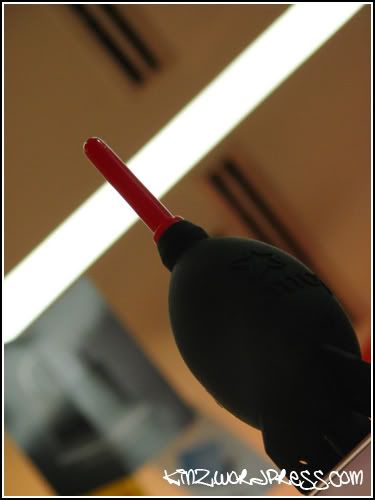 Blower.. |
|
|
Aug 3 2007, 04:42 PM
|

Senior Member
2,171 posts Joined: Oct 2004 From: Selangor
|
Hehe. Lucky not dead yet. Still a S3 user here..
|
|
|
Aug 3 2007, 04:58 PM
|
|
Staff
10,459 posts Joined: Sep 2005 From: Puchong
|
Oh gosh, the lighter pic is interesting. Even my naked eye can't see such sparks when I strike a lighter. What settings did you use?
My recent pic:  This post has been edited by mengsuan: Aug 3 2007, 05:09 PM |
|
|
Aug 3 2007, 08:10 PM
|

Junior Member
118 posts Joined: Nov 2006 From: Perlis - Alor Setar - Kuala Terengganu
|
Your scenary pic also nice.. mind to share what is ur setting.. i'm in learning process.. hehehe
|
|
|
Aug 3 2007, 10:35 PM
|
|
Staff
10,459 posts Joined: Sep 2005 From: Puchong
|
I just used the features available on the dial.
I have a few others which I manually adjusted the settings, but it's not as good as the camera's settings. Looks like my brain is not as powerful as the camera's processor.  QUOTE File Name IMG_1103.JPG Camera Model Name Canon PowerShot S3 IS Shooting Date/Time 7/14/2007 7:20:54 PM Shooting Mode Foliage My Colors Mode Off Tv (Shutter Speed) 1/250 Av (Aperture Value) 4.0 Light Metering Evaluative Exposure Compensation 0 ISO Speed Auto Lens 6.0 - 72.0 mm Focal Length 6.0 mm Digital Zoom None IS Mode On Image Size 2816x2112 Image Quality Fine Flash Off White Balance Auto AF Mode Continuous AF Parameters Contrast Normal Sharpness Normal Saturation Normal Color Space sRGB File Size 1332 KB Drive Mode Single-frame shooting Owner's Name |
|
|
Aug 3 2007, 11:08 PM
|
|
Junior Member
192 posts Joined: Dec 2005 From: P.J.
|
QUOTE Make : Canon That's for the lighter picture... Model : Canon PowerShot S3 IS DateTime : 2007:08:01 01:39:18 DateTimeOriginal : 2007:08:01 01:39:18 ShutterSpeedValue : 1/40Sec ApertureValue : F2.7 ExposureBiasValue : EV0.0 MaxApertureValue : F2.7 ExposureMode : Manual WhiteBalance : Manual MacroMode : Off Self-timer : Off Quality : Fine Focus Mode : MF ImageSize : Large Easy shooting mode : Manual Digital Zoom : Off Contrast : -2 Saturation : -2 Sharpness : +2 MeteringMode : Evaluative FocusType : Manual ExposureProgram : Manual Focal length of lens : 6-72(mm) Long Shutter Mode : Off White Balance : Fluorescent Sequence number(Continuous mode) : 0 Flash bias : 0 EV Owner name : Kinz  |
| Change to: |  0.0246sec 0.0246sec
 1.10 1.10
 6 queries 6 queries
 GZIP Disabled GZIP Disabled
Time is now: 23rd December 2025 - 02:42 AM |
 Quote
Quote