Welcome Guest ( Log In | Register )

205 Pages « < 106 107 108 109 110 > » Bottom

Outline · [ Standard ] · Linear+

 Your Home Theater Setup.. v2, Let's share..

views
     
jamesleetech
post Jan 4 2017, 01:05 AM

On my way
****
Senior Member
684 posts

Joined: Apr 2010


QUOTE(SSJBen @ Jan 3 2017, 05:08 PM)
» Click to show Spoiler - click again to hide... «


As for the last question, I don't have an Oppo 203. So... not much comment about what you've said about the player have different results. By right, if the player is connected to a non-HDR capable TV, then the option should simply be greyed out entirely (which is what the PS4s/XboneS are doing).
Can you link me to that FB post where the person tested out HDR on a non-HDR capable display? Sounds to me like the processing is done on the player itself before being sent out to the display (basically like "bitstreaming" the entire video signal over after post-processing).

Good discussion though. thumbup.gif
*
The facebook link came from a closed group that require approval to a request to join.

Anyway, here is the link posted by the group member "El Hefe's HiFi Reviews"...
https://www.facebook.com/groups/HTnHiFiOfMa...77401388987647/

Just to show you the photos (phone quality) that he posted, I post it here below for your reference.

» Click to show Spoiler - click again to hide... «


I may have more things to discuss or explore in this area of HDR and Dolby Vision and also I may have further reply to you too. Anyway, I will just stop here. thumbsup.gif

This post has been edited by jamesleetech: Jan 4 2017, 01:50 AM
jamesleetech
post Jan 4 2017, 10:31 PM

On my way
****
Senior Member
684 posts

Joined: Apr 2010


QUOTE(teop @ Jan 3 2017, 04:27 PM)
Ahh, but the BFM ads actually tries to encourage people to read....

Anyway I have always enjoyed the details you put into your reply. Makes it so much better since not everyone can ask question properly or completely... otherwise this thread will become a rapid exchange of one line questions and answers.
*
Thanks for your kind reply. Appreciated it. It is already THE trend among everyone to express anything using the shortest possible sentence. I can understand why. Typing on the smartphone or the computer keyboard is tedious and time consuming.

Anyway, its okay for me when people used short sentence, one "liners", short forms, acronyms or whatever. The only problem here for me is to properly understand what the writer was trying to say. Hehehe, I can't read what is inside a person's mind.

I just "invent" an example... "Is my room big enough for HT? I have a HiFi system now." I think many of you DO know what additional info is needed to be mentioned after that question. Then, what happens next are back and forth replies which actually can be a bit time consuming loh. Use simple short sentences is absolutely okay but it should also have some common sense on what info must be mentioned too.

I am also guilty of giving wrong answers to a very simple and straight forward question. I did not use my common sense. A person asked... "which is better, Denon or Onkyo?" I answered Marantz. He clearly wants to know which of these two. He didn't ask people to suggest other brands. I should have replied Denon and should have given my personal reasons why. Hehehe... numerous people answered with Yamaha, Pioneer, etc making it even more confusing to the writer. Another thing is, there are people who simply answered this or that. Yes, just say its a personal opinion/preference and explain a bit on why that one is better. Example.... "Denon is my personal preference. Better vocals".... simple and short.

QUOTE(teop @ Jan 3 2017, 04:49 PM)
Isn't 3D TV on the way out? I did remember that a few manufacturer is on the exit. Maybe only for the very high-end? This will definitely hamper future 3D adoption by studios
*
More and more lower-end TVs/Projectors will not have 3D in the future?

Maybe you are right to say that, because of poor consumer acceptance or usage. With more and more TVs with 100+hz refresh rates and 60+ frames per second, I guess it may cost only a little extra to add in 3D so it may still appear in lower-end models. I am just assuming only. Similar question can also be asked about the TV Bluetooth feature. Do Bluetooth appear in only high-end models? How many of you actually do use your TV bluetooth? If many of us uses the TV Bluetooth, then such demand will ensure that this will continue to be included in the future, maybe more and more lower-end TVs will have it.

You said that less and less 3D TVs will hamper future 3D releases. Well... yes, I agree that we can't watch 3D blurays without 3D TV. I can also say "without 3D blurays", 3D becomes useless in 3D TV. Its just like a "chicken and egg" story, which comes first. I believe whether studios continue to produce 3Ds do not depend just on 3D TV or 3D blurays or 3D movies in cinemas... it depends solely on consumers continued support and without it, then 3D will be a past history. Even IF 3D totally disappears from the TV, I do suspect that it will still reappear again in the future.

Only time will tell whether lower-end TVs will not have 3D.

» Click to show Spoiler - click again to hide... «


Additional Reading Info...

http://nypost.com/2015/03/18/the-3-d-fad-i...dnt-be-happier/

https://entertainment-industry.knoji.com/th...s-of-the-1950s/

http://stereoscopynews.com/hotnews/history...ite-3d-channels

https://www.sky.com/help/articles/watch-sky-in-3d

This post has been edited by jamesleetech: Jan 4 2017, 10:58 PM
ktek
post Jan 5 2017, 07:41 PM

小喇叭
********
All Stars
13,197 posts

Joined: Jul 2006
hdmi 2.1 announced !!
SSJBen
post Jan 5 2017, 08:01 PM

Stars deez nuts.
*******
Senior Member
4,522 posts

Joined: Apr 2006


Lol soon everyone's receivers are outdated again. Lmao.
saitong09
post Jan 5 2017, 10:43 PM

10k Club
********
All Stars
10,820 posts

Joined: Jan 2010
From: KL/PJ


QUOTE(SSJBen @ Jan 5 2017, 08:01 PM)
Lol soon everyone's receivers are outdated again. Lmao.
*
If your player have dual HDMI out like Oppo, receiver no need upgrade smile.gif
SSJBen
post Jan 5 2017, 10:49 PM

Stars deez nuts.
*******
Senior Member
4,522 posts

Joined: Apr 2006


QUOTE(saitong09 @ Jan 5 2017, 10:43 PM)
If your player have dual HDMI out like Oppo, receiver no need upgrade smile.gif
*
Doesn't work for my setup. Oppo players HDMI passthroughs adds quite a bit of input lag. I do play games, so that's a big no-no.

That said, HDMI 2.1 can be firmware patched into HDMI 2.0 hardwares provided the implementation was following the standard to begin with. So fingers crossed that my receiver gets it. But then again, companies want to milk their products and want to make money, so they probably might not even care.
jamesleetech
post Jan 6 2017, 03:11 PM

On my way
****
Senior Member
684 posts

Joined: Apr 2010


QUOTE(SSJBen @ Jan 5 2017, 10:49 PM)
Doesn't work for my setup. Oppo players HDMI passthroughs adds quite a bit of input lag. I do play games, so that's a big no-no.

That said, HDMI 2.1 can be firmware patched into HDMI 2.0 hardwares provided the implementation was following the standard to begin with. So fingers crossed that my receiver gets it. But then again, companies want to milk their products and want to make money, so they probably might not even care.
*
I don't follow you. Highlighted as blue text in quote. Mmm... how do playing games cause Oppo players to have HDMI input lag? I don't have any input lag problems with my 105D HDMI 1 to TV and HDMI 2 to my Pre-Processor. You use Zone to stream to another room and play games using the same HT AVR? If I use PC HDMI to my HT Pre-Amp, I don't use my Oppo and vice versa... both are not switched on together.

confused.gif Am I right to assume that you have a complicated connection setup. Sorry for not being able to figure it out. blush.gif Please enlighten me.

This post has been edited by jamesleetech: Jan 6 2017, 03:14 PM
sonerin
post Jan 6 2017, 04:06 PM

Look at all my stars!!
*******
Senior Member
8,739 posts

Joined: Aug 2009
Attached Image
Attached Image

touch up to my man cave
SSJBen
post Jan 6 2017, 04:36 PM

Stars deez nuts.
*******
Senior Member
4,522 posts

Joined: Apr 2006


QUOTE(jamesleetech @ Jan 6 2017, 03:11 PM)
I don't follow you. Highlighted as blue text in quote. Mmm... how do playing games cause Oppo players to have HDMI input lag? I don't have any input lag problems with my 105D HDMI 1 to TV and HDMI 2 to my Pre-Processor. You use Zone to stream to another room and play games using the same HT AVR? If I use PC HDMI to my HT Pre-Amp, I don't use my Oppo and vice versa... both are not switched on together.

confused.gif Am I right to assume that you have a complicated connection setup. Sorry for not being able to figure it out.  blush.gif Please enlighten me.
*
You're mistaken James.

My reply to saitong99 was in regards to why an Oppo (or any player with a HDMI passthrough for that matter) does not work for my setup is because I do play games. This all came up with the HDMI 2.1 post, which although at this point nothing uses it and won't for quite a while, is something I'm concerned with in the next 2-3 years.

Because saitong99 said "if your player has dual HDMI out like Oppo receiver no need upgrade", wouldn't that mean having to passthrough all info to the Oppo player then out to the display?
The Oppo HDMI passthrough is not a pure direct passthrough, it adds latency and causes irregular spikes in input lag (which is a lot worse than just having a constant number). That's why for my setup consisting of a gaming PC/HTPC + consoles, that isn't going to work for me.

My current (and always have been) setup is of course the simplest most direct way - all sources to the receiver, then receiver out to the display. Inherently, receivers do add input lag as well. But turning off all the GUI/short message displays, disabling upscaling, all comes down to just under 5ms of additional input lag. So it's something that is mostly not noticeable versus plugging directly to the display.
Skylinestar
post Jan 6 2017, 08:04 PM

Mega Duck
********
All Stars
10,474 posts

Joined: Jan 2003
From: Sarawak
QUOTE(SSJBen @ Jan 5 2017, 10:49 PM)
Doesn't work for my setup. Oppo players HDMI passthroughs adds quite a bit of input lag. I do play games, so that's a big no-no.

That said, HDMI 2.1 can be firmware patched into HDMI 2.0 hardwares provided the implementation was following the standard to begin with. So fingers crossed that my receiver gets it. But then again, companies want to milk their products and want to make money, so they probably might not even care.
*
what saitong09 means is:
Oppo output1 > TV (with post HDMI2.1 standard)
Oppo output2 > AVR/Prepro (without HDMI2.1 standard)
...and media playback from the Oppo itself. Nothing to do with Oppo inputs for passthrough.

SSJBen, are you saying Oppo output2 is more laggy than output1? If you're talking about the input, yes, all additional input stages produce lag.
jamesleetech
post Jan 6 2017, 11:39 PM

On my way
****
Senior Member
684 posts

Joined: Apr 2010


QUOTE(SSJBen @ Jan 6 2017, 04:36 PM)
You're mistaken James.

» Click to show Spoiler - click again to hide... «


My current (and always have been) setup is of course the simplest most direct way - all sources to the receiver, then receiver out to the display. Inherently, receivers do add input lag as well. But turning off all the GUI/short message displays, disabling upscaling, all comes down to just under 5ms of additional input lag. So it's something that is mostly not noticeable versus plugging directly to the display.
*
Your reply makes it even more confusing for me. Sorry for being dumb so please bear with me here.

I will use a graphic to better illustrate what I did understand from Saitong99...
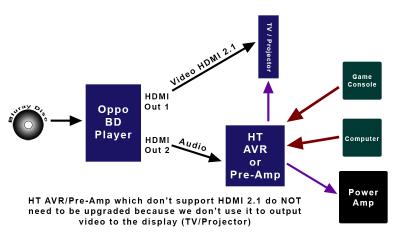
Attached Image

I am repeating here. What Saitong99 earlier said was that the AVR do not need to be updated or upgraded to support HDMI 2.1 since the AVR is used to process the audio only and don't need to be connected to the TV/Projector. Since the video portion from Oppo is directly output to the TV/Projector, all it needs is for the Oppo to be upgraded/replaced (firmware ?) to support HDMI 2.1.

Since you said that you used the simplest direct way of connection of all sources to the AVR, then is your actual connection the same as the graphic illustrated above?

IF its the same connection I described above, then by right your HTPC should have been off when you play the Oppo
since only one TV display is used. Lagging to either your HTPC or Oppo should not affect each other since one of them is off.

Am I missing something here? I don't think you somehow connected your Oppo HDMI 1 out directly to your HTPC which is connected to the TV, and then Oppo HDMI 2 out to your AVR? "IF" you only used your HTPC as HDMI output to your TV, then it will be a problem when HDMI 2.1 isn't supported.

Yes, I can believe that there will be some (unnoticeable) lag issues when both the Oppo two HDMI outs are used. Having your HTPC connected to the AVR should by right not cause Oppo to increase lag because your HTPC is off when Oppo is used.

What I can easily understand is for the Oppo player to be "upgraded" to support HDMI 2.1 without requiring the AVR to be upgraded or replaced.

If you say that both Oppo HDMI 1 and 2 Outputs will be disabled when it detected that either one is connected to a device that don't support HDMI 2.1, well, then I can understand. Example... Oppo HDMI 1 to 1st Device (HDMI 2.1 ready) and Oppo HDMI 2 to 2nd device (Not HDMI 2.1 ready)... then both Oppo HDMI will be disabled (black screen). I don't know so is this correct ?

I know that technology changes very fast but its still a bit early to talk about any HDMI 2.1 update or upgrade. Even if HDMI 2.1 support is completed, it should be a very long time to wait for 8K blurays to appear. We are just beginning to talk about 4K.


This post has been edited by jamesleetech: Jan 7 2017, 12:01 AM
SSJBen
post Jan 7 2017, 01:09 AM

Stars deez nuts.
*******
Senior Member
4,522 posts

Joined: Apr 2006


QUOTE(Skylinestar @ Jan 6 2017, 08:04 PM)
what saitong09 means is:
Oppo output1 > TV (with post HDMI2.1 standard)
Oppo output2 > AVR/Prepro (without HDMI2.1 standard)
...and media playback from the Oppo itself. Nothing to do with Oppo inputs for passthrough.

SSJBen, are you saying Oppo output2 is more laggy than output1? If you're talking about the input, yes, all additional input stages produce lag.
*
If that's what he is saying, then I appologize because I've partly mistaken what he said.

I was under the impression that he's saying all sources except the Oppo player is connected to the receiver. Then receiver to Oppo player then out to the display. By doing this, like I said - it causes noticeable increase in input lag because the signal is being processed by the player. It's not a direct passthrough, this is even with Darbee entirely disabled.

I'm talking strictly about games here, not movies.


QUOTE(jamesleetech @ Jan 6 2017, 11:39 PM)
Your reply makes it even more confusing for me. Sorry for being dumb so please bear with me here.

I will use a graphic to better illustrate what I did understand from Saitong99...

Attached Image

I am repeating here. What Saitong99 earlier said was that the AVR do not need to be updated or upgraded to support HDMI 2.1 since the AVR is used to process the audio only and don't need to be connected to the TV/Projector. Since the video portion from Oppo is directly output to the TV/Projector, all it needs is for the Oppo to be upgraded/replaced (firmware ?) to support HDMI 2.1.

Since you said that you used the simplest direct way of connection of all sources to the AVR, then is your actual connection the same as the graphic illustrated above?

IF its the same connection I described above, then by right your HTPC should have been off when you play the Oppo
since only one TV display is used. Lagging to either your HTPC or Oppo should not affect each other since one of them is off.

Am I missing something here? I don't think you somehow connected your Oppo HDMI 1 out directly to your HTPC which is connected to the TV, and then Oppo HDMI 2 out to your AVR? "IF" you only used your HTPC as HDMI output to your TV, then it will be a problem when HDMI 2.1 isn't supported.

Yes, I can believe that there will be some (unnoticeable) lag issues when both the Oppo two HDMI outs are used. Having your HTPC connected to the AVR should by right not cause Oppo to increase lag because your HTPC is off when Oppo is used.

What I can easily understand is for the Oppo player to be "upgraded" to support HDMI 2.1 without requiring the AVR to be upgraded or replaced.

If you say that both Oppo HDMI 1 and 2 Outputs will be disabled when it detected that either one is connected to a device that don't support HDMI 2.1, well, then I can understand. Example... Oppo HDMI 1 to 1st Device (HDMI 2.1 ready) and Oppo HDMI 2 to 2nd device (Not HDMI 2.1 ready)... then both Oppo HDMI will be disabled (black screen). I don't know so is this correct ?

I know that technology changes very fast but its still a bit early to talk about any HDMI 2.1 update or upgrade. Even if HDMI 2.1 support is completed, it should be a very long time to wait for 8K blurays to appear. We are just beginning to talk about 4K.
*
I belief I've partly mistaken on what saitong said earlier. My bad.

What I'm describing is INPUT lag, not system lag like you're explaining in your post. Input lag ties strictly to games and nothing else (unless you like playing with GUIs...?).

As I explained to bro Skylinestar, I was mistaken by Saitong's comment. So my mistake there, I was under the wrong impression that everything goes through the Oppo player.

The thing I'm mostly intrigued about the implementation of HDMI 2.1 is that it comes with the long awaited, critically important support for Variable Refresh Rate. That's really a game-changer for modern video games, where no longer a game needs to be tied a certain refresh rate, causing judder, drops or screen tearing. I'm sure you've heard of it already on the PC side via Gsync and Freesync.

Dickong
post Jan 9 2017, 06:15 PM

Regular
******
Senior Member
1,689 posts

Joined: Jan 2003
Hi sifu, i connect my avr front pre out to my pre amp by rca cable n my pre amp output to power amp by XLR cable n i switch my power amp to balance input but no sound, but my cd output to same preamp also by rca n preamp output by XLR cable but got sound. Wonder any sifu can help rectify the problem.tq

This post has been edited by Dickong: Jan 9 2017, 06:16 PM
sonerin
post Jan 10 2017, 06:57 AM

Look at all my stars!!
*******
Senior Member
8,739 posts

Joined: Aug 2009
Did you switch your pre amp to the correct input from AVR
ktek
post Jan 10 2017, 11:37 AM

小喇叭
********
All Stars
13,197 posts

Joined: Jul 2006
QUOTE(Dickong @ Jan 9 2017, 06:15 PM)
Hi sifu, i connect my avr front pre out to my pre amp by rca cable n my pre amp output to power amp by XLR cable n i switch my power amp to balance input but no sound, but my cd output to same preamp also by rca n preamp output by XLR cable but got sound. Wonder any sifu can help rectify the problem.tq
*
did u assign avr preout correctly ma?
if not assign or wrong channel is no sound
Dickong
post Jan 10 2017, 01:53 PM

Regular
******
Senior Member
1,689 posts

Joined: Jan 2003
QUOTE(sonerin @ Jan 10 2017, 06:57 AM)
Did you switch your pre amp to the correct input from AVR
*
Previous from avr amp rca to preamp n out rca to power amp ok but now just change from avr amp still using rca but preamp out to power amp by xlr cable n no sound. A bit strange is cd to pre amp is using rca cable n xlr cable to power amp no problem.
Dickong
post Jan 10 2017, 01:56 PM

Regular
******
Senior Member
1,689 posts

Joined: Jan 2003
QUOTE(ktek @ Jan 10 2017, 11:37 AM)
did u assign avr preout correctly ma?
if not assign or wrong channel is no sound
*
The avr preout actually i didnt di anything from previous setting except i just change the output from pre to power amp to xlr cable.
ktek
post Jan 10 2017, 03:44 PM

小喇叭
********
All Stars
13,197 posts

Joined: Jul 2006
QUOTE(Dickong @ Jan 10 2017, 01:56 PM)
The avr preout actually i didnt di anything from previous setting except i just change the output from pre to power amp to xlr cable.
*
Yamaha aventage rite.
Using What pre amp
sivanathan04
post Jan 10 2017, 04:55 PM

Enthusiast
*****
Senior Member
701 posts

Joined: Jul 2011


QUOTE(sonerin @ Jan 6 2017, 04:06 PM)
Attached Image
Attached Image

touch up to my man cave
*
thumbup.gif
Dickong
post Jan 10 2017, 06:22 PM

Regular
******
Senior Member
1,689 posts

Joined: Jan 2003
QUOTE(ktek @ Jan 10 2017, 03:44 PM)
Yamaha aventage rite.
Using What pre amp
*
Nvm i got it working n by the i am using Aventage n Parasound Halo P5 preamp

205 Pages « < 106 107 108 109 110 > » Top
 

Change to:
| Lo-Fi Version
0.0403sec    0.28    6 queries    GZIP Disabled
Time is now: 5th December 2025 - 05:46 PM
