Welcome Guest ( Log In | Register )

205 Pages « < 54 55 56 57 58 > » Bottom

Outline · [ Standard ] · Linear+

 Your Home Theater Setup.. v2, Let's share..

views
     
ktek
post Jul 10 2016, 04:56 AM

小喇叭
********
All Stars
13,191 posts

Joined: Jul 2006
QUOTE(sonerin @ Jul 4 2016, 09:26 PM)
No problem. I was into HT a lot more as well. I am currently using raspberry pi2 with volumio as media player. Is very clean sound. Of course with NUC a better CPU will be even better
*
sonerin did u ever tighten the bolt behind monitor audio speaker? instruction say do it after some while
sonerin
post Jul 10 2016, 07:31 AM

Look at all my stars!!
*******
Senior Member
8,739 posts

Joined: Aug 2009
QUOTE(ktek @ Jul 10 2016, 04:56 AM)
sonerin did u ever tighten the bolt behind monitor audio speaker? instruction say do it after some while
*
I am not sure, I don't have monitor audio speaker
skeelee
post Jul 10 2016, 09:00 AM

Getting Started
**
Junior Member
285 posts

Joined: Aug 2011
QUOTE(ktek @ Jul 10 2016, 04:56 AM)
sonerin did u ever tighten the bolt behind monitor audio speaker? instruction say do it after some while
*
The bolts securing the drivers to the speaker cabinet need to be tightened regularly. Actually not really that regular, once every one or two years will do. Reputable speakers should come with their own tools for doing that. I believe Monitor Audio provides Allen keys for such purpose.
sonerin
post Jul 10 2016, 09:48 AM

Look at all my stars!!
*******
Senior Member
8,739 posts

Joined: Aug 2009
I will say not to do anything unless you hear the sound has change
skeelee
post Jul 10 2016, 09:52 AM

Getting Started
**
Junior Member
285 posts

Joined: Aug 2011
QUOTE(sonerin @ Jul 10 2016, 09:48 AM)
I will say not to do anything unless you hear the sound has change
*
The drivers are subject to vibration, a lot of it, and the bolts become loose. You will be surprised how loose some the bolts have become over time.

sonerin
post Jul 10 2016, 10:29 AM

Look at all my stars!!
*******
Senior Member
8,739 posts

Joined: Aug 2009
Yes if is loosen than of course is good to tighten it. as long as there is no change of sound i will think is ok
lionelzc
post Jul 10 2016, 11:03 AM

Casual
***
Junior Member
333 posts

Joined: Apr 2008


QUOTE(ktek @ Jul 9 2016, 10:58 PM)
if ur receiver can see input status, will be clear.
possible got dolby prologic (emulated surround effect)
*
Ahh..I see.

Unfortunately my receiver can't check input status.

As far as I know, the optical to RCA convertewr doesn't support dolby or dts, only PCM.


ktek
post Jul 10 2016, 11:11 AM

小喇叭
********
All Stars
13,191 posts

Joined: Jul 2006
QUOTE(skeelee @ Jul 10 2016, 09:52 AM)
The drivers are subject to vibration, a lot of it, and the bolts become loose. You will be surprised how loose some the bolts have become over time.
*
thanks for the info from u 2 sifus.
seller has provide allen key in sealed plastic, so i think its about time to adjust once.
instruction say screw in until bolt touch casing, then a 90' tighten will do. kautim

This post has been edited by ktek: Jul 10 2016, 11:13 AM
saitong09
post Jul 10 2016, 12:08 PM

10k Club
********
All Stars
10,820 posts

Joined: Jan 2010
From: KL/PJ


sonerin
Been quoted rm40+ per meter for Supra Classic 2x4.0, worth to take and got big different? Currently using Boss system AWG 12 OFC cable..
sonerin
post Jul 10 2016, 03:57 PM

Look at all my stars!!
*******
Senior Member
8,739 posts

Joined: Aug 2009
QUOTE(saitong09 @ Jul 10 2016, 12:08 PM)
sonerin
Been quoted rm40+ per meter for Supra Classic 2x4.0, worth to take and got big different? Currently using Boss system AWG 12 OFC cable..
*
I have not heard the sound from supra cable but I will think is quite a decent cable. However, Bose system is really nothing to improve even with change of cable. I will say is just nice looking system.
saitong09
post Jul 10 2016, 04:22 PM

10k Club
********
All Stars
10,820 posts

Joined: Jan 2010
From: KL/PJ


QUOTE(sonerin @ Jul 10 2016, 03:57 PM)
I have not heard the sound from supra cable but I will think is quite a decent cable. However, Bose system is really nothing to improve even with change of cable. I will say is just nice looking system.
*
Oh, I plan to replace my DZ7 and vokal speaker wire with Supra wire smile.gif
sonerin
post Jul 10 2016, 05:38 PM

Look at all my stars!!
*******
Senior Member
8,739 posts

Joined: Aug 2009
QUOTE(saitong09 @ Jul 10 2016, 04:22 PM)
Oh,  I plan to replace my DZ7 and vokal speaker wire with Supra wire smile.gif
*
I see. I am sure is better than stock cable but really can't tell if it will change much
saitong09
post Jul 10 2016, 06:30 PM

10k Club
********
All Stars
10,820 posts

Joined: Jan 2010
From: KL/PJ


QUOTE(sonerin @ Jul 10 2016, 05:38 PM)
I see. I am sure is better than stock cable but really can't tell if it will change much
*
Just curious if same type of wire but different diameter, got different? e.g. 2x2.5 vs 2x4.0
jamesleetech
post Jul 10 2016, 07:23 PM

On my way
****
Senior Member
684 posts

Joined: Apr 2010


QUOTE(ktek @ Jul 10 2016, 04:56 AM)
sonerin did u ever tighten the bolt behind monitor audio speaker? instruction say do it after some while
*
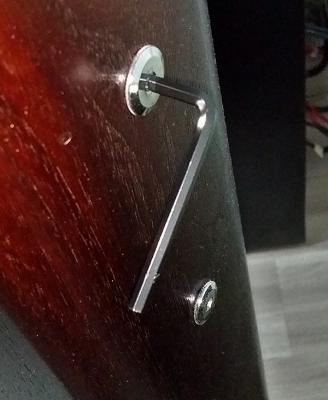
Attached Image

I checked mine last year after about 1.5 years. It was only slightly loose so I tightened it until its not loose.

Be very careful. Just make sure NOT to over tighten the rear bolts as it may damage the threads that hold the bolts. Not necessarily a 90 degree turn.

A few years ago, I had a friend who over turned the bolts till it becomes "forever loose" and he had to send the bookshelf speakers back to the distributor, Ban Leong, for parts replacement. Eng Siang International Ltd in Singapore is the new distributor.
sonerin
post Jul 10 2016, 07:44 PM

Look at all my stars!!
*******
Senior Member
8,739 posts

Joined: Aug 2009
QUOTE(saitong09 @ Jul 10 2016, 06:30 PM)
Just curious if same type of wire but different diameter, got different? e.g. 2x2.5 vs 2x4.0
*
Theoritically bigger should be better but is just a thought. You must try out to know
sonerin
post Jul 10 2016, 07:55 PM

Look at all my stars!!
*******
Senior Member
8,739 posts

Joined: Aug 2009
QUOTE(jamesleetech @ Jul 10 2016, 07:23 PM)
Attached Image

I checked mine last year after about 1.5 years. It was only slightly loose so I tightened it until its not loose.

Be very careful. Just make sure NOT to over tighten the rear bolts as it may damage the threads that hold the bolts. Not necessarily a 90 degree turn.

A few years ago, I had a friend who over turned the bolts till it becomes "forever loose" and he had to send the bookshelf speakers back to the distributor, Ban Leong, for parts replacement. Eng Siang International Ltd in Singapore is the new distributor.
*
Didn't know MA had only so few screws to hold the drivers
jamesleetech
post Jul 10 2016, 08:05 PM

On my way
****
Senior Member
684 posts

Joined: Apr 2010


QUOTE(lionelzc @ Jul 9 2016, 11:11 AM)
Hello sifus, I am a noob to home theater stuff and want to ask a question about HT audio.

I am currently using a cheap no brand av receiver with 5 speaker setup (no subwoofer) with astro byond and blu ray as output to the lg plasma tv with optical out to the av receiver.

astro byond---hdmi--->

                                      tv----optical out (PCM)--->optical to rca converter--->av receiver-->5 speaker

blu ray player-hdmi--->

The question here is why does my speakers sometime output to 2 or 5 speakers eventhough optical PCM can only support max 2.0ch?

It's not really a problem but I find it a bit consistent when changing channels.

I have tried using a 5.1 test video via blu ray and confirmed it's not true 5 ch output.

Edit: Forgot to include optical to rca converter
*
Since your optical to rca converter only support 2 channel output, the audio has obviously been changed by your AV Receiver. You don't have sub-woofer for LFE channel.

You also said that your AV receiver don't display input status so its not easy to find out why your receiver sometimes output 2 channel and sometimes 5 channels. Look at your receiver remote to see if there is/are any buttons that changes the 2 channels audio to emulate 5 channels. Usually most Denon, Marantz and Onkyo AV receivers have 4 buttons which are coloured in "Green, Red, Blue and Yellow" which can change the "Sound Mode" from original 2 channels to emulated (not true) 5.1 surround.

Attached Image

In my case, when I play a video with only 2 channel audio, I can press the remote "Green" Movie button to change from Stereo to Dolby Surround (5.1).

Since your AV receiver is a different brand, I don't know whether your receiver supports such features or not. If it does support such feature, your receiver may do it in a different way and probably you may have pressed one of your remote button which caused the 5 channels emulation.

If there is a Manual, you can check it to find out. You can also post a picture of your remote here to show the buttons that it have so that I can at least "guess" the reason.

jamesleetech
post Jul 10 2016, 08:09 PM

On my way
****
Senior Member
684 posts

Joined: Apr 2010


QUOTE(sonerin @ Jul 10 2016, 07:55 PM)
Didn't know MA had only so few screws to hold the drivers
*
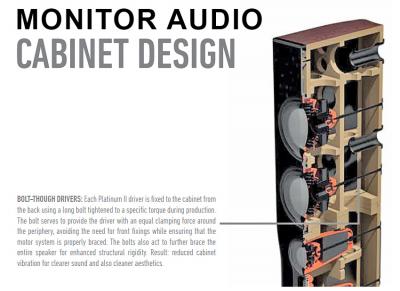
Yaloh. Each bolt is for holding one driver to the rear of the cabinet. MA bookshelfs with 2 drivers only have 2 rear bolts. My MA Gold GX200 have 4 drivers so it has 4 rear bolts.
sonerin
post Jul 10 2016, 08:47 PM

Look at all my stars!!
*******
Senior Member
8,739 posts

Joined: Aug 2009
QUOTE(jamesleetech @ Jul 10 2016, 08:09 PM)
Yaloh. Each bolt is for holding one driver to the rear of the cabinet. MA bookshelfs with 2 drivers only have 2 rear bolts. My MA Gold GX200 have 4 drivers so it has 4 rear bolts.
*
No wonder it get loosen because only 1 bolt
jamesleetech
post Jul 10 2016, 09:06 PM

On my way
****
Senior Member
684 posts

Joined: Apr 2010


QUOTE(sonerin @ Jul 10 2016, 08:47 PM)
No wonder it get loosen because only 1 bolt
*
A picture speaks a thousand words.

Attached Image

205 Pages « < 54 55 56 57 58 > » Top
 

Change to:
| Lo-Fi Version
0.0219sec    0.30    6 queries    GZIP Disabled
Time is now: 3rd December 2025 - 01:27 PM