Welcome Guest ( Log In | Register )

10 Pages « < 7 8 9 10 >Bottom

Outline · [ Standard ] · Linear+

 Door Bell Wiring

views
     
Jackymaybach
post Nov 6 2020, 10:42 AM

New Member
*
Newbie
1 posts

Joined: Nov 2010


QUOTE(emons87 @ Aug 27 2019, 04:59 PM)
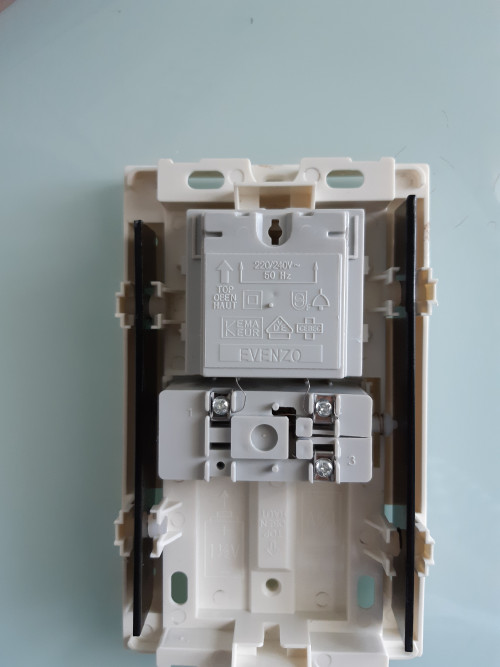
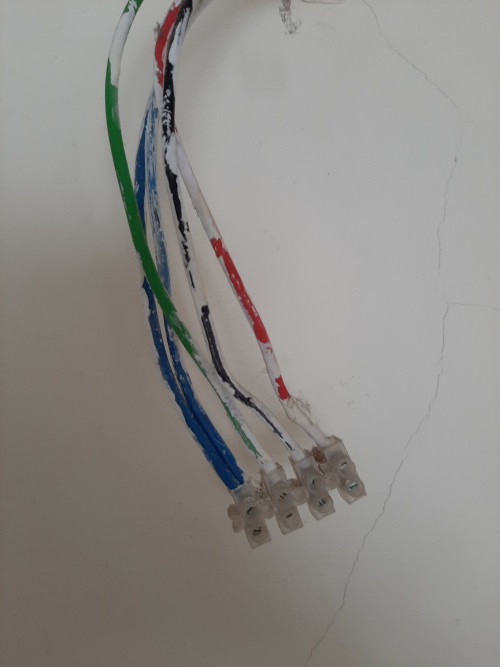
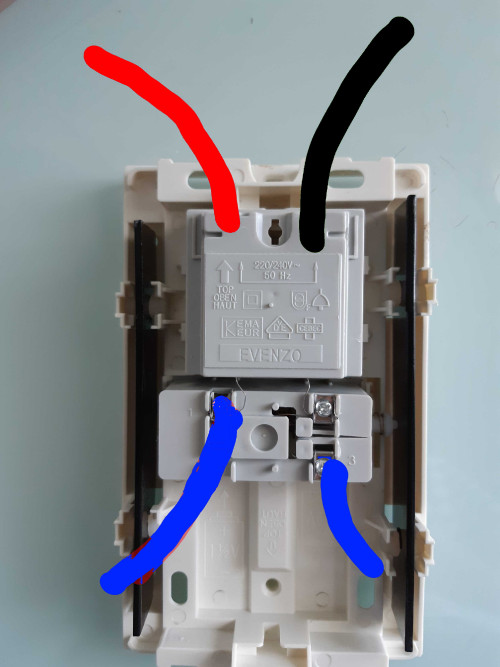
Hi. Need help on this.. Is the wiring in the last picture is correct?

user posted image
user posted image
user posted image
user posted image
*
Hi emons87,

My home doorbell wiring is exactly same as yours, just confirm if you had install the doorbell and the wiring diagram show in last picture of yours is correct?
stormer.lyn
post Nov 6 2020, 02:36 PM

Regular
******
Senior Member
1,132 posts

Joined: Apr 2014
From: Shah Alam, Selangor
QUOTE(Jackymaybach @ Nov 6 2020, 10:42 AM)
Hi emons87,

My home doorbell wiring is exactly same as yours, just confirm if you had install the doorbell and the wiring diagram show in last picture of yours is correct?
*
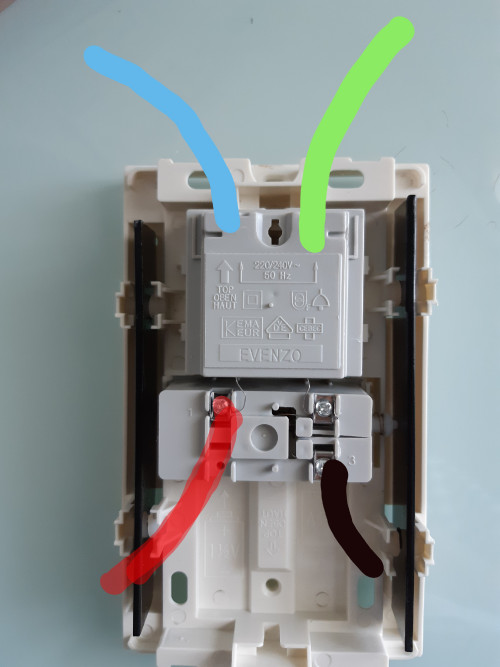
For this exact wiring, please connect as the picture below.
user posted image

Red = Live
Black = Neutral
Green = Earth. No need to use for a double-insulated item
Red will always have power, you'll need to turn OFF the Miniature Circuit Breaker in the DB. This is since the doorbell doesn't have a switch to turn OFF power. You can check if Red is power with a test pen. You can check if Red and Black is as I said by temporary connecting a small 240 V lamp to Red+Black, and turning on the MCB. The lamp should light.

Q - What are the Blue wires then? In the doorbell switch the wires are red+black.
A - The normal way of doing things in Malaysia is to run armoured cable to the gate post for the doorbell switch. Then half-way the electrician will change to the normal electrical cable. That joint is usually behind the socket where the gate open/close switch is. You see, they run multiple core armoured cable to the gate post for the gate, the doorbell, the post light, etc. If you check, the blue wires won't have power. Both are blue, and connected together, because the doorbell switch does not have power, it is just contacts to ring the doorbell.

Follow these instructions at your own risk. Please get a qualified person to check if you are in any way unsure.
Thunder_Bolt
post Feb 9 2021, 10:08 PM

New Member
*
Junior Member
24 posts

Joined: Nov 2008


Does anyone know if i want to remove the door bell,
how should I handle the wires coming out from the wall? How should I connect them? This is for condo unit.
Thanks in advance.
SUSceo684
post Feb 9 2021, 11:08 PM

Component Burner
********
All Stars
11,667 posts

Joined: Jan 2003
From: Klang/Subang


QUOTE(Thunder_Bolt @ Feb 9 2021, 10:08 PM)
Does anyone know if i want to remove the door bell,
how should I handle the wires coming out from the wall? How should I connect them? This is for condo unit.
Thanks in advance.
*
Firstly you will need 5 sections long of a connector block.
QUOTE
What is a connector block? https://shopee.com.my/MAJU-6A-10A-15A-20A-P...7111.7053302836 buy the midsize one about 15A type easier to use. Small ones prone to screw jumping off. Around RM1.20 or so for whole strip.
Then you will need a test pen and a phone with camera.
And masking tape + marker pen.

Before you start, test the test pen by poking it into a live terminal at a socket just to see it is working (when wire is hot) and not faulty.
TURN OFF THE WHOLE DB BOX. NEVER WORK HOT. It is too easy to die from 230V.
Open up ding dong bell cover.
Test all wires/contacts (which are connected) with the test pen again to ensure that nothing is hot.

Label the wires ABCDE or 12345 with masking tape and marker pen. It is a headache to retest everything once messed up.
Take a few meaningful pictures (the as-installed wires and wire labels relative to the ding dong bell) before you open up any screws.
Email those pictures to yourself for safekeeping.

The conblock may come in strip of 12 so count how many and cut it off accordingly.
Now open up wires one by one and screw them into the conblock, one wire per section.

Leave the tape labels on the wires for easier reinstallation.
For added safety, wrap up the conblock in insulation tape, very cheap only, to prevent against accidental touching (regardless by humans or lizards) or water ingress (in case ceiling leak) as some of those wires are operating on 230V.

QUOTE
Insulation tape is about 50c or so per roll. Can be any colour. 3M is good stuff. You can buy online or offline hardware store.
https://shopee.com.my/3M-Temflex-Vinyl-PVC-...3884.5154793409
You may now dispose the old ding dong bell.
After safely terminating the wires into the conblock and mummifying the conblock, it is now safe to turn on your DB box.

This post has been edited by ceo684: Feb 9 2021, 11:15 PM

drew86
post May 9 2021, 09:33 PM

Getting Started
**
Junior Member
197 posts

Joined: Sep 2007
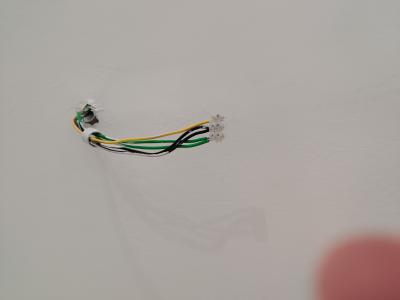
Hi. Bumping old topic. Realized my house has very weird doorbell point. 2 green 2 black and 1 yellow (live). Switch at gate post are 2 yellows. Can anyone advise how i should wire my doorbell?

Thanks!

Attached Image
Attached Image
Attached Image
SUSceo684
post May 9 2021, 09:49 PM

Component Burner
********
All Stars
11,667 posts

Joined: Jan 2003
From: Klang/Subang


QUOTE(drew86 @ May 9 2021, 09:33 PM)
Hi. Bumping old topic. Realized my house has very weird doorbell point. 2 green 2 black and 1 yellow (live). Switch at gate post are 2 yellows. Can anyone advise how i should wire my doorbell?

Thanks!


Attached Image

*
Where does this blue wire come from?
SUSslimey
post May 9 2021, 10:40 PM


*******
Senior Member
6,914 posts

Joined: Apr 2007
QUOTE(drew86 @ May 9 2021, 09:33 PM)
Hi. Bumping old topic. Realized my house has very weird doorbell point. 2 green 2 black and 1 yellow (live). Switch at gate post are 2 yellows. Can anyone advise how i should wire my doorbell?

Thanks!

Attached Image
Attached Image
Attached Image
*
where is the other ends of the 2 yellow wire? need to find them and connect them to 0 and 2.

the bottom part of door bell one of them connect to black, the other connect to the live yellow
drew86
post May 9 2021, 10:57 PM

Getting Started
**
Junior Member
197 posts

Joined: Sep 2007
QUOTE(ceo684 @ May 9 2021, 09:49 PM)
Where does this blue wire come from?
*
Pls ignore the wires. Just my own wire to connect to point.

QUOTE(slimey @ May 9 2021, 10:40 PM)
where is the other ends of the 2 yellow wire? need to find them and connect them to 0 and 2.

the bottom part of door bell one of them connect to black, the other connect to the live yellow
*
That's what's annoying me.. I can't find it anywhere..so thought if there's any special configuration that I'm missing out. There is no other possible point for doorbell.
SUSceo684
post May 9 2021, 11:06 PM

Component Burner
********
All Stars
11,667 posts

Joined: Jan 2003
From: Klang/Subang


QUOTE(drew86 @ May 9 2021, 10:57 PM)
Pls ignore the wires. Just my own wire to connect to point.
That's what's annoying me.. I can't find it anywhere..so thought if there's any special configuration that I'm missing out. There is no other possible point for doorbell.
*
Noted on test lead as blue wire.

Colour mismatched cables will be rather tricky to test for continuity with power running. I worry that one of the gate post wires are actually 230V live.

If you have a long enough spare wire and a multimeter can try to check 1 by 1 wire (turn off the whole DB box) from the gate to the doorbell point inside (separate them out using a spare connector block) for continuity. It may have been mixed up or they are using half of yellow outdoor and half of black indoor. Or worse, hooked up the gate post wires into DB box. Macam macam can happen.
SUSslimey
post May 9 2021, 11:07 PM


*******
Senior Member
6,914 posts

Joined: Apr 2007
QUOTE(drew86 @ May 9 2021, 10:57 PM)
Pls ignore the wires. Just my own wire to connect to point.
That's what's annoying me.. I can't find it anywhere..so thought if there's any special configuration that I'm missing out. There is no other possible point for doorbell.
*
or maybe the wire in the picture is not for door bell.

try opening the mcb box.........maybe you find something there.
drew86
post May 9 2021, 11:10 PM

Getting Started
**
Junior Member
197 posts

Joined: Sep 2007
QUOTE(ceo684 @ May 9 2021, 11:06 PM)
Noted on test lead as blue wire.

Colour mismatched cables will be rather tricky to test for continuity with power running. I worry that one of the gate post wires are actually 230V live.

If you have a long enough spare wire and a multimeter can try to check 1 by 1 wire (turn off the whole DB box) from the gate to the doorbell point inside (separate them out using a spare connector block) for continuity. It may have been mixed up or they are using half of yellow outdoor and half of black indoor. Or worse, hooked up the gate post wires into DB box. Macam macam can happen.
*
Hmm one thing i missed pointing out is that the yellow wire is only hot when switch is pressed. Means most likely they messed up the wiring?
SUSceo684
post May 9 2021, 11:16 PM

Component Burner
********
All Stars
11,667 posts

Joined: Jan 2003
From: Klang/Subang


QUOTE(drew86 @ May 9 2021, 11:10 PM)
Hmm one thing i missed pointing out is that the yellow wire is only hot when switch is pressed. Means most likely they messed up the wiring?
*
By right it is 5 wires at doorbell.
3 from MCB box to doorbell. 230V.
2 from gate to doorbell as unpowered (for low voltage) as dingdong button trigger.

I'd test the gate post wires to see if they light up a test pen.

many funny² things can and have happened in my experience.
see WRT DEVELOPER WIRING in https://forum.lowyat.net/index.php?showtopi...ost&p=100869300

Not all banglas know what they're doing. laugh.gif

This post has been edited by ceo684: May 9 2021, 11:17 PM
drew86
post May 9 2021, 11:23 PM

Getting Started
**
Junior Member
197 posts

Joined: Sep 2007
QUOTE(ceo684 @ May 9 2021, 11:16 PM)
By right it is 5 wires at doorbell.
3 from MCB box to doorbell. 230V.
2 from gate to doorbell as unpowered (for low voltage) as dingdong button trigger.

I'd test the gate post wires to see if they light up a test pen.

many funny² things can and have happened in my experience.
see WRT DEVELOPER WIRING in https://forum.lowyat.net/index.php?showtopi...ost&p=100869300

Not all banglas know what they're doing. laugh.gif
*
Thanks! Alright will test it soon. Will be a big screw up if they've wired switch from DB...which would be the prime suspect in my case no? Since the switch causes my wall point yellow wire to go hot, without any bell installed.
SUSceo684
post May 9 2021, 11:28 PM

Component Burner
********
All Stars
11,667 posts

Joined: Jan 2003
From: Klang/Subang


QUOTE(drew86 @ May 9 2021, 11:23 PM)
Thanks! Alright will test it soon. Will be a big screw up if they've wired switch from DB...which would be the prime suspect in my case no? Since the switch causes my wall point yellow wire to go hot, without any bell installed.
*
Major screw up if the gate switch actually controls the 230V supply to the wall point. Things in the wet like outdoor switches should never run on 230V high voltage as it is not waterproof rated for industrial use (IP67+). 230V AC kill people very easily. It just takes 0.05A (very little current), at 230V to be RIP.

That's why ur doorbell is running on safe low voltage 8V to outside gate post button. Like smarttag battery (9V DC).

However some uninformed bangla seem to have decided to wire the outdoor gate post to run on live 230V AC shakehead.gif

If the wall point 230V L (yellow) is always hot regardless whether the doorbell switch is pressed then this is normal.

This post has been edited by ceo684: May 9 2021, 11:42 PM
SUSslimey
post May 9 2021, 11:29 PM


*******
Senior Member
6,914 posts

Joined: Apr 2007
QUOTE(drew86 @ May 9 2021, 11:23 PM)
Thanks! Alright will test it soon. Will be a big screw up if they've wired switch from DB...which would be the prime suspect in my case no? Since the switch causes my wall point yellow wire to go hot, without any bell installed.
*
can be normal.


ozak
post May 10 2021, 12:07 AM

10k Club
********
All Stars
17,018 posts

Joined: Jan 2005


QUOTE(drew86 @ May 9 2021, 09:33 PM)
Hi. Bumping old topic. Realized my house has very weird doorbell point. 2 green 2 black and 1 yellow (live). Switch at gate post are 2 yellows. Can anyone advise how i should wire my doorbell?

Thanks!

Attached Image
Attached Image
Attached Image
*
You brought a wrong door bell.

user posted image

This post has been edited by ozak: May 10 2021, 12:08 AM
SUSceo684
post May 10 2021, 12:47 AM

Component Burner
********
All Stars
11,667 posts

Joined: Jan 2003
From: Klang/Subang


QUOTE(ozak @ May 10 2021, 12:07 AM)
You brought a wrong door bell.

user posted image
*
I read 1st page of this thread. This is the type that can electrocute friends coming eh? tongue.gif
ozak
post May 10 2021, 08:40 AM

10k Club
********
All Stars
17,018 posts

Joined: Jan 2005


QUOTE(ceo684 @ May 10 2021, 12:47 AM)
I read 1st page of this thread. This is the type that can electrocute friends coming eh? tongue.gif
*
Yup.

But depending on what house is he stay in.

Condo or landed.

If condo, I guess should be ok since the switch no exposes to rain.
drew86
post May 10 2021, 11:11 PM

Getting Started
**
Junior Member
197 posts

Joined: Sep 2007
QUOTE(ozak @ May 10 2021, 08:40 AM)
Yup.

But depending on what house is he stay in.

Condo or landed.

If condo, I guess should be ok since the switch no exposes to rain.
*

Landed. So no, not gonna be acceptable at all.
ozak
post May 11 2021, 11:22 AM

10k Club
********
All Stars
17,018 posts

Joined: Jan 2005


QUOTE(drew86 @ May 10 2021, 11:11 PM)
Landed. So no, not gonna be acceptable at all.
*
Since it is already wiring, it would be headache to rewiring again.

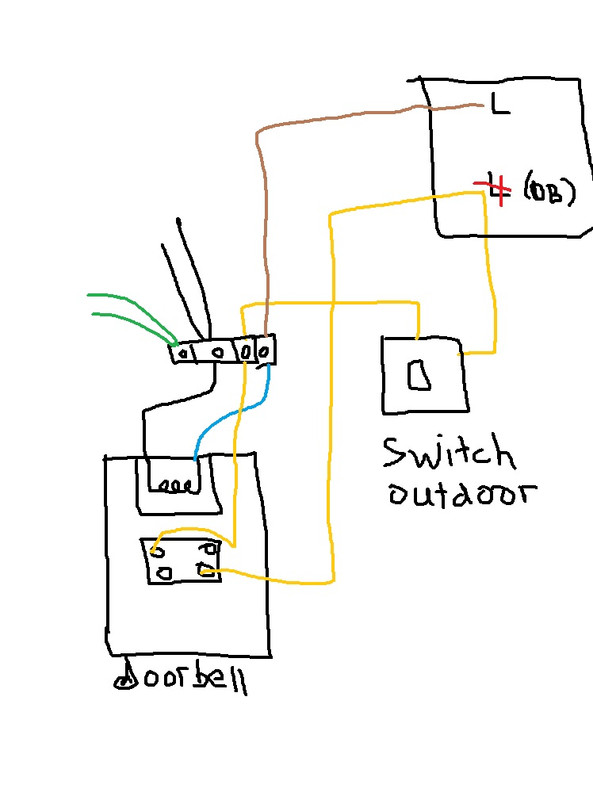
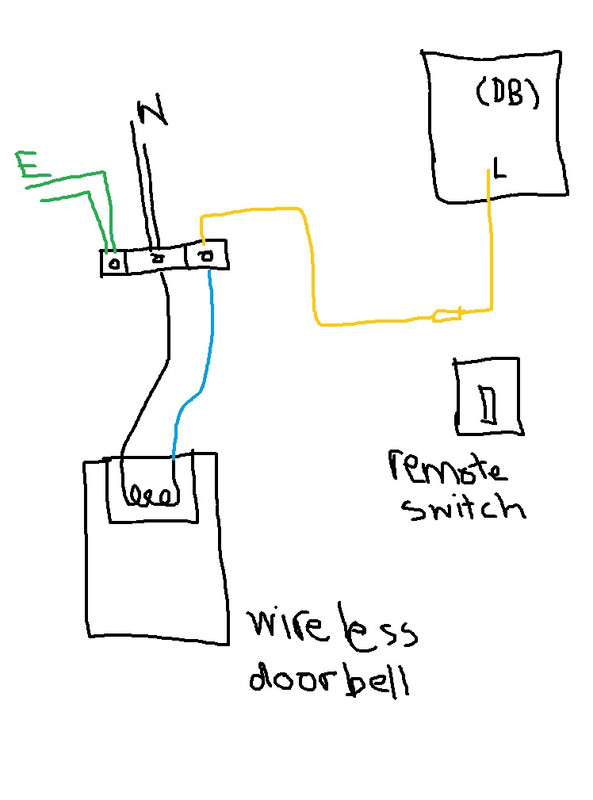
2 option to solve the problem I can think of.

Option 1.
Take away the L wire from the DB and extend it to the doorbell. Now the 2 yellow wire can join to the low voltage transformer side of door bell and the switch. (safe)

Wire another L (240v) to the doorbell main side. This can use back your purchase door bell.

user posted image

Option 2.
Get a wireless door bell with come the remote switch that run on battery. (Some new doorbell even don't need a battery for the remote switch)

Join the 2 yellow wire in the outdoor hub. Makesure the join doesn't expose to water. Now the internal yellow wire is L. Join the wire to the door bell.

user posted image

Both are safe to use the switch.

10 Pages « < 7 8 9 10 >Top
 

Change to:
| Lo-Fi Version
0.0279sec    0.38    6 queries    GZIP Disabled
Time is now: 4th December 2025 - 02:08 AM