

Thanks!
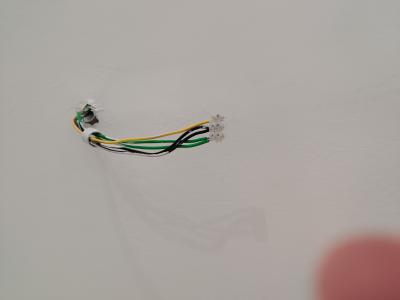


Door Bell Wiring
|
|
 May 9 2021, 09:33 PM May 9 2021, 09:33 PM
Return to original view | IPv6 | Post
#1
|
 
Junior Member
197 posts Joined: Sep 2007 
|
Hi. Bumping old topic. Realized my house has very weird doorbell point. 2 green 2 black and 1 yellow (live). Switch at gate post are 2 yellows. Can anyone advise how i should wire my doorbell?
Thanks!
|
|
|
|
|
|
May 9 2021, 10:57 PM
Return to original view | IPv6 | Post
#2
|
|
Junior Member
197 posts Joined: Sep 2007
|
QUOTE(ceo684 @ May 9 2021, 09:49 PM) Where does this blue wire come from? Pls ignore the wires. Just my own wire to connect to point. QUOTE(slimey @ May 9 2021, 10:40 PM) where is the other ends of the 2 yellow wire? need to find them and connect them to 0 and 2. That's what's annoying me.. I can't find it anywhere..so thought if there's any special configuration that I'm missing out. There is no other possible point for doorbell.the bottom part of door bell one of them connect to black, the other connect to the live yellow |
|
|
May 9 2021, 11:10 PM
Return to original view | IPv6 | Post
#3
|
|
Junior Member
197 posts Joined: Sep 2007
|
QUOTE(ceo684 @ May 9 2021, 11:06 PM) Noted on test lead as blue wire. Hmm one thing i missed pointing out is that the yellow wire is only hot when switch is pressed. Means most likely they messed up the wiring?Colour mismatched cables will be rather tricky to test for continuity with power running. I worry that one of the gate post wires are actually 230V live. If you have a long enough spare wire and a multimeter can try to check 1 by 1 wire (turn off the whole DB box) from the gate to the doorbell point inside (separate them out using a spare connector block) for continuity. It may have been mixed up or they are using half of yellow outdoor and half of black indoor. Or worse, hooked up the gate post wires into DB box. Macam macam can happen. |
|
|
May 9 2021, 11:23 PM
Return to original view | IPv6 | Post
#4
|
|
Junior Member
197 posts Joined: Sep 2007
|
QUOTE(ceo684 @ May 9 2021, 11:16 PM) By right it is 5 wires at doorbell. Thanks! Alright will test it soon. Will be a big screw up if they've wired switch from DB...which would be the prime suspect in my case no? Since the switch causes my wall point yellow wire to go hot, without any bell installed.3 from MCB box to doorbell. 230V. 2 from gate to doorbell as unpowered (for low voltage) as dingdong button trigger. I'd test the gate post wires to see if they light up a test pen. many funny² things can and have happened in my experience. see WRT DEVELOPER WIRING in https://forum.lowyat.net/index.php?showtopi...ost&p=100869300 Not all banglas know what they're doing.  |
|
|
May 10 2021, 11:11 PM
Return to original view | IPv6 | Post
#5
|
|
Junior Member
197 posts Joined: Sep 2007
|
QUOTE(ozak @ May 10 2021, 08:40 AM) Yup. But depending on what house is he stay in. Condo or landed. If condo, I guess should be ok since the switch no exposes to rain. Landed. So no, not gonna be acceptable at all. |
|
|
May 11 2021, 12:14 PM
Return to original view | Post
#6
|
|
Junior Member
197 posts Joined: Sep 2007
|
QUOTE(ozak @ May 11 2021, 11:22 AM) Since it is already wiring, it would be headache to rewiring again. Great suggestions. Thanks!👍 Hopefully there are no misaligned/disconnected conduit pipes then..😖😖2 option to solve the problem I can think of. Option 1. Take away the L wire from the DB and extend it to the doorbell. Now the 2 yellow wire can join to the low voltage transformer side of door bell and the switch. (safe) Wire another L (240v) to the doorbell main side. This can use back your purchase door bell. 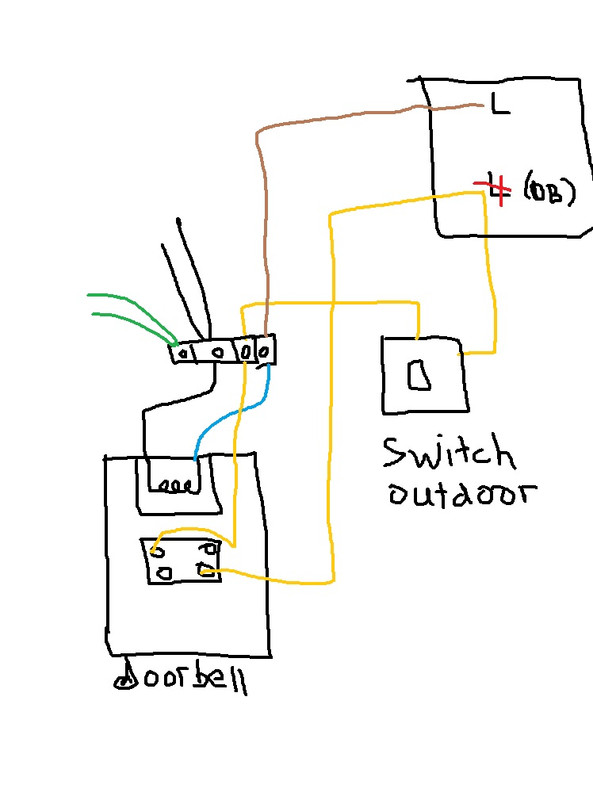 Option 2. Get a wireless door bell with come the remote switch that run on battery. (Some new doorbell even don't need a battery for the remote switch) Join the 2 yellow wire in the outdoor hub. Makesure the join doesn't expose to water. Now the internal yellow wire is L. Join the wire to the door bell. 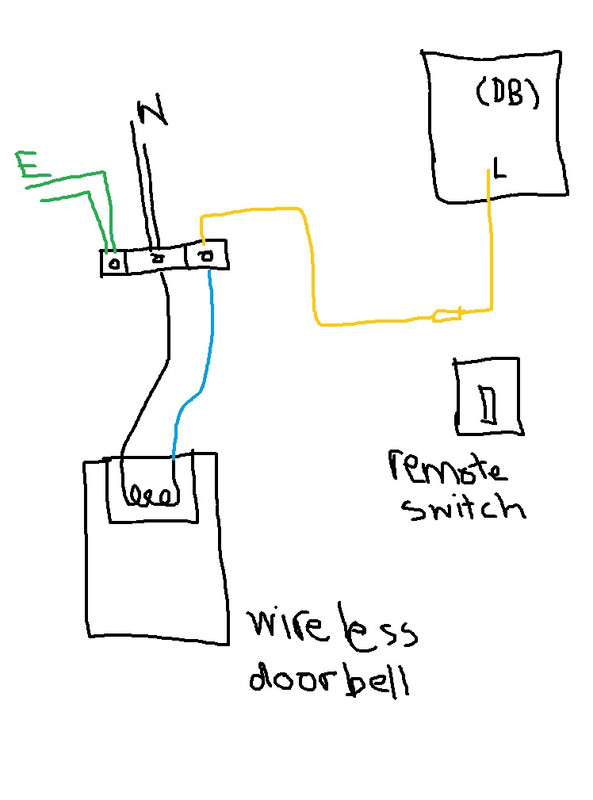 Both are safe to use the switch. This post has been edited by drew86: May 11 2021, 12:15 PM |
| Change to: |  0.0235sec 0.0235sec
 0.72 0.72
 7 queries 7 queries
 GZIP Disabled GZIP Disabled
Time is now: 4th December 2025 - 10:14 AM |
 Quote
Quote