Outline ·
[ Standard ] ·
Linear+
Home Networking TP-Link 3G Routers Owner Club V3, MR3420
|
1024kbps
|
 Jun 30 2014, 12:23 PM Jun 30 2014, 12:23 PM
|

|
QUOTE(chuahcs79 @ Jun 30 2014, 02:20 AM) yeah rooter firmware do have a lot of magical moments  I wonder if i should try some higher end model llike Archer C7  Their router are cheap but it lacks many advanced functions on stock firmware, which make it less attractive. Also, when it works, it works flawlessly, when it does not work = reset router damn noob i am. |
|
|
|
|
|
TSblacktubi
|
Jun 30 2014, 05:25 PM
|
-

|
QUOTE(1024kbps @ Jun 30 2014, 12:23 PM) I wonder if i should try some higher end model llike Archer C7 Their router are cheap but it lacks many advanced functions on stock firmware, which make it less attractive. Also, when it works, it works flawlessly, when it does not work = reset router damn noob i am. Let us know once you tried TP-LINK AC model Need a router with faster wireless to replace my 1043ND. |
|
|
|
|
|
1024kbps
|
Jun 30 2014, 10:01 PM
|
|
|
QUOTE(blacktubi @ Jun 30 2014, 05:25 PM) Let us know once you tried TP-LINK AC model Need a router with faster wireless to replace my 1043ND. Lol the top of my computer are full of routers if i can get it cheaper at second hand market i'd glad to test it out. |
|
|
|
|
|
chuahcs79
|
Jul 1 2014, 02:07 AM
|
Look at all my stars!!
|
QUOTE(1024kbps @ Jun 30 2014, 10:01 PM) Lol the top of my computer are full of routers if i can get it cheaper at second hand market i'd glad to test it out. so far i didnt any anyone selling wireless AC router from tplink as used unit yet |
|
|
|
|
|
2505702
|
Jul 1 2014, 02:30 AM
|
New Member

|
wrong section..sorry
This post has been edited by 2505702: Jul 1 2014, 02:37 AM
|
|
|
|
|
|
afif92
|
Jul 4 2014, 08:13 PM
|
|
|
hi, how to make huawei e392 shows the qos in 4g network? usng TPLINK MR3420 Huntsman 2014-01-25red
|
|
|
|
|
|
chuahcs79
|
Jul 5 2014, 03:17 AM
|
Look at all my stars!!
|
QUOTE(afif92 @ Jul 4 2014, 08:13 PM) hi, how to make huawei e392 shows the qos in 4g network? usng TPLINK MR3420 Huntsman 2014-01-25red 4G mode dont show QoS |
|
|
|
|
|
amizie
|
Jul 13 2014, 08:51 AM
|
New Member
|
modem k5005 boleh pakai ngan tp link ni x?
|
|
|
|
|
|
chuahcs79
|
Jul 13 2014, 03:00 PM
|
Look at all my stars!!
|
QUOTE(amizie @ Jul 13 2014, 08:51 AM) modem k5005 boleh pakai ngan tp link ni x? Yes can  |
|
|
|
|
|
eddyann
|
 Jul 21 2014, 11:57 AM Jul 21 2014, 11:57 AM
|
|
|
Hi, I'm finally upgrade the tplink mr3040 battery operated 3G router. Currently using the FunnelWeb 2014-04-14a (ofmodemsandmen.com) Right now all seems to be functional, LAN,3G except the wifi. This is 3G router means that I can share 3G broadband to LAN and WiFi at the same time. WiFi got some difficulties to lock IP (DHCP has been enabled). Once it got the IP, still I cannot access the luci interface or surf net (no pings) using WiFi. LAN is ok. did I missed something? Personally, I don't know what else to look for Attached thumbnail(s)
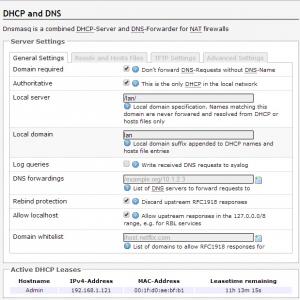


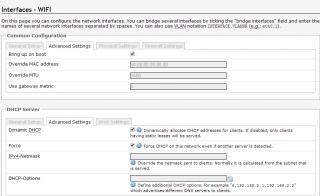
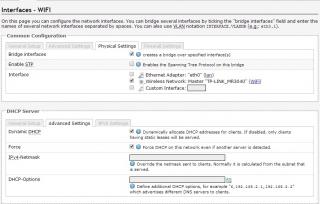
|
|
|
|
|
|
Hoshiyuu
|
Jul 21 2014, 03:25 PM
|
|
|
Modem: Huawei E398 (Vodaphone case)
Hardware Version: CD4E398M
Firmware Version: 11.433.57.00.000
I just noticed that my 3G ping likes to have spikes of 40ms every now and then, I've tried connect from completely different location (Kajang and Klang), with router or without router, and moving around the room for the sweet spot. (Signal strength is at a respectable 65~70%, around -73dBm)
Is there a fix for this? Is my firmware the optimal firmware version? I can't even find a firmware I dare to flash from Google due to so many E398 variants after Blacktubi took down his firmware collection =(
|
|
|
|
|
|
TSblacktubi
|
Jul 21 2014, 07:11 PM
|
-
|
Hoshiyuu
You are already on the latest firmware. No upgrade required.
3G connection is known for spiking when there's activity utilising the connection.
|
|
|
|
|
|
Hoshiyuu
|
Jul 21 2014, 07:19 PM
|
|
|
QUOTE(blacktubi @ Jul 21 2014, 07:11 PM) Hoshiyuu You are already on the latest firmware. No upgrade required. 3G connection is known for spiking when there's activity utilising the connection. Ah, I see. I do faintly recall a year or so back you said that a certain version was more stable and you preferred it? Does it compare well to the latest? |
|
|
|
|
|
TSblacktubi
|
Jul 21 2014, 07:26 PM
|
-
|
QUOTE(Hoshiyuu @ Jul 21 2014, 07:19 PM) Ah, I see. I do faintly recall a year or so back you said that a certain version was more stable and you preferred it? Does it compare well to the latest? Yours seem alright to me. This is usual, maybe you should try LTE |
|
|
|
|
|
digilife
|
Jul 21 2014, 07:48 PM
|
|
|
QUOTE(eddyann @ Jul 21 2014, 11:57 AM) Hi, I'm finally upgrade the tplink mr3040 battery operated 3G router. Currently using the FunnelWeb 2014-04-14a (ofmodemsandmen.com) Right now all seems to be functional, LAN,3G except the wifi. This is 3G router means that I can share 3G broadband to LAN and WiFi at the same time. WiFi got some difficulties to lock IP (DHCP has been enabled). Once it got the IP, still I cannot access the luci interface or surf net (no pings) using WiFi. LAN is ok. did I missed something? Personally, I don't know what else to look for Log in via LAN Go to Network > WiFi Under Wireless Overview click "Edit " Under Device Configuration , Interface Configuration , edit your ESSID if you like , > Wireless Security Then Save and Apply Kautim Btw, i flashed my WDR4300 to FW and it works as expected 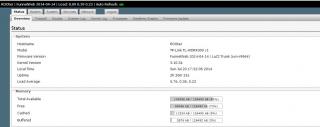
 |
|
|
|
|
|
rootlinux
|
Jul 22 2014, 10:10 AM
|
|
|
QUOTE(digilife @ Jul 21 2014, 07:48 PM) Log in via LAN Go to Network > WiFi Under Wireless Overview click "Edit " Under Device Configuration , Interface Configuration , edit your ESSID if you like , > Wireless Security Then Save and Apply Kautim Btw, i flashed my WDR4300 to FW and it works as expected
Can the FunnelWeb install additional software from OpenWrt flawlessly? Do you use 5GHz wireless? How is it? Thanks. This post has been edited by rootlinux: Jul 22 2014, 10:11 AM |
|
|
|
|
|
MrSars
|
Jul 24 2014, 08:01 PM
|
Getting Started
|
Hey guys, need some advice here. My adapter/plug for MR3420 have died and i have found my old modem adapter and i want to use it on my MR3420. But I'm afraid if I'm wrong the MR3420 will broke. I've taken the picture of both adapter, i need sifu2 to tell me is it ok to use or not? OR do you guys have any other option?  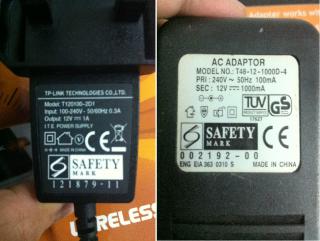
|
|
|
|
|
|
TSblacktubi
|
Jul 24 2014, 08:04 PM
|
-
|
QUOTE(MrSars @ Jul 24 2014, 08:01 PM) Hey guys, need some advice here. My adapter/plug for MR3420 have died and i have found my old modem adapter and i want to use it on my MR3420. But I'm afraid if I'm wrong the MR3420 will broke. I've taken the picture of both adapter, i need sifu2 to tell me is it ok to use or not? OR do you guys have any other option?
No problem |
|
|
|
|
|
MrSars
|
Jul 24 2014, 08:05 PM
|
Getting Started
|
QUOTE(blacktubi @ Jul 24 2014, 08:04 PM) Alright thank you  |
|
|
|
|
|
MrSars
|
Jul 24 2014, 08:18 PM
|
Getting Started
|
Unfortunately the adapter is not useable anymore but i found another one to test. 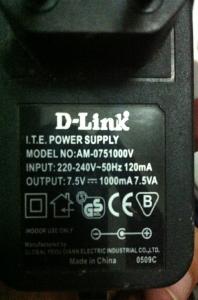
Instead of asking the same question over and over again, can you guys teach me what should i take a look to identify the adapter/plug is useable or not? |
|
|
|
|





 Quote
Quote





 0.0236sec
 0.40
0.40
 6 queries
 GZIP Disabled