

This post has been edited by llk: Nov 12 2013, 07:54 AM
Attached thumbnail(s)

AMD Radeon™ Discussion V9, Latest - 13.11 Beta 9.5 | WHQL - 13.10
|
|
 Nov 12 2013, 07:25 AM Nov 12 2013, 07:25 AM
|
 
Senior Member
4,158 posts Joined: Jan 2003 From: KL 
|
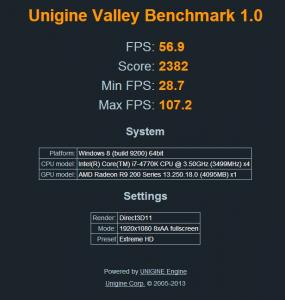
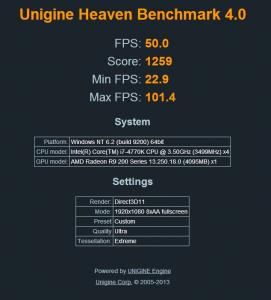
Ok, here are some benchmark results for my R9 290, all at default speed
This post has been edited by llk: Nov 12 2013, 07:54 AM Attached thumbnail(s)
|
|
|
|
|
|
Nov 12 2013, 08:36 AM
|

Senior Member
7,084 posts Joined: Feb 2011 From: Penang 
|
QUOTE(llk @ Nov 12 2013, 07:25 AM) Ok, here are some benchmark results for my R9 290, all at default speed How are the acoustics level? Was it loud? |
|
|
Nov 12 2013, 09:02 AM
|

Senior Member
1,657 posts Joined: May 2013 From: Gay El
|
QUOTE(llk @ Nov 12 2013, 07:25 AM) Ok, here are some benchmark results for my R9 290, all at default speed how's the temp? |
|
|
Nov 12 2013, 09:42 AM
|
|
Senior Member
4,158 posts Joined: Jan 2003 From: KL
|
QUOTE(rav3n82 @ Nov 12 2013, 08:36 AM) How are the acoustics level? Was it loud? I set the fan speed to 45%, temperature is about 42-45 degree, fan acoustics level still within my acceptable level, my 2 CM sickflow 120mm fans in front of the casing bit louder than the gpu fan sound. When running those benchmarking softwares the temperature will jump to around 65-70, i set the fan speed to 60% above based on the temperature range, the sound produced by the fan at this level is extremely high, i think most of the people will not acceptedThis post has been edited by llk: Nov 12 2013, 09:47 AM Attached File(s)  Record_0001.wav ( 616.04k )
Number of downloads: 13
Record_0001.wav ( 616.04k )
Number of downloads: 13 |
|
|
Nov 12 2013, 09:44 AM
|
|
Senior Member
7,084 posts Joined: Feb 2011 From: Penang
|
QUOTE(llk @ Nov 12 2013, 09:42 AM) I set the fan speed to 45%, temperature is about 42-45 degree, fan acoustics level still within my acceptable level, my 2 CM sickflow 120mm fans in front of the casing bit louder than the gpu fan sound. When running those benchmarking softwares the temperature will jump to around 65-70, i set the fan speed to 60% above based on the temperature range, the sound produced by the fan at this level is extremely high, i think most of the people will not accepted I see, means you did manually adjust the fan speed. How about if you leave it at default? I believe the latest Beta v9.2 driver will render it to run at ~2650 RPM (49%) at load.This post has been edited by rav3n82: Nov 12 2013, 09:45 AM |
|
|
Nov 12 2013, 09:45 AM
|
|
Junior Member
346 posts Joined: Jan 2003
|
Viewnet gigabyte sold out for r290. Need wait restock
|
|
|
|
|
|
Nov 12 2013, 09:50 AM
|
|
Senior Member
4,158 posts Joined: Jan 2003 From: KL
|
QUOTE(rav3n82 @ Nov 12 2013, 09:44 AM) I see, means you did manually adjust the fan speed. How about if you leave it at default? I believe the latest Beta v9.2 driver will render it to run at ~2650 RPM (49%) at load. Surprisingly not, right after i install the last driver i check the fan speed by using gigabyte oc 2 software, the fan speed is preset at about 30% only.I have attached the fan sound during running benchmark in my previous post. |
|
|
Nov 12 2013, 09:51 AM
|
|
Senior Member
4,158 posts Joined: Jan 2003 From: KL
|
QUOTE(sentlon @ Nov 12 2013, 09:45 AM) Viewnet gigabyte sold out for r290. Need wait restock The sales person told me the one that i grab is the last piece  |
|
|
Nov 12 2013, 09:57 AM
|
|
Senior Member
7,084 posts Joined: Feb 2011 From: Penang
|
QUOTE(llk @ Nov 12 2013, 09:50 AM) Surprisingly not, right after i install the last driver i check the fan speed by using gigabyte oc 2 software, the fan speed is preset at about 30% only. Fairly acceptable sound level. What was the fan speed % of your recording?I have attached the fan sound during running benchmark in my previous post. Surprised that it run at only 30% level. Perhaps you could use MSI Afterburner or Evga Precision to check on the fan speed. |
|
|
Nov 12 2013, 10:02 AM
|
 
Forum Admin
44,415 posts Joined: Jan 2003  
|
normally sound recording exaggerated the audio level by a lot.
also depends on how close is the recording device. |
|
|
Nov 12 2013, 10:09 AM
|
|
Senior Member
4,158 posts Joined: Jan 2003 From: KL
|
QUOTE(rav3n82 @ Nov 12 2013, 09:57 AM) Fairly acceptable sound level. What was the fan speed % of your recording? I'm not really sure cause while running the benchmark in full screen i not able to check the fan speed. But that is the maximum sound ever produced so far.Surprised that it run at only 30% level. Perhaps you could use MSI Afterburner or Evga Precision to check on the fan speed. |
|
|
Nov 12 2013, 10:11 AM
|
|
Senior Member
4,158 posts Joined: Jan 2003 From: KL
|
QUOTE(goldfries @ Nov 12 2013, 10:02 AM) normally sound recording exaggerated the audio level by a lot. You may right because the actual sound abit lower than the recorded. I'm using my Galaxy S3 to record the sound & i put it really close to the side panel. also depends on how close is the recording device. |
|
|
Nov 12 2013, 10:19 AM
|
|
Senior Member
7,084 posts Joined: Feb 2011 From: Penang
|
QUOTE(llk @ Nov 12 2013, 10:09 AM) I'm not really sure cause while running the benchmark in full screen i not able to check the fan speed. But that is the maximum sound ever produced so far. On the hardware monitor of MSI Afterburner / Evga Precision, you can see a chart showing min/max of the fan speed. Run the software, then just leave it while you benchmark / game. » Click to show Spoiler - click again to hide... « |
|
|
|
|
|
Nov 12 2013, 10:29 AM
|
|
Senior Member
4,158 posts Joined: Jan 2003 From: KL
|
QUOTE(rav3n82 @ Nov 12 2013, 10:19 AM) On the hardware monitor of MSI Afterburner / Evga Precision, you can see a chart showing min/max of the fan speed. Run the software, then just leave it while you benchmark / game. I have install Gigabyte OC 2, more or less same like this, tonite will try run some more benchmarking programs & monitor the temperature. » Click to show Spoiler - click again to hide... « |
|
|
Nov 12 2013, 11:14 AM
|
|
Junior Member
346 posts Joined: Jan 2003
|
I didnt see any lowyat seller selling the r290.
Anyone know who is selling with reasonable prices? |
|
|
Nov 12 2013, 11:25 AM
|
|
Senior Member
7,084 posts Joined: Feb 2011 From: Penang
|
QUOTE(llk @ Nov 12 2013, 10:29 AM) I have install Gigabyte OC 2, more or less same like this, tonite will try run some more benchmarking programs & monitor the temperature. Thanks bro. Btw, what card did you use before this one?  |
|
|
Nov 12 2013, 12:25 PM
|

Senior Member
6,612 posts Joined: Jan 2003 From: Tomorrow
|
QUOTE(llk @ Nov 12 2013, 09:50 AM) Surprisingly not, right after i install the last driver i check the fan speed by using gigabyte oc 2 software, the fan speed is preset at about 30% only. If i'm not mistaken, after your update to beta 9.2 you need to press the default button in CCC to make it use the new fan algorithm.I have attached the fan sound during running benchmark in my previous post. |
|
|
Nov 12 2013, 12:42 PM
|

Senior Member
1,604 posts Joined: Oct 2004 From: Seremban 
|
Hi all,
I am currently using Radeon 7850. And I am planning to get the R9 290 in the near future. I read that the noise level is a concern. I had experience regarding to this back when using Radeon 4870 to a point that I had to change the reference cooler to Arctic Cooling. Since the 290 in the market now(AFAIK) are all using reference cooler, is it safe to assume that the arrival of other models with their own coolers will effectively solve this problem? I'm sorry if this has been answered before. I just started reading about it today. Thanks. |
|
|
Nov 12 2013, 12:43 PM
|
|
Senior Member
4,158 posts Joined: Jan 2003 From: KL
|
QUOTE(rav3n82 @ Nov 12 2013, 11:25 AM) Thanks bro. Btw, what card did you use before this one? Previously using zotac gtx760 amp edition, sold after 1month + |
|
|
Nov 12 2013, 12:47 PM
|
|
Senior Member
4,158 posts Joined: Jan 2003 From: KL
|
QUOTE(Acid_RuleZz @ Nov 12 2013, 12:25 PM) If i'm not mistaken, after your update to beta 9.2 you need to press the default button in CCC to make it use the new fan algorithm. Ok, will try tonite, thanks |
|
Topic ClosedOptions
|
| Change to: |  0.3077sec 0.3077sec
 0.61 0.61
 7 queries 7 queries
 GZIP Disabled GZIP Disabled
Time is now: 12th December 2025 - 07:05 AM |
 Quote
Quote
