Welcome Guest ( Log In | Register )

Bump Topic Topic Closed RSS Feed
130 Pages « < 125 126 127 128 129 > » Bottom

Outline · [ Standard ] · Linear+

 The Official Nikon Discussion Thread Ver.22, NEW RUMORE Nikon DF!

views
     
gnome
post Nov 27 2013, 12:45 AM

- We game, do you? -
*******
Senior Member
4,925 posts

Joined: Jan 2003
QUOTE(Agito666 @ Nov 26 2013, 01:57 PM)
2 years without drybox  sweat.gif
*
Wow already 2 years eh? Time sure flies laugh.gif

QUOTE(PF T.J. @ Nov 26 2013, 02:25 PM)
Scared already laugh.gif
I don't even have drybox  rclxub.gif
*
I also dont have drybox tongue.gif

Thinking of getting one once i cleaned my lens lol

Spam one more from thai

user posted image
TSAgito666
post Nov 27 2013, 01:41 AM

10k Club
Group Icon
Elite
11,861 posts

Joined: Oct 2008
From: Bangalasia
user posted image

i also want spam... baru fresh from edit, not fresh from memory card laugh.gif
QiAnG
post Nov 27 2013, 06:32 AM

On my way
****
Senior Member
545 posts

Joined: Jun 2011
Noooo, got a not bad shot of a baby jumping spider hiding behind a leaf looking at me, eyes in focus, then realize I didn't have my memory card slotted in =.=''
Pro3363
post Nov 27 2013, 09:15 AM

Aiming high to stay flying
Group Icon
Elite
1,193 posts

Joined: Aug 2011
From: Miri, Sarawak


QUOTE(QiAnG @ Nov 27 2013, 06:32 AM)
Noooo, got a not bad shot of a baby jumping spider hiding behind a leaf looking at me, eyes in focus, then realize I didn't have my memory card slotted in =.=''
*
First world problems... laugh.gif Even the second card slot not loaded? rolleyes.gif
raclette
post Nov 27 2013, 09:45 AM

Casual
***
Junior Member
428 posts

Joined: Aug 2009
QUOTE(f5calvin @ Nov 26 2013, 11:21 PM)
cheapest ady i think.. dno why shashinki selling it so cheap =,=
*
they get things from japan right? that was last time when i was actively involved with photography. the owner did phd in japan and doing business from there. Now im not sure whether theirs are AP or nikon malaysia set.
Pro3363
post Nov 27 2013, 09:48 AM

Aiming high to stay flying
Group Icon
Elite
1,193 posts

Joined: Aug 2011
From: Miri, Sarawak


QUOTE(raclette @ Nov 27 2013, 09:45 AM)
they get things from japan right? that was last time when i was actively involved with photography. the owner did phd in japan and doing business from there. Now im not sure whether theirs are AP or nikon malaysia set.
*
It's Malaysia set... Grey set they put IMPORT...
raclette
post Nov 27 2013, 09:50 AM

Casual
***
Junior Member
428 posts

Joined: Aug 2009
QUOTE(Pro3363 @ Nov 27 2013, 09:48 AM)
It's Malaysia set... Grey set they put IMPORT...
*
i see. cool then

user posted image

This post has been edited by raclette: Nov 27 2013, 10:17 AM
QiAnG
post Nov 27 2013, 12:09 PM

On my way
****
Senior Member
545 posts

Joined: Jun 2011
QUOTE(Pro3363 @ Nov 27 2013, 09:15 AM)
First world problems... laugh.gif  Even the second card slot not loaded? rolleyes.gif
*
Yep, removed them all the last time I used them =.=

btw, finally free enough to go out and try my 105 macro and raynox 250.. all i can say is, with raynox on, I cant even find the target. =.='' have to practice more
gerald7
post Nov 27 2013, 12:47 PM

r a n d o m l y
*******
Senior Member
2,452 posts

Joined: Nov 2007
From: Kuching, Sarawakland


QUOTE(PF T.J. @ Nov 25 2013, 09:58 PM)
I can't really tell also haha laugh.gif
Great photo, good composition, interesting and cute subject  notworthy.gif  notworthy.gif
*
wink.gif

QUOTE(@meno @ Nov 25 2013, 11:30 PM)
Looks fine to me on my monitor, just nice.
What monitor are you viewing the photo from?
I'll try check this out at work tomorrow with my office monitors and see if it feels different.
*
Im using DELL el cheepo monitor...

QUOTE(alpha001 @ Nov 25 2013, 11:48 PM)
i can see the artifact sweat.gif
Maybe the build in camera preset is too hard + flickr sharpening
IMHO soften the image in camera or post
resolution doesnt matter i guess
long time i dont open lightroom doh.gif
great compo btw thumbup.gif
*
I shooting raw, and didnt apply any sharpening in my processes at all...

QUOTE(mingyuyu @ Nov 26 2013, 12:15 AM)
flickr will sharpen every of your pictures in small size preview as what celciuz said.

can't do anything with it, just remember not to sharpen you picture too much if you going to show them through flickr's preview.

if full resolution, no sharpening will be applied.
*
thing is on my computer already feel over sharp... then to flikr even more absurd .. I wonder if its the resize algorithm on CS6 .. . last time on CS5 didnt 'feel' the sharpness while resize

mingyuyu
post Nov 27 2013, 01:03 PM

B A N N E D
Group Icon
Elite
3,249 posts

Joined: Oct 2011


When you resize in PS, did you straight resize it from high resolution (lets say 20mp?) to low resolution (lets say 3mp)? if you do so, it might introduce artifacts to the image. But if you resize "gently", for example from 20mp to 10mp, then to 5mp, then the image wont really get any artifacts.
gerald7
post Nov 27 2013, 01:10 PM

r a n d o m l y
*******
Senior Member
2,452 posts

Joined: Nov 2007
From: Kuching, Sarawakland


QUOTE(mingyuyu @ Nov 27 2013, 01:03 PM)
When you resize in PS, did you straight resize it from high resolution (lets say 20mp?) to low resolution (lets say 3mp)? if you do so, it might introduce artifacts to the image. But if you resize "gently", for example from 20mp to 10mp, then to 5mp, then the image wont really get any artifacts.
*
maybe thats why. went from 6016px to 1200px.. HmmMm Hmmm...
copperwire93
post Nov 27 2013, 01:31 PM

On my way
****
Senior Member
574 posts

Joined: Nov 2009
From: Kuala Terengganu, Terengganu


QUOTE(QiAnG @ Nov 27 2013, 12:09 PM)
Yep, removed them all the last time I used them =.=

btw, finally free enough to go out and try my 105 macro and raynox 250.. all i can say is, with raynox on, I cant even find the target. =.='' have to practice more
*
I'm not sure about the effect of Raynox with 105. 105 is a long macro lens, and Raynox is an adapter to help you gain the focus at close distance. Same case when I was using extension tube. Hence, I think you need to get your lens closer to your subject than normally you'll do with 105 alone.
QiAnG
post Nov 27 2013, 01:33 PM

On my way
****
Senior Member
545 posts

Joined: Jun 2011
QUOTE(copperwire93 @ Nov 27 2013, 01:31 PM)
I'm not sure about the effect of Raynox with 105. 105 is a long macro lens, and Raynox is an adapter to help you gain the focus at close distance. Same case when I was using extension tube. Hence, I think you need to get your lens closer to your subject than normally you'll do with 105 alone.
*
Yea, working distance really reduced a lot, plus finding the target on the viewfinder is tough as the depth of field is soo small, working at more than 2x magnification is not easy =.= .. will try to work around with this, shooting without raynox is easy though
mingyuyu
post Nov 27 2013, 01:52 PM

B A N N E D
Group Icon
Elite
3,249 posts

Joined: Oct 2011


QUOTE(gerald7 @ Nov 27 2013, 01:10 PM)
maybe thats why. went from 6016px to 1200px.. HmmMm Hmmm...
*
yeap, that's the reason.

i don't really prefer to resize my images in PS as this problem will occur. perhaps you should export using LR in a smaller size to prevent the artifacts?

QUOTE(QiAnG @ Nov 27 2013, 01:33 PM)
Yea, working distance really reduced a lot, plus finding the target on the viewfinder is tough as the depth of field is soo small, working at more than 2x magnification is not easy =.= .. will try to work around with this, shooting without raynox is easy though
*
you can start by focusing further first while looking for your subject, then get closer and slowly adjust the focusing to nearer.

the same issue appears for telephoto user, sometimes when you are shooting at 300mm or further, you can't locate your subject if the focusing isn't lock yet.
TSAgito666
post Nov 27 2013, 02:36 PM

10k Club
Group Icon
Elite
11,861 posts

Joined: Oct 2008
From: Bangalasia
Attached Image

what was the setting in your PS, do you got bother this setting for image resizing?
gerald7
post Nov 27 2013, 02:40 PM

r a n d o m l y
*******
Senior Member
2,452 posts

Joined: Nov 2007
From: Kuching, Sarawakland


QUOTE(mingyuyu @ Nov 27 2013, 01:52 PM)
yeap, that's the reason.

i don't really prefer to resize my images in PS as this problem will occur. perhaps you should export using LR in a smaller size to prevent the artifacts?

*
I use LR mainly as a catalog for selecting and basic tuning. Then drop into PS for cleanup. then resize for web.


QUOTE(Agito666 @ Nov 27 2013, 02:36 PM)
Attached Image

what was the setting in your PS, do you got bother this setting for image resizing?
*
i usually set to AUTO >_<
TSAgito666
post Nov 27 2013, 02:44 PM

10k Club
Group Icon
Elite
11,861 posts

Joined: Oct 2008
From: Bangalasia
QUOTE(gerald7 @ Nov 27 2013, 02:40 PM)
I use LR mainly as a catalog for selecting and basic tuning. Then drop into PS for cleanup. then resize for web.
i usually set to AUTO >_<
*
that is no auto la lol, you use CTRL + R when resizing image normally top bar will show which engine to resize one, or if you use image > resize... there got ask you for that, i think maybe you silap change to other option or what...
gerald7
post Nov 27 2013, 02:51 PM

r a n d o m l y
*******
Senior Member
2,452 posts

Joined: Nov 2007
From: Kuching, Sarawakland


QUOTE(Agito666 @ Nov 27 2013, 02:44 PM)
that is no auto la lol, you use CTRL + R when resizing image normally top bar will show which engine to resize one, or if you use image > resize... there got ask you for that, i think maybe you silap change to other option or what...
*
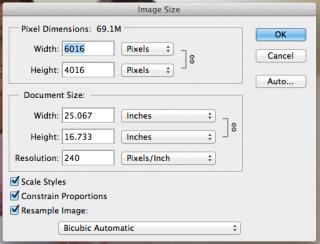
I dont know how you resize but for me its COMMAND+ALT+I and I leave the RESAMPLE IMAGE on AUTOMATIC

Attached Image

smile.gif
TSAgito666
post Nov 27 2013, 03:01 PM

10k Club
Group Icon
Elite
11,861 posts

Joined: Oct 2008
From: Bangalasia
QUOTE(gerald7 @ Nov 27 2013, 02:51 PM)
I dont know how you resize but for me its COMMAND+ALT+I and I leave the RESAMPLE IMAGE on AUTOMATIC

Attached Image

smile.gif
*
oh then should be no problem
i also set to automatic, only when do pixel art i need change to hard edge for enlarge things biggrin.gif
well that one is for doing digital artwork already tongue.gif
[PF] T.J.
post Nov 27 2013, 04:27 PM

20k VIP Club
Group Icon
Elite
24,193 posts

Joined: Feb 2010
From: Perak
QUOTE(gnome @ Nov 27 2013, 12:45 AM)
Wow already 2 years eh? Time sure flies laugh.gif
I also dont have drybox tongue.gif

Thinking of getting one once i cleaned my lens lol

Spam one more from thai

» Click to show Spoiler - click again to hide... «
*
Wah, pretty girl thumbup.gif
Love her pose!
Too bad the lighting of the venue is pretty harsh sad.gif

QUOTE(Agito666 @ Nov 27 2013, 01:41 AM)
» Click to show Spoiler - click again to hide... «

i also want spam... baru fresh from edit, not fresh from memory card  laugh.gif
*
The lighting in this photo also quite harsh from above T____T
Usually the shadows can be avoided by asking the model to take one step forward or backward hmm.gif As long as not under the light directly should result in less shadows hmmm

Just my 2 cents la tongue.gif Sometimes cannot too bossy and order the model around too much I suppose XD

QUOTE(QiAnG @ Nov 27 2013, 06:32 AM)
Noooo, got a not bad shot of a baby jumping spider hiding behind a leaf looking at me, eyes in focus, then realize I didn't have my memory card slotted in =.=''
*
I feel you bro laugh.gif
Nvm la, keep trying. As long as you go out and shoot, there will always be better photos than the last~
I often forget to turn on my flash as well sweat.gif


130 Pages « < 125 126 127 128 129 > » Top
Topic ClosedOptions
 

Change to:
| Lo-Fi Version
0.0334sec    0.70    6 queries    GZIP Disabled
Time is now: 11th December 2025 - 08:06 PM