Welcome Guest ( Log In | Register )

13 Pages « < 7 8 9 10 11 > » Bottom

Outline · [ Standard ] · Linear+

 NETWORK ATTACHED STORAGE (NAS) V2

views
     
ozak
post Nov 20 2020, 07:39 PM

10k Club
********
All Stars
17,018 posts

Joined: Jan 2005


QUOTE(xxboxx @ Nov 20 2020, 04:22 PM)
ozak
It seems there's no way in DiskStation to set a HDD as removable drive? I doesn't find if there's such option.
*
Remove able drive?


ozak
post Nov 20 2020, 10:25 PM

10k Club
********
All Stars
17,018 posts

Joined: Jan 2005


QUOTE(xxboxx @ Nov 20 2020, 08:43 PM)
I guess that is a no?  sweat.gif
Something like this MyArchive
Internal HDD can be used as removable storage for keeping additional storage.
I guess having external HDD reader + internal HDD also can achieve same thing, only need additional hardware.
*
I prefer to have fix NAS hdd inside.

But how about RAID if using as removeable?
ozak
post Nov 21 2020, 09:36 AM

10k Club
********
All Stars
17,018 posts

Joined: Jan 2005


QUOTE(xxboxx @ Nov 21 2020, 02:51 AM)
For the removable drive bay, it can't be part of RAID. Example usage on 4-bays NAS, 3 HDD in RAID, 1 bay for hot swappable HDD.
*
Ya I think my NAS have 1 hot swappable bay.

But put all in raid. I don't no what it is for. Feel kind of waste away the bay.
ozak
post Nov 21 2020, 09:57 PM

10k Club
********
All Stars
17,018 posts

Joined: Jan 2005


QUOTE(xxboxx @ Nov 21 2020, 07:43 PM)
Is there anything on DSM that indicate you can create pool/volume that can be removable?
I can't find such options. I google also can't find it got such function.
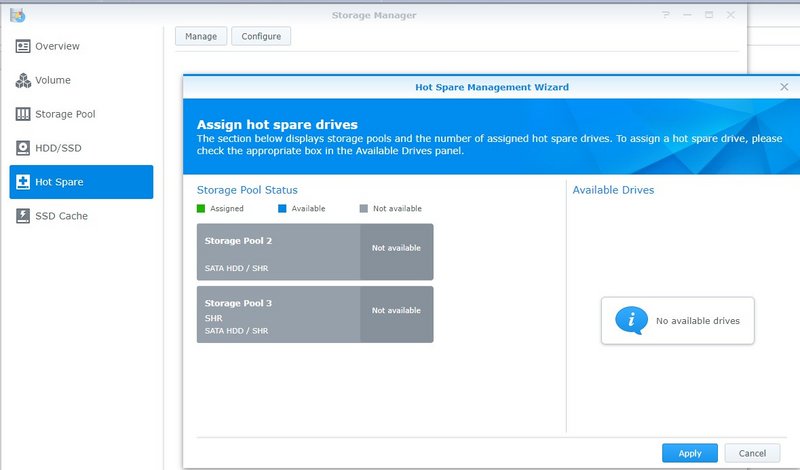
This ?

user posted image
ozak
post Dec 12 2020, 01:12 AM

10k Club
********
All Stars
17,018 posts

Joined: Jan 2005


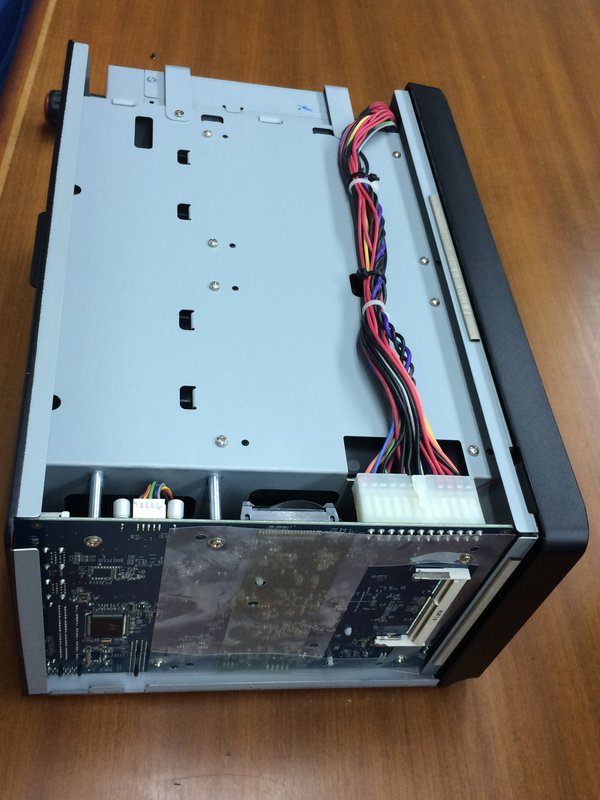
RAM upgrade for Synology DS1815+
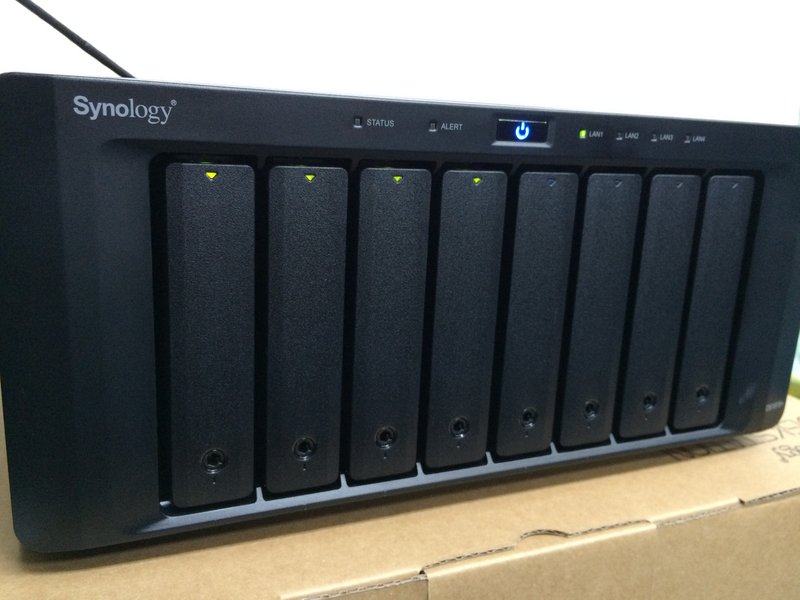
user posted image

My NAS been 6yrs now. I feel it slow down quite sometime. Like

1) The media player respond slow to the NAS file. Got to wait abit each directory.
2) Torrent file process slow if too many in 1 time.
3) Slow in photo/video upload in photo station
4) Photo station or Server log in slow.

Start to suspect that the RAM is not enough. NAS original comes with 2gb Ram. Follow the NAS spec, its max can upgrade is 6gb. Mean I can upgrade another 4gb Ram. There is 2 slot on the motherboard.

So brought a 4gb DDR3L 1600mhz Sodimm Ram. Install and try to boot up.
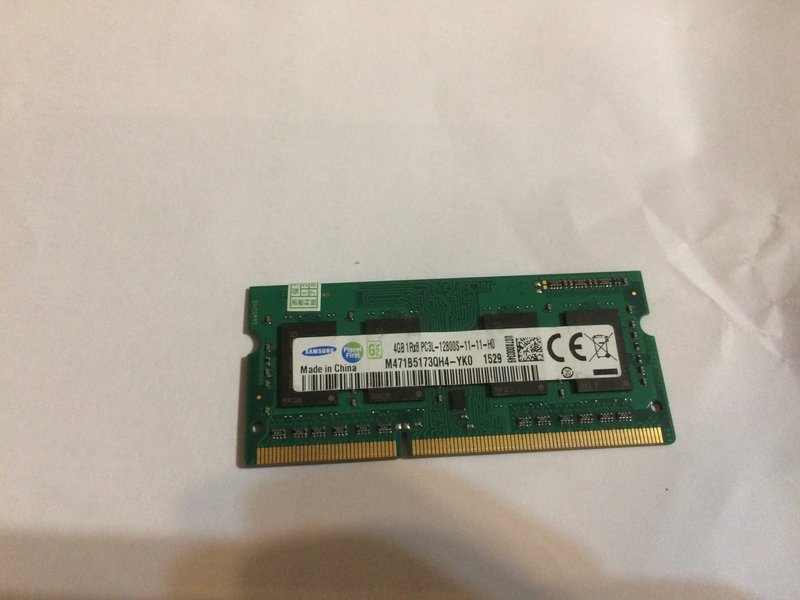
user posted image

user posted image


It doesn't want to boot up. The button light flashing nonstop and nothing happen. sweat.gif

Thought the Ram is bad. Or not match? But I brought 1pcs only. Can't test to prove. sweat.gif

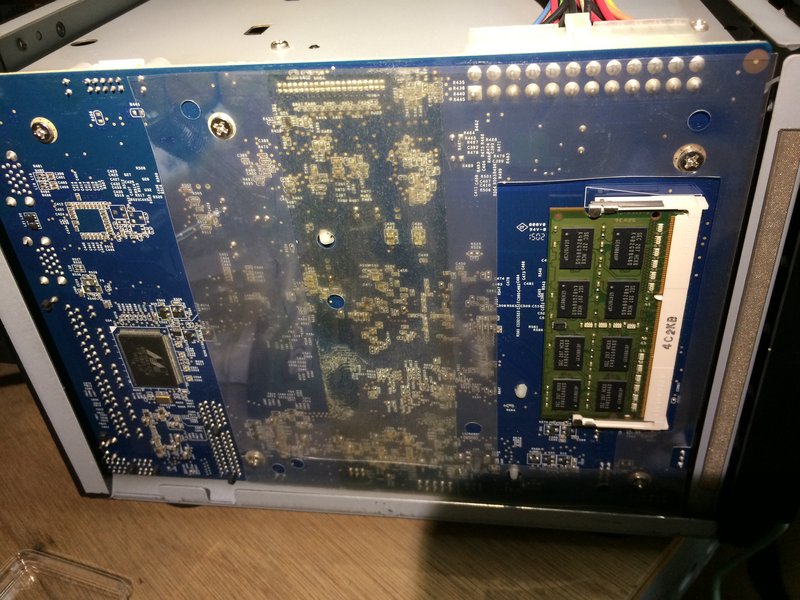
Then I remember I did upgrade my PC Ram last time and got spare 2pcs of 4gb = 8gb Ram. But the model is slightly different.
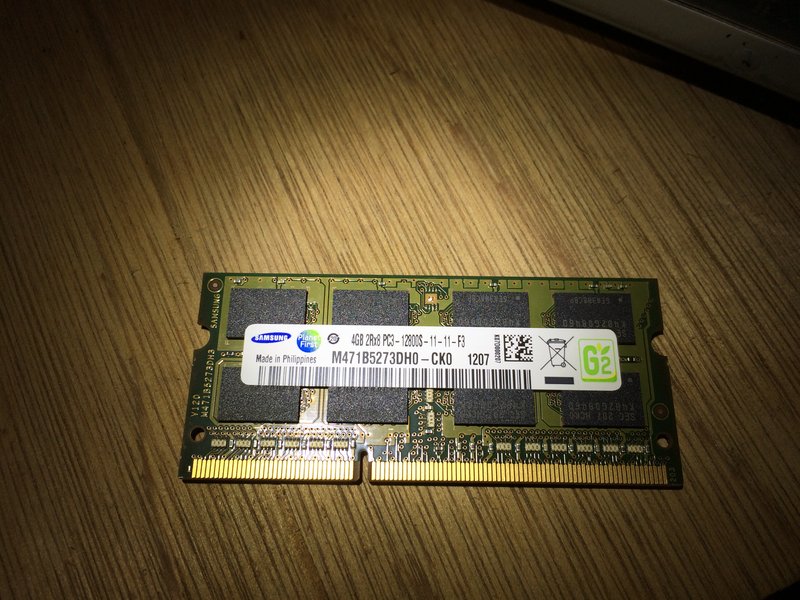
user posted image


I give it a try. But this time I take out the NAS 2gb original Ram and replace both together with 2x4gb Ram. That is 8gb which is over the NAS spec max 6gb.
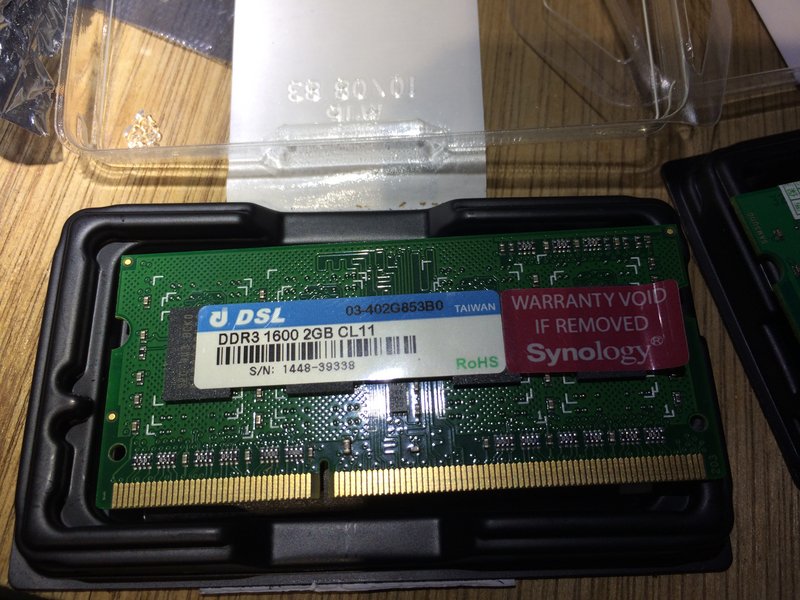
user posted image

user posted image


Then boot it up and it run! No error. rclxms.gif I thought WTH synology bullshit with the 6gb max Ram. dry.gif

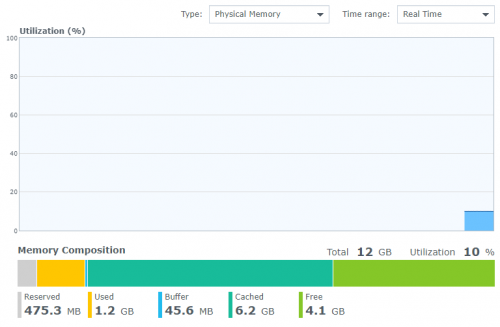
Log in to server and check any error. Nothing. Cache increase in memory and everything run fine.
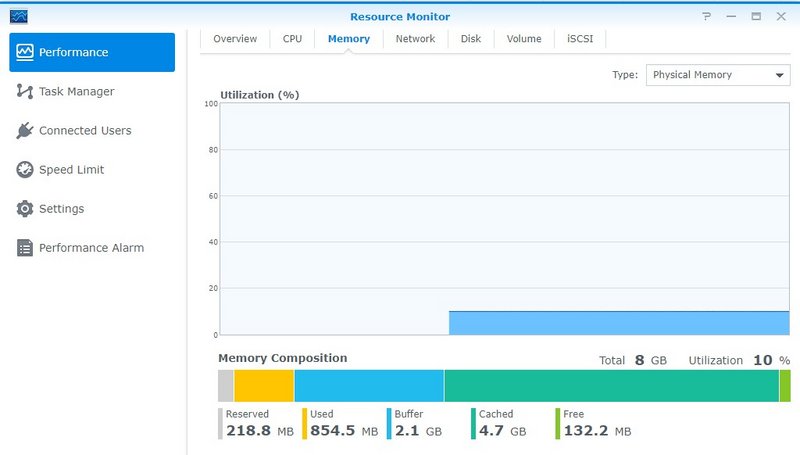
user posted image


Speed and response increase so much now. No lagging. rclxm9.gif

Wonder can I install 8gb x2 =16gb ram. hmm.gif
ozak
post Dec 12 2020, 09:37 AM

10k Club
********
All Stars
17,018 posts

Joined: Jan 2005


QUOTE(xxboxx @ Dec 12 2020, 03:01 AM)
Mine is 4GB solder on and 1 free slot. Synology list as can install max additional 4GB. But other have even install 16GB without issue. brows.gif
I more modest, only go for additional 8GB tongue.gif

user posted image

To confirm no memory error with the RAM, run an utility that will check the RAM. Forgot what the program called, it run on Windows and will put the NAS into some sort of checking stage until it complete the checking.
*
It run few days now.

I guess my install problem is the 4gb ram doesn't match with 2gb original Synology ram.

I didn't buy the Synology ram cause it too expensive. If for your case, to makesure another ram is fine, you need to buy the original ram. Cause another ram is solder on. sweat.gif

If the lagging again in future, will try 8gb x 2. I believe it can be run. Provided it run in a pair same model.
ozak
post Dec 18 2020, 12:35 PM

10k Club
********
All Stars
17,018 posts

Joined: Jan 2005


QUOTE(xxboxx @ Dec 18 2020, 12:30 PM)
Anyone using Synology Photo Station and Moments to create albums in 1 user and share it with other users?

I'm trying to create shared albums that will appear on all selected users Moments app so that they can access it on their phones. So far still haven't figured it out, rough idea is have to create albums in Photo Station then share to other user Photo Station, and change settings on other user Moments.

I wish DMS 7 stable can faster be released so that can just use 1 Photos app instead of going around 2 apps.

And don't know if Synology wrongly implement or Google making it difficult for them. Everytime when edit user, Google will auto fill username and password into email and password column, everytime have to delete the entry for email and re-enter password when edit user. In Drive and Moments app also same story, it will entry into wrong column, username is entered into domain/QuickConnect ID instead.
*
Been Using Photostation for very long.

I create many user and their own password to open the apps in the photostation. Pretty easy.

You can create album, sub album just like folder.

And also able to categorize which album can be view and which is private.


ozak
post Dec 18 2020, 01:35 PM

10k Club
********
All Stars
17,018 posts

Joined: Jan 2005


QUOTE(xxboxx @ Dec 18 2020, 12:45 PM)
My main objective is so that multiple users can use only Moments app on their phone to access shared albums. They not going to use the web-based Photo Station.

Now trying to understand how to share to other Photo Station then also how to make it appear on their phone's Moments app.
*
I didn't know got Moment.

Any advantage over Photostation apps?

Will the user mess up your photostation album in the Moment?
ozak
post Dec 18 2020, 03:47 PM

10k Club
********
All Stars
17,018 posts

Joined: Jan 2005


QUOTE(xxboxx @ Dec 18 2020, 02:15 PM)
Main advantage is they can access it from their phone, no need use computer. It's very similar to Google Photos, can access from PC but most of the time everyone access Photos from their phone.

I can just take the easy route, copy all files to each user's folder. But that will create a lot duplicate files, not to mention hundreds of GB space.

I'm not sure if they can mess up my Photo Station album, which will be a problem since everyone will access the same file. sweat.gif
But I got saw there's option to disallow files to be modified by shared user, maybe any changes will only be on that user own metadata, without any affect to the original file.
*
Photostation can be access by phone, ipad and pc too. Been access by my friend and relative around the world.

Sometime I directly dump the pic into photostation from the phone at another country.

The important is, only I can do with the pic. Others only can view or DL. All this can be set in Photostation setting.
ozak
post Dec 18 2020, 10:03 PM

10k Club
********
All Stars
17,018 posts

Joined: Jan 2005


QUOTE(xxboxx @ Dec 18 2020, 09:34 PM)
You mean access it by phone's web browser? I tried it just now, yeah can access it but not as smooth as Moments app on phone. Using Moments it feels very similar to using Google Photos.

Another advantage of using Moments on phone is it can directly backup the phone photos and videos, so it's an automated process on the phone. Like mine now, I set DCIM as folder to backup (it also can choose multiple folders to backup). After it complete backup I can choose "free up space", which it will proceed to delete all the photos in DCIM folder. I can let it remain in Moments folder if I don't want to share with others or I can copy/move it to Photo folder which will auto share it to other users. All other users also can auto backup their photos, and then I can move the photos to shared folder.

Finally figured out how to configure the sharing options. Each user must have access to Photo Station and Moments app in DSM. After copy photos to Photo folder (Photo Station working folder), in Photo Station I need to assign privileges to each user which folder they can browse. After done that the user can access by their own Photo Station and also by changing to Shared Photo Library in Moments web-portal. In Phone app, they have to change at Source of Photos to see shared photos.
*
Thanks.

I will try out the moment apps later when free.
ozak
post Dec 21 2020, 11:52 AM

10k Club
********
All Stars
17,018 posts

Joined: Jan 2005


QUOTE(HandsomeDupe @ Dec 21 2020, 10:42 AM)
Hi guys, need some help here.

Just purchased DS220j last week to play around with.

Managed to setup using DDNS from synology, but I'm unable to access it from the internet. I have :
1. Enable port forwarding in my maxis router
2. Whitelist port both in my synology router and maxis router

Any clue on where else to look for ?
*
Log in to synology website and check your quickconnect it register already.

See also the way you input site is correct or not.

In the nas setting, enable quickconnect and input your ddns.
ozak
post Dec 21 2020, 05:57 PM

10k Club
********
All Stars
17,018 posts

Joined: Jan 2005


QUOTE(HandsomeDupe @ Dec 21 2020, 03:42 PM)
Yup done all the above.

The ddns only survive for few hours then become inaccessible.
My home network is using maxis (piggy back TM)
*
I m using maxis too.

Router side got port forward?

In the NAS setting quickconnect/ general or advannced, everything filled up correct?
ozak
post Dec 21 2020, 07:05 PM

10k Club
********
All Stars
17,018 posts

Joined: Jan 2005


QUOTE(HandsomeDupe @ Dec 21 2020, 06:58 PM)
Thanks for your reply.
All set correctly, my maxis router got port forwarding in uPnP section. How about yours?
*
No problem with my NAS connection. Been run for many yrs.

Even after change to the new router, connect as usual. Maxis contractor help me setup the router.

Go to Synology port forward list and check what port needs forward.


ozak
post Dec 22 2020, 08:23 AM

10k Club
********
All Stars
17,018 posts

Joined: Jan 2005


QUOTE(xxboxx @ Dec 22 2020, 12:36 AM)
Can you request Maxis to assign you with public IP? With TM, request reason for CCTV usually can get it.

If not then delete your DDNS and just use QuickConnect
*
Why need a DDNS when already have quickconnect?

Quickconnect is the most easiest and simple to use.
ozak
post Dec 22 2020, 06:18 PM

10k Club
********
All Stars
17,018 posts

Joined: Jan 2005


QUOTE(xxboxx @ Dec 22 2020, 03:52 PM)
QuickConnect is easy but it's not direct connection to NAS. Transfer speed is slower.
If you want to get https certificate signed also have to use DDNS.

What are the differences between QuickConnect and DDNS?
*
Before quickconnect available, I use free DDNS connect.

Pain in the ass using free DDNS. Have to log in to the DDNS website once a month to make sure youโ€™re still here. Cannot detect NAS and no connection is high %. Lost track your IP.

If donโ€™t want those trouble, probably got to pay.

Been using quickconnect for 6yrs. Really stable.
ozak
post Dec 22 2020, 07:54 PM

10k Club
********
All Stars
17,018 posts

Joined: Jan 2005


QUOTE(xxboxx @ Dec 22 2020, 07:32 PM)
Last time Synology don't have their own DDNS service yet?
Now is very easy, just set a hostname and select service provider or use Synology one. It will periodically auto check and establish the connection.
*
Nothing.

And setup is difficult for normal people.
ozak
post Jan 3 2021, 09:12 PM

10k Club
********
All Stars
17,018 posts

Joined: Jan 2005


QUOTE(WaNaWe900 @ Jan 3 2021, 05:42 PM)
Sifus  notworthy.gif

I had transfer movies to the "Video" folder and last night try play from my TV... only that it show another movie subtitles  whistling.gif  whistling.gif  whistling.gif  I dun know what happened, the movie MP4 video format and subtitle *.srt format.. if using normal ssd plug at my tv no such problems  icon_rolleyes.gif
*
Normally I rename the subtitle file to same name as the video file.
ozak
post Jan 4 2021, 02:12 PM

10k Club
********
All Stars
17,018 posts

Joined: Jan 2005


QUOTE(WaNaWe900 @ Jan 4 2021, 01:35 PM)
Yes the subtitle for movie A, played movie D but subtitle A appear ๐Ÿ˜…๐Ÿ˜…๐Ÿ˜….. I will try play movie A and see what coming out โœŒ
*
Subtitle and how the video play is manage by the media player right? You can search and switch the subtitle as you want.

NAS is just stream the data file out.
ozak
post Jan 4 2021, 11:21 PM

10k Club
********
All Stars
17,018 posts

Joined: Jan 2005


QUOTE(WaNaWe900 @ Jan 4 2021, 11:16 PM)
Sifus  notworthy.gif

Friend of mine suggest that I should have a hub connection between the NAS and Desktop...

The Hub will be connected to the Router for internet  icon_rolleyes.gif

Will these change any setting that I had already set  sweat.gif  such as QuickConnect  unsure.gif
*
Switch.

Nothing change.
ozak
post Jan 6 2021, 11:50 AM

10k Club
********
All Stars
17,018 posts

Joined: Jan 2005


QUOTE(WaNaWe900 @ Jan 5 2021, 08:54 PM)
user posted image

Should we accept this  hmm.gif  hmm.gif  hmm.gif
*
Becarefull what you can share.

This 2 weeks, my NAS got someone try to log in. But fail.

IP from local.

Attempt 1 -- IP Address [121.122.63.71] has been blocked by (My NAS) via SSH 2020-12-26 08:45

Attempt 2 -- IP Address [14.192.247.42] has been blocked by (My NAS) via SSH 2021-01-05 16:47

13 Pages « < 7 8 9 10 11 > » Top
 

Change to:
| Lo-Fi Version
0.0891sec    0.39    7 queries    GZIP Disabled
Time is now: 1st December 2025 - 08:39 AM