Welcome Guest ( Log In | Register )

Bump Topic Topic Closed RSS Feed
205 Pages « < 46 47 48 49 50 > » Bottom

Outline · [ Standard ] · Linear+

 TM HyppTV, Primetime. Anytime. Everytime

views
     
RAMChYLD
post Oct 1 2014, 11:46 AM

Regular
******
Senior Member
1,715 posts

Joined: May 2005
From: Klang


QUOTE(AVFAN @ Oct 1 2014, 11:18 AM)
thanks for info.

which means unifi users are already getting better "hd" channels than streamyx...
*
That I can attest. Because I see none of the degradations reported by the Streamyx users.

It's a shame that they're not planning to upgrade their copper infra to support the speeds. Could've just done so as a stopgap measure or give people a choice (ie expensive but stable UniFi, or cheaper but not very stable Streamyx).

This post has been edited by RAMChYLD: Oct 1 2014, 11:50 AM
AVFAN
post Oct 1 2014, 01:17 PM

20k VIP Club
*********
All Stars
24,454 posts

Joined: Nov 2010
QUOTE(RAMChYLD @ Oct 1 2014, 11:46 AM)
That I can attest. Because I see none of the degradations reported by the Streamyx users.

It's a shame that they're not planning to upgrade their copper infra to support the speeds. Could've just done so as a stopgap measure or give people a choice (ie expensive but stable UniFi, or cheaper but not very stable Streamyx).
*
nothing good and move fast here, as we all know.
and if u read the crap people r reporting with other isp's, unifi n streamyx aren't that bad!

i personally am satisfied with what I get from vip10.
for rm199, i get www, torrents, phone, hypptv, android tv, wifi for iPads, visitors.
save a fair bit with no astro, no paid iptv.

McFcker
post Oct 1 2014, 03:30 PM

Getting Started
**
Junior Member
50 posts

Joined: Aug 2008
From: in front of the computer
hey, wanna ask if anyone experiencing the same problem, using VIP10 right now before this was VIP5 the Hypptv is unwatchable it lags alot, i called the svc they said is due to the internet speed, but its been like that since last year when i was on VIP5...
sky3742
post Oct 1 2014, 06:50 PM

On my way
****
Junior Member
561 posts

Joined: May 2010
From: alor setar, kedah, malaysia


1. I don't know why they bring the astro channel like oasis, awani and etc... into hypptv.
2. UTV STARS has been replaced by BINDASS PLAY
http://www.exchange4media.com/57527_disney...ndass-play.html
3. anyone is not noticed about australia plus which replaced australia network?
AVFAN
post Oct 1 2014, 06:59 PM

20k VIP Club
*********
All Stars
24,454 posts

Joined: Nov 2010
QUOTE(McFcker @ Oct 1 2014, 03:30 PM)
hey, wanna ask if anyone experiencing the same problem, using VIP10 right now before this was VIP5 the Hypptv is unwatchable it lags alot, i called the svc they said is due to the internet speed, but its been like that since last year when i was on VIP5...
*
u mean u hv lag on hypptv with vip10 now?
that shudnt be, mine all smooth, everyday, everytime.
speed problem? that's their job to fix it!
the usual culprit is either the modem or the router, so do check that..

This post has been edited by AVFAN: Oct 1 2014, 07:00 PM
McFcker
post Oct 1 2014, 07:14 PM

Getting Started
**
Junior Member
50 posts

Joined: Aug 2008
From: in front of the computer
QUOTE(AVFAN @ Oct 1 2014, 07:59 PM)
u mean u hv lag on hypptv with vip10 now?
that shudnt be, mine all smooth, everyday, everytime.
speed problem? that's their job to fix it!
the usual culprit is either the modem or the router, so do check that..
*
yes the video lags stutters on hypptv but the internet speed on the comp is at full speed.
kherel77
post Oct 1 2014, 07:51 PM

Noobie
******
Senior Member
1,435 posts

Joined: Apr 2011
From: Blank Space


QUOTE(McFcker @ Oct 1 2014, 07:14 PM)
yes the video lags stutters on hypptv but the internet speed on the comp is at full speed.
*
Maybe your STB is the culprit...
AVFAN
post Oct 1 2014, 08:39 PM

20k VIP Club
*********
All Stars
24,454 posts

Joined: Nov 2010
QUOTE(McFcker @ Oct 1 2014, 07:14 PM)
yes the video lags stutters on hypptv but the internet speed on the comp is at full speed.
*
that being the case, the modem is fine.
then, either port lan4 of modem for hypptv is faulty or the stb is faulty.
check the cables n connections too - they can be the source of problems.

i would call them to come test both with spare units to confirm the problem.
you duwan to pay full to get a half cooked product!

This post has been edited by AVFAN: Oct 1 2014, 08:44 PM
McFcker
post Oct 1 2014, 08:43 PM

Getting Started
**
Junior Member
50 posts

Joined: Aug 2008
From: in front of the computer
this is what i am getting
» Click to show Spoiler - click again to hide... «

AVFAN
post Oct 1 2014, 08:45 PM

20k VIP Club
*********
All Stars
24,454 posts

Joined: Nov 2010
QUOTE(McFcker @ Oct 1 2014, 08:43 PM)
this is what i am getting

all channels or always the same ones?

This post has been edited by AVFAN: Oct 1 2014, 08:45 PM
McFcker
post Oct 1 2014, 08:56 PM

Getting Started
**
Junior Member
50 posts

Joined: Aug 2008
From: in front of the computer
QUOTE(AVFAN @ Oct 1 2014, 09:45 PM)
all channels or always the same ones?
*
every channels some worst than the others
AVFAN
post Oct 1 2014, 09:01 PM

20k VIP Club
*********
All Stars
24,454 posts

Joined: Nov 2010
QUOTE(McFcker @ Oct 1 2014, 08:56 PM)
every channels some worst than the others
*
check the lan cables, try changing cables.
the unifi guy used a new cable for modem-router when he changed my modem recently.
he said its a better cable, old one no good.

if all tried, still same, better call, complain p, get them to troubleshoot again.
audiocool
post Oct 1 2014, 10:27 PM

On my way
****
Senior Member
587 posts

Joined: Jan 2006
QUOTE(McFcker @ Oct 1 2014, 08:43 PM)
this is what i am getting
» Click to show Spoiler - click again to hide... «

*
I have similar issue like you especially when watch HD channel, that time technician came over my house and change new STB to me. Once he change it, I have similar issue like you.
First they change new HDMI cable for me because background color of the main menu is different color than actual.

After changed, still not smooth. But this time the color of home screen is ok. After goto HyppTV, not smooth.
Technician call to their call center, not what they did. and TV program back to normal.

This is just my experience hope it can give you some hints.
RAMChYLD
post Oct 2 2014, 11:13 AM

Regular
******
Senior Member
1,715 posts

Joined: May 2005
From: Klang


QUOTE(McFcker @ Oct 1 2014, 03:30 PM)
hey, wanna ask if anyone experiencing the same problem, using VIP10 right now before this was VIP5 the Hypptv is unwatchable it lags alot, i called the svc they said is due to the internet speed, but its been like that since last year when i was on VIP5...
*
This is very weird tho. IPTV on UniFi does not use internet bandwidth, it has it's own 20Mbps VLAN. So when you're signing up for VIP5, you're actually getting VIP5 PLUS a secondary 20mbps line for IPTV.

QUOTE(AVFAN @ Oct 1 2014, 09:01 PM)
check the lan cables, try changing cables.
the unifi guy used a new cable for modem-router when he changed my modem recently.
he said its a better cable, old one no good.

if all tried, still same, better call, complain p, get them to troubleshoot again.
*
+1. There is either something wrong with the IPTV box, something wrong with the modem or something wrong with the cabling.

On the topic of the IPTV box, which type did you receive? I have this theory- If it's the newer Huawei Android one, maybe he activated it in Streamyx mode instead of UniFi mode. Streamyx does not have VLAN so the IPTV simply leached off the internet connection, but UniFi does have VLAN dedicated to IPTV and the IPTV should use it.

This post has been edited by RAMChYLD: Oct 2 2014, 11:17 AM
AVFAN
post Oct 2 2014, 11:21 AM

20k VIP Club
*********
All Stars
24,454 posts

Joined: Nov 2010
QUOTE(audiocool @ Oct 1 2014, 10:27 PM)
First they change new HDMI cable for me because background color of the main menu is different color than actual.
*
hdmi cable can be a problem too. not that hypptv requires the best cable.
but testing the hypptv cable on another player-same tv wil confirm it is good or not.

McFcker
post Oct 2 2014, 11:37 AM

Getting Started
**
Junior Member
50 posts

Joined: Aug 2008
From: in front of the computer
QUOTE(RAMChYLD @ Oct 2 2014, 12:13 PM)
This is very weird tho. IPTV on UniFi does not use internet bandwidth, it has it's own 20Mbps VLAN. So when you're signing up for VIP5, you're actually getting VIP5 PLUS a secondary 20mbps line for IPTV.
+1. There is either something wrong with the IPTV box, something wrong with the modem or something wrong with the cabling.

On the topic of the IPTV box, which type did you receive? I have this theory- If it's the newer Huawei Android one, maybe he activated it in Streamyx mode instead of UniFi mode. Streamyx does not have VLAN so the IPTV simply leached off the internet connection, but UniFi does have VLAN dedicated to IPTV and the IPTV should use it.
*
IPTV box i receive the Huawei EC 2108E. The modem seem to be working fine, the orange one. I have tried changing HDMI cables and still the same. Will try getting a new Lan cable this weekend to test.

How much to get a brand new STB?
AVFAN
post Oct 2 2014, 01:23 PM

20k VIP Club
*********
All Stars
24,454 posts

Joined: Nov 2010
QUOTE(McFcker @ Oct 2 2014, 11:37 AM)
IPTV box i receive the Huawei EC 2108E. The modem seem to be working fine, the orange one. I have tried changing HDMI cables and still the same. Will try getting a new Lan cable this weekend to test.

How much to get a brand new STB?
*
i read back yr previous posts...

so, u were on vip5, upgraded to vip10 but using same equipment, no change right?
the hypptv stb did not work right from day1 with vip5, same now?

the stb u hv is the old type, but it works - i hv the same.
orange modem... if old equipment, orange is the color of the router.
the modem is white for old, silver for new replacement.
are the connections correct? shud be:
.. incoming fiber->modem
.. modem ->router; modem->phone
.. router port4->hypptv stb
.. router ports 1, 2, 3 ->ethernet

if connections all good and firm, the problem is coming from:
1. modem-router network cable no good or
2. port4 of router malfunction
3. router->tv hdmi cable faulty
4. stb kaput

check n trouble shoot as much as u can. if no success, hv to call unfi and get them to diagnose n fix it.
modem replacement is foc. router and stb replacement are not. for router, better buy yr own. stb, no idea.

n... be patient when u call... sometimes it takes 10 calls in 2 days to get through!
n the calls are not free, chargeable - check yr unifi bill later...

This post has been edited by AVFAN: Oct 2 2014, 01:37 PM

McFcker
post Oct 2 2014, 01:37 PM

Getting Started
**
Junior Member
50 posts

Joined: Aug 2008
From: in front of the computer
QUOTE(AVFAN @ Oct 2 2014, 02:23 PM)
i read back yr previous posts...

so, u were on vip5, upgraded to vip10 but using same equipment, no change right?
the hypptv stb did not work right from day1 with vip5, same now?

the stb u hv is the old type, but it works - i hv the same.
orange modem... if old equipment, orange is the color of the router.
the modem is white for old, silver for new replacement.
are the connections correct? shud be:
.. incoming fiber->modem
.. modem ->router; modem->phone
.. router port4->hypptv stb
.. router ports 1, 2, 3 ->ethernet

if connections all good and firm, i suspect the problem is coming from
1. modem-router network cable no good or
2. port4 of router malfunction
3. router->tv hdmi cable faulty
*
When i was on VIP5 the first year was ok, i think this issue started last year.
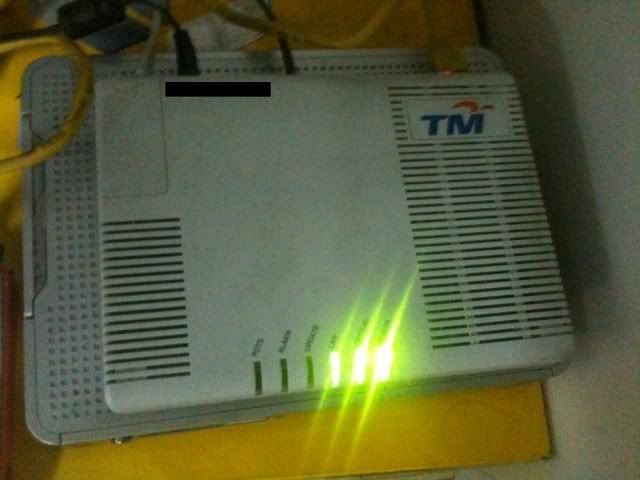
i guess the modem you mean is the BTU? mine is similar to this
» Click to show Spoiler - click again to hide... «


AVFAN
post Oct 2 2014, 02:30 PM

20k VIP Club
*********
All Stars
24,454 posts

Joined: Nov 2010
QUOTE(McFcker @ Oct 2 2014, 01:37 PM)
When i was on VIP5 the first year was ok, i think this issue started last year.
i guess the modem you mean is the BTU? mine is similar to this
» Click to show Spoiler - click again to hide... «

*
yes, that is the modem or btu.
how old is it?
mine was the same, lasted 3 yrs.
then, it started to act weird... phone could call out but can't receive, sometimes dead.
lights blinking goes beserk at times, but could use still.
i did not suspect the problem until it died one day, no light at all.
reported to unifi, r placed foc with new silver one, new network cable, all ok.
unifi guy said 3 yrs is extraordinary, most last 2 only.
if u dun hv similar symptoms, then it shud be still working fine.

This post has been edited by AVFAN: Oct 2 2014, 02:33 PM
McFcker
post Oct 2 2014, 02:35 PM

Getting Started
**
Junior Member
50 posts

Joined: Aug 2008
From: in front of the computer
QUOTE(AVFAN @ Oct 2 2014, 03:30 PM)
yes, that is the modem or btu.
how old is it?
mine was the same, lasted 3 yrs.
then, it started to act weird... phone could call out but can't receive, sometimes dead.
lights blinking goes beserk at times, but could use still.
i did not suspect the problem until it died one day, no light at all.
reported to unifi, r placed foc with new silver one, new network cable, all ok.
unifi guy said 3 yrs is extraordinary, most last 2 only.
if u dun hv similar symptoms, then it shud be still working fine.
*
i guess mine is also about 3 year old. Will ask my bro to check it since my lappy is far away from the BTU.

205 Pages « < 46 47 48 49 50 > » Top
Topic ClosedOptions
 

Change to:
| Lo-Fi Version
0.0352sec    0.35    6 queries    GZIP Disabled
Time is now: 4th December 2025 - 03:04 AM