Welcome Guest ( Log In | Register )

33 Pages « < 13 14 15 16 17 > » Bottom

Outline · [ Standard ] · Linear+

PC Audio Creative GigaWorks S750 7.1 speaker repair, A short guide and info with pictures...

views
     
rsseco
post Aug 14 2016, 03:57 AM

New Member
*
Junior Member
33 posts

Joined: Jul 2016


QUOTE(asenrzhang @ Aug 13 2016, 10:24 AM)
Sorry to hear that, I guess there're still issues somewhere.

I think you can isolate the issue on power amplifier board first:
[list=1]
[*]Check potential failed components, at least check same component which failed last time. If failed, replace them.

[*]Replace fuse

[*]Unplug CN4 & CN5 connector on power supply board, this will isolate issues on power amplifier board
[attachmentid=7315434]
As I made the test before re-assemble the sub, I do it this way, like I do it before too. And this way it works, also I think (I don't have leave the Sub on for a long time..)
Perhaps you're right, could be on a bash board... I will try it again alone first.
But I need to take care, I only have 5 fuse left...


One thing which I found strange as I checked all component after I soldered the capacitor, on one (C69 or C60, I don't remember exactly) the negative pole was "shortcuting" the circuit under the board (I check if no solder was touching out the "round", it was OK). On two capacitors, I had to do the trick with some cable in "L"-shape so I could solder on the bottom (as you can see on the picture)

user posted image
asenrzhang
post Aug 14 2016, 09:18 PM

Getting Started
**
Junior Member
68 posts

Joined: Apr 2015
From: China
QUOTE(rsseco @ Aug 14 2016, 03:57 AM)
..
One thing which I found strange as I checked all component after I soldered the capacitor, on one (C69 or C60, I don't remember exactly) the negative pole was "shortcuting" the circuit under the board (I check if no solder was touching out the "round", it was OK). On two capacitors, I had to do the trick with some cable in "L"-shape so I could solder on the bottom (as you can see on the picture)

user posted image
*
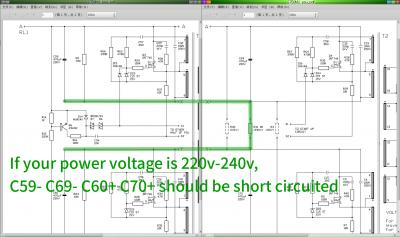
If your power voltage is 220V~240V, I mean the accepted input voltage of your S750 subwoofer is 220V~240V, according the power supply board schematics, C59- C69- C60+ C70+ should be short circuited.


Attached thumbnail(s)
Attached Image
rsseco
post Aug 16 2016, 11:29 PM

New Member
*
Junior Member
33 posts

Joined: Jul 2016


QUOTE(asenrzhang @ Aug 14 2016, 02:18 PM)
If your power voltage is 220V~240V, I mean the accepted input voltage of your S750 subwoofer is 220V~240V, according the power supply board schematics, C59- C69- C60+ C70+ should be short circuited.
OK, also this "behavior" is normal !

Some (bad) news today : as said, I tested again without the two DASH board connected, as I do it before and believed it was repaired.
So, fuse replaced, powered on. LED on back, green, as always. Red light on remote controller, on, as always.
Powered on with button : master light on and volume leds on... then I heard some crackling, then it began to smoke ; remote controller was still on, I switched it off manually. (After I check the fuse, it has blown, but it was really me who powered the "thing" off )

I dissamble the power board, and visually check the board (I tryed to smell too, but all the board smells "burned" now)
What I found :

- R36, in front of Q3 (replaced by new mosfet) seems to have burn. But not really sure it comes from the resistor, as I've got always 46.7 Ohm (same as R38, in front of Q4). On your doc, it says "47R, so it should be OK). I check (visually) the capacitor in front (C29), on one pin it seems have overheat too (but it's not broken). As I don't have a capacitor-meter, I measure the value in Ohm : I have 530 Ohm, same value as the capacitor in front of R38.

Edit : I check Q3. It seems the "burn" comes from...

- Q4 have split ! (between ceramic and the heatshrink)

see pictures :
user posted image
user posted image

My thoughts : are the IRF740 low quality/bad/defective (?), or problem is coming from somewhere else ?.
-> As I tested the old Q3 and Q4 and found only one bad, I can think there can really come from the new ones. (as wrote before, as I removed the two mosfets, I have replaced twice by new ones)

user posted image

This post has been edited by rsseco: Aug 17 2016, 12:15 AM
asenrzhang
post Aug 17 2016, 03:39 AM

Getting Started
**
Junior Member
68 posts

Joined: Apr 2015
From: China
excl.gif Disclaimer: I'm not a professional electronic engineer, not even an amateur, so, take the advice at your own risk.

QUOTE(rsseco @ Aug 16 2016, 11:29 PM)
...
What I found :

- R36, in front of Q3 (replaced by new mosfet) seems to have burn. But not really sure it comes from the resistor, as I've got always 46.7 Ohm (same as R38, in front of Q4). On your doc, it says "47R, so it should be OK). I check (visually) the capacitor in front (C29), on one pin it seems have overheat too (but it's not broken). As I don't have a capacitor-meter, I measure the value in Ohm : I have 530 Ohm, same value as the capacitor in front of R38.

Edit : I check Q3. It seems the "burn" comes from...

- Q4 have split ! (between ceramic and the heatshrink)

see pictures :

My thoughts : are the IRF740 low quality/bad/defective (?), or problem is coming from somewhere else ?.
-> As I tested the old Q3 and Q4 and found only one bad, I can think there can really come from the new ones. (as wrote before, as I removed the two mosfets, I have replaced twice by new ones)

*
Well, when components get burned, it usually means it's overheated or overloaded/over current or over voltage.
  • overloaded/over current: I guess this could be the reason.

    Although the power amplifier boards are not connected, there're still components after transformer, which is a load too, and I guess it could be D2 D3 been failed too, you can check the resistance between 1 and 3 leg of D2 and D3, if the resistance is very low, then the component is failed. Usually it shouldn't be conductive between 1 and 3 leg. See the datasheet: http://pdf1.alldatasheet.com/datasheet-pdf...GE/FEP16DT.html

    Maybe check D4 and D5 too..

  • overheating: I don't think so
  • over voltage: I don't think so

rsseco
post Aug 17 2016, 04:24 AM

New Member
*
Junior Member
33 posts

Joined: Jul 2016


QUOTE(asenrzhang @ Aug 16 2016, 08:39 PM)
excl.gif Disclaimer: I'm not a professional electronic engineer, not even an amateur, so, take the advice at your own risk.
Well, when components get burned, it usually means it's overheated or overloaded/over current or over voltage.

  • overloaded/over current: I guess this could be the reason.

    Although the power amplifier boards are not connected, there're still components after transformer, which is a load too, and I guess it could be D2 D3 been failed too, you can check the resistance between 1 and 3 leg of D2 and D3, if the resistance is very low, then the component is failed. Usually it shouldn't be conductive between 1 and 3 leg. See the datasheet: http://pdf1.alldatasheet.com/datasheet-pdf...GE/FEP16DT.html

    Maybe check D4 and D5 too..
  • overheating: I don't think so
  • over voltage: I don't think so

*
Thanks for new advice. I will check it tomorrow. I think I must remove these components before testing, as always ? But D2, D3 are in the upper section of the board, is this section not designed for the standby power ?
I re-check the specs of the IRF, they are designed for 400V, so as you say, it's not an over-voltage, as if the power value on this point not exceed this value ? T1 or T2 could not be the cause ?

Cu
asenrzhang
post Aug 17 2016, 02:39 PM

Getting Started
**
Junior Member
68 posts

Joined: Apr 2015
From: China
excl.gif Disclaimer: I'm not a professional electronic engineer, not even an amateur, so, take the advice at your own risk.

QUOTE(rsseco @ Aug 17 2016, 04:24 AM)
I think I must remove these components before testing, as always  ?
That's the reliable way. But for testing resistance between 1 and 3 leg of D2 D3 D4 D5, you can test without unsolder them, unless something else caused short circuit between 1 and 3 leg (My subwoofer don't have short circuit issue on D2~D5, but I found one piece of degraded glue under one of them, it's between the legs and heat sink, it's hard to be found because I never removed heat sink).

QUOTE(rsseco @ Aug 17 2016, 04:24 AM)
But D2, D3 are in the upper section of the board, is this section not designed for the standby power  ?
I think there're two parts on the upper section, one part is the standby/auxiliary power, another part is main power.
Attached Image
(Photo is stolen from https://forum.lowyat.net/index.php?showtopi...ost&p=69404301)

QUOTE(rsseco @ Aug 17 2016, 04:24 AM)
I re-check the specs of the IRF, they are designed for 400V, so as you say, it's not an over-voltage, as if the power value on this point not exceed this value  ? T1 or T2 could not be the cause  ?
It could be over voltage or T1 T2 's fault, you can check it later.

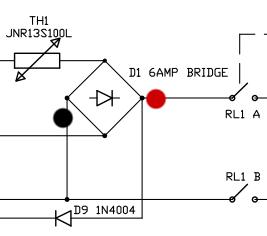
Standby power and main power come from D1, and your standby part seems works okay, so, keeps your power in standby mode, and measure the DC voltage output of D1. (Just be careful of your safety when measuring, because it has power now)

This post has been edited by asenrzhang: Aug 17 2016, 11:48 PM
SubK002
post Aug 17 2016, 05:56 PM

New Member
*
Junior Member
49 posts

Joined: Jun 2007


I have 1 unit S750 faulty woofer, who wanna take it?
asenrzhang
post Aug 17 2016, 11:46 PM

Getting Started
**
Junior Member
68 posts

Joined: Apr 2015
From: China
QUOTE(SubK002 @ Aug 17 2016, 05:56 PM)
I have 1 unit S750 faulty woofer, who wanna take it?
*
I'd like to buy a faulty subwoofer for backup.

What's the symptom of your woofer? I need to know the symptom to see whether or not I can repair it.

rsseco
post Aug 18 2016, 12:56 AM

New Member
*
Junior Member
33 posts

Joined: Jul 2016


So, I've check the resistance between 1&3 pin of D3, D5, D2 and D4. They are all conductive, with about 1 ohm !

But... Where is D1 ???
asenrzhang
post Aug 18 2016, 02:48 AM

Getting Started
**
Junior Member
68 posts

Joined: Apr 2015
From: China
excl.gif Disclaimer: I'm not a professional electronic engineer, not even an amateur, so, take the advice at your own risk.

QUOTE(rsseco @ Aug 18 2016, 12:56 AM)
So, I've check the resistance between 1&3 pin of D3, D5, D2 and D4. They are all conductive, with about 1 ohm  !
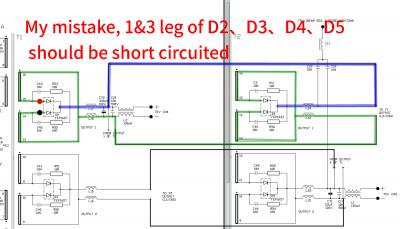
Wait, what? all of them? That's my stupid mistake, they should be short circuited!
Attached Image

Change the measure method in this way:
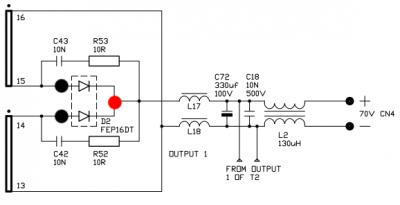
Switch multimeter to 'Diode' location, Red probe on leg 2, Black probe on leg 1 then 3.
Attached Image
If they're conductive, then it's failed. (like testing normal diode.)

QUOTE(rsseco @ Aug 18 2016, 12:56 AM)
But... Where is D1  ???
*
If I remember correctly, D1 is here (see the picture)
Attached Image

But since there's no model name of this 6 AMP bridge rectifier on schematics, I don't know which two legs should be tested.

This post has been edited by asenrzhang: Aug 18 2016, 02:53 AM
SubK002
post Aug 18 2016, 05:52 PM

New Member
*
Junior Member
49 posts

Joined: Jun 2007


QUOTE(asenrzhang @ Aug 17 2016, 11:46 PM)
I'd like to buy a faulty subwoofer for backup.

What's the symptom of your woofer? I need to know the symptom to see whether or not I can repair it.
*
No power, I think power supply spoilt.
Sure, you want?
asenrzhang
post Aug 18 2016, 06:16 PM

Getting Started
**
Junior Member
68 posts

Joined: Apr 2015
From: China
QUOTE(SubK002 @ Aug 18 2016, 05:52 PM)
No power, I think power supply spoilt.
Sure, you want?
*
Yes, I want a faulty S750 subwoofer to
  • increasing my repairing skills
  • try to make a 7.2 channel system after successfully repaired

I actually tried to buy one on eBay: http://www.ebay.com/itm/322228247729 , but the owner canceled my bidding since I'm a new guy (Zero Feedback) on eBay.

By the way, does your subwoofer selled with other components? such as the Control Pod and/or the Remote Control and/or the audio input cable.
I think I need at least a subwoofer and a Control Pod and audio input cable to make a 7.2 system.
rsseco
post Aug 18 2016, 11:18 PM

New Member
*
Junior Member
33 posts

Joined: Jul 2016


QUOTE(asenrzhang @ Aug 17 2016, 07:48 PM)
excl.gif Disclaimer: I'm not a professional electronic engineer, not even an amateur, so, take the advice at your own risk.
Wait, what? all of them? That's my stupid mistake, they should be short circuited!
Attached Image

Change the measure method in this way:
Switch multimeter to 'Diode' location, Red probe on leg 2, Black probe on leg 1 then 3.
Attached Image
If they're conductive, then it's failed. (like testing normal diode.)
Tested again all 4 D's : they're OK (non conductive). Sometimes, only at first touch with the black leg, I've got a value, but only a fraction of second (then it shows it's non conductive)
Tested with component already soldered on board, I'd like to precise.


QUOTE(asenrzhang @ Aug 17 2016, 07:48 PM)
If I remember correctly, D1 is here (see the picture)
Attached Image

But since there's no model name of this 6 AMP bridge rectifier on schematics, I don't know which two legs should be tested.
*
OK, I've seen the inscription on the board, it was hidden by the heatshrink.
I've tested this component too : red probe leg on the last (or first) pin, and black on each other pin : passive in one way only, 3 different values of resistance.

And finally, I tested the two Q3 and Q4 : I confirm, they are out of order (conductive in all ways !)

So, now what could be the matter ? cry.gif

asenrzhang
post Aug 19 2016, 12:43 AM

Getting Started
**
Junior Member
68 posts

Joined: Apr 2015
From: China
excl.gif Disclaimer: I'm not a professional electronic engineer, not even an amateur, so, take the advice at your own risk.

QUOTE(rsseco @ Aug 18 2016, 11:18 PM)
...
Sometimes, only at first touch with the black leg, I've got a value, but only a fraction of second (then it shows it's non conductive)
That could be capacitors absorbing power for a short time.

QUOTE(rsseco @ Aug 18 2016, 11:18 PM)
Tested with component already soldered on board, I'd like to precise.
OK, I've seen the inscription on the board, it was hidden by the heatshrink.
I've tested this component too : red probe leg on the last (or first) pin, and black on each other pin : passive in one way only, 3 different values of resistance.

And finally, I tested the two Q3 and Q4 : I confirm, they are out of order (conductive in all ways !)

So, now what could be the matter ?  cry.gif
*
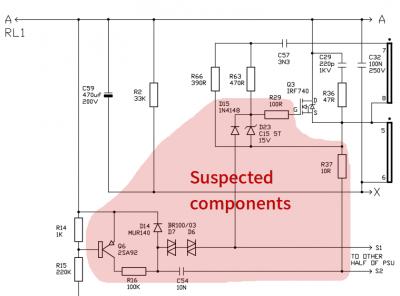
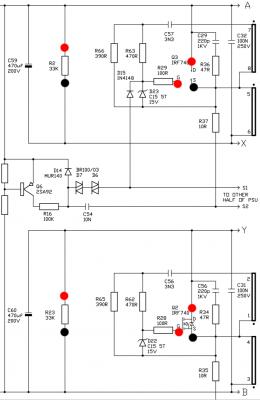
D2~D5 are okay + each time Q3 Q4 got burned, these two phenomenons push my sight to the Gate side of Q3 Q4, my guess is some components in the marked area may failed, then make Gate-Source over voltage (Vgs limit is ±20V).

My guess could be totally wrong though.
Attached Image
I don't know how to check D23 D6 D7 Q6, so you can check D14 D15 first (easy to check).


QUOTE(rsseco @ Aug 16 2016, 11:29 PM)
...
see pictures :
user posted image
user posted image
...
Your photos of Q3 Q4 been burned/cracked were taken from Gate side, so I don't know the situation on Source side, if Source side are not burned/cracked, it may proved that it's Vgs over voltage caused Q3 Q4 been burned/cracked.


This post has been edited by asenrzhang: Aug 19 2016, 01:48 AM
rsseco
post Aug 19 2016, 02:53 AM

New Member
*
Junior Member
33 posts

Joined: Jul 2016


I begin to check some components :
D14 is ok
R14 have 980 ohm
R15 value is always changing, and decreasing
R37 have 5,9ohm instead of 10 ?
R29 have 89ohm instead of 100 ?

For the rest, I must first remove the heatshrink, then I will remove the two Q3 and Q4 and will recheck all these values.

Just to remember, at the origin of the default, only C70 has explosed/leaked, the 3 other caps were only "bombed". Will the problem not be on the "road" to it ?

And only one of the IRF740 was defective, why are they now 2 which brake down ?
asenrzhang
post Aug 20 2016, 05:52 PM

Getting Started
**
Junior Member
68 posts

Joined: Apr 2015
From: China
excl.gif Disclaimer: I'm not a professional electronic engineer, not even an amateur, so, take the advice at your own risk.

QUOTE(rsseco @ Aug 19 2016, 02:53 AM)
I begin to check some components  :
D14 is ok
R14 have 980 ohm
R15 value is always changing, and decreasing
R37 have 5,9ohm instead of 10  ?
R29 have 89ohm instead of 100  ?
If resistor is not unsoldered, it's reading value is often smaller because of the parallel circuit.

QUOTE(rsseco @ Aug 19 2016, 02:53 AM)
For the rest, I must first remove the heatshrink, then I will remove the two Q3 and Q4 and will recheck all these values.
QUOTE(rsseco @ Aug 17 2016, 04:24 AM)
I re-check the specs of the IRF, they are designed for 400V, so as you say, it's not an over-voltage, as if the power value on this point not exceed this value  ?
After Q3 and Q4 been removed, can you power on again and check the voltage of following? Maybe your suspicion is right.
  • D1 output
    Attached Image
  • Q3&Q4: Gate solder pad to Source solder pad. In comparison, maybe do same check on Q1&Q2
  • Q3&Q4: Drain solder pad to Source solder pad. In comparison, maybe do same check on Q1&Q2
  • R2 or C59 or C69. In comparison, maybe do same check on R23 or C60 or C70
    Attached Image

QUOTE(rsseco @ Aug 19 2016, 02:53 AM)
Just to remember, at the origin of the default, only C70 has explosed/leaked, the 3 other caps were only "bombed". Will the problem not be on the "road" to it  ?
I couldn't tell. But you already replaced C59 C60 C69 C70 & C61 with new capacitors in same rating right?

QUOTE(rsseco @ Aug 19 2016, 02:53 AM)
And only one of the IRF740 was defective, why are they now 2 which brake down  ?
*
I couldn't tell either. Maybe one of them survived in the first time, and this time it had no luck.
rsseco
post Aug 21 2016, 02:57 AM

New Member
*
Junior Member
33 posts

Joined: Jul 2016


QUOTE(asenrzhang @ Aug 20 2016, 10:52 AM)
If resistor is not unsoldered, it's reading value is often smaller because of the parallel circuit.
After Q3 and Q4 been removed, can you power on again and check the voltage of following? Maybe your suspicion is right.
Ok, the only thing I will remove before runing this test, is only these 2 components ? When you write "power on", that's mean : replace fuse, power cord in (to AC outlet), main power switch on ? Or the same, incl. power on via control pad ? Is there no risk to blown the fuse again, despite Q3 and Q4 are left ?

QUOTE(asenrzhang @ Aug 20 2016, 10:52 AM)
I couldn't tell. But you already replaced C59 C60 C69 C70 & C61 with new capacitors in same rating right?
I couldn't tell either. Maybe one of them survived in the first time, and this time it had no luck.
The big caps are new, yes. The only thing which change compared to original, is they're 250V instead 200V.
C61 is original cap (I don't know why I removed it...). You think it could be the faulty one ?

This post has been edited by rsseco: Aug 21 2016, 02:58 AM
asenrzhang
post Aug 21 2016, 06:29 PM

Getting Started
**
Junior Member
68 posts

Joined: Apr 2015
From: China
excl.gif Disclaimer: I'm not a professional electronic engineer, not even an amateur, so, take the advice at your own risk.
QUOTE(rsseco @ Aug 21 2016, 02:57 AM)
Ok, the only thing I will remove before runing this test, is only these 2 components ?
Yes, because Q3 Q4 had been burned/cracked, so remove them in case they are short circuited.

QUOTE(rsseco @ Aug 21 2016, 02:57 AM)
When you write "power on", that's mean : replace fuse, power cord in (to AC outlet), main power switch on ? Or the same, incl. power on via control pad ?
Power on via control pod: press the "standby/power" button to switch from 'Standby' state to 'Power On' state. This will give power to Q3 Q4 (well, actually, giver power to solder pads of Q3 Q4, it's open circuit now)

QUOTE(rsseco @ Aug 21 2016, 02:57 AM)
Is there no risk to blown the fuse again, despite Q3 and Q4 are left ?
There's always a risk until all issues are cleared. If somewhere else than Q3 Q4 had been short circuited (degraded glues, or a piece of solder), it will make fuse blown too.

Measure the voltage is just to clear the suspicion of over voltage.

QUOTE(rsseco @ Aug 21 2016, 02:57 AM)
The big caps are new, yes. The only thing which change compared to original, is they're 250V instead 200V.
C61 is original cap (I don't know why I removed it...). You think it could be the faulty one ?
*
It's okay to me to use 250V rating instead of 200V.
C61 is used for standby part, so, it shouldn't affect the main power part.
What I cared here is the original capacitors may not shape the waveform very well.


===============================
QUOTE(rsseco @ Aug 12 2016, 02:57 AM)
Today was THE day !

And finally... it's alive again !
...
By the way, when you said "it's alive", do you mean you powered it on and listened some music? or just saw the standby LED is on in red color?

QUOTE(rsseco @ Aug 16 2016, 11:29 PM)
...
Edit : I check Q3. It seems the "burn" comes from...
- Q4 have split ! (between ceramic and the heatshrink)
...
Is the heat sink and mounting copper short circuited?


This post has been edited by asenrzhang: Aug 22 2016, 03:07 AM


Attached thumbnail(s)
Attached Image
rsseco
post Aug 23 2016, 12:41 AM

New Member
*
Junior Member
33 posts

Joined: Jul 2016


Hi, I was a bit busy this week-end, so I haven't done the new tests yet.
But I can answer some of your questions :


QUOTE(asenrzhang @ Aug 21 2016, 11:29 AM)
There's always a risk until all issues are cleared. If somewhere else than Q3 Q4 had been short circuited (degraded glues, or a piece of solder), it will make fuse blown too.
I just hope I will not make more damage on the board/toanother components !
For degraded glue, I think there is no more on this power board. But on the others board, I didn't clean it.

QUOTE(asenrzhang @ Aug 21 2016, 11:29 AM)
By the way, when you said "it's alive", do you mean you powered it on and listened some music? or just saw the standby LED is on in red color?
I will try to explain you as cleary I can, with my poor english !

For the story before this day, and in order to make the work easier, I removed the all electronic board from the subwoofer housing (the wood housing). And for do this, I desoldered the speaker (3x cables)
So I had only the back plate with all board attached to it. And the power board wasn't screwed on this back plate.
Before I found that Q3 or Q4 were brocken, at the time I replace the capacitors, I have done a test (as you ask me to do the last time) without the 2 dash amplifier board connected.
So, coming to this D-Day :
- I began to replace the capacitor at the same place as original (before, I "deport" them). On C61 and two of the "bigs", I had to do the "L" method with a short piece of cable, as I hadn't the ring on the back of the board. After the capacitors were on position, I checked if all the pole were conductive : they were (and it's at this time that I noticed I had a short circuit between a - pole of one cap to a + pole of another...)
- After that, I screwed back Q3 and Q4 on the heatsink, and then I replaced the all thing on the board back. I first soldered back Q3 and Q4. After all was OK, I wanted to screw back the other Qx ... and it's a this moment that I didn't found the screws anymore.
- So, in order to test the repair, I decided to take some screws with spacers from the uppers transitors (Dx ...)
- I connected the PSU board on the "main" board (and that's it), connected only the control pod, replaced the fuse, checked if main switch is on 0 position and connected the power cable in the outlet.
I check too if the 3 cables to the speaker aren't shortcuting.
- Main switch passed on 1 : green LED on back plate : ON ; red LED on control pod : ON
- Powered on via control pod : amber of master going ON and volume LEDs too ! I waited on this state 4-5 s (before, after max 2s the fuse blowned). So, as I had removed the screws from some transistors, I didn't want to wait on power on state for a while and switched it off. For me it was repaired at this time, as the fuse was already OK.
- The next day, I searched some screws with spacers (I dismantled a PC PSU to do so) and the evening I reassembled all back (I had soldered the speaker the day before). And as said, for me it was completly fixed, I didn't tryed it before and had closed the subwoofer with all screws, took it at place, connected the soundcard and all speakers cables and... powered on...1...2...off !!! The rest of the story, you know it !

QUOTE(asenrzhang @ Aug 21 2016, 11:29 AM)
Is the heat sink and mounting copper short circuited?
*
I have already checked this, on all Qx : no, they are isolated from the heatsink. I check if any shortcircuit were between the two aluminium spacers which fastens the psu board on the L-aluminum plate : negative too (I thought it could comes from this, as my tests were done without this aluminum plate.

This post has been edited by rsseco: Aug 23 2016, 12:53 AM

asenrzhang
post Aug 23 2016, 03:05 AM

Getting Started
**
Junior Member
68 posts

Joined: Apr 2015
From: China
QUOTE(rsseco @ Aug 23 2016, 12:41 AM)
Hi, I was a bit busy this week-end, so I haven't done the new tests yet.
But I can answer some of your questions :
I just hope I will not make more damage on the board/toanother components !
For degraded glue, I think there is no more on this power board. But on the others board, I didn't clean it.
I will try to explain you as cleary I can, with my poor english !

For the story before this day, and in order to make the work easier, I removed the all electronic board from the subwoofer housing (the wood housing). And for do this, I desoldered the speaker (3x cables)
So I had only the back plate with all board attached to it. And the power board wasn't screwed on this back plate.
Before I found that Q3 or Q4 were brocken, at the time I replace the capacitors, I have done a test (as you ask me to do the last time) without the 2 dash amplifier board connected.
So, coming to this D-Day :
- I began to replace the capacitor at the same place as original (before, I "deport" them). On C61 and two of the "bigs", I had to do the "L" method with a short piece of cable, as I hadn't the ring on the back of the board. After the capacitors were on position, I checked if all the pole were conductive :  they were (and it's at this time that I noticed I had a short circuit between a - pole of one cap to a + pole of another...)
- After that, I screwed back Q3 and Q4 on the heatsink, and then I replaced the all thing on the board back. I first soldered back Q3 and Q4. After all was OK, I wanted to screw back the other Qx ... and it's a this moment that I didn't found the screws anymore.
- So, in order to test the repair, I decided to take some screws with spacers from the uppers transitors (Dx ...)
- I connected the PSU board on the "main" board (and that's it), connected only the control pod, replaced the fuse, checked if main switch is on 0 position and connected the power cable in the outlet.
I check too if the 3 cables to the speaker aren't shortcuting.
- Main switch passed on 1 : green LED on back plate : ON ; red LED on control pod : ON
- Powered on via control pod : amber of master going ON and volume LEDs too ! I waited on this state 4-5 s (before, after max 2s the fuse blowned). So, as I had removed the screws from some transistors, I didn't want to wait on power on state for a while and switched it off. For me it was repaired at this time, as the fuse was already OK.
Thanks for your detail information!
It looks you had done perfect checks! thumbsup.gif thumbsup.gif thumbsup.gif
It could be better if you powered on for a longer time, say five minutes.

QUOTE(rsseco @ Aug 23 2016, 12:41 AM)
- The next day, I searched some screws with spacers (I dismantled a PC PSU to do so) and the evening I reassembled all back (I had soldered the speaker the day before). And as said, for me it was completly fixed, I didn't tryed it before and had closed the subwoofer with all screws, took it at place, connected the soundcard and all speakers cables and... powered on...1...2...off !!! The rest of the story, you know it !
So, there could be something happened in this step which caused fuse blown.

QUOTE(rsseco @ Aug 23 2016, 12:41 AM)
I have already checked this, on all Qx : no, they are isolated from the heatsink.
I assumed that you did same check on D2~D5 too, am I right?

QUOTE(rsseco @ Aug 23 2016, 12:41 AM)
I check if any shortcircuit were between the two aluminium spacers which fastens the psu board on the L-aluminum plate : negative too (I thought it could comes from this, as my tests were done without this aluminum plate.
*
If I remembered correctly, these two aluminum screw nuts are connected to GROUND on power supply board.


33 Pages « < 13 14 15 16 17 > » Top
 

Change to:
| Lo-Fi Version
0.0469sec    0.43    6 queries    GZIP Disabled
Time is now: 14th December 2025 - 03:52 AM