Outline ·
[ Standard ] ·
Linear+
Sony Xperia™ Z/ZL, Official Thread V8, v4.2.2 Official | Honami Port available
|
mafioso
|
 Jul 22 2013, 04:46 PM Jul 22 2013, 04:46 PM
|

|
QUOTE(Andrewtst @ Jul 22 2013, 04:31 PM) Once done, I will post up some for seducing. haha! Thanks for intro Xpose Framework, really cool! It even can solved the blue master key issue! wow! you can also put the decompiling/recompiling tut a page or 2 ago to the OP if u want.. so next time users can refer for easier apk editing.  but right now having trouble decompiling phonebook apk. haih.. not sure whats wrong.. finding solution now. wanna make the contact pics large.. comparing the modded one and stock, see which value is different then i change it.. since stock is ODEX, i prefer a more stable mod This post has been edited by mafioso: Jul 22 2013, 04:47 PM |
|
|
|
|
|
TSAndrewtst
|
Jul 22 2013, 05:29 PM
|
|
|
QUOTE(mafioso @ Jul 22 2013, 04:46 PM) you can also put the decompiling/recompiling tut a page or 2 ago to the OP if u want.. so next time users can refer for easier apk editing. but right now having trouble decompiling phonebook apk. haih.. not sure whats wrong.. finding solution now. wanna make the contact pics large.. comparing the modded one and stock, see which value is different then i change it.. since stock is ODEX, i prefer a more stable mod You running odexed now? The guide will add-in in future, soon, not today. haha! |
|
|
|
|
|
mafioso
|
Jul 22 2013, 05:35 PM
|
|
|
QUOTE(Andrewtst @ Jul 22 2013, 05:29 PM) You running odexed now? The guide will add-in in future, soon, not today. haha! Yes, stock 4.2.2.. fully odexed rom.  The other day I deodexed it but battery drain like crazy. Wipe and reinstall .423 again and all is well.. weird.  |
|
|
|
|
|
TSAndrewtst
|
Jul 22 2013, 05:38 PM
|
|
|
Having FUN with 320 DPI (Xperia Z Ultra DPI) setup! haha!   » Click to show Spoiler - click again to hide... « This post has been edited by Andrewtst: Jul 22 2013, 05:38 PM |
|
|
|
|
|
minimalistic
|
Jul 22 2013, 05:38 PM
|
Getting Started

|
i am from 4.1.2 if i wanna flash 4.2.2 stock rom do i have to wipe everything? tq..
|
|
|
|
|
|
mcchin
|
Jul 22 2013, 05:58 PM
|
|
|
QUOTE(minimalistic @ Jul 22 2013, 05:38 PM) i am from 4.1.2 if i wanna flash 4.2.2 stock rom do i have to wipe everything? tq.. down to your preference by default the update from sony themselves wont wipe anthing so you can continue using the phone as normal but people said that the 4.2.2 update is laggy (i cant feel it) but compared to honami rom, it does show some laggyness |
|
|
|
|
|
Racerx
|
Jul 22 2013, 06:29 PM
|
|
|
QUOTE(minimalistic @ Jul 22 2013, 05:38 PM) i am from 4.1.2 if i wanna flash 4.2.2 stock rom do i have to wipe everything? tq.. I recommend wiping everything. My phone had a slight lagginess to it after upgrading from .253 [4.1.2] to .423 [4.2.2] but it was gone when I wiped everything and reflashed the .423 [4.2.2] .ftf |
|
|
|
|
|
kuanzc
|
Jul 22 2013, 07:20 PM
|
|
|
Andrewtst How do you get your contact picture? Do you get it from social site or manually assign them one by one?
|
|
|
|
|
|
psyeo
|
Jul 22 2013, 08:02 PM
|
|
|
QUOTE(Blue.Army @ Jul 22 2013, 05:59 PM) any of you guys use running apps that works on xperia devices? nike+ is not supported right? any other apps? i'm planning to get zl  Runkeeper is my first choice. Nike+ Running is working fine via GPS and accelerometer . (Not too sure about Nike + sensor use in Nike shoes thou) |
|
|
|
|
|
yujirorasy
|
Jul 22 2013, 08:32 PM
|
Getting Started
|
i want to flash Honami but i dont like the new walkman. is it possible to flash or install the older version ?
|
|
|
|
|
|
mineja
|
Jul 22 2013, 09:18 PM
|
Getting Started
|
Any trick to change DPI for xperia keyboard?
|
|
|
|
|
|
ILoveXperia
|
 Jul 22 2013, 09:18 PM Jul 22 2013, 09:18 PM
|
Getting Started
|
hello all new user here in lowyat forum.. been using sony xperia z for 3 month now. been reading from v1 of xperia z until now haha |
|
|
|
|
|
ChuanHong
|
Jul 22 2013, 10:18 PM
|
|
|
QUOTE(Blue.Army @ Jul 22 2013, 05:59 PM) any of you guys use running apps that works on xperia devices? nike+ is not supported right? any other apps? i'm planning to get zl using runkeeper.. no problem for my XZL.. jogging 3 km and watching the average time.. |
|
|
|
|
|
minimalistic
|
Jul 22 2013, 10:34 PM
|
Getting Started
|
QUOTE(mcchin @ Jul 22 2013, 05:58 PM) down to your preference by default the update from sony themselves wont wipe anthing so you can continue using the phone as normal but people said that the 4.2.2 update is laggy (i cant feel it) but compared to honami rom, it does show some laggyness tq for teh tips! i flashed to 423 without wiping anything then root then flash monxMODE modified rom.. now my phone super beautiful!  i didnt feel any lagginess for now..(yet) maybe will try flashing Honami rom later to test it out myself |
|
|
|
|
|
minimalistic
|
Jul 22 2013, 10:38 PM
|
Getting Started
|
QUOTE(Racerx @ Jul 22 2013, 06:29 PM) I recommend wiping everything. My phone had a slight lagginess to it after upgrading from .253 [4.1.2] to .423 [4.2.2] but it was gone when I wiped everything and reflashed the .423 [4.2.2] .ftf so you reflashed 423 with another 423? thats nice... i didnt think the method exists! lol  |
|
|
|
|
|
mafioso
|
Jul 22 2013, 10:38 PM
|
|
|
QUOTE(mineja @ Jul 22 2013, 09:18 PM) Any trick to change DPI for xperia keyboard? you got install xposed framework and app setting module right? just played around.. find xperia keyboard and just change the DPI i tested with stock 480. too big. (dunno why).. lol. try to set back the DPI you changed in build.prop if u set 320, try 320 for the xperia keyboard |
|
|
|
|
|
mafioso
|
Jul 22 2013, 10:55 PM
|
|
|
ahhhh.. been trying for more than an hour to find the code to change the function when you tap on the clock in pull down notification panel.. find it kinda useless that it goes to date/time setting.. rather than a most used feature = ALARM CLOCK!  cant seem to find the code in SystemUI  ---- okay. cannot edit the shortcut in the clock notification panel due to odex file.. will try to deodex systemui tmr and see if i am able to edit it. This post has been edited by mafioso: Jul 23 2013, 12:56 AM |
|
|
|
|
|
mineja
|
Jul 22 2013, 11:12 PM
|
Getting Started
|
QUOTE(mafioso @ Jul 22 2013, 10:38 PM) you got install xposed framework and app setting module right? just played around.. find xperia keyboard and just change the DPI i tested with stock 480. too big. (dunno why).. lol. try to set back the DPI you changed in build.prop if u set 320, try 320 for the xperia keyboard If i change in build.prop,the keyboard its change but i dont want all system change in 320DPI,just certain apps i want to change I do it in app setting module and here the keyboard happen,not align 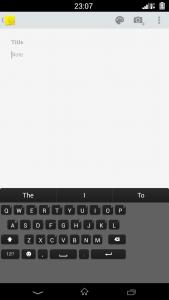
|
|
|
|
|
|
mafioso
|
Jul 22 2013, 11:19 PM
|
|
|
QUOTE(mineja @ Jul 22 2013, 11:12 PM) If i change in build.prop,the keyboard its change but i dont want all system change in 320DPI,just certain apps i want to change I do it in app setting module and here the keyboard happen,not align
what DPI you used for the system? try to slowly increase it.. keep editing till you got it right. no need to follow the standard android DPI amount. try setting it at 370? no need to reboot after applying, just force close then choose the keyboard again.. |
|
|
|
|




 Quote
Quote


 0.0303sec
 0.52
0.52
 6 queries
 GZIP Disabled