Outline ·
[ Standard ] ·
Linear+
Tp LInk TL-MR3420 Owner CLub V2.5, need a pro here
|
digilife
|
 May 16 2013, 10:52 AM May 16 2013, 10:52 AM
|

|
QUOTE(BladeRider88 @ May 16 2013, 10:28 AM) My area & USB modem (Huawei E398) supports DC-HSPA+ but inside the router it shows as HSPA+  Currently i am on 1043ND + latest version of blackwidow firmware My same router (1043ND) shows DC-HSPA+ on Barrier Breaker |
|
|
|
|
|
digilife
|
May 16 2013, 11:05 AM
|
|
|
QUOTE(BladeRider88 @ May 16 2013, 10:58 AM) Guess i have to accept the cold hard fact  High speed era turns out to be a past tense  do you have other modems to try ? use the same E398 on MDMA11beta and see if DC is available there  |
|
|
|
|
|
digilife
|
May 16 2013, 11:56 PM
|
|
|
QUOTE(z8net @ May 16 2013, 10:16 PM) newbie reporting in  Setup: TL-MR3420 V2 + Huawei E398U1V2 (from blacktubi  ) OpenWRT: rfactory.org just setup everything just now location: Cheras (near Bandar Sri Permaisuri) result:    Pls show your ROOter page like mine but cover your Cell ID like what i done 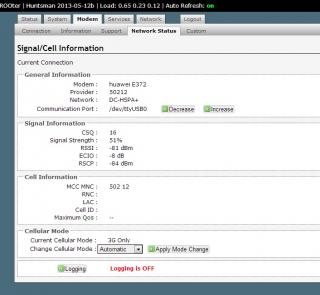
|
|
|
|
|
|
digilife
|
May 17 2013, 12:24 AM
|
|
|
QUOTE(z8net @ May 17 2013, 12:12 AM) my experience setting up just now seems that blackwidow connection very not stable with my e398u1v2. keep dc'ing. not happening when using huntsman...
Current Cellular Mode : Unknown
Change Cellular Mode : AutomaticThese are valuable infos for Dairyman Btw, it seems that Huawei uses Communication Port : /dev/ttyUSB0irrespective of LTE or DC-HSPA+ modem |
|
|
|
|
|
digilife
|
May 18 2013, 02:50 PM
|
|
|
QUOTE(noobandroid @ May 18 2013, 02:37 PM) MF680 , = Communication Port : /dev/ttyUSB1 |
|
|
|
|
|
digilife
|
May 18 2013, 04:27 PM
|
|
|
QUOTE(blacktubi @ May 17 2013, 09:20 PM) what is the difference between PAP,CHAP and PPP ?  |
|
|
|
|
|
digilife
|
May 18 2013, 07:12 PM
|
|
|
QUOTE(xphr3ak @ May 18 2013, 06:38 PM) digilife What did you put for the auth protocol then? Just now, I've tested the internet speed at Forest Heights. Danm slow bro. The RSSI was around -95dBm and have tried at Taman Rashidah Utama.. I got ~5mbps with constant speed. Do you think, by getting omni and panel antenna will get for the better speed? *Where do you live arr bro? I want to buy a house around there lah.. Got arrr?  Thanks. I used Maxis in Pulai Villa, Pulai Impian. can get 18Mbps in the dead of the night. If you want good speed in Sban, Lavendar Heights is the place and it should be the first location there to get LTE because currently pipu there is enjoying FTTH. |
|
|
|
|
|
digilife
|
May 18 2013, 08:33 PM
|
|
|
bro , pls remove your Ip Address Bandar Seremban now  Paroi, if get a Panel Antenna face it towards Senawang can get good speed on a E398 This post has been edited by digilife: May 18 2013, 08:34 PM |
|
|
|
|
|
digilife
|
May 19 2013, 07:11 PM
|
|
|
My Barrier Breaker flashed 1043ND is not getting any response via 192.168.1.1 ? what could be the reason/s ? what can i do to overcome/revive it ? Thanks guys |
|
|
|
|
|
digilife
|
May 20 2013, 01:15 AM
|
|
|
QUOTE(noobandroid @ May 19 2013, 10:25 PM) failsafe mode then use putty to access it any instructions ? thanks |
|
|
|
|
|
digilife
|
May 20 2013, 08:15 AM
|
|
|
QUOTE(noobandroid @ May 20 2013, 05:48 AM) Thanks bro, I am resting the 1043ND for a few days and see if it revert back to is former self , if it did not, i gonna try the Putty/Telnet way. Meanwhile on my RT-N16 (factory FW) now 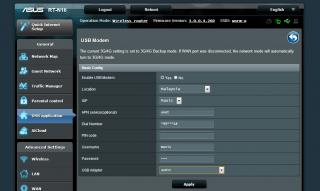
|
|
|
|
|
|
digilife
|
May 20 2013, 05:23 PM
|
|
|
Why so many TP links having problem now ? btw, my MR3420 on HM 12b still fine ( touch wood )  |
|
|
|
|
|
digilife
|
May 20 2013, 05:41 PM
|
|
|
QUOTE(xphr3ak @ May 20 2013, 05:37 PM) Mind to share the .bin file? Thanks. flip back the pages, its there |
|
|
|
|
|
digilife
|
May 20 2013, 07:24 PM
|
|
|
QUOTE(camel90 @ May 20 2013, 05:59 PM) Hi guys, i'm interested with this device, here are some questions i would like to ask : 1. Is it compatible with Huawei E1762 (originally from Maxis but re-flashed to ori non telco to use umobile) 2. How is the wifi strength ? for a normal small 2 storey terrace house enough to cover if the router is located outside (ie : hall) 3. I read at the first post there are many tweaks and wrt which i don't understand at all. So, if i buy this device as stock at Cycom or wherever, i can simply setup as per manual provided to use with the modem above right ? I don't have to do all those tweaks if i just want to use it as normal? (I'M VERY SORRY, noob ) Thanks I tried my MR3420 V2 ( rm85 ) on first floor ( higher better signal ) and at the living room downstair i get abt 3Mbps ( up 5Mbps ) . It you have the $$ get a Asus RT N16 ( rm310 ) ~ you should get 4.5Mbps QUOTE(renishi @ May 20 2013, 06:13 PM) bought a v2 tl-mr3420 but it seems... less white or should i say yellowish instead of being as white as seen in the picture. SIgh Sun tanned Router ~ from PD  |
|
|
|
|
|
digilife
|
May 20 2013, 09:15 PM
|
|
|
QUOTE(ibnuasad @ May 20 2013, 08:58 PM) Ini semua pakai router high-class....I can only afford MR3420 Try 1043ND , you wont regret , just add abt rm60 based on the MR3420 new price , but must flash it to OpenWRT to enjoy USB Modem support. |
|
|
|
|
|
digilife
|
May 21 2013, 01:50 PM
|
|
|
|
|
|
|
|
|
digilife
|
Jun 2 2013, 05:24 PM
|
|
|
QUOTE(fitzhex @ Jun 2 2013, 04:11 PM) no method to overcome? mine sometime it fall back to wcdma and wont turn to dc-hspa+ back. ping www.google.com -t also wont stop it fall back to wcdma. My Way stream some music from sky.fm forever DC-HSPA+ , purple LED on my MF680 A special request to ROOter FW expert. Is it possible to include OpenVPN support into this version of OpenWRT like what those Sabai OS are doing now. Sabai Tech |
|
|
|
|
|
digilife
|
Jun 2 2013, 07:56 PM
|
|
|
QUOTE(Wahroonga Farm @ Jun 2 2013, 07:49 PM) Thank You You and Diaryman Canada is just GREAT |
|
|
|
|
|
digilife
|
Jun 3 2013, 12:05 AM
|
|
|
QUOTE(garytey @ Jun 2 2013, 11:43 PM) do you think we can flash latest huntsman over wifi? can , but there is a BIG chance that you will BRICK your router 9.9/10 use LAN Cable when flashing |
|
|
|
|
|
digilife
|
Jun 3 2013, 07:57 AM
|
|
|
QUOTE(Wahroonga Farm @ Jun 3 2013, 06:40 AM) It was discovered by Coltect that removing IPv6 compatibility and including OpenVPN, that considerable flash RAM space was freed. Some words of wisdom from Diaryman. So we now have a development path that should suit everyone. Excellent idea. It would be Great if incoming sms is flashed across our device/s that are LAN connected but not WiFi connected cause usually the Admin(simcard owner) only have access to LAN connection whereas WiFi users could be Guest/s. We would not want Guest users to read our private messages rite. In your opinion among the ROOter-able routers, which one is considered to have the biggest Flash Memory with the Highest CPU speed. It would be Fantastic for users to knoe them so that when they shop for new routers, they can purchase the "most powerful" one if their pocket permits. Thanks. |
|
|
|
|



 Quote
Quote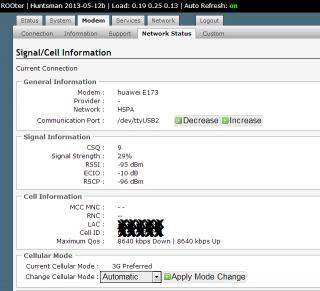


 0.0496sec
 0.66
0.66
 7 queries
 GZIP Disabled