

QUOTE(chuahcs79 @ Jun 3 2013, 06:13 PM)
the zte mf820D modem in 4G LTE modem seems able to surpass the 25Mbps limit in tplink stock firmware,..

Who would want stock FW if he/she have played with ROOter ?
Tp LInk TL-MR3420 Owner CLub V2.5, need a pro here
|
|
 Jun 3 2013, 06:15 PM Jun 3 2013, 06:15 PM
Return to original view | Post
#101
|
 
Senior Member
8,025 posts Joined: Feb 2005 From: Planet Boleland  
|
QUOTE(chuahcs79 @ Jun 3 2013, 06:13 PM) the zte mf820D modem in 4G LTE modem seems able to surpass the 25Mbps limit in tplink stock firmware,.. Who would want stock FW if he/she have played with ROOter ? |
|
|
|
|
|
Jun 3 2013, 06:26 PM
Return to original view | Post
#102
|
|
Senior Member
8,025 posts Joined: Feb 2005 From: Planet Boleland
|
QUOTE(Wahroonga Farm @ Jun 3 2013, 04:09 PM) Interesting thought.  What about if SMS access was password protected? Any extra feature will be most welcome.   There is a basic list and details of CPU speed and flash RAM of the basic ROOtable routers on the website. http://ofmodemsandmen.com/supported.html Noted, it seems that TP-Link WDR4900 have the best bang for the bucks and future proof too. The other very important factor is the USB power available to power the modem. Powered USB hub to the rescue , possible ? Yeah, it would be just Perfect if that powered USB Hub can support multiple usb modems to load balance [ different telcos simcards ] like what those guys at Mikrotik are playing now. Maybe we need a bigger flash memory to accommodate the bigger file  Cheers  |
|
|
Jun 3 2013, 07:08 PM
Return to original view | Post
#103
|
|
Senior Member
8,025 posts Joined: Feb 2005 From: Planet Boleland
|
QUOTE(chuahcs79 @ Jun 3 2013, 06:33 PM) latest huntsman still have bugs,... while stock firmware able to surpass 25Mbps limit for zte mf820D modem,.. When you were on the early OpenWRT and i was on stock FW ( MR3420 ) , i too think this way.still many user out there is prefer stock firmware,.. user friendly.. actually stock firmware does come with a lot of goodie too if u pay attention,.. modem compatibility wise stock firmware is much flexible to recognize more usb modem than openwrt/openwrt(Rooter ) But once i started using OpenWRT AA, i just fell "head over heels" on this FW, and since the introduction of ROOter ~ I never looked back ~ Bugs is common and is part and parcel of the package. Now ROOter is getting more and more exiting  OpenVPN support like Sabai OS , SMS receivable and much more are in the pipeline, we name it, Dairyman will try to accomplish it ..... I want mutiple usb modem support so that i can combine a Maxis (LTE)+ Celcom (LTE) + Umobile (LTE) simcard to blaze the Net  |
|
|
Jun 3 2013, 07:53 PM
Return to original view | Post
#104
|
|
Senior Member
8,025 posts Joined: Feb 2005 From: Planet Boleland
|
QUOTE(Wahroonga Farm @ Jun 3 2013, 07:34 PM) The ROOter itself is password protected so that should be sufficient? Meaning only the person who have access to the admin page will ONLY be able to read the SMS and not others ?If your answer is YES, that would be sufficient. Pls bring it on.  Thanks |
|
|
Jun 5 2013, 01:26 PM
Return to original view | Post
#105
|
|
Senior Member
8,025 posts Joined: Feb 2005 From: Planet Boleland
|
QUOTE(Wahroonga Farm @ Jun 5 2013, 12:49 PM) Hi, YES GO 4G DongleWho makes the Yes Go 4G dongle? Need some good soul to investigate and capture connection data with a ROOter to see if it is possible? Cheers John k IMW U300 Maker = Infomark ( Korea ) ASUS Rt N16 supports it. I have posted the log in page before , there is a Log in ID box and a PW box too |
|
|
Jun 5 2013, 02:14 PM
Return to original view | Post
#106
|
|
Senior Member
8,025 posts Joined: Feb 2005 From: Planet Boleland
|
QUOTE(ppijat @ Jun 5 2013, 01:55 PM) Are you sure this ASUS Rt N16 router can detect YES dongle if 'cucuk' on it? Where can i buy it? No need 'Zoom' after this. ASUS RT N16 have to update to this FW, then baru can use YES GO DongleASUS RT-N16 Firmware version 3.0.0.4.354 http://support.asus.com/download.aspx?SLan...Aa6AQFncrceRBEo This post has been edited by digilife: Jun 5 2013, 02:14 PM |
|
|
|
|
|
Jun 5 2013, 02:53 PM
Return to original view | Post
#107
|
|
Senior Member
8,025 posts Joined: Feb 2005 From: Planet Boleland
|
QUOTE(ppijat @ Jun 5 2013, 02:37 PM) Also this router can Rooter ka? N16 have different OpenWRT FW but not ROOterBut, sincerely ASUSWRT is superb enough, Currently this is my faster Router ~ meaning it return my best speed on a USB Modem dial in, Only 1043ND ROOter come close behind it, MR3420, HW550 , TD-W8968. MR3220, Hame A1 and E355 semua no fight at all........  |
|
|
Jun 5 2013, 04:59 PM
Return to original view | Post
#108
|
|
Senior Member
8,025 posts Joined: Feb 2005 From: Planet Boleland
|
QUOTE(Wahroonga Farm @ Jun 5 2013, 04:09 PM) Thanks for the details. Yes, simply because we need Opensource volunteers to give those big brother a push, else there will be no improvement. Big bro only look at value, low end router dun enjoy much features. Asus make very sweet kit IMO. Since there already is a good working router for the Yes GO 4G dongle, is there a pressing need for ROOter support? Cheers John k I strongly believe Opensource expert can even achieve better results compared to big brother because they are more creative. Just look at some of the projects available currently. ROOter have more features available compared to factory FW based on the same model in TP Link range.  |
|
|
Jun 5 2013, 05:46 PM
Return to original view | Post
#109
|
|
Senior Member
8,025 posts Joined: Feb 2005 From: Planet Boleland
|
QUOTE(Wahroonga Farm @ Jun 5 2013, 05:38 PM) Hi can you point me to the post please. My pleasureCheers Here we go 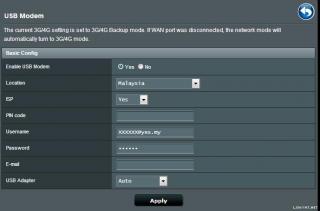
The log-in id and pw is important as YES will identify users via the id and pw This post has been edited by digilife: Jun 5 2013, 05:50 PM |
|
|
Jun 5 2013, 06:39 PM
Return to original view | Post
#110
|
|
Senior Member
8,025 posts Joined: Feb 2005 From: Planet Boleland
|
QUOTE(digilife @ Jun 5 2013, 05:46 PM) My pleasure I tried on my YES GO Dongle (HM2013-06-03), as expected , cannot establish a connection Here we go
The log-in id and pw is important as YES will identify users via the id and pw Here i copy the necessary details for you to have a look 
|
|
|
Jun 6 2013, 12:35 PM
Return to original view | Post
#111
|
|
Senior Member
8,025 posts Joined: Feb 2005 From: Planet Boleland
|
QUOTE(ppijat @ Jun 5 2013, 07:40 PM) That mean Asus RT-N16 cannot use YES 4G dongle also? OMG.. i already order this router few hour ago... RT N16 can support YES Dongle if you update to the latest FWQUOTE(crusher @ Jun 6 2013, 11:50 AM) Currently using E398 from blacktubi - Have you flash it to the latest ROOter FW ?plugged directly in my laptop can get up to 28mbps, but if plugged through MR3420, straight dropped to 11mbps only. Anyone encountered the same problem? Basically the router is place on the same spot as my modem did. (beside me) |
|
|
Jun 10 2013, 08:39 PM
Return to original view | Post
#112
|
|
Senior Member
8,025 posts Joined: Feb 2005 From: Planet Boleland
|
This dun shows that you are logged into its Network but sooner it might, just need to be patience

This post has been edited by digilife: Jun 10 2013, 08:52 PM |
|
|
Jun 12 2013, 12:50 AM
Return to original view | Post
#113
|
|
Senior Member
8,025 posts Joined: Feb 2005 From: Planet Boleland
|
QUOTE(chuahcs79 @ Jun 11 2013, 11:26 PM) the setup TL-MR3420 V2 + ZTE MF820D Nice one Chuah, but why dun try on ROOter ? green LED on ZTE MF820D mean is on LTE Location where ? Muntri St again ? |
|
|
|
|
|
Jun 12 2013, 01:00 AM
Return to original view | Post
#114
|
|
Senior Member
8,025 posts Joined: Feb 2005 From: Planet Boleland
|
QUOTE(chuahcs79 @ Jun 12 2013, 12:55 AM) i dont want to comments anything on Rooter because i dont want user misunderstanding on my statement,.. it will happen only when the RSSI there is < -60dbm as i already say,..there's some perks using original stock firmware,... and stability to hold on same IP for 1 week + is main one of them  where is the location, can PM me  thanks |
|
|
Jun 14 2013, 09:00 PM
Return to original view | Post
#115
|
|
Senior Member
8,025 posts Joined: Feb 2005 From: Planet Boleland
|
QUOTE(chuahcs79 @ Jun 14 2013, 08:37 PM) the 40MHz in wireless channel width does push the both download & upload to the Max,.. so in most cases, u will see higher upload and lower ping,.. well this is one of the perks in stock firmware,.. remember once u select 40MHz in channel width, u must set AUTO in wireless channel . not all channel works well with the 40MHz,.. if u manually select wrong channel for it, u will end up with zero internet connection response Wireless N only utilise 20/40MHz, Wireless B & G uses 20MHzThis is the selection available on ROOter 
|
|
|
Jun 14 2013, 09:15 PM
Return to original view | Post
#116
|
|
Senior Member
8,025 posts Joined: Feb 2005 From: Planet Boleland
|
QUOTE(chuahcs79 @ Jun 14 2013, 09:09 PM) that rooter section wireless setting section have bug,.. he he, try it yourself Bugs or not, i am getting this now and btw, this version of ROOter caan have Dual SSID But i only use one , the "abcd" the "open" one i left it disable........ MR3420 V1 |
|
|
Jun 15 2013, 09:28 AM
Return to original view | Post
#117
|
|
Senior Member
8,025 posts Joined: Feb 2005 From: Planet Boleland
|
QUOTE(Wahroonga Farm @ Jun 15 2013, 08:33 AM) What's the bug? Bugs or no, ROOter is FREE for use.Using 40Mhz bandwidth allows max throughput. No one force anyone to use. I, since used ROOter, no turning back now........... Features aplenty...... |
|
|
Jun 15 2013, 04:33 PM
Return to original view | Post
#118
|
|
Senior Member
8,025 posts Joined: Feb 2005 From: Planet Boleland
|
QUOTE(Wahroonga Farm @ Jun 15 2013, 04:20 PM) Hi what interface is that ?I use manual channel selection and don't see that problem.  Channel 11 (703n)  150n 40Mhz works perfectly and fast. Cheers John k looks goody |
|
|
Jun 16 2013, 03:01 PM
Return to original view | Post
#119
|
|
Senior Member
8,025 posts Joined: Feb 2005 From: Planet Boleland
|
QUOTE(Wahroonga Farm @ Jun 16 2013, 12:17 PM) Huntsman 2013-06-16a is released. Downloaded 2013-06-16a for MR3420 and 1043NDThe long awaited SMS messaging arrives. Network Status information is now only active when visiting the Network Status page. The modem is only sent signal commands when you are on the Network Status page and there is a delay while the data is gathered when you first go to the page. This eases the load on the modem and the possibility of modem communication conflicts. Enjoy! Notes: The SMS feature may not work correctly for all SIMs and modems. Please advise any SMS bug reports. To make flash RAM room for the SMS feature 4Mb routers only have IPv4 support in this version. 8Mb still support IPv6. Current reported issues with this release: Luci may lock up "problem loading page", but internet connection is fine. It appears to be a consequence of OpenWRT Version R36713. A fix is available and a new release is on the way shortly (2013-06-17). Visit the usual places. WIKI change log - http://whirlpool.net.au/wiki/wiki_rooter_pg4 Of Modems and Men - http://ofmodemsandmen.com/index.html For 1043ND, onced flashed , its 2013-06-16a as expected. But for MR3420 even though you flashed the newly downloaded file, its shows in the interface that it is 2013-06-03 although you have the sms feature  |
|
|
Jun 16 2013, 03:41 PM
Return to original view | Post
#120
|
|
Senior Member
8,025 posts Joined: Feb 2005 From: Planet Boleland
|
QUOTE(digilife @ Jun 16 2013, 03:01 PM) Downloaded 2013-06-16a for MR3420 and 1043ND For 1043ND, onced flashed , its 2013-06-16a as expected. But for MR3420 even though you flashed the newly downloaded file, its shows in the interface that it is 2013-06-03 although you have the sms feature 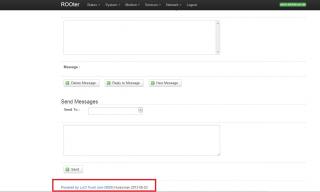
|
|
Topic ClosedOptions
|
| Change to: |  0.0599sec 0.0599sec
 0.76 0.76
 7 queries 7 queries
 GZIP Disabled GZIP Disabled
Time is now: 15th December 2025 - 09:28 PM |
 Quote
Quote