Welcome Guest ( Log In | Register )

Bump Topic Topic Closed RSS Feed
11 Pages < 1 2 3 4 > » Bottom

Outline · [ Standard ] · Linear+

 Tp LInk TL-MR3420 Owner CLub V2.5, need a pro here

views
     
digilife
post Apr 15 2013, 08:10 AM

The MNP guy, its me yeah.
*******
Senior Member
8,025 posts

Joined: Feb 2005
From: Planet Boleland


QUOTE(chuahcs79 @ Apr 15 2013, 01:59 AM)
insert a schedule task ping google ,..
- login 192.168.1.1 or 192.168.0.1
- your password
- System
- Schedule Tasks
- type in or copy & paste this command : * * * * * /bin/ping -q -s 1 -c 60 8.8.8.8 & > /dev/null
- Click Submit
- Go To Reboot
- Select Performs Reboot

After  that u can check the ping whether working, -> Status -> System log:
u will see something like this meaning it is working : 

Oct 30 05:43:10 OpenWrt cron.info crond[1140]: crond: USER root pid 1732 cmd /bin/ping -q -s 1 -c 60 8.8.8.8 & > /dev/null
Oct 30 05:44:01 OpenWrt cron.info crond[1140]: crond: USER root pid 1857 cmd /bin/ping -q -s 1 -c 60 8.8.8.8 & > /dev/null
Oct 30 05:45:01 OpenWrt cron.info crond[1140]: crond: USER root pid 2441 cmd /bin/ping -q -s 1 -c 60 8.8.8.8 & > /dev/null
Oct 30 05:46:01 OpenWrt cron.info crond[1140]: crond: USER root pid 3115 cmd /bin/ping -q -s 1 -c 60 8.8.8.8 & > /dev/null
Oct 30 05:47:01 OpenWrt cron.info crond[1140]: crond: USER root pid 3408 cmd /bin/ping -q -s 1 -c 60 8.8.8.8 & > /dev/null
Oct 30 05:48:01 OpenWrt cron.info crond[1140]: crond: USER root pid 3414 cmd /bin/ping -q -s 1 -c 60 8.8.8.8 & > /dev/null
*
Do i need to include this default line too ?

*/2 * * * * /etc/root

If yes, above or below it?

( Sorry i am a noob icon_rolleyes.gif )


QUOTE(Wahroonga Farm @ Apr 15 2013, 04:46 AM)
Hi,

There is a response to this question in the Australian forum here. smile.gif

BTW, nothing will have changed in the stability or speed of connection between BlackWidow and Huntsman as the underlying software is unchanged.

The evolution is now focused on features such as:

Driver-less modem support, DDNS package addition, Entry of SIM Pin code, Update to QOS system, Mode and band selection, SMS receive and send.

And a couple of those are already done.  rclxub.gif

Cheers

John k
*
How do i utilise these New Features?

Update to QOS system, Mode and band selection, SMS receive and send

Thank You in advance

notworthy.gif notworthy.gif


digilife
post Apr 15 2013, 08:29 AM

The MNP guy, its me yeah.
*******
Senior Member
8,025 posts

Joined: Feb 2005
From: Planet Boleland


QUOTE(Wahroonga Farm @ Apr 15 2013, 08:24 AM)
You can't. smile.gif

Still on the to do list.  whistling.gif

Cheers
*
Oh okay, its gonna be interesting when its available for release

thumbup.gif thumbup.gif

Thanks to the Developer , Dairyman is it ?

notworthy.gif notworthy.gif
digilife
post Apr 15 2013, 01:44 PM

The MNP guy, its me yeah.
*******
Senior Member
8,025 posts

Joined: Feb 2005
From: Planet Boleland


Those who have intention to buy a 3G router, go for 1043ND because in OpenWRT , it support USB modem , LTE modem too and it is power by a 1.5A power adaptor that also includes Gigabit LAN , price wise just abt rm30 over MR3420. It also have 8MB of flash memory for a bigger image compared to 4MB on MR3420, not forget to mention its triple antenna.........

This post has been edited by digilife: Apr 15 2013, 01:47 PM
digilife
post Apr 15 2013, 02:02 PM

The MNP guy, its me yeah.
*******
Senior Member
8,025 posts

Joined: Feb 2005
From: Planet Boleland


QUOTE(maxcheam @ Apr 15 2013, 01:55 PM)
+1 to this for home use. I'm using a couple of MR3020s for travel, testing, remote locations as well. Small, portable and USB powered. Good enough for E398 24x7 usage though I haven't try LTE yet.
*
which is better MR3020 or Mr3040 if wanna be mobile ?

Both also support OpenWRT rite ?


digilife
post Apr 15 2013, 06:00 PM

The MNP guy, its me yeah.
*******
Senior Member
8,025 posts

Joined: Feb 2005
From: Planet Boleland


QUOTE(khairilyazit @ Apr 15 2013, 03:38 PM)
how bout dual usb routers.. got suggestion?
*
I have in my collection a few routers , MR3420, MR3220, TD-W8968, WR1043ND, Asus RT-N16, RT-N15U.

The ones in red on Factory FW does not support USB Modems , I believe some day in time custom FW will make them USB modem compatible. Asus RT-N16 and WR1043ND both have Dual USB port but only one usb port at one time can connect to a usb modem, the other usb is for External storage.

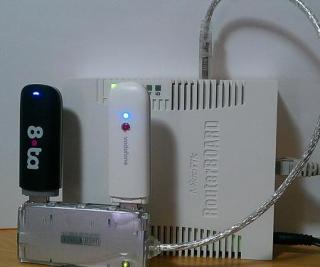
If you really want to use dual usb at the same time to load balance ( on different Telco ) go for Mikrotik.

Attached Image


digilife
post Apr 15 2013, 06:22 PM

The MNP guy, its me yeah.
*******
Senior Member
8,025 posts

Joined: Feb 2005
From: Planet Boleland


QUOTE(blacktubi @ Apr 15 2013, 06:12 PM)
1043ND got 2 X USB? sweat.gif
*
Unless Dairyman come up with a dual USB Modem support Custom FW for 1043ND icon_idea.gif else, play with Mikrotik ~ but mind you dun use 2 sims of the same telco icon_idea.gif

However with 1043ND power adaptor of 1.5A, i guess it will be under-power to run 2 USB modem at one go, BUT i am running my Asus RT-16N on a 2.0A power adaptor although the default is only 1.5A laugh.gif ~ and the WiFi Signal is Superb brows.gif
digilife
post Apr 15 2013, 06:33 PM

The MNP guy, its me yeah.
*******
Senior Member
8,025 posts

Joined: Feb 2005
From: Planet Boleland


QUOTE(blacktubi @ Apr 15 2013, 06:31 PM)
You won't want to know how I run my 1043ND, I rewire and share the power adapter with my ADSL modem and working good even if I use 3G laugh.gif

I mean does it got 2 USB port, mine V1.8 only got one USB port
*
sorry, i got mixed up , i mean can we use a dual hub icon_rolleyes.gif

laugh.gif laugh.gif
digilife
post Apr 15 2013, 07:35 PM

The MNP guy, its me yeah.
*******
Senior Member
8,025 posts

Joined: Feb 2005
From: Planet Boleland


QUOTE(miezaidin @ Apr 15 2013, 07:07 PM)
correct...but there no info regarding signal....hehehhehe.... thumbup.gif
or only on V2 can display that...?
*
see mine

Attached Image
digilife
post Apr 16 2013, 01:17 PM

The MNP guy, its me yeah.
*******
Senior Member
8,025 posts

Joined: Feb 2005
From: Planet Boleland


QUOTE(chuahcs79 @ Apr 16 2013, 01:02 PM)
the huntsman at modem network status section, the port always show wrong port, and we have to manually decrease it to right port number,.. sometimes it worked a while sometimes after reboot it dont worked anymore. have to repeat to decrease it manually all over again  notworthy.gif
*
Mine MR3420 V1 on Huntsman , dun have that problem cause i use "Default"

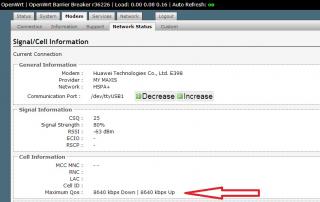
Attached Image


I wonder if we can increase the QoS as mine is always on 8640/8640 , even on HSPA+ and DC-HSPA+ too

Attached Image
digilife
post Apr 16 2013, 05:45 PM

The MNP guy, its me yeah.
*******
Senior Member
8,025 posts

Joined: Feb 2005
From: Planet Boleland


QUOTE(arif48 @ Apr 16 2013, 05:38 PM)
i don't remember. but i think i change the lan to dhcp. is there any difference which one i change to dhcp? and any ideas how can i undo what i've done. i've tried resetting the router but no luck
*
just do a 30/30/30 full factory reset > 192.168.0.1 > reflash again

smile.gif
digilife
post Apr 16 2013, 05:50 PM

The MNP guy, its me yeah.
*******
Senior Member
8,025 posts

Joined: Feb 2005
From: Planet Boleland


Preparing the Router

To make sure the router accepts the new image correctly we must reset the router to its factory default state. Do not skip this step unless the router is new, fresh out of the box.

This step is only taken if the router still contains the factory firmware. It is not needed when upgrading a router that is running the ROOter firmware.

Do a 30/30/30 hard reset of the router.

Make sure the router is powered up.

Press in the reset button on the back of the router and hold it in for 30 seconds.

Continue to hold in the reset button and disconnect the router power.

Keep holding in the reset button for another 30 seconds.

While still holding in the reset button, power up the router once again.

Hold the reset button in for another 30 seconds, and then release it.

Let the router start up normally.

Source
digilife
post Apr 16 2013, 06:30 PM

The MNP guy, its me yeah.
*******
Senior Member
8,025 posts

Joined: Feb 2005
From: Planet Boleland


QUOTE(arif48 @ Apr 16 2013, 06:11 PM)
nothing happen. it's still unreachable.
*
Did you plug in the LAN cable correctly ?

Did you follow 30/30/30 Hard Reset with care ?

Did you restart a different browser, dun use tyhe browser that u usually use, try a
different browser
digilife
post Apr 16 2013, 06:44 PM

The MNP guy, its me yeah.
*******
Senior Member
8,025 posts

Joined: Feb 2005
From: Planet Boleland


QUOTE(arif48 @ Apr 16 2013, 06:39 PM)
yes, yes and yes. and it still the same.
*
can you SC your problematic page ?

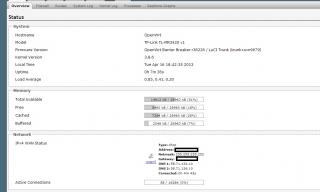
this is my main status page ( i just cold restsrt my router )


Attached thumbnail(s)
Attached Image
digilife
post Apr 16 2013, 07:04 PM

The MNP guy, its me yeah.
*******
Senior Member
8,025 posts

Joined: Feb 2005
From: Planet Boleland


QUOTE(arif48 @ Apr 16 2013, 06:57 PM)
i cannot reach the status page. everytime i try to open 192.168.1.1 and 192.168.0.1 it just kept loading and loading until it says unable to connect to network.

[attachmentid=3395347]
*
Using LAN cable ?

Try it on another pc/laptop ?

What you did before this happened ?

Could this helps ?

http://www.rfactory.org/OpenWRT/unbrick.html
digilife
post Apr 18 2013, 12:32 PM

The MNP guy, its me yeah.
*******
Senior Member
8,025 posts

Joined: Feb 2005
From: Planet Boleland


QUOTE(BladeRider88 @ Apr 18 2013, 12:24 PM)
Just flashed Huntsman into my 3420 v1 and v2
Both modem can identify my E398 & E372 without any issues.  biggrin.gif
Now left 3020, later will upgrade to Huntsman version  laugh.gif
Thanks to the developer, Dairyman
*
another Flashoholic onboard..........

thumbup.gif thumbup.gif
digilife
post Apr 20 2013, 02:04 PM

The MNP guy, its me yeah.
*******
Senior Member
8,025 posts

Joined: Feb 2005
From: Planet Boleland


QUOTE(BladeRider88 @ Apr 18 2013, 08:32 PM)
Haha...thank you for your welcome
Anyway, very happy with dairyman openwrt build

How about your 1043nd? How is the performance?
*
Now both my MR3420 V1 and 1043ND running on Huntsman 2013-04-14. My Asus RT N-16 is left out in the cold already laugh.gif

Stability 90% cause sometimes although connected, i get no internet activity ~ i believe is due to Maxis , even when i use usb modem direct plug-in laptop also like that. Not router FW's problem. Just need to wait a while, it will be back to normal without reset or turning off the power..............and IP changed after that............. laugh.gif
digilife
post Apr 20 2013, 02:35 PM

The MNP guy, its me yeah.
*******
Senior Member
8,025 posts

Joined: Feb 2005
From: Planet Boleland


QUOTE(chuahcs79 @ Apr 20 2013, 02:25 PM)
but on my case, it seems like is is openwrt huntsmand & black widow issue though,

after i flash back to openwrt AA and stock firmware,.. the issue is gone,..  hmm.gif
*
the final release of AA is the most stable, i am still having "your" MR3420 V1 and V2 still untouched as spare/backup incase Huntsman fakaps thumbup.gif biggrin.gif

i also have another Mr3420 V2 & Mr3220 still in virgin FW, waiting to flash newer FW from Dairyman thumbup.gif brows.gif
digilife
post Apr 20 2013, 06:15 PM

The MNP guy, its me yeah.
*******
Senior Member
8,025 posts

Joined: Feb 2005
From: Planet Boleland


QUOTE(wavezard @ Apr 20 2013, 02:48 PM)
digilife how many routers you have? want to give me free 1? hahahaha

is there any firmware  other than SABAI that can use vpn?
*
Sabai is good if you intends to use VPN on your connection.

But its an Over Priced option.

smile.gif
digilife
post Apr 20 2013, 08:24 PM

The MNP guy, its me yeah.
*******
Senior Member
8,025 posts

Joined: Feb 2005
From: Planet Boleland


QUOTE(khairilyazit @ Apr 20 2013, 06:35 PM)
meaning if ur qos is at 42000 its possible to get speed in the high 30mbps region..

ppp dialing  has lots of overhead..

if u r currently using ppp n speed averaging around 4-5 mbps.. with qmi its possible to get close to 6-7 mbps..
*
How to set qmi on Huntsman MR3420 ?

Thanks

smile.gif
digilife
post Apr 21 2013, 08:57 AM

The MNP guy, its me yeah.
*******
Senior Member
8,025 posts

Joined: Feb 2005
From: Planet Boleland


QUOTE(maxcheam @ Apr 21 2013, 08:44 AM)
haha.. same here!  sweat.gif
I don't think I'll ever turn back to other version without those features.  thumbup.gif
*
++

hope Dairyman can enhance Huntsman somemore


11 Pages < 1 2 3 4 > » Top
Topic ClosedOptions
 

Change to:
| Lo-Fi Version
0.0461sec    0.69    7 queries    GZIP Disabled
Time is now: 12th December 2025 - 02:51 PM