

-removed, server MySQL error just now-
This post has been edited by blacktubi: Aug 22 2013, 10:05 PM
Tp LInk TL-MR3420 Owner CLub V2.5, need a pro here
Tp LInk TL-MR3420 Owner CLub V2.5, need a pro here
|
|
 Aug 22 2013, 10:03 PM Aug 22 2013, 10:03 PM
Return to original view | Post
#101
|
 
Elite
8,413 posts Joined: Jul 2008  
|
-removed, server MySQL error just now-
This post has been edited by blacktubi: Aug 22 2013, 10:05 PM |
|
|
|
|
|
Aug 22 2013, 10:03 PM
Return to original view | Post
#102
|
|
Elite
8,413 posts Joined: Jul 2008
|
QUOTE(rootlinux @ Aug 22 2013, 10:26 AM) Does ROOter Hunstman come with VLAN support? Thank you. Able to bring up the switch config but not sure if it work. Nothing to test right now. Do let me know if you able to get it work  This post has been edited by blacktubi: Aug 22 2013, 10:05 PM Attached thumbnail(s) 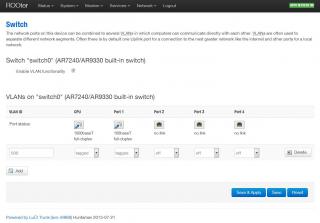
|
|
|
Aug 22 2013, 10:52 PM
Return to original view | Post
#103
|
|
Elite
8,413 posts Joined: Jul 2008
|
QUOTE(rootlinux @ Aug 22 2013, 10:49 PM) @blacktubi Good luck, it shall work if Rooter didn't break VLAN tagging which it shouldn'tThank you. I will flash my TL-WR1043ND with ROOter later and share the screen shot. Want to try ROOter with Maxis Fiber  Let me know if it work  |
|
|
Aug 22 2013, 11:10 PM
Return to original view | Post
#104
|
|
Elite
8,413 posts Joined: Jul 2008
|
QUOTE(DoomGuard @ Aug 22 2013, 11:10 PM) sifu sifu please help.. Send to warranty, you get a new MR3420.when i try to revert back from rooter to stock firmware i bricked my router. what to do now? the stock firmware i got from ofmanandmodern website.. i do a setting reset too before flash to stock firmware.. please help thanks |
|
|
Aug 23 2013, 04:59 PM
Return to original view | Post
#105
|
|
Elite
8,413 posts Joined: Jul 2008
|
QUOTE(digilife @ Aug 23 2013, 04:44 PM) what is the main usage for VLAN support? On Fibre where they used to separate bandwidth. Sort off, just a simple cocky explanation stream movies ?  |
|
|
Aug 24 2013, 11:53 AM
Return to original view | Post
#106
|
|
Elite
8,413 posts Joined: Jul 2008
|
QUOTE(zhihao4456 @ Aug 24 2013, 11:47 AM) Wow, seems quite complicated when i read this thread? 1) A custom router firmwre that provide more featuresCan any sifu guide me? * im using huawei e372 with tl-mr3420 * house area no 4g coverage 1) what is openwrt? 2) what do i have to do to always have a stable and fast connection? (I dun need any special features, will be just surfing internet and play games) 3) any tips and tricks so connection wont go idle? 4) any other tips would recommend me? Thank you ^^ 2) On your E372, force your modem to 2100Mhz, it should be faster. Read the WIKI, complete guide are there 3) It's a 3G issue, but you can ping something to keep your modem some small load 4) Read the WIKI |
|
|
|
|
|
Aug 24 2013, 12:13 PM
Return to original view | Post
#107
|
|
Elite
8,413 posts Joined: Jul 2008
|
QUOTE(zhihao4456 @ Aug 24 2013, 12:11 PM) what wiki? where? can provide me the link? i will learn from there then ^^ https://forum.lowyat.net/index.php?showtopic=2584921&hl= |
|
|
Aug 25 2013, 08:05 PM
Return to original view | Post
#108
|
|
Elite
8,413 posts Joined: Jul 2008
|
QUOTE(babygolden @ Aug 25 2013, 08:00 PM) Hi guys, Try failsafe mode, if you are not techie, just send your MR3420 to warranty I tried to flash my MR3420 V1 to OpenWrt, but i think i accidentally flashed "openwrt-ar71xx-generic-tl-mr34.bin" instead of "openwrt-ar71xx-generic-tl-mr3420-v1-squashfs-factory.bin" , I cant access the router admin after reboot, when i check the status, default gateway is blank (as in image below), is there anyway i can get back to stock firmware or to the right firmware? Read about it here http://wiki.openwrt.org/doc/howto/generic.failsafe Try set your computer to manual IP first. 192.168.1.2, subnet 255.255.255.0 |
|
|
Aug 25 2013, 08:07 PM
Return to original view | Post
#109
|
|
Elite
8,413 posts Joined: Jul 2008
|
QUOTE(zhiyuanchan @ Aug 25 2013, 01:02 AM) Saw it from mine luci. But which is real? Trial and error each of the slowly, one will work " [ 12.600000] usbcore: registered new interface driver option [ 12.600000] usbserial: USB Serial support registered for GSM modem (1-port) [ 12.610000] option 1-1:1.0: GSM modem (1-port) converter detected [ 12.620000] usb 1-1: GSM modem (1-port) converter now attached to ttyUSB0 [ 12.620000] option 1-1:1.1: GSM modem (1-port) converter detected [ 12.630000] usb 1-1: GSM modem (1-port) converter now attached to ttyUSB1 [ 12.640000] option 1-1:1.2: GSM modem (1-port) converter detected [ 12.640000] usb 1-1: GSM modem (1-port) converter now attached to ttyUSB2 [ 12.670000] usbcore: registered new interface driver sierra [ 12.670000] usbserial: USB Serial support registered for Sierra USB modem "  Try from ttyUSB2 |
|
|
Aug 30 2013, 06:09 PM
Return to original view | Post
#110
|
|
Elite
8,413 posts Joined: Jul 2008
|
QUOTE(1024kbps @ Aug 30 2013, 06:04 PM) Anyone know which good Huawei 21mbps modem that work with TL_MR3420 V1? Your E3131 is HiLink based or uses the old Mobile Partner protocol? I do have 2 HSPA modem but one is E355, the other is too new, E3331, which isnt supported by it  E355 have rather weak Wifi signal, and it isnt as fast as my other 21mbps modem due to always stuck on 7.2mbps network, my room has very weak HSPA network If Hilink based you need to use a custom firmware eg Rooter If Mobile Partner, get a BIN file from TP-LINK |
|
|
Aug 30 2013, 06:14 PM
Return to original view | Post
#111
|
|
Elite
8,413 posts Joined: Jul 2008
|
QUOTE(1024kbps @ Aug 30 2013, 06:13 PM) It's E3331, Hilink based + driverless. Hilink based then, only Rooter support it BRB working time |
|
|
Aug 30 2013, 06:20 PM
Return to original view | Post
#112
|
|
Elite
8,413 posts Joined: Jul 2008
|
chuahcs79
I think there should be a V3 The current thread is messy and confusing |
|
|
Aug 31 2013, 03:04 PM
Return to original view | Post
#113
|
|
Elite
8,413 posts Joined: Jul 2008
|
QUOTE(0168257061 @ Aug 31 2013, 03:03 PM) Any pro knows how can I use this router to share my MDMA in pc ? What do you mean?i tried google but failed.  Use MDMA while modem connected to the router? I guess Rooter firmware got a set of diagnostics tools which is fairly similar to MDMA |
|
|
|
|
|
Aug 31 2013, 03:26 PM
Return to original view | Post
#114
|
|
Elite
8,413 posts Joined: Jul 2008
|
QUOTE(0168257061 @ Aug 31 2013, 03:22 PM) means my 3g plug to laptop, Possible but not practical.then from my laptop share connection to router, router share internet via wifi Mind telling why you want to do it at first? |
|
|
Aug 31 2013, 03:30 PM
Return to original view | Post
#115
|
|
Elite
8,413 posts Joined: Jul 2008
|
|
|
|
Aug 31 2013, 03:49 PM
Return to original view | Post
#116
|
|
Elite
8,413 posts Joined: Jul 2008
|
QUOTE(0168257061 @ Aug 31 2013, 03:33 PM) the modem router cant get lte signal when i plug my e398. Have you already used the Rooter Firmware?it keep search forever and wont connect MR3420V1 is incompatible with LTE |
|
|
Aug 31 2013, 04:08 PM
Return to original view | Post
#117
|
|
Elite
8,413 posts Joined: Jul 2008
|
QUOTE(0168257061 @ Aug 31 2013, 03:53 PM) using v2. V2 support LTE, if it doesn't work then you might need flash a custom firmwarei thought it supported 4g |
|
|
Sep 3 2013, 11:04 AM
Return to original view | Post
#118
|
|
Elite
8,413 posts Joined: Jul 2008
|
QUOTE(jsteoh93 @ Sep 3 2013, 10:06 AM) still the same tho.. Consider using rooter firmware, use the least congested wifi channel any other solutions bro? or nid to upgrade to huntsman..  ? ?What is your wifi signal |
|
|
Sep 3 2013, 11:49 AM
Return to original view | Post
#119
|
|
Elite
8,413 posts Joined: Jul 2008
|
QUOTE(PCKUCHING @ Sep 3 2013, 11:22 AM) Thanks, Why not select on computer baru plug into router.i just update my TL-MR3420 to new rooter firmware by using k5006-z i canot select LTE only or lte prefer (missing) LTE working fine.. network show unknown.. which E398/k5005 seem ok i can select auto/3g only /lte only any ideal what can i do? K5006Z don't have full compatibility apparently |
|
|
Sep 4 2013, 01:47 PM
Return to original view | Post
#120
|
|
Elite
8,413 posts Joined: Jul 2008
|
QUOTE(butetzzz @ Sep 4 2013, 07:59 AM) dear sifu2, what is the best replacement for MR3420? best in the market now. Get another router and use it with MR3420Else Mikrotik |
|
Topic ClosedOptions
|
| Change to: |  0.0234sec 0.0234sec
 0.57 0.57
 7 queries 7 queries
 GZIP Disabled GZIP Disabled
Time is now: 10th December 2025 - 08:41 AM |
 Quote
Quote