Welcome Guest ( Log In | Register )

Bump Topic Topic Closed RSS Feed
11 Pages « < 3 4 5 6 7 > » Bottom

Outline · [ Standard ] · Linear+

 Tp LInk TL-MR3420 Owner CLub V2.5, need a pro here

views
     
blacktubi
post Aug 4 2013, 09:44 PM

-
Group Icon
Elite
8,413 posts

Joined: Jul 2008

QUOTE(renishi @ Aug 4 2013, 09:39 PM)
hmmm alright. Performance bad in terms or reception or battery life? or brand dependable? Zte's or huawei's?
*
So many portable router, TP-LINK one are incompatible with LTE modem. Only Hame is compatible but you cant use LTE.

So better get a cheap MiFi, since you aim for saving, any one will do. laugh.gif

If you got nice budget, Sierra 75XS is nice at around RM200+/-. Even higher, get 760S RM400+/-. I am using that, never disappoint me, performance is great.
blacktubi
post Aug 6 2013, 11:41 PM

-
Group Icon
Elite
8,413 posts

Joined: Jul 2008

QUOTE(0168257061 @ Aug 6 2013, 11:31 PM)
I have been living good with band-locking and MDMA.
Just couldn't sure why in the router it take damn ages to find tower.
I never waited once.
*
How about back to stock firmware
blacktubi
post Aug 12 2013, 03:08 PM

-
Group Icon
Elite
8,413 posts

Joined: Jul 2008

QUOTE(zhiyuanchan @ Aug 12 2013, 03:05 PM)
is it TL-WR1043ND support 3G modem?
*
Yes, use rooter firmware
http://ofmodemsandmen.com/

BTW, I think the first post should be updated
blacktubi
post Aug 12 2013, 04:02 PM

-
Group Icon
Elite
8,413 posts

Joined: Jul 2008

QUOTE(zhiyuanchan @ Aug 12 2013, 03:18 PM)
Any good 3G router you recommand except TL3420 ?
*
Mikrotik series but not that user friendly wink.gif
blacktubi
post Aug 12 2013, 11:37 PM

-
Group Icon
Elite
8,413 posts

Joined: Jul 2008

QUOTE(noobandroid @ Aug 12 2013, 10:46 PM)
is there anything to worry when the load average exceeds 1.0 1.0 1.0?

my huawei still not detected on the router :/
*
You need a newer firmware for your Huawei?
blacktubi
post Aug 12 2013, 11:56 PM

-
Group Icon
Elite
8,413 posts

Joined: Jul 2008

QUOTE(zhiyuanchan @ Aug 12 2013, 11:54 PM)
Btw just now i try use 3m cable on TL3420 and connect with E398 it's can't detect my 3G modem , is it my power adapter under power?
*
No, because your 3M USB cable quality is bad.

Resistance too high
blacktubi
post Aug 13 2013, 12:00 AM

-
Group Icon
Elite
8,413 posts

Joined: Jul 2008

QUOTE(zhiyuanchan @ Aug 12 2013, 11:57 PM)
So what should i do?  sweat.gif
*
But a power extension cable and put your router outside instead of your modem laugh.gif
blacktubi
post Aug 13 2013, 12:05 AM

-
Group Icon
Elite
8,413 posts

Joined: Jul 2008

QUOTE(zhiyuanchan @ Aug 13 2013, 12:04 AM)
not very understand lol , rclxub.gif
*
5M Power Extension Cord. It is easier to understand? sweat.gif

This post has been edited by blacktubi: Aug 13 2013, 12:05 AM
blacktubi
post Aug 13 2013, 09:44 PM

-
Group Icon
Elite
8,413 posts

Joined: Jul 2008

QUOTE(noobandroid @ Aug 13 2013, 09:10 PM)
this is 4th time i use huntsman and still disappoints me, e353 no firmware found on any sites
*
Should have use stock firmware them
blacktubi
post Aug 14 2013, 07:09 PM

-
Group Icon
Elite
8,413 posts

Joined: Jul 2008

QUOTE(eugene88 @ Aug 14 2013, 04:33 PM)
How to force DC-HSPA+? I already configure the band at MDMA doh.gif
*
Why you are so obsessed with DC-HSPA+?

Modem will auto switch when you need it
blacktubi
post Aug 14 2013, 09:06 PM

-
Group Icon
Elite
8,413 posts

Joined: Jul 2008

QUOTE(eugene88 @ Aug 14 2013, 07:21 PM)
If I plug in to my laptop it will connect to DC-HSPA+ directly with 12Mpbs but if I use the router it will connect to HSPA+ with only around 4Mpbs only..
Thanks for the clarification, I thought need to manually configure for DC-HSPA+ doh.gif
*
Your router is lemon unit? hmm.gif
Try rooter firmware, who know you got luck laugh.gif

If your laptop and router same position shouldn't have any trouble.
Else try download a speedtest file from cachefly.com


blacktubi
post Aug 15 2013, 11:31 AM

-
Group Icon
Elite
8,413 posts

Joined: Jul 2008

QUOTE(zhiyuanchan @ Aug 15 2013, 12:51 AM)
with LTE speed? rclxms.gif

And where can i get USB 3.0 3m with RM21? I found 3m RM45 without postage. rclxub.gif
*
digilife When you want to do a bulk order? tongue.gif
blacktubi
post Aug 17 2013, 10:29 PM

-
Group Icon
Elite
8,413 posts

Joined: Jul 2008

QUOTE(noobandroid @ Aug 17 2013, 10:22 PM)
using a USB 3 extension instead of USB 2 got difference?
*
USB 3 use better material due to it's more sensitive on resistance
Some USB2 extension is basically trash

How to test a USB cable, use an iPad. If it is charging, then it's good, if it doesn't or show incompatible charger then you can trash that laugh.gif
blacktubi
post Aug 17 2013, 10:42 PM

-
Group Icon
Elite
8,413 posts

Joined: Jul 2008

QUOTE(noobandroid @ Aug 17 2013, 10:39 PM)
erm.. android, laugh.gif
*
Android charges on anything lah laugh.gif
Even cap ayam power bank laugh.gif
blacktubi
post Aug 17 2013, 11:04 PM

-
Group Icon
Elite
8,413 posts

Joined: Jul 2008

thpace : One known Mobile Partner / Windows bug. sad.gif

noobandroid : Android for phone, iOS for tablet. biggrin.gif
blacktubi
post Aug 19 2013, 02:22 PM

-
Group Icon
Elite
8,413 posts

Joined: Jul 2008

Anyone tried the QoS with those DC-HSPA+ modem like E372

As it seem since LTE series Huawei modem stop announcing QoS
blacktubi
post Aug 19 2013, 10:34 PM

-
Group Icon
Elite
8,413 posts

Joined: Jul 2008

QUOTE(lifestyle1326 @ Aug 19 2013, 09:36 PM)
Seem like very big project to unbrick....

Between any recommend modem, cheap plus friendly usage ? tongue.gif
*
Just send to your seller, tell them it happen suddenly.
Or if you live in KL, directly to Lowyat Plaza TP-LINK Service center, save all the shipping hassle

But make sure your rotuer totally inaccessible, else they found out and you kantoi laugh.gif
blacktubi
post Aug 20 2013, 06:52 PM

-
Group Icon
Elite
8,413 posts

Joined: Jul 2008

QUOTE(ruffaz @ Aug 20 2013, 05:39 PM)
hey, sorry for quoting old post. since you're using e173, same like me.. i've some problem with it

the modem is perfectly fine. the problem is,  i think there is some sort of interference. i only get 1mbps when i connect the modem directly to the router. but, if i use usb extension cable and put the modem at the right spot *away from modem*, i can get 6mbps..

i tried to put the modem(connected to router without extension) at the same spot i got 6mbps earlier.. but, all i get is the same 1mbps.. i  am very sure there is interference problem.
i was unable to use the usb extension cable permanently as there is some problem with it.. use it for a few minutes, everything is ok... but after a few moments...(within hours) its like, the modem suddenly turned off. no blink or whatsoever. so, i've to reset the router all over again..

do you have this issue? how did you solve this issue? thanks.  biggrin.gif
*
Buy a good USB cable, that old one is bad biggrin.gif

Maybe I should start sell some cheap and good USB cable laugh.gif
blacktubi
post Aug 21 2013, 03:15 PM

-
Group Icon
Elite
8,413 posts

Joined: Jul 2008

QUOTE(xphr3ak @ Aug 21 2013, 08:21 AM)
Panchor Jaya.
No LTE here yet. sad.gif
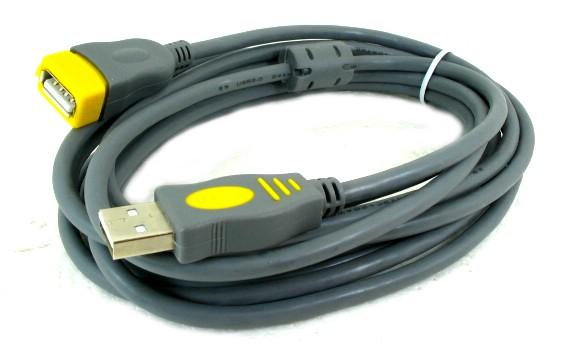
Is this high quality one?

user posted image

Thanks.
*
Cable is thick and there's carbon block there.

Should be okay
blacktubi
post Aug 21 2013, 03:32 PM

-
Group Icon
Elite
8,413 posts

Joined: Jul 2008

QUOTE(digilife @ Aug 21 2013, 03:21 PM)
Ferrite Core, i like them

Can you bring in some ?

Its seling in bundles of 10pcs , 50pcs and 100pcs packaging  sweat.gif

Btw, that cable shown is not USB 3.0 compliant  wink.gif
*
Oops, it should be ferrite

I guess my first batch E398 come with USB cable, nowadays I guess Huawei cut cost so sweat.gif

Let me do some homework and see if I can find any nice and affordable laugh.gif

11 Pages « < 3 4 5 6 7 > » Top
Topic ClosedOptions
 

Change to:
| Lo-Fi Version
0.0495sec    0.68    7 queries    GZIP Disabled
Time is now: 9th December 2025 - 03:21 PM